Global Database vs Leadsforge: Which B2B Data Tool Wins?
One sells you a licensed company database with firmographics and credit data. The other builds lead lists from a chat prompt. Here is how Global Database and Leadsforge actually compare on coverage, contact accuracy, pricing and export limits.
TL;DR
- Global Database is a licensed B2B company database: firmographics, credit and financial records, technology tracking, and contact records attached to company profiles. It sells annual, quote-based subscriptions and is strongest when you need company intelligence, not just an inbox.
- Leadsforge is an AI lead-list builder. You describe your ICP in plain language, it returns a list with emails. It is fast, cheap to start, and shallow on firmographic depth.
- The two tools are not really competing for the same buyer. Global Database competes with ZoomInfo and Dun & Bradstreet. Leadsforge competes with Apollo lists and scraper-plus-enrichment stacks.
- Both fall down at the same point: email accuracy at the moment of send. Neither is built as a verification layer, so bounce risk lands on you.
- Practical stack for most SMB and mid-market teams: pick one source of company records, then run every address through a dedicated finder/verifier before it touches your sequencer.
What is Global Database and who is it for?#
Global Database is a UK-headquartered B2B data provider that sells access to structured company records across most major markets. Think of it less as a prospecting tool and more as a licensed reference library: registered company details, financial filings and credit scores, employee counts, industry codes, technology installs, and decision-maker contacts hanging off those company profiles.
The typical buyer is not a two-person SDR team. It is a credit risk analyst, a market-research team, a compliance function, or a mid-market GTM group that needs defensible, sourced company data and can justify an annual contract for it.
That shapes everything about the product:
- Company-first data model. You start from an organisation and drill into people, not the other way around.
- Modular licensing. Company data, credit reports, technology tracking and contact data are often priced and sold as separate modules.
- Annual, quote-based pricing. There is no public self-serve checkout with a credit-card field and a $49 tier.
- Depth over freshness. Registry-sourced records are excellent for legal names, filings and structure. Personal email addresses move faster than any registry updates.
If your question is "who owns this company, how financially healthy are they, and what stack do they run?" — this is the right category of tool.
What is Leadsforge and how is it different?#
Leadsforge sits at the opposite end. It is an AI-native lead-list generator: you type something like "heads of marketing at Series A fintechs in Germany with 50–200 employees," and it returns a list of contacts with email addresses. No boolean filter builder, no 40-field search form.
The value proposition is time-to-list. A rep who has never opened a data platform can produce a usable prospect list in a couple of minutes. Pricing is self-serve and starts low enough that an individual seller can expense it.
The trade-offs are equally clear:
- Prompt ambiguity. Natural-language targeting is fast but imprecise. "Mid-sized SaaS" means different things to you and to the model.
- Thin firmographics. You get name, title, company, email — not filings, credit exposure, or ownership structure.
- Credit-metered output. Volume is capped by plan, and re-running a vague prompt burns credits on rows you throw away.
- Verification is a black box. "Verified emails" is a claim in the marketing copy; you rarely see the SMTP evidence behind each row.
How do Global Database and Leadsforge actually source their data?#
This is the part most comparison posts skip, and it is the part that predicts your bounce rate. Data provenance determines how stale a record can get before anyone notices.
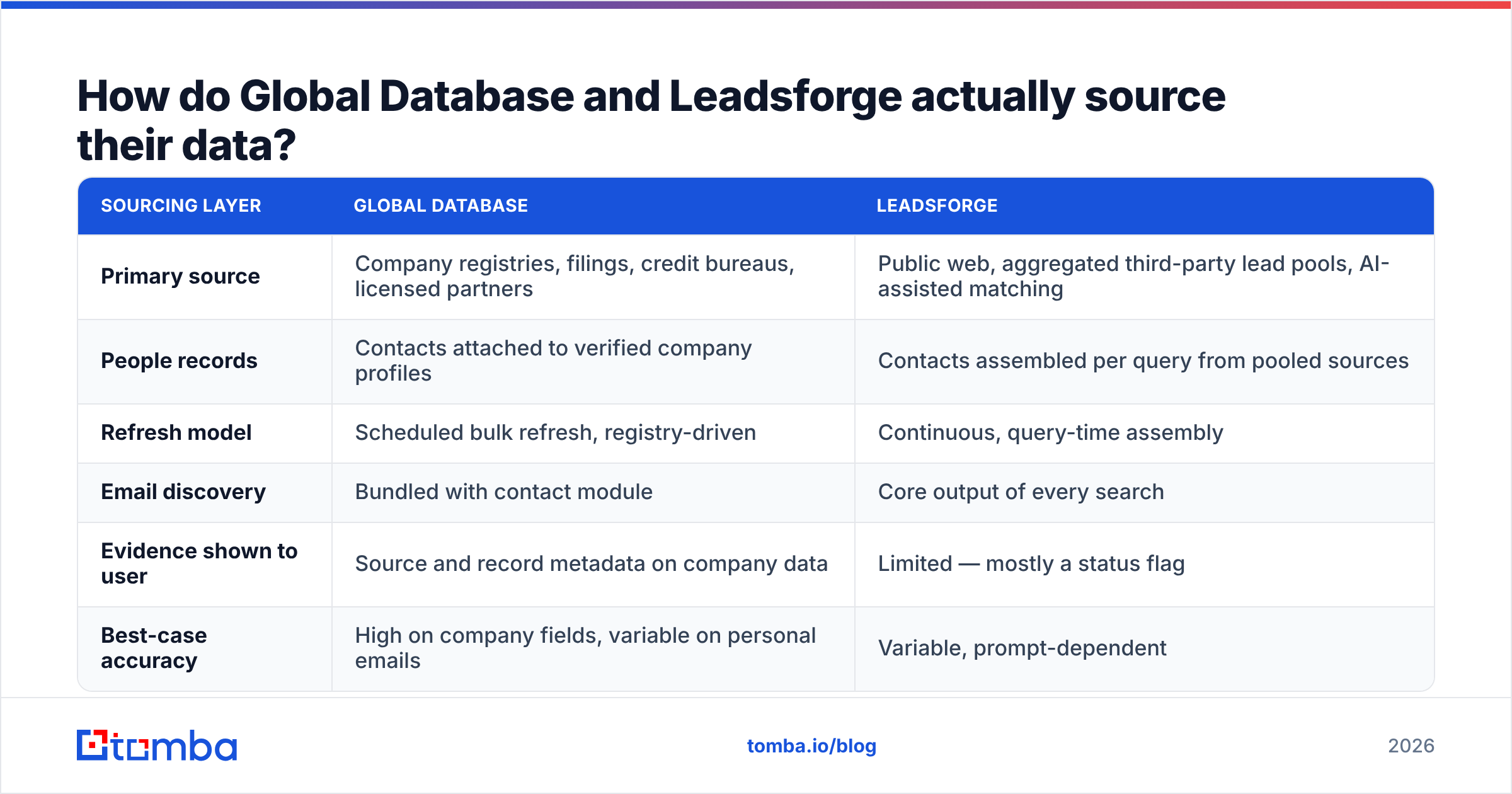
| Sourcing layer | Global Database | Leadsforge |
|---|---|---|
| Primary source | Company registries, filings, credit bureaus, licensed partners | Public web, aggregated third-party lead pools, AI-assisted matching |
| People records | Contacts attached to verified company profiles | Contacts assembled per query from pooled sources |
| Refresh model | Scheduled bulk refresh, registry-driven | Continuous, query-time assembly |
| Email discovery | Bundled with contact module | Core output of every search |
| Evidence shown to user | Source and record metadata on company data | Limited — mostly a status flag |
| Best-case accuracy | High on company fields, variable on personal emails | Variable, prompt-dependent |
Registry-sourced data ages slowly and predictably. Web-assembled contact data ages fast and unpredictably — a VP changes jobs, the row is wrong within a week, and nothing in the pipeline tells you. Neither model solves that; both need a live check at send time. That is why the email verifier step is not optional regardless of which vendor you pick.
Global Database vs Leadsforge: the full comparison#
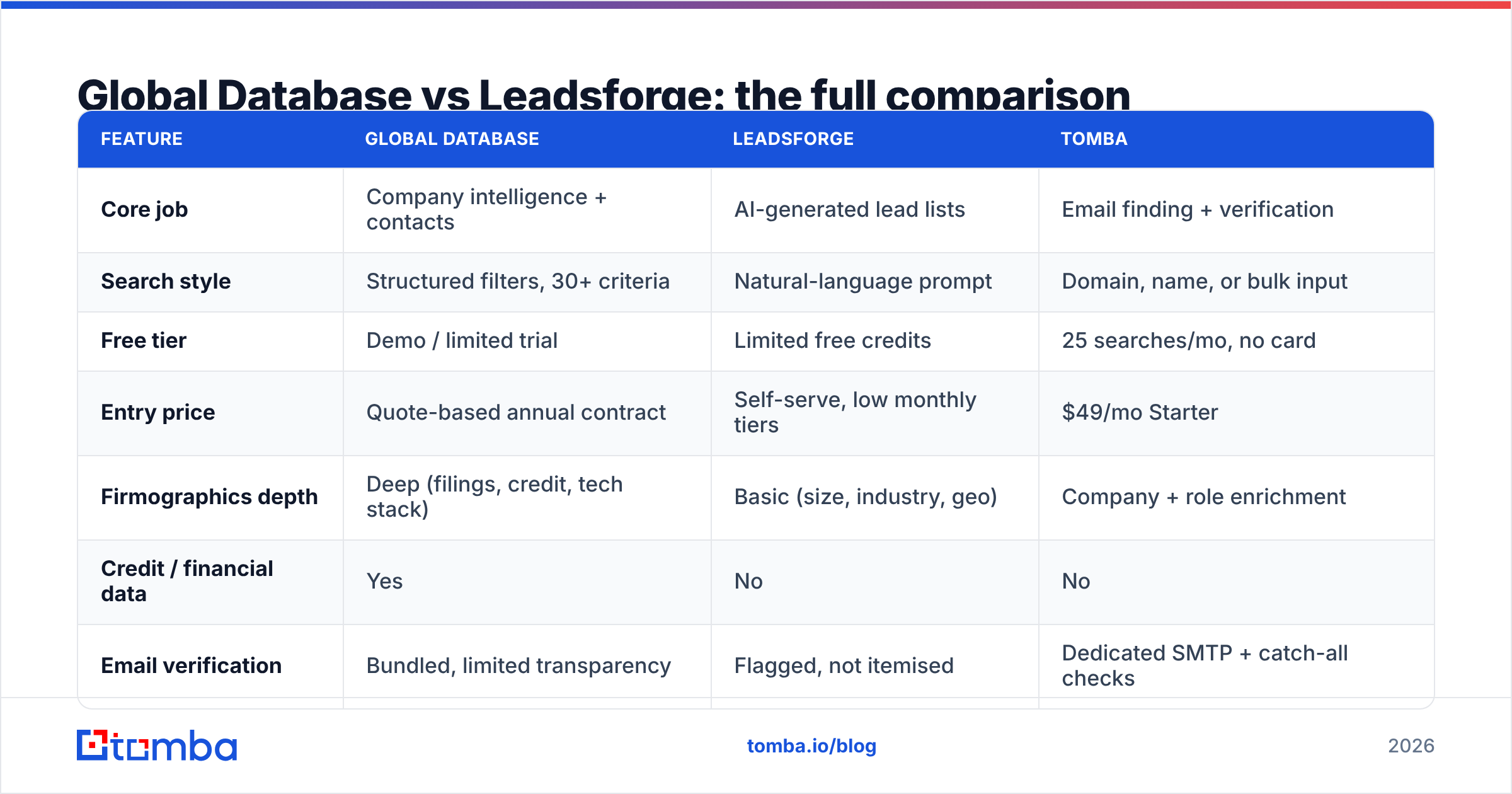
Here is the head-to-head, with a dedicated email-finding layer as a third column so you can see where each tool stops.
| Feature | Global Database | Leadsforge | Tomba |
|---|---|---|---|
| Core job | Company intelligence + contacts | AI-generated lead lists | Email finding + verification |
| Search style | Structured filters, 30+ criteria | Natural-language prompt | Domain, name, or bulk input |
| Free tier | Demo / limited trial | Limited free credits | 25 searches/mo, no card |
| Entry price | Quote-based annual contract | Self-serve, low monthly tiers | $49/mo Starter |
| Firmographics depth | Deep (filings, credit, tech stack) | Basic (size, industry, geo) | Company + role enrichment |
| Credit / financial data | Yes | No | No |
| Email verification | Bundled, limited transparency | Flagged, not itemised | Dedicated SMTP + catch-all checks |
| Catch-all handling | Not surfaced | Not surfaced | Dedicated catch-all verifier |
| API access | Available on higher tiers | Limited | Full REST API on all paid plans |
| Bulk processing | CSV export by licence | Plan-capped exports | Bulk finder + verifier |
| Contract term | Typically annual | Monthly | Monthly, cancel anytime |
| Best fit | Risk, research, mid-market GTM | Solo sellers, early-stage SDRs | Any team sending cold email |

Which one has more accurate data?#
Short answer: Global Database wins on company accuracy, and neither wins on email accuracy.
That distinction matters more than the headline coverage numbers either vendor publishes. Company fields — legal entity, registered address, SIC code, filing history — come from sources that are updated on a legal schedule. If Global Database says a company filed accounts in March, that is checkable. Coverage claims about "millions of contacts" are a different animal entirely, because a contact record is only as good as the day it was last confirmed.
Three things to test before you sign anything:
- Ask for a sample against your own list. Give both vendors 200 companies you already know well. Count matches, count wrong titles, count bounced addresses. Vendor-published accuracy percentages are marketing; your own list is evidence.
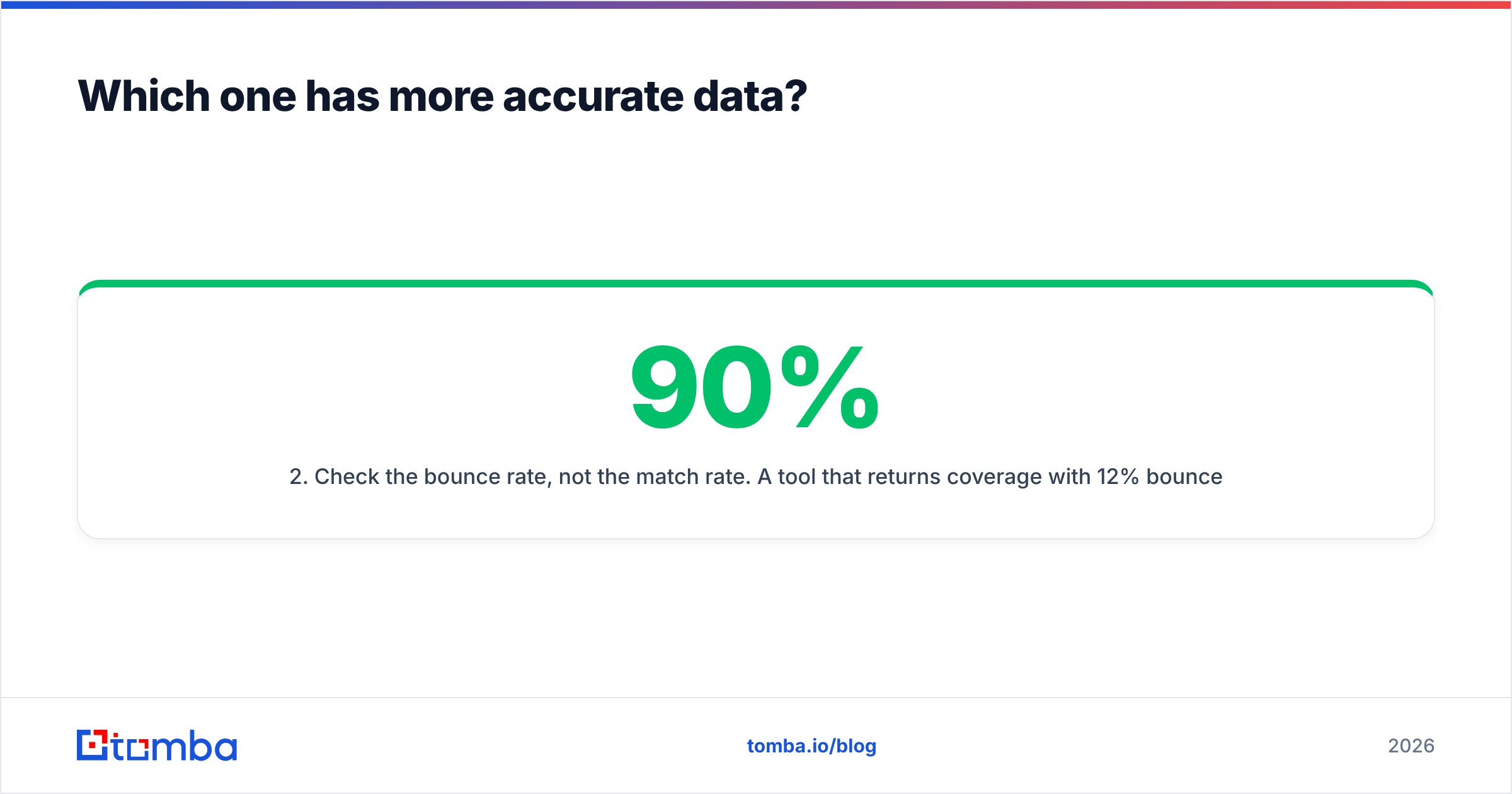
- Check the bounce rate, not the match rate. A tool that returns 90% coverage with 12% bounces is worse than one returning 65% coverage with 1% bounces. Mailbox providers punish the first profile hard.
- Ask how catch-all domains are treated. Most vendors mark catch-all domains as "valid" because the server accepts everything. That inflates their accuracy claim and inflates your bounce rate. A catch-all verifier is the only honest way to handle those.
- Look at record age. Ask when each contact row was last confirmed. If nobody can answer, assume the worst.
Independent buyer reviews on G2 are useful for the qualitative side — support responsiveness, contract flexibility, how painful the export limits feel in practice — but do not treat star ratings as an accuracy benchmark.
How much do Global Database and Leadsforge cost?#
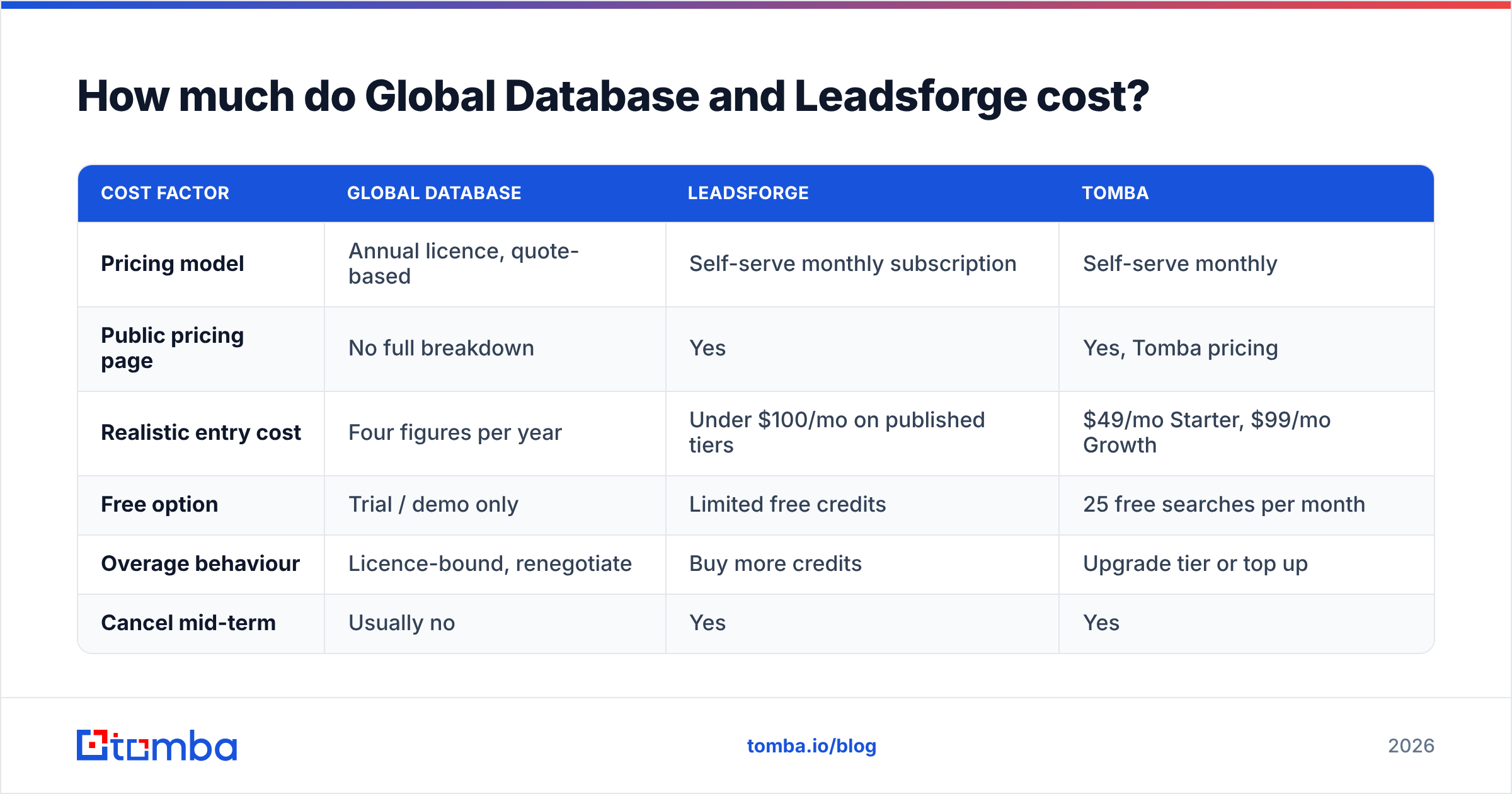
| Cost factor | Global Database | Leadsforge | Tomba |
|---|---|---|---|
| Pricing model | Annual licence, quote-based | Self-serve monthly subscription | Self-serve monthly |
| Public pricing page | No full breakdown | Yes | Yes, Tomba pricing |
| Realistic entry cost | Four figures per year | Under $100/mo on published tiers | $49/mo Starter, $99/mo Growth |
| Free option | Trial / demo only | Limited free credits | 25 free searches per month |
| Overage behaviour | Licence-bound, renegotiate | Buy more credits | Upgrade tier or top up |
| Cancel mid-term | Usually no | Yes | Yes |
The honest framing: Global Database's price is not the number, it is the commitment. Quote-based annual contracts make sense when data is a company-wide asset feeding risk models, research reports and account planning. They make very little sense when three SDRs need 2,000 emails a month, because you cannot scale the spend down when the quarter is slow.
Leadsforge's price is low, but credit maths bites. A prompt that returns 500 rows where 300 are off-ICP still consumed 500 credits. Measure cost per usable, deliverable contact, not cost per row.
Always confirm current numbers on each vendor's own pricing page before budgeting — tiers in this category change more often than blog posts get updated.

When should you choose Global Database?#
Pick Global Database when the company record is the product you actually need:
- You underwrite or extend credit. Financial and credit data is a genuine differentiator here, and Leadsforge does not compete on it at all.
- You sell into regulated or enterprise accounts where legal entity structure, parent/subsidiary mapping and filings matter for territory and account planning.
- You run market research or TAM sizing and need consistent, sourced firmographics across regions rather than a per-campaign list.
- You have procurement and a budget cycle that can absorb an annual licence and the negotiation it takes to get there.
What it will not do: give you a clean, verified sending list on Monday morning for a campaign that goes out Tuesday. Layer a domain search and verification step on top for that.
When should you choose Leadsforge?#
Pick Leadsforge when speed and low commitment beat depth:
- You are one to five people and nobody owns "data ops" as a job.
- Your ICP is simple to describe — one region, one or two titles, a clear company-size band. Natural-language search performs well when the target is unambiguous.
- You test a lot of segments. Generating six different micro-lists in an afternoon is genuinely easier here than in any filter-based platform.
- You cannot sign an annual contract. Month-to-month with a card is the whole point.
What it will not do: survive an audit, feed a data warehouse, or give you the account context an enterprise AE needs before a first call. And it will not tell you which of its "verified" addresses is sitting behind a catch-all server.
Where does a dedicated email finder fit in the stack?#
Both tools are sources. Neither is a quality gate. Those are different jobs, and conflating them is how teams end up with a 9% bounce rate and a burned sending domain.
A workable stack looks like this:
- Source — Global Database for account intelligence, Leadsforge for fast list generation, or your own scraped/CRM list. Pick whichever matches your buyer.
- Find — resolve missing addresses from name + domain with an email finder rather than guessing patterns by hand.
- Verify — SMTP-check every address, including catch-all domains, and drop anything that fails.
- Enrich — add role, seniority and company fields so personalisation is not just
{{first_name}}. - Send — only clean, verified rows reach the sequencer.
Tomba covers steps two through four for $49/mo on Starter and $99/mo on Growth, with a free tier of 25 searches a month to test the match rate against your own list before you spend anything. There is a full Tomba API on every paid plan, so this step can run automatically between your data source and your CRM instead of as a manual CSV round-trip.

What is the verdict on Global Database vs Leadsforge?#
There is no single winner, because they answer different questions.
- Need company intelligence, credit data and defensible sourcing? Global Database, and budget for an annual licence.
- Need a lead list before lunch with no contract? Leadsforge, and accept the firmographic ceiling.
- Need both cheaply? Neither, honestly. Combine a lighter data source with a dedicated finder and verifier, and spend the difference on your sending infrastructure.
The mistake to avoid is buying either one as your deliverability strategy. Data goes stale between the day it is licensed and the day you press send, and no source-side accuracy claim survives contact with a mailbox provider's bounce policy. The verification layer is what protects the domain you spend two years warming.
If you are already sitting on a list from either platform and want to know how much of it is actually deliverable, run it through the Tomba Email Finder and verification stack first. Twenty-five free searches a month is enough to test a sample, and Starter at $49/mo covers most SMB outbound volume — no annual contract, no credit negotiation, and no guessing which rows are going to bounce.
Related guides#
Ready to find emails that actually work?
Join 150,000+ professionals who stopped guessing and started sending. Free credits on signup — no credit card required.
Get the Tomba newsletter
Practical outbound tactics and product updates — once every two weeks.
About the author