Global Database vs Tomba: Which B2B Data Tool Wins in 2026?
Global Database sells company intelligence with credit and financial data. Tomba sells verified email discovery at API speed. Here is where each one wins, where each one wastes your budget, and how to pick.
Global Database vs Tomba is a choice between two different jobs. One tool tells you which companies to go after. The other tells you how to reach the people inside them. This guide compares both on data, accuracy, price, and daily workflow.
TL;DR
- Global Database is a company-intelligence platform. Its strength is firmographics, financials, credit risk, and officer records, especially for UK and European entities. Contact emails are a secondary layer, not the core product.
- Tomba is an email-discovery engine. It finds and verifies a person's work email at a given domain. You can run it from the app, a browser extension, a spreadsheet add-on, or the API.
- Pricing models are not comparable. Tomba publishes flat tiers (Free, $49, $99, $249). Global Database routes most buyers through a sales call and an annual contract.
- They solve different problems. Need to score accounts by revenue and credit health? Global Database wins. Need 4,000 verified inboxes this week? Tomba wins.
- The common mistake: buying a heavy intelligence suite for a light contact problem. You then pay for 90% of a platform you never open.
What is Global Database?#
Global Database is a UK-headquartered B2B data provider built around company records rather than people records. The platform pulls in registry filings, financial statements, credit scores, and shareholder and director data. It also tracks import/export activity and technology-stack signals. All of it lands in searchable company profiles across dozens of countries.
The pitch is breadth of context. You can filter for manufacturing firms in Germany with revenue between €5M and €50M. Then you read the balance sheet, check the directors, and judge whether the business looks stable. All of that happens before you spend a rep-hour on the account. For credit teams, procurement teams, and enterprise ABM programs, that is genuinely useful. You cannot rebuild it from LinkedIn scraping.
Contact data does exist inside those profiles. But it sits downstream of the company record. You start from an account and drill toward people. That direction of travel matters, and it is the biggest structural difference here.
What is Tomba?#
Tomba inverts the model. You start from a person or a domain, and you end with an email address you can send to.
The core product is the email finder. Give it a name and a company domain, and it returns the most likely address. Each result carries a confidence score and the public sources behind it.
Around that sit the tools that keep the workflow honest. An email verifier runs SMTP-level checks. Domain search pulls every discoverable address at a company. A catch-all verifier handles domains that accept everything. A phone finder adds numbers, and data enrichment appends job titles and company attributes to a list you already own.
The delivery surfaces are wide: web app, Chrome extension, Google Sheets and Excel add-ins, bulk CSV processing, a CLI, an MCP server, and a documented email finder API. That last one is why Tomba shows up in engineering-owned pipelines more often than in procurement-owned ones.
Global Database vs Tomba: how do the two tools differ?#
Strip away the marketing and five real differences remain.
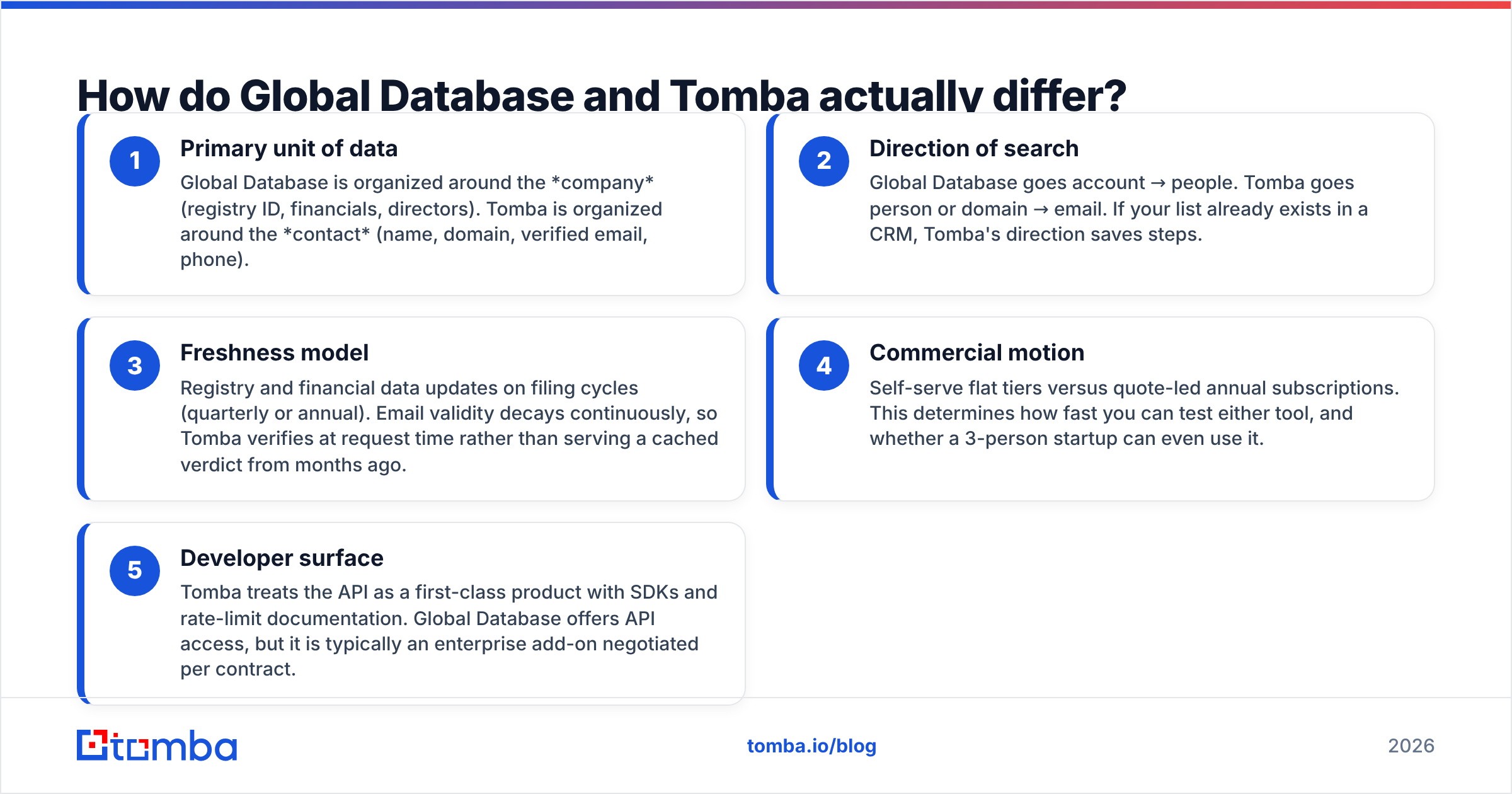
- Primary unit of data. Global Database is organized around the company: registry ID, financials, directors. Tomba is organized around the contact: name, domain, verified email, phone.
- Direction of search. Global Database goes account → people. Tomba goes person or domain → email. If your list already lives in a CRM, Tomba's direction saves steps.
- Freshness model. Registry and financial data updates on filing cycles, so quarterly or annual. Email validity decays every day. Tomba therefore verifies at request time instead of serving a verdict cached months ago.
- Commercial motion. Flat self-serve tiers versus quote-led annual contracts. This sets how fast you can test either tool, and whether a three-person startup can use it at all.
- Developer surface. Tomba treats the API as a first-class product, with SDKs and rate-limit docs. Global Database offers API access too, but it is usually an enterprise add-on negotiated per contract.
None of this makes one tool "better." Each is right for a different job. A credit analyst who buys Tomba will be disappointed. A cold-outbound team that buys an intelligence suite pays for filings it never reads.
Global Database vs Tomba: which has better data accuracy?#
Accuracy means two different things here. Confusing them is how buyers end up unhappy.
For firmographic and financial accuracy, Global Database holds the stronger position. Registry-sourced data is authoritative by construction: Companies House filings, official financial statements, director appointments. If the record says the company filed £4.2M in turnover, that number came from a document, not a model.
For email accuracy, the test is simpler. Does the message land, or does it bounce? That is a live-state question. A perfectly sourced address dies the day its owner leaves the company, and no quarterly refresh catches that. Tomba answers with verification at the moment of request: MX lookup, SMTP handshake, disposable-domain detection, role-account flagging, and a separate path for catch-all domains.

Run a cheap test before you sign anything. Take 100 contacts you emailed successfully in the last 60 days, then run them through both tools. Measure three numbers. Match rate: how many returned an address at all. Agreement rate: how many matched what you know is correct. False-confidence rate: how many returned a confident address you know is wrong. Vendors never publish that third number, and it is the one that burns your sender reputation.
Also check how each tool handles unknown. A provider that returns "not found" on a hard lookup beats one that guesses firstname.lastname@ and calls it 85% confident. Guessing inflates coverage stats and deflates deliverability.
How does pricing compare?#
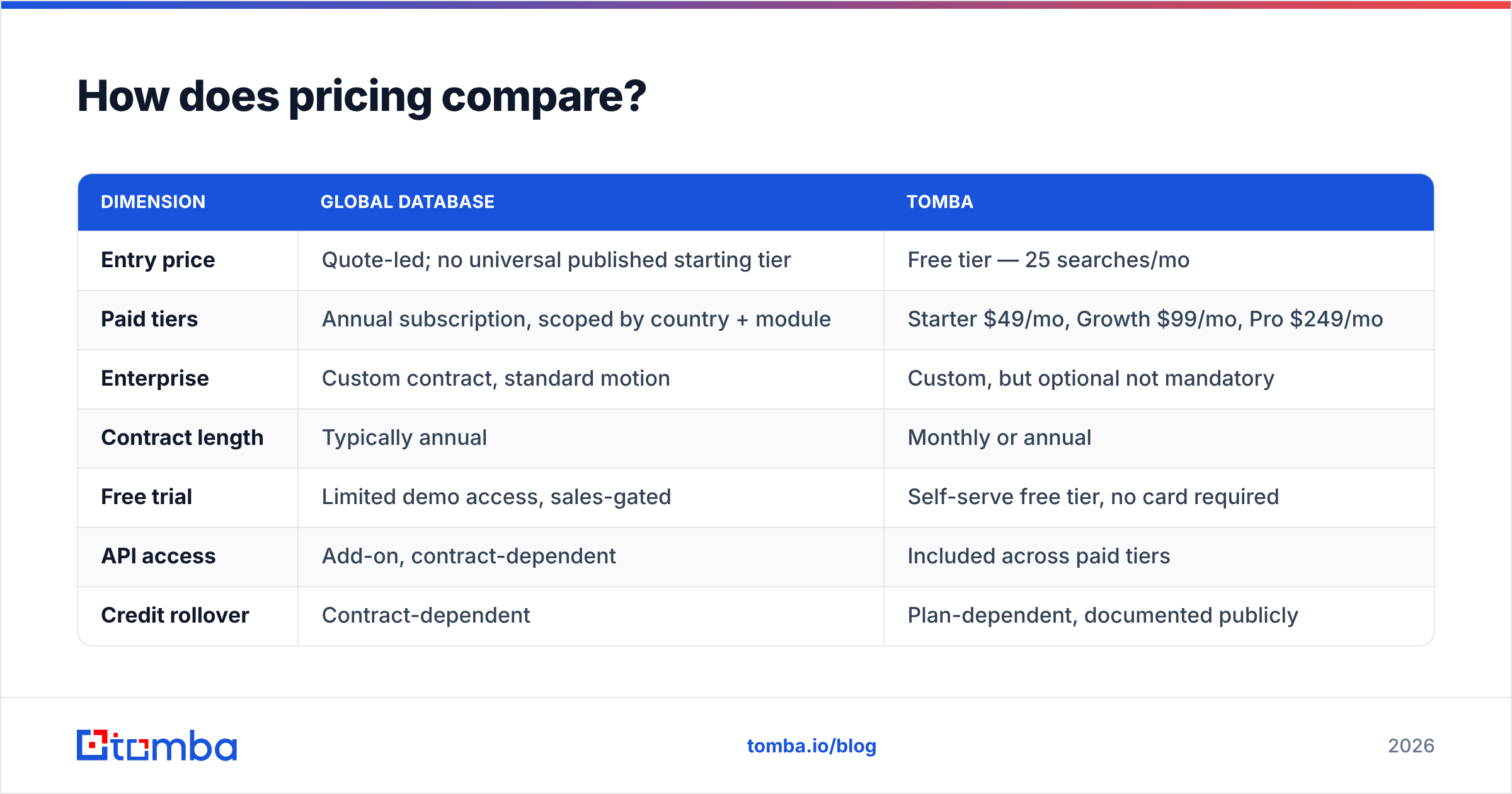
In a Global Database vs Tomba pricing comparison, the two products stop being comparable in any tidy way.
| Dimension | Global Database | Tomba |
|---|---|---|
| Entry price | Quote-led; no universal published starting tier | Free tier — 25 searches/mo |
| Paid tiers | Annual subscription, scoped by country + module | Starter $49/mo, Growth $99/mo, Pro $249/mo |
| Enterprise | Custom contract, standard motion | Custom, but optional not mandatory |
| Contract length | Typically annual | Monthly or annual |
| Free trial | Limited demo access, sales-gated | Self-serve free tier, no card required |
| API access | Add-on, contract-dependent | Included across paid tiers |
| Credit rollover | Contract-dependent | Plan-dependent, documented publicly |
| Time to first result | Days (demo → quote → onboarding) | Minutes (sign up → search) |
Two honest caveats. First, Global Database's pricing really does vary by scope. Country coverage, modules like credit reports or technology tracking, and seat count all move the number. That is a fair reason for quote-led pricing on a data suite of that shape. Check current terms with their sales team rather than trusting any third-party figure, including this article's.
Second, cheaper is not automatically better. Say your GTM motion depends on filtering by credit risk before a rep ever calls. A $49/mo email finder cannot replace that, because it does not hold the data. Compare against the job, not against the invoice. Full Tomba pricing is published if you want to sanity-check the table above.

Which tool fits which team?#
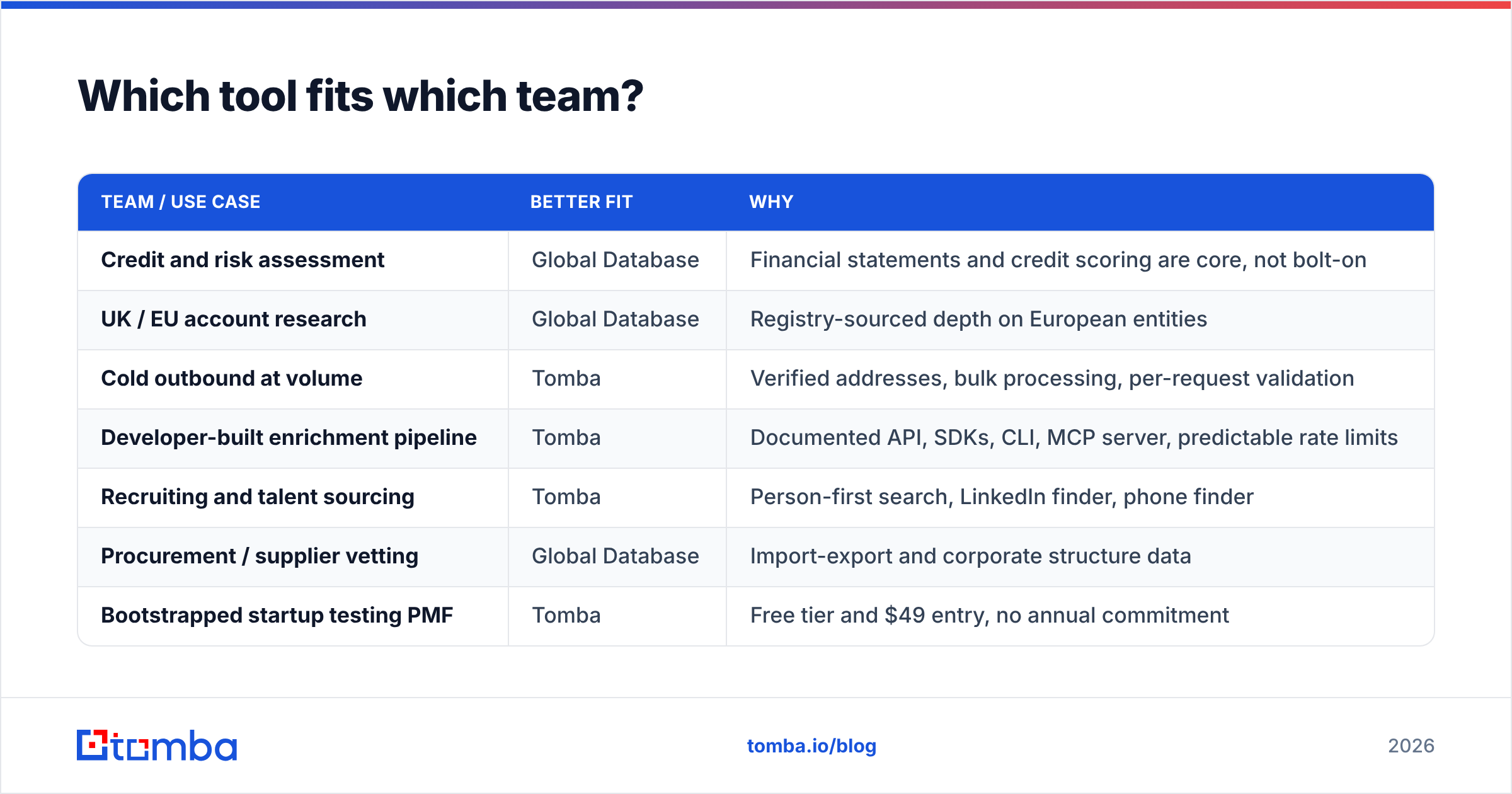
| Team / use case | Better fit | Why |
|---|---|---|
| Credit and risk assessment | Global Database | Financial statements and credit scoring are core, not bolt-on |
| UK / EU account research | Global Database | Registry-sourced depth on European entities |
| Cold outbound at volume | Tomba | Verified addresses, bulk processing, per-request validation |
| Developer-built enrichment pipeline | Tomba | Documented API, SDKs, CLI, MCP server, predictable rate limits |
| Recruiting and talent sourcing | Tomba | Person-first search, LinkedIn finder, phone finder |
| Procurement / supplier vetting | Global Database | Import-export and corporate structure data |
| Bootstrapped startup testing PMF | Tomba | Free tier and $49 entry, no annual commitment |
| Enterprise ABM with a data team | Both | Intelligence layer for targeting, finder layer for contact resolution |
The "both" row is not a cop-out. In a Global Database vs Tomba decision, mature revenue teams often buy both: an intelligence platform for account selection, and a dedicated finder for contact resolution. One vendor rarely leads in both. What you should avoid is the reverse — buying one tool and pretending it does the other job well.
What are the workflow differences day to day?#
Global Database's workflow is research-shaped. You log in, build a filter set, review company profiles, export a segment, and hand it to marketing or sales ops. It rewards deliberate, batched work. Analysts like it. Reps who live in a browser tab next to LinkedIn find it heavy.
Tomba's workflow is interruption-shaped. A rep finds a prospect on LinkedIn, clicks the browser extension, gets a verified address, and pushes it to the CRM without leaving the page. Or ops runs a 5,000-row CSV through bulk processing overnight. Or an engineer wires the API into the signup flow, so every inbound lead is enriched before routing.
Integration coverage reflects the same split. Tomba connects natively to HubSpot, Salesforce, Pipedrive, Zapier, Make, Airtable, Google Sheets, and Slack. Those are the tools where individual contacts get worked. Global Database integrates too, but its center of gravity is export-and-import rather than real-time lookup.
Check one more thing on either platform: how the vendor documents its sources. Tomba publishes a breakdown of where its data comes from, which matters for GDPR-scoped programs. If a vendor cannot tell you where a record came from, your compliance team will eventually ask. "The platform had it" is not an answer.
Where does each tool fall short?#
Global Database's honest weaknesses:
- Quote-led pricing filters out small teams. It also stretches evaluation into a multi-week cycle.
- Contact-level email freshness is not the design goal, so verification depth trails specialist tools.
- The interface carries the weight of an analyst suite. That is friction for a rep who needs one address in ten seconds.
- Coverage skews toward markets with strong public filing regimes. It is excellent in the UK and thinner where registries are closed.
Tomba's honest weaknesses:
- No financial statements, credit scores, or director records. It will not tell you whether an account can pay you.
- Firmographic filtering is lighter than a dedicated intelligence platform's.
- Catch-all domains stay probabilistic on any platform. The catch-all verifier narrows the risk but cannot erase it, and any vendor claiming otherwise is overselling.
- The free tier at 25 searches/mo is a taste test, not a pilot. Budget for Starter if you want a real benchmark.
Read independent review data on G2 for both before you commit. Pay attention to reviews from companies your size, because enterprise and SMB satisfaction diverge sharply on quote-led products.
Global Database vs Tomba: which should you choose?#
Answer one question. Is your bottleneck knowing which companies to target, or reaching the people inside them?
If it is targeting, the intelligence layer earns its price. You have budget, a long sales cycle, and deals that die because you chased shaky accounts. Global Database is a credible choice, especially for UK and European coverage.
If it is reaching, an intelligence suite will not fix it. You already know your ICP, your list is built, and 22% of your sends bounce. You need accurate, freshly verified addresses at a price that scales with volume rather than with seats. That is the finder category, and it is what Tomba was built for.
If the honest answer is both, run them as separate layers with separate budgets. That costs less than one expensive tool that half-solves each job.
Start with the cheap experiment. Pull 100 contacts you can verify yourself, run them through Tomba Email Finder on the free tier, and compare match rate and bounce rate against your current stack. If the numbers hold, $49/mo buys the whole workflow: finder, verifier, domain search, extension, and API. If they do not, you have lost an afternoon instead of an annual contract.
Related guides#
Ready to find emails that actually work?
Join 150,000+ professionals who stopped guessing and started sending. Free credits on signup — no credit card required.
Get the Tomba newsletter
Practical outbound tactics and product updates — once every two weeks.
About the author