Global Database vs ZoomInfo: Honest 2026 Data Comparison
Global Database and ZoomInfo both sell B2B contact and company data, but they sell it in completely different shapes. Here is how coverage, accuracy, contracts and real cost compare in 2026 — and when neither is the right buy.
Global Database vs ZoomInfo comes down to one question. Do you want data about companies, or data about people? Global Database leans company. ZoomInfo leans people. Here is the short version.
TL;DR
- Global Database is a UK-built B2B platform. It is strongest on company firmographics, financials, credit data and European registry coverage.
- ZoomInfo is the US market leader. It is strongest on contact depth, intent signals and CRM-native workflow.
- ZoomInfo wins on North American contact density and buying-intent data.
- Global Database wins on European company records, financial filings and smaller, clearer commitments.
- Neither is cheap or self-serve. ZoomInfo is an annual, seat-based buy, and buyers often report five-figure deals. Global Database sits well below that, but still expects a subscription.
- If you only need verified work emails, a per-lookup finder does the same job for far less. Tomba starts free and runs $49/mo at Starter.
- Best fit for teams under 20 reps: a light company-data source plus a pay-as-you-go finder and verifier. Not a full suite.
Global Database vs ZoomInfo: what are these two tools?#
Both tools answer the same question. Who should I contact, and how do I reach them? They just start from opposite ends of the market.
Global Database is a London-based B2B data provider. It covers companies in roughly 195 countries. Its edge is depth on the account, not the person. You get registry-sourced company records, financial statements, credit scores, shareholder and director data, tech installs, and trade activity in some markets. It sells to sales, marketing, compliance and credit-risk teams. That last group is unusual, and it explains a lot about the product.
ZoomInfo is the incumbent. It grew out of DiscoverOrg. It is still the default answer to "where do we buy B2B contact data?" Its edge is contact depth in North America. You get direct dials at scale. You get an intent layer built on Bombora and its own web signals. You also get a workflow product — Copilot, Engage and Data-as-a-Service — that pushes records into Salesforce, HubSpot or Outreach. No analyst sits in the middle.
Put simply: Global Database tells you all about a company, including whether it can pay. ZoomInfo hands you 400 people to call this quarter, in your CRM, with a reason to call today.
Global Database vs ZoomInfo: how do the features compare?#
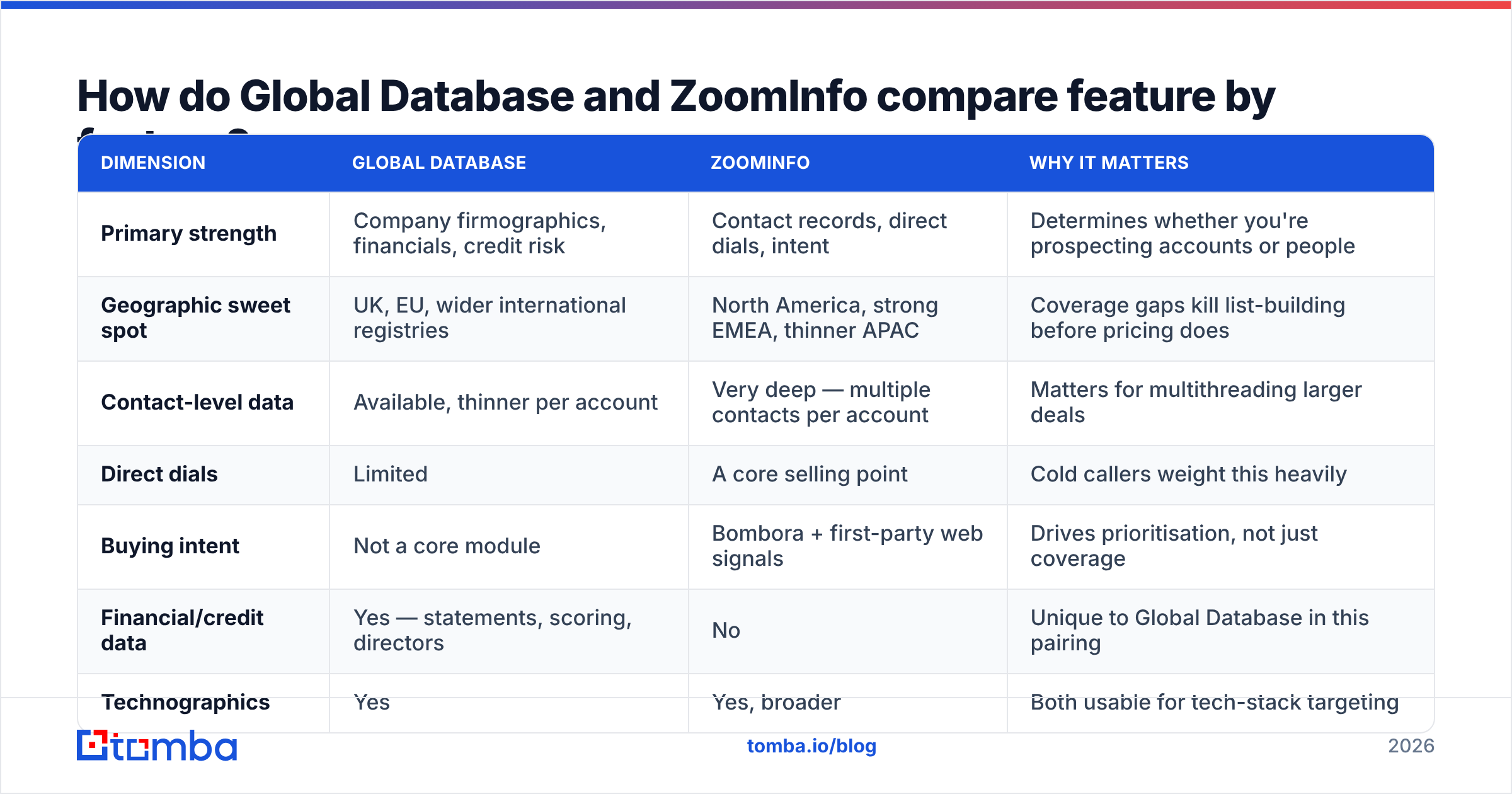
| Dimension | Global Database | ZoomInfo | Why it matters |
|---|---|---|---|
| Primary strength | Company firmographics, financials, credit risk | Contact records, direct dials, intent | Determines whether you're prospecting accounts or people |
| Geographic sweet spot | UK, EU, wider international registries | North America, strong EMEA, thinner APAC | Coverage gaps kill list-building before pricing does |
| Contact-level data | Available, thinner per account | Very deep — multiple contacts per account | Matters for multithreading larger deals |
| Direct dials | Limited | A core selling point | Cold callers weight this heavily |
| Buying intent | Not a core module | Bombora + first-party web signals | Drives prioritisation, not just coverage |
| Financial/credit data | Yes — statements, scoring, directors | No | Unique to Global Database in this pairing |
| Technographics | Yes | Yes, broader | Both usable for tech-stack targeting |
| CRM sync | Integrations available | Native, deep, bi-directional | Adoption failure is usually a workflow problem |
| API access | Yes, plan-dependent | Yes, priced separately | Check credit accounting before signing |
| Contract shape | Subscription, smaller commitments | Annual contract, seat + credit based | The single biggest cost driver |
Read that table twice before you open any pricing page. Most bad data buys are not about price. They are about shape. Teams pay for a kind of data they never use.

Global Database vs ZoomInfo: which one has better data accuracy?#
Accuracy claims mean little until you define the word. Vendors blur three numbers together:
- Match rate — the share of your input list the vendor returns anything for. Vendors quote this first, because it is the friendliest number.
- Deliverability rate — the share of returned emails that pass SMTP checks and do not bounce.
- Freshness — how recently the record was confirmed. A clean email for someone who left 14 months ago is still a bounce.
Both platforms face the same problem on that third point. B2B contact data decays about 25–30% a year through job changes alone. That rate rose after the 2023–2025 tech layoffs. No vendor is immune. ZoomInfo leans on scale and its contributor network. Global Database leans on registry sources, which stay stable for company data but not for people data.
Buyer reviews on G2 show a steady pattern. ZoomInfo scores well on coverage and poorly on price and contract terms. Smaller vendors score well on value and less well on breadth. That pattern has held for years. It is the honest summary of this matchup.

One habit protects you here. Never trust a supplied email without your own check. Run every export through an email verifier before it reaches your sending tool. A 4% bounce rate on a 5,000-record import means 200 hard bounces. Google and Microsoft both read that as a bad sender signal. Verifying costs very little. Rebuilding a burned domain does not.
Global Database vs ZoomInfo: what does each one cost?#
This is where the two split hardest. Treat every number you read online with care, including the ones here.
ZoomInfo does not publish list prices. Buyer reports on review sites and procurement marketplaces do show the shape. You sign an annual contract. You pay per seat, plus a credit allowance. Intent, Engage and API access are add-ons. Small teams often report entry points in the mid five figures a year once they add a few seats. Enterprise deals go well past that. Overage credits and auto-renewal clauses are the two lines buyers wish they had pushed back on.
Global Database sits in a different bracket. It publishes plan tiers. It sells to teams, not just to procurement. Its financial-data modules are priced apart from sales prospecting. Expect a subscription in the low hundreds per user per month, depending on modules and region. Credit-risk data is its own product. Check current figures with the vendor, because published tiers here change often.
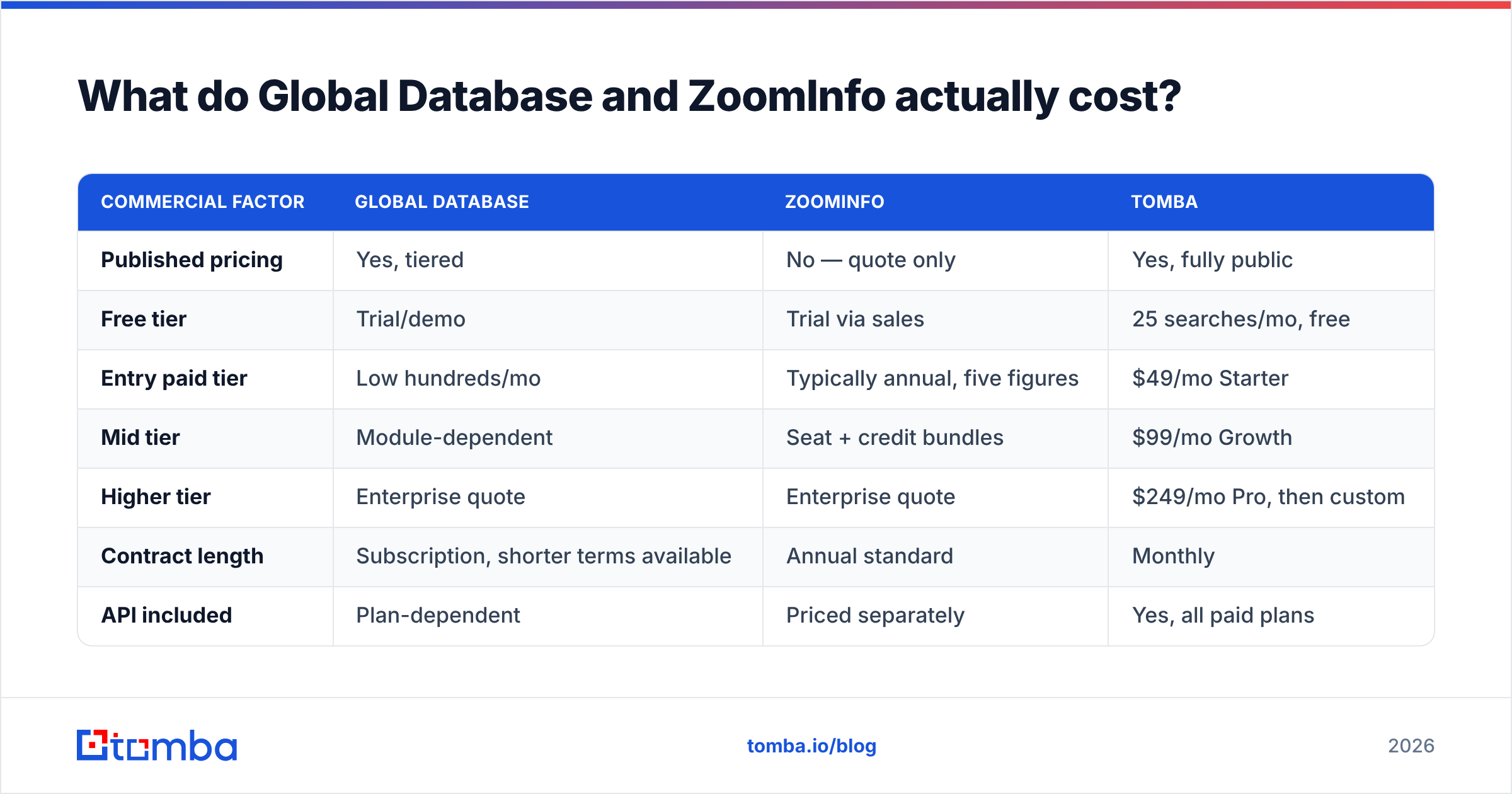
| Commercial factor | Global Database | ZoomInfo | Tomba |
|---|---|---|---|
| Published pricing | Yes, tiered | No — quote only | Yes, fully public |
| Free tier | Trial/demo | Trial via sales | 25 searches/mo, free |
| Entry paid tier | Low hundreds/mo | Typically annual, five figures | $49/mo Starter |
| Mid tier | Module-dependent | Seat + credit bundles | $99/mo Growth |
| Higher tier | Enterprise quote | Enterprise quote | $249/mo Pro, then custom |
| Contract length | Subscription, shorter terms available | Annual standard | Monthly |
| API included | Plan-dependent | Priced separately | Yes, all paid plans |
| Credit rollover | Plan-dependent | Usually no | Plan-dependent |
Two honest notes. First, ZoomInfo's price is not crazy. You are buying direct dials, intent and a workflow layer that really does shorten ramp time on a 40-rep floor. Second, most teams weighing it up do not have a 40-rep floor. They have six reps, a spreadsheet list process, and one person who owns data quality part-time. That team pays enterprise money for features it never switches on.

Global Database vs ZoomInfo: who should choose which?#
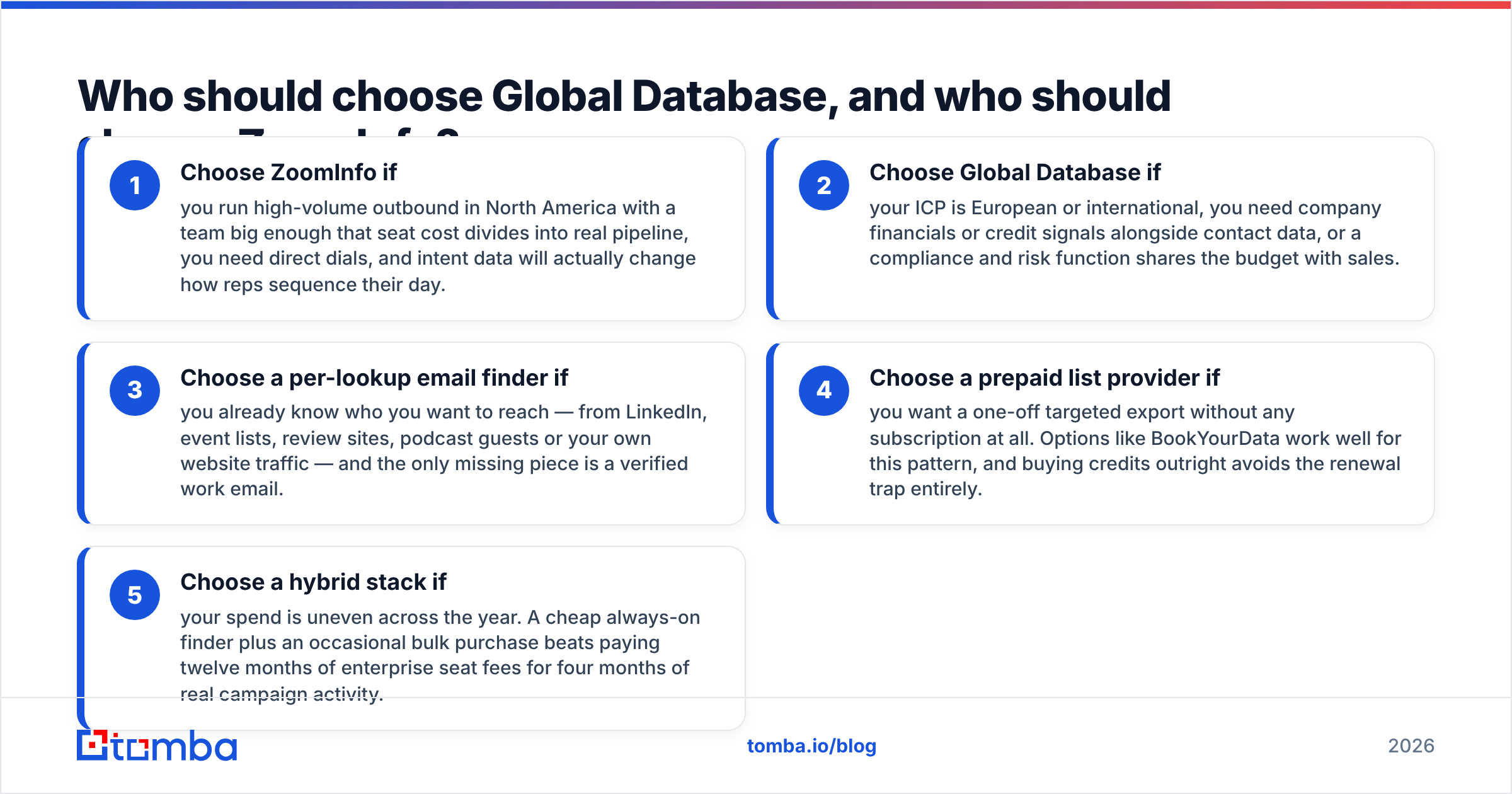
Match the tool to the motion, not to the brand ranking.
- Choose ZoomInfo if you run high-volume outbound in North America. Your team is big enough that seat cost turns into real pipeline. You need direct dials. And intent data will actually change how reps plan their day.
- Choose Global Database if your ICP is European or international. You need company financials or credit signals next to contact data. Or a compliance and risk team shares the budget with sales.
- Choose a per-lookup email finder if you already know who you want to reach. The names may come from LinkedIn, event lists, review sites, podcasts or your own site traffic. The only missing piece is a verified work email.
- Choose a prepaid list provider if you want a one-off export with no subscription. BookYourData works well here. Buying credits outright avoids the renewal trap.
- Choose a hybrid stack if your spend swings across the year. A cheap always-on finder plus an occasional bulk buy beats twelve months of seat fees for four months of real campaigns.

Is there a cheaper way to get the same contact data?#
Often, yes. Most teams buy a database when what they need is a lookup.
The difference matters. A database charges you for access to everything, used or not. A lookup tool charges you for the records you ask for. Say your monthly volume is 500–3,000 contacts against a list you can already define. Then the lookup model is far cheaper. The data is fresher too, because it is resolved when you ask, not pulled from a snapshot.
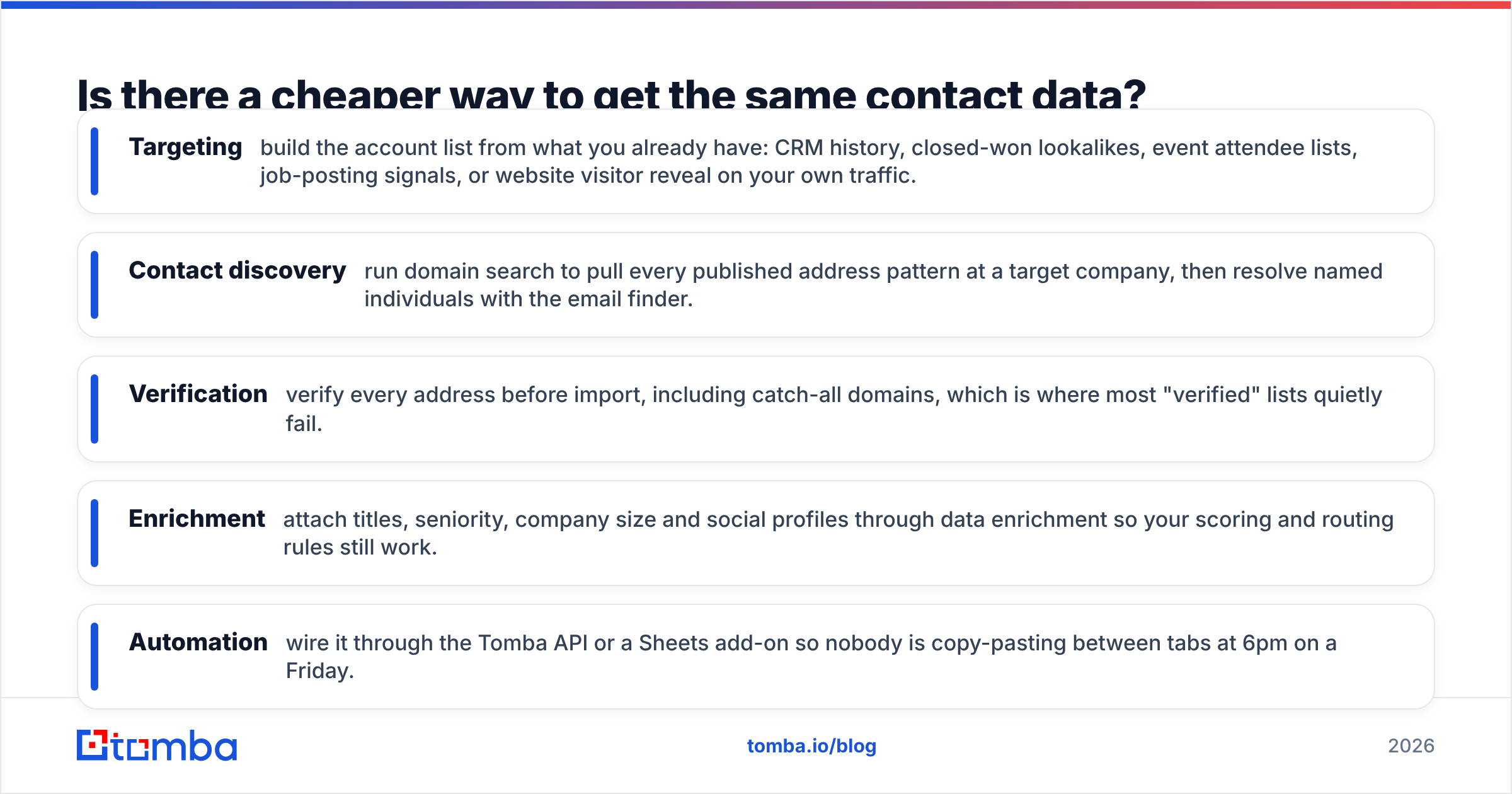
A practical replacement stack looks like this:
- Targeting — build the account list from what you already have. CRM history, closed-won lookalikes, event lists, job-posting signals, or website visitor reveal on your own traffic.
- Contact discovery — run domain search to pull every published address pattern at a target company. Then resolve named people with the email finder.
- Verification — verify every address before import. That includes catch-all domains, where most "verified" lists quietly fail.
- Enrichment — attach titles, seniority, company size and social profiles through data enrichment, so your scoring and routing rules still work.
- Automation — wire it through the Tomba API or a Sheets add-on. Nobody should be copy-pasting between tabs at 6pm on a Friday.
That stack costs a fraction of a suite licence. It also scales down in quiet months. See current Tomba pricing for the exact tiers.
You do give something up, and you should know it. No direct dials at ZoomInfo's scale. No Bombora intent feed. No credit-risk filings. If those three drive your revenue, buy the suite and push hard on the renewal clause. If they do not, you are paying rent on features you will never open.
How should you run your own Global Database vs ZoomInfo test?#
Do not compare marketing pages. Compare output on your own data.
Build a 200-row test list from accounts you know well. Include 20 records where you know the right answer, because you have emailed the person. Run the same list through every vendor in the trial. Then score four columns: match rate, verified-deliverable rate, bounce rate after a real send, and cost per usable record. That last number is the only one that matters. It is almost never the number on the pricing page.
Three things skew trials. Vendors sometimes route trial requests through fresher pipelines than production. Match rates look better when you feed in famous companies instead of your real mid-market ICP. And credit rules differ. Some vendors charge for a no-result lookup, some do not, which can swing real cost by 30% or more. Ask about credits in writing before you sign.
Check the exit path too. Can you export what you collected? Does the contract auto-renew, and what is the notice window? Data vendors are sticky. The cost of leaving is part of the cost of joining.
Final verdict: Global Database vs ZoomInfo in 2026#
ZoomInfo is the stronger product for high-volume North American outbound. You need a team big enough to absorb seat costs, and a real appetite for intent-led prioritising. Global Database fits international teams better. It suits anyone who needs company financials, registry-grade firmographics or credit context alongside prospecting. It also will not lock you into an enterprise-scale annual deal.
For most people reading a Global Database vs ZoomInfo comparison, though, the real answer is a third option. If you already know your accounts and just need verified work emails, start with the Tomba Email Finder. The free tier gives you 25 searches a month, so you can test accuracy against contacts you can check by hand. Starter is $49/mo. Every paid plan includes API access, so you can wire it into whatever you already run. Test it on your own list before you sign anything annual.
Related guides#
Ready to find emails that actually work?
Join 150,000+ professionals who stopped guessing and started sending. Free credits on signup — no credit card required.
Get the Tomba newsletter
Practical outbound tactics and product updates — once every two weeks.
About the author