Gmail Email Finder: How to Find Anyone's Gmail in 2026
Personal Gmail addresses are the hardest contacts in B2B to source. Here is how Gmail email finders actually work, which methods hold up, and how to verify a @gmail.com address before you hit send.
TL;DR
- A "Gmail email finder" covers two very different jobs: finding a personal
@gmail.comaddress, and finding a work address on a domain that runs on Google Workspace. The second is solvable at scale. The first mostly is not. - Roughly 40% of business domains route mail through Google, so a huge share of "corporate" B2B emails are technically Gmail — and those are findable with normal domain-based tooling.
- Pure
@gmail.comaddresses have no public directory, no MX-level pattern, and no catch-all fallback. Anyone promising 95% coverage on personal Gmail is selling you guesses. - Verification matters more here than anywhere else: Google throttles SMTP probing hard, so a "valid" result from a weak verifier is often just a timeout dressed up as a green check.
- The workflow that holds up in 2026: find the work email first, use permutation plus verification only as a fallback, and never mail an unverified guess from your primary domain.
What is a Gmail email finder?#
A Gmail email finder is any tool or method that returns a Google-hosted email address for a specific person. That single label hides two problems with wildly different difficulty levels, and confusing them is the reason most people conclude that "email finders don't work."
Problem one: the work address on a Google-hosted domain. A company signs up for Google Workspace, points its MX records at Google, and issues addresses like sarah@acme.com. The mailbox lives on Google's infrastructure. The address itself is a normal corporate email that follows a company-wide pattern, appears in press releases, shows up in git commits, and gets scraped by every data provider on earth. This is a solved problem — a standard email finder handles it.
Problem two: the personal @gmail.com address. No pattern. No company directory. No domain to search. Google publishes nothing, and there is no MX trick that maps a name to an inbox. Finding john.smith.1987@gmail.com requires that the address has leaked into a public source at some point — a GitHub commit, a conference registration, a forum signature, a WHOIS record from before privacy proxies became default.
If you are targeting freelancers, solo consultants, creators, small ecommerce operators, or early-stage founders, you are in problem-two territory. If you are targeting anyone at a company with its own domain, you are in problem-one territory even when the underlying mailbox is Gmail.
Why are Gmail addresses harder to find than work emails?#
Corporate email has structure. Personal Gmail has none.
A work address is generated by an IT policy: first.last@, flast@, first@. Once you have confirmed the pattern for one employee at a company, you can predict the rest with high confidence and verify from there. That is the entire economic basis of the domain search category.
Gmail has no policy. The address was chosen by a human in 2007 who wanted something that was still available. jsmith@gmail.com was taken, so they became johnsmith2412@gmail.com, or smithy.dev@gmail.com, or something with a childhood nickname in it. There is no algorithm that recovers that.
Three more structural obstacles:
- Dots and plus-addressing are noise. Google ignores dots entirely —
john.smith@gmail.comandjohnsmith@gmail.comdeliver to the same inbox. That means permutation tools generate dozens of "different" candidates that are all the same address, inflating apparent coverage without adding information. The email address spec allows this local-part flexibility; Google leans into it. - Google does not answer SMTP honestly at scale. Probe too many addresses and you get greylisted, rate-limited, or served ambiguous responses. Verifiers that rely purely on SMTP handshakes degrade fast against
gmail.com. - No catch-all fallback. On a corporate catch-all domain you at least learn "the domain accepts mail." Gmail rejects unknown users cleanly, which is good for accuracy but means a failed guess gives you zero partial credit.
How do Gmail email finders actually work?#
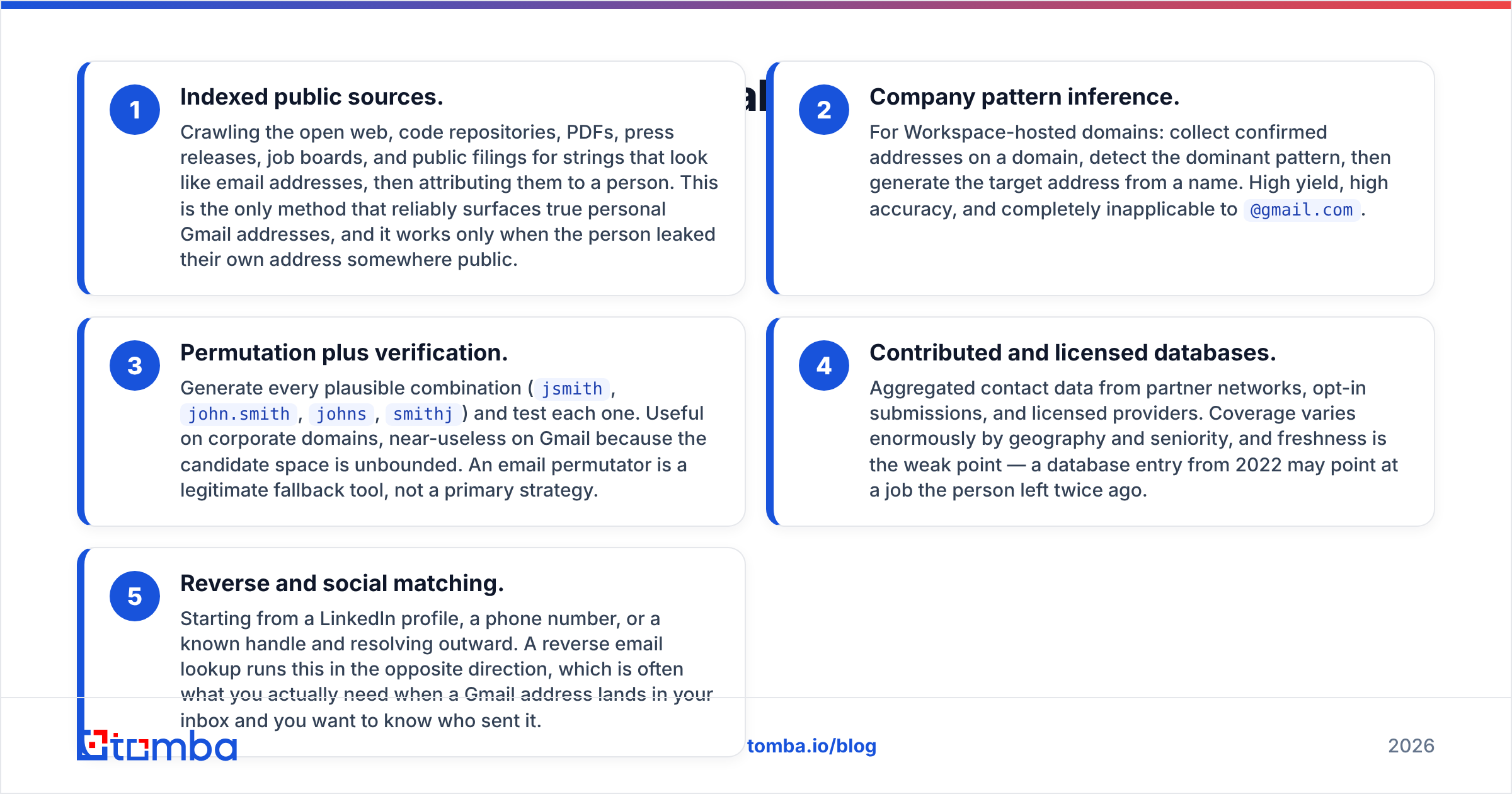
Every tool in this category runs some combination of five techniques. Knowing which one produced your result tells you how much to trust it.
- Indexed public sources. Crawling the open web, code repositories, PDFs, press releases, job boards, and public filings for strings that look like email addresses, then attributing them to a person. This is the only method that reliably surfaces true personal Gmail addresses, and it works only when the person leaked their own address somewhere public.
- Company pattern inference. For Workspace-hosted domains: collect confirmed addresses on a domain, detect the dominant pattern, then generate the target address from a name. High yield, high accuracy, and completely inapplicable to
@gmail.com. - Permutation plus verification. Generate every plausible combination (
jsmith,john.smith,johns,smithj) and test each one. Useful on corporate domains, near-useless on Gmail because the candidate space is unbounded. An email permutator is a legitimate fallback tool, not a primary strategy. - Contributed and licensed databases. Aggregated contact data from partner networks, opt-in submissions, and licensed providers. Coverage varies enormously by geography and seniority, and freshness is the weak point — a database entry from 2022 may point at a job the person left twice ago.
- Reverse and social matching. Starting from a LinkedIn profile, a phone number, or a known handle and resolving outward. A reverse email lookup runs this in the opposite direction, which is often what you actually need when a Gmail address lands in your inbox and you want to know who sent it.
The honest summary: for @gmail.com, only methods 1, 4, and 5 do real work. Methods 2 and 3 are corporate-domain techniques that some vendors quietly apply to Gmail anyway, which is where the fake coverage numbers come from.
How accurate are Gmail email finders in 2026?#
Accuracy claims in this category are close to meaningless unless the vendor tells you the denominator. "98% accuracy" usually means "of the emails we returned, 98% verified" — it says nothing about the 70% of your list where the tool returned nothing at all. Coverage and accuracy are separate numbers and you need both.

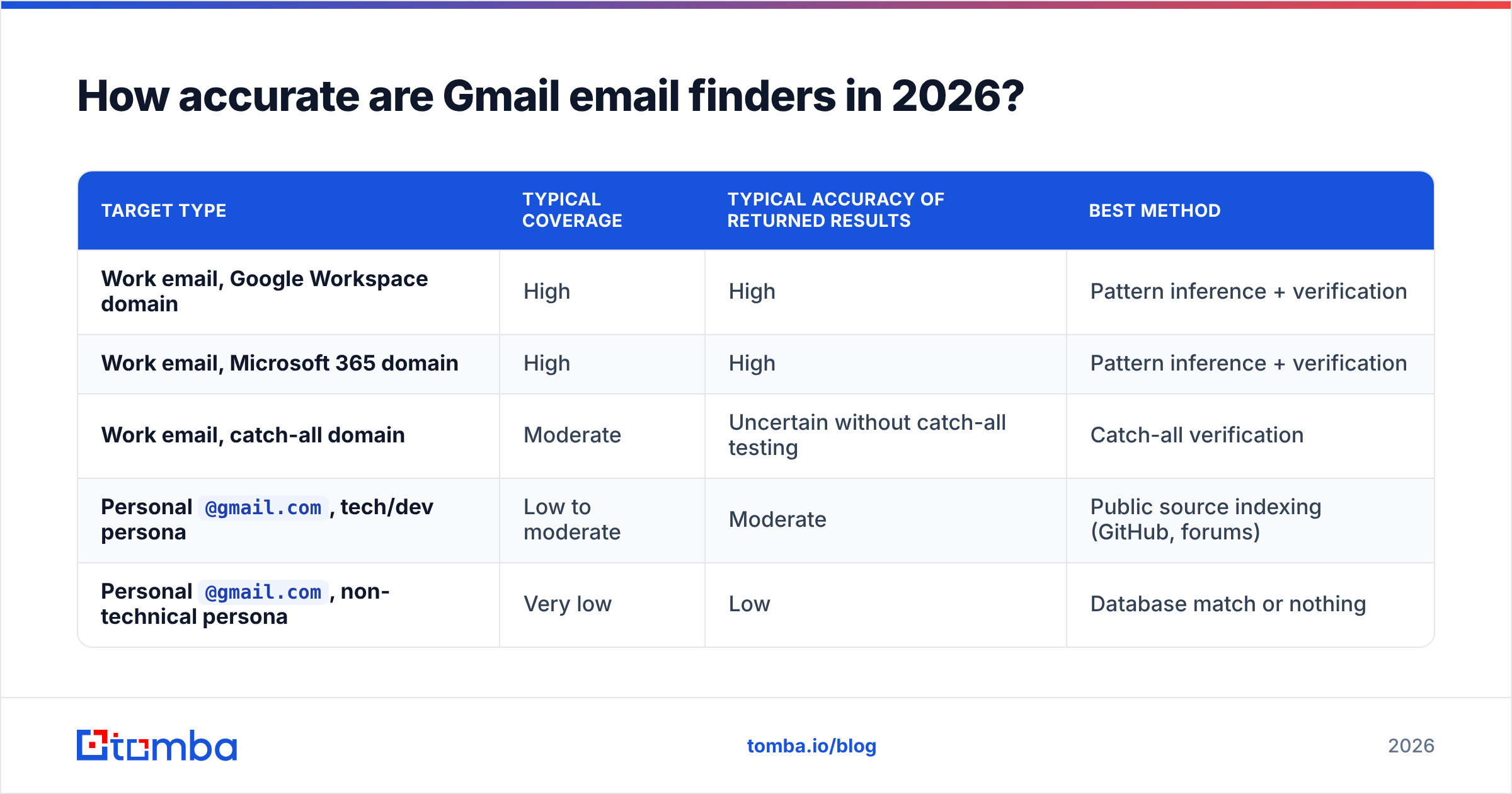
A realistic set of expectations, based on how the underlying methods behave:
| Target type | Typical coverage | Typical accuracy of returned results | Best method |
|---|---|---|---|
| Work email, Google Workspace domain | High | High | Pattern inference + verification |
| Work email, Microsoft 365 domain | High | High | Pattern inference + verification |
| Work email, catch-all domain | Moderate | Uncertain without catch-all testing | Catch-all verification |
Personal @gmail.com, tech/dev persona |
Low to moderate | Moderate | Public source indexing (GitHub, forums) |
Personal @gmail.com, non-technical persona |
Very low | Low | Database match or nothing |
The pattern is consistent: the more public writing, code, or commerce a person does under their own name, the better your odds. A developer who has pushed commits with a personal address is findable. A regional sales manager who has never posted publicly is not, and no amount of credits will change that.
This is also why bounce rate is the metric that matters, not the vendor's accuracy badge. If you send to unverified Gmail guesses, you will bounce, and Google's own Workspace sender guidelines make it clear that a high bounce rate is one of the fastest ways to damage your sending reputation. Run every result through an email verifier before it touches a sequence.
Which Gmail email finder should you use?#
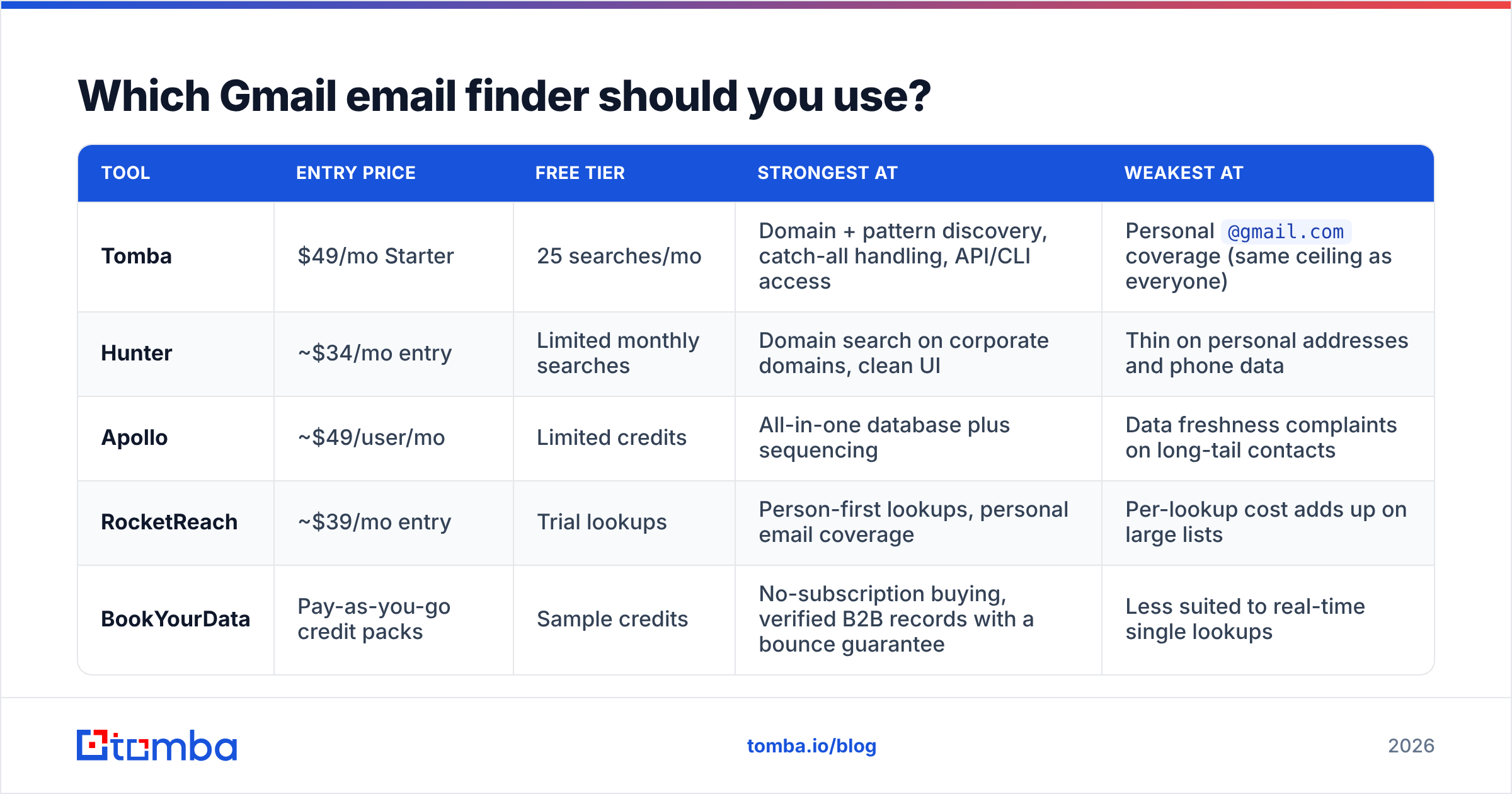
The tools below all overlap, but they solve different halves of the problem. Prices are the published entry-level tiers at the time of writing and change frequently — check the vendor before you buy.

| Tool | Entry price | Free tier | Strongest at | Weakest at |
|---|---|---|---|---|
| Tomba | $49/mo Starter | 25 searches/mo | Domain + pattern discovery, catch-all handling, API/CLI access | Personal @gmail.com coverage (same ceiling as everyone) |
| Hunter | ~$34/mo entry | Limited monthly searches | Domain search on corporate domains, clean UI | Thin on personal addresses and phone data |
| Apollo | ~$49/user/mo | Limited credits | All-in-one database plus sequencing | Data freshness complaints on long-tail contacts |
| RocketReach | ~$39/mo entry | Trial lookups | Person-first lookups, personal email coverage | Per-lookup cost adds up on large lists |
| BookYourData | Pay-as-you-go credit packs | Sample credits | No-subscription buying, verified B2B records with a bounce guarantee | Less suited to real-time single lookups |
A few notes that the table cannot capture:
- Subscription vs. credit packs is a real decision. If your prospecting is bursty — a campaign every quarter rather than daily outbound — pay-as-you-go models like BookYourData's avoid paying for idle months. If you enrich continuously or run enrichment through an API, a monthly plan is cheaper per record. Compare Tomba pricing against your actual monthly volume, not your aspirational volume.
- API access is the hidden differentiator. Anyone can look up ten contacts in a UI. The question is whether the tool can sit inside your CRM sync, your Sheets workflow, or your enrichment pipeline without a human in the loop.
- Nobody wins on personal Gmail. Every vendor in this table hits the same wall. Differences in
@gmail.comcoverage between the leaders are smaller than the differences in how honestly they report it.

Can you find someone's Gmail for free?#
Sometimes — with manual effort and low success rates. The free routes worth trying before you spend credits:
- GitHub commit history. If the target has ever pushed code,
https://api.github.com/users/<username>/events/publicfrequently exposes the commit author email. This is the single highest-yield free method for technical personas. - Their own website or newsletter. Solo operators often use a personal Gmail as their contact address and publish it in plain text or lightly obfuscated. An email extractor pulls addresses out of pasted page text in seconds.
- Public documents. Conference speaker lists, PDF slide decks, grant applications, meetup registrations, and open datasets leak addresses constantly.
- Domain WHOIS on older registrations. Privacy proxies are standard now, but registrations from before 2018 often still show a personal Gmail in the registrant record.
- Free-tier searches. Most vendors give you a monthly allowance. Tomba's free tier includes 25 searches per month, which is enough to test whether a tool actually finds your specific persona before you commit to a plan.
What does not work: "free Gmail finder" sites that ask for a name and return a plausible-looking address instantly. Those are permutators with a marketing layer. They generate firstlast@gmail.com and present it as a finding. Test one against your own name and watch it confidently invent an address that has never existed.
Is it legal to find someone's Gmail address?#
Legality depends on jurisdiction, source, and how you use the address — not on the tool.
Under GDPR, an email address tied to an identifiable person is personal data whether it ends in @acme.com or @gmail.com. Processing it requires a lawful basis, and legitimate interest for B2B outreach is a defensible one when the contact is clearly business-relevant. A personal Gmail belonging to a private individual is a much weaker fit for that argument than a work address at a company you sell to. Under CAN-SPAM in the US, cold B2B email is permitted with accurate headers, a genuine physical address, and a working opt-out.
Practical guardrails that keep you out of trouble regardless of regime:
- Prefer the work address when one exists. It is easier to justify and it performs better.
- Honor opt-outs immediately and permanently, across every tool in your stack.
- Keep a record of where each address came from. "We do not know" is the worst possible answer to a data-subject request.
- Skip consumer-context targets entirely. If your product is B2B, a private individual's personal inbox is not your market.
Reputable vendors document their sourcing publicly — Tomba's data sources page is the kind of disclosure to look for before signing anything, and third-party review sites like G2 are useful for spotting vendors whose compliance story falls apart under customer scrutiny.
How do you verify a Gmail address before you send?#
Verification against gmail.com behaves differently from verification against a corporate domain, and this trips up a lot of teams.
Google rate-limits SMTP probing aggressively. A verifier that hammers gmail.com with handshake attempts will start receiving deferrals and ambiguous responses, which weak tools translate into "valid" or "unknown" more or less at random. Good verifiers throttle, distribute, and retry across time rather than forcing an instant answer.
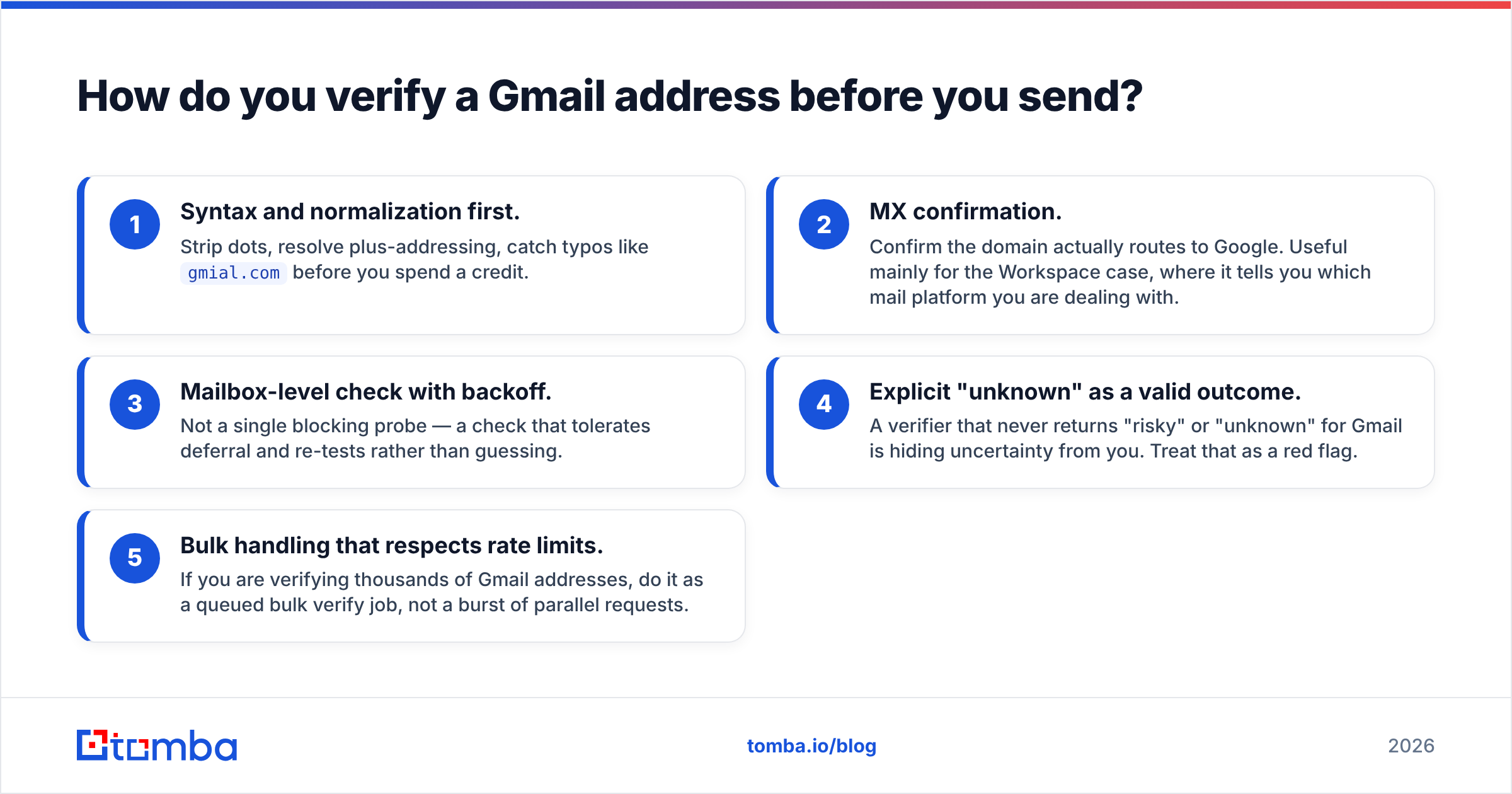
What a trustworthy result looks like:
- Syntax and normalization first. Strip dots, resolve plus-addressing, catch typos like
gmial.combefore you spend a credit. - MX confirmation. Confirm the domain actually routes to Google. Useful mainly for the Workspace case, where it tells you which mail platform you are dealing with.
- Mailbox-level check with backoff. Not a single blocking probe — a check that tolerates deferral and re-tests rather than guessing.
- Explicit "unknown" as a valid outcome. A verifier that never returns "risky" or "unknown" for Gmail is hiding uncertainty from you. Treat that as a red flag.
- Bulk handling that respects rate limits. If you are verifying thousands of Gmail addresses, do it as a queued bulk verify job, not a burst of parallel requests.
Then apply the send-side discipline: warm the sending domain, keep volume per inbox modest, and quarantine anything marked risky rather than shipping it into your main sequence. The cost of one bad send is not the bounce — it is the reputation hit that suppresses your next thousand legitimate emails.
What's the workflow that actually works?#
Put it together and the practical sequence looks like this:
Step 1 — Check the domain first. If the person works somewhere with a website, run a domain search before you think about Gmail at all. You will resolve the majority of B2B targets here, and the address you get is both more findable and more defensible.
Step 2 — Confirm the pattern. One or two confirmed addresses on a domain give you the format for everyone else. This is where cost per contact collapses.
Step 3 — Fall back to person-first lookup. For the remainder, search by name plus company or by profile URL. This is where personal Gmail addresses surface, when they surface at all.
Step 4 — Verify everything, without exception. No result goes into a sequence unverified, regardless of which step produced it.
Step 5 — Accept the miss rate. A realistic target is full coverage on corporate domains and a minority hit rate on personal Gmail. Teams that chase 100% coverage end up mailing guesses and paying for it in deliverability. Build your pipeline math around the coverage you actually get.
If your prospect list is mostly people at companies — which for almost every B2B seller it is — the fastest path is to stop hunting for personal inboxes and start resolving work addresses properly. Run your list through Tomba Email Finder to get the work address and its confidence score, verify in the same pass, and keep the manual Gmail archaeology for the handful of solo operators where it is genuinely the only option. The free tier gives you 25 searches a month to test it against your own list before you decide anything.
Related guides#
// get started
Find, verify and enrich your first contacts today
Start on the free plan with 25 searches a month, then scale when your team is ready.
Free plan · No credit card required · GDPR & CCPA
// about the author