GMass vs Tomba: Which Cold Email Tool Wins in 2026?
GMass sends cold email from inside Gmail. Tomba finds and verifies the addresses you send to. Here is the honest breakdown of pricing, accuracy, limits, and which one your outbound stack actually needs first.
TL;DR
- GMass and Tomba are not really competitors. GMass is a Gmail-based sending engine (mail merge, sequences, scheduling). Tomba is a data layer (email finding, verification, enrichment).
- If your problem is "I have a list and need to send it," GMass wins. If your problem is "I don't have the addresses, or half of them bounce," Tomba wins.
- GMass pricing starts around $25/user/mo on its Standard tier; Tomba starts free (25 searches/mo) with paid plans from $49/mo.
- GMass inherits Gmail's sending limits — roughly 2,000 recipients/day on Google Workspace. That caps your realistic volume no matter what plan you buy.
- The stack most teams end up with: Tomba for finding and verifying, GMass (or any sender) for delivery. Buying only one of the two is where campaigns break.
What are GMass and Tomba, actually?#
They solve different halves of the same job.
GMass is a Chrome extension that turns Gmail into a cold email platform. You install it, a few extra buttons appear in your Gmail compose window, and suddenly you can mail-merge a spreadsheet, schedule follow-up sequences, track opens and clicks, and pull recipient lists straight out of a Gmail search. Everything happens inside the Gmail UI you already know — no separate app to log into.
Tomba is the layer that comes before the send. It's a B2B contact data platform: find email addresses from a name and domain, pull every published address on a company domain, verify emails before you send, check catch-all domains, and enrich records with job titles, LinkedIn profiles, and phone numbers. There's an API, a Chrome extension, Sheets and Excel add-ins, and bulk processing.
So "GMass vs Tomba" is really a question about which gap in your outbound process is currently bleeding money.

How do the two tools actually differ?#
Here's the head-to-head on the attributes that change buying decisions.
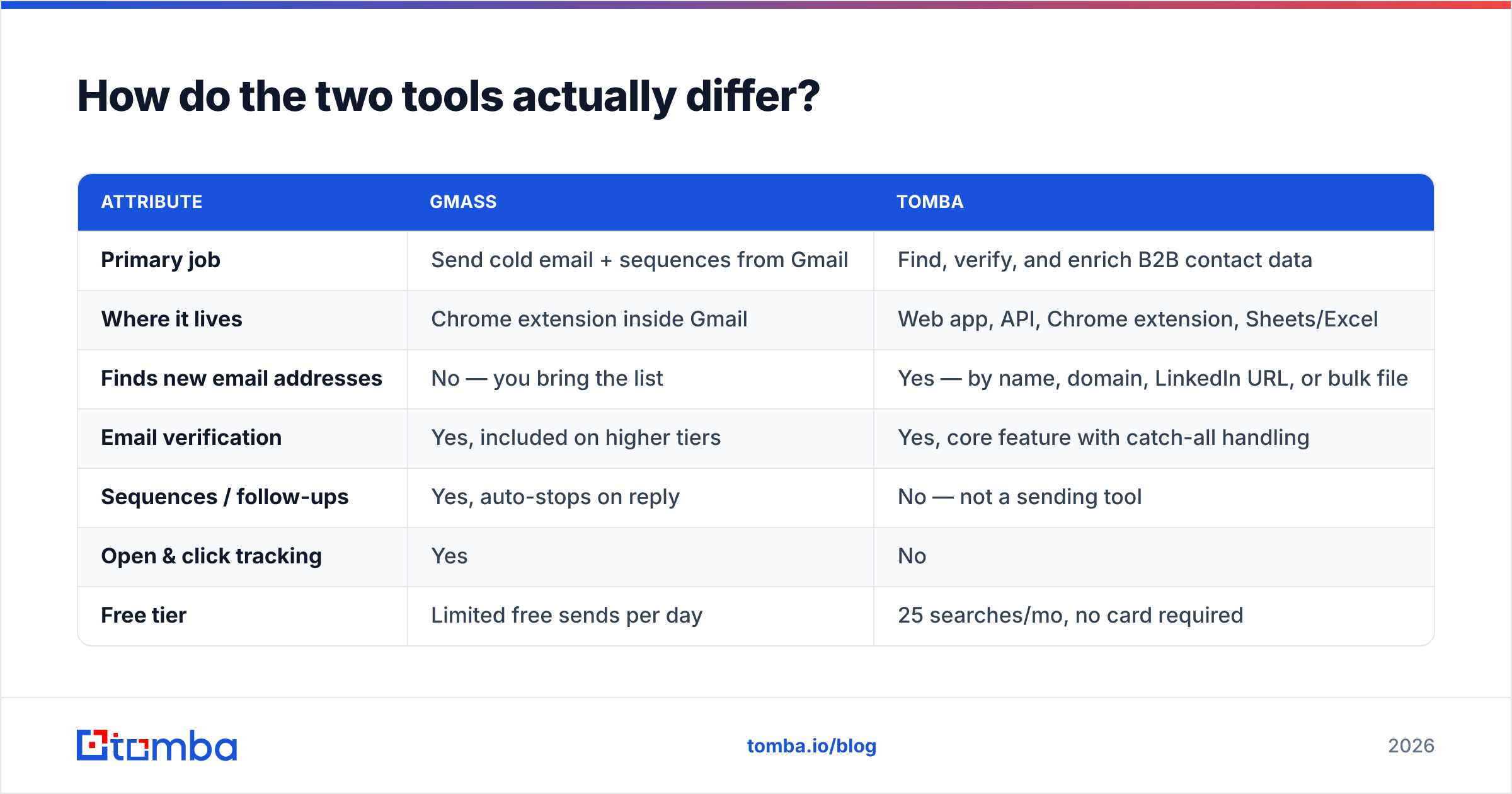
| Attribute | GMass | Tomba |
|---|---|---|
| Primary job | Send cold email + sequences from Gmail | Find, verify, and enrich B2B contact data |
| Where it lives | Chrome extension inside Gmail | Web app, API, Chrome extension, Sheets/Excel |
| Finds new email addresses | No — you bring the list | Yes — by name, domain, LinkedIn URL, or bulk file |
| Email verification | Yes, included on higher tiers | Yes, core feature with catch-all handling |
| Sequences / follow-ups | Yes, auto-stops on reply | No — not a sending tool |
| Open & click tracking | Yes | No |
| Free tier | Limited free sends per day | 25 searches/mo, no card required |
| Entry paid price | ~$25/user/mo (Standard) | $49/mo (Starter) |
| Daily volume ceiling | Bound by Gmail limits (~2,000/day on Workspace) | Credit-based, no send limits (it doesn't send) |
| API access | Yes | Yes — REST, CLI, and MCP server |
| Best for | Solo founders, agencies, Gmail-native teams | Anyone whose list quality or list size is the bottleneck |
Two things stand out in that table.
First, GMass's ceiling isn't set by GMass — it's set by Google. Google Workspace caps external recipients at roughly 2,000 per day per account, and GMass throttles to stay underneath it. That's plenty for a founder doing 60 personalised touches a day. It's a hard wall for an SDR team trying to run 15,000 sends a week from one inbox.
Second, Tomba has no send limit because it never sends. Its constraint is credits, and credits map to searches and verifications, not to recipients.
Which problem is actually costing you money?#
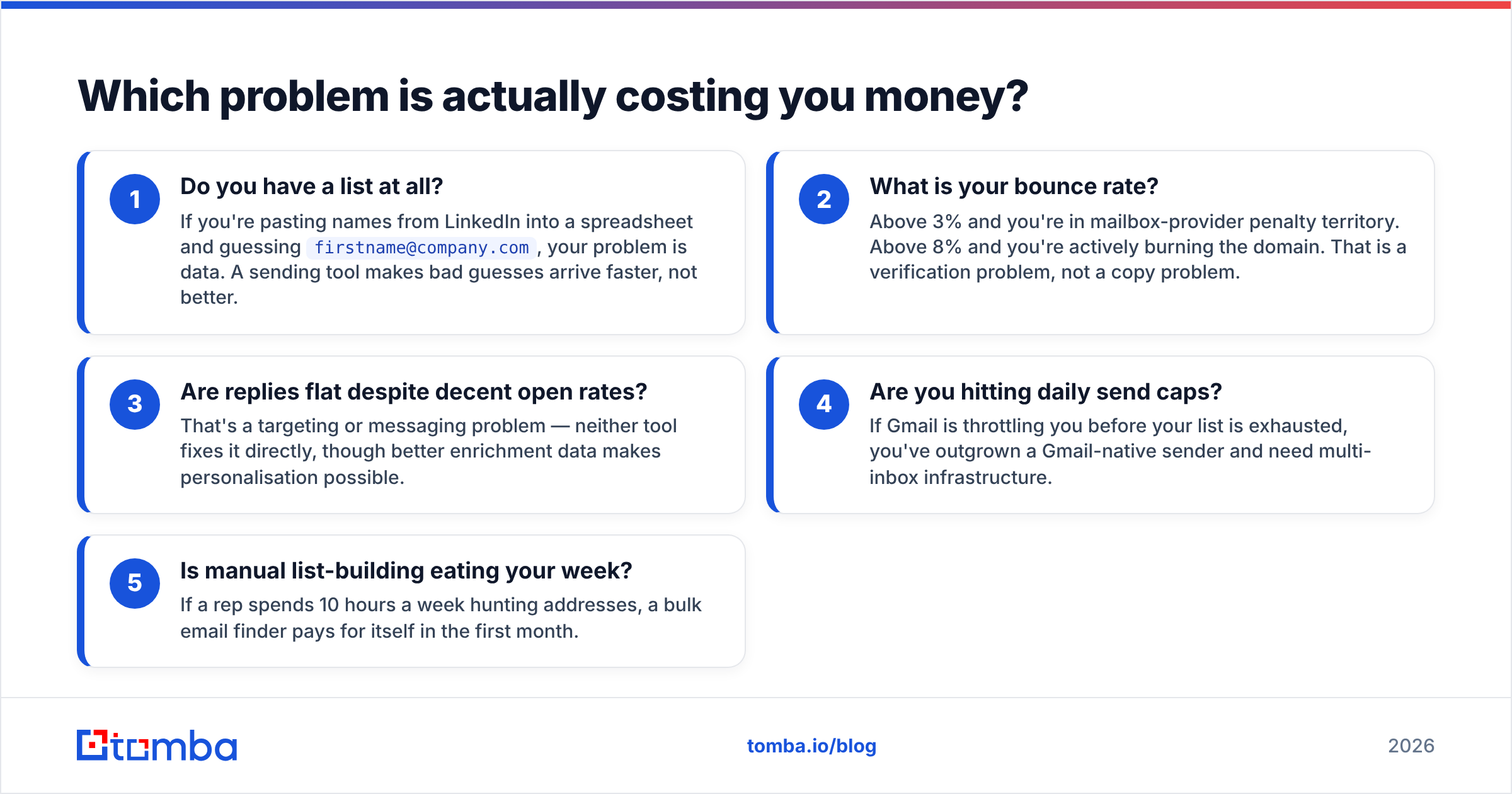
Before you compare price tags, diagnose the bottleneck. Run through these five checks honestly:
- Do you have a list at all? If you're pasting names from LinkedIn into a spreadsheet and guessing
firstname@company.com, your problem is data. A sending tool makes bad guesses arrive faster, not better. - What is your bounce rate? Above 3% and you're in mailbox-provider penalty territory. Above 8% and you're actively burning the domain. That is a verification problem, not a copy problem.
- Are replies flat despite decent open rates? That's a targeting or messaging problem — neither tool fixes it directly, though better enrichment data makes personalisation possible.
- Are you hitting daily send caps? If Gmail is throttling you before your list is exhausted, you've outgrown a Gmail-native sender and need multi-inbox infrastructure.
- Is manual list-building eating your week? If a rep spends 10 hours a week hunting addresses, a bulk email finder pays for itself in the first month.
Checks 1, 2, and 5 point to Tomba. Checks 3 and 4 point somewhere else entirely — and check 4 in particular is a reason to look past GMass to a dedicated multi-inbox sender.
How does GMass pricing compare to Tomba pricing?#
GMass prices per user, per Gmail account, and the tiers are built around features rather than volume. As listed on its pricing page at the time of writing, Standard sits around $25/mo, Premium around $35/mo, and Professional around $65/mo, with annual billing knocking the effective monthly rate down. Verification is bundled into the higher tiers; on lower tiers it's a separate purchase.
Tomba's pricing is credit-based: a free tier with 25 searches per month, Starter at $49/mo, Growth at $99/mo, Pro at $249/mo, and custom Enterprise pricing. Credits cover finding and verification across the whole toolset, so the same subscription funds domain search, catch-all checks, and enrichment.
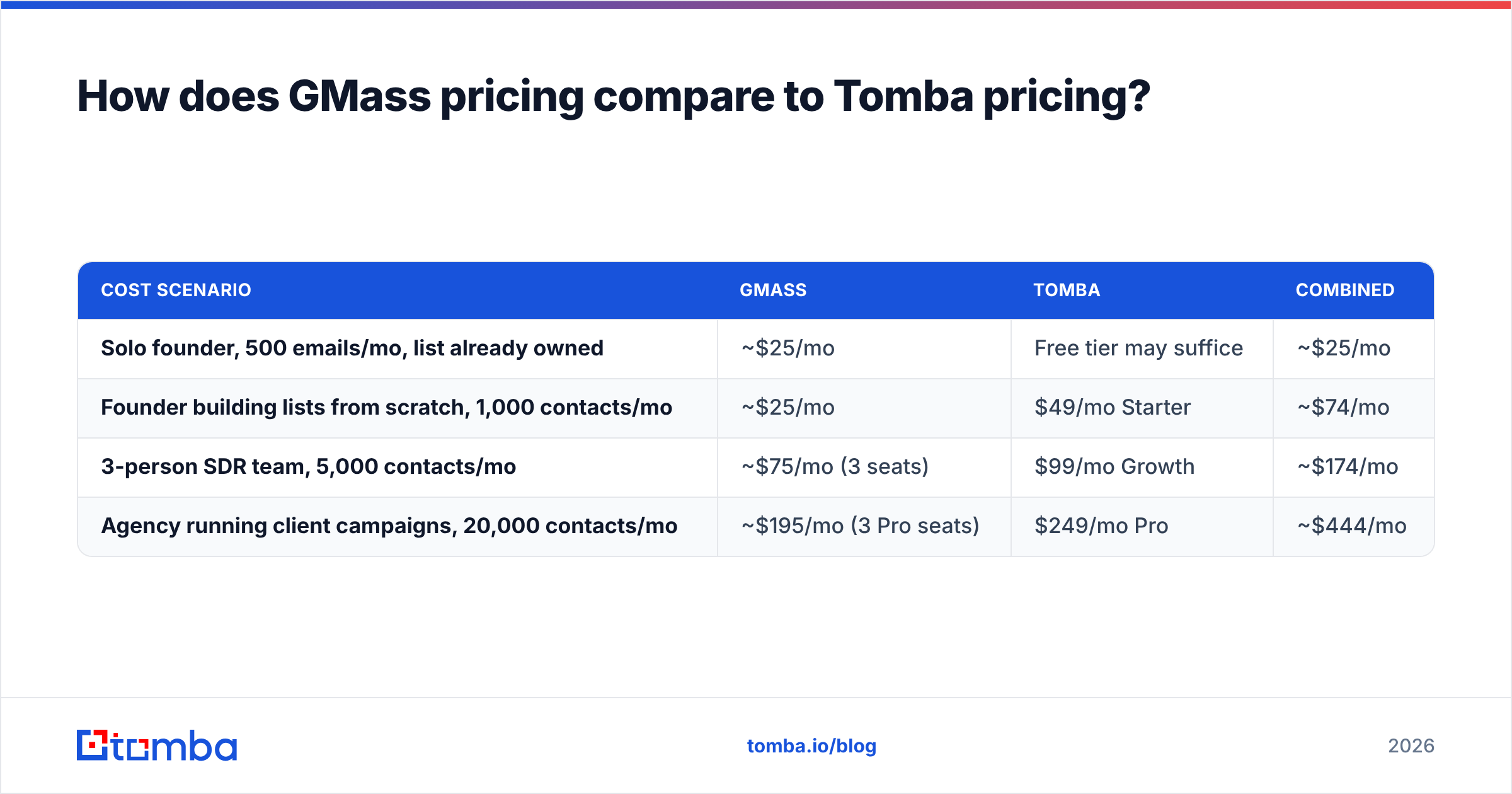
| Cost scenario | GMass | Tomba | Combined |
|---|---|---|---|
| Solo founder, 500 emails/mo, list already owned | ~$25/mo | Free tier may suffice | ~$25/mo |
| Founder building lists from scratch, 1,000 contacts/mo | ~$25/mo | $49/mo Starter | ~$74/mo |
| 3-person SDR team, 5,000 contacts/mo | ~$75/mo (3 seats) | $99/mo Growth | ~$174/mo |
| Agency running client campaigns, 20,000 contacts/mo | ~$195/mo (3 Pro seats) | $249/mo Pro | ~$444/mo |
The pattern: the sending layer scales with headcount, the data layer scales with volume. Agencies feel this hardest — every new client inbox is another GMass seat, while contact volume rides one Tomba plan.
Check both vendors' current pages before you budget; SaaS pricing moves, and GMass in particular has adjusted tiers more than once.
Does verification actually change your results?#
Yes, and it's the least glamorous, highest-ROI step in outbound.
Bounces are not just wasted sends. Mailbox providers read a high hard-bounce rate as a signal that you're mailing a scraped or stale list, and they respond by pushing your mail to spam — including mail to valid addresses. One bad campaign can degrade sender reputation for weeks. Industry guidance from vendors like HubSpot puts the safe zone at roughly 2% or below.
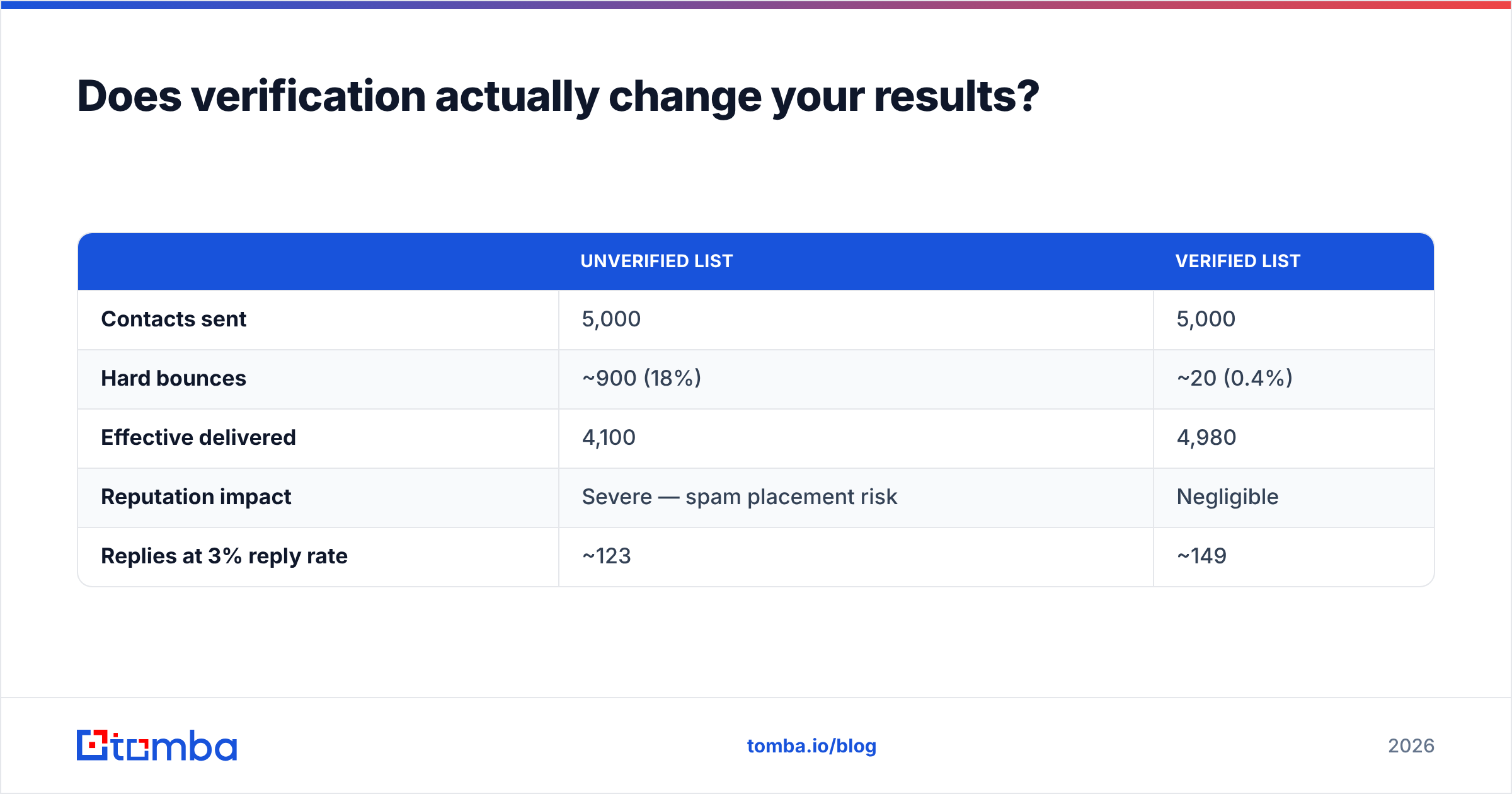
Here's the arithmetic on a 5,000-contact campaign:
| Unverified list | Verified list | |
|---|---|---|
| Contacts sent | 5,000 | 5,000 |
| Hard bounces | ~900 (18%) | ~20 (0.4%) |
| Effective delivered | 4,100 | 4,980 |
| Reputation impact | Severe — spam placement risk | Negligible |
| Replies at 3% reply rate | ~123 | ~149 |
Same list, same copy, same sender. The verified run produces roughly 20% more conversations and doesn't put the domain at risk. GMass does bundle verification on its higher tiers, which is a genuine strength — but if you're on a lower tier, or you want catch-all domains handled properly, a dedicated catch-all verifier does more precise work than a bundled add-on.
When should you pick GMass?#
GMass is the right call in a specific and common set of circumstances:
- You live in Gmail and refuse to leave it. No new UI, no CSV export dance. That's the whole pitch and it's a real one.
- You already have a clean list. Inbound signups, event attendees, an existing CRM export — GMass turns that into a sequenced campaign in minutes.
- Your volume is modest. Under a couple thousand recipients per day, Gmail's limits are irrelevant to you.
- You want mail-merge plus tracking without enterprise pricing. Compared to Outreach or Salesloft, GMass is dramatically cheaper for basically the same core send-and-follow-up loop.
- You need Gmail-search list building. Pulling every address you've ever emailed in a particular thread or label is a genuinely unusual feature, and useful for reactivation campaigns.
Its reviews on G2 consistently praise ease of setup and Gmail-native deliverability. That's earned.
When should you pick Tomba?#
Tomba is the right call when the list — not the send — is the constraint:
- You're starting from a company list, not a contact list. You have 400 target domains and zero named contacts. Domain search turns domains into people.
- You want data inside your existing workflow. The API, CLI, and MCP server mean you can enrich records inside a script, a CRM sync, or an AI agent rather than in a UI.
- Your bounce rate is embarrassing. Verification and catch-all handling are core, not an upsell.
- You need more than email. Phone numbers, LinkedIn profiles, and firmographic enrichment come from the same credit pool.
- You run multiple sending tools. Tomba is sender-agnostic — the same data feeds GMass, Instantly, Smartlead, or a Salesforce sequence.
Can you use GMass and Tomba together?#
That's the configuration that actually works, and it takes about ten minutes to set up.
- Build a target account list. Firmographic filters, a conference attendee list, a scraped directory — whatever fits your ICP.
- Turn domains into contacts with Tomba. Bulk domain search returns named contacts with titles and confidence scores. Export to CSV.
- Verify before you touch the sender. Drop anything marked invalid, and decide your risk tolerance on catch-all and risky results separately.
- Import to Google Sheets. GMass reads Sheets natively, so the CSV never needs to touch your desktop.
- Compose and merge in Gmail. Use Tomba's enrichment fields — title, company, LinkedIn — as merge tags for personalisation that isn't just
{{firstName}}. - Let GMass handle the sequence. Auto-stop on reply, throttle under Gmail's limits, and track from the same inbox.
The handoff point is the CSV. Everything upstream is data quality; everything downstream is delivery.
What are the honest limitations of each?#
GMass limitations. It's tied to Gmail, so your deliverability is your Google account's deliverability — there's no inbox rotation, no shared IP pool, no way around the daily cap besides buying more Google accounts. It doesn't build prospect lists from scratch. And per-seat pricing gets expensive for agencies managing many client inboxes.
Tomba limitations. It doesn't send. It doesn't sequence. It doesn't track opens. If you were hoping one subscription would replace your whole outbound stack, it won't — and neither will GMass. Coverage also varies by region and company size; small local businesses with no web presence are hard for any finder, Tomba included. You can see where Tomba's data comes from before committing.
Neither of these is a flaw so much as a scope boundary. Tools that try to do both usually do one badly.
Which one should you buy first?#
Buy the one that unblocks your next campaign.
If you have a list sitting in a spreadsheet right now and no way to send it at scale, start with GMass. Twenty-five dollars and a Chrome extension gets you sending this afternoon.
If you're staring at a list of target companies with no contact names — or watching an 18% bounce rate torch your domain — start with Tomba. There's no point buying delivery infrastructure for data you don't have.
Most teams that run outbound seriously for more than a quarter end up with both, plus a warmup tool. That's not vendor sprawl; it's three genuinely different jobs.
Start with the free tier: 25 searches a month, no credit card, enough to test whether Tomba can actually find your ICP before you spend anything. Run Tomba Email Finder against twenty of your target accounts, verify the results, and compare the hit rate against whatever you're guessing today. If the data holds up, plug it into GMass and send.
Related guides#
Ready to find emails that actually work?
Join 150,000+ professionals who stopped guessing and started sending. Free credits on signup — no credit card required.
Get the Tomba newsletter
Practical outbound tactics and product updates — once every two weeks.
About the author