Go4database vs Leadsforge: Which B2B Data Tool Wins in 2026?
Go4database sells pre-built B2B lists; Leadsforge builds them with AI prompts. We compare pricing models, data freshness, deliverability risk, and which one actually survives contact with a modern inbox.
Go4database vs Leadsforge is a choice between two ways to get B2B contacts. One sells you a ready-made list. The other builds a list on demand. Here is how they compare on price, data quality, and inbox risk.
TL;DR
- Go4database sells pre-built B2B contact lists by industry, region, and job title. You pay once, download a file, and own it forever. You also own the decay baked into it.
- Leadsforge is an AI list builder. You describe your ICP in plain words, and it builds a list on demand. The workflow is fresher, but the sourcing is a black box you cannot audit.
- Neither tool solves the real problem. A downloaded contact is a snapshot, and B2B email data decays 22-30% per year. You still have to verify.
- On cost per usable contact, Go4database looks cheaper up front. It gets pricier once you strip out bounces. Leadsforge costs more per record but wastes fewer sends.
- Best move for most teams: use either one as a sourcing layer. Then re-verify every address before it touches your sending domain.
What are Go4database and Leadsforge?#
Both answer the same question: "where do I get 5,000 contacts by Friday?" The difference is like buying a phone book versus hiring a researcher.
Go4database is a list vendor in the classic sense. It keeps large pre-built databases, sorted by industry, tech stack, job function, revenue band, and country. It sells them as files you download. You browse a catalog ("Healthcare CFOs, USA, 42,000 records"), you pay, and you get a CSV or XLSX. The selling point is volume and speed. You can see the catalog structure on the Go4database site.
Leadsforge takes the AI-native route that has spread since 2024. You skip the fixed catalog. Instead you describe your ideal customer in plain language — "Series B fintech companies in the UK with a Head of Compliance." The system then builds a matching list from its sources at request time. The pitch is that lists are built for your ICP, not picked off a shelf.
That one design gap — shelf vs. on-demand — shapes everything else. It drives pricing, freshness, legal risk, and how much cleanup lands on your desk.

How do the two data models differ?#
Six differences matter more than the marketing copy on either homepage.
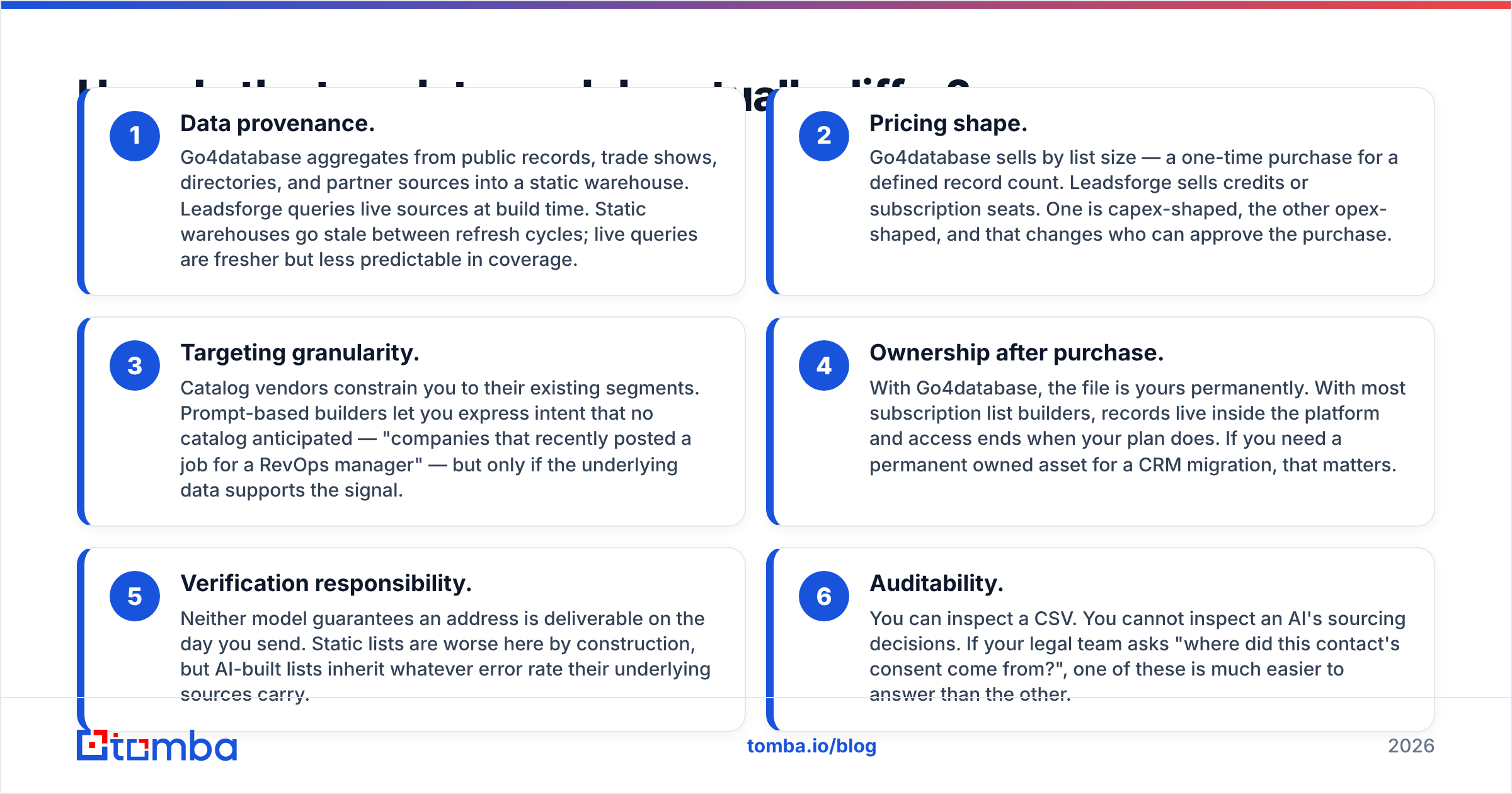
Data provenance. Go4database pulls from public records, trade shows, directories, and partners into a static warehouse. Leadsforge queries live sources at build time. Static warehouses go stale between refreshes. Live queries are fresher, but coverage is less predictable.
Pricing shape. Go4database sells by list size, as a one-time buy for a set record count. Leadsforge sells credits or seats. One is capex-shaped, the other opex-shaped. That changes who signs off on the spend.
Targeting granularity. Catalog vendors limit you to their existing segments. Prompt-based builders let you ask for things no catalog planned for, such as "companies that just posted a RevOps manager job." That works only if the data supports the signal.
Ownership after purchase. With Go4database, the file is yours for good. With most subscription builders, records stay in the platform and access ends with your plan. That matters if you need an owned asset for a CRM migration.
Verification responsibility. Neither model promises an address is deliverable on send day. Static lists are worse by design. AI-built lists still inherit the error rate of their sources.
Auditability. You can read a CSV. You cannot read an AI's sourcing choices. When legal asks where a contact's consent came from, one answer is much easier than the other.
Which one has better data accuracy?#
Neither vendor publishes audited accuracy numbers. That should be your first red flag about the whole list-buying category. Vendors self-report. In B2B data, self-reported accuracy is a marketing number, not a measured one.
What you can measure is bounce rate on your own send. That is the only number that pays the bills. Teams testing bought lists report a steady pattern:
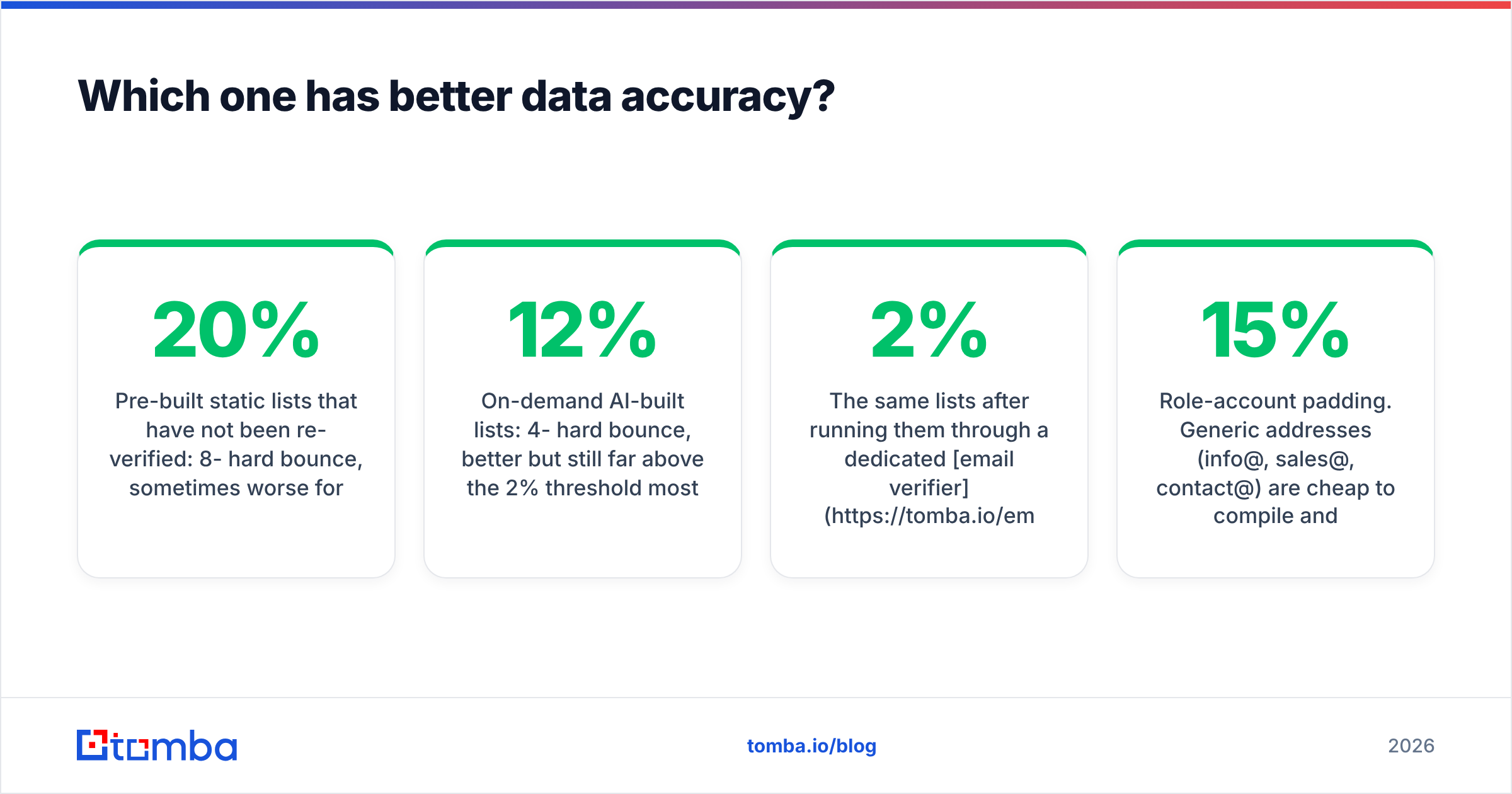
- Pre-built static lists, not re-verified: 8-20% hard bounce. Lists over a year old run worse.
- On-demand AI-built lists: 4-12% hard bounce. Better, but still well above the 2% line most ESPs treat as a warning.
- The same lists after a run through a dedicated email verifier: usually under 2%.
That last line is the whole argument. In the go4database vs leadsforge debate, the verification step is what separates a campaign from a domain-reputation incident.

Two accuracy traps show up in this comparison.
Catch-all inflation. About a fifth of B2B domains run as catch-all. The mail server accepts anything at that domain. Both vendors count those as "valid" because a basic SMTP check comes back positive. They are not validated. They are unverifiable without deeper analysis. A catch-all verifier is the only way to sort real mailboxes from accept-everything ones.
Role-account padding. Generic addresses (info@, sales@, contact@) are cheap to compile. They pad record counts without adding people you can reach. Scan any sample file for the ratio before you buy. If role accounts make up more than 10-15% of a list, you are paying for filler.
How does pricing compare?#
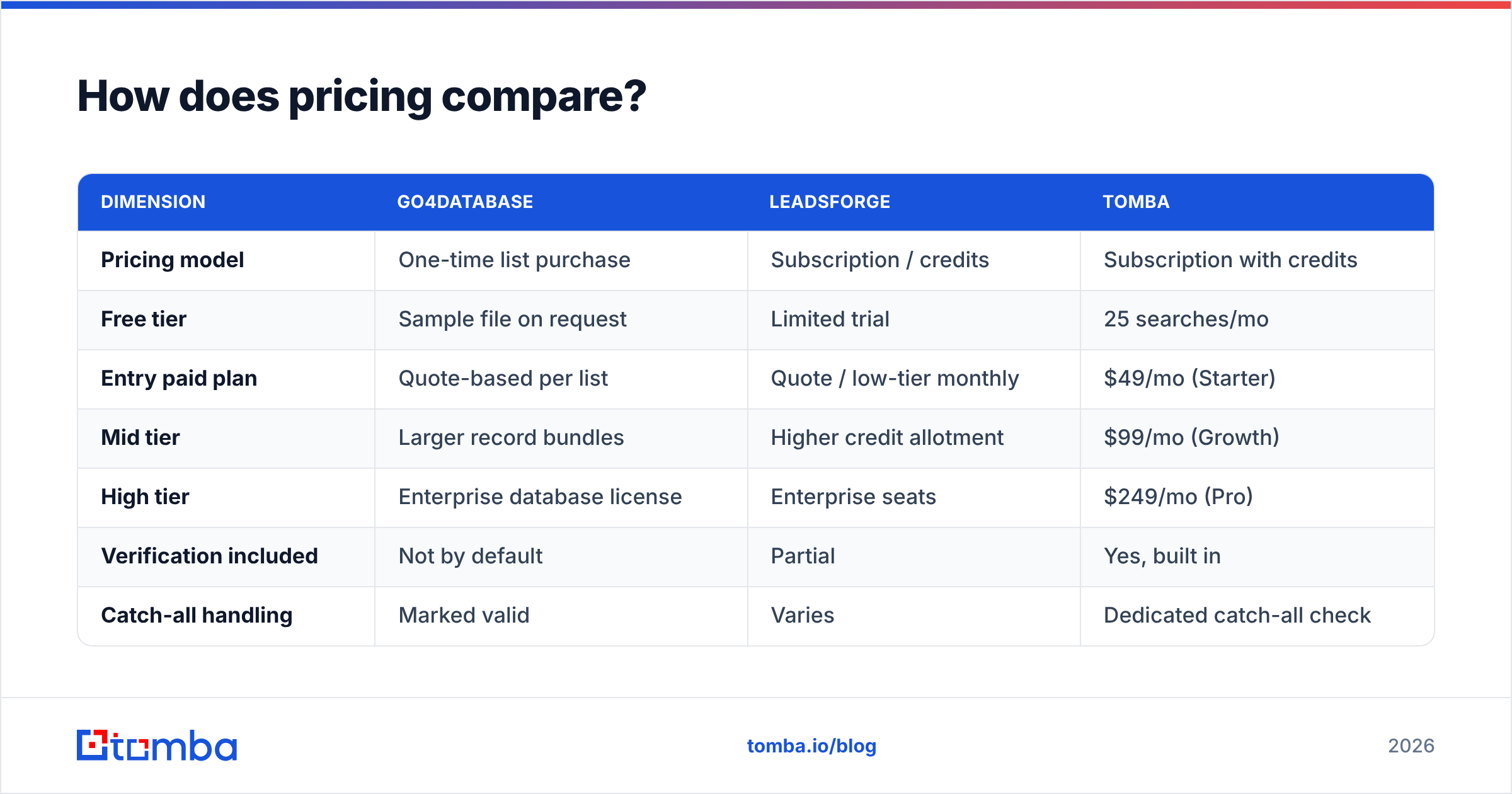
List prices move constantly, and both vendors quote on request for large volumes. Treat the table below as structural, not a live rate card. The column that matters is the last one: what you pay per contact that reaches a human.
| Dimension | Go4database | Leadsforge | Tomba |
|---|---|---|---|
| Pricing model | One-time list purchase | Subscription / credits | Subscription with credits |
| Free tier | Sample file on request | Limited trial | 25 searches/mo |
| Entry paid plan | Quote-based per list | Quote / low-tier monthly | $49/mo (Starter) |
| Mid tier | Larger record bundles | Higher credit allotment | $99/mo (Growth) |
| High tier | Enterprise database license | Enterprise seats | $249/mo (Pro) |
| Verification included | Not by default | Partial | Yes, built in |
| Catch-all handling | Marked valid | Varies | Dedicated catch-all check |
| Data ownership | Permanent file | Platform-bound | Export at any time |
| API access | Rarely | Yes | Yes, full REST API |
The trap in list buying is simple. The invoice and the true cost are different numbers. A 10,000-record list at $0.05 per record looks like $500. Say 15% hard bounce and another 20% are unverifiable catch-alls. You are left with about 6,500 usable contacts, so the real cost is closer to $0.077 each. Then add the deliverability damage from 1,500 bounces. That never shows up on an invoice, but it shows up in your inbox placement for months.
Run that math before you weigh go4database vs leadsforge against Tomba pricing or anyone else. Cost per usable contact is the only fair comparison.

Is either safe for cold email deliverability?#
Not without work. This is where most teams get hurt.
Google and Yahoo set bulk-sender rules in 2024. They cap spam complaints at 0.3% and expect authenticated, low-bounce sending. A bought list breaks the spirit of that in three ways at once. The recipients never opted in. The addresses are unverified. And send volume jumps from zero.
Here is what a bought list does to a cold-email domain that has not been prepared:
- Hard bounces above 5% flag list-buying to mailbox providers almost at once.
- Spam traps are dead addresses that providers switch back on to catch stale lists. They turn up more in old static data than in freshly built lists.
- Complaint rate climbs when targeting is loose. Loose targeting is exactly what a broad catalog segment produces.
If you use either vendor, the sequence is not optional: dedupe, verify, segment, warm the domain, then send in small batches. HubSpot's sales blog covers the cadence side well. The data-hygiene side is on you.

What about GDPR and compliance risk?#
This question should decide the purchase for any team selling into Europe.
Under GDPR, a bought list of EU personal data needs a lawful basis. "We bought it from a vendor" is not one. Legitimate interest can cover B2B outreach in some member states. But you have to document the assessment and show where the data came from. In the US, CAN-SPAM sets a much lower bar: accurate headers, a real physical address, and a working unsubscribe. That is why list buying stays common in US outbound and stays risky in EU outbound.
The practical takeaway for go4database vs leadsforge: ask both vendors, in writing, for their sourcing documentation and their process for deletion requests. A vendor that answers clearly is worth paying more for. A vendor that dodges is a liability you are buying at scale.
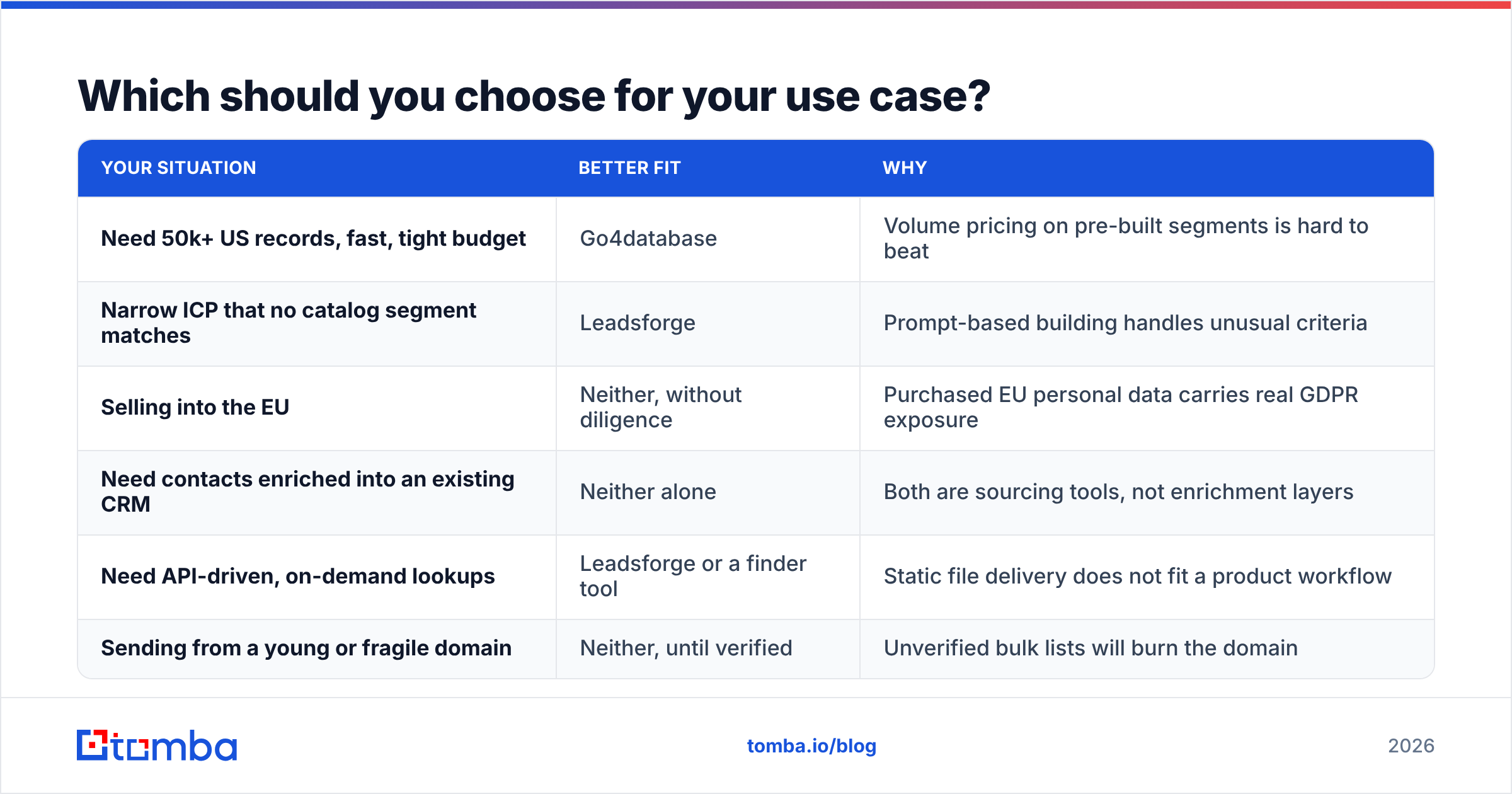
Which should you choose for your use case?#
| Your situation | Better fit | Why |
|---|---|---|
| Need 50k+ US records, fast, tight budget | Go4database | Volume pricing on pre-built segments is hard to beat |
| Narrow ICP that no catalog segment matches | Leadsforge | Prompt-based building handles unusual criteria |
| Selling into the EU | Neither, without diligence | Bought EU personal data carries real GDPR exposure |
| Need contacts enriched into an existing CRM | Neither alone | Both are sourcing tools, not enrichment layers |
| Need API-driven, on-demand lookups | Leadsforge or a finder tool | Static file delivery does not fit a product workflow |
| Sending from a young or fragile domain | Neither, until verified | Unverified bulk lists will burn the domain |
Notice how many rows end in "neither." That is not a dodge. List vendors solve sourcing and nothing else. Enrichment, verification, and CRM sync are separate jobs.
Are there better alternatives to buying a list at all?#
It depends on whether you need breadth or precision.
If you need breadth — a large pool for a broad play — pre-built list vendors are the efficient choice. Check neutral marketplaces like G2 for current user reviews before you commit. Vendors such as BookYourData sit on the same shelf-based, pay-per-record model as Go4database, so they make a fair second quote. The category as a whole competes on segment depth and refresh cadence.
If you need precision — the exact 200 people at the exact 60 target accounts — a find-and-verify workflow beats any bought file. You build only what you will actually contact:
- Start from accounts, not contacts. Pick target domains first. Then use domain search to pull the people who work there today.
- Verify before enrichment. Verify first, and you only pay to enrich real people.
- Enrich what survives. Data enrichment adds titles, company data, and social profiles to the addresses that passed.
- Batch what scales. For thousands of records, a bulk email finder does the same job as a bought list. Every record is built against live data instead of a warehouse snapshot.
The cost profile differs in a useful way. A list purchase is a bet placed before you know the quality. A find-and-verify workflow spends in step with what you use.
Go4database vs Leadsforge: which one wins?#
Go4database wins on cost per record and permanence. Do you need a large US-focused file that you own outright? Does your team have the discipline to clean it before sending? Then it is the cheaper of the two.
Leadsforge wins on targeting and freshness. If your ICP is narrow enough that no catalog segment fits, prompt-based building saves you from buying 40,000 records to reach 800 good ones.
Both lose to a verified, on-demand workflow when deliverability is the constraint. For cold outbound in 2026, it almost always is. The teams getting replies are not the ones with the biggest lists. They are the ones whose bounce rate stays under 2% while rivals torch a domain every quarter.
So the honest answer to go4database vs leadsforge is this: pick either one as a sourcing layer, then verify. Never let unverified data touch your sending infrastructure.
Build the list instead of buying it. Tomba Email Finder finds work email addresses by domain, name, or company. Every result comes back with a confidence score and verification status, so you know what you are sending to before you send. Start free with 25 searches a month, or move to Starter at $49/mo when you scale. No stale CSV. No permanent bounce liability.
Related guides#
Ready to find emails that actually work?
Join 150,000+ professionals who stopped guessing and started sending. Free credits on signup — no credit card required.
Get the Tomba newsletter
Practical outbound tactics and product updates — once every two weeks.
About the author