Go4database vs Leadsrush: Which B2B List Vendor Wins in 2026?
Both sell prebuilt B2B contact lists with quote-based pricing and few public accuracy numbers. Here is how Go4database and Leadsrush actually differ — and when neither is the right buy.
TL;DR
- Go4database vs Leadsrush is a choice between two static list vendors. You pay for a file of contacts, not for live lookups. That one fact drives every difference below.
- Neither one publishes per-record pricing. Neither one publishes an audited accuracy rate. Both quote per project, so your negotiation skill sets your cost more than any rate card does.
- Go4database is the more visible of the two. It sells broad lists sliced by industry and job title. Leadsrush shows up mostly in appended and managed-list work, and its public review footprint is thinner.
- The real risk with either one is decay, not price. B2B contact data goes stale at about 2–2.5% per month. A 12-month-old file is weak no matter who sold it.
- Sending the list into a cold email sequence? Budget for verification on top of the purchase price. Or skip the file and pull contacts on demand.
What are Go4database and Leadsrush?#
Both firms sell the same core product: prebuilt B2B contact lists. You can slice them by industry, job title, geography, company size, or tech stack. You tell a sales rep what segment you want. They quote a price for N records. You get a CSV or a CRM import.
Go4database sells itself as a broad-coverage list provider. Healthcare lists, technology user lists, C-level lists, region-specific files. It has been around long enough to build a public footprint: a marketing site, indexed list pages for dozens of verticals, and cold outreach that most B2B marketers have seen at least once.
Leadsrush works in the same category with a smaller public surface. It shows up more often in custom list builds and data appending than in the "browse our 400 pre-packaged lists" model. Its published material is thinner, so claims are harder to check on your own. That is itself a data point when you are signing a purchase order.
Neither one is an email finder, an enrichment API, or a live database you query. That gap matters more than any feature checkbox. Hold onto it.
Go4database vs Leadsrush: how do they compare head-to-head?#
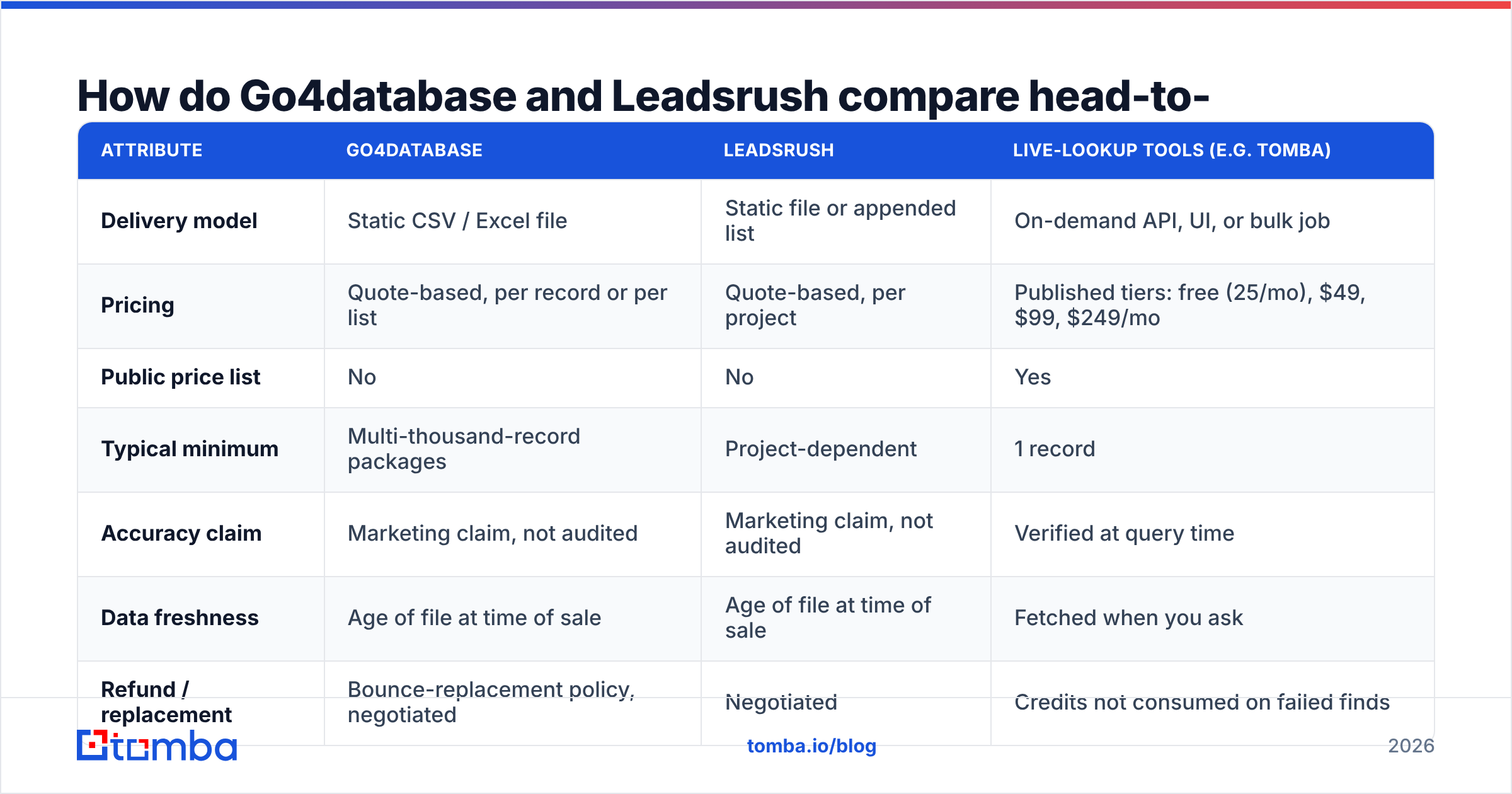
Here is the honest side-by-side. Where a vendor does not publish a number, the table says so. An unpublished figure is information. It is not a gap to fill with a guess.
| Attribute | Go4database | Leadsrush | Live-lookup tools (e.g. Tomba) |
|---|---|---|---|
| Delivery model | Static CSV / Excel file | Static file or appended list | On-demand API, UI, or bulk job |
| Pricing | Quote-based, per record or per list | Quote-based, per project | Published tiers: free (25/mo), $49, $99, $249/mo |
| Public price list | No | No | Yes |
| Typical minimum | Multi-thousand-record packages | Project-dependent | 1 record |
| Accuracy claim | Marketing claim, not audited | Marketing claim, not audited | Verified at query time |
| Data freshness | Age of file at time of sale | Age of file at time of sale | Fetched when you ask |
| Refund / replacement | Bounce-replacement policy, negotiated | Negotiated | Credits not consumed on failed finds |
| Best fit | Broad industry-wide campaigns | Custom segment builds, appending | Targeted, account-based outreach |
The pattern is clear. The two list vendors resemble each other far more than either one resembles a live-lookup tool. Picking one is a procurement decision: who quotes better, who honors replacements, whose segment fits your ICP. Picking between "buy a list" and "query a database" is a strategy decision. That second choice is the one that moves your reply rate.
Which one has more accurate data?#
Neither vendor publishes an audited accuracy rate. Comparing headline percentages would just compare two marketing claims. What you can compare is the way each one's data goes wrong.
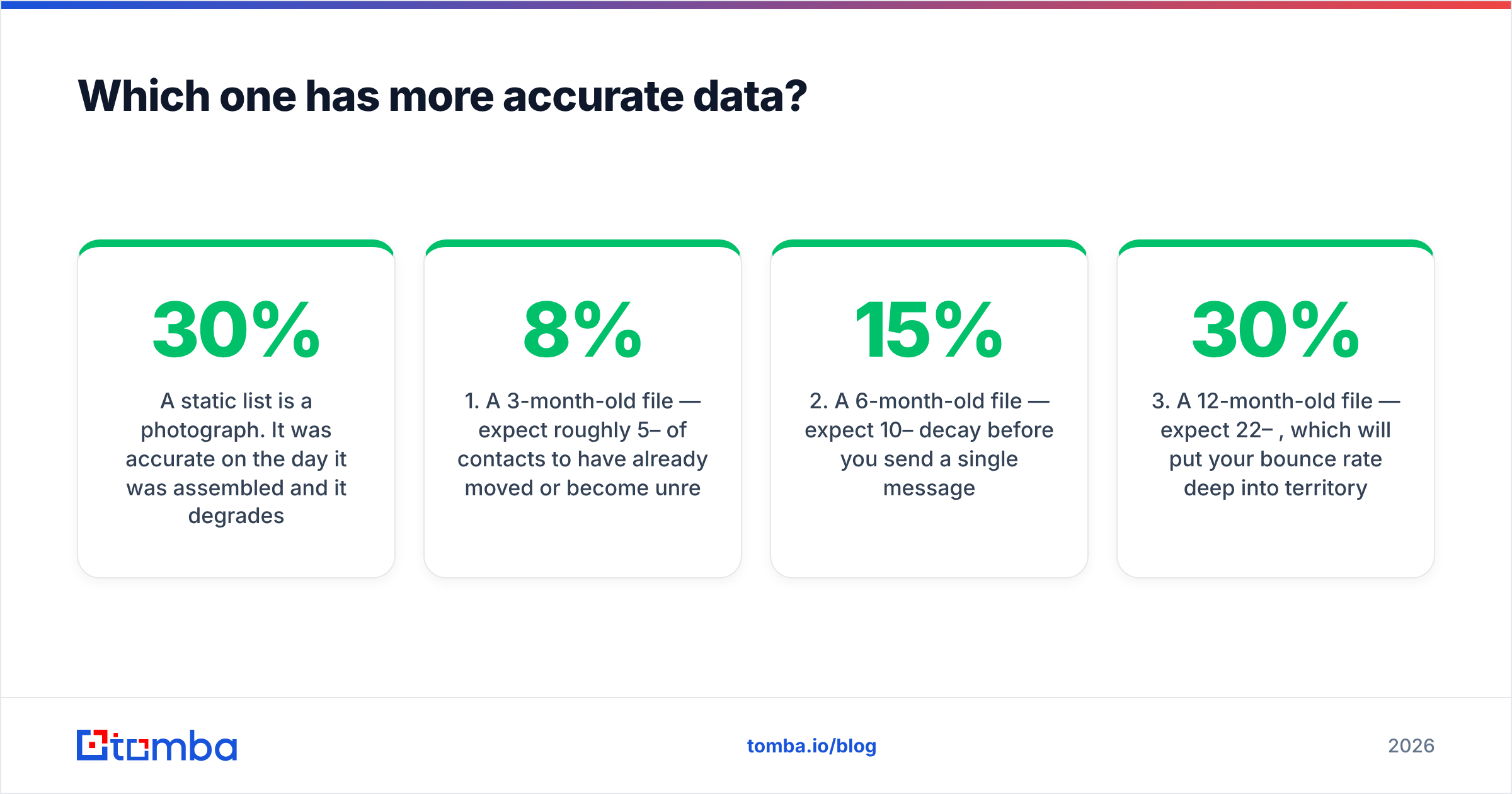
A static list is a photograph. It was right on the day someone built it. It decays from that moment on. Industry estimates put B2B contact decay at 22–30% per year. Job changes, company rebrands, mail-server migrations, and role cuts all feed it. That gives you a rough model:
- A 3-month-old file — expect 5–8% of contacts to have moved or gone dark.
- A 6-month-old file — expect 10–15% decay before you send one message.
- A 12-month-old file — expect 22–30%. That bounce rate damages your sender reputation.
- A file of unknown age — treat it as 12 months old. Vendors rarely offer the assembly date.
- A catch-all-heavy segment — accuracy claims mean almost nothing here. The receiving server accepts everything and tells you nothing.

The practical move is the same with either vendor. Ask for the assembly or last-refresh date in writing. Then run the file through an email verifier before it touches your sending domain. Verification costs a fraction of a cent per record. It routinely removes 10–25% of a purchased list. If that number offends you, you have learned something about what you bought.
Some segments are full of catch-all domains. A standard verifier returns "unknown" on a large share of those rows. That is where a catch-all verifier earns its keep. It sorts the deliverable catch-all addresses from the ones that vanish in silence.
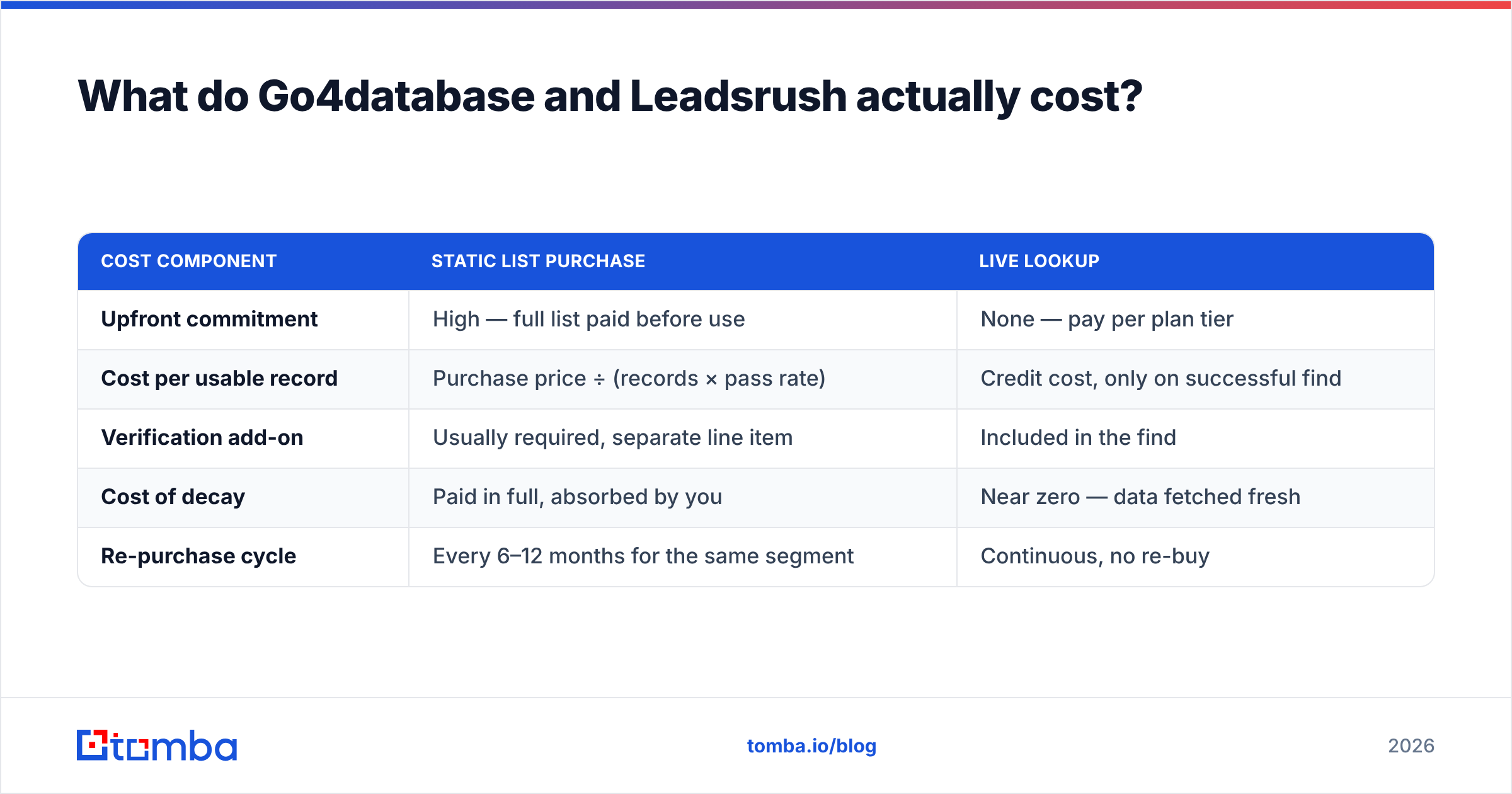
What do Go4database and Leadsrush actually cost?#
Both are quote-based, so there is no rate card to compare. What you can compare is the shape of the spend.
| Cost component | Static list purchase | Live lookup |
|---|---|---|
| Upfront commitment | High — full list paid before use | None — pay per plan tier |
| Cost per usable record | Purchase price ÷ (records × pass rate) | Credit cost, only on successful find |
| Verification add-on | Usually required, separate line item | Included in the find |
| Cost of decay | Paid in full, absorbed by you | Near zero — data fetched fresh |
| Re-purchase cycle | Every 6–12 months for the same segment | Continuous, no re-buy |
Run the math that matters. You buy 10,000 records, and 20% bounce or go nowhere. You paid for 10,000 and got 8,000. Your true cost per usable contact is 25% above the quoted price. Bounce-replacement policies soften that. But replacements come out of the same aging pool. They are not fresher data.
Published pricing is easy to model by comparison. Tomba's pricing starts free at 25 searches per month. Then $49/mo for Starter, $99/mo for Growth, and $249/mo for Pro, with Enterprise quoted. You can work out your cost per contact before you sign anything. That helps when finance asks you to defend the line item.

Is buying a B2B list still legal in 2026?#
Legal in some places, risky in others, and less and less relevant to whether it works.
In the US, the CAN-SPAM Act does not require prior consent for commercial email. It requires accurate headers, a valid physical address, honest subject lines, and a working opt-out you honor within 10 business days. A purchased B2B list can meet that bar.
The EU and UK set a higher bar with GDPR and PECR. Legitimate interest can support B2B outreach. But you need a documented basis, a clear source for each record, and a way to honor deletion requests. A vendor that cannot say where one record came from makes that paperwork impossible. Ask both Go4database and Leadsrush for provenance in writing before you buy any EU-heavy segment. Tomba answers that same question in public about its own data sources. Hold any vendor to the same standard.
The commercial reality is stricter than the legal one. Google and Yahoo's bulk-sender rules set a hard ceiling on spam complaints. A stale purchased list drives complaints and hard bounces faster than almost any other input. No compliance memo protects your sender reputation from that.
Where does the static-list model break down?#
Three places, over and over:
- Cold list, cold message. A CSV gives you a name, a title, and a company. It does not give you a trigger — a funding round, a new hire, a tech-stack change. Generic sequences to generic lists produced today's dismal B2B reply rates.
- Everyone else bought it too. Prepackaged vertical lists get sold again and again. If you bought the "US SaaS VP Marketing" file, so did a dozen rivals. Those prospects got a dozen near-identical emails this quarter.
- You cannot iterate. Say you learn mid-campaign that your real buyer is the Director of RevOps, not the VP. With a static file you buy again. With a live tool you re-query and go.

This is not an argument that list vendors are worthless. Bought lists work fine for broad awareness plays, event invitations, and market-sizing work. A 2% response rate on huge volume can be acceptable. Some vendors run the model with real accountability — BookYourData is a fair reference point, since it publishes per-record pricing and a bounce guarantee in the open. The problem is not lists. The problem is opaque lists sold with no freshness date.
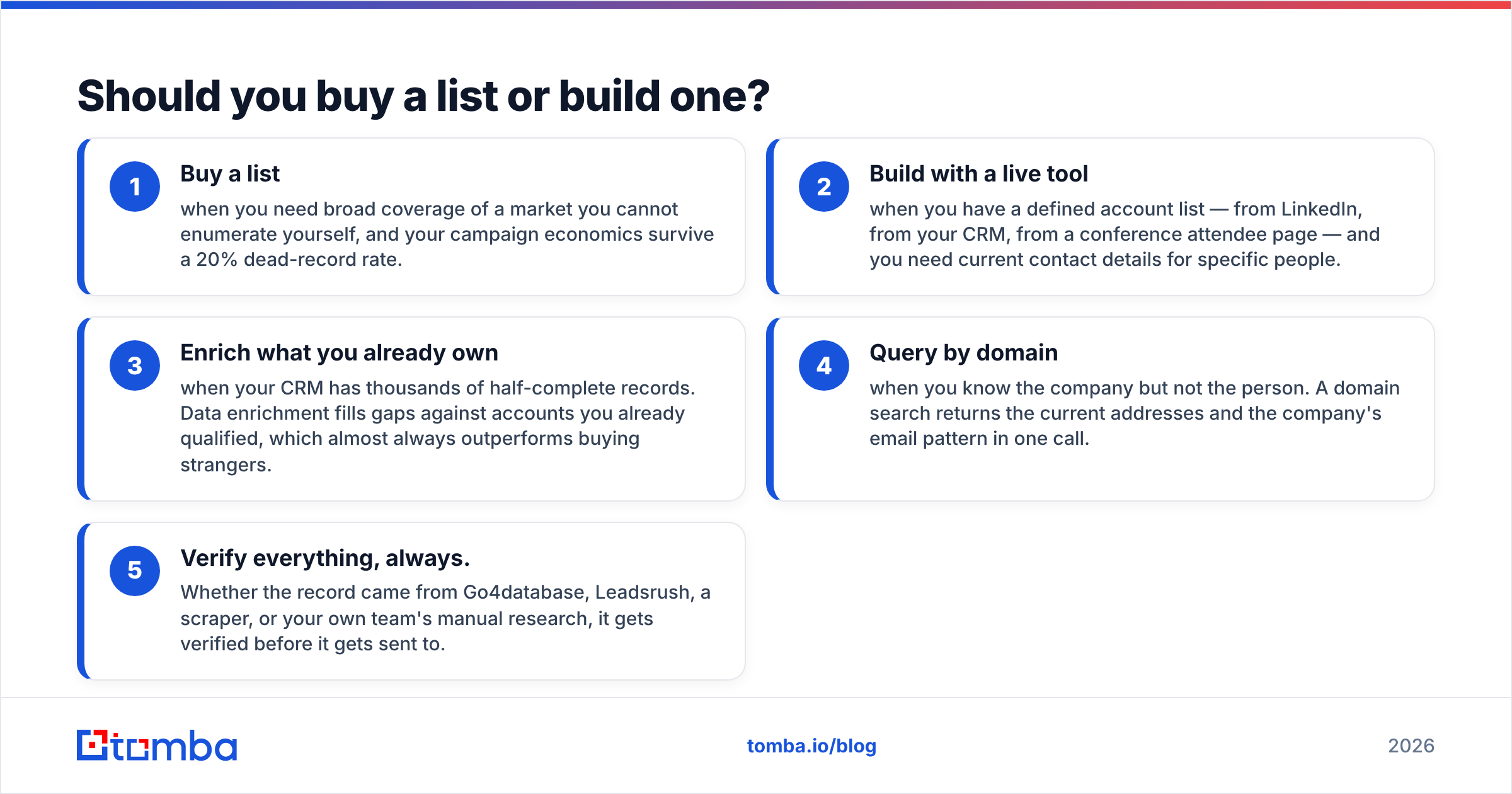
Should you buy a list or build one?#
Use this decision frame instead of a vendor preference:
- Buy a list when you need broad coverage of a market you cannot map yourself, and your campaign math survives a 20% dead-record rate.
- Build with a live tool when you have a defined account list — from LinkedIn, from your CRM, from a conference page — and you need current details for named people.
- Enrich what you already own when your CRM holds thousands of half-complete records. Data enrichment fills gaps on accounts you already qualified. That almost always beats buying strangers.
- Query by domain when you know the company but not the person. A domain search returns the current addresses and the company's email pattern in one call.
- Verify everything, always. Go4database, Leadsrush, a scraper, or your own team's research — every record gets verified before anyone sends to it.
Most teams that quit list buying do not quit on price. They quit because the buy-and-blast loop stops booking meetings, and nobody wants to open the CSV any more.
Go4database vs Leadsrush: which should you choose?#
Go4database if you want the more established vendor with a wider public catalog and more vertical-specific segments. Its visibility means you can find third-party discussion on review platforms like G2 and Capterra before you commit. That has nothing to do with data quality. It has everything to do with cutting your downside.
Leadsrush if you need a custom-built segment or an append against records you already hold. Get a sample file and written provenance before payment. Its narrow public footprint is a reason to insist on a paid sample of 100–200 records. Verify it yourself. Then negotiate the full buy on the measured pass rate.
Neither if your motion is targeted outbound to named accounts. There you pay for volume you will never use, and you inherit decay you did not create.
Whichever way you go, hold the same three conditions. A written last-refresh date. A paid sample you verify before the full buy. A bounce-replacement clause with a defined pass-rate threshold. A vendor who agrees to all three is worth talking to. One who refuses has told you what you needed to know.
Where does Tomba fit?#
Not as a replacement for every list purchase. As the layer that makes purchased data survivable — and, more often, unnecessary. Point the Tomba Email Finder at the accounts you actually want. You get current verified addresses at query time, not whatever a file captured months ago. Start on the free tier's 25 searches and test the pass rate against your own ICP first. If it beats the sample file your list vendor sent, you have your answer. And you did not need a quote call to get it.
Related guides#
Ready to find emails that actually work?
Join 150,000+ professionals who stopped guessing and started sending. Free credits on signup — no credit card required.
Get the Tomba newsletter
Practical outbound tactics and product updates — once every two weeks.
About the author