Go4database vs Lusha: Which B2B Data Provider Wins in 2026?
One sells you a pre-built email list. The other sells you live lookups by the seat. We compare Go4database and Lusha on accuracy, pricing, compliance and refund terms — and name the buyer each one actually fits.
TL;DR
- Go4database sells you a file. Lusha sells you a faucet. Go4database is a list vendor — you buy a pre-built B2B contact database by industry, job title or geography, usually as a one-time CSV. Lusha is a live contact-data platform with a Chrome extension, CRM integrations and per-seat credits.
- If you need data you can audit before you send, Lusha wins. Per-record lookups mean you see and verify each contact as you pull it, instead of inheriting 50,000 rows of unknown age.
- If you need volume at the lowest possible cost per record, a list vendor looks cheaper — until you price in bounces. A $0.02/record list with 30% decay is more expensive than a $0.20/record verified lookup.
- Neither is a verification layer. Whichever you buy, run the addresses through an independent email verifier before the first send. Nobody's internal "verified" badge is a substitute.
- The third option most teams skip: build the list yourself from your ICP using domain search plus an email finder, starting at $0 and scaling to $49/mo. You control freshness because you generate the record on the day you send.
What are Go4database and Lusha, exactly?#
They sit in different categories, which is why most head-to-head posts about them are useless. Here's the honest framing.
- Go4database is a list broker. Its model (go4database.com) is selling pre-compiled B2B contact databases: healthcare lists, technology-user lists, C-level lists, country-specific lists. You describe a segment, you get a quote, you receive a file. Delivery is typically a spreadsheet, and the transaction is usually one-time rather than subscription.
- Lusha is a prospecting data platform. Lusha works on credits attached to seats. You install the browser extension, land on a LinkedIn profile or a company site, and reveal the email and phone number on demand. It syncs to Salesforce, HubSpot and Outreach, and has a free tier plus paid seat tiers.
- Their data pipelines differ fundamentally. List vendors compile from directories, registrations, partnerships and public filings, then refresh on a schedule. Lusha runs a contributory network plus public-web collection, refreshing continuously as users query records.
- Their failure modes differ too. A list decays quietly — you don't learn it's stale until your bounce rate spikes on send day. A live lookup fails loudly — you burn a credit and get "no email found," which is annoying but cheap and immediately visible.
- Compliance posture differs. Lusha publishes GDPR and CCPA processes and holds ISO 27701 privacy certification. List brokers vary widely; some segments are consent-documented, others are scraped compilations with vague provenance. Always ask for the source-of-consent documentation in writing before you buy any list.
How do Go4database and Lusha compare head-to-head?#
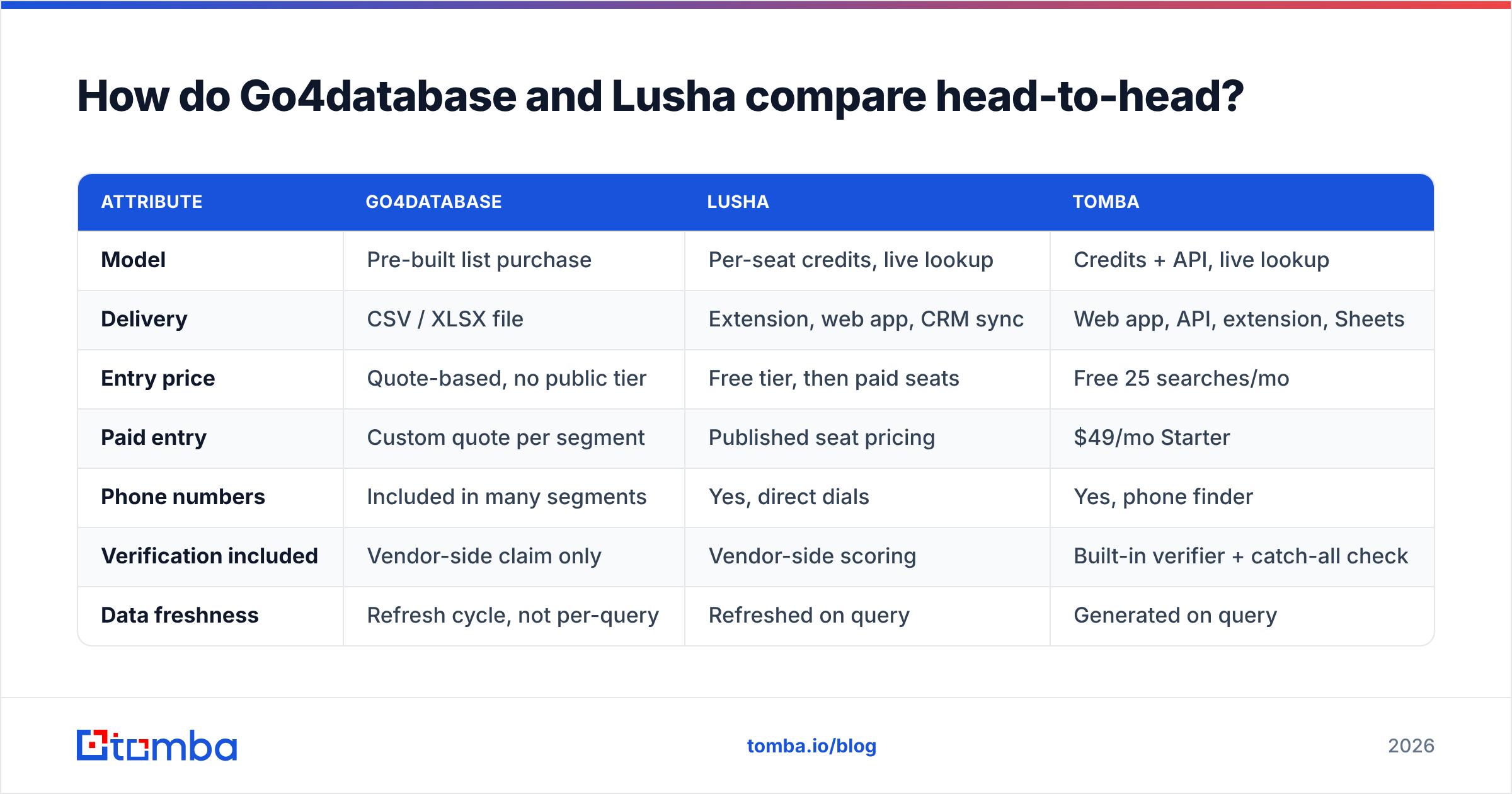
Below is the practical comparison. Where a vendor doesn't publish a number, we say so rather than inventing one — check both pricing pages before you sign anything.
| Attribute | Go4database | Lusha | Tomba |
|---|---|---|---|
| Model | Pre-built list purchase | Per-seat credits, live lookup | Credits + API, live lookup |
| Delivery | CSV / XLSX file | Extension, web app, CRM sync | Web app, API, extension, Sheets |
| Entry price | Quote-based, no public tier | Free tier, then paid seats | Free 25 searches/mo |
| Paid entry | Custom quote per segment | Published seat pricing | $49/mo Starter |
| Phone numbers | Included in many segments | Yes, direct dials | Yes, phone finder |
| Verification included | Vendor-side claim only | Vendor-side scoring | Built-in verifier + catch-all check |
| Data freshness | Refresh cycle, not per-query | Refreshed on query | Generated on query |
| API access | Rarely | Yes on higher tiers | Yes on all paid tiers |
| Best for | Bulk TAM lists, offline campaigns | Rep-by-rep prospecting | Domain-first list building at scale |

The pattern in that table matters more than any single cell. Go4database optimizes for breadth at a fixed price. Lusha optimizes for depth per contact, priced by the seat. If your motion is "one rep working 40 accounts a week," seat-based pricing is efficient. If your motion is "build a 20,000-row list for a quarterly campaign," seat pricing gets expensive fast and a list starts to look attractive — right up until deliverability enters the conversation.
Which one gives you more accurate data?#
Live lookup wins on accuracy, and it isn't close — but the reason is structural, not because one vendor is better at data science.
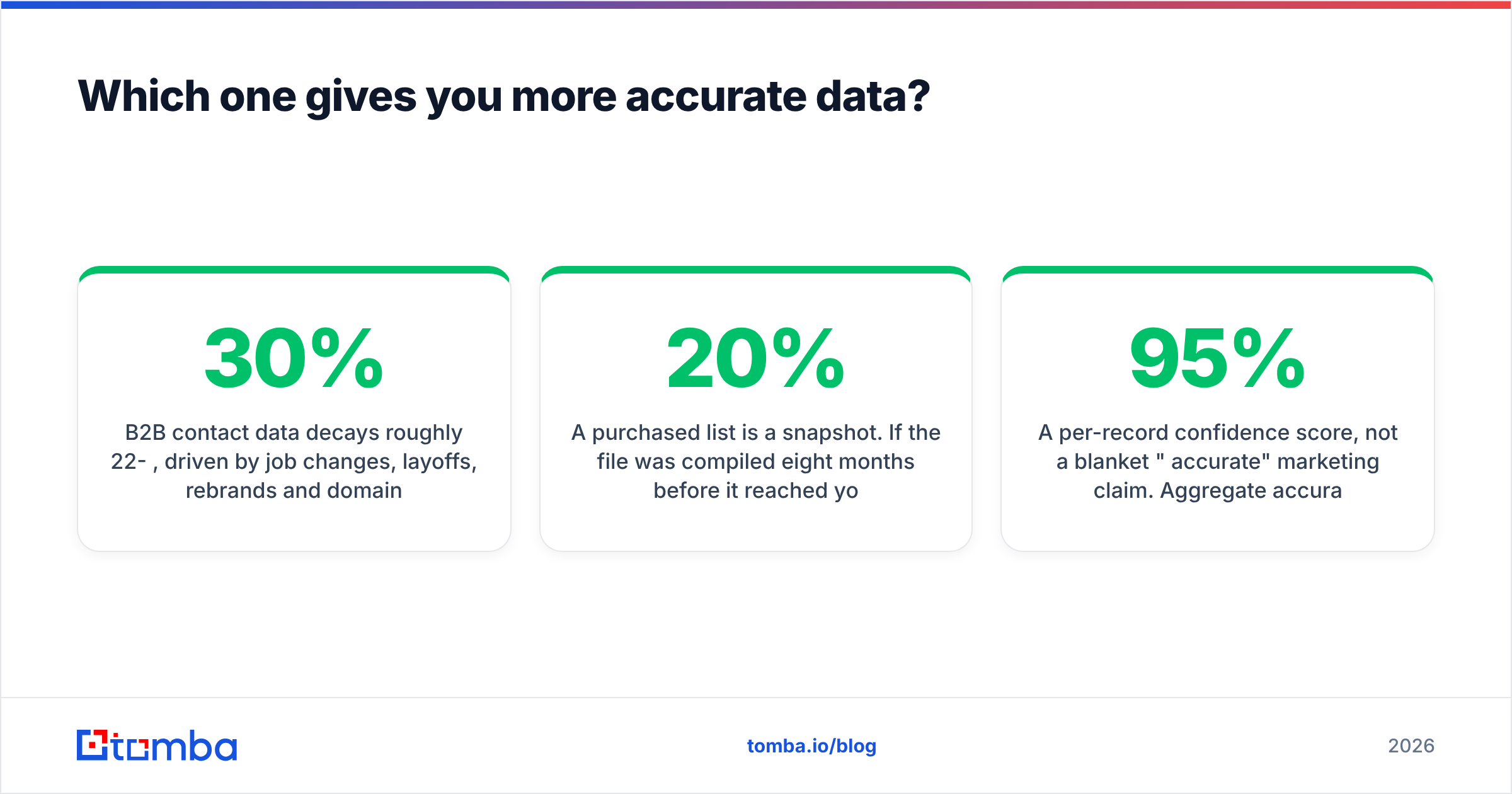
B2B contact data decays roughly 22-30% per year, driven by job changes, layoffs, rebrands and domain migrations. Independent research from Gartner and most CRM vendors puts the figure in that band. That decay rate is the entire argument.
A purchased list is a snapshot. If the file was compiled eight months before it reached you — which is normal, not sinister — something like 15-20% of it is already wrong on arrival. You have no way to tell which 15-20%.
A live lookup is a query. Lusha resolves the record when you click, so the answer reflects the state of the network today. Same for Tomba: when you run a domain search against acme.com this morning, you get patterns and addresses confirmed against sources crawled recently, plus a confidence score per address.

Three things to insist on regardless of which vendor you pick:
- A per-record confidence score, not a blanket "95% accurate" marketing claim. Aggregate accuracy claims are unfalsifiable. Per-record scores let you set a threshold and drop everything below it.
- A documented bounce guarantee with a refund or credit mechanism. Ask what percentage triggers it, how you prove it, and whether the remedy is cash or replacement records. Get it in the contract, not the sales email.
- An independent verification pass. Never send to a list because the seller called it verified. Run it through a bulk verify job and treat the result as the source of truth. On any list with a meaningful share of catch-all domains, add a catch-all verifier step — those addresses accept everything at SMTP and will silently wreck your bounce math otherwise.
What does each one actually cost?#
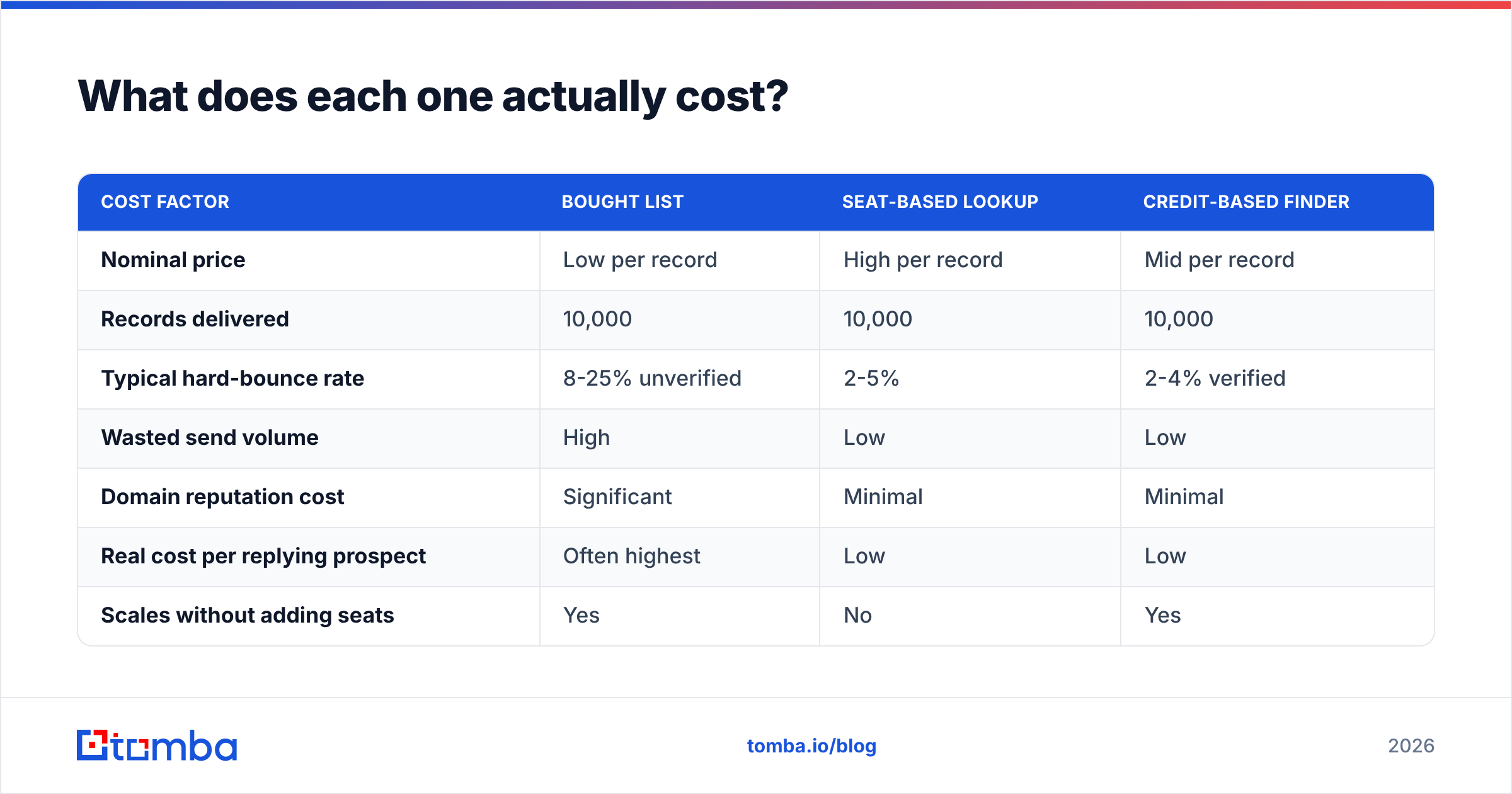
Sticker price is the wrong metric. Cost per usable, deliverable contact is the right one. Here's how the math typically plays out on a 10,000-contact campaign.
| Cost factor | Bought list | Seat-based lookup | Credit-based finder |
|---|---|---|---|
| Nominal price | Low per record | High per record | Mid per record |
| Records delivered | 10,000 | 10,000 | 10,000 |
| Typical hard-bounce rate | 8-25% unverified | 2-5% | 2-4% verified |
| Wasted send volume | High | Low | Low |
| Domain reputation cost | Significant | Minimal | Minimal |
| Real cost per replying prospect | Often highest | Low | Low |
| Scales without adding seats | Yes | No | Yes |
Go4database quotes per segment, so you'll need to request pricing for your specific slice. That opacity cuts both ways: you can negotiate, but you can't benchmark before you talk to sales.
Lusha publishes tiers, including a free plan, and charges by seat. That's clean and predictable for a five-rep team. It gets awkward when a single ops person needs to enrich 30,000 rows — you're paying seat economics for a batch job.
Tomba sits between the two on structure: a free tier at 25 searches/mo, then $49/mo Starter, $99/mo Growth, $249/mo Pro, and custom Enterprise. Full Tomba pricing is public, credits are account-level rather than seat-level, and the Tomba API is available on every paid plan — so the ops-person-enriching-30,000-rows case doesn't require buying seats nobody logs into.
One more line item nobody puts on the invoice: domain reputation. A 15% bounce rate on a purchased list doesn't just waste 1,500 sends. It tanks your sender reputation, which suppresses inbox placement for the 8,500 addresses that were good, plus every campaign you run for the next month. That's the hidden cost that makes cheap lists expensive.

Is a static list ever the right buy?#
Yes — three scenarios where a compiled database genuinely beats live lookup:
- Offline or non-email channels. Direct mail, event invites, and phone-first campaigns don't punish stale email records the way cold email does. A wrong email costs you nothing if you're dialing.
- Total addressable market sizing. You need the shape of a market, not deliverable addresses. Firmographic breadth beats per-record precision.
- Markets where live tools have thin coverage. Some regions and verticals — regional manufacturing, healthcare administration in specific countries — are genuinely better covered by specialist compilers than by contributory networks. If you've tested a live tool and coverage came back under 40%, a specialist list vendor is a reasonable next call.
If you go that route, buy from vendors that publish consent provenance and offer a replacement guarantee. BookYourData, for instance, is a well-regarded pay-as-you-go list provider with a published accuracy guarantee and no-subscription pricing — a solid reference point for what good list-vendor terms look like when you're evaluating Go4database's quote against alternatives.
Which should you pick for your team?#
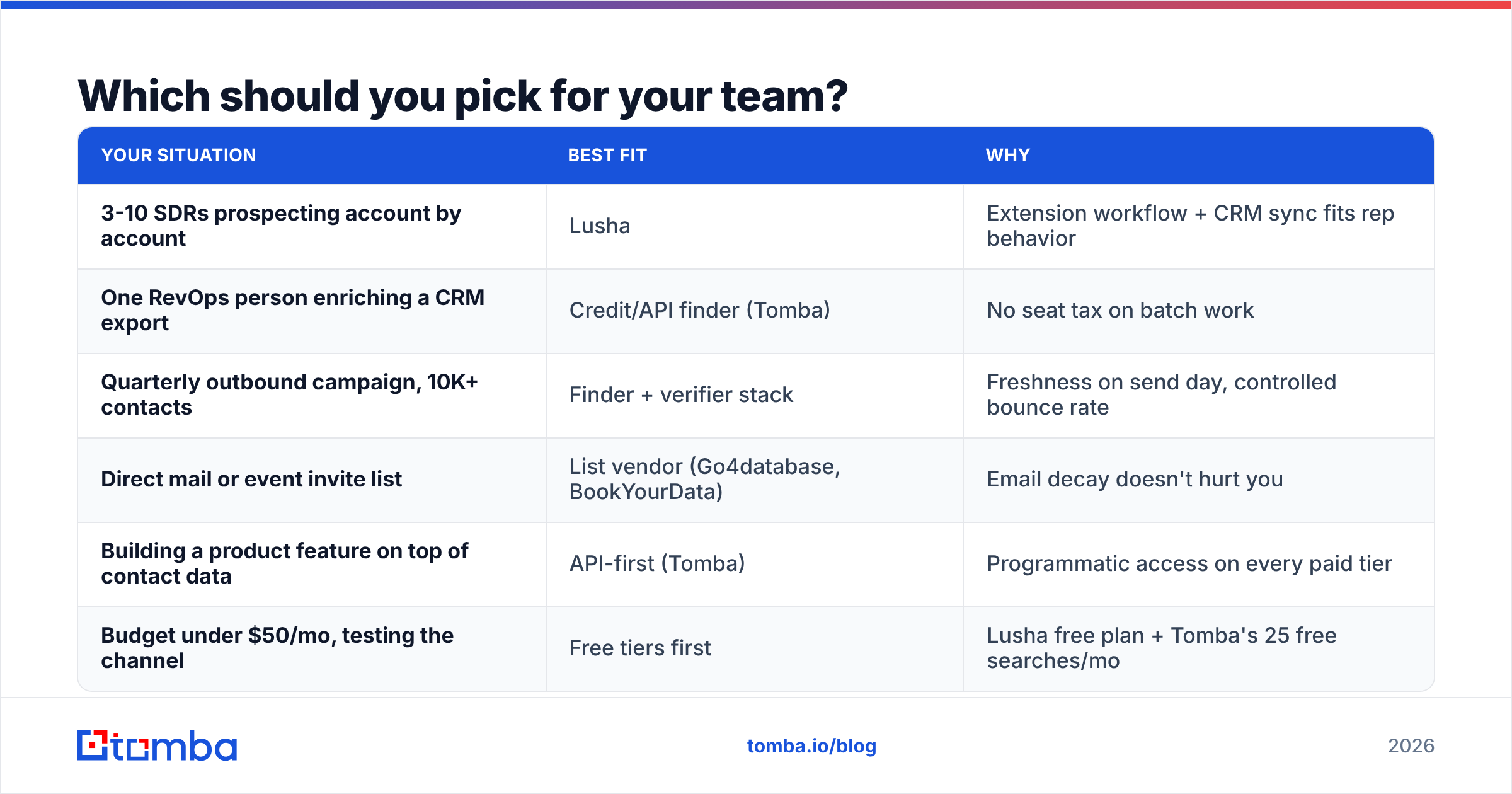
Match the tool to the motion, not to the review-site score.
| Your situation | Best fit | Why |
|---|---|---|
| 3-10 SDRs prospecting account by account | Lusha | Extension workflow + CRM sync fits rep behavior |
| One RevOps person enriching a CRM export | Credit/API finder (Tomba) | No seat tax on batch work |
| Quarterly outbound campaign, 10K+ contacts | Finder + verifier stack | Freshness on send day, controlled bounce rate |
| Direct mail or event invite list | List vendor (Go4database, BookYourData) | Email decay doesn't hurt you |
| Building a product feature on top of contact data | API-first (Tomba) | Programmatic access on every paid tier |
| Budget under $50/mo, testing the channel | Free tiers first | Lusha free plan + Tomba's 25 free searches/mo |
Check current user reviews on G2 before committing — coverage quality shifts quarter to quarter, and the reviews from the last 90 days are worth more than the aggregate star rating.
What about building the list yourself?#
This is the option most teams dismiss because it sounds like manual work. It isn't, and it's usually the cheapest path to a high-deliverability list.
The workflow, end to end:
- Define the ICP as a domain list. Not "SaaS companies" — an actual list of company domains from your CRM, a directory, or website visitor data. If you're not sure who's already interested, visitor identification turns anonymous traffic into named companies to seed the list.
- Run domain search on each domain. You get the company's email pattern plus the named people who match your target roles. This is where you find out that acme.com uses
first.last@and notflast@— the single biggest cause of guessed-address bounces. - Resolve specific people. For named targets from LinkedIn or a conference speaker list, use the LinkedIn finder or feed name + domain into the email finder.
- Verify everything, then segment. Drop invalid addresses, quarantine catch-alls into a separate lower-volume sequence, and send only to confirmed-valid on your primary domain.
- Enrich for personalization. Add title, seniority, company size and tech stack via data enrichment so the first line of your email isn't generic.
Total elapsed time for a 2,000-contact list built this way: a few hours of mostly-automated work, or minutes if you script it against the API. Bounce rates in the 1-3% range are normal because every record was generated and validated within days of the send.
The tradeoff is honest: you're doing assembly instead of buying assembled. In exchange you get freshness you can prove, provenance you can explain to a legal team, and a cost structure that doesn't scale with headcount.
The verdict#
Lusha wins the head-to-head for most B2B teams doing email outreach in 2026 — live resolution, published pricing, a real free tier, CRM integrations, and a documented compliance posture. Go4database is the better call when you need bulk breadth for non-email channels, need coverage in a niche live tools miss, or are sizing a market rather than sending to it.
But the framing "Go4database vs Lusha" hides the actual decision, which is: do you want to rent someone's snapshot, rent someone's seat, or generate the record yourself on the day you send it? For cold email specifically, the third option wins on both accuracy and cost per replying prospect — and it's the only one where you can explain exactly where every address came from.
If you want to test that without a sales call, start with the Tomba Email Finder. The free tier gives you 25 searches a month — enough to run your ICP against a purchased sample and see the overlap for yourself. Paid plans start at $49/mo with account-level credits, built-in verification, catch-all detection, and full API access on every tier. Build the list, verify it, then decide whether anyone's snapshot is worth paying for.
Related guides#
Ready to find emails that actually work?
Join 150,000+ professionals who stopped guessing and started sending. Free credits on signup — no credit card required.
Get the Tomba newsletter
Practical outbound tactics and product updates — once every two weeks.
About the author