Go4database vs Reachfast: Which B2B Data Source Wins in 2026?
One sells you a prebuilt list. The other looks contacts up on demand. We break down accuracy, pricing models, verification, and which one actually fits your outbound motion in 2026.
TL;DR
- Go4database and Reachfast are not the same product category. Go4database sells prebuilt, bulk B2B contact lists (industry, geography, job title). Reachfast is a lookup tool — you search a person or company and it returns emails and phone numbers on demand.
- Buy a list when you need volume fast and can tolerate decay. Use a lookup tool when you need a specific person's current address today.
- Neither vendor publishes a verified-bounce SLA you can hold them to. Whatever you buy, verify before you send — a purchased list without verification is a deliverability incident waiting to happen.
- Pricing models are incomparable on purpose. Go4database quotes per list/record; Reachfast charges per credit/seat. Normalize both to cost-per-usable contact before you sign anything.
- If you mostly need accurate work emails at predictable cost, a credit-based finder + verifier stack (Tomba, Findymail, Hunter) usually beats both. Tomba starts free at 25 searches/mo and $49/mo at Starter.
What are Go4database and Reachfast?#
Go4database is a B2B list vendor. You tell it the segment you want — "healthcare CIOs in Texas", "SaaS founders in DACH" — and it returns a downloadable file of contacts, usually priced per record or per list, often with a minimum order. The pitch is volume and speed: you go from zero to 50,000 rows in a day. See go4database.com for its current segment catalog.
Reachfast sits in the contact-lookup category. You search a name, a company, or a LinkedIn profile, and it attempts to return a verified work email and, in many cases, a mobile number. It leans on a Chrome extension and per-credit consumption rather than bulk file delivery. Check reachfast.io for its current feature set and plan structure.
That difference is the whole comparison. One is a stock purchase; the other is a query service. Everything downstream — accuracy, cost, compliance exposure, deliverability risk — follows from it.
How do a list vendor and a lookup tool actually differ?#
Four structural differences matter more than any feature-checkbox comparison:
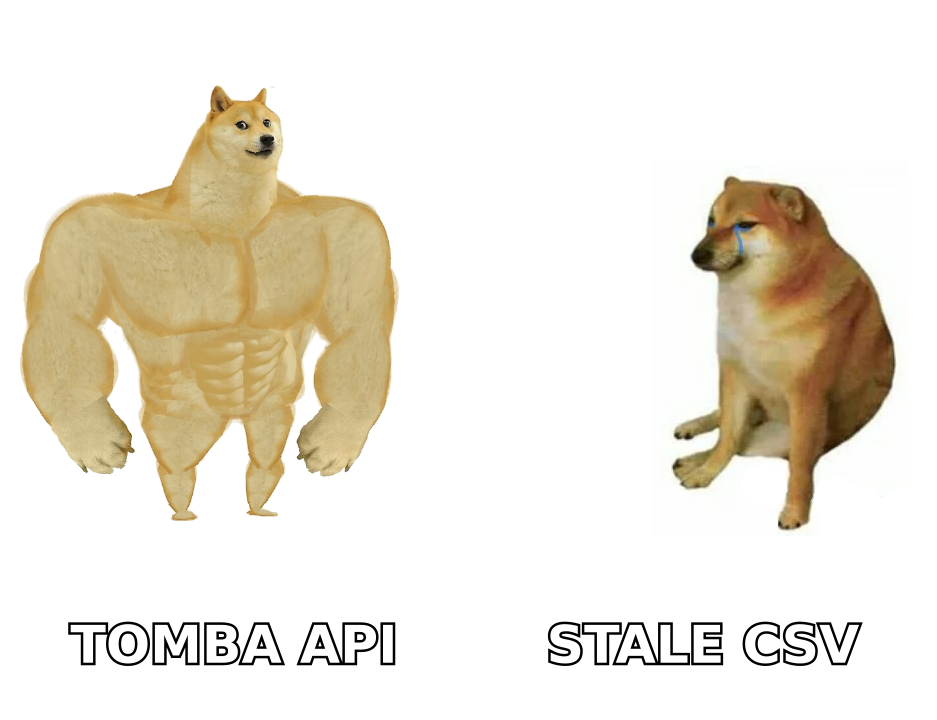
- Freshness at time of use. A purchased list is a photograph. It was accurate the day it was compiled and decays roughly 2–2.5% per month as people change jobs — that's ~25–30% rot per year, a figure repeatedly cited in B2B data research from firms like Gartner and validated by anyone who has re-verified a 12-month-old file. A lookup tool re-queries at request time, so freshness is a function of when you searched, not when someone built the file.
- Cost shape. Lists are capex-flavored: a big up-front spend, near-zero marginal cost afterwards. Lookup tools are opex-flavored: small monthly commitment, cost that scales with usage. Your finance team cares about this more than your SDRs do.
- Targeting precision. List vendors sell segments. Lookup tools serve individuals. If your ICP is "the VP of RevOps at these 400 named accounts," a segment file will overshoot badly — you'll pay for 12,000 rows to get 400 useful ones.
- Compliance surface. Buying a compiled list transfers a consent question to you: where did these records come from, and what lawful basis covers your outreach under GDPR/CCPA? Vendors publish policies; you inherit the risk. On-demand lookups against publicly available business data are generally easier to document, but "easier" isn't "exempt" — you still need a legitimate-interest record.
Which has better data accuracy?#
Neither vendor publishes an independently audited accuracy figure, so treat marketing claims from both as unverified. What you can do is run the only test that matters: pull 200 records, run them through a third-party email verifier, and count how many come back valid, catch-all, or invalid.
Here's what we consistently see across list-vendor vs. lookup-tool head-to-heads in this segment:
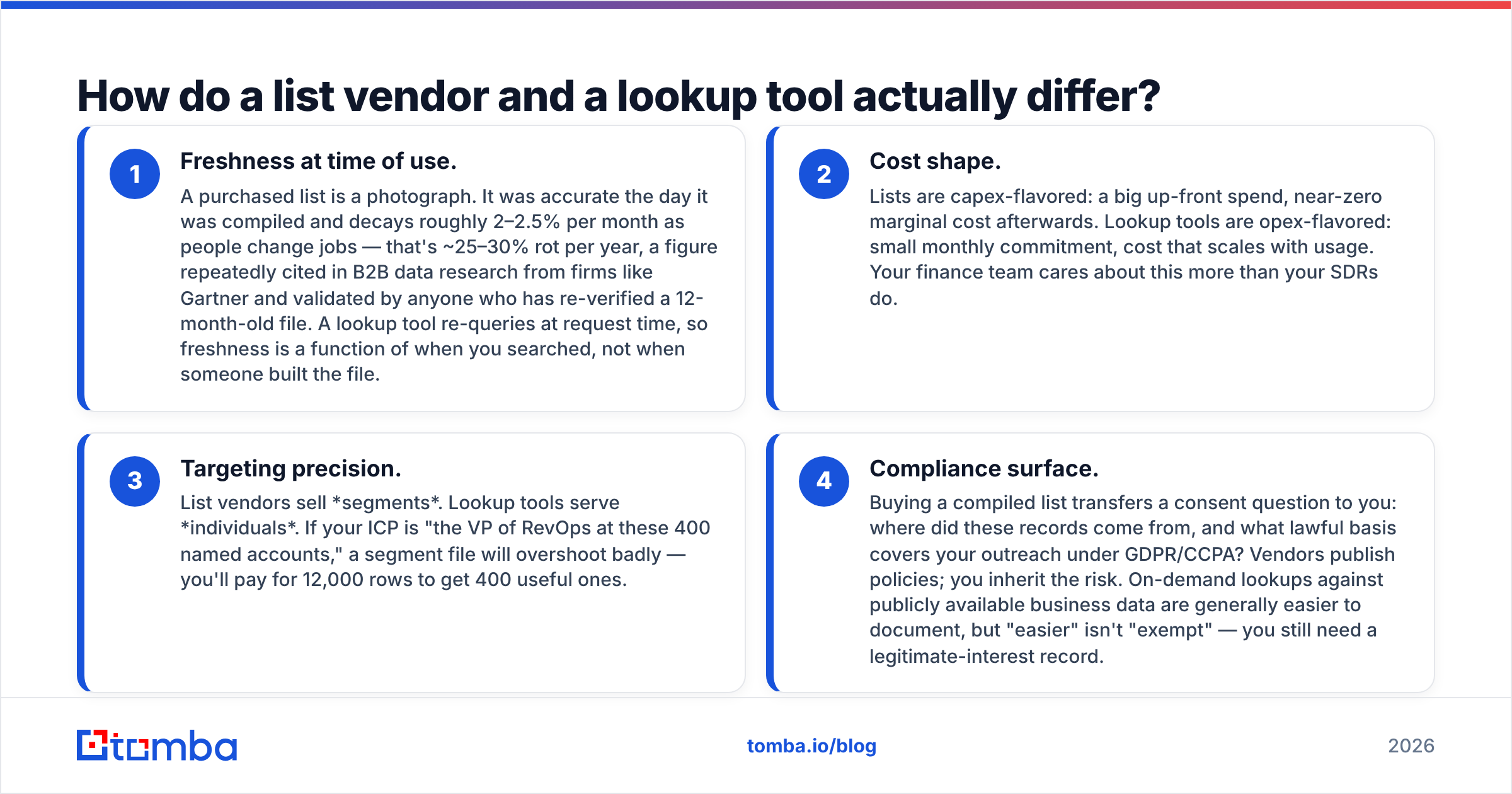
- Bulk list files typically land in the 60–80% deliverable range once you strip invalids, role accounts, and catch-alls — worse if the file is older than six months.
- Real-time lookup tools land higher on found records (often 85–95% deliverable) but return fewer records overall — they'll simply say "not found" instead of guessing.
That trade is the honest summary: lists give you rows, lookups give you rows you can actually send to. A "1,000,000 record database" that verifies at 62% is a 620,000 record database with a $X,XXX invoice attached to the 380,000 rows you'll never use.

Two practical accuracy rules regardless of which vendor you pick:
- Never trust a supplier's own "verified" badge as your only check. Vendors verify at compile time; you send at use time. Re-verify inside 30 days of sending.
- Handle catch-all domains separately. A catch-all server accepts everything, so standard SMTP checks return "valid" for addresses that don't exist. Run those through a dedicated catch-all verifier instead of blindly mailing them.
Go4database vs Reachfast: the full comparison#
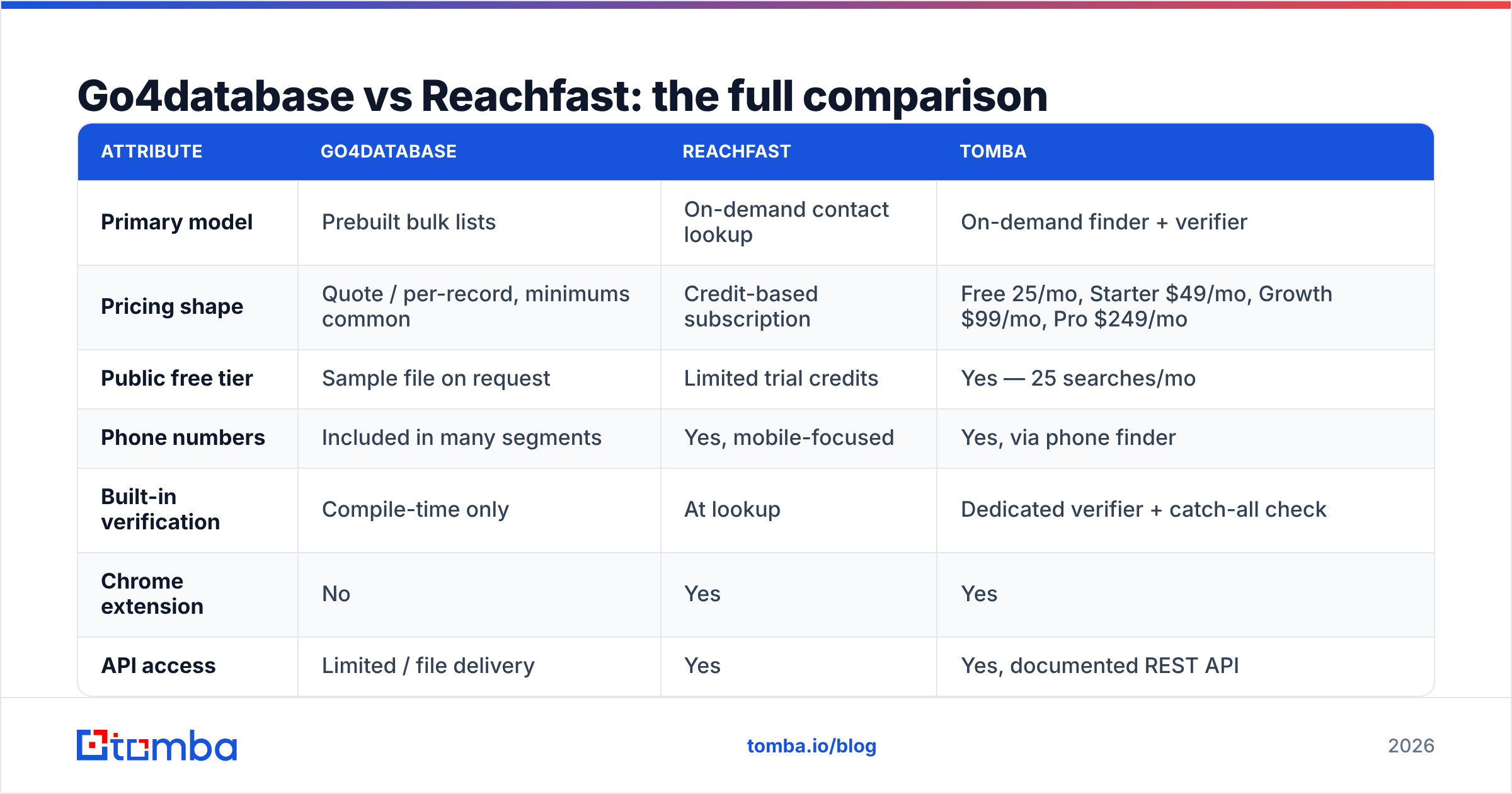
| Attribute | Go4database | Reachfast | Tomba |
|---|---|---|---|
| Primary model | Prebuilt bulk lists | On-demand contact lookup | On-demand finder + verifier |
| Pricing shape | Quote / per-record, minimums common | Credit-based subscription | Free 25/mo, Starter $49/mo, Growth $99/mo, Pro $249/mo |
| Public free tier | Sample file on request | Limited trial credits | Yes — 25 searches/mo |
| Phone numbers | Included in many segments | Yes, mobile-focused | Yes, via phone finder |
| Built-in verification | Compile-time only | At lookup | Dedicated verifier + catch-all check |
| Chrome extension | No | Yes | Yes |
| API access | Limited / file delivery | Yes | Yes, documented REST API |
| Best for | Broad awareness campaigns, event lists | Named-account prospecting | Domain-level and named-contact prospecting at fixed cost |
| Weakest at | Freshness, precision targeting | Volume fills, low-signal industries | Very large one-shot list buys |

A note on the pricing row: Go4database and Reachfast both negotiate, and published figures move. Always request a current quote and ask two questions vendors dislike: what is the refund or replacement policy on invalid records, and is that policy measured by my verifier or yours? If the answer is "ours," discount the number.
How should you compare the pricing models?#
You can't compare $/record to $/credit directly. Normalize both to cost per usable contact:
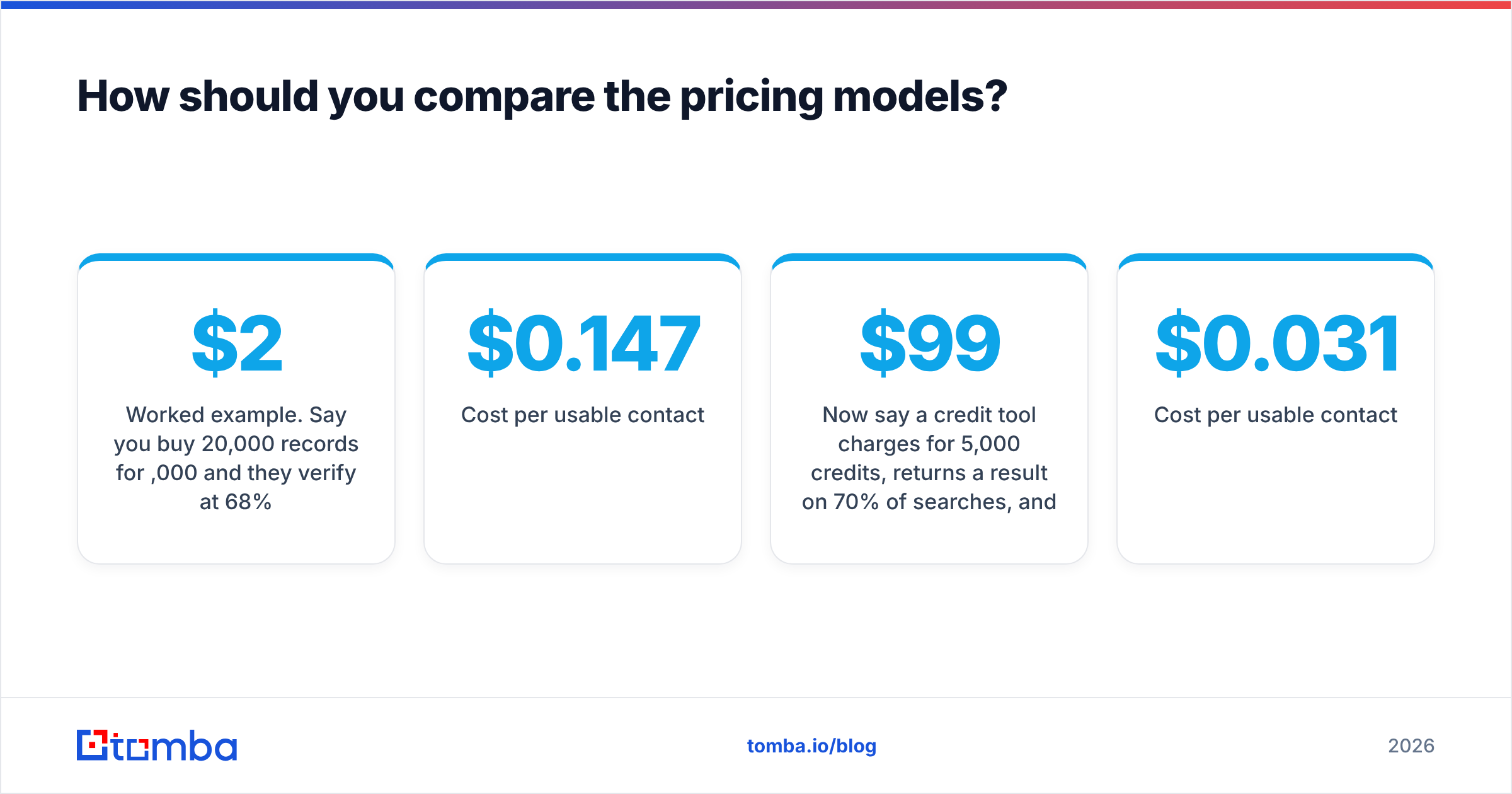
cost per usable contact = total spend / (records returned × verified-valid rate)Worked example. Say you buy 20,000 records for $2,000 and they verify at 68%:
- Usable contacts: 13,600
- Cost per usable contact: $0.147
Now say a credit tool charges $99/month for 5,000 credits, returns a result on 70% of searches, and those results verify at 92%:
- Usable contacts: 5,000 × 0.70 × 0.92 = 3,220
- Cost per usable contact: $0.031
The list looks cheaper per raw row and is five times more expensive per contact you can actually email. Run this math with your own verified sample before you sign — it flips a surprising number of purchase decisions. For reference on how credit-based plans stack up, see the Tomba pricing tiers and note the free 25 searches/mo for running exactly this kind of test.
Also budget for the hidden line items:
- Verification cost. Purchased lists need a full verification pass. That's a real per-record charge on top of the file.
- Deduplication. Overlap between a purchased list and your CRM is often 15–25%. You paid for those rows twice.
- Suppression. Existing customers, open opportunities, and unsubscribes must be scrubbed out before the first send.

Which one should you actually buy?#
Choose Go4database if:
- You need broad reach in a defined vertical and precision matters less than volume — trade-show follow-up, regional awareness, direct mail.
- You have an in-house verification and suppression workflow already running.
- Your legal team is comfortable with compiled-list provenance and you can document lawful basis.
Choose Reachfast if:
- You run named-account outbound and need a specific person's current mobile or work email.
- Your SDRs live in LinkedIn and want a browser extension in the workflow.
- You'd rather pay for 3,000 good lookups than 30,000 mediocre rows.
Choose neither if: your core need is "give me every verified email at these 500 companies, at a price I can forecast." That's a domain-search-plus-verifier job, not a list purchase and not a one-at-a-time lookup. A domain search returns the mailboxes and known patterns for a company in one call, and a bulk pass handles the other 499.
For teams that want a middle path, BookYourData is worth a look — it's a pay-as-you-go list provider with per-record verification built into the purchase flow, which removes the biggest objection to buying lists in the first place. Different shape from both tools here, and a legitimate option if you want file delivery without the freshness gamble.
What does a sane 2026 contact-data stack look like?#
Most teams doing meaningful outbound end up with three layers, not one vendor:
- A finder layer for work emails at scale — domain-level and named-contact search, priced per credit so cost tracks usage.
- A verification layer that runs immediately before send, not at purchase time, with explicit catch-all handling.
- An enrichment layer that fills firmographics, phone numbers, and social profiles onto records you already own — see data enrichment for the shape of this.
The reason to separate these is leverage. If your finder is bundled with your verifier and your sequencer, switching any one of them means renegotiating all three. Keep them modular and you keep pricing power. A documented email finder API makes that modularity practical — you can swap the finder behind your own pipeline without rewriting the sequencer.
Two more habits that beat any vendor choice:
- Sample before you scale. 200 records, verified by a neutral third party, tells you more than any G2 grid. Speaking of which, cross-check current user sentiment on G2 before committing — review volume and recency are more informative than star averages.
- Re-verify on a schedule. Quarterly for active sequences, monthly for high-value accounts. Data decay is not a one-time cleanup; it's a subscription you pay in bounces if you ignore it.
Frequently asked questions#
Is Go4database or Reachfast better for cold email deliverability? Reachfast's on-demand model is structurally safer, because addresses are resolved closer to send time. But the deciding factor is your own verification pass, not the vendor. Any list — bought or looked up — should be verified within 30 days of the send.
Can I use a purchased list under GDPR? Sometimes, under legitimate interest, with documented balancing tests, clear opt-out, and a defensible provenance trail. "The vendor said it was compliant" is not a defense. Talk to counsel before mailing EU contacts from a purchased file.
Do I still need a verifier if the tool says addresses are verified? Yes. Vendor verification happens at compile or lookup time; your send happens later. The gap is where bounces live.
What's the fastest way to compare these two objectively? Pull 200 records from each covering the same ICP. Run both through the same verifier. Compare valid rate, catch-all rate, and cost per usable contact. Ninety minutes of work, and it settles the argument with numbers instead of positioning.
Where to start#
If your bottleneck is finding accurate work emails at a cost you can forecast — not buying a file and hoping — start with the Tomba Email Finder. Search by domain, name, or company, verify in the same workflow, and test the whole thing on the free tier's 25 searches per month before you spend a dollar. Run it against the same 200-record sample you'd use to evaluate Go4database or Reachfast, and let the verified-valid rate pick the winner for you.
Related guides#
Ready to find emails that actually work?
Join 150,000+ professionals who stopped guessing and started sending. Free credits on signup — no credit card required.
Get the Tomba newsletter
Practical outbound tactics and product updates — once every two weeks.
About the author