Go4Database vs Tomba: Which B2B Email Data Wins in 2026?
One sells you a static contact list. The other verifies every address in real time. Here is how Go4Database and Tomba actually compare on accuracy, pricing, compliance, and workflow fit in 2026.
TL;DR
- Different products, not different prices. Go4Database sells pre-built, purchasable contact lists by industry and geography. Tomba is a real-time email finder and verification API that resolves addresses on demand.
- Buy a list when you need volume fast and cheap. Build with a finder when bounce rate, compliance, and deliverability decide whether your domain survives Q1.
- Static lists decay ~22-30% per year as people change jobs. A list purchased in January is materially wrong by December; a live lookup is never older than the moment you ran it.
- Tomba pricing is transparent and public — Free (25 searches/mo), Starter $49/mo, Growth $99/mo, Pro $249/mo. Go4Database quotes per list, so cost-per-usable-contact is the only fair comparison metric.
- The honest verdict: if you are running cold outbound into inboxes you care about, real-time verification wins. If you need a broad market map for a niche vertical with no digital footprint, a purchased list can be a legitimate starting input — provided you verify every row before sending.
What is Go4Database and what does it actually sell?#
Go4Database is a B2B list vendor. The model is straightforward: you tell them the segment you want — "IT decision makers in the UK", "healthcare CFOs in North America", "Shopify store owners" — and they deliver a file with names, job titles, company data, emails, and often phone numbers and mailing addresses.
This is the oldest business model in B2B data. It predates the internet by decades; direct-mail list brokers did exactly this with printed labels. The value proposition is speed and breadth: you get 50,000 rows in a day without building any scraping, enrichment, or verification infrastructure.
The tradeoffs are equally old:
- The file is a snapshot. Its accuracy peaks the moment it is compiled and declines from there.
- You do not control the sourcing. You inherit whatever collection method the vendor used, along with its compliance posture.
- Exclusivity is rarely guaranteed. The same segment may have been sold to competitors in your space, which means your prospects may have received four similar emails before yours.
- Verification is usually your job. Most list vendors claim a hygiene process. Very few will refund you on a 12% bounce rate.
None of that makes list-buying illegitimate. It makes it a raw input rather than a finished product.
What is Tomba and how is it structurally different?#
Tomba is an email finder and verification platform. Instead of shipping you a file, it resolves a contact at query time: you supply a name and a domain (or just a domain), and Tomba returns the most probable professional address plus a confidence score and the public sources that support it.
The mechanical difference matters more than any feature list. A purchased list answers "who existed in this segment when the file was built?" Tomba answers "does this specific address work right now?"
Around the core finder sit the tools that make that answer usable at scale:
- Domain search — pull every discoverable address at a company, with roles and departments, so you can map a buying committee instead of guessing at one contact.
- Email verifier — SMTP-level validation with MX checks, syntax checks, and disposable-domain detection before a message ever leaves your sequencer.
- Catch-all verifier — the hard case. Catch-all domains accept everything at the gateway and bounce silently later, which is exactly how bought lists quietly destroy sender reputation.
- Bulk email finder — CSV in, verified contacts out, when you do need list-scale throughput.
- Tomba API — the piece that turns all of the above into an automated pipeline rather than a manual chore.
How accurate is each source in practice?#
Accuracy is where the two models diverge hardest, and it is worth being precise about what the word means.
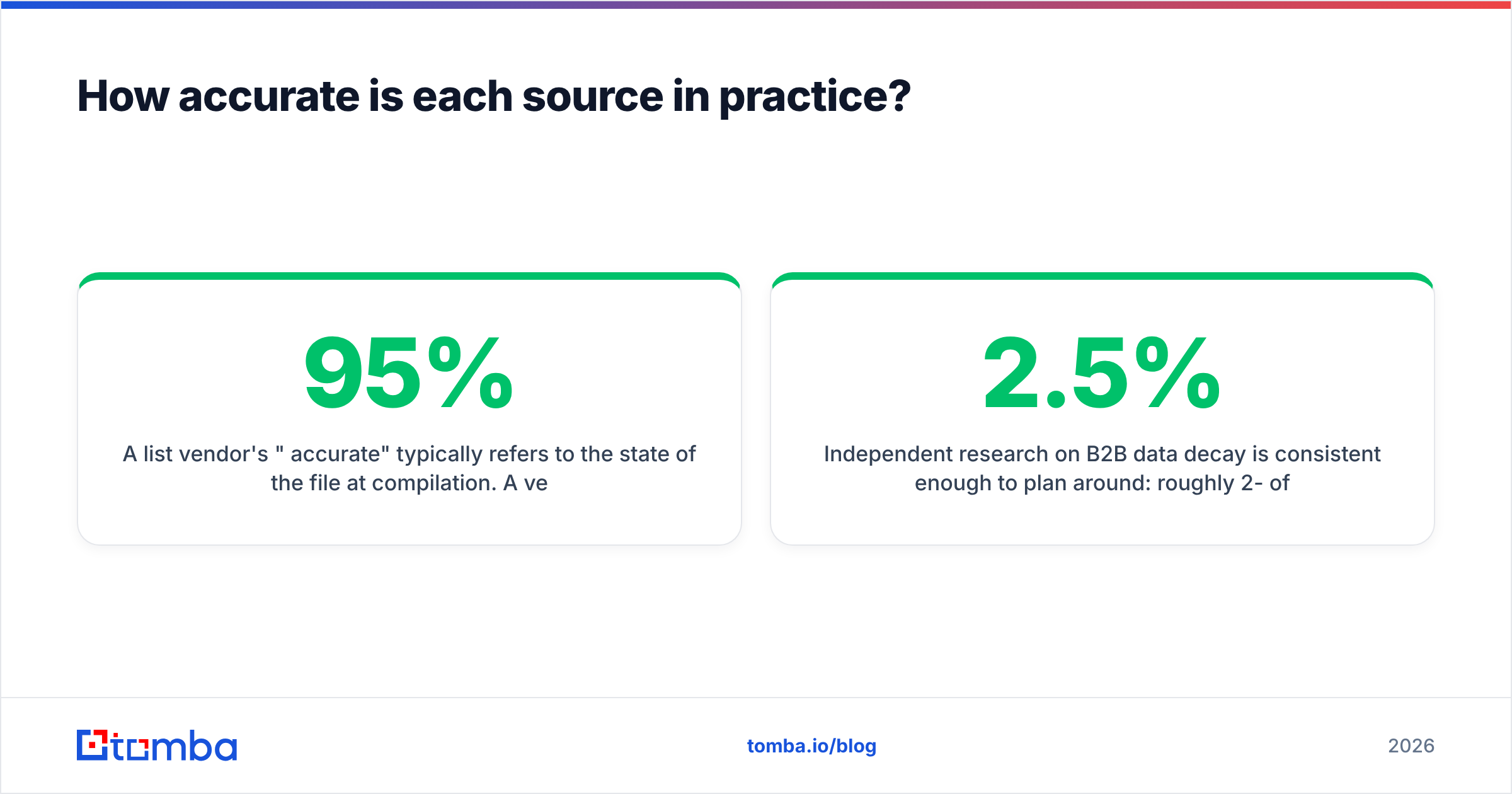
A list vendor's "95% accurate" typically refers to the state of the file at compilation. A verification platform's accuracy refers to the deliverability of the address at the moment you queried it. These are not the same claim and should never be compared as if they were.
Independent research on B2B data decay is consistent enough to plan around: roughly 2-2.5% of a contact database goes stale every month through job changes, company moves, domain migrations, and departures. Compound that and a list bought in January is 22-30% wrong by December. Gartner and other analyst firms have documented the revenue impact of poor data quality for years, and the mechanism is boring: bad addresses bounce, bounces damage sender reputation, damaged reputation suppresses inbox placement for your good addresses too.

The practical takeaway: even if a purchased list is genuinely excellent on day one, you still need a verification layer between the file and your sending domain. That layer is not optional. Google and Yahoo's bulk-sender requirements — documented publicly by Google — put a hard spam-rate ceiling on senders, and a bounce-heavy list is the fastest way to breach it.
Where this leaves you: verification is mandatory in both worlds. The question is whether you pay for the list and the verification, or just build from verification directly.
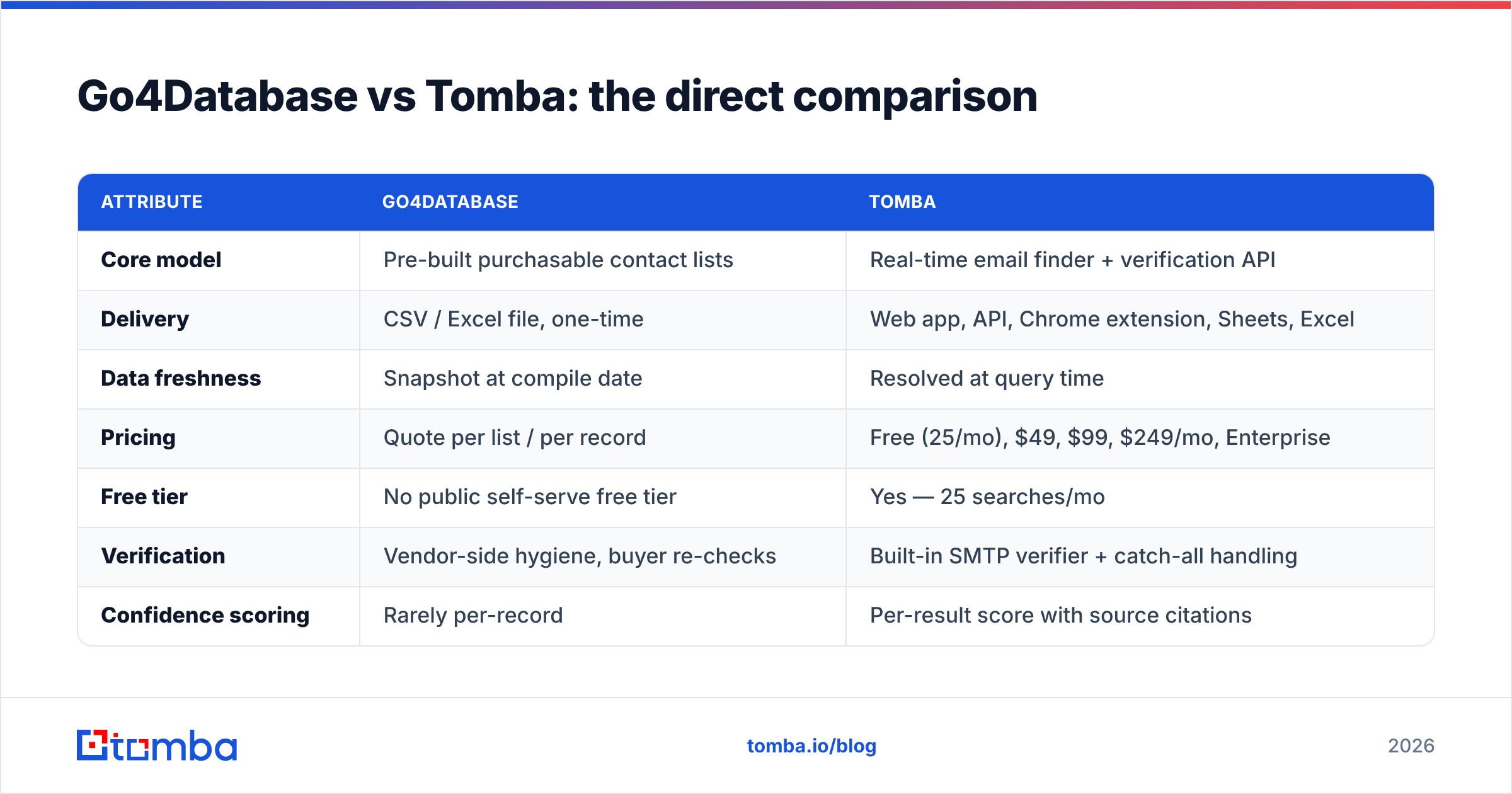
Go4Database vs Tomba: the direct comparison#
| Attribute | Go4Database | Tomba |
|---|---|---|
| Core model | Pre-built purchasable contact lists | Real-time email finder + verification API |
| Delivery | CSV / Excel file, one-time | Web app, API, Chrome extension, Sheets, Excel |
| Data freshness | Snapshot at compile date | Resolved at query time |
| Pricing | Quote per list / per record | Free (25/mo), $49, $99, $249/mo, Enterprise |
| Free tier | No public self-serve free tier | Yes — 25 searches/mo |
| Verification | Vendor-side hygiene, buyer re-checks | Built-in SMTP verifier + catch-all handling |
| Confidence scoring | Rarely per-record | Per-result score with source citations |
| Best for | Broad market mapping, niche verticals | Targeted outbound, ABM, CRM hygiene, automation |
| Automation fit | Manual import | Native API, MCP, Zapier, HubSpot, Salesforce |
| Cost model risk | Pay for rows you never use | Pay per search you actually run |
The row that decides most purchases is the last one. A 50,000-row list costs the same whether you email 50,000 people or the 900 who actually match your ICP after filtering. A credit-based finder charges for the 900.
Which is cheaper per usable contact?#
Do not compare sticker prices. Compare cost per contactable, verified, in-ICP record.
Work it like this:
- Start with list size. Say 50,000 rows.
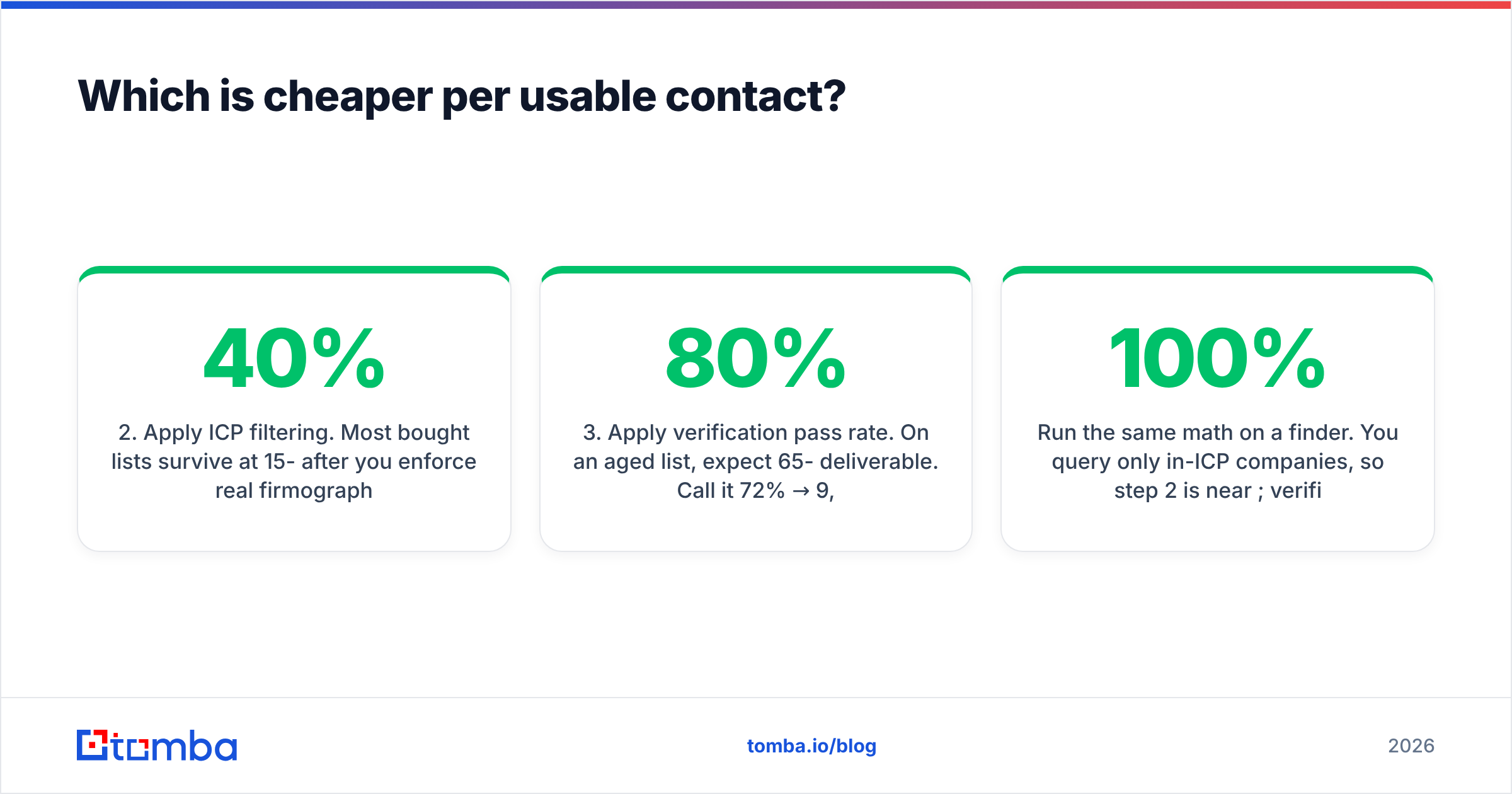
- Apply ICP filtering. Most bought lists survive at 15-40% after you enforce real firmographic criteria. Call it 25% → 12,500 rows.
- Apply verification pass rate. On an aged list, expect 65-80% deliverable. Call it 72% → 9,000 rows.
- Add the verification cost you paid to find that out.
- Divide total spend by 9,000.
Run the same math on a finder. You query only in-ICP companies, so step 2 is near 100%; verification is bundled, so step 4 is zero incremental; and step 3 lands in the 95%+ range on found-and-verified results. The volume is lower, but almost every row is usable.
Where the list wins: when your absolute row count needs to be enormous and your qualification cost per row is near zero — broad awareness plays, event invite blasts to an existing region, or seeding a database you will progressively enrich later.
Where the finder wins: everything targeted. Check the Tomba pricing tiers against your monthly prospect volume; if you are resolving fewer than a few thousand contacts a month, the Growth plan almost always beats a list purchase on cost-per-usable-contact.
Is buying a B2B list still compliant in 2026?#
This is the part most comparison posts skip, and it is the part that carries actual downside risk.
GDPR (EU/UK): legitimate interest can support B2B outreach, but it requires you to document the basis, honour objections, and be able to explain where the data came from. If your vendor cannot give you provenance per record, you cannot fully satisfy that. The ICO's direct marketing guidance is the reference text, and it is more readable than its reputation suggests.
CAN-SPAM (US): far more permissive. It does not require prior consent for B2B email; it requires accurate headers, a real physical address, and a working opt-out honoured within 10 business days. A bought list is legal here.
Practical reality: the compliance question and the deliverability question have converged. Mailbox providers now treat "recipients who did not expect you" as a spam signal regardless of what the statute permits. You can be perfectly CAN-SPAM compliant and still get filtered into oblivion.
The mitigations are the same either way: verify before sending, warm your domain, keep spam complaints under 0.1%, segment tightly, and never send 5,000 messages from a domain that sent 40 last week. Our guide to email deliverability covers the mechanics; the SPF checker is a two-minute sanity check before any campaign.
How do the two fit different team profiles?#
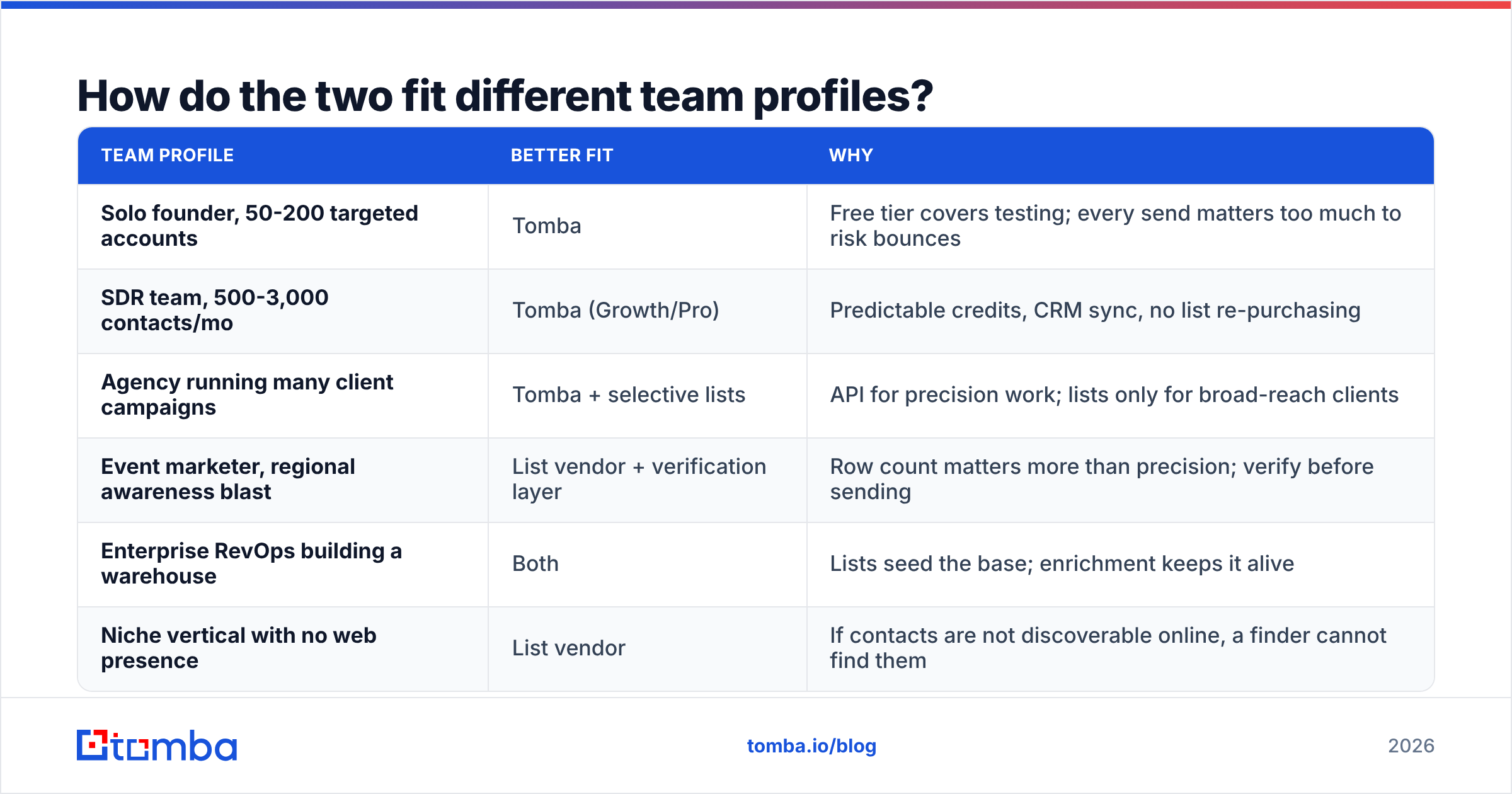
| Team profile | Better fit | Why |
|---|---|---|
| Solo founder, 50-200 targeted accounts | Tomba | Free tier covers testing; every send matters too much to risk bounces |
| SDR team, 500-3,000 contacts/mo | Tomba (Growth/Pro) | Predictable credits, CRM sync, no list re-purchasing |
| Agency running many client campaigns | Tomba + selective lists | API for precision work; lists only for broad-reach clients |
| Event marketer, regional awareness blast | List vendor + verification layer | Row count matters more than precision; verify before sending |
| Enterprise RevOps building a warehouse | Both | Lists seed the base; enrichment keeps it alive |
| Niche vertical with no web presence | List vendor | If contacts are not discoverable online, a finder cannot find them |
That last row is the honest concession. Email finders work by resolving public and inferred signals. If your target market is offline-heavy — regional distributors, family manufacturers, trades with no corporate site — a compiled list may genuinely be your only route. In that case, treat the file as a lead source, not a send list, and push every row through a bulk verify pass first.
What about the other options on the shortlist?#
Neither of these tools exists in a vacuum, and a fair comparison should name the field.
- BookYourData is the strongest player in the pay-as-you-go list category. It offers self-serve segment building with a verification guarantee attached, which closes much of the freshness gap that traditional list vendors leave open. If you have decided a purchased list is right for your use case, it belongs on the shortlist.
- Apollo and ZoomInfo bundle database plus sequencer plus intent data. Powerful, but you pay platform pricing and get locked into their sending stack.
- Clay and similar orchestration tools waterfall across multiple providers per record. Excellent coverage, meaningfully higher cost and setup time.
- Tomba sits deliberately in the infrastructure layer: find, verify, enrich, and hand off to whatever CRM or sequencer you already run. No lock-in on the sending side.
Vendor-neutral reviews on G2 are worth ten minutes before any purchase — filter to reviews from companies your size, since data tool satisfaction correlates strongly with team scale.
What is the smartest way to combine both?#
The teams with the best outbound numbers rarely pick one model exclusively. The pattern that works:
- Define the ICP narrowly first. Two firmographic filters and one trigger. Not five.
- Source company-level, not contact-level. Build a target account list from whatever source is cheapest — including a purchased list.
- Resolve contacts at the account level with a finder. Run domain search per account to map the actual buying committee as it exists today.
- Verify everything. Including — especially — the rows that came from a purchased file.
- Enrich the survivors. Data enrichment fills in the personalisation fields that decide reply rate.
- Re-verify quarterly. Data decay is a subscription, not a one-time cost.
This gets you the breadth of a list and the freshness of a finder, and it keeps your sending domain out of the blast radius when a segment turns out to be stale.
The verdict#
Choose Tomba if your outbound is targeted, your sending domain is a long-term asset, and you want data that is correct at send time rather than at purchase time. The transparent pricing, the free tier for testing, and the API-first design make it the lower-risk default for most B2B teams in 2026.
Choose a list vendor — Go4Database, BookYourData, or another — if you need scale in a vertical that finders cannot reach, and you accept that verification is a separate, mandatory step you will pay for either way.
Choose both if you are running a real GTM motion at scale. Lists give you the map; a finder tells you which doors still open.
The one thing that is not optional in either scenario: verify before you send. Every bounce you avoid is inbox placement you keep for the emails that actually matter.
Start with the free tier before you spend on a list. Run 25 searches through the Tomba Email Finder against your ten best-fit target accounts, and compare what comes back with the sample rows any list vendor will send you. Same accounts, same job titles, side by side — that test costs nothing and answers the question better than any comparison post can, including this one.
Related guides#
Ready to find emails that actually work?
Join 150,000+ professionals who stopped guessing and started sending. Free credits on signup — no credit card required.
Get the Tomba newsletter
Practical outbound tactics and product updates — once every two weeks.
About the author