GoAutoDial JustGoCloud Alternatives: 9 Dialers Compared
GoAutoDial is cheap to license and expensive to run. Here are nine alternatives — open-source, cloud, and hybrid — compared on dialer type, real pricing, setup effort, and who each one actually fits.
Shopping for GoAutoDial JustGoCloud alternatives? Nine dialers are worth a look in 2026. This guide compares them on dialer type, real price, setup effort, and team size.
TL;DR
- GoAutoDial is a GPL-licensed, Asterisk-based call center suite; JustGoCloud is the hosted version sold by the same company. The software is cheap. The Linux, SIP, and compliance work around it is not.
- If you have a sysadmin and a low cost-per-seat mandate, VICIdial is the closest like-for-like alternative — same lineage, bigger community, zero license fee.
- If you want to stop babysitting servers, CloudTalk, JustCall, and Kixie are the realistic mid-market landing spots at roughly $25–$95 per user per month.
- Enterprises with QA, WFM, and compliance requirements end up at Five9, Genesys Cloud CX, or Talkdesk — expect $100–$200+ per seat.
- Whichever dialer you pick, your connect rate is decided by the phone data feeding it, not the software. Bad numbers burn dials on every platform equally.
What are GoAutoDial and JustGoCloud, exactly?#
GoAutoDial is an open-source contact center stack built on Asterisk. A web UI sits on top of the same telephony core that powers most open-source predictive dialers. You download it, put it on a server, configure SIP trunks, and run inbound, outbound, predictive, and blended campaigns. The company behind it, GoAutoDial Inc., also sells support subscriptions and a hosted product.
JustGoCloud is that hosted product: GoAutoDial delivered as a managed cloud service, priced per agent, so you skip the server build. Same features, different operating model. You trade root access and a flat infrastructure bill for a per-seat subscription and someone else's uptime.
Both sit in the same category: high-volume outbound calling for BPOs, collections, insurance, and lead-gen teams. Those teams care about dials per hour, not pretty dashboards. That market has gotten crowded since 2020. That is why so many teams now search for GoAutoDial JustGoCloud alternatives.
Why do teams look for GoAutoDial alternatives?#
Four reasons come up over and over in G2 reviews and community threads:
- Operational overhead. Self-hosted Asterisk means you own kernel updates, codec issues, NAT traversal, disk-full incidents at 2 a.m., and the person who understands all of it. When that person leaves, the dialer becomes a liability.
- Modern channel gaps. Native SMS, WhatsApp, web chat, and CRM-embedded calling are table stakes for a 2026 sales floor. Bolting them onto an Asterisk stack is a project, not a setting.
- Compliance pressure. Consent capture, call recording retention, STIR/SHAKEN attestation, and branded caller ID are handled as first-class features by the big cloud CCaaS vendors and as DIY exercises everywhere else.
- Support expectations. Community forums are excellent for debugging and terrible for an SLA. Teams that bill clients for uptime eventually want a vendor to call.
None of these mean GoAutoDial is bad. They mean the cost model moved. A $0 license with a $6,000/month engineer attached is not cheaper than $40/seat.
What should you compare before switching?#
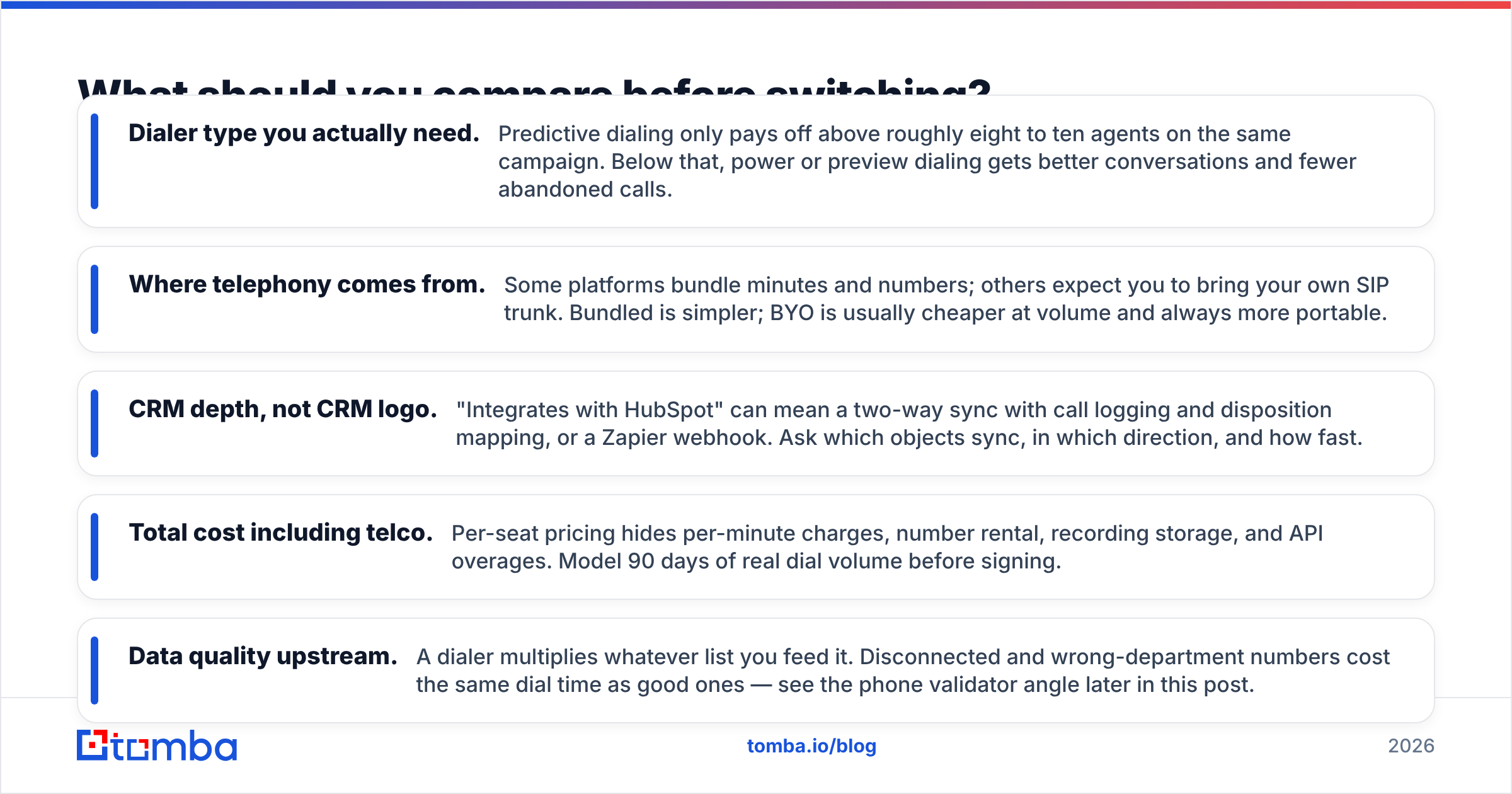
Ignore feature checklists for a minute. These five variables decide whether a migration succeeds:
- Dialer type you actually need. Predictive dialing only pays off above roughly eight to ten agents on the same campaign. Below that, power or preview dialing gets better conversations and fewer abandoned calls.
- Where telephony comes from. Some platforms bundle minutes and numbers; others expect you to bring your own SIP trunk. Bundled is simpler; BYO is usually cheaper at volume and always more portable.
- CRM depth, not CRM logo. "Integrates with HubSpot" can mean a two-way sync with call logging and disposition mapping, or a Zapier webhook. Ask which objects sync, in which direction, and how fast.
The last two variables decide your true cost:
- Total cost including telco. Per-seat pricing hides per-minute charges, number rental, recording storage, and API overages. Model 90 days of real dial volume before signing.
- Data quality upstream. A dialer multiplies whatever list you feed it. Disconnected and wrong-department numbers cost the same dial time as good ones — see the phone validator angle later in this post.
Which GoAutoDial JustGoCloud alternatives win in 2026?#
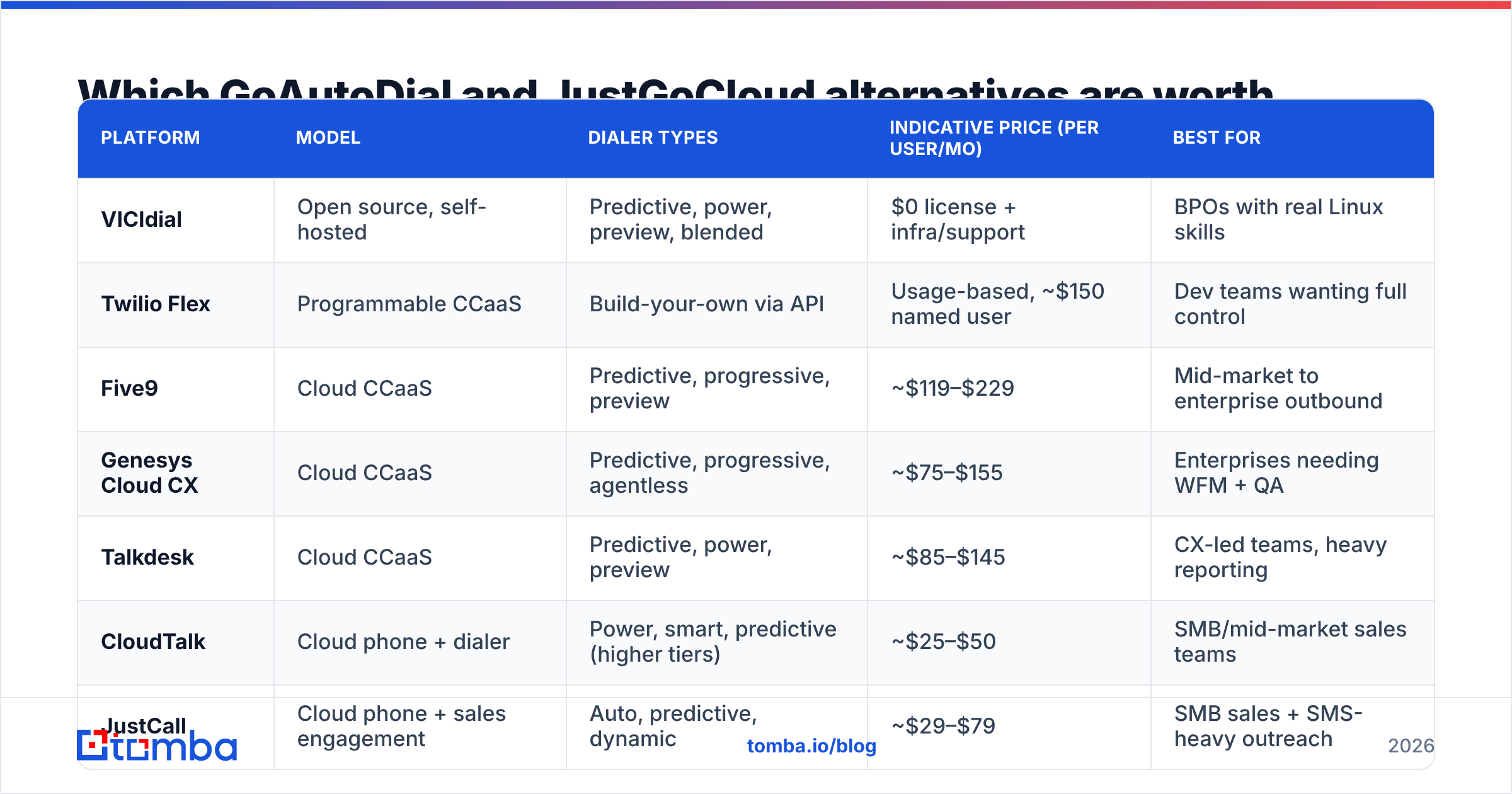
Pricing below is published list pricing at the time of writing, rounded to the nearest common tier. Always confirm on the vendor site. Contact center vendors change packaging often, and most will negotiate.
| Platform | Model | Dialer types | Indicative price (per user/mo) | Best for |
|---|---|---|---|---|
| VICIdial | Open source, self-hosted | Predictive, power, preview, blended | $0 license + infra/support | BPOs with real Linux skills |
| Twilio Flex | Programmable CCaaS | Build-your-own via API | Usage-based, ~$150 named user | Dev teams wanting full control |
| Five9 | Cloud CCaaS | Predictive, progressive, preview | ~$119–$229 | Mid-market to enterprise outbound |
| Genesys Cloud CX | Cloud CCaaS | Predictive, progressive, agentless | ~$75–$155 | Enterprises needing WFM + QA |
| Talkdesk | Cloud CCaaS | Predictive, power, preview | ~$85–$145 | CX-led teams, heavy reporting |
| CloudTalk | Cloud phone + dialer | Power, smart, predictive (higher tiers) | ~$25–$50 | SMB/mid-market sales teams |
| JustCall | Cloud phone + sales engagement | Auto, predictive, dynamic | ~$29–$79 | SMB sales + SMS-heavy outreach |
| Kixie | Sales dialer + CRM-native | Power, multi-line | ~$35–$95 | SMB SDR teams on HubSpot/Pipedrive |
| Squaretalk | Cloud contact center | Predictive, progressive, preview | ~$25–$50 | Cost-sensitive high-volume dialing |
Four practical reads on that table:
VICIdial is the honest like-for-like swap. Same open-source lineage, same Asterisk core, a far larger installed base, and no license cost. VICIdial will feel familiar to any GoAutoDial admin within a day. It is also the option that keeps every operational burden you were trying to escape — you are changing software, not changing the job.
Twilio Flex is a platform, not a product. Flex gives you a React-based agent UI and complete API control over routing and dialing logic. If you have engineers, it is the most flexible option on this list. If you do not, it is a six-month project with no end date.
Five9, Genesys, and Talkdesk are the compliance answer. You pay two to four times the SMB price and get supervisor tooling, workforce management, QA scoring, recording retention policies, and an actual SLA. For regulated outbound — collections, insurance, healthcare — that premium is usually the whole point.
CloudTalk, JustCall, Kixie, and Squaretalk are where most GoAutoDial refugees land. They cover power dialing, call recording, CRM sync, and SMS at a price that does not require a procurement cycle, and you can be live in a week.
Is self-hosting still cheaper than cloud in 2026?#
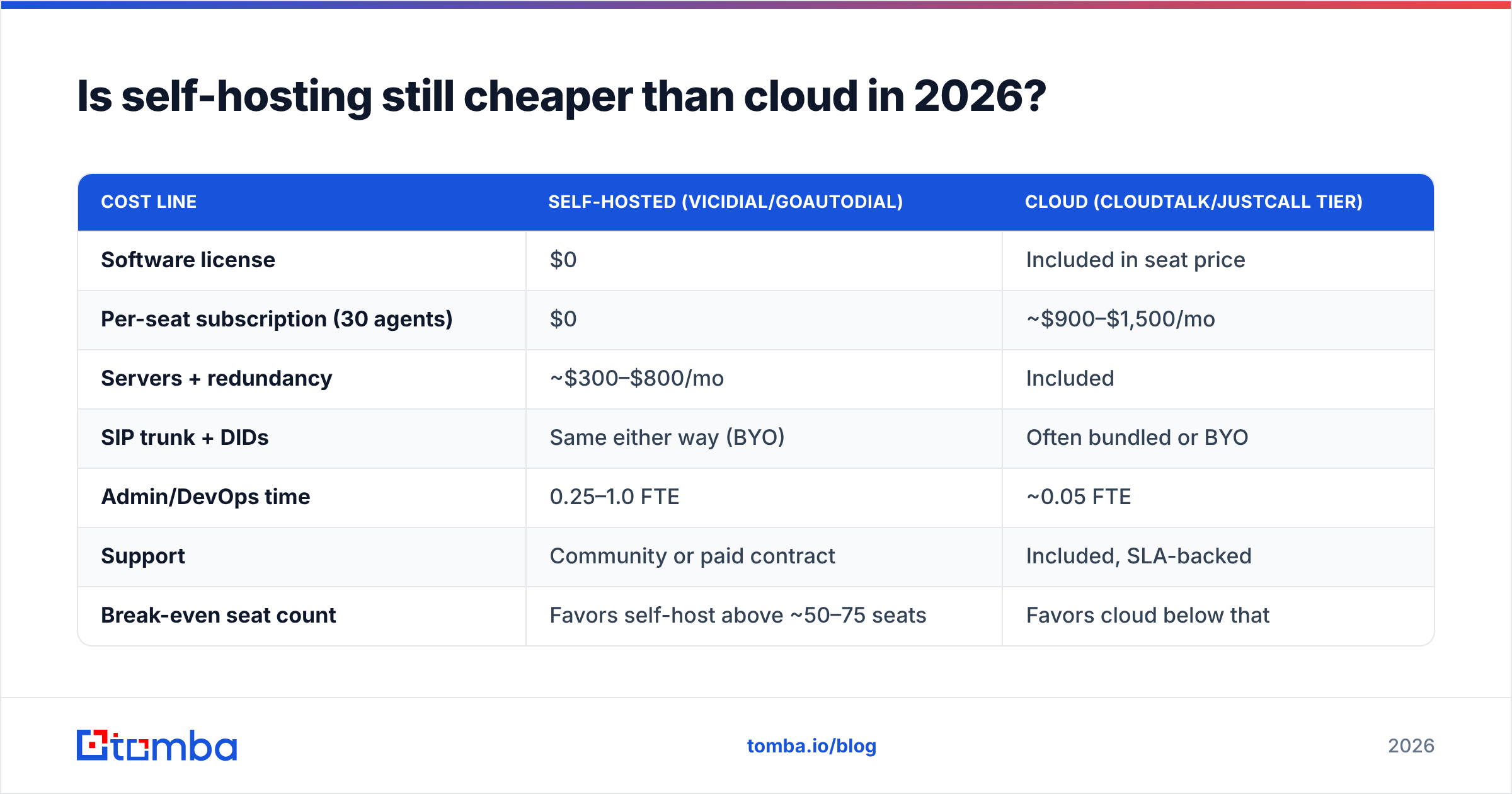
Only under specific conditions. Run the arithmetic honestly.
| Cost line | Self-hosted (VICIdial/GoAutoDial) | Cloud (CloudTalk/JustCall tier) |
|---|---|---|
| Software license | $0 | Included in seat price |
| Per-seat subscription (30 agents) | $0 | ~$900–$1,500/mo |
| Servers + redundancy | ~$300–$800/mo | Included |
| SIP trunk + DIDs | Same either way (BYO) | Often bundled or BYO |
| Admin/DevOps time | 0.25–1.0 FTE | ~0.05 FTE |
| Support | Community or paid contract | Included, SLA-backed |
| Break-even seat count | Favors self-host above ~50–75 seats | Favors cloud below that |
The break-even moves with salary costs. In markets where a competent Asterisk admin costs $2,000/month, self-hosting wins early. Where that same admin costs $9,000/month, cloud wins until you are well past a hundred seats. That is the entire debate — everything else is preference.

Which alternative fits which team?#
You run a BPO with 100+ seats and in-house Linux talent. Go VICIdial. Keep GoAutoDial's operating model, drop the vendor dependency, gain a community large enough that most of your problems are already answered in a forum thread.
You run a 10–40 person outbound sales team. CloudTalk, JustCall, or Kixie. Pick based on your CRM: Kixie for HubSpot and Pipedrive shops, JustCall if SMS is a serious channel, CloudTalk if you want European numbers and clean call analytics.
You are in a regulated vertical. Five9 or Genesys Cloud CX. The recording retention, consent management, and supervisor tooling justify the seat price the first time an auditor asks a question.
You have engineers and unusual routing logic. Twilio Flex. Nothing else lets you express "if the lead viewed pricing twice this week, route to the AE queue with a whisper" in code without fighting the product.
You are price-sensitive and high-volume. Squaretalk or a VICIdial deployment on managed hosting. Both keep cost-per-dial low without asking you to become a telephony company.
How do you keep dial lists clean after switching?#
Here is the part nobody puts in the migration plan: the platform is not what limits your connect rate. B2B phone data decays fast. People change roles, companies re-issue direct dials, and departments consolidate numbers. A list built 18 months ago can be a third dead before your new dialer places its first call.
Three habits fix most of it:
- Validate before loading, not after dialing. Line-type and reachability checks catch disconnected and invalid numbers before they consume agent time. A phone validator pass on import is cheap compared to burned dials.
- Enrich the record, don't just store the number. Job title, company size, and a verified email on the same record let you follow a voicemail with an email the same hour. Contact-level data enrichment turns a phone list into a working account record.
- Keep a second channel warm. Connect rates on cold dials have been sliding for years. The teams holding steady pair dials with email and LinkedIn touches. That means you need verified addresses next to your numbers, which is what a bulk email finder run against your dial list gives you.
On sourcing: if you need net-new numbers rather than cleanup, provider quality varies enormously by region and seniority. Tools like Tomba's phone finder work well for direct-dial discovery tied to a known person or domain. List vendors such as BookYourData are a reasonable option when you want pre-built, filterable B2B records rather than record-by-record lookups. Both approaches are legitimate — the mistake is assuming any single source covers every geography.
What does a realistic migration look like?#
Budget three to six weeks, not three days.
- Week 1 — Export and audit. Pull campaigns, lists, dispositions, DNC entries, and recordings out of GoAutoDial. Map dispositions to the new platform's schema now; doing it later corrupts your reporting history.
- Week 2 — Telephony. Port or re-provision DIDs, configure SIP trunks, and test caller ID attestation. This is the step that slips. Number porting is measured in business days and controlled by carriers, not by your vendor.
- Week 3 — Data hygiene. Deduplicate, validate, and enrich the lists before they touch the new dialer. Migrating dead records just moves the problem.
- Weeks 4–6 — Parallel run. Keep the old system live for one campaign while the new one handles another. Compare dials per hour, contact rate, and average handle time on the same list segment. Cut over only when the new stack wins on the metric you actually manage to.
Two things to keep from GoAutoDial regardless of where you go: your DNC list (it is a legal artifact, not a convenience) and your disposition taxonomy (it is the backbone of every conversion report you have).
What about AI dialers and parallel dialing?#
The 2026 wrinkle is the parallel-dialing category — tools that dial four to ten lines at once, drop the ones that go to voicemail, and connect the rep only on a human answer. Reps report meaningfully more conversations per hour than with single-line power dialing.
Two caveats before you chase the demo numbers. First, parallel dialing amplifies list quality problems: dialing ten bad numbers at once produces ten dead calls at once. Second, abandoned-call rules exist for a reason, and the compliance exposure is real in regulated markets. Treat parallel dialing as a tool for clean, validated, opted-in lists — not as a workaround for a stale database.
The same logic applies to AI note-takers and call scoring. They make good conversations more valuable. They do not create conversations.
The bottom line#
There is no single winner among GoAutoDial JustGoCloud alternatives, because the platforms answer different questions. VICIdial answers "how do I keep control and pay nothing for software." CloudTalk, JustCall, and Kixie answer "how do I stop running servers this quarter." Five9, Genesys, and Talkdesk answer "how do I pass an audit." Twilio Flex answers "how do I build exactly what I want." Pick the question first, then the vendor.
And whichever way you go, fix the input before you upgrade the machine. A dialer with a clean, enriched, multi-channel list beats a better dialer with a stale one every single quarter.
Ready to fix the data layer before you migrate? Start with the Tomba Email Finder to pair verified work emails with every number on your dial list, so voicemails get a same-day email follow-up instead of a dead end. The free tier covers 25 searches a month, and paid plans start at $49/mo — see Tomba pricing for the full breakdown, or wire it straight into your new stack through the Tomba API.
Related guides#
Ready to find emails that actually work?
Join 150,000+ professionals who stopped guessing and started sending. Free credits on signup — no credit card required.
Get the Tomba newsletter
Practical outbound tactics and product updates — once every two weeks.
About the author