Goava vs Leadsforge (2026): Which Sales Data Tool Wins?
Goava sells account intelligence for Nordic teams. Leadsforge sells AI-built lead lists. They solve different problems badly if you buy the wrong one — here is the honest breakdown, with pricing, data coverage, and a cheaper third path.
Short answer: pick Goava for Nordic account planning, and Leadsforge for fast, cheap lead lists. The goava vs leadsforge call is close on price. It is not close on data depth. Here is the full breakdown.
TL;DR
- Goava is a Nordic account intelligence and lead scoring tool. It is strongest when you sell to Swedish, Norwegian, Danish, or Finnish firms. It pushes company signals straight into your CRM.
- Leadsforge is an AI lead-list builder. You describe your buyer in plain words and it returns a contact list. Fast to start, thin on account depth and public docs.
- Neither vendor posts a full price list. Goava sells annual, per-seat contracts by quote. Leadsforge sells low-cost entry credits. Check both with the vendor before you sign.
- The goava vs leadsforge choice is really about your sales motion: territory planning, or high-volume outbound.
- Need verified contact data at a set price instead of a whole suite? A finder plus a verifier (Tomba starts free, then $49/mo) usually costs a fraction of either tool.
What are Goava and Leadsforge?#
They are not the same kind of product. They just show up in the same searches.
Goava is a Swedish sales intelligence tool built around account discovery. It pulls in company registry data, financials, web tech signals, and news. Then it scores each account against your current customers. The pitch to a sales manager is simple. Stop guessing which of the 60,000 firms in your patch to call. Here are the 400 that look like your best customers. It plugs into HubSpot, Salesforce, Pipedrive, and Upsales. Its Nordic data is genuinely strong, because it reads regional registries that global vendors tend to skip.
Leadsforge sits at the other end. It is a list builder with a chat-style front end. You type "SaaS firms in Germany, 50–200 staff, hiring SDRs" and it builds a list with contact details. The selling point is speed and a low entry price, not depth. Public docs, customer counts, and third-party reviews are all thinner than Goava's. That matters when you buy data. Thin public proof is itself a signal.
So the honest framing of goava vs leadsforge is this. One gives you account intelligence for a set territory. The other gives you fast contact lists for volume outbound.
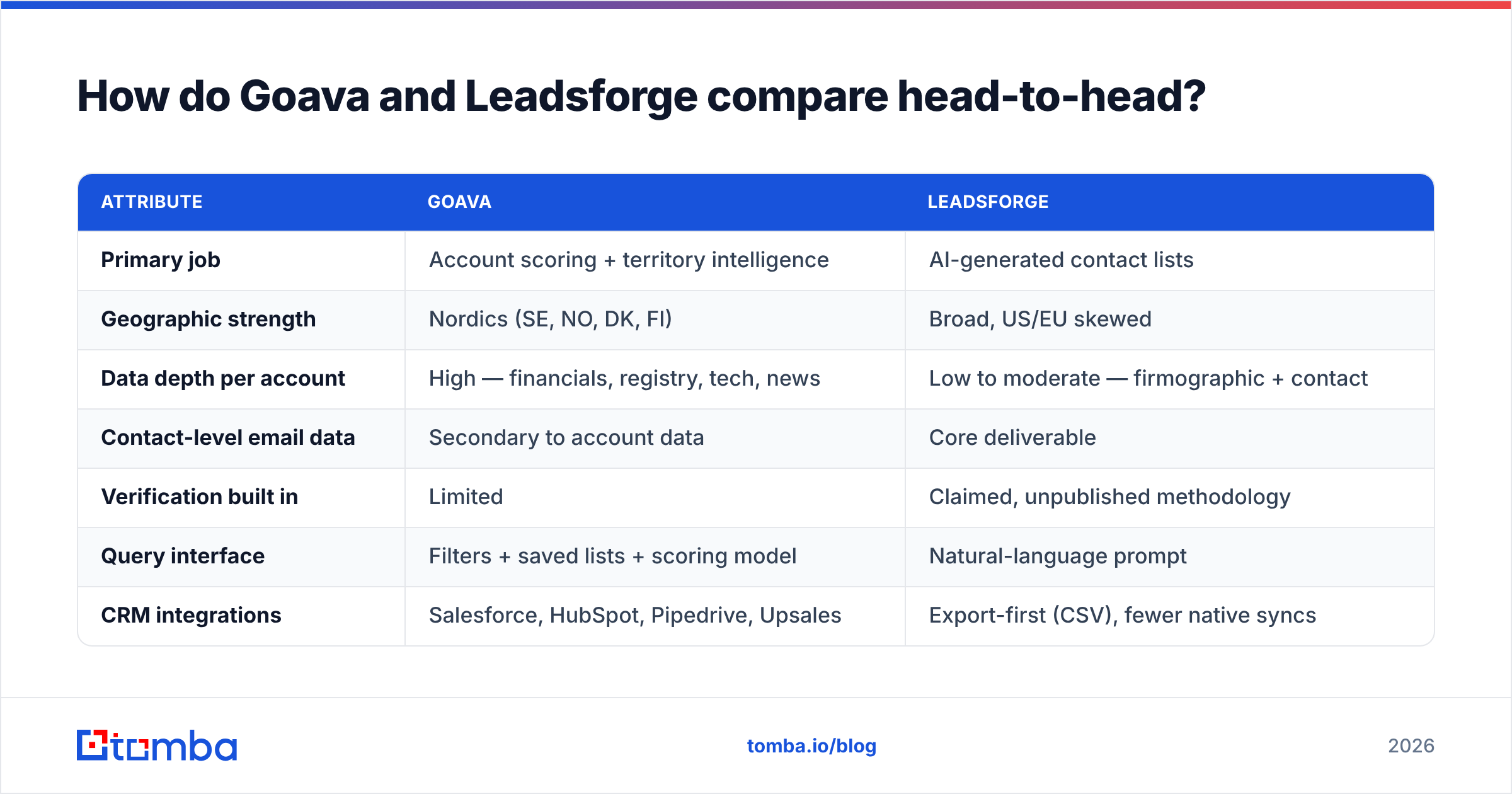
Goava vs Leadsforge: how do they compare head-to-head?#
| Attribute | Goava | Leadsforge |
|---|---|---|
| Primary job | Account scoring + territory intelligence | AI-generated contact lists |
| Geographic strength | Nordics (SE, NO, DK, FI) | Broad, US/EU skewed |
| Data depth per account | High — financials, registry, tech, news | Low to moderate — firmographic + contact |
| Contact-level email data | Secondary to account data | Core deliverable |
| Verification built in | Limited | Claimed, unpublished methodology |
| Query interface | Filters + saved lists + scoring model | Natural-language prompt |
| CRM integrations | Salesforce, HubSpot, Pipedrive, Upsales | Export-first (CSV), fewer native syncs |
| API access | Available on higher tiers | Limited |
| Pricing model | Quote-based, annual, per seat | Credit packs, lower entry cost |
| Free option | Demo only | Small free/trial allowance |
| Best for | AEs and managers doing territory planning | SDRs building volume lists |
| Weakest at | Non-Nordic coverage, price transparency | Account depth, auditability of sources |
The table makes the trade clear. Goava tells you why this account. Leadsforge hands you 2,000 rows. Buy Goava and expect a cheap list machine, and the contract will annoy you. Buy Leadsforge and expect a research layer, and you will still do the research by hand.
Which one has better data coverage?#
It depends on your territory. That is the single biggest factor in the goava vs leadsforge call.
Goava's edge comes from Nordic company registries. Think Bolagsverket data in Sweden, plus the same sources across the region. You get real revenue, staff counts, board changes, and credit signals. Not scraped guesses. If you sell into Stockholm, Oslo, Copenhagen, or Helsinki, a US-built database will struggle to match that. Outside the Nordics, Goava thins out fast. You pay premium rates for average data.
Leadsforge is broader but shallower. Prompt-based list building is handy. The catch is that you cannot see what the query did. Filter by hand and you know "industry = SaaS" came from one field. Let an AI read your sentence and you do not know if it matched a SIC code, a website keyword, or a job title. That is fine for top-of-funnel volume. It is bad for anything you must defend to a CRO.
Run these two checks before you commit to either tool:
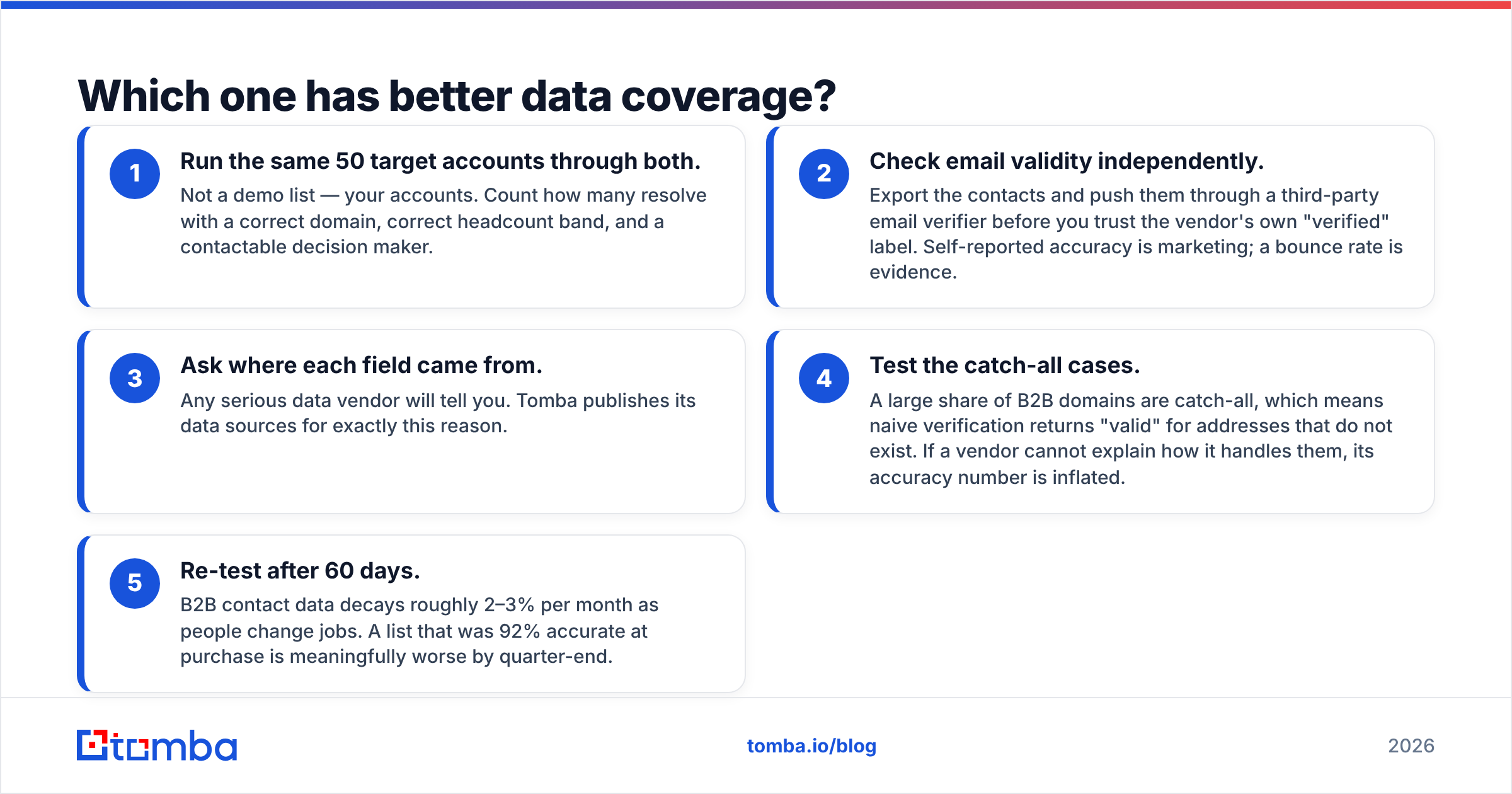
- Test 50 real target accounts in both. Not a demo list. Yours. Count how many come back with a correct domain, a right headcount band, and a reachable buyer.
- Verify the emails yourself. Export the contacts. Push them through a third-party email verifier before you trust any "verified" label. Self-reported accuracy is marketing. A bounce rate is evidence.
Then dig into sources and decay:
- Ask where each field came from. Any serious vendor will tell you. Tomba publishes its data sources for that reason.
- Test the catch-all cases. Many B2B domains are catch-all. Naive checks return "valid" for addresses that do not exist. If a vendor cannot explain how it handles them, its accuracy number is inflated.
- Re-test after 60 days. B2B contact data decays 2–3% per month as people change jobs. A list that was 92% accurate at purchase is much worse by quarter-end.
How does pricing actually work for each?#
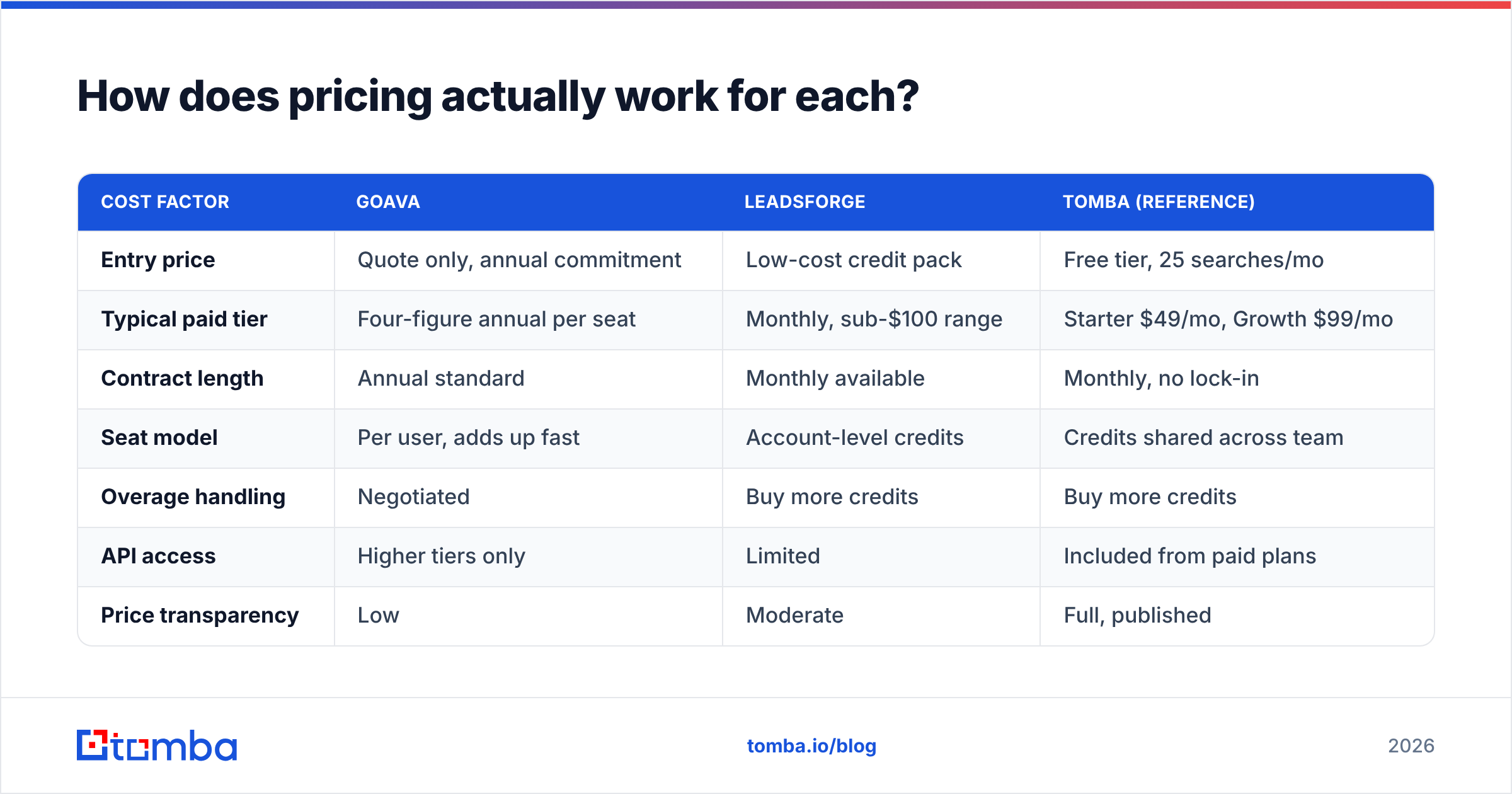
Neither vendor makes this easy. Treat every figure below as a starting point for a negotiation, not a rate card. Goava does not post prices. It sells annual deals through a sales call. Leadsforge advertises cheap entry credits, but it repackages them often.
| Cost factor | Goava | Leadsforge | Tomba (reference) |
|---|---|---|---|
| Entry price | Quote only, annual commitment | Low-cost credit pack | Free tier, 25 searches/mo |
| Typical paid tier | Four-figure annual per seat | Monthly, sub-$100 range | Starter $49/mo, Growth $99/mo |
| Contract length | Annual standard | Monthly available | Monthly, no lock-in |
| Seat model | Per user, adds up fast | Account-level credits | Credits shared across team |
| Overage handling | Negotiated | Buy more credits | Buy more credits |
| API access | Higher tiers only | Limited | Included from paid plans |
| Price transparency | Low | Moderate | Full, published |
The goava vs leadsforge price gap is mostly structural. Per-seat annual licensing means two new SDRs in Q3 trigger a fresh negotiation. Credit pricing tracks what you actually use. Most outbound teams change size through the year. When they do, seats quietly become the priciest line in the stack. Check the Tomba pricing page to see what an unbundled setup costs.
Who should choose Goava?#
Buy Goava if three things are true at once.
Your buyers sit in the Nordics. Your motion is account-based, not spray-and-pray. And someone will really use the scoring model, rather than export lists and ignore it.
That third point is where most Goava rollouts fail. Scoring only pays off if reps change what they do. If your reps live in the CRM and never open the tool, you pay intelligence prices for a list. So ask the vendor to show the in-CRM view before you sign. Not the standalone dashboard. That is where adoption lives or dies. The same rule applies to any CRM purchase.
Goava also wins when provenance matters. Registry data has a traceable origin. That helps in regulated markets, and in GDPR talks with a European legal team.
Who should choose Leadsforge?#
Choose Leadsforge if you are early, moving fast, and need any list in front of an SDR this week.
The plain-language input removes the learning curve. A founder who has never used a filter tool can build a usable list in ten minutes. For a seed-stage team testing three buyer profiles in a quarter, that speed beats depth. You are hunting for a signal, not drawing a territory map.
Be honest about the limits. Prompt-built lists need more cleaning. Dedupe, verify, and re-check titles before anything hits a sequence. Spend the time you saved on list-building here instead. Export early, too. Export-first tools give you leverage, because your data is not locked behind a renewal.

What do both tools miss?#
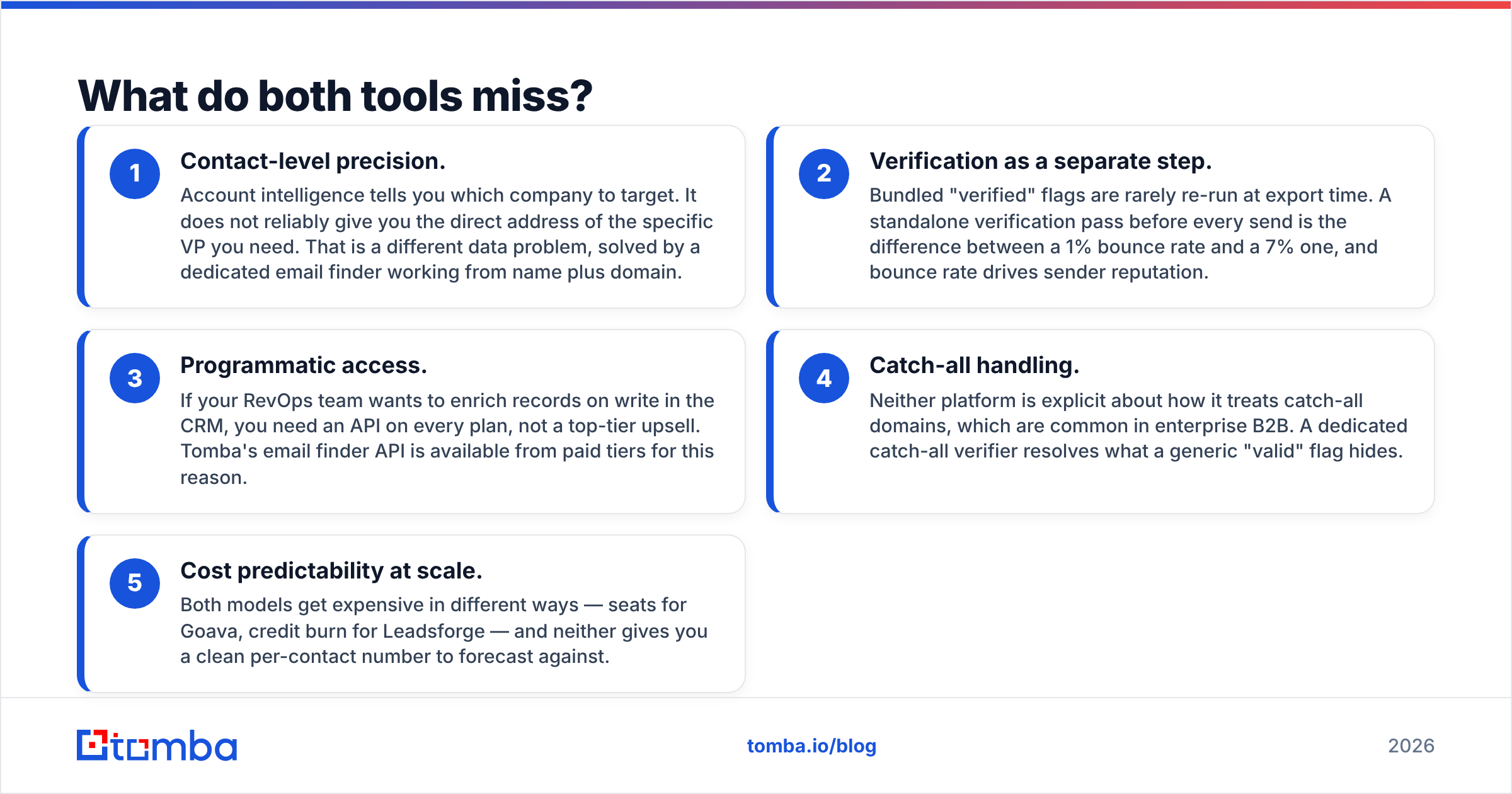
Both tools bundle assumptions that may not fit your workflow. The gaps show up in the same spots.
- Contact-level precision. Account data tells you which company to target. It rarely gives you the direct address of the one VP you need. A dedicated email finder solves that from a name and a domain.
- Verification as its own step. Bundled "verified" flags are seldom re-run at export time. A fresh check before every send is the gap between a 1% bounce rate and a 7% one. Bounces drive sender reputation.
Two more gaps bite later, once you scale:
- Programmatic access. RevOps teams want to enrich records on write. That needs an API on every plan, not a top-tier upsell. Tomba's email finder API ships with paid tiers.
- Catch-all handling. Neither tool explains how it treats catch-all domains, which are common in big firms. A catch-all verifier shows what a plain "valid" flag hides.
- Cost you can forecast. Seats bite with Goava. Credit burn bites with Leadsforge. Neither gives you a clean per-contact number.
Are there better alternatives in 2026?#
Yes, depending on the job. The mistake is to treat goava vs leadsforge as a two-horse race.
For Nordic account intelligence, Goava's closest rivals are Vainu and the Upsales data layer. For broad B2B contact data, Apollo and ZoomInfo win on volume. BookYourData suits teams that want a pay-as-you-go verified list with no subscription. Its guarantee model fits buyers who purchase in bursts rather than all year.
For contact discovery and verification, unbundling is usually cheaper. A finder, a verifier, and a data enrichment layer cost less than a full suite. You can also swap any piece. Keep your CRM as the system of record. Then pipe verified data into it through HubSpot or Salesforce.
The unbundled path also survives budget cuts. When a CFO trims spend, a six-figure annual contract is an easy target. A $49–$99/mo data utility that feeds every sequence is not.
How do you decide without a 60-day trial?#
Run this in a week.
List ten accounts you would love to close. Ask each vendor to pull the full record for those ten on a live call. That means firmographics, buyer names, direct emails, and the source of each field. Do not accept a curated demo set. Then export what they give you and verify the emails yourself. Now compute one number: cost per usable, verified, correctly-titled contact.
That number settles most goava vs leadsforge debates in about twenty minutes. It often shows that neither tool is the right first buy. What you needed was accurate contact data and a sequencer, not a whole platform.
Is your real bottleneck finding and verifying addresses for people you already know you want? Start with the Tomba Email Finder. The free tier gives you 25 searches a month, so you can benchmark any Goava or Leadsforge quote. Starter is $49/mo. Every plan includes verification, so you never pay twice to trust your own list. Test it on your ten dream accounts before you sign anything annual.
Related guides#
Ready to find emails that actually work?
Join 150,000+ professionals who stopped guessing and started sending. Free credits on signup — no credit card required.
Get the Tomba newsletter
Practical outbound tactics and product updates — once every two weeks.
About the author