Goava vs Lusha (2026): Which B2B Data Tool Actually Wins?
Goava sells Nordic sales intelligence. Lusha sells global contact data. They solve different halves of the same problem — here is which one fits your pipeline, and when a cheaper email-first tool beats both.
Most Goava vs Lusha shortlists start with the wrong question. The two tools do not do the same job. Goava finds the companies worth calling. Lusha finds the people to call there. This guide compares Goava vs Lusha on data, price and reach. It also names a cheaper option if all you need is verified work emails.
TL;DR
- Goava vs Lusha is not really a fight. Goava is a Nordic-focused sales intelligence and account-recommendation platform. Lusha is a global contact-data provider. One tells you which companies to call. The other tells you who to call there.
- Pick Goava if you sell into Sweden, Norway, Denmark or Finland. You get registry-grade firmographics and an ICP engine that surfaces accounts your reps would miss.
- Pick Lusha if you need contact data across US and EU markets fast. It lives inside LinkedIn and your CRM, and you can live with per-seat credit pricing.
- Pick neither if your real problem is "I have a company list, I need verified work emails." A dedicated email finder does that job cheaper and more accurately.
- Budget reality: Goava is quote-only enterprise pricing. Lusha is per-seat with credit caps. A domain-first email finder like Tomba starts at $49/mo flat with a free tier.
What are Goava and Lusha, exactly?#
They sit at different layers of the prospecting stack. Mixing them up is the most common budgeting mistake in this comparison.
Goava is a Swedish sales intelligence platform built for the Nordic market. Its core job is account discovery. It pulls in official registry data, financials, web tech, hiring signals and news. Then it scores and recommends companies that look like your best customers. Reps open Goava to answer one question: "who should be on my list this quarter?"
Lusha is a contact data provider. Its core job is contact retrieval. You land on a LinkedIn profile, a company page or a filtered list. Lusha returns work emails, direct dial numbers and basic firmographics. You push that into HubSpot, Salesforce or your sequencer. Reps open Lusha to answer a different question: "how do I reach this person?"
That split drives the whole Goava vs Lusha debate. A Goava seat without a contact-data layer leaves reps with great target accounts and no phone numbers. A Lusha seat without an account-selection process leaves reps burning credits on companies that were never a fit.
The four layers of a prospecting stack#
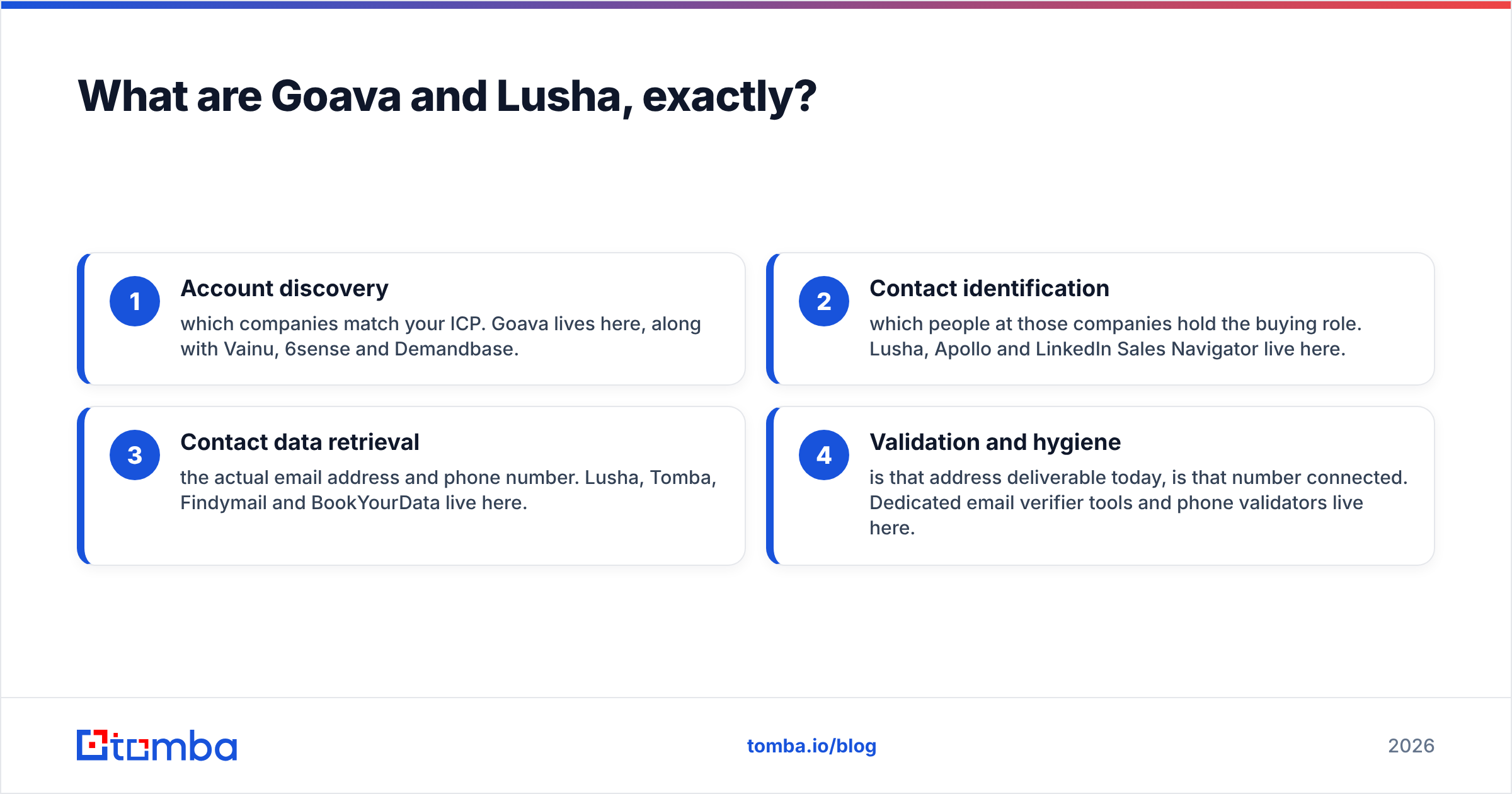
Map any tool to one of these before you compare prices:
- Account discovery — which companies match your ICP. Goava lives here, along with Vainu, 6sense and Demandbase.
- Contact identification — which people at those companies hold the buying role. Lusha, Apollo and LinkedIn Sales Navigator live here.
- Contact data retrieval — the actual email address and phone number. Lusha, Tomba, Findymail and BookYourData live here.
- Validation and hygiene — is that address still live, is that number connected. Dedicated email verifier tools and phone validators live here.
Goava covers layer 1 deeply and touches layer 2. Lusha covers layers 2 and 3 and touches layer 4. Neither covers all four well. That is why most teams who buy one end up buying something else beside it.
Goava vs Lusha: how do they compare head-to-head?#
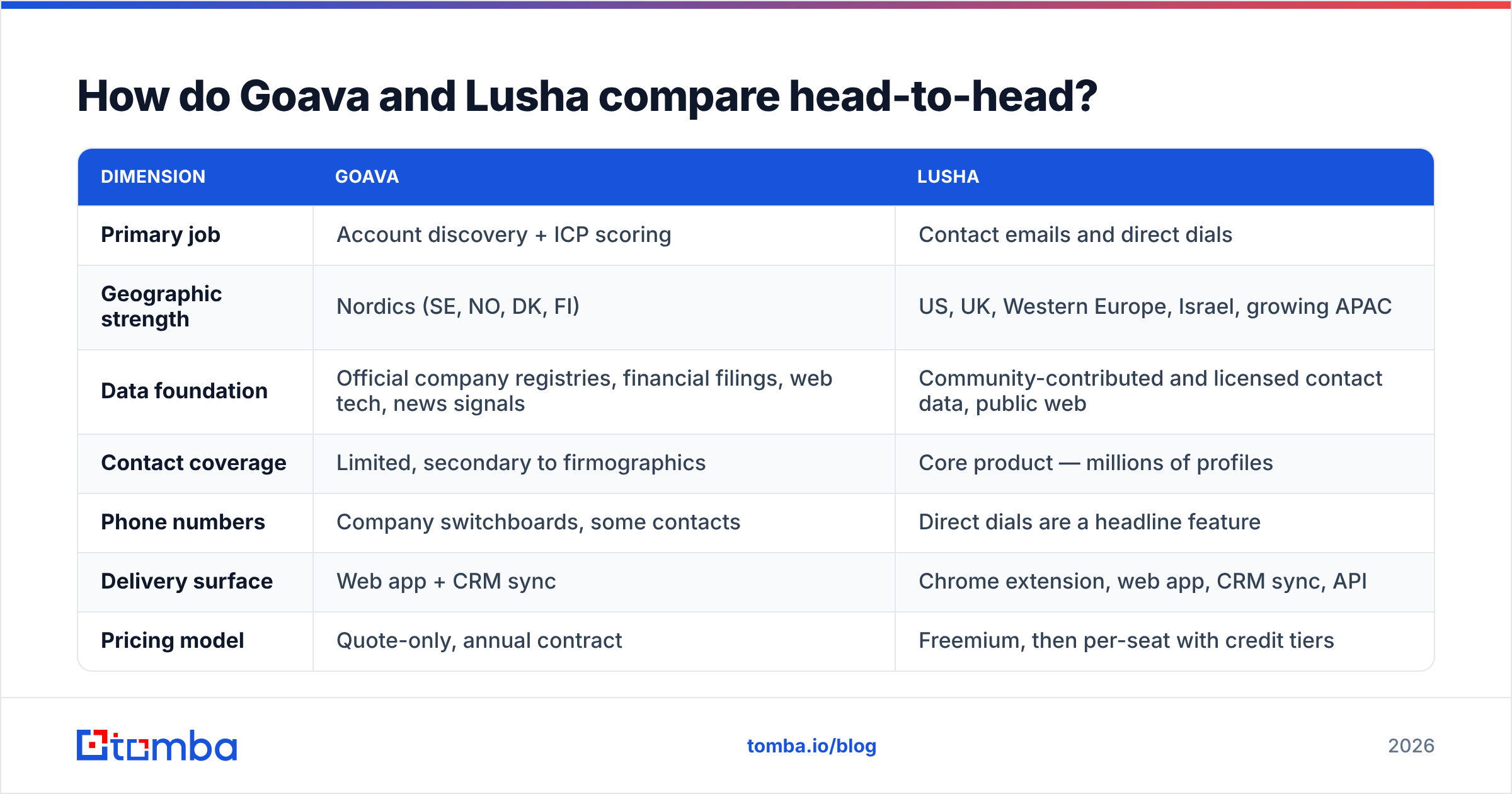
Here is the practical comparison. Prices and limits shift, so treat published figures as a starting point. Check each vendor's page before you sign anything.
| Dimension | Goava | Lusha |
|---|---|---|
| Primary job | Account discovery + ICP scoring | Contact emails and direct dials |
| Geographic strength | Nordics (SE, NO, DK, FI) | US, UK, Western Europe, Israel, growing APAC |
| Data foundation | Official company registries, financial filings, web tech, news signals | Community-contributed and licensed contact data, public web |
| Contact coverage | Limited, secondary to firmographics | Core product — millions of profiles |
| Phone numbers | Company switchboards, some contacts | Direct dials are a headline feature |
| Delivery surface | Web app + CRM sync | Chrome extension, web app, CRM sync, API |
| Pricing model | Quote-only, annual contract | Freemium, then per-seat with credit tiers |
| Free option | Demo only | Free plan with a small monthly credit allowance |
| Best fit team size | Nordic mid-market and enterprise sales orgs | SDR teams of 1–100 anywhere |
| Biggest weakness | Nearly useless outside the Nordics | Credit burn and per-seat cost scale badly |
Two rows deserve more detail.
Geography is not a footnote for Goava. Its edge comes from Nordic public data, which is unusually rich and machine-readable. Swedish and Norwegian registries publish revenue, headcount, board members and filings in a structured way. Most countries do not. Goava turns that into a real moat. Point it at Spain or Ohio and the moat disappears.
Per-seat credits are not a footnote for Lusha. Ten reps on a mid-tier plan is a very different invoice than one power user. Say one ops person builds lists for the whole team. Then per-seat pricing is the wrong shape for you, and a flat-rate API tool will cost less.
Whose data is actually more accurate?#
The Goava vs Lusha accuracy question has no single answer. Ask accurate at what, because each one claims accuracy on different fields.
Goava's firmographic data is excellent in-region. It comes from mandatory government filings, not from scraping or guesswork. Revenue, entity structure and headcount bands for a Swedish AB are about as reliable as B2B data gets. Its contact data is thinner, and it is not why anyone buys the product.
Lusha's accuracy is contact-level, and it varies by segment. Hit rates on senior titles at mid-market US and Western European companies are usually solid. Coverage thins out for smaller firms, non-English regions and roles that avoid LinkedIn. Review sites like G2 show the same themes across the whole category. Good coverage on core markets, uneven results outside them, and the odd stale record. That is normal for the category, not a Lusha flaw.
The takeaway is the same either way: never send to unverified data. Even a 95% accurate list of 10,000 contacts holds 500 bounces. Modern inbox providers punish that hard. Run any list through a verification pass before it reaches your sequencer. Treat catch-all domains as their own bucket, and use a catch-all verifier instead of mailing them blind.

How does pricing compare in practice?#
Goava vs Lusha pricing splits along the same line as the products. Goava does not publish prices. It is a sales-led, annual-contract product. In practice that means a four- or five-figure yearly commitment, depending on seats and modules. Lusha publishes its tiers and sells per user with monthly credit allowances. It also has a free plan built to hook individual reps before a team rollout.
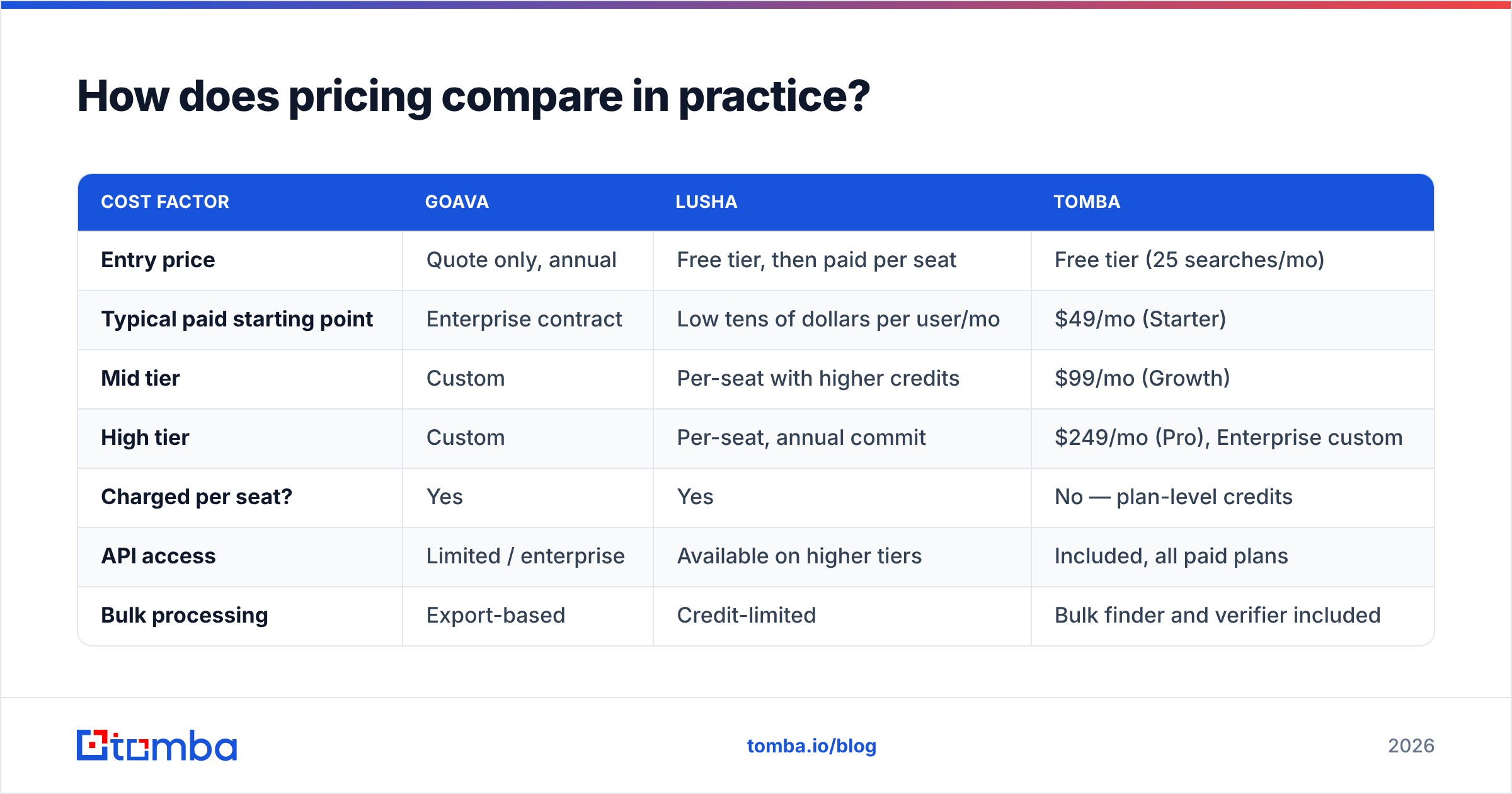
The number that matters to most buyers is cost per usable contact. Here is how the two stack up against a dedicated email-finding tool.
| Cost factor | Goava | Lusha | Tomba |
|---|---|---|---|
| Entry price | Quote only, annual | Free tier, then paid per seat | Free tier (25 searches/mo) |
| Typical paid starting point | Enterprise contract | Low tens of dollars per user/mo | $49/mo (Starter) |
| Mid tier | Custom | Per-seat with higher credits | $99/mo (Growth) |
| High tier | Custom | Per-seat, annual commit | $249/mo (Pro), Enterprise custom |
| Charged per seat? | Yes | Yes | No — plan-level credits |
| API access | Limited / enterprise | Available on higher tiers | Included, all paid plans |
| Bulk processing | Export-based | Credit-limited | Bulk finder and verifier included |
Full Tomba pricing is public and flat-rate. That is the structural difference. You do not pay twice when a second rep needs the same contact. For a five-person SDR team, per-seat models usually land 3–5x higher at the same volume.
None of this makes Goava overpriced. Say Goava surfaces twelve Nordic accounts a year that your reps would never have found, and your ACV is €40k. The math is trivially positive. It makes Goava specific. Buy it for account discovery, not for contact data. Do not let a bundle pitch convince you it replaces your data layer.
Who should choose Goava?#
Say yes to Goava if three or more of these are true:
- Your TAM is Nordic. Sweden, Norway, Denmark or Finland make up most of your pipeline, and registry-grade firmographics really change your targeting.
- Account selection is your bottleneck, not contact data. Reps have reachable contacts but keep working the wrong companies.
- You run a defined ICP motion. Goava's engine learns from closed-won history. With 15 customers, it has nothing to match against.
- You use a CRM it syncs with. HubSpot, Salesforce, Pipedrive and the Nordic-native CRMs are where the value lands. Goava as a standalone browser tab gets abandoned in six weeks.
- You can absorb an annual commitment. There is no month-to-month escape hatch.
Say no if you sell globally, or if you are pre-product-market-fit. Say no too if your honest problem is "we have a list, we cannot reach anyone on it."
Who should choose Lusha?#
Say yes to Lusha if:
- You need direct dials, not just emails. This is Lusha's strongest edge over email-only tools, and phone-heavy teams really benefit.
- Your reps prospect inside LinkedIn. The extension is fast, and reps adopt it without training.
- Your target market is US or Western Europe. Coverage is strongest there.
- You want to start free. The free tier lets you test hit rates on your own ICP first. Every buyer should do that.
Say no if a small team does high-volume list building. Say no if you need an API-first workflow at a sane price. Say no if your seats outnumber your credit use — the classic per-seat waste pattern.
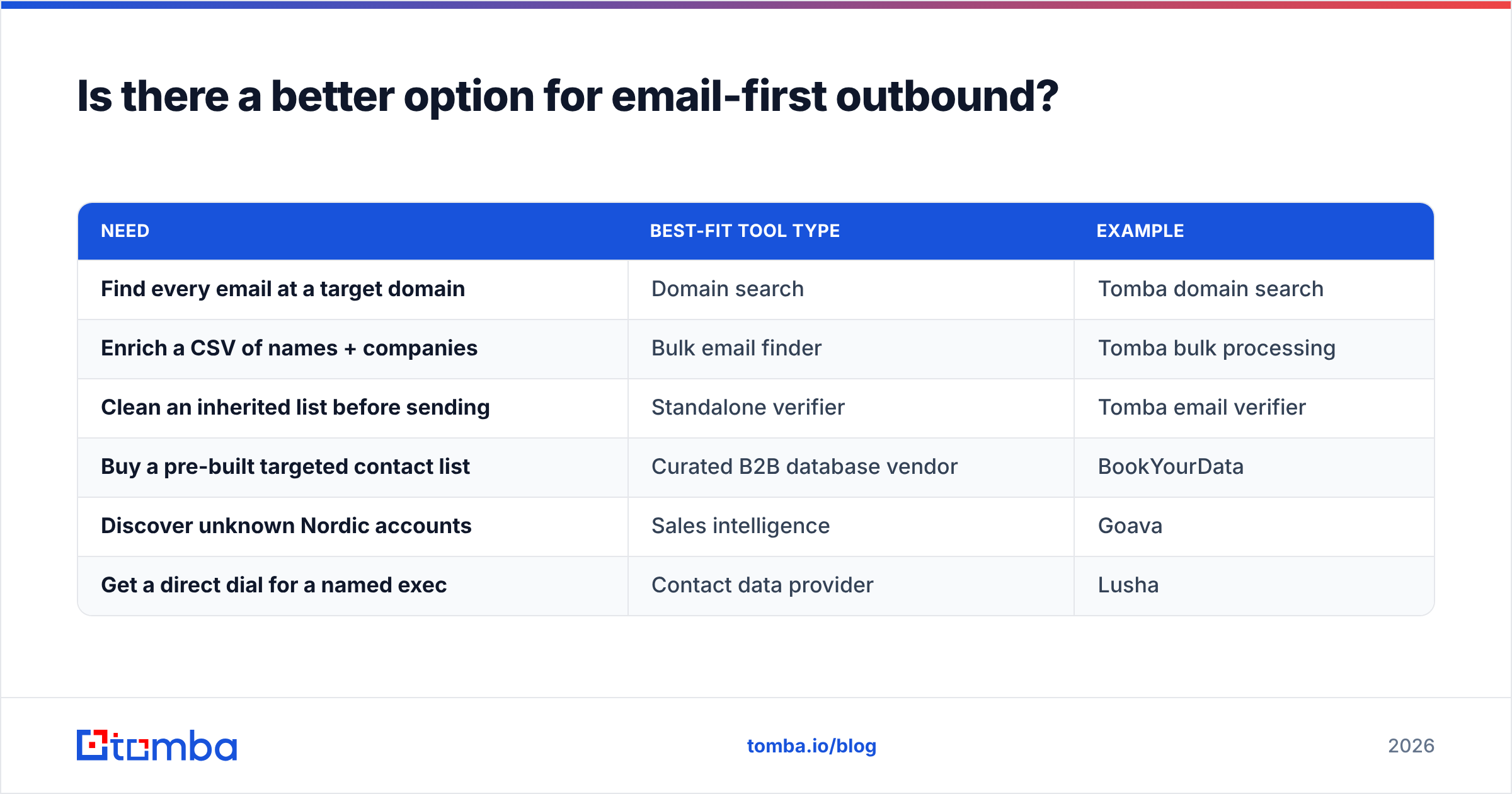
Is there a better option for email-first outbound?#
Yes — but only if your job is "turn a company list into verified inboxes." That is a narrower problem than either platform solves. Narrower tools solve it cheaper.
| Need | Best-fit tool type | Example |
|---|---|---|
| Find every email at a target domain | Domain search | Tomba domain search |
| Enrich a CSV of names + companies | Bulk email finder | Tomba bulk processing |
| Clean an inherited list before sending | Standalone verifier | Tomba email verifier |
| Buy a pre-built targeted contact list | Curated B2B database vendor | BookYourData |
| Discover unknown Nordic accounts | Sales intelligence | Goava |
| Get a direct dial for a named exec | Contact data provider | Lusha |
That fourth row deserves an honest note. Maybe you would rather buy a filtered, pay-as-you-go list than run discovery yourself. Then a database vendor like BookYourData is a fair route, and often a cleaner fit than a platform subscription. Different buying motion, same destination.
For the email rows, a dedicated finder wins on unit cost. It is not paying for an account-scoring engine or a per-seat sales model. Flat plans, API access on every paid tier, and data enrichment on the same credits mean one ops person can serve a whole sales floor.
What does a realistic 2026 stack look like?#
Most teams that weigh Goava vs Lusha end up with a layered stack, not a single winner:
- Account layer — Goava (Nordic), Vainu, or a manual ICP list from your CRM's closed-won data. Output: a target account list.
- People layer — LinkedIn Sales Navigator or Lusha, to find the right titles at those accounts. Output: names and roles.
- Data layer — an email finder and verifier, to turn names and domains into deliverable addresses. Output: a sendable list.
- Send layer — your sequencer, warmed domains, and a routine that suppresses anything not verified in the last 90 days.
Goava and Lusha sit on different rungs. That is why "which one wins" has no clean answer. "Which one do I buy first" does. Buy for your bottleneck. Working the wrong accounts? Buy layer 1. Have accounts but no phone numbers? Buy layer 2. Have names but bouncing emails? Buy layer 3 and stop overpaying for the rest.
Goava vs Lusha: the verdict#
Goava wins for Nordic account discovery. Lusha wins for global contact retrieval, especially direct dials. Neither wins on cost per verified email, and for many teams that is the metric that governs pipeline.
Sell into the Nordics with a targeting problem? Goava is a defensible line item, and there is no close substitute. Prospect globally on LinkedIn and need phone numbers? Lusha's free tier makes testing risk-free. Run 50 credits against your own ICP and measure the hit rate yourself. Do that before you believe any vendor's accuracy claim, including this article's.
But maybe you read this whole Goava vs Lusha comparison for one reason. Your list has domains and names, and you just need addresses that land. Then you are shopping one layer too high.
Start with the Tomba Email Finder. Free tier at 25 searches a month. $49/mo Starter with no per-seat penalty. Built-in verification, plus an API so your ops team can wire it into whatever account layer you choose. Run your next 200 prospects through it and compare the bounce rate to what you pay today. That test costs nothing, and it settles the argument faster than any comparison table.
Related guides#
Ready to find emails that actually work?
Join 150,000+ professionals who stopped guessing and started sending. Free credits on signup — no credit card required.
Get the Tomba newsletter
Practical outbound tactics and product updates — once every two weeks.
About the author