Goava vs Wiza (2026): Which Sales Data Tool Wins?
Goava scores Nordic accounts with AI; Wiza pulls emails from LinkedIn lists. They solve different halves of prospecting — here's which one your team actually needs, and what each costs.
TL;DR
- Goava is a Nordic-focused sales intelligence platform: it scores and recommends accounts using Swedish/Nordic company registry data, financials, and signals. It is an account-selection tool, not a contact-finder.
- Wiza is a LinkedIn-first contact extractor: you run a Sales Navigator search, export it, and Wiza returns verified work emails and phone numbers.
- They barely overlap. Goava answers "which companies should I call?"; Wiza answers "how do I reach the people at those companies?"
- Pricing reality: Wiza starts around $39/mo for a light credit pack and climbs fast on volume; Goava sells annual seats on quote and skews enterprise. Neither publishes a true free-forever tier with meaningful volume.
- If you sell outside the Nordics, Goava's core advantage evaporates. If you need contact data at API scale and outside LinkedIn's walls, a dedicated email finder is the cheaper, more durable layer.
Most "Goava vs Wiza" searches come from a team that has confused two separate problems. Let's split them properly, then decide.
What is Goava?#
Goava is a Swedish sales intelligence platform built for B2B teams selling into the Nordic market. Its pitch is prioritisation: instead of a rep guessing which of 40,000 registered companies deserves a call this week, Goava ingests company registry data, financial filings, hiring activity, technology usage, and news signals, then ranks accounts by fit against your existing customer base.
The product's real engine is its lookalike modelling. You connect your CRM, Goava learns what your closed-won accounts have in common — revenue band, employee count, industry code, growth trajectory — and surfaces companies that resemble them. Reps get a daily recommendation feed rather than a static list.
Where it excels:
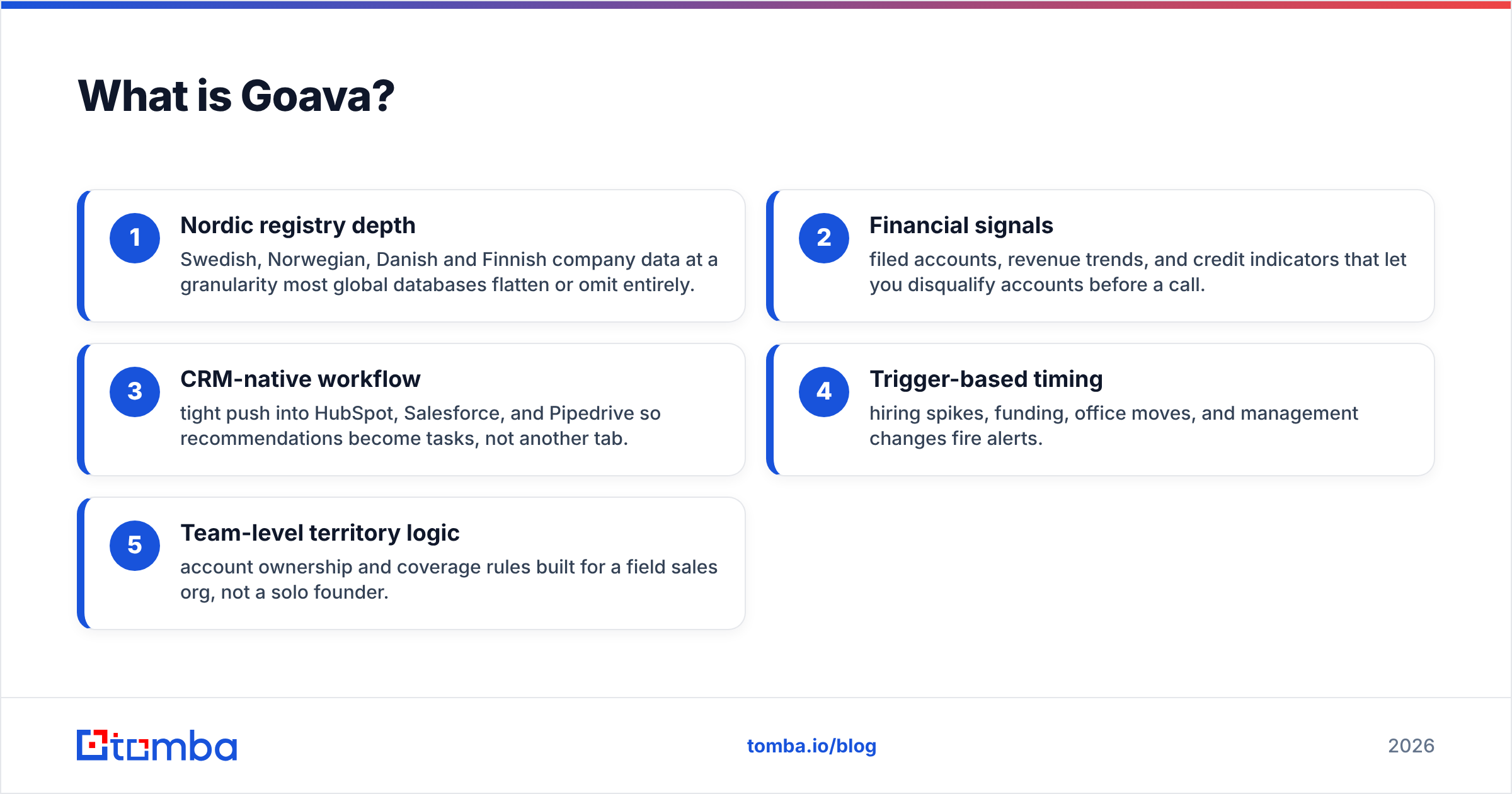
- Nordic registry depth — Swedish, Norwegian, Danish and Finnish company data at a granularity most global databases flatten or omit entirely.
- Financial signals — filed accounts, revenue trends, and credit indicators that let you disqualify accounts before a call.
- CRM-native workflow — tight push into HubSpot, Salesforce, and Pipedrive so recommendations become tasks, not another tab.
- Trigger-based timing — hiring spikes, funding, office moves, and management changes fire alerts.
- Team-level territory logic — account ownership and coverage rules built for a field sales org, not a solo founder.
What Goava is not: a global contact database. Its contact coverage outside the Nordics thins out sharply, and its email data is not the reason anyone buys it.
What is Wiza?#
Wiza inverts the model. It starts from LinkedIn — specifically Sales Navigator — and converts a saved search or list into a clean CSV of contacts with verified emails and, on higher plans, mobile numbers. You install the Chrome extension, run your search, click export, and Wiza scrapes and enriches in the background.
The value is speed of the last mile. If your ICP definition already lives in Sales Navigator filters (title, headcount, geography, recent job change), Wiza turns that filter into an outreach-ready list in minutes. It also offers a standalone people search and a REST API for teams that outgrew the extension.
Its limits are structural. Wiza is only as good as LinkedIn's index — if a prospect has no LinkedIn presence, or the profile is stale, Wiza has nothing to enrich. It also inherits LinkedIn's account-safety risk profile: heavy extraction from a personal Sales Navigator seat is not a zero-risk activity, and teams running large volumes typically burn through dedicated accounts.

Goava vs Wiza: how do they actually compare?#
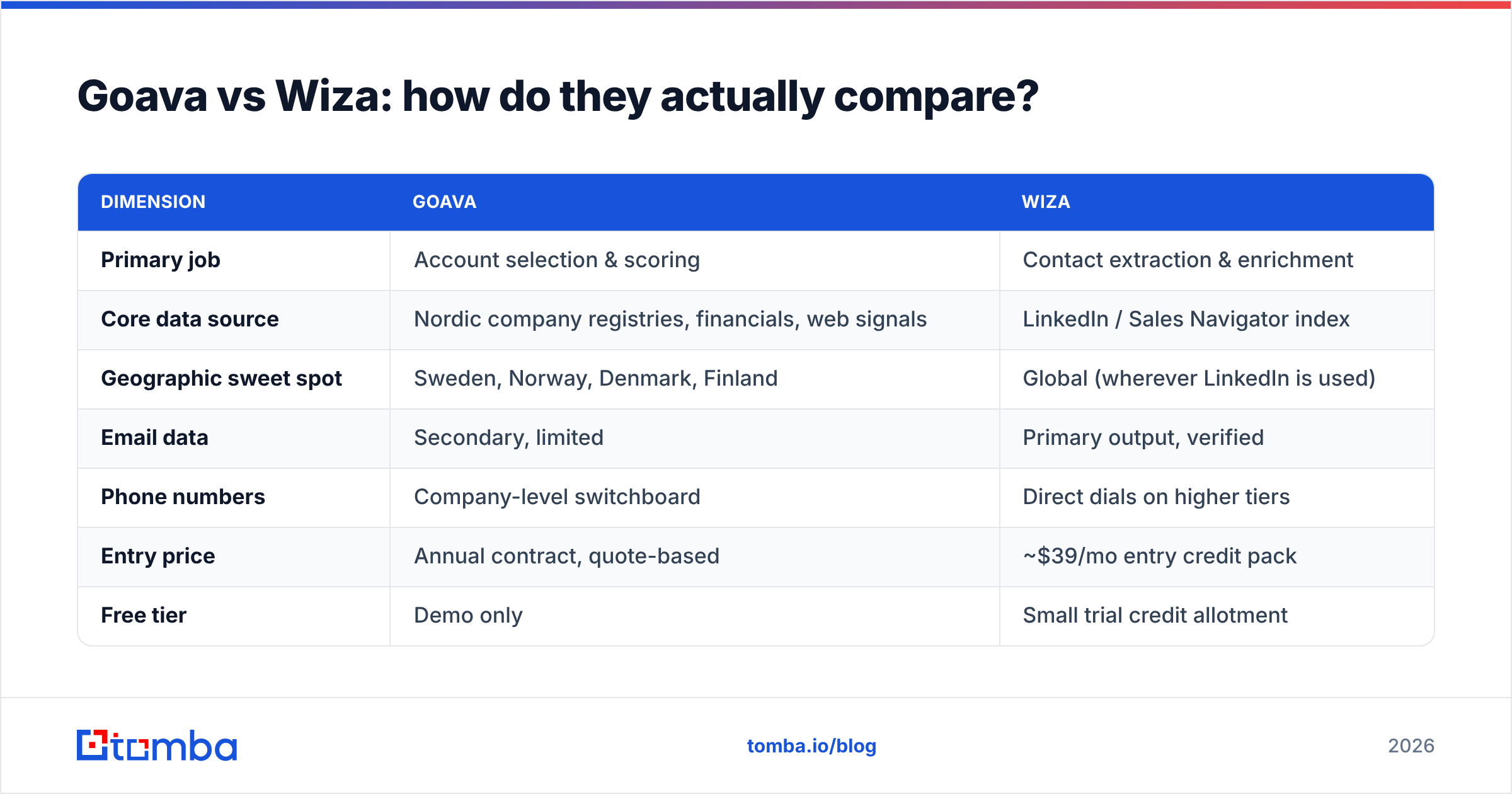
| Dimension | Goava | Wiza |
|---|---|---|
| Primary job | Account selection & scoring | Contact extraction & enrichment |
| Core data source | Nordic company registries, financials, web signals | LinkedIn / Sales Navigator index |
| Geographic sweet spot | Sweden, Norway, Denmark, Finland | Global (wherever LinkedIn is used) |
| Email data | Secondary, limited | Primary output, verified |
| Phone numbers | Company-level switchboard | Direct dials on higher tiers |
| Entry price | Annual contract, quote-based | ~$39/mo entry credit pack |
| Free tier | Demo only | Small trial credit allotment |
| API access | Available on higher plans | Yes, on paid plans |
| CRM integrations | HubSpot, Salesforce, Pipedrive, Upsales | HubSpot, Salesforce, Outreach, Salesloft |
| Best for | Nordic field sales teams with a defined ICP | SDR teams running LinkedIn-sourced outbound |
| Weakness | Near-useless outside the Nordics | Blind to anyone off LinkedIn |
Read that table twice. There is no row where the two products are competing for the same budget line — except the row that matters to a CFO: total spend on "data."
Which one should you buy for Nordic markets?#
If your entire addressable market is Sweden plus a bit of Norway, Goava is a legitimately strong pick and the comparison stops being close. Nordic registry data is genuinely hard to assemble yourself: Bolagsverket filings, industry codes, and financial history don't come packaged in the global databases most vendors resell. Goava has done that work and keeps it fresh.
The practical test is whether your sales motion is account-led. Do reps work a named territory of 200–800 companies where picking the right 30 this quarter is the whole game? That is Goava's shape. If instead your reps blast 3,000 contacts a month across five countries, the scoring layer is overhead you won't use.
One honest caveat: Goava's contact layer is thin enough that most customers pair it with something else for email. That pairing cost belongs in your evaluation, not in a footnote.
Which one should you buy for LinkedIn-driven outbound?#
Wiza wins this lane by simply being purpose-built for it. If your prospecting process is "define a Sales Navigator filter, export, sequence," Wiza removes the friction with fewer steps than almost anything else on the market. G2 reviewers consistently praise the export speed and the CSV hygiene — column mapping that doesn't need cleanup before it hits your sequencer.
Three things to price in before you commit:
- Credit burn is nonlinear. Exporting a 2,500-person list consumes credits per row regardless of how many rows you ultimately email. Filter hard before export, not after.
- Sales Navigator is a prerequisite. That's roughly $99/user/month on top of Wiza. Budget the pair, not the tool.
- Coverage drops in non-English markets. German Mittelstand, Japanese enterprise, and much of Southern Europe are under-represented on LinkedIn relative to their actual B2B activity.
Is there a third option that covers the gap?#
Yes, and it's worth naming because most teams comparing Goava vs Wiza end up buying neither exclusively.
The gap is contact data that isn't chained to LinkedIn and isn't chained to one region. Once you've picked target accounts — via Goava, via your CRM, via a spreadsheet a founder wrote — you need emails for named people at those domains. That is a distinct, commodity-priced job.
This is where a dedicated finder-plus-verifier stack earns its keep. Tomba's domain search takes a company URL and returns the people and email patterns behind it, no LinkedIn profile required. The email verifier runs SMTP-level validation so you're not shipping bounces into a warm domain. Pricing is transparent: free tier at 25 searches/month, Starter $49/mo, Growth $99/mo, Pro $249/mo — see full Tomba pricing rather than a quote form.

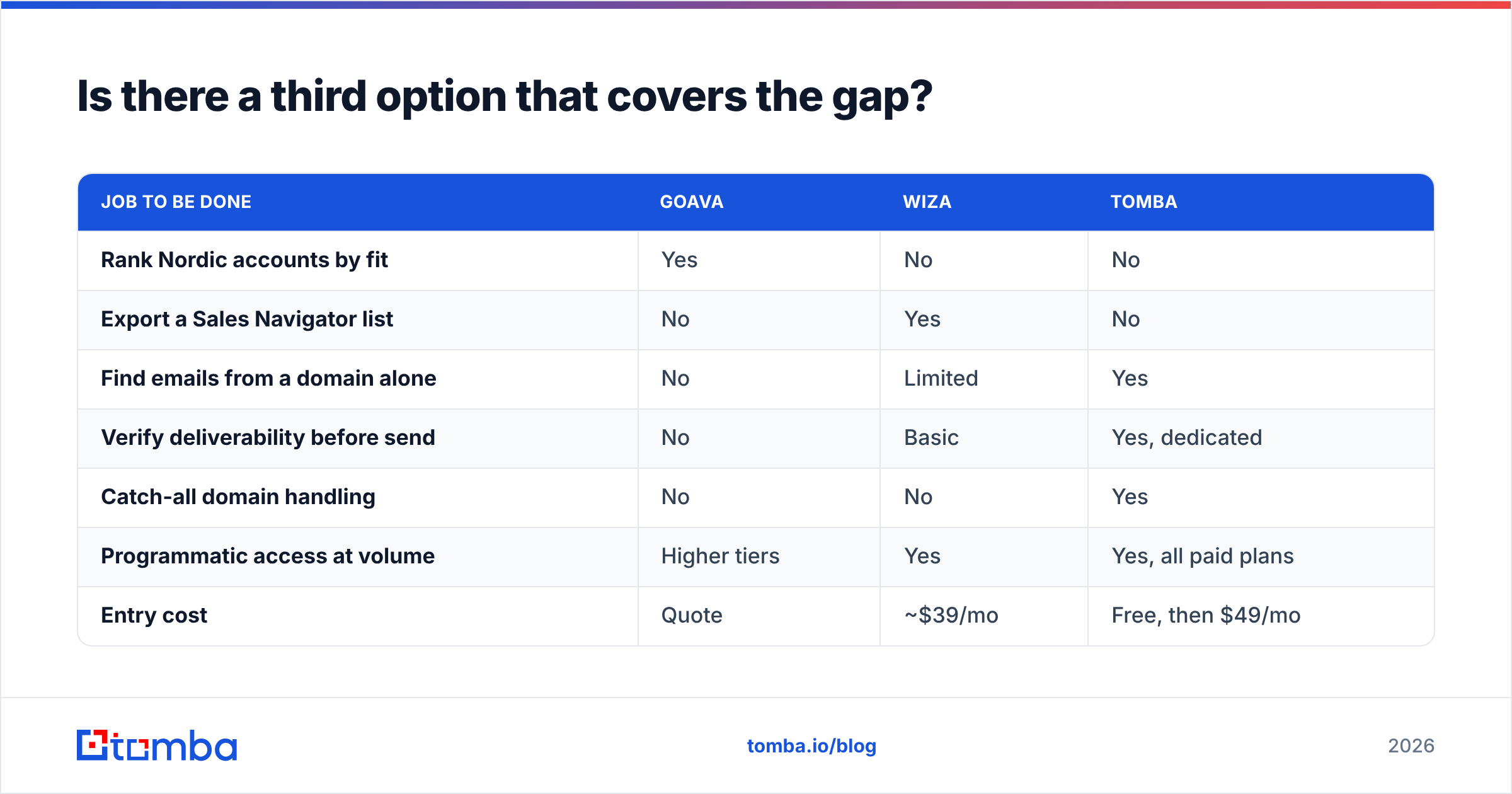
| Job to be done | Goava | Wiza | Tomba |
|---|---|---|---|
| Rank Nordic accounts by fit | Yes | No | No |
| Export a Sales Navigator list | No | Yes | No |
| Find emails from a domain alone | No | Limited | Yes |
| Verify deliverability before send | No | Basic | Yes, dedicated |
| Catch-all domain handling | No | No | Yes |
| Programmatic access at volume | Higher tiers | Yes | Yes, all paid plans |
| Entry cost | Quote | ~$39/mo | Free, then $49/mo |
Note the honest row: Wiza's verification is real but bundled and basic. If your domain reputation matters — and after the 2024 Google and Yahoo bulk sender rules, it does — a dedicated verification pass is not optional. HubSpot's research on email deliverability puts list hygiene ahead of nearly every other sending variable.
How do the pricing models really differ?#
Goava sells annual contracts, typically per-seat, with a platform fee. You will talk to a rep. Expect the structure common to Nordic SaaS: a floor that makes sense for a team of five or more and rarely for a team of one. There is no self-serve path.
Wiza sells credits. The entry tier lands near $39/month for a modest allotment, with Email + Phone plans stepping up substantially. The math to run: divide monthly spend by the number of contacts you will actually sequence, not the number you export. Teams routinely discover their real cost-per-usable-contact is 3–4x the headline rate because they exported wide.
Tomba prices on searches with the same logic but a materially lower floor, and — relevant if you're building tooling — the Tomba API is included on every paid plan rather than gated behind an enterprise tier. For teams needing scale without seat maths, bulk email finder runs lists in one pass.
If you're comparing more broadly, G2's sales intelligence category is a reasonable place to sanity-check claims against current reviewer sentiment before you sign anything.
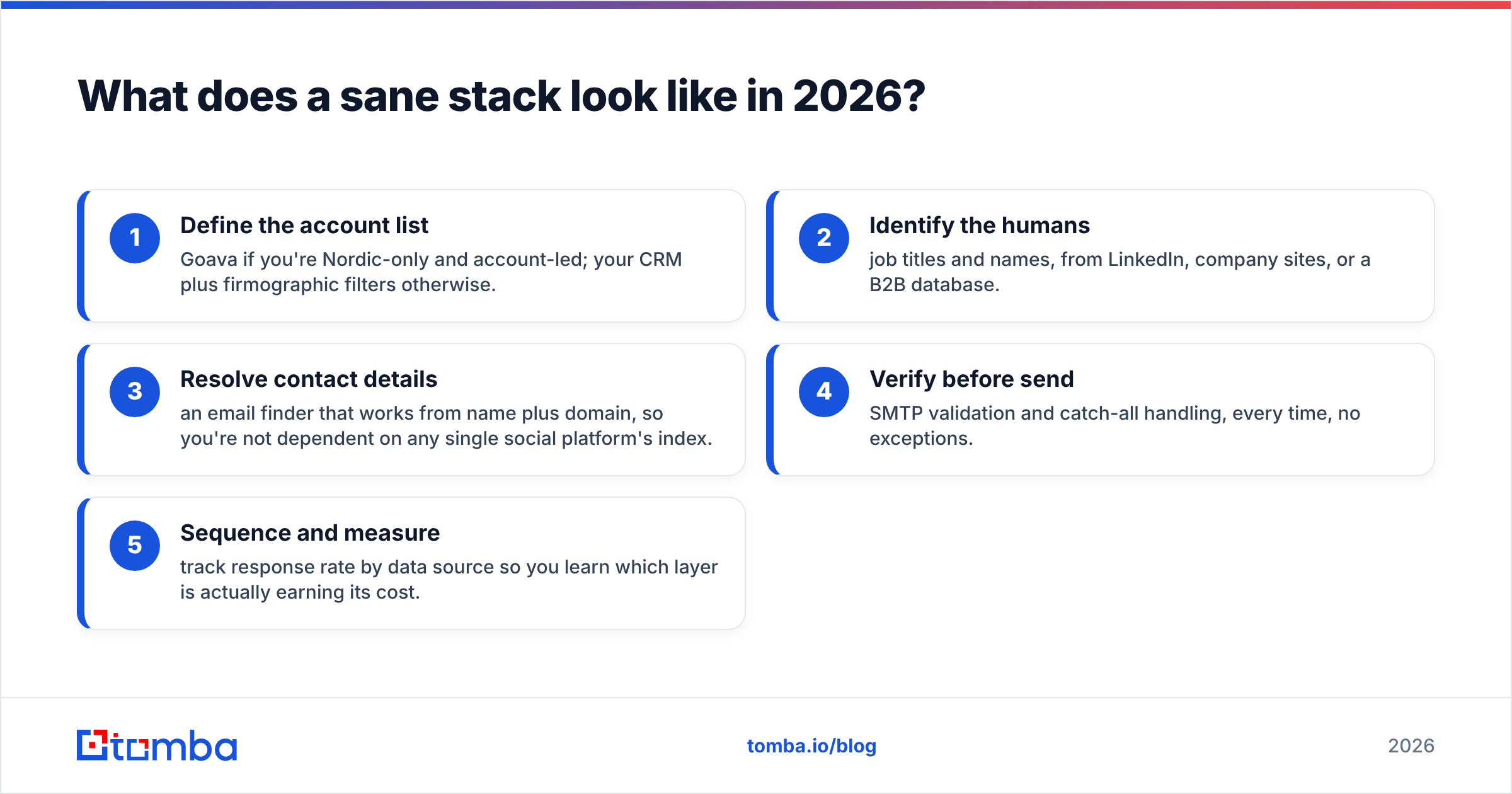
What does a sane stack look like in 2026?#
Here is the pattern that works for most mid-market B2B teams:
- Define the account list — Goava if you're Nordic-only and account-led; your CRM plus firmographic filters otherwise.
- Identify the humans — job titles and names, from LinkedIn, company sites, or a B2B database.
- Resolve contact details — an email finder that works from name plus domain, so you're not dependent on any single social platform's index.
- Verify before send — SMTP validation and catch-all handling, every time, no exceptions.
- Sequence and measure — track response rate by data source so you learn which layer is actually earning its cost.
Most teams over-invest in step 1 and under-invest in steps 3 and 4. A perfectly scored account list that bounces 22% of its emails produces worse results than a rough list with clean data. Deliverability is the constraint, not targeting sophistication.
Frequently asked questions#
Is Goava available outside the Nordics? Goava serves some data for other European markets, but its depth, freshness, and scoring accuracy are built around Nordic registries. Teams selling into DACH, UK, or North America consistently report thinner results.
Does Wiza violate LinkedIn's terms of service? Wiza operates in the same grey zone as every LinkedIn extraction tool. LinkedIn's user agreement restricts automated data collection. Wiza mitigates risk, but the account exposure sits with you. Read LinkedIn's own terms rather than a vendor's summary of them.
Can I use both together? Yes, and some Nordic teams do: Goava for account selection, Wiza for contact export on the accounts that clear scoring. Just price the combined stack honestly — you're now paying for Goava, Wiza, and Sales Navigator.
Which has better email accuracy? Wiza, comfortably, because it's the product's core output while it's peripheral for Goava. Against dedicated finders, Wiza is competitive on LinkedIn-sourced contacts and weaker on contacts with no LinkedIn footprint.
What if I only need emails, not scoring or exports? Then neither tool is a good fit. You want a finder-and-verifier stack at a fraction of the price, ideally with API access so it fits into whatever you already run.
The verdict#
Goava if you sell to Nordic companies with a named-account motion and need to decide who to work. Wiza if your prospecting starts and ends in Sales Navigator and you need clean exports fast. Neither if your actual bottleneck is finding and verifying email addresses at scale across markets and sources — which, for most outbound teams, it is.
Start with the layer that unblocks everything else. Run a domain through the Tomba Email Finder and see what it returns for one of your target accounts — the free tier gives you 25 searches a month with no card, enough to benchmark it against whatever you're paying for today before you sign another annual contract.
Related guides#
Ready to find emails that actually work?
Join 150,000+ professionals who stopped guessing and started sending. Free credits on signup — no credit card required.
Get the Tomba newsletter
Practical outbound tactics and product updates — once every two weeks.
About the author