GoCustomer vs GrowMeOrganic (2026): Which One Should You Pick?
GoCustomer sells AI-personalized outreach. GrowMeOrganic sells unlimited exports and drip campaigns. We break down data quality, pricing, deliverability risk, and which one actually fits your outbound motion.
If you are weighing GoCustomer vs GrowMeOrganic, you are really choosing between two bets. One tool bets on bigger lists. The other bets on better messages. This guide compares both on the things that cost you money.
TL;DR
- GrowMeOrganic is the volume play. You get a B2B database, LinkedIn and Sales Navigator extraction, and drip campaigns on one flat plan.
- Pick it if you need lots of contacts and simple sequences, without watching a credit meter.
- GoCustomer is the AI outreach play. It leans on AI-written personalization, multichannel steps, and reply handling.
- Pick it if your bottleneck is writing and sending, not sourcing.
- Neither tool is a real verification engine. Both hand you data that still needs a bounce check before it touches your sending domain.
- Pricing works differently. GrowMeOrganic publishes self-serve tiers. GoCustomer usually routes buyers to a demo and a custom quote.
- Confirm current numbers on the vendor site before you sign.
- The setup we see win most often is a hybrid: a dedicated finder plus verifier for data, and whichever sender your team will actually open each morning.
In the GoCustomer vs GrowMeOrganic debate, the real question is simple. What breaks first in your outbound — the list or the message? This post takes both apart. It also says when the honest answer is "use something else for the data layer."
GoCustomer vs GrowMeOrganic: what does each tool actually do?#
GrowMeOrganic (growmeorganic.com) is an all-in-one B2B prospecting and outreach suite. The pitch is usage that feels unlimited. You get a contact database, a Chrome extension that pulls profiles and emails from LinkedIn and Sales Navigator, a Google Maps scraper for local businesses, and an email drip builder. It all sits under one flat plan instead of a credit meter. Agencies, solo founders, and lean SDR teams like it for that reason.
GoCustomer (gocustomer.ai) sits further down the funnel. Its focus is AI-driven outreach. It writes personalized first lines and sequences, runs multichannel touches, and cuts the copy work that eats an SDR's morning. The promise is not "here are 50,000 contacts." It is "here are the messages that get replies."
That split matters more than any feature checklist. GrowMeOrganic optimizes for input volume. GoCustomer optimizes for message quality per contact. Pick the wrong one for your gap and either tool will disappoint you.
GoCustomer vs GrowMeOrganic: feature by feature#
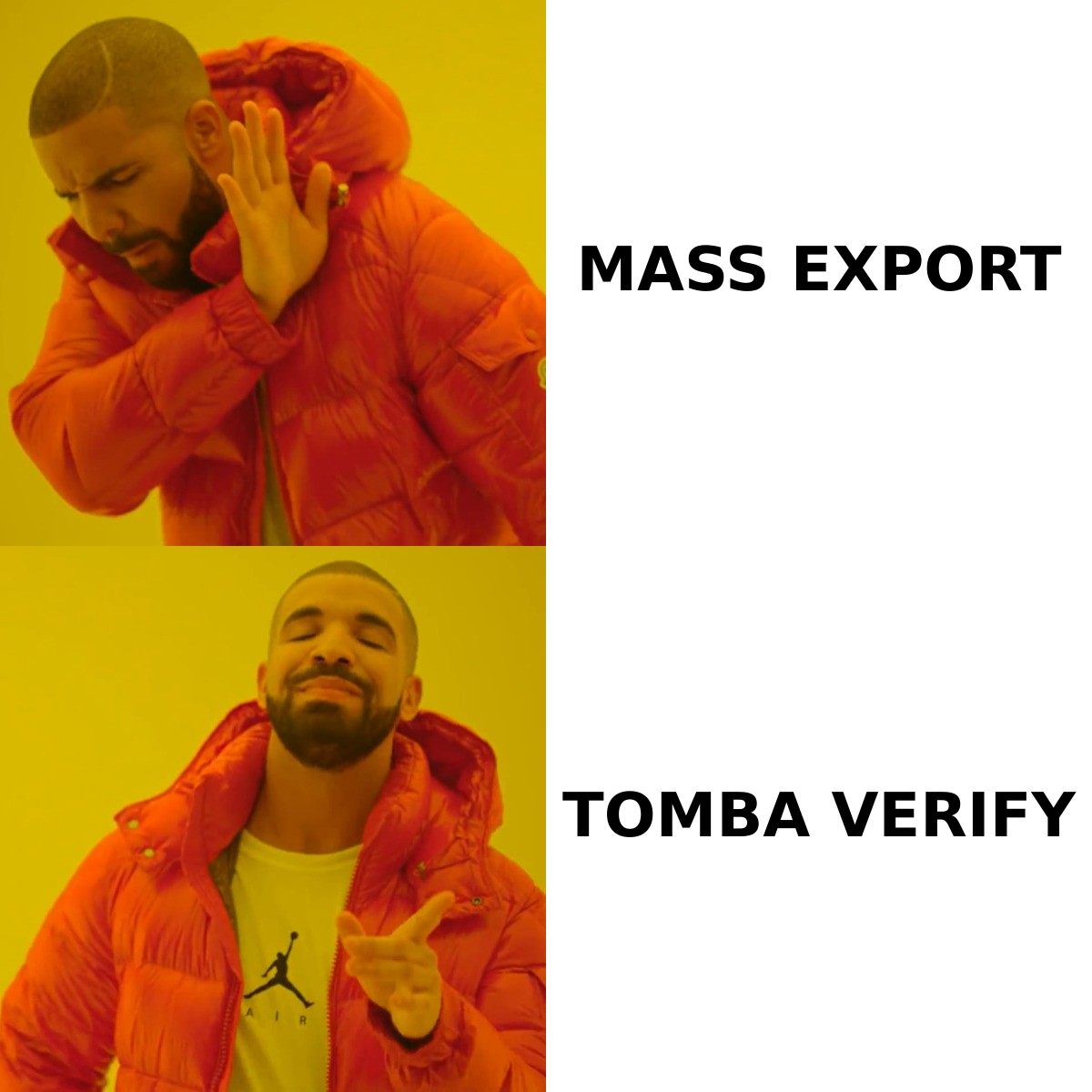
Here is the side-by-side on the things that change outcomes. Vendor features move fast. Treat this as a decision map, not a contract, and check anything you plan to buy.
| Capability | GoCustomer | GrowMeOrganic |
|---|---|---|
| Core positioning | AI-personalized outbound sequencing | All-in-one prospecting + drip campaigns |
| Built-in contact database | Limited / enrichment-oriented | Yes — large B2B contact database |
| LinkedIn extraction | Secondary | Core strength (Chrome extension, Sales Navigator) |
| Local business scraping | No | Yes (Google Maps style extraction) |
| Email sending / sequences | Yes, AI-assisted, multichannel | Yes, drip campaigns with follow-ups |
| AI copy generation | Primary differentiator | Basic / template-driven |
| Email verification | Basic checks, not a dedicated verifier | Basic checks, not a dedicated verifier |
| Pricing model | Demo-led / custom quote in practice | Published self-serve tiers |
| Best for | Teams with a list but weak messaging | Teams that need lists and simple sending |
| Weakest for | Cheap high-volume list building | Sophisticated personalization at scale |
Two rows deserve extra attention. They are where buyers get burned.
Email verification. Both platforms ship some validation. Neither is built as a verification engine the way a dedicated email verifier is. Bundled checks are usually syntax and MX level. That catches the obvious junk. It misses the costly stuff: role accounts, dead mailboxes on live domains, and catch-all servers that accept everything and deliver nothing. Send straight from an unverified export and your bounce rate pays for it. So does your sender reputation.
Pricing model. A public price list and a demo-gated quote are not the same thing. The difference decides how fast you can pilot. It also decides whether you can budget without a sales call, and how much leverage you have at renewal.
GoCustomer vs GrowMeOrganic: which one has better data accuracy?#
Honest answer: neither publishes audited accuracy numbers. Be suspicious of any comparison post that quotes a precise percentage for either. What you can judge is the mechanism behind the data. Mechanism predicts decay.
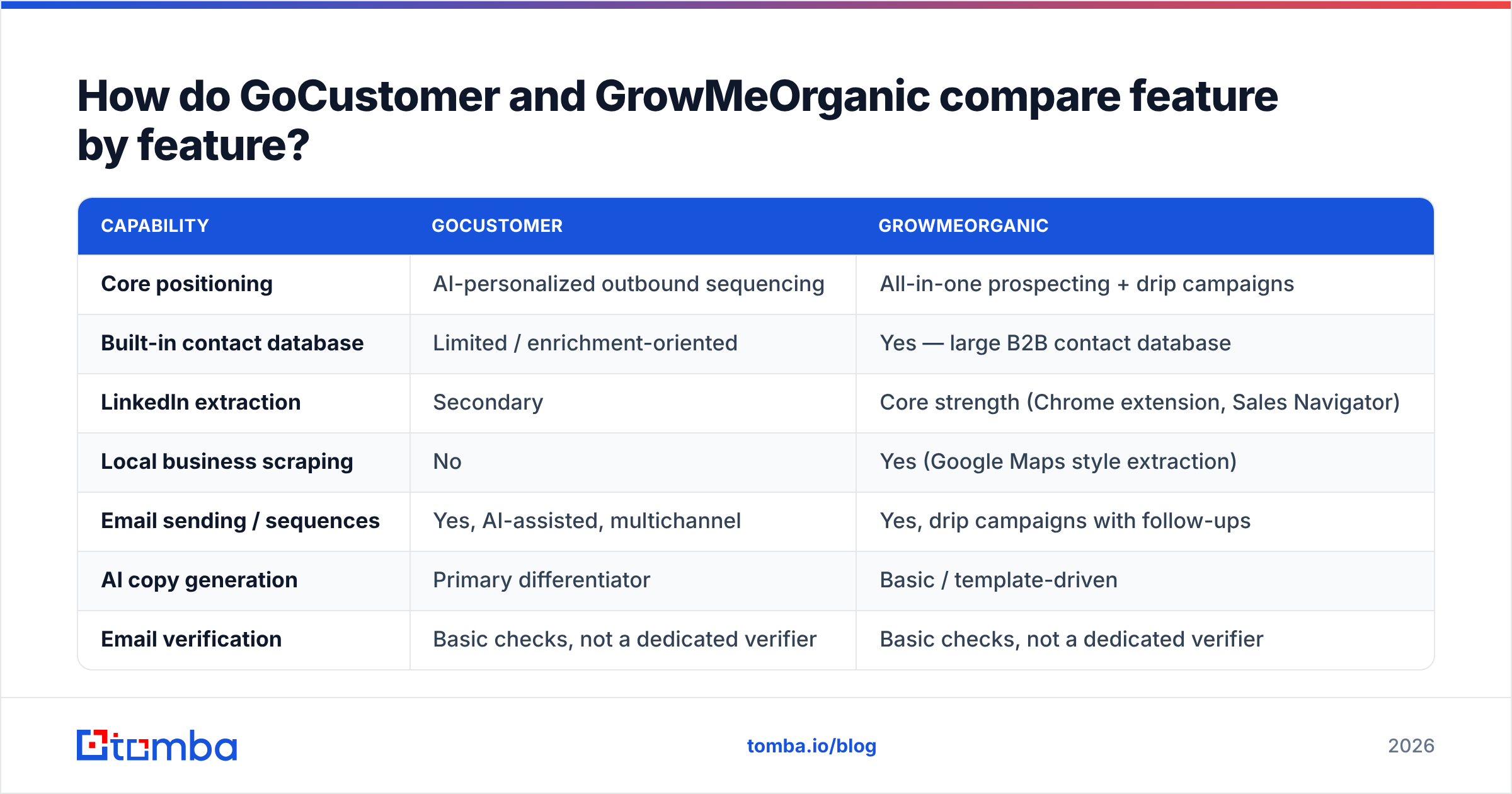
Here is how to test both on your own ICP before you commit:
- Build one 100-row control list. Use the same industry, seniority, and geography for both tools. Different segments give you meaningless results.
- Measure fill rate, not export size. How many of the 100 came back with a business email at all? A tool with 100 rows and 40 emails does not beat a tool with 60 rows and 55 emails.
- Verify both exports with the same third-party checker. Run each list through a neutral email verification pass. Record valid, risky, and invalid. That number predicts your bounce rate.
- Check the catch-all share. Catch-all domains are where "verified" claims quietly fall apart. A catch-all verifier tells you whether those addresses are reachable or just accepted and dropped.
- Spot-check 10 rows by hand. Open the LinkedIn profile. Confirm the person still holds the title. Job changes are the biggest source of stale B2B data, and no scraper is immune.
- Repeat 30 days later. Freshness is a process, not a snapshot. The tool that re-crawls wins over a year, even if it loses on day one.
Run that test once. You will have a better answer for your market than any generic benchmark, including this one. The data sources behind a provider matter more than its marketing page. Extraction tools and database tools fail in different ways. You want to know which failure you are buying.
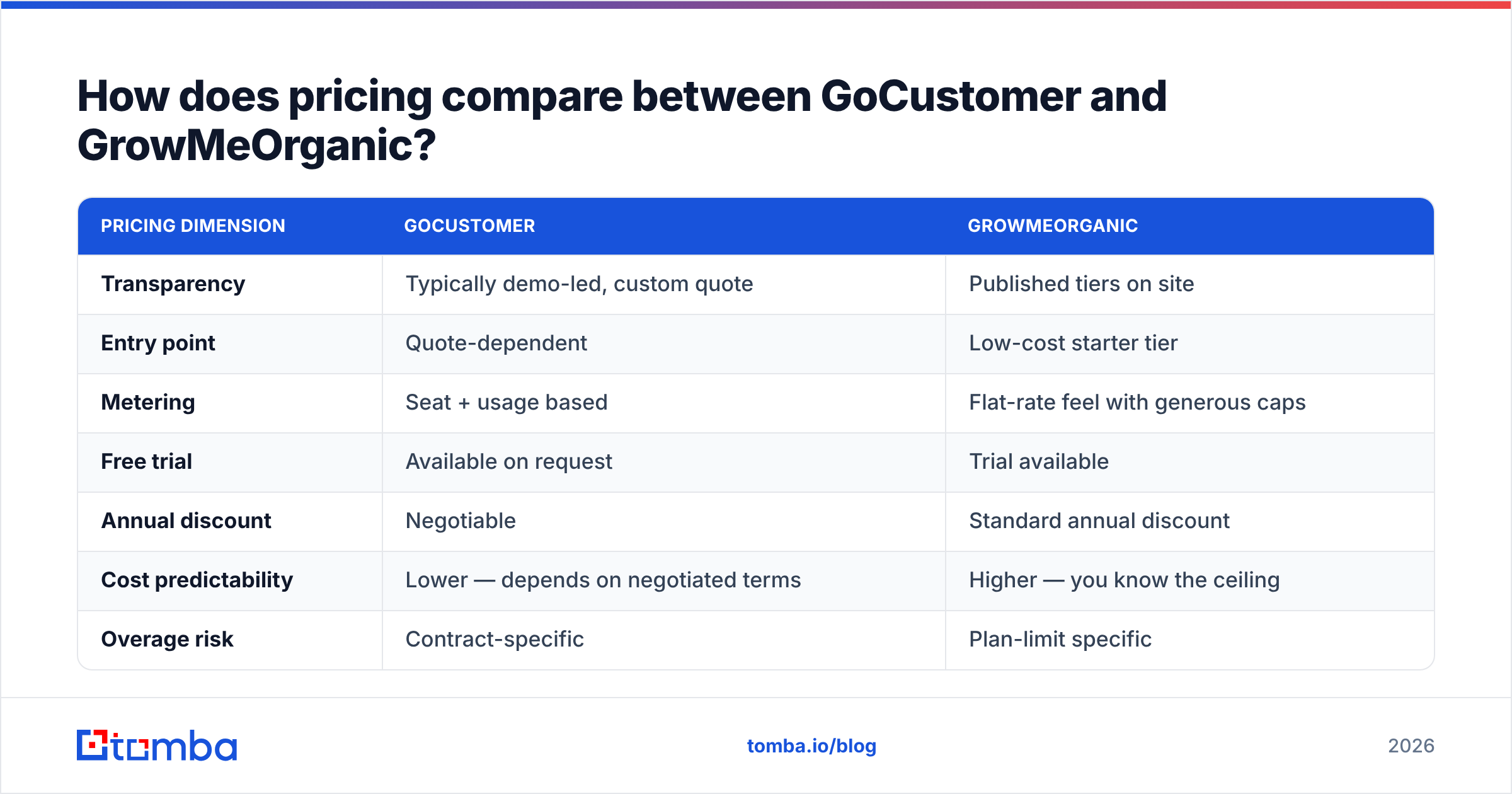
GoCustomer vs GrowMeOrganic: how does pricing compare?#
Pricing is where the two products differ most. Which one is cheaper depends on how you use them.
| Pricing dimension | GoCustomer | GrowMeOrganic |
|---|---|---|
| Transparency | Typically demo-led, custom quote | Published tiers on site |
| Entry point | Quote-dependent | Low-cost starter tier |
| Metering | Seat + usage based | Flat-rate feel with generous caps |
| Free trial | Available on request | Trial available |
| Annual discount | Negotiable | Standard annual discount |
| Cost predictability | Lower — depends on negotiated terms | Higher — you know the ceiling |
| Overage risk | Contract-specific | Plan-limit specific |
Confirm every number with the vendor. SaaS pricing in this category changes quarterly. Any post that quotes a dollar figure from memory is a liability, including this one. The shape is what lasts. GrowMeOrganic suits self-serve buyers who want a known ceiling. GoCustomer suits teams that are fine with a sales-led purchase and a negotiated scope.
For reference on what open pricing looks like here, Tomba lists every tier: a free plan with 25 searches per month, Starter at $49/mo, Growth at $99/mo, Pro at $249/mo, and custom Enterprise terms. Full details sit on the Tomba pricing page. The point is not that cheaper is better. It is that you should be able to model your cost before a demo, not after.
Is GrowMeOrganic better for high-volume prospecting?#
For raw sourcing throughput, yes. That is its home turf.
Its extraction stack covers LinkedIn, Sales Navigator, and local business listings. The flat rate means you can run wide, exploratory searches without watching a credit counter drain. Say an agency builds lists for five client ICPs a month. Or a founder tests four verticals before committing. That freedom is worth real money. Credit anxiety makes people under-prospect, and under-prospecting kills more pipeline than bad copy does.
The trade-off is the one that always comes with volume: quality variance. More rows means more role accounts (info@, sales@), more stale titles, and more guessed patterns. None of those were confirmed against a mail server. If your process is "export, upload, send," volume turns into a deliverability problem instead of an advantage.
The fix is boring and it works. Put a verification gate between export and send. Run the whole file through a bulk verify pass. Drop the invalids, hold the risky ones, and load only the rest into your sequencer. It takes ten minutes. It protects your domain, which you cannot buy a replacement for.
Is GoCustomer better for AI-driven outreach?#
If your list is already fine and your reply rate is not, GoCustomer aims straight at your problem.
Its argument is that generic sequences have stopped working. That holds up. Inbox providers filter harder every year. Buyers spot template language in two seconds. A fifth follow-up is worth almost nothing now. AI personalization on the first line and the value prop is a real lever. It helps most when you cannot pay an SDR to research 200 accounts a week by hand.
Two honest caveats:
- AI personalization is only as good as its inputs. Thin enrichment gives you confidently wrong lines, which read worse than none at all. Feed it real firmographic and role data through proper contact enrichment and the output improves right away.
- Personalization does not fix deliverability. A great email in the spam folder still gets zero replies. Warmup, SPF/DKIM/DMARC alignment, and list hygiene sit upstream of copy. Many buyers pay for an AI outreach tool to fix what was really a sender reputation problem.
Review data on G2 shows the same pattern across this category. Teams rate outreach platforms high on workflow and lower on data freshness. That is not a knock on one vendor. Sending software and data software are different engineering problems, and few companies do both well.
What do both platforms handle poorly?#
Fair criticism cuts both ways. Three gaps show up whichever one you pick:
- Catch-all domains. Many mid-market and enterprise mail servers accept every address at the domain. Bundled validators mark these "accepted" and move on. You learn they were dead when your bounce dashboard turns red. A specialized catch-all finder is the only reliable way to resolve them.
- Job-change decay. B2B contact data rots about 2–3% a month from role changes alone. Any list older than a quarter needs re-enrichment. Neither tool pushes you to do it, because re-verification is not a growth metric for them.
- API depth for engineering teams. Want to wire lookups into your own product, CRM, or RevOps pipeline? All-in-one suites usually expose a thinner API than a data-first vendor does. A documented email finder API with clear rate limits and response schemas is a different class of tool than a Chrome extension.
None of these are dealbreakers. They are why many mature outbound teams unbundle. One vendor finds and verifies. Another sends.
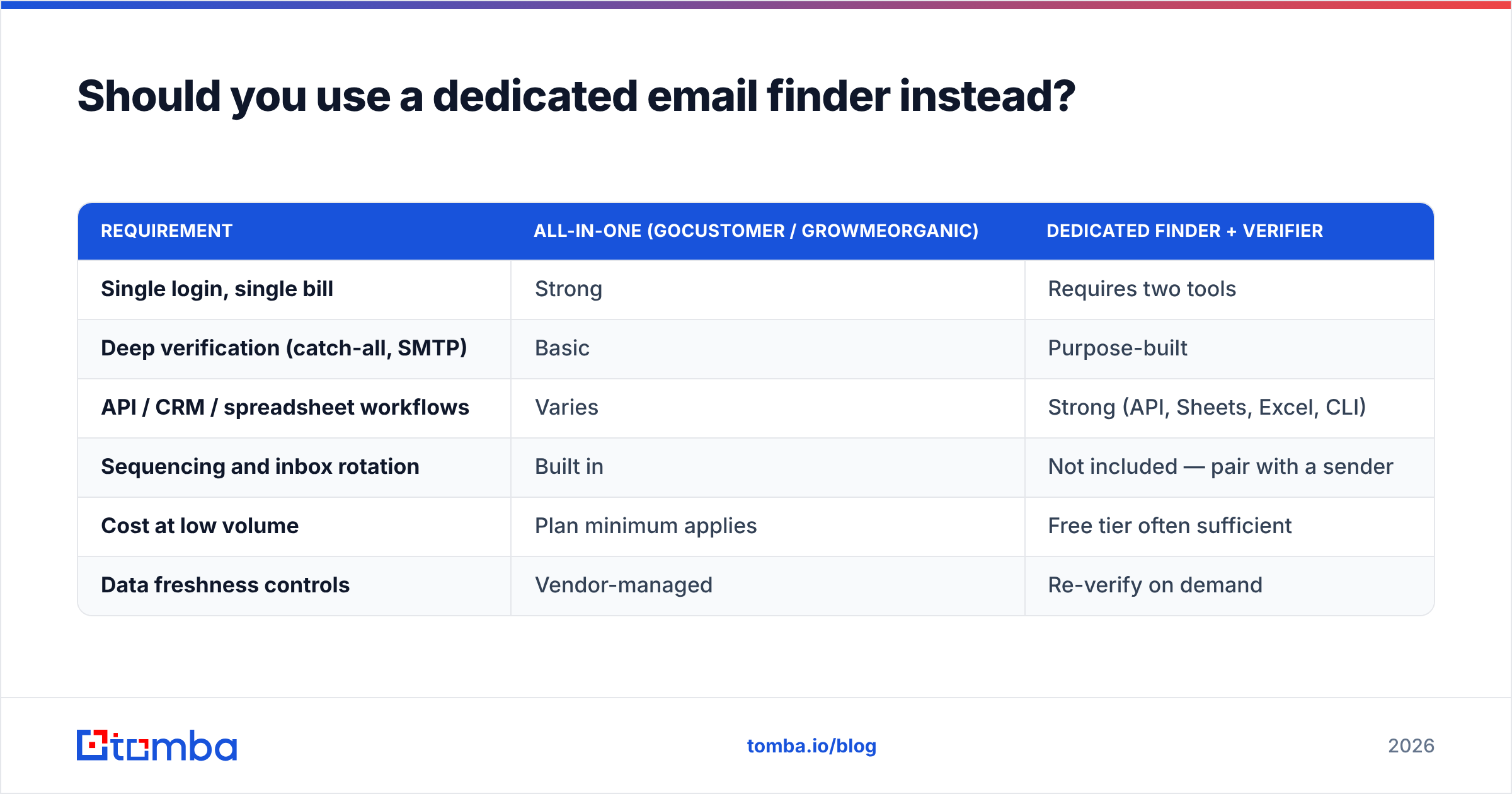
Should you use a dedicated email finder instead?#
Often, yes — as the data layer. It does not have to replace your sender.
| Requirement | All-in-one (GoCustomer / GrowMeOrganic) | Dedicated finder + verifier |
|---|---|---|
| Single login, single bill | Strong | Requires two tools |
| Deep verification (catch-all, SMTP) | Basic | Purpose-built |
| API / CRM / spreadsheet workflows | Varies | Strong (API, Sheets, Excel, CLI) |
| Sequencing and inbox rotation | Built in | Not included — pair with a sender |
| Cost at low volume | Plan minimum applies | Free tier often sufficient |
| Data freshness controls | Vendor-managed | Re-verify on demand |
Most teams land on a hybrid. Source and verify with a specialist. Then push the clean list into the sequencer your reps already use. Build the list with a domain search across target accounts. Resolve individuals with an email finder. Verify the file. Only then hand it to GoCustomer, GrowMeOrganic, or your current outreach stack.
Simplicity may matter more than precision. If you are a two-person team sending a few hundred emails a month, one vendor is one less thing to manage. Then the all-in-one wins. That is a fair call, not a compromise.
GoCustomer vs GrowMeOrganic: which one should you choose in 2026?#
Choose GrowMeOrganic if: you need contacts more than copy. You want a published price and a known ceiling. You work across several ICPs or client accounts. And you will add a verification step before you send.
Choose GoCustomer if: your sourcing is handled and reply rates are the bottleneck. You have budget for a sales-led purchase. AI personalization at scale is the exact gap you are closing.
Choose neither as your data layer if: deliverability is already shaky. Or you send high volume. Or you work across catch-all-heavy enterprise domains. Or you need programmatic access. In those cases, put a specialist in front of whichever sender you prefer.
The real question is not which tool is better. It is which failure you can least afford. Bad copy costs you replies. Bad data costs you your domain, and domains take months to repair.
Whichever sender you pick, the list feeding it sets your ceiling. Tomba Email Finder gives you verified professional email addresses by domain, name, or company. It resolves catch-alls and includes a free tier of 25 searches a month. Run one 100-contact head-to-head against your GoCustomer or GrowMeOrganic export. Compare the bounce rates. Let the numbers pick your stack.
Related guides#
Ready to find emails that actually work?
Join 150,000+ professionals who stopped guessing and started sending. Free credits on signup — no credit card required.
Get the Tomba newsletter
Practical outbound tactics and product updates — once every two weeks.
About the author