GoCustomer vs LeadEngine AI: Which AI SDR Wins in 2026?
Both promise an AI SDR that researches, writes, and sends for you. Here is how GoCustomer and LeadEngine AI actually differ on data, personalization depth, cost, and the parts neither of them fixes.
TL;DR
- GoCustomer and LeadEngine AI sit in the same category — AI-assisted outbound that researches a prospect, drafts a personalized message, and pushes it into a sequence. They differ mostly in how much of the workflow they own.
- GoCustomer leans toward hyper-personalization at the message level: take a contact you already have, enrich it, and generate copy that references something real.
- LeadEngine AI leans toward the "engine" framing: list building plus scoring plus outreach in one loop, with less emphasis on hand-tuning individual emails.
- Neither vendor publishes a transparent self-serve price the way an email-finding tool does. Both are quote-led at the time of writing, so budget for a demo cycle and a seat-based contract.
- Whichever you pick, the AI is downstream of your data. A perfectly written email to a dead mailbox still bounces — which is why most teams pair an AI SDR with a dedicated email verifier rather than trusting the platform's built-in list.
What are GoCustomer and LeadEngine AI?#
Both are AI outbound platforms, and both describe themselves in roughly the same language: fewer manual hours, more personalized touches, more meetings booked. That similarity is the whole problem when you are evaluating them, so start with the shape of each product rather than the marketing.
GoCustomer positions itself around AI-driven personalization for sales outreach. The pitch is that generic mail-merge fields ("Hi {{first_name}}, I saw you work at {{company}}") stopped working years ago, and that an AI layer can read public signals about a prospect and write an opener that sounds like a human did the homework. In practice you feed it contacts, it enriches and researches them, and it produces sequence copy you review and send.
LeadEngine AI takes the broader "engine" position: sourcing prospects, scoring them for fit, and running the outreach as one continuous system. The value proposition is less "write me a better first line" and more "keep the top of my funnel full without me building lists on Monday mornings."
The honest summary: GoCustomer is closer to a personalization and messaging layer; LeadEngine AI is closer to a pipeline-generation loop. Teams that already have a source of contacts tend to want the first. Teams starting from zero tend to want the second. Plenty of teams end up needing both, which is where the cost math gets uncomfortable.
One caveat worth stating up front, because most comparison posts hide it: both products are smaller and younger than the Outreach/Apollo tier of the market. Public review volume is thin, feature pages change quarterly, and pricing is negotiated. Verify every number against the vendor before you sign anything — including the numbers in this post.
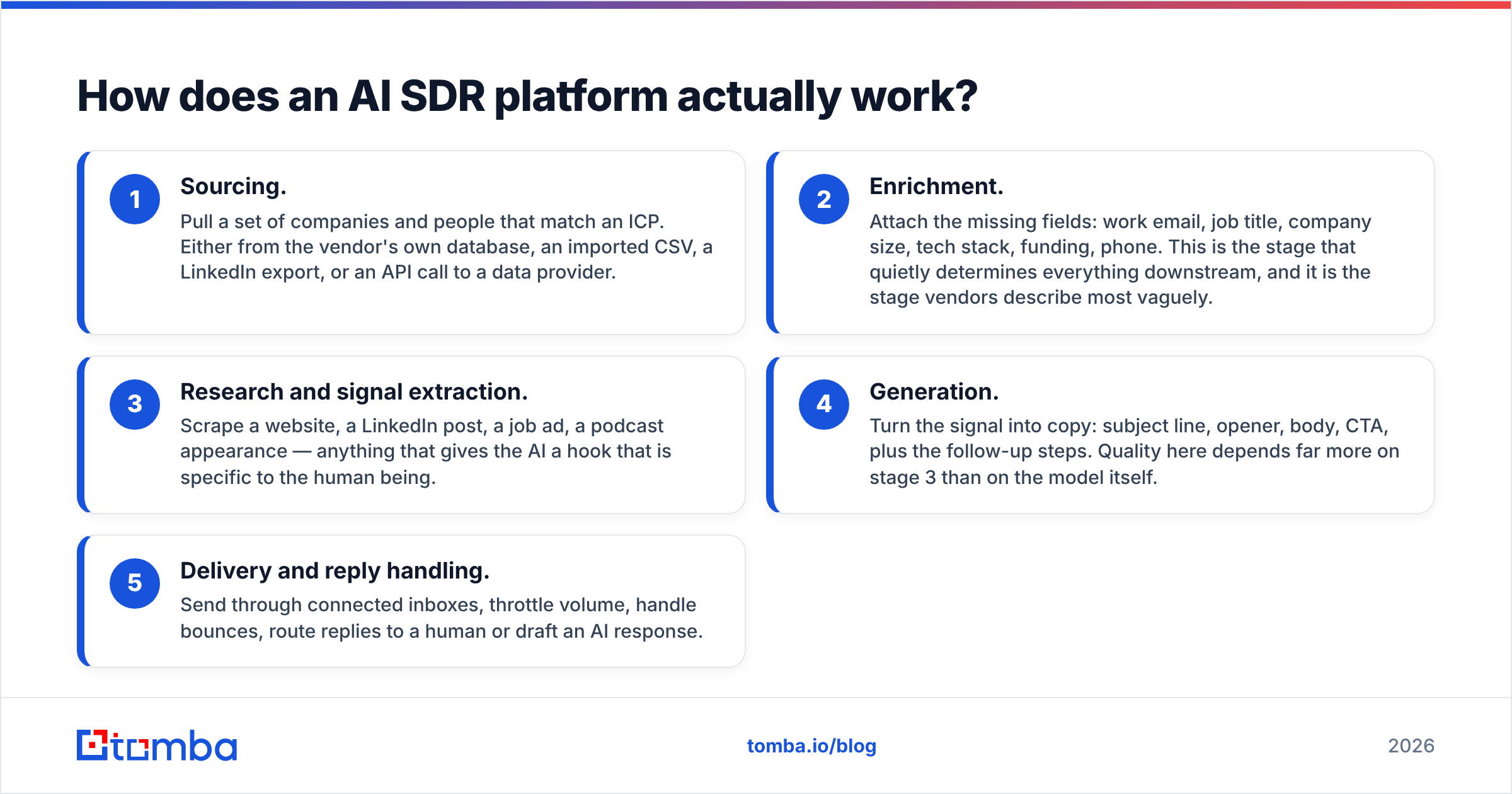
How does an AI SDR platform actually work?#
Under the branding, nearly every tool in this category runs the same five-stage pipeline. Understanding the stages is how you tell which vendor is strong where.
- Sourcing. Pull a set of companies and people that match an ICP. Either from the vendor's own database, an imported CSV, a LinkedIn export, or an API call to a data provider.
- Enrichment. Attach the missing fields: work email, job title, company size, tech stack, funding, phone. This is the stage that quietly determines everything downstream, and it is the stage vendors describe most vaguely.
- Research and signal extraction. Scrape a website, a LinkedIn post, a job ad, a podcast appearance — anything that gives the AI a hook that is specific to the human being.
- Generation. Turn the signal into copy: subject line, opener, body, CTA, plus the follow-up steps. Quality here depends far more on stage 3 than on the model itself.
- Delivery and reply handling. Send through connected inboxes, throttle volume, handle bounces, route replies to a human or draft an AI response.
The failure mode is consistent across every vendor in the space: stages 4 and 5 get the demo time, stages 1 and 2 get the disclaimers. If the enrichment layer hands the model a bad email and a stale job title, the model writes a beautifully personalized message to someone who left the company in 2024. That is not an AI problem. It is a data problem wearing an AI costume.
GoCustomer vs LeadEngine AI: how do they compare?#
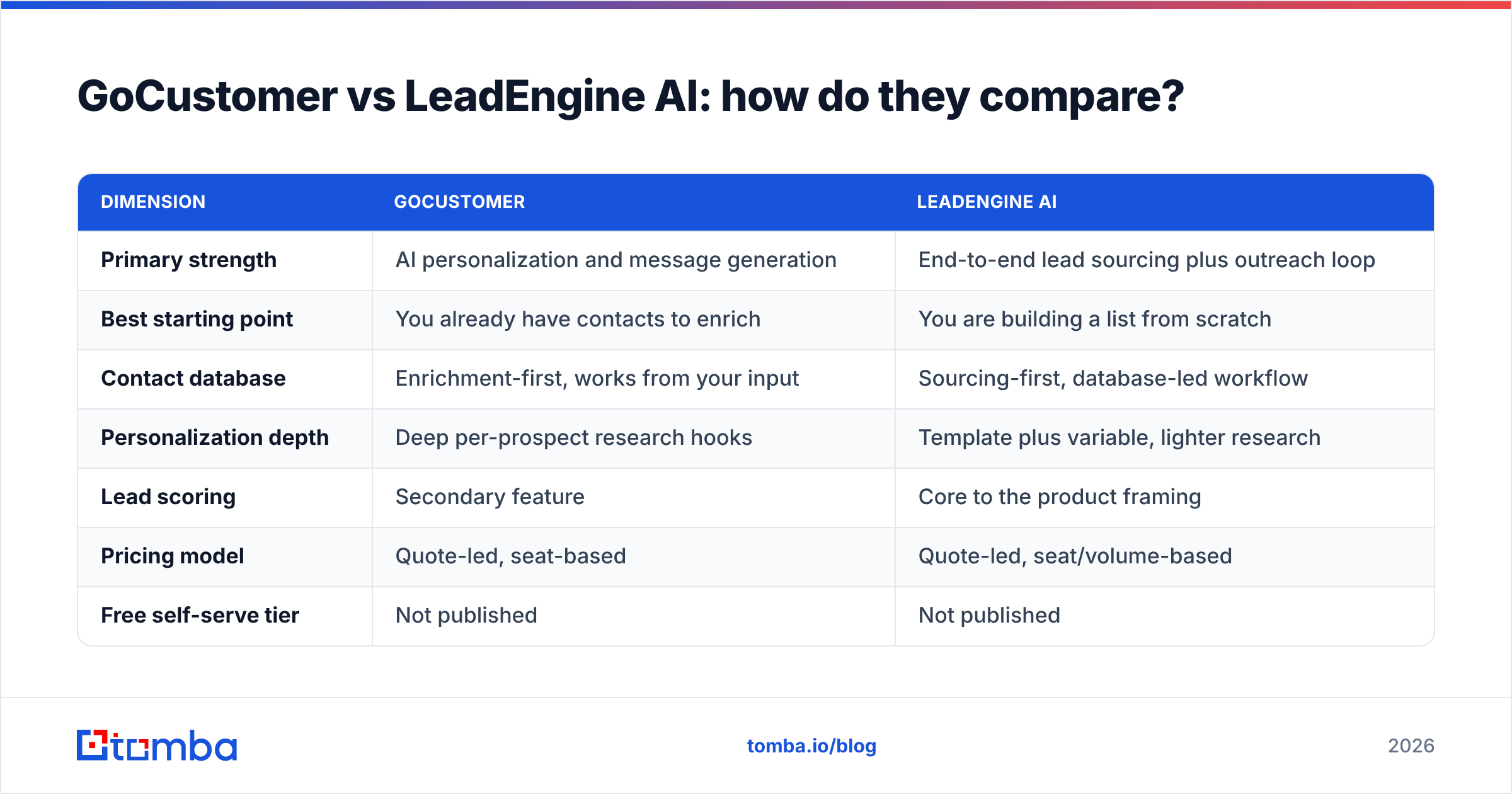
Here is the practical side-by-side. Treat the pricing row as "confirm before you commit" — both vendors run quote-led motions and change tiers frequently.
| Dimension | GoCustomer | LeadEngine AI |
|---|---|---|
| Primary strength | AI personalization and message generation | End-to-end lead sourcing plus outreach loop |
| Best starting point | You already have contacts to enrich | You are building a list from scratch |
| Contact database | Enrichment-first, works from your input | Sourcing-first, database-led workflow |
| Personalization depth | Deep per-prospect research hooks | Template plus variable, lighter research |
| Lead scoring | Secondary feature | Core to the product framing |
| Pricing model | Quote-led, seat-based | Quote-led, seat/volume-based |
| Free self-serve tier | Not published | Not published |
| Email verification | Bundled, quality varies by source | Bundled, quality varies by source |
| API access for engineering teams | Limited/on request | Limited/on request |
| Typical buyer | SDR team of 2-15 with existing CRM data | Founder-led sales or agency needing volume |
| Ramp time | Days — once your list is clean | Weeks — ICP tuning takes iteration |
| Biggest weakness | Output only as good as your input data | Sourced lists need independent verification |
Read that table twice and you will notice the same word in both weakness rows. Data. It is the shared dependency, and it is the one thing neither platform's demo will stress-test in front of you.
Which one has better data?#
Neither, reliably — and that is the most useful thing anyone can tell you about this matchup.
AI outbound platforms are, almost universally, aggregators. They license or scrape contact data, blend sources, and present a single confidence-free email field in the UI. Some of it is excellent. Some of it is a role-based catch-all address that will accept your message and route it to a black hole. The platform reports it as "delivered," your dashboard shows a 0% reply rate, and you spend two weeks blaming your copy.
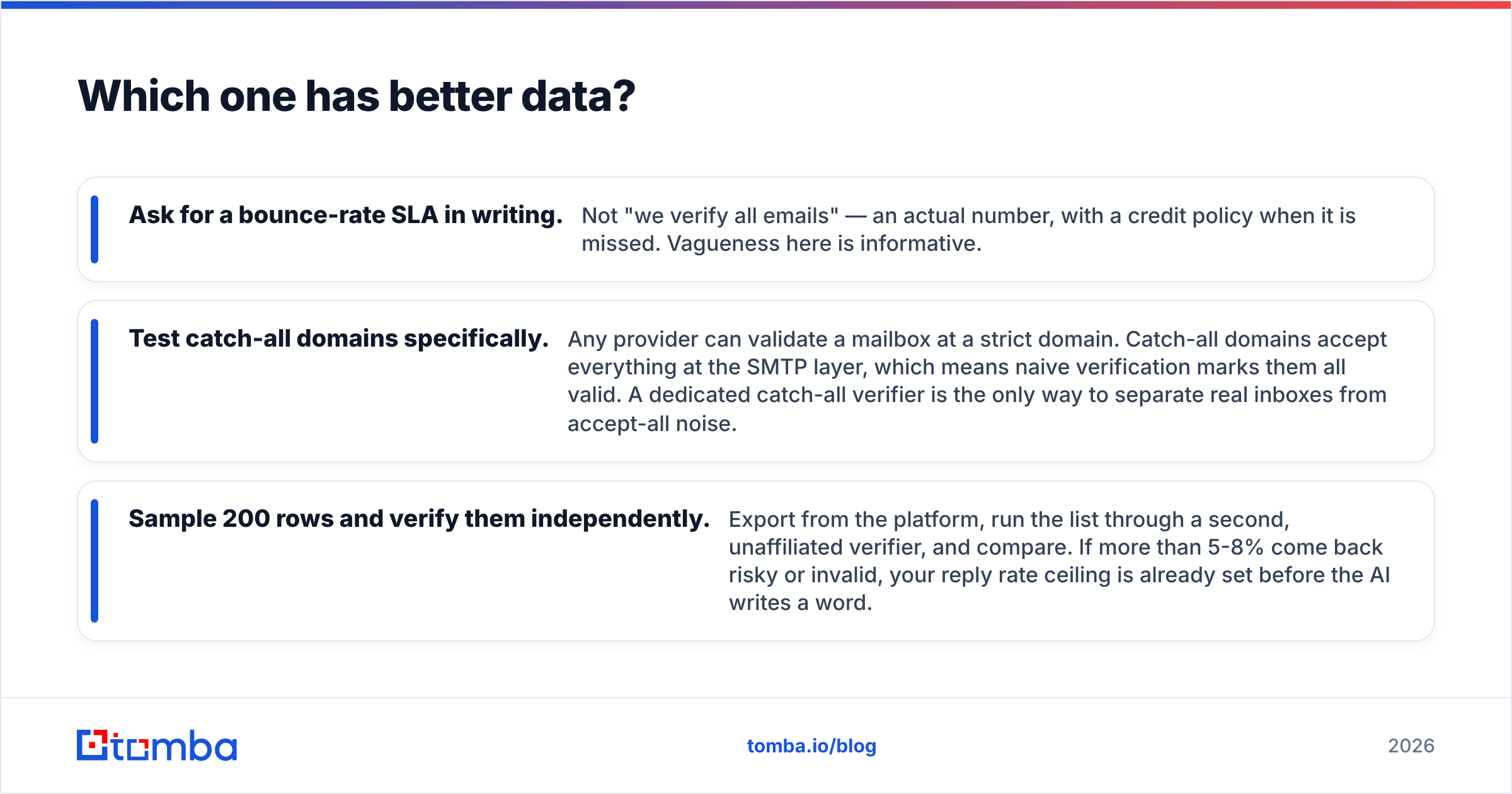
Three checks separate real data quality from a good-looking UI:
- Ask for a bounce-rate SLA in writing. Not "we verify all emails" — an actual number, with a credit policy when it is missed. Vagueness here is informative.
- Test catch-all domains specifically. Any provider can validate a mailbox at a strict domain. Catch-all domains accept everything at the SMTP layer, which means naive verification marks them all valid. A dedicated catch-all verifier is the only way to separate real inboxes from accept-all noise.
- Sample 200 rows and verify them independently. Export from the platform, run the list through a second, unaffiliated verifier, and compare. If more than 5-8% come back risky or invalid, your reply rate ceiling is already set before the AI writes a word.
This is why a growing number of teams run a split stack: an AI SDR for orchestration and copy, and a separate email-finding and verification layer that they own. The Tomba API exists for exactly that pattern — you resolve and verify the contact first, then hand a clean record to whatever outreach engine you like. The AI never sees a guess.
For a fuller view of how data providers source and refresh records, HubSpot's sales blog has solid vendor-neutral background on prospecting data hygiene, and G2 is worth scanning for recent reviews of both platforms — filter by review date, because anything older than twelve months describes a different product in this category.
How much do GoCustomer and LeadEngine AI cost?#
Both run quote-led pricing, which means the sticker number depends on seats, sending volume, and how hard you negotiate. Plan for three cost buckets, not one:
- Platform seats. The headline cost, usually per user per month, annual commitment preferred by the vendor.
- Credits or enrichment volume. Metered separately in most AI SDR contracts. Heavy list building burns this faster than teams forecast.
- The stuff you still buy anyway. Inbox infrastructure, domains, warmup, and — nearly always — a second verification tool because you do not trust the bundled one.
That third bucket is the one that surprises buyers. You sign a consolidated "all-in-one" contract, then discover you are still paying for verification and still paying for deliverability tooling. It is worth pricing the alternative: a lean outreach tool plus a dedicated data layer. Tomba's pricing starts free at 25 searches per month, moves to $49/mo on Starter and $99/mo on Growth, with Pro at $249/mo — which is typically less than one AI SDR seat, and it covers the finding and verification half of the job outright.

Which is better for cold email deliverability?#
Deliverability is where AI outbound tools are most oversold. Neither GoCustomer nor LeadEngine AI can override the rules that Google and Microsoft enforce at the inbox. Both can help you stay inside them.
The controllable variables, in rough order of impact:
- List hygiene. A bounce rate above 2-3% damages sender reputation quickly, and reputation damage outlasts the campaign that caused it.
- Volume ramp. New domains sending 200 emails on day one get filtered regardless of how clever the AI copy is.
- Authentication. SPF, DKIM, and DMARC configured correctly on every sending domain. Non-negotiable since the 2024 bulk-sender requirements.
- Content variance. Genuinely personalized first lines create natural variance, which helps. Identical bodies with a rotating first sentence do not fool modern filters as much as vendors imply.
GoCustomer's personalization depth gives it a mild theoretical edge on the fourth point. LeadEngine AI's volume orientation makes the first two points more dangerous if you are not careful — bigger sourced lists mean more unverified addresses moving through your domains. Both edges are small compared to simply not emailing dead mailboxes.
Who should choose which?#
Choose GoCustomer if: you have a CRM full of accounts, a defined ICP, and a small team whose bottleneck is writing time rather than list size. The personalization layer earns its keep when each contact is worth real money and a generic email would be insulting.
Choose LeadEngine AI if: you are founder-led or agency-side, your list is the bottleneck, and you need a repeatable sourcing-to-send loop more than you need artisanal copy per prospect.
Choose neither if: your reply problem is an offer problem. No AI SDR fixes a message nobody wants to receive. If your last three campaigns died at under 1% reply with clean data, the tooling is not the variable to change.
Consider a split stack if: you have any engineering capacity. Own the data layer through an API, run outreach in a cheap sequencer, and skip the consolidated contract entirely. This is the fastest-growing pattern among technical GTM teams, and it is usually 40-60% cheaper at the same volume.
What do neither of these tools fix?#
Three things, and they are the three that actually move reply rate.
Your ICP definition. An AI that personalizes to the wrong person just makes the rejection more polite. Tighten the segment before you buy software.
Your offer. Personalization is a delivery mechanism, not a value proposition. The first line gets the email read; the second paragraph decides whether anyone replies.
Your data freshness. B2B contact data decays roughly 20-30% per year through job changes alone. Whatever you enriched in January is measurably wrong by July. Re-verification is a recurring process, not a one-time import — which is why bulk verification belongs in your monthly ops routine, not just your onboarding checklist.
The verdict#
GoCustomer wins on message quality for teams that already have contacts. LeadEngine AI wins on top-of-funnel volume for teams that do not. Neither wins on data, because neither is a data company — they are workflow companies that resell someone else's records.
If you are choosing between them, run the same 200-contact test list through both trials, verify the outputs independently, and compare bounce rates before you compare copy. The tool with the cleaner list will beat the tool with the cleverer sentences every time.
And whichever platform you land on, own your contact layer separately. Start with Tomba Email Finder — find verified professional emails by domain, name, or company, confirm them before they ever reach your sequencer, and stop paying an AI to write beautiful messages to mailboxes that no longer exist. The free tier gives you 25 searches a month to test the accuracy claim yourself, which is exactly how you should evaluate every vendor in this comparison.
Related guides#
Ready to find emails that actually work?
Join 150,000+ professionals who stopped guessing and started sending. Free credits on signup — no credit card required.
Get the Tomba newsletter
Practical outbound tactics and product updates — once every two weeks.
About the author