Gold-Vision CRM Pricing, Reviews, Pros and Cons (2026)
Gold-Vision is a UK-built mid-market CRM with strong marketing automation and a quote-based price tag. Here is what it actually costs, what reviewers praise, and where it falls short.
Gold-Vision CRM pricing is quote-based, not published. This guide breaks down what you will actually pay in 2026. It also covers what reviewers praise, where the product falls short, and who should skip it.
TL;DR
- Gold-Vision is a UK-built mid-market CRM. It bundles sales, marketing automation, project management and support into one licence. That is its main selling point versus buying three separate tools.
- Pricing is quote-based and per-user-per-month, billed annually. There is a minimum seat count and a one-off implementation fee. Expect the real first-year number to land well above the headline per-seat figure.
- Reviewers praise the UK-based support team, Outlook integration and the marketing automation module. The recurring complaints are a dated UI, a steep admin learning curve, and reporting that needs help to build.
- It suits 10–150 seat UK/EU teams that want one vendor and a named account manager. It is a poor fit for self-serve startups, US-heavy teams, and anyone who wants public pricing.
- No CRM licence includes contact data. Budget separately for finding and verifying the email addresses you will put into it.
What is Gold-Vision CRM?#
Gold-Vision is a customer relationship management platform built by Esteiro Solutions in Northampton, UK. It sells mostly to mid-market B2B companies in the UK, Europe and Australia. It has been around since the early 2000s. In CRM terms, that makes it an established, quietly profitable product rather than a venture-backed land grab.
The pitch is consolidation. Instead of paying for a CRM, a separate marketing automation tool, a project delivery tool and a ticketing system, Gold-Vision packages all four as modules on one database. You get pipeline management, email campaigns with behavioural scoring, event management, project tracking and a support desk. All of it sits under one contract with one account manager. You can see the current module breakdown on the official Gold-Vision site.
That consolidation story is the main reason to consider it. It is also why Gold-Vision CRM pricing is harder to pin down than a self-serve tool's.
Gold-Vision CRM pricing: how much does it cost in 2026?#
Short answer: Gold-Vision does not publish a full price list. Pricing is per user, per month, billed annually. A demo call gates the quote. Three variables shape it — edition, module mix and seat count.
That is a deliberate sales motion, not an accident. Vendors who sell to mid-market buyers with services attached almost always quote rather than publish. The services part varies far more than the licence does.
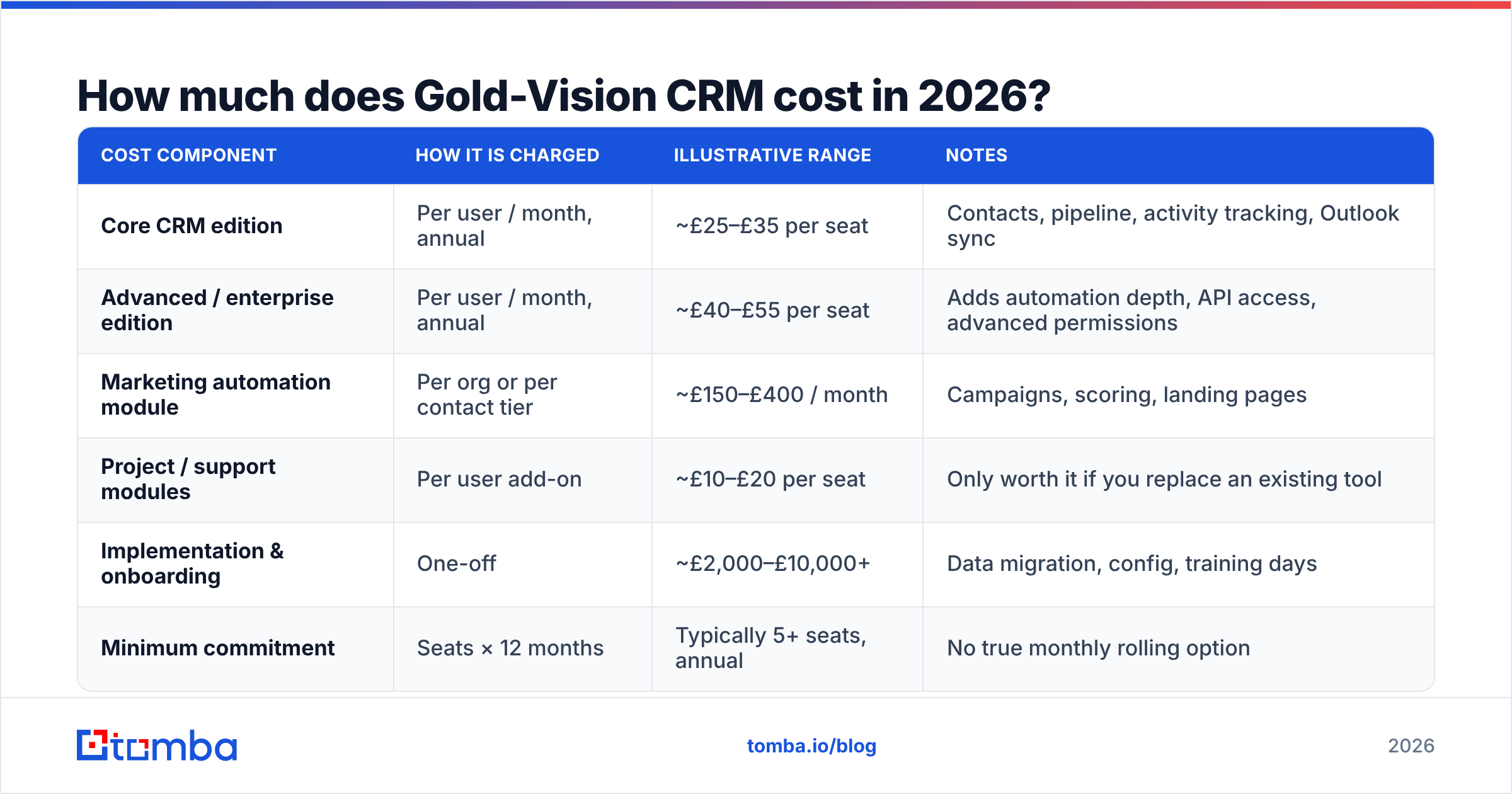
Here is how the cost model breaks down. Treat the figures below as illustrative planning numbers based on publicly discussed ranges for comparable UK mid-market CRMs. Always confirm the current quote with the vendor before you build a budget on it.
| Cost component | How it is charged | Illustrative range | Notes |
|---|---|---|---|
| Core CRM edition | Per user / month, annual | ~£25–£35 per seat | Contacts, pipeline, activity tracking, Outlook sync |
| Advanced / enterprise edition | Per user / month, annual | ~£40–£55 per seat | Adds automation depth, API access, advanced permissions |
| Marketing automation module | Per org or per contact tier | ~£150–£400 / month | Campaigns, scoring, landing pages |
| Project / support modules | Per user add-on | ~£10–£20 per seat | Only worth it if you replace an existing tool |
| Implementation & onboarding | One-off | ~£2,000–£10,000+ | Data migration, config, training days |
| Minimum commitment | Seats × 12 months | Typically 5+ seats, annual | No true monthly rolling option |
The number that matters is not the per-seat price. It is the first-year total. Take a 20-seat team on the advanced edition, with the marketing module and a mid-sized implementation. That team is realistically looking at a five-figure first year. A meaningful chunk of it is one-off services. Year two drops sharply. Model both years before you compare against a competitor's sticker price.
What is actually included at each tier?#
Do not trust a feature matrix from a sales deck. Work through what each edition changes in daily use:
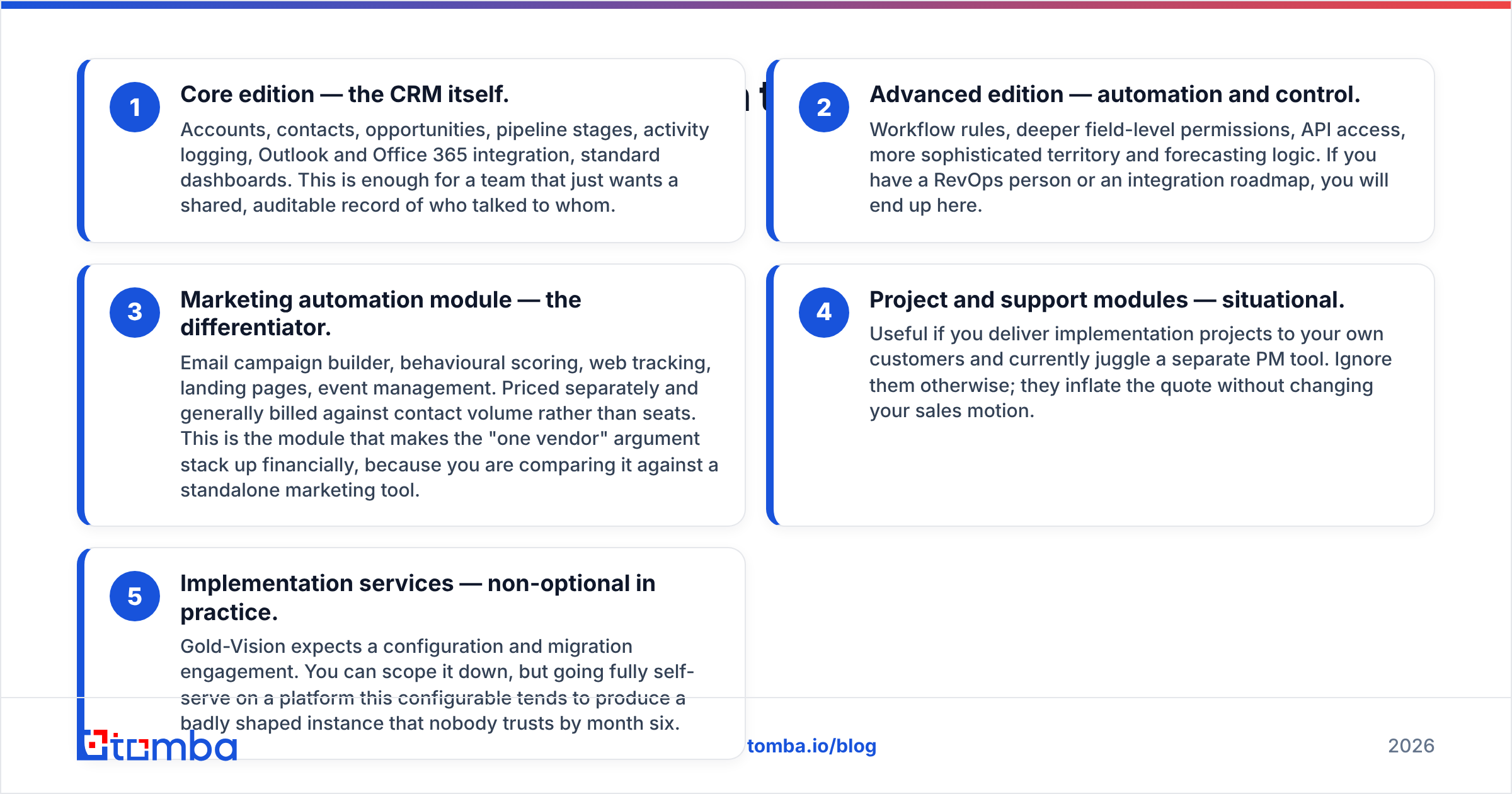
- Core edition — the CRM itself. Accounts, contacts, opportunities, pipeline stages, activity logging, Outlook and Office 365 integration, standard dashboards. Enough for a team that wants a shared, auditable record of who talked to whom.
- Advanced edition — automation and control. Workflow rules, deeper field-level permissions, API access, richer territory and forecasting logic. If you have a RevOps person or an integration roadmap, you will end up here.
- Marketing automation module — the differentiator. Email campaign builder, behavioural scoring, web tracking, landing pages, event management. It is priced separately and usually billed against contact volume rather than seats. This module is what makes the one-vendor argument stack up, because you compare it against a standalone marketing tool.
- Project and support modules — situational. Useful if you deliver projects to your own customers and juggle a separate PM tool today. Ignore them otherwise. They inflate the quote without changing your sales motion.
- Implementation services — non-optional in practice. Gold-Vision expects a configuration and migration engagement. You can scope it down. But going fully self-serve on a platform this configurable tends to produce a badly shaped instance that nobody trusts by month six.
The strategic read: the price only looks good if you genuinely switch off other subscriptions.
Buy the CRM edition alone and keep your existing marketing stack, and you pay mid-market prices for a mid-market CRM. You never collect the consolidation discount that justified the choice.
What do Gold-Vision reviews actually say?#
Aggregate review sentiment on G2's CRM category and Capterra is broadly positive. The praise is unusually consistent about which things are good.
What reviewers repeatedly praise:
- Support quality. This comes up more than any feature. Named contacts, UK office hours, humans who know your setup. For a 30-person company with no CRM admin, that is worth real money.
- Outlook and email integration. Activity capture from Outlook is reliable and low-friction. That single factor often decides whether reps use a CRM at all.
- Configurability. Custom fields, screens and workflows without developer time.
- Marketing automation depth relative to price. Reviewers moving from a basic email tool call the scoring and web tracking a genuine step up.
What reviewers repeatedly criticise:
- Interface age. Functional and dense, but not modern. Teams coming from HubSpot or Pipedrive notice at once.
- Reporting learning curve. Non-standard reports are doable but not intuitive. Several reviewers lean on support to build them.
- Admin complexity. The flexibility that gets praised also makes first configuration a project, not an afternoon.
- Mobile experience. Adequate, not a highlight. Field-heavy teams should test it during the trial.
- Opaque pricing. Buyers who wanted a quick comparison found the demo gate frustrating.
None of these are disqualifying. But notice the pattern. The complaints cluster around self-service. The praise clusters around being helped. That tells you which kind of buyer thrives here.
What are the hidden costs behind Gold-Vision CRM pricing?#
Every quote-based CRM has cost that lives outside the licence line. Budget for these explicitly:
- Implementation and data migration. The one-off buyers most often underestimate. Dirty source data multiplies it, because someone has to dedupe and normalise before import.
- The annual commitment. Seats you hired for in January still cost you in November after attrition. Buy for the team you have, not the team on the plan.
- Training time. Two to four hours per rep, plus an admin who owns the instance. Internal salary time is a real line item even when nobody invoices it.
- Integration work. If your stack needs custom connections, API access sits on the higher edition. The build sits with you or a partner.
- Contact data — the big one. A CRM stores records. It does not supply them. Empty CRMs are the most common form of wasted CRM spend, and filling them is a separate budget with a separate vendor.
That last point deserves its own section. It is where most CRM ROI leaks away.
Does Gold-Vision include contact data?#
No — and neither do HubSpot, Salesforce or Pipedrive at their standard tiers. This is the most common budgeting mistake in CRM procurement. Teams approve a five-figure platform contract, then have no line item for the prospect records that make the platform useful.
A CRM is a filing cabinet with workflow attached. It is excellent at telling you what happened with a contact you already have. It cannot tell you that a VP of Operations at a 200-person logistics company exists. It cannot find her email address, or say whether that address will bounce.
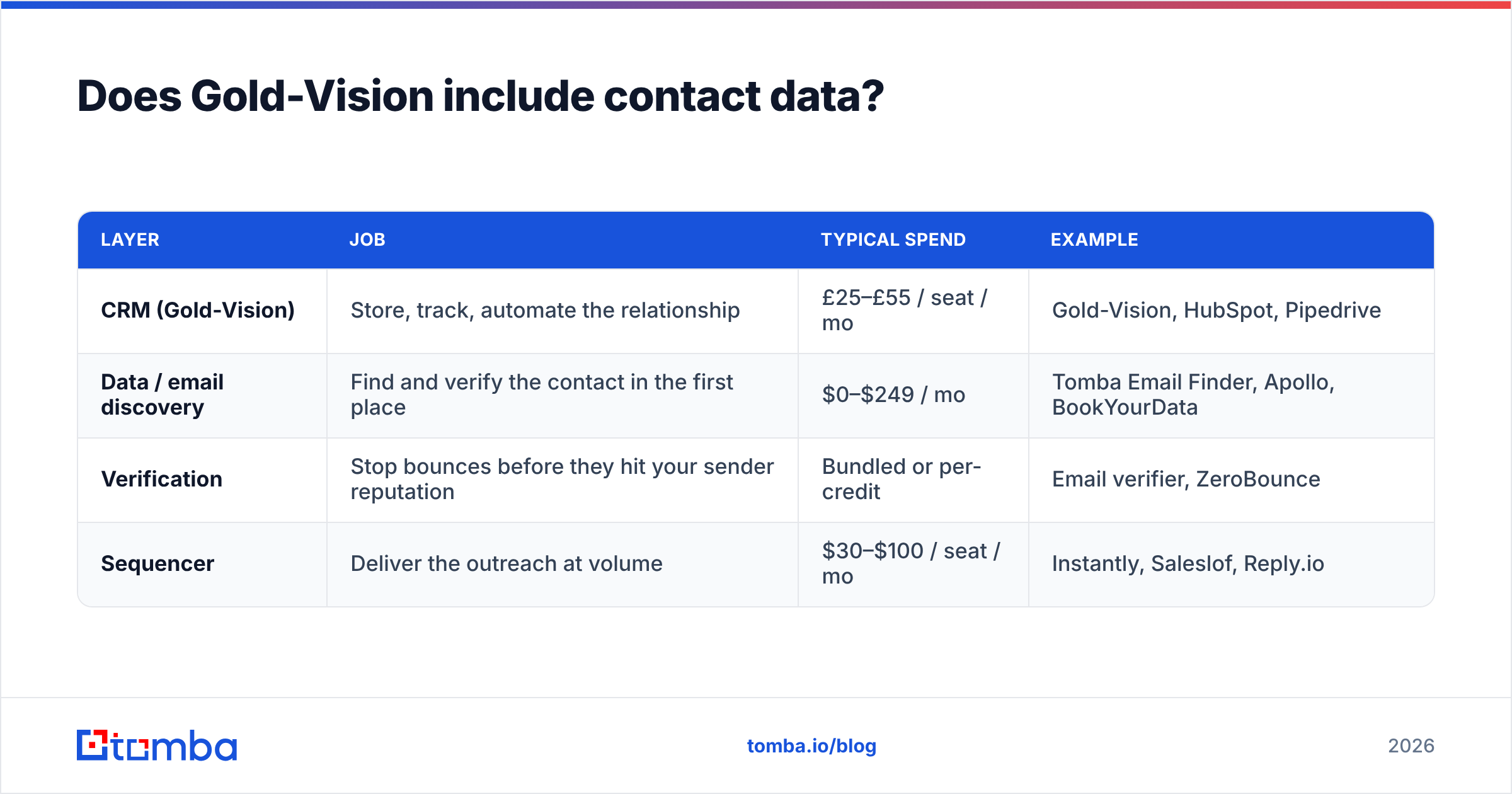
That gap is filled by a prospecting and enrichment layer sitting upstream of the CRM:
| Layer | Job | Typical spend | Example |
|---|---|---|---|
| CRM (Gold-Vision) | Store, track, automate the relationship | £25–£55 / seat / mo | Gold-Vision, HubSpot, Pipedrive |
| Data / email discovery | Find and verify the contact in the first place | $0–$249 / mo | Tomba Email Finder, Apollo, BookYourData |
| Verification | Stop bounces before they hit your sender reputation | Bundled or per-credit | Email verifier, ZeroBounce |
| Sequencer | Deliver the outreach at volume | $30–$100 / seat / mo | Instantly, Saleslof, Reply.io |
Note the asymmetry. The discovery layer usually costs a fraction of the CRM layer. But it decides whether the CRM layer produces revenue. Tomba pricing starts with a free tier at 25 searches a month, then $49/mo Starter, $99/mo Growth and $249/mo Pro. That is an order of magnitude below a 20-seat CRM contract, for the input that makes it work.
If you run a marketing motion inside Gold-Vision, contact enrichment matters twice over. Scoring and segmentation are only as good as the firmographic fields behind them. Blank job titles produce meaningless lead scores.

How does Gold-Vision compare to other mid-market CRMs?#
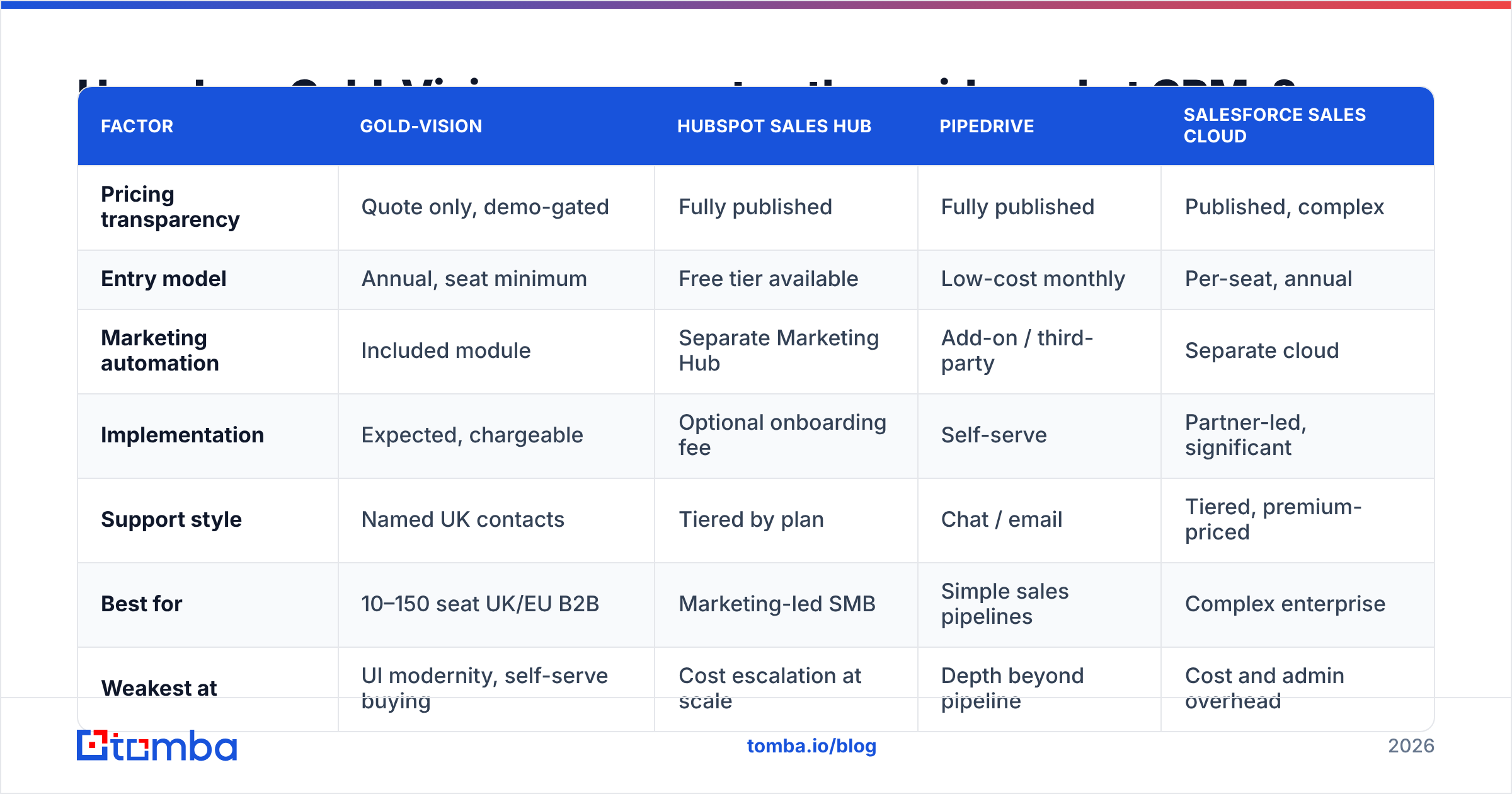
The honest comparison is not feature-by-feature. Every CRM in this bracket does pipelines and contacts. What differs is the buying model and the support posture.
| Factor | Gold-Vision | HubSpot Sales Hub | Pipedrive | Salesforce Sales Cloud |
|---|---|---|---|---|
| Pricing transparency | Quote only, demo-gated | Fully published | Fully published | Published, complex |
| Entry model | Annual, seat minimum | Free tier available | Low-cost monthly | Per-seat, annual |
| Marketing automation | Included module | Separate Marketing Hub | Add-on / third-party | Separate cloud |
| Implementation | Expected, chargeable | Optional onboarding fee | Self-serve | Partner-led, significant |
| Support style | Named UK contacts | Tiered by plan | Chat / email | Tiered, premium-priced |
| Best for | 10–150 seat UK/EU B2B | Marketing-led SMB | Simple sales pipelines | Complex enterprise |
| Weakest at | UI modernity, self-serve buying | Cost escalation at scale | Depth beyond pipeline | Cost and admin overhead |
Read that table as a decision on how you want to buy, not on which product wins. If you want to swipe a card and start on Tuesday, Gold-Vision is the wrong shape regardless of quality. If you want a UK vendor who picks up the phone and configures your pipeline for you, it fits — and HubSpot's self-serve model will feel like abandonment.
Who should choose Gold-Vision — and who should skip it?#
Choose it if:
- You are a 10–150 seat B2B company in the UK, Ireland, Europe or Australia.
- You already pay for a CRM and a marketing automation tool, and you want one contract.
- You have no in-house CRM administrator and value hands-on implementation support.
- Your sales process is relationship-led with long cycles, where configurability beats speed.
- You run events, or deliver projects to customers, and want those on the same record.
Skip it if:
- You are a startup that needs to be live this week with no procurement cycle.
- You want transparent, comparable pricing before speaking to anyone.
- Your team is US-based and expects US-hours support as standard.
- Your motion is high-volume outbound, where the CRM is a thin layer under a sequencer.
- Modern UI is a genuine adoption risk with your team. Test that in the demo, not after signing.
What should you ask on the demo call?#
Go in with numbers, not curiosity. Five questions change your quote:
- "What is the total first-year cost including implementation, for exactly N seats?" Not the per-seat rate. The total.
- "What is the seat minimum, and what happens if we reduce seats at renewal?" Get the downgrade path in writing.
- "Is API access on our edition, or does it require an upgrade?" This sets your integration ceiling.
- "How is the marketing module priced — per seat, per contact, or flat?" Contact-tier pricing scales with list growth, which is the thing you are trying to grow.
- "What does year-two renewal look like, and is there an uplift cap?" Ask before you sign, never after.
The bottom line#
Gold-Vision is a solid, well-supported CRM. It earns its keep when you genuinely consolidate several tools into it and value a human on the other end of the phone. It loses on price transparency, UI freshness and self-serve speed. Judge Gold-Vision CRM pricing on first-year total cost against the stack it replaces, not on a per-seat number in isolation.
And whichever CRM you land on, remember the part no licence covers: the contacts. A pipeline is only as good as the verified people in it. Paying £30 a seat to store records you never sourced is the most expensive kind of empty.
Fill the pipeline before you pay to manage it. Tomba Email Finder finds verified professional email addresses by name, domain or company. It checks them before they reach your sequencer and pushes clean records into your CRM. Start free with 25 searches a month — no demo call, no seat minimum, no annual commitment.
Related guides#
Ready to find emails that actually work?
Join 150,000+ professionals who stopped guessing and started sending. Free credits on signup — no credit card required.
Get the Tomba newsletter
Practical outbound tactics and product updates — once every two weeks.
About the author