Google Maps Scraping Tool: How to Pick One in 2026
Google Maps holds millions of local business records, but scraping it is messy, legally grey, and rarely gives you the decision-maker's email. Here's how the tools actually compare — and what to do after the export.
TL;DR
- A google maps scraping tool pulls business name, address, phone, category, rating, and website from Maps listings — it almost never gives you a named decision-maker's email.
- Three approaches exist: browser extensions ($0–$50/mo, low volume), cloud scrapers like Apify or Outscraper (pay-per-record, ~$0.30–$3 per 1,000), and the official Google Places API (metered, ToS-safe, no email field).
- Scraping public Maps data isn't automatically illegal, but Google's Terms of Service prohibit it, and GDPR still applies to any personal data you touch.
- The real bottleneck is enrichment: a Maps export is a list of
info@addresses and websites. Turning domains into named contacts is a separate job. - Budget for two line items — the scraper and the enrichment layer. Skipping the second one is why most Maps campaigns bounce at 20%+.
What is a Google Maps scraping tool?#
A google maps scraping tool is software that automates what you'd otherwise do by hand: search Maps for "dental clinic, Austin TX," open every result, and copy the business details into a spreadsheet. Instead of 200 manual copy-pastes, you get a CSV in four minutes.
Think of it like a photocopier pointed at a phone book. It doesn't create data — Google already shows all of it publicly — it just captures it at machine speed and in a structured shape.
The fields you can realistically expect from any tool in this category:
- Core identity — business name, category, Google Place ID, and the Maps URL itself. These are the stable keys you'll dedupe against later.
- Location data — full address, latitude/longitude, postal code, and often the service-area radius for mobile businesses.
- Contact surface — public phone number and website URL. This is where most tools stop, and it matters more than vendors admit.
- Reputation signals — star rating, total review count, and sometimes the full review text with reviewer names and dates.
- Operational metadata — opening hours, "temporarily closed" flags, price level, and whether the listing is claimed by the owner.
- Occasionally, emails — scraped not from Maps but from the business website the listing links to. Almost always a generic
info@orcontact@.
That last point is the one that catches people. Google Maps has no email field. Every "email finder" claim in a Maps scraper's marketing means the tool crawled the linked website and grabbed whatever mailto: it found.

Is scraping Google Maps legal in 2026?#
Short answer: public business data scraping is generally lawful in the US, but it violates Google's Terms of Service, and personal data pulled along the way falls under GDPR and CCPA regardless.
Three separate questions get collapsed into one, so untangle them:
Contract. Google's Terms of Service explicitly prohibit automated extraction of content from its services without permission. Breaking a ToS is a contract issue, not a criminal one. The practical consequence is IP bans and blocked accounts, not lawsuits — Google has historically enforced this through rate limiting rather than litigation against small operators.
Computer-crime law. In the US, hiQ Labs v. LinkedIn established that scraping publicly accessible pages doesn't violate the Computer Fraud and Abuse Act, since no authorization is being bypassed. That precedent is why the scraping industry exists at all. It does not immunize you from the contract issue above.
Data protection. This is the one people underestimate. A business address is business data. A named owner, a personal mobile, or a reviewer's name attached to a review is personal data. Once you store it on an EU resident, GDPR obligations attach — lawful basis, transparency notice, deletion on request. Business-to-business outreach can rest on legitimate interest, but you still have to document the balancing test and honor opt-outs.
The pragmatic position most B2B teams land on: scrape firmographic and location fields freely, be deliberate about anything that identifies a human, and keep a suppression list that actually works.
How do the main tool types compare?#
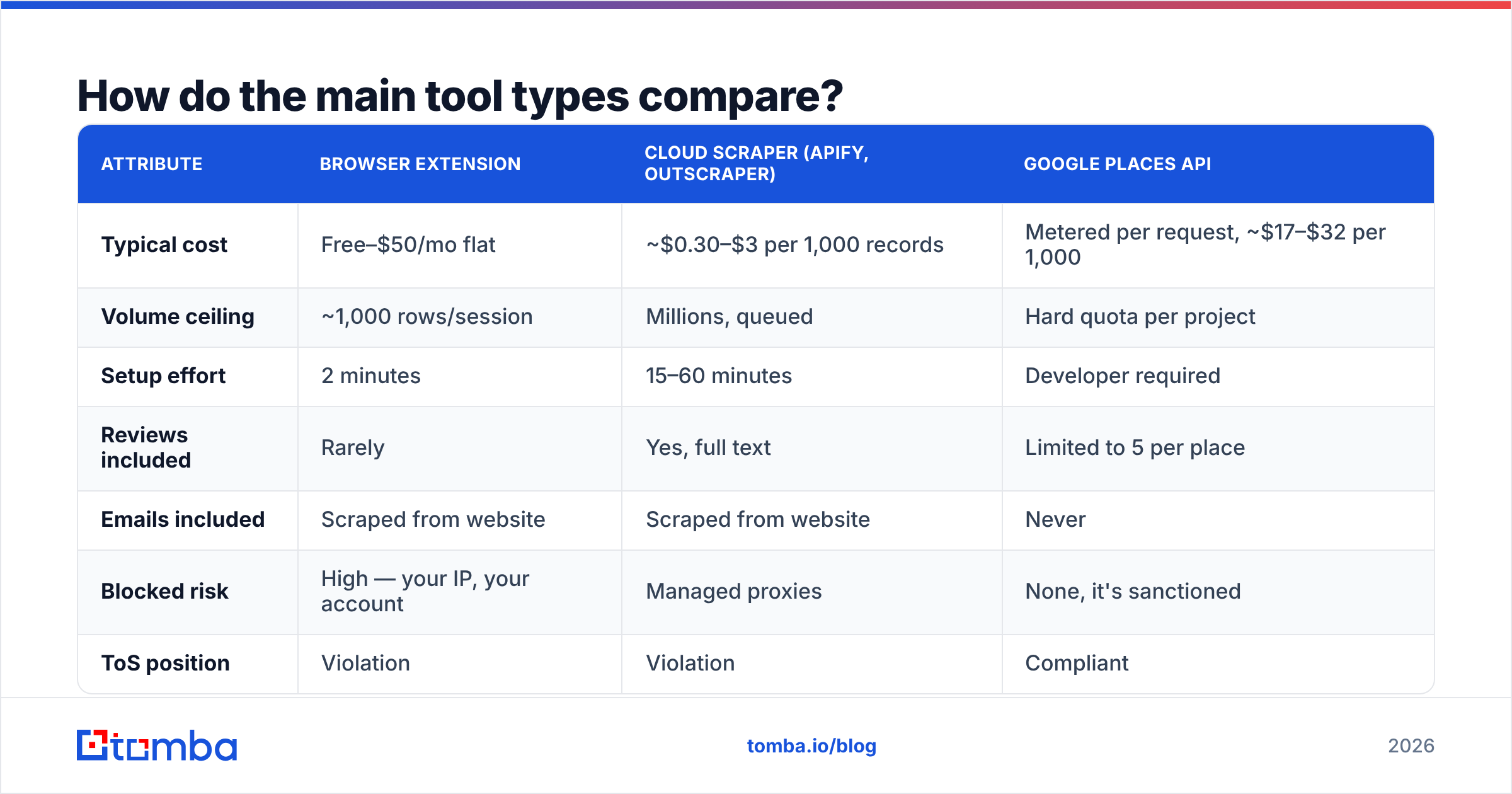
There are three architectures, and they fail in different ways. Pick based on volume and whether you need the data to survive a compliance review.
| Attribute | Browser extension | Cloud scraper (Apify, Outscraper) | Google Places API |
|---|---|---|---|
| Typical cost | Free–$50/mo flat | ~$0.30–$3 per 1,000 records | Metered per request, ~$17–$32 per 1,000 |
| Volume ceiling | ~1,000 rows/session | Millions, queued | Hard quota per project |
| Setup effort | 2 minutes | 15–60 minutes | Developer required |
| Reviews included | Rarely | Yes, full text | Limited to 5 per place |
| Emails included | Scraped from website | Scraped from website | Never |
| Blocked risk | High — your IP, your account | Managed proxies | None, it's sanctioned |
| ToS position | Violation | Violation | Compliant |
| Best for | One-off local lists | Recurring, multi-city pulls | Product features, audits |
The cost column is the part that flips intuition. The official API is the most expensive per record and gives you the fewest fields — you pay for legitimacy, not richness. For a one-time list of 500 gyms in Manchester, an extension is fine. For a monthly refresh of 40,000 restaurants across six countries feeding a CRM, a cloud scraper with rotating proxies is the only thing that won't collapse.
A fourth option is worth naming: buying a pre-built local business database instead of scraping one. Vendors like BookYourData sell verified B2B contact lists with named roles attached, which sidesteps the scrape-then-enrich pipeline entirely. It costs more per record and gives you less control over the geographic slice, but if your ICP is "any dentist in Texas" rather than "dentists within 3 miles of this specific intersection," it's often faster.
What does a Google Maps export actually give you?#
A row that looks complete and is useless for outreach. Here's a real-shaped example:
| Field | Value |
|---|---|
| Name | Redwood Family Dental |
| Category | Dentist |
| Phone | (512) 555-0182 |
| Website | redwoodfamilydental.com |
| Email (site-scraped) | info@redwoodfamilydental.com |
| Rating | 4.7 (312 reviews) |
| Owner name | — |
| Decision-maker email | — |
You have a company. You do not have a person. Sending a cold pitch to info@ on a dental practice's shared inbox means a receptionist deletes it, and enough of those in a row will hurt your sender reputation because shared inboxes get marked as spam aggressively.
There's a second problem: staleness. Local business data decays fast. Restaurants close, clinics rebrand, franchises change hands. Scraped Maps data captures a moment. If you scraped in January and mail in June, expect a meaningful slice of hard bounces from domains that no longer resolve. Running the list through an email verifier before send isn't optional at this volume — it's the difference between a 2% bounce rate and a 15% one that gets your domain throttled.
How do you turn Maps data into contactable leads?#
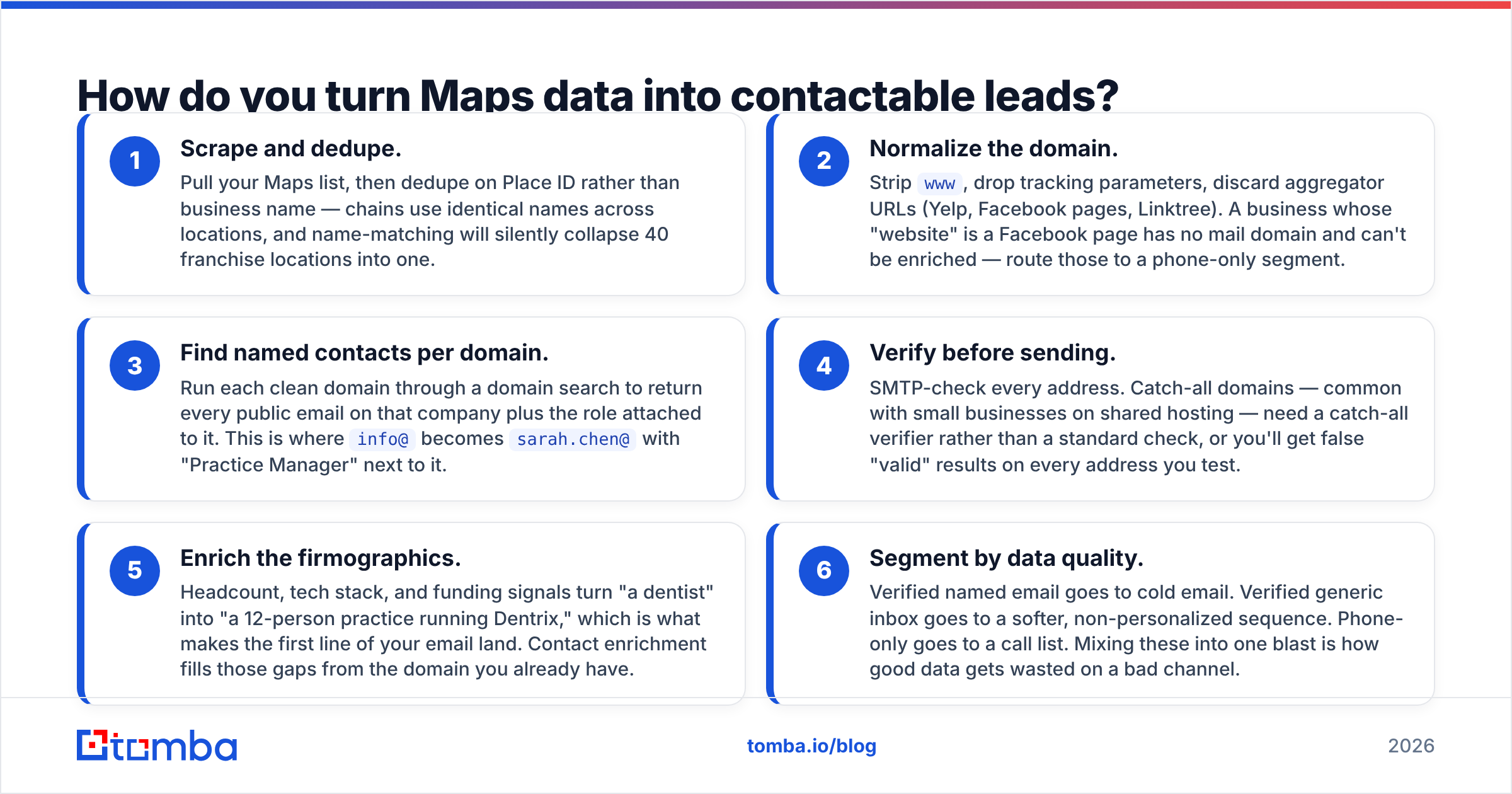
Treat the scrape as step one of three. The domain is the handoff point.
- Scrape and dedupe. Pull your Maps list, then dedupe on Place ID rather than business name — chains use identical names across locations, and name-matching will silently collapse 40 franchise locations into one.
- Normalize the domain. Strip
www, drop tracking parameters, discard aggregator URLs (Yelp, Facebook pages, Linktree). A business whose "website" is a Facebook page has no mail domain and can't be enriched — route those to a phone-only segment. - Find named contacts per domain. Run each clean domain through a domain search to return every public email on that company plus the role attached to it. This is where
info@becomessarah.chen@with "Practice Manager" next to it. - Verify before sending. SMTP-check every address. Catch-all domains — common with small businesses on shared hosting — need a catch-all verifier rather than a standard check, or you'll get false "valid" results on every address you test.
- Enrich the firmographics. Headcount, tech stack, and funding signals turn "a dentist" into "a 12-person practice running Dentrix," which is what makes the first line of your email land. Contact enrichment fills those gaps from the domain you already have.
- Segment by data quality. Verified named email goes to cold email. Verified generic inbox goes to a softer, non-personalized sequence. Phone-only goes to a call list. Mixing these into one blast is how good data gets wasted on a bad channel.
Steps 3 through 5 are a different product category from step 1. Maps scrapers are geographic search tools; they're built to answer "who is near here." Email-finding tools are identity resolution tools; they answer "who works here and how do I reach them." Very few products do both well, and the ones that claim to usually do the second one badly.
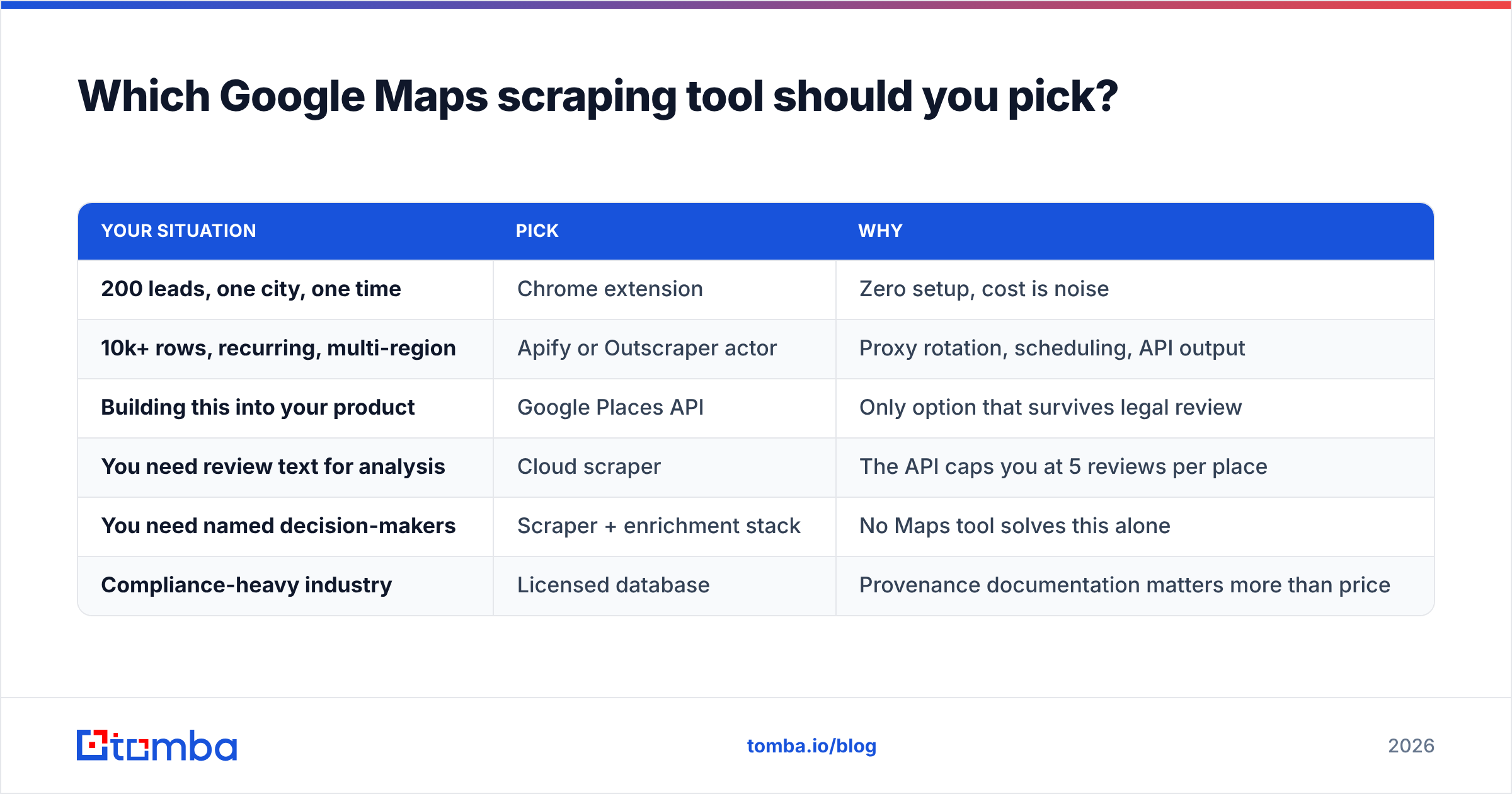
Which Google Maps scraping tool should you pick?#
Match the tool to the job, not to the feature list.
| Your situation | Pick | Why |
|---|---|---|
| 200 leads, one city, one time | Chrome extension | Zero setup, cost is noise |
| 10k+ rows, recurring, multi-region | Apify or Outscraper actor | Proxy rotation, scheduling, API output |
| Building this into your product | Google Places API | Only option that survives legal review |
| You need review text for analysis | Cloud scraper | The API caps you at 5 reviews per place |
| You need named decision-makers | Scraper + enrichment stack | No Maps tool solves this alone |
| Compliance-heavy industry | Licensed database | Provenance documentation matters more than price |
On the cloud-scraper side, Apify runs a marketplace of Maps actors with per-result pricing and a free monthly credit, which makes it easy to test before committing. Outscraper is the more turnkey option — less flexible, less configuration. Both handle proxy rotation, which is the actual hard part; a scraper without rotating residential proxies will be rate-limited inside an hour on any serious volume.
Whatever you pick, budget two line items. Teams consistently underspend on the second one, then blame the scraper when their campaign bounces. A $30 scrape that produces 5,000 unusable info@ addresses is more expensive than a $30 scrape plus $49 of enrichment that produces 1,400 verified named contacts — because only one of those two lists can actually be mailed.
What are the most common mistakes?#
Scraping at maximum speed. Aggressive request rates get your IP banned and, worse, produce silently truncated data — the scraper returns 800 of 2,000 results and reports success. Always spot-check the count against what Maps shows in the browser.
Trusting the "email" column. Site-scraped emails are unverified by definition. A mailto: in a page footer might be five years old and pointing at a departed employee. Verify everything, always.
Ignoring the closed flag. "Temporarily closed" listings frequently mean permanently closed. Filter them out at ingest rather than discovering it via bounces.
One list, one message. A 50-location franchise and a solo practitioner have nothing in common except a Google category. Segment on review count and headcount before you write a single line of copy.
No suppression list. If you're scraping the same geography quarterly, you will re-scrape people who already told you no. Maintain a permanent do-not-contact table keyed on domain, and check against it before every send.
Skipping the pattern check. Before running a full enrichment job, test the company email pattern on a handful of domains. Knowing whether a sector uses first.last@ or finitial+last@ saves credits on bulk runs.
What's the realistic ROI?#
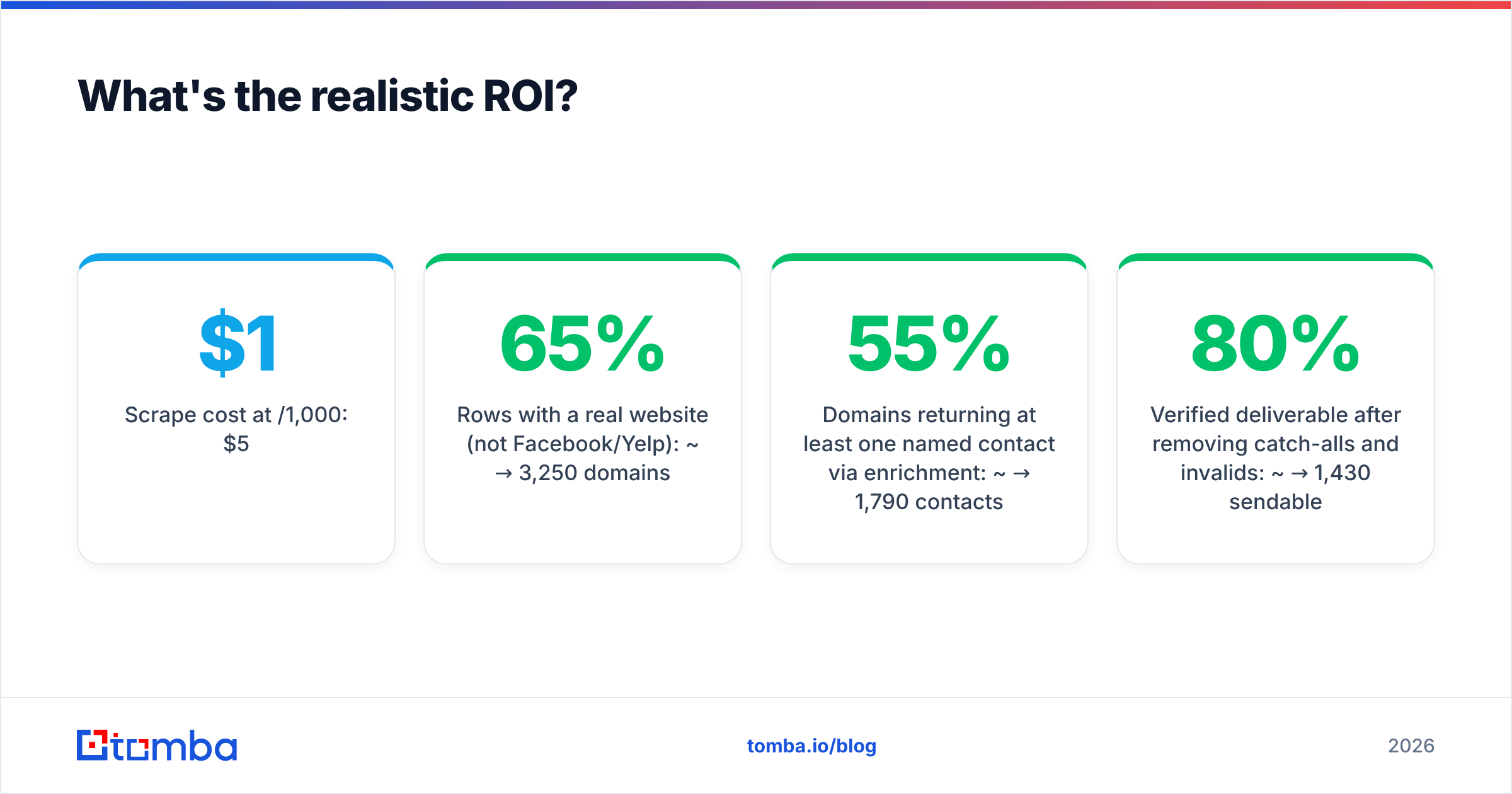
Run the arithmetic on a concrete case: 5,000 scraped Maps listings for HVAC contractors across three states.
- Scrape cost at $1/1,000: $5
- Rows with a real website (not Facebook/Yelp): ~65% → 3,250 domains
- Domains returning at least one named contact via enrichment: ~55% → 1,790 contacts
- Verified deliverable after removing catch-alls and invalids: ~80% → 1,430 sendable
- Enrichment and verification cost at Growth tier: $99/mo
So roughly $104 turns 5,000 raw listings into 1,430 mailable named contacts — about 7 cents each. That's competitive with any purchased list, and you controlled the geography and category precisely. The catch is the funnel: you lost 71% of your rows between scrape and send. Anyone who tells you a Maps scraper alone gives you 5,000 leads is counting rows, not contacts.
If your volume is genuinely small — a few hundred local businesses — the free tier and manual lookups will carry you. Check Tomba pricing against your expected domain count before you commit to a tier; the Starter plan at $49/mo covers most single-market local campaigns, while Growth at $99/mo makes sense once you're refreshing multi-city lists monthly. For anything running on a schedule, wire it up through the Tomba API so enrichment happens as rows land rather than as a monthly batch chore.
Ready to turn Maps rows into real contacts?#
A google maps scraping tool solves geography. It does not solve identity. Once you have your domains, the Tomba Email Finder takes each one and returns named, verified professional email addresses with roles attached — the part Maps structurally cannot give you. Start on the free tier with 25 searches, test it against a sample of your scraped domains, and compare the named-contact hit rate to whatever your scraper's built-in "email" column produced. The gap is usually the whole argument.
Related guides#
Ready to find emails that actually work?
Join 150,000+ professionals who stopped guessing and started sending. Free credits on signup — no credit card required.
Get the Tomba newsletter
Practical outbound tactics and product updates — once every two weeks.
About the author