9 Best GoTo Connect Alternatives in 2026 (Compared & Priced)
GoTo Connect is a solid all-in-one phone system, but it is not the cheapest, the most sales-native, or the easiest to scale. Here are nine alternatives compared on price, dialer power, CRM depth, and the hidden costs nobody puts on the pricing page.
TL;DR
- GoTo Connect is a competent all-in-one UCaaS phone system, but teams leave it for three reasons: per-seat cost creep, a dialer that is not built for high-volume outbound, and CRM integrations that feel bolted on.
- If you want the closest like-for-like replacement, look at RingCentral, Nextiva, or 8x8. If you want a sales-first dialer, look at Kixie, JustCall, or Aircall.
- Cheapest credible swaps for a 5-10 person team: Zoom Phone and Ooma Office. Best AI-native option: Dialpad.
- Pricing is only half the switch cost. Number porting, e911 fees, per-minute international rates, and integration tiers routinely add 20-40% to the sticker price.
- The phone system is never the bottleneck. Bad phone data is. Validate numbers before they hit a dialer or you will pay for connect rates you never get.
What is GoTo Connect, and who actually uses it?#
GoTo Connect is the cloud phone and unified communications product from GoTo (the company formerly known as LogMeIn, which absorbed Jive Communications in 2018). It bundles a hosted PBX, softphone apps, SMS, video meetings, and a visual dial-plan editor into a single per-user subscription. You can read the current feature set on the official GoTo Connect page.
The typical buyer is a 10-200 seat business that wants one vendor for phones and meetings, has at least a few physical desk phones still plugged in, and values the drag-and-drop call-flow builder. Professional services firms, clinics, property managers, and multi-location retail all land here. Reviews on G2 generally praise reliability and the dial plan editor while flagging support responsiveness and admin complexity.
That profile matters, because it explains the mismatch. GoTo Connect was designed for a company that receives a lot of calls and needs them routed intelligently. If your team's job is to make 120 outbound calls a day into a CRM, you are using a routing product as a prospecting product.
Why do teams look for GoTo Connect alternatives?#
Five patterns come up repeatedly when teams evaluate GoTo Connect alternatives:
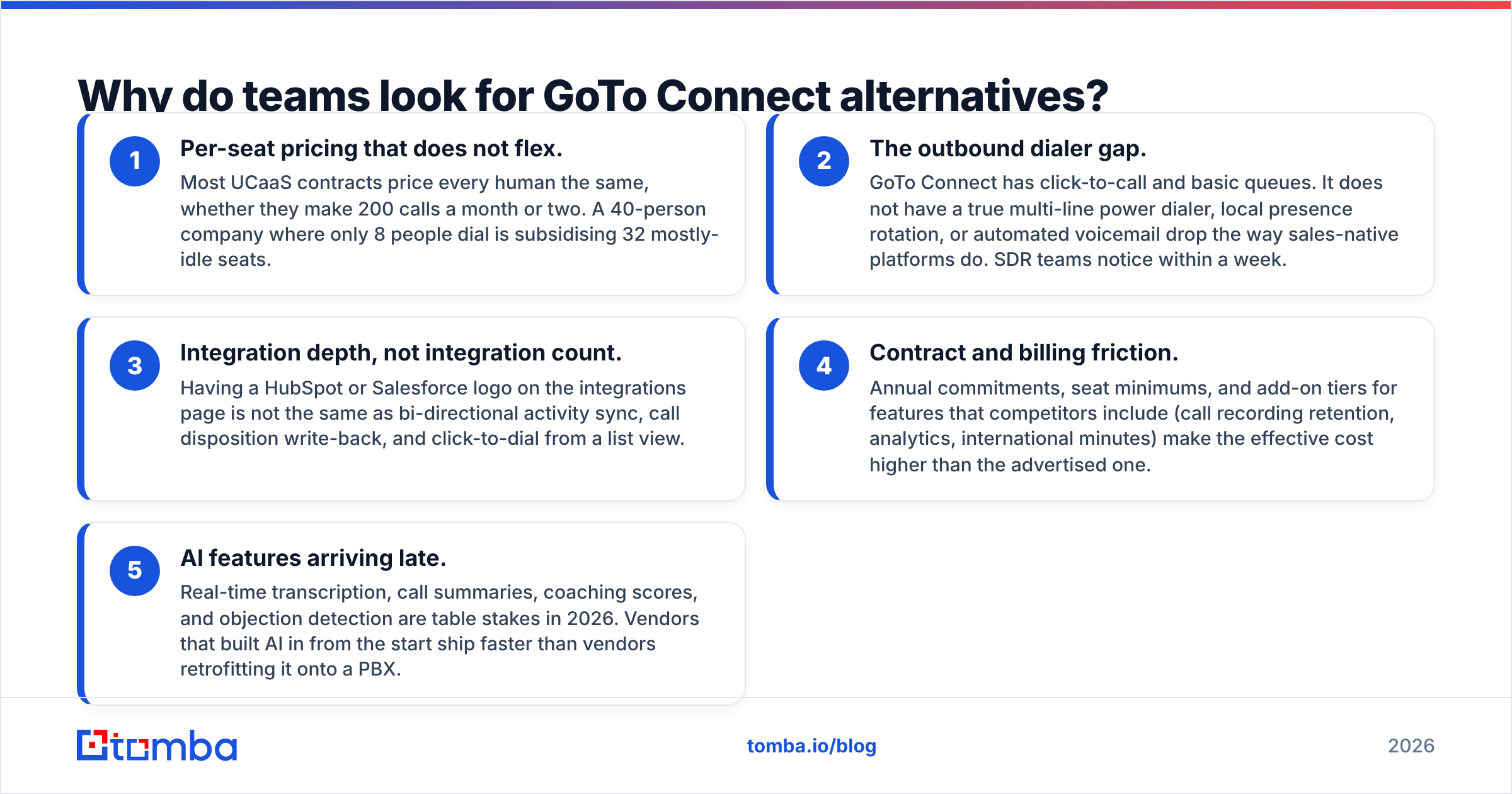
- Per-seat pricing that does not flex. Most UCaaS contracts price every human the same, whether they make 200 calls a month or two. A 40-person company where only 8 people dial is subsidising 32 mostly-idle seats.
- The outbound dialer gap. GoTo Connect has click-to-call and basic queues. It does not have a true multi-line power dialer, local presence rotation, or automated voicemail drop the way sales-native platforms do. SDR teams notice within a week.
- Integration depth, not integration count. Having a HubSpot or Salesforce logo on the integrations page is not the same as bi-directional activity sync, call disposition write-back, and click-to-dial from a list view.
- Contract and billing friction. Annual commitments, seat minimums, and add-on tiers for features that competitors include (call recording retention, analytics, international minutes) make the effective cost higher than the advertised one.
- AI features arriving late. Real-time transcription, call summaries, coaching scores, and objection detection are table stakes in 2026. Vendors that built AI in from the start ship faster than vendors retrofitting it onto a PBX.
None of these make GoTo Connect a bad product. They make it the wrong product for a specific job.
What should you compare before switching phone systems?#
Before you look at a single vendor, write down where you land on these six axes. It will cut your shortlist from twelve to three.
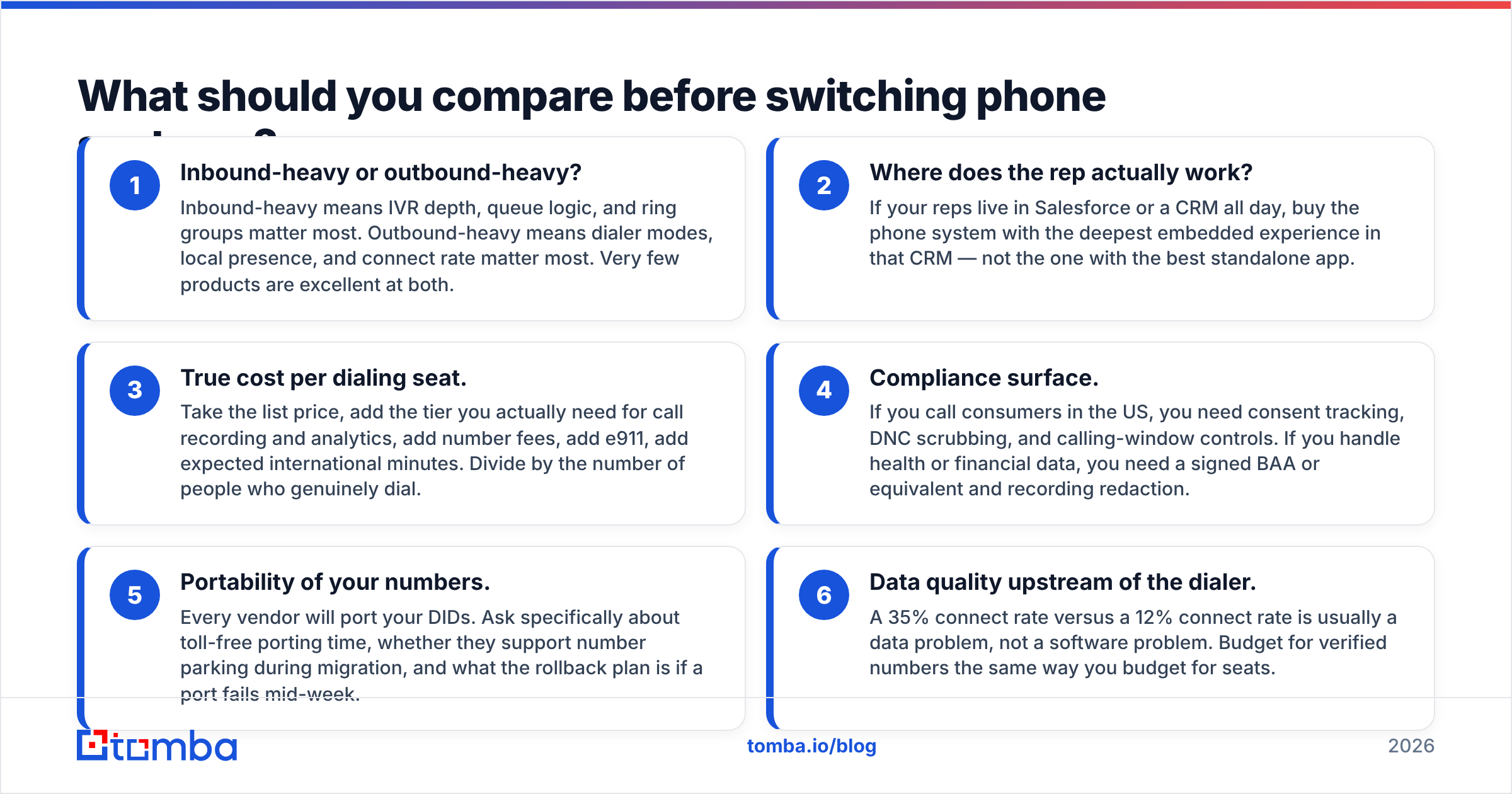
- Inbound-heavy or outbound-heavy? Inbound-heavy means IVR depth, queue logic, and ring groups matter most. Outbound-heavy means dialer modes, local presence, and connect rate matter most. Very few products are excellent at both.
- Where does the rep actually work? If your reps live in Salesforce or a CRM all day, buy the phone system with the deepest embedded experience in that CRM — not the one with the best standalone app.
- True cost per dialing seat. Take the list price, add the tier you actually need for call recording and analytics, add number fees, add e911, add expected international minutes. Divide by the number of people who genuinely dial.
- Compliance surface. If you call consumers in the US, you need consent tracking, DNC scrubbing, and calling-window controls. If you handle health or financial data, you need a signed BAA or equivalent and recording redaction.
- Portability of your numbers. Every vendor will port your DIDs. Ask specifically about toll-free porting time, whether they support number parking during migration, and what the rollback plan is if a port fails mid-week.
- Data quality upstream of the dialer. A 35% connect rate versus a 12% connect rate is usually a data problem, not a software problem. Budget for verified numbers the same way you budget for seats.
Which are the best GoTo Connect alternatives in 2026?#
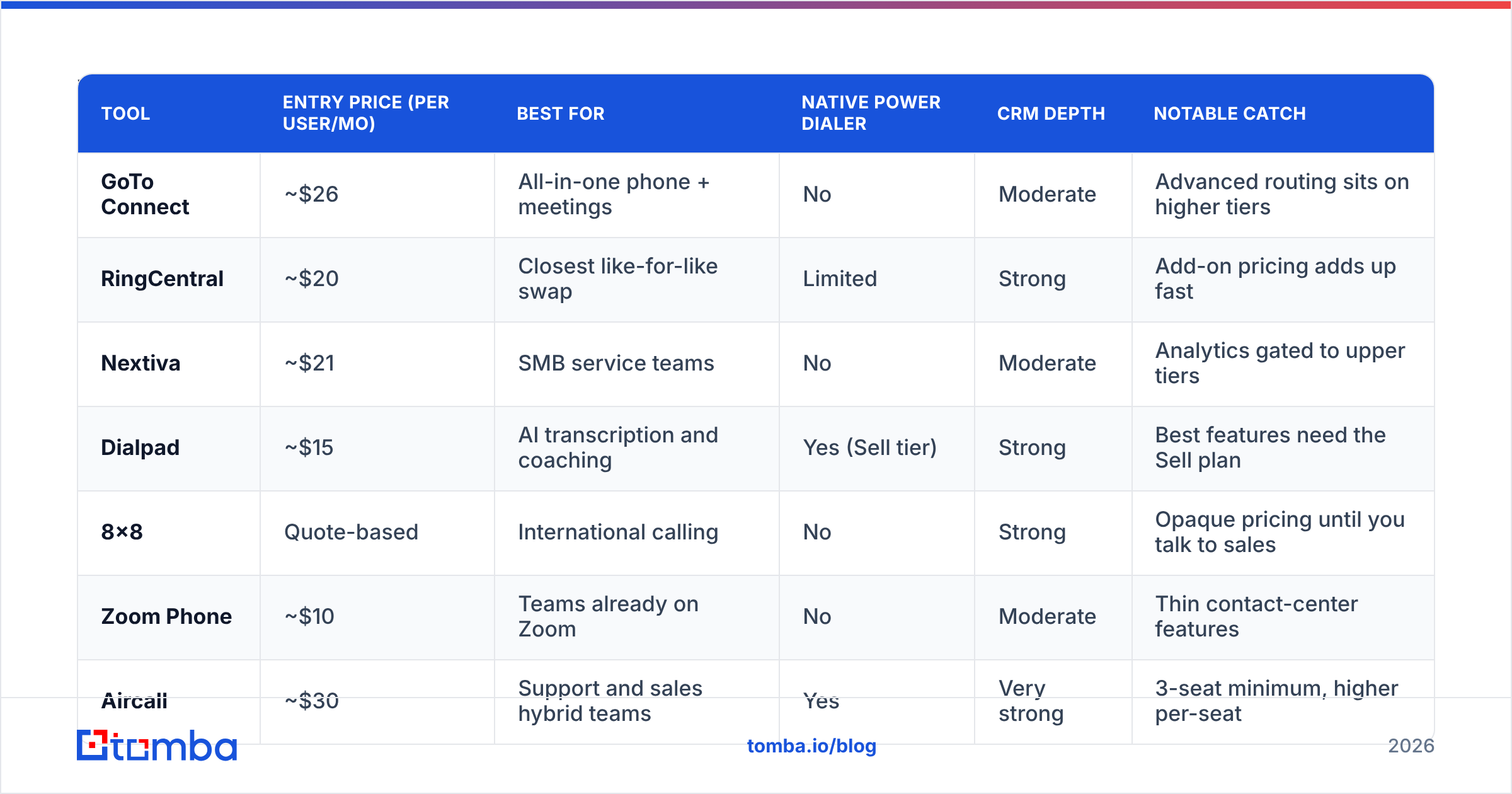
Prices below reflect publicly listed entry-tier rates per user per month at the time of writing, generally on annual billing. Always confirm on the vendor's own pricing page — UCaaS list pricing changes quarterly and volume discounts are the norm above 20 seats.
| Tool | Entry price (per user/mo) | Best for | Native power dialer | CRM depth | Notable catch |
|---|---|---|---|---|---|
| GoTo Connect | ~$26 | All-in-one phone + meetings | No | Moderate | Advanced routing sits on higher tiers |
| RingCentral | ~$20 | Closest like-for-like swap | Limited | Strong | Add-on pricing adds up fast |
| Nextiva | ~$21 | SMB service teams | No | Moderate | Analytics gated to upper tiers |
| Dialpad | ~$15 | AI transcription and coaching | Yes (Sell tier) | Strong | Best features need the Sell plan |
| 8x8 | Quote-based | International calling | No | Strong | Opaque pricing until you talk to sales |
| Zoom Phone | ~$10 | Teams already on Zoom | No | Moderate | Thin contact-center features |
| Aircall | ~$30 | Support and sales hybrid teams | Yes | Very strong | 3-seat minimum, higher per-seat |
| JustCall | ~$29 | Outbound SDR pods | Yes | Very strong | Some AI features cost extra |
| Kixie | ~$35 | High-volume cold calling | Yes (multi-line) | Very strong | Overkill for inbound-only teams |
| Ooma Office | ~$20 | Micro-businesses, low complexity | No | Light | Minimal sales tooling |
RingCentral — the safest like-for-like replacement#
If your priority is "same job, fewer complaints," RingCentral is the default. It matches GoTo Connect on PBX depth, exceeds it on integrations and contact-center options, and has the largest partner ecosystem in the category. The trade-off is the same one you already have: it is a per-seat UCaaS product with tiered add-ons, and the bill grows with headcount rather than with usage. Choose it when you are inbound-heavy and want a boring, reliable migration.
Dialpad — best if you want AI built in, not bolted on#
Dialpad built real-time transcription, live coaching cards, and automatic call summaries into its core rather than shipping them as a 2024 retrofit. Entry pricing undercuts GoTo Connect, and the Sell tier adds a power dialer plus CRM-embedded dialing. It is the strongest option for a team that wants call intelligence without buying a separate conversation-intelligence tool.
Aircall and JustCall — the sales-native middle ground#
Both were designed around the outbound workflow rather than the office PBX. You get power dialing, shared inboxes, call tagging, disposition write-back, and deep native integrations with HubSpot, Pipedrive, and Salesforce. Aircall skews slightly toward blended support-and-sales teams; JustCall skews toward SDR pods running sequences. Neither is the cheapest per seat, and that is the point — you pay more per seat because fewer seats need to exist.
Kixie — for teams whose entire job is dialing#
Kixie's multi-line dialer, local presence rotation, and voicemail drop exist for one workflow: burn through a list, log everything, and move on. If your reps make 100+ dials a day, the per-seat premium pays for itself in connect volume. If your reps make 15 dials a day, you are buying a race car for a school run.
Zoom Phone and Ooma — the budget swaps#
Zoom Phone is the cheapest credible replacement for a team already standardised on Zoom, and the unified admin story is genuinely simpler. Ooma Office is the low-complexity pick for businesses under ten people that need reliable calling and nothing else. Both trade away analytics depth and sales tooling for price and simplicity.
8x8 and Nextiva — the enterprise-leaning options#
8x8 is strongest when international calling volume is significant; its unlimited-country calling plans can beat per-minute rates decisively at scale, though you will have to go through sales to see real numbers. Nextiva sits closest to GoTo Connect in positioning — an SMB-friendly all-in-one — and is worth a quote mainly as pricing leverage during renewal.
Is switching phone systems actually worth the disruption?#
Only if you can name the number that will change.
Switching from one UCaaS product to another to save $4 per seat is rarely worth two weeks of porting risk and retraining. Switching because your team is manually dialing from a spreadsheet and a power dialer would triple daily conversations is obviously worth it. Write down the metric first — connect rate, dials per rep per day, average speed to answer, cost per dialing seat — and only switch if the alternative moves it by a margin that survives a skeptical CFO.
A useful rule: if the answer to "what breaks today?" is "nothing, it's just annoying," negotiate your renewal instead of migrating. Bring a competitor quote. GoTo, RingCentral, and Nextiva all discount aggressively against each other.

What do most teams get wrong when they replace GoTo Connect?#
They buy a better dialer and feed it the same bad list.
Every phone system vendor markets connect rate improvements, and every one of those improvements assumes the number you dial belongs to a real person who still works there. In B2B, direct-dial data decays fast — people change roles, companies restructure, and mobile numbers scraped from aggregators are frequently either wrong, disconnected, or attached to someone who left two years ago. A power dialer running a 40%-stale list just reaches voicemail faster.
Three fixes, in order of impact:
- Validate before you dial. Running numbers through a phone validator removes disconnected lines, flags line type (mobile versus landline versus VoIP), and confirms carrier and region before your rep burns a slot. Line type alone changes your approach — a mobile is a different conversation than a switchboard.
- Source direct dials, not switchboards. A main company number routed through a gatekeeper is not a sales asset. A phone finder that returns direct numbers tied to a named contact is worth more per record than ten generic company lines.
- Enrich, then segment. Title, seniority, headcount, and tech stack drive who you call first. Pushing raw names into a dialer without contact enrichment means your best rep spends the morning on the wrong accounts.
Do this once and the difference in daily conversations usually dwarfs the difference between any two vendors on the table above.
How do you migrate without dropping calls?#
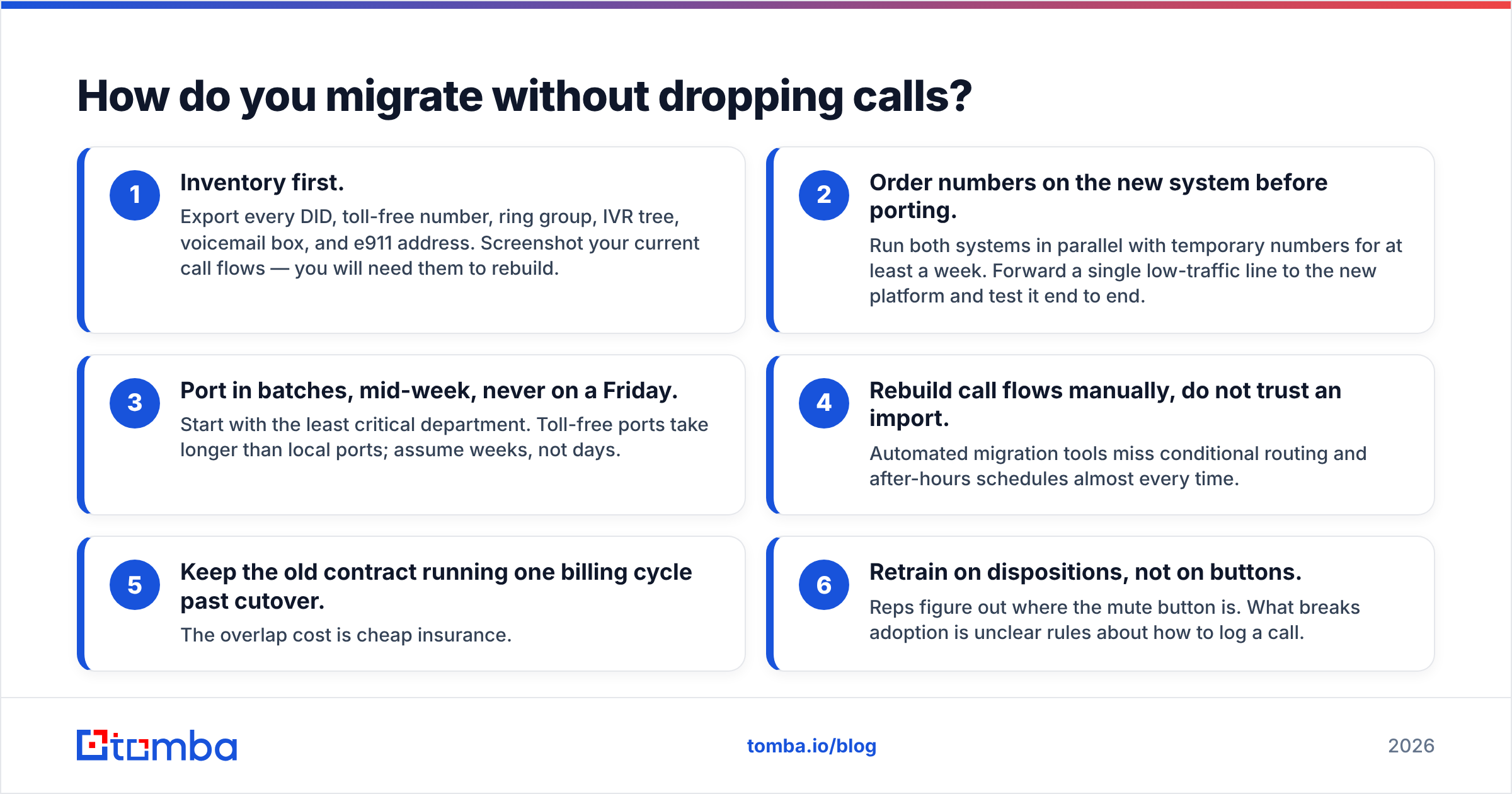
A migration that goes badly costs more than a year of the savings you were chasing. The sequence that works:
- Inventory first. Export every DID, toll-free number, ring group, IVR tree, voicemail box, and e911 address. Screenshot your current call flows — you will need them to rebuild.
- Order numbers on the new system before porting. Run both systems in parallel with temporary numbers for at least a week. Forward a single low-traffic line to the new platform and test it end to end.
- Port in batches, mid-week, never on a Friday. Start with the least critical department. Toll-free ports take longer than local ports; assume weeks, not days.
- Rebuild call flows manually, do not trust an import. Automated migration tools miss conditional routing and after-hours schedules almost every time.
- Keep the old contract running one billing cycle past cutover. The overlap cost is cheap insurance.
- Retrain on dispositions, not on buttons. Reps figure out where the mute button is. What breaks adoption is unclear rules about how to log a call.
Which GoTo Connect alternative should you pick?#
- You are inbound-heavy and want minimal change: RingCentral or Nextiva.
- You want AI call intelligence included: Dialpad.
- You run an outbound SDR team inside a CRM: JustCall or Aircall.
- You dial 100+ times a day per rep: Kixie.
- You want the lowest bill and already use Zoom: Zoom Phone.
- You are under 10 people and want simple: Ooma Office.
- You have heavy international volume: get an 8x8 quote.
There is no universally better product than GoTo Connect — there is only a better fit for a defined workflow. Pick the axis you actually care about, then negotiate hard, because every vendor in this category expects to discount.
Get the data right before you get the dialer right#
The fastest connect-rate improvement most teams can make has nothing to do with which logo is on their softphone. It is having accurate, verified contact data attached to every record before the first dial — and an email fallback for the 60-70% of prospects who will never pick up a number they do not recognise.
Start with Tomba Email Finder to build a verified contact layer around your call list, then layer direct dials on top of it. The free tier gives you 25 searches a month to test accuracy on your own accounts before you commit, and paid plans start at $49/month — see Tomba pricing for the full breakdown. Whatever phone system you land on, it will perform better with clean data behind it.
Related guides#
Ready to find emails that actually work?
Join 150,000+ professionals who stopped guessing and started sending. Free credits on signup — no credit card required.
Get the Tomba newsletter
Practical outbound tactics and product updates — once every two weeks.
About the author