GoTo Connect vs Zoom in 2026: Full Comparison for Sales Teams
GoTo Connect is a business phone system with meetings attached. Zoom is a meetings platform with phone attached. Here is how the two actually compare on price, reliability, and outbound sales workflows.
TL;DR
- GoTo Connect is a phone system first. Its DNA is PBX: auto-attendants, ring groups, call flows, hunt groups, e911. Meetings come along for the ride.
- Zoom is a meetings platform first. Zoom Phone is a strong add-on, but it is an add-on — you pay for a Workplace seat and then pay again for a phone license.
- On list price, GoTo Connect is usually cheaper than a comparable Zoom Workplace + Zoom Phone bundle for teams that genuinely need both. Zoom wins if your team lives in video and only some reps need a DID.
- For high-volume outbound calling, neither is a dialer. Both do one-at-a-time dialing well; power dialing and cadence logic still come from your sales engagement tool.
- The real cost driver is neither vendor. Bad phone and email data burns more budget than a $10/seat license difference. Clean your contact records before you argue about seat pricing.
What are GoTo Connect and Zoom, exactly?#
They are not the same category of product, which is why the comparison confuses people.
GoTo Connect is a cloud UCaaS platform — the successor to Jive, folded into the GoTo (formerly LogMeIn) portfolio. You buy it because you need a business phone system: numbers, extensions, a receptionist flow, voicemail-to-email, call recording, and a softphone your reps can use from a laptop or a mobile. Video meetings and messaging are bundled in so you do not need a second vendor for internal calls.
Zoom came at it from the opposite direction. It won the video meeting market, then extended into a full workplace suite: Team Chat, Zoom Phone, Zoom Contact Center, whiteboards, notes, and an AI Companion layer across all of it. Zoom Phone is a real cloud PBX with call queues, IVR, and SMS — it just sits on top of a Workplace subscription rather than being the subscription.
That difference decides most purchases. Ask which product your team would be angry to lose. If it is the phone tree and the shared inbound line, start with GoTo. If it is the meeting room, the recordings, and the AI summaries, start with Zoom.
How do GoTo Connect and Zoom compare feature by feature?#
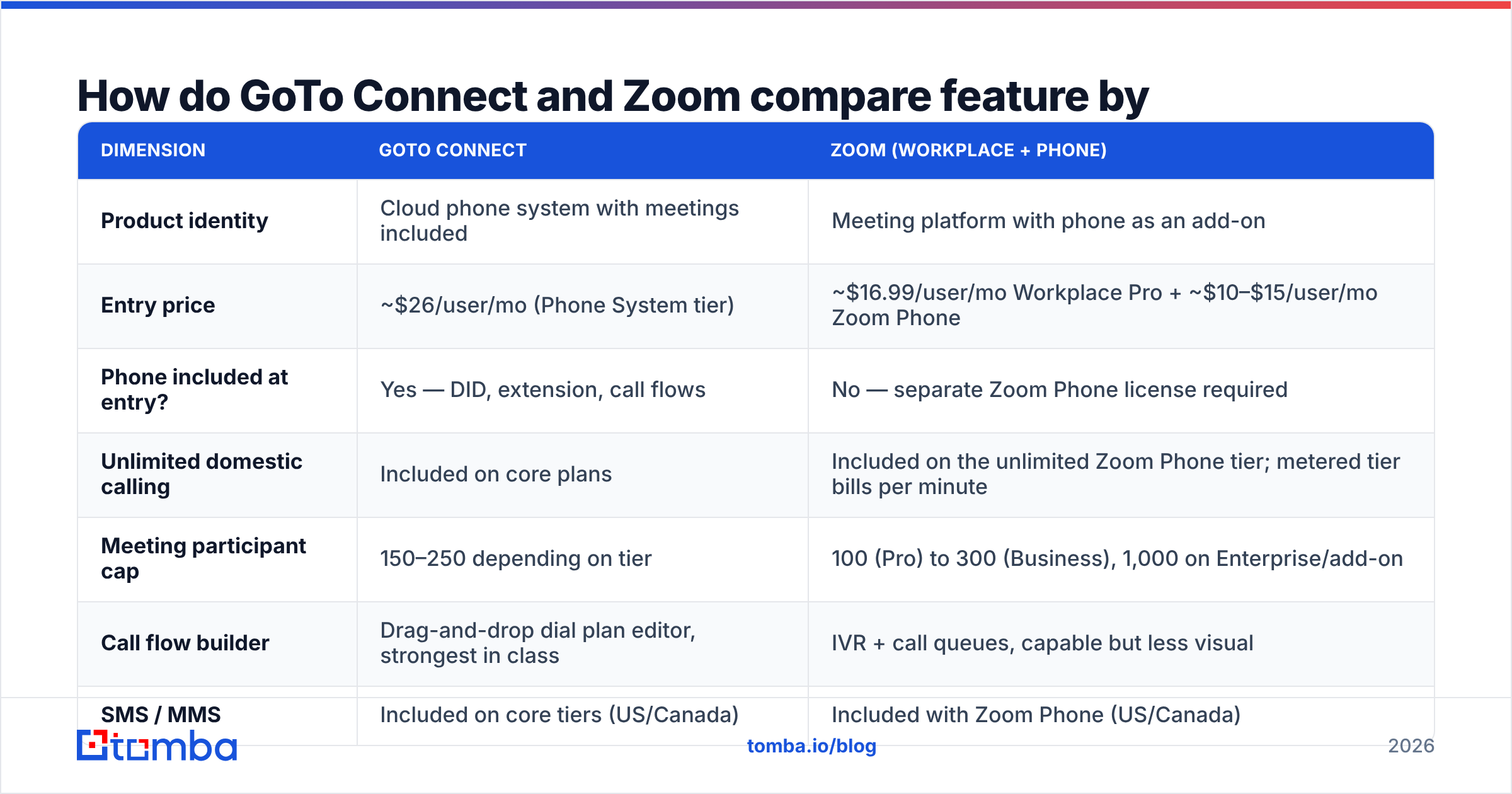
Prices below are public list prices at the time of writing, billed annually, per user per month. Both vendors discount at volume and both change packaging often — treat this as a shape, not a quote.
| Dimension | GoTo Connect | Zoom (Workplace + Phone) |
|---|---|---|
| Product identity | Cloud phone system with meetings included | Meeting platform with phone as an add-on |
| Entry price | ~$26/user/mo (Phone System tier) | ~$16.99/user/mo Workplace Pro + ~$10–$15/user/mo Zoom Phone |
| Phone included at entry? | Yes — DID, extension, call flows | No — separate Zoom Phone license required |
| Unlimited domestic calling | Included on core plans | Included on the unlimited Zoom Phone tier; metered tier bills per minute |
| Meeting participant cap | 150–250 depending on tier | 100 (Pro) to 300 (Business), 1,000 on Enterprise/add-on |
| Call flow builder | Drag-and-drop dial plan editor, strongest in class | IVR + call queues, capable but less visual |
| SMS / MMS | Included on core tiers (US/Canada) | Included with Zoom Phone (US/Canada) |
| AI features | AI-assisted call summaries, transcription | AI Companion bundled across meetings, phone, chat |
| Contact center | GoTo Contact Center add-on | Zoom Contact Center add-on |
| CRM integrations | Salesforce, HubSpot, Zoho, MS Teams | Broadest ecosystem — Salesforce, HubSpot, Zendesk, ServiceNow, plus a large marketplace |
| Best for | SMB and multi-location teams that live on the phone | Teams whose primary channel is video, adding phone selectively |
Read the table once more with a specific question: how many of your seats actually need a phone number? That single number flips the math. If it is 100% of seats, GoTo's all-in pricing is usually tighter. If it is 30% — the classic pattern where AEs and support need DIDs but engineering and marketing do not — Zoom lets you buy phone licenses only for the seats that need them while everyone keeps a meeting seat.
Which one is better for outbound sales calling?#
GoTo Connect, narrowly — but with a caveat that matters more than the winner.
GoTo's advantage for outbound teams is operational: local presence numbers across a lot of area codes, straightforward call recording policies, a call flow editor a sales ops person can actually configure without a ticket, and a softphone that does not fight with the rest of your desktop. Reporting on call volume, talk time, and missed calls is native rather than an add-on.
Zoom Phone matches most of that on paper and beats GoTo on one axis: if your reps already spend six hours a day in Zoom, keeping calls in the same window removes an app switch. Zoom's power dialer and call queue routing have matured, and AI Companion call summaries land in the same place as meeting summaries — useful when a deal moves between channels.
The caveat: neither product is a sales engagement platform. If you want a 200-dial-a-day cadence with local presence rotation, automatic logging, and email steps interleaved, you are buying Outreach, Salesloft, or a similar tool and connecting it to whichever phone system you pick. Do not choose between GoTo and Zoom on dialer specs you will not end up using.
And before either dialer matters, the list has to be real. A rep making 80 dials into a list where 30% of the numbers are wrong is not a rep with a tooling problem. Run numbers through a phone validator and source direct dials with a phone finder so your connect rate reflects your pitch, not your data hygiene.
What does each one really cost at 25 seats?#
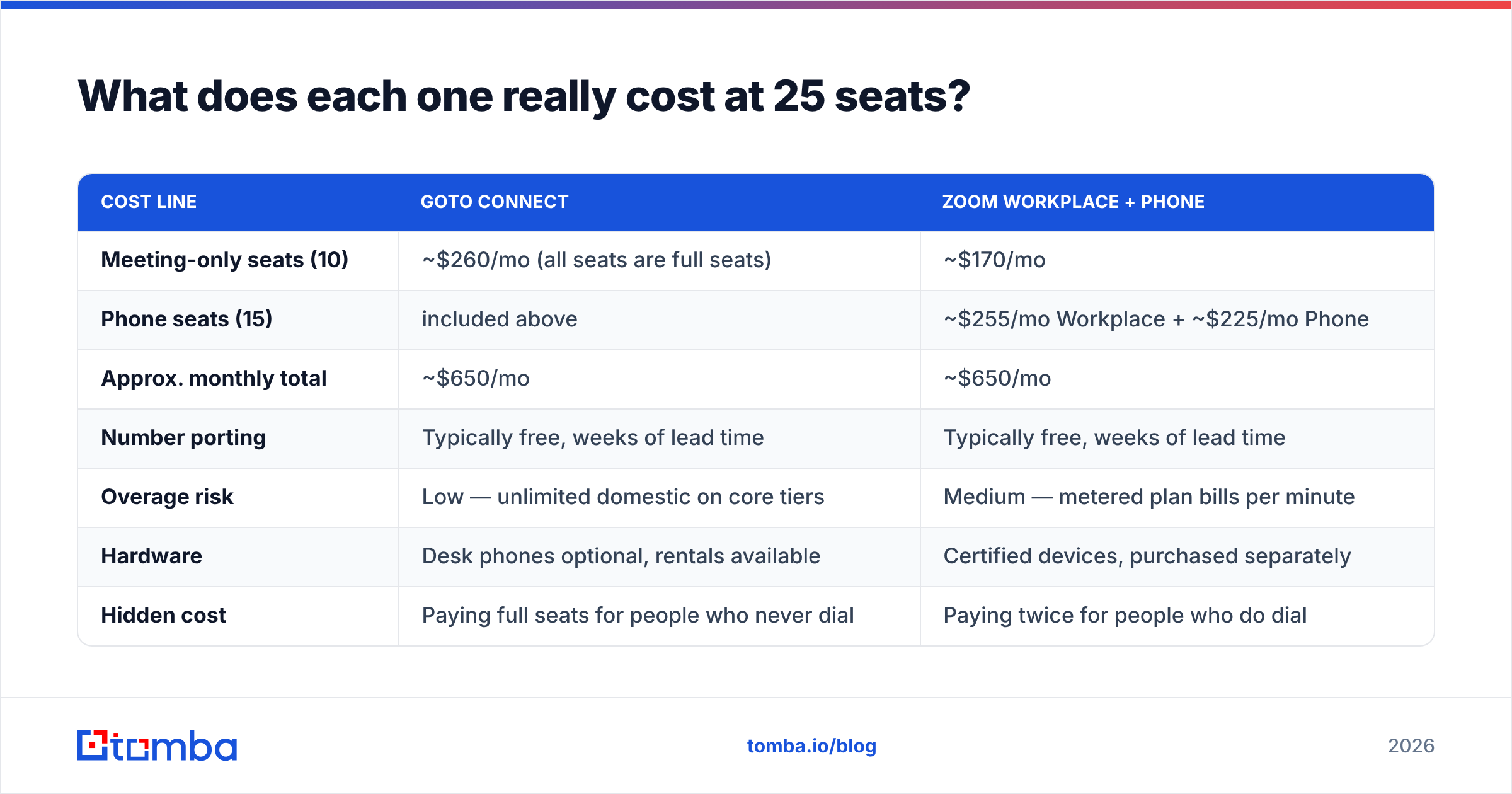
Licenses are only part of it. Here is the honest cost shape for a 25-person revenue team where 25 need meetings and 15 need a phone number.
| Cost line | GoTo Connect | Zoom Workplace + Phone |
|---|---|---|
| Meeting-only seats (10) | ~$260/mo (all seats are full seats) | ~$170/mo |
| Phone seats (15) | included above | ~$255/mo Workplace + ~$225/mo Phone |
| Approx. monthly total | ~$650/mo | ~$650/mo |
| Number porting | Typically free, weeks of lead time | Typically free, weeks of lead time |
| Overage risk | Low — unlimited domestic on core tiers | Medium — metered plan bills per minute |
| Hardware | Desk phones optional, rentals available | Certified devices, purchased separately |
| Hidden cost | Paying full seats for people who never dial | Paying twice for people who do dial |
The two land in roughly the same place at this mix, which is the point. The spread only opens up at the extremes. At 25 seats where all 25 dial, GoTo is meaningfully cheaper. At 25 seats where 4 dial, Zoom is meaningfully cheaper. Model your own ratio before you accept either sales rep's TCO slide — and check current G2 reviews for how each vendor's renewal pricing behaves in year two, since that is where the quoted discount often evaporates.
How do they compare on reliability and call quality?#
Both publish uptime targets in the four-nines range and both largely hit them. Publicly reported outages for either platform tend to be regional and short. If you are deciding on reliability alone, you are deciding on a coin flip.
What actually drives call quality is your network, not the vendor:
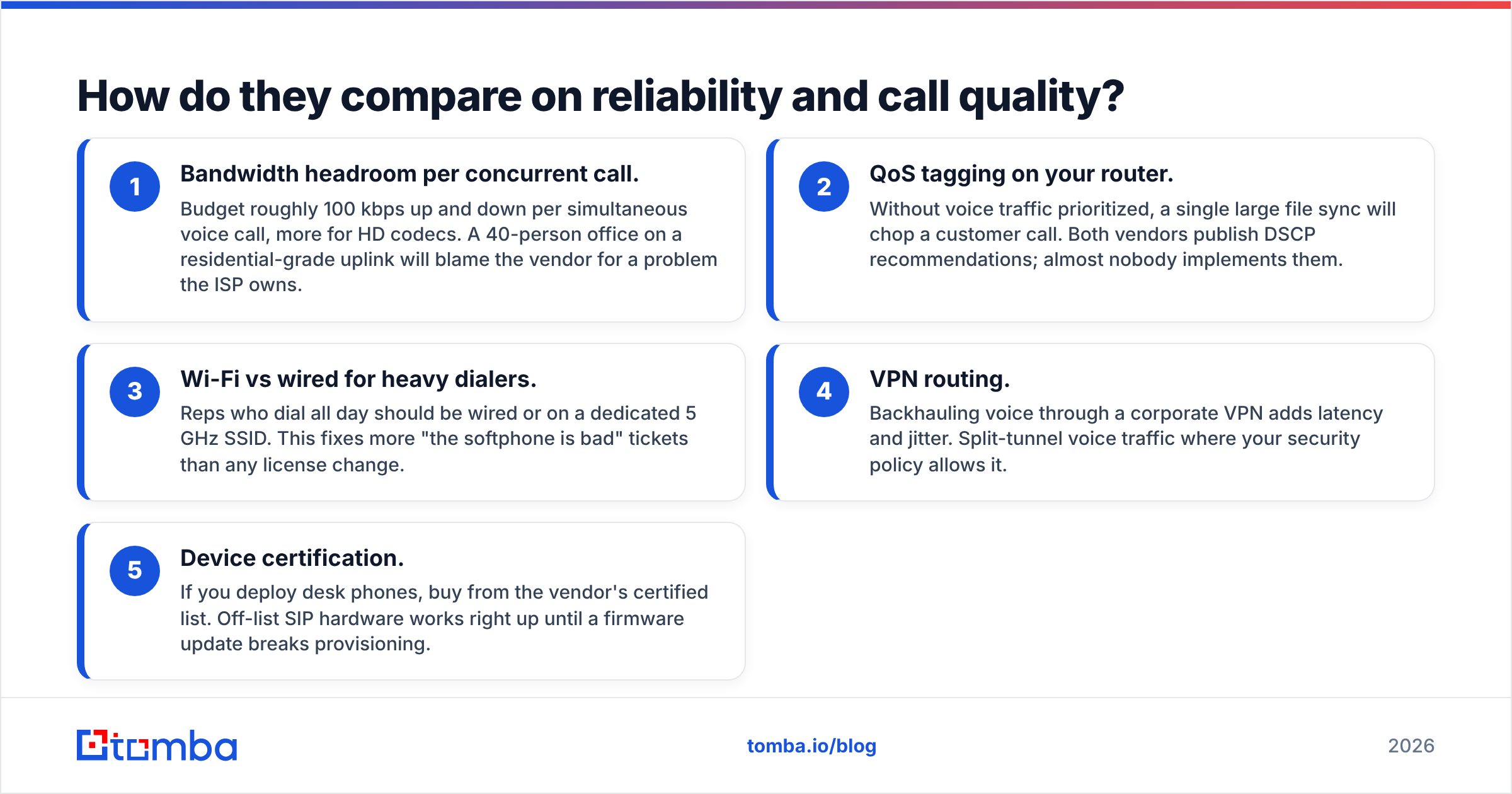
- Bandwidth headroom per concurrent call. Budget roughly 100 kbps up and down per simultaneous voice call, more for HD codecs. A 40-person office on a residential-grade uplink will blame the vendor for a problem the ISP owns.
- QoS tagging on your router. Without voice traffic prioritized, a single large file sync will chop a customer call. Both vendors publish DSCP recommendations; almost nobody implements them.
- Wi-Fi vs wired for heavy dialers. Reps who dial all day should be wired or on a dedicated 5 GHz SSID. This fixes more "the softphone is bad" tickets than any license change.
- VPN routing. Backhauling voice through a corporate VPN adds latency and jitter. Split-tunnel voice traffic where your security policy allows it.
- Device certification. If you deploy desk phones, buy from the vendor's certified list. Off-list SIP hardware works right up until a firmware update breaks provisioning.
Fix those five and the GoTo-vs-Zoom call quality debate mostly disappears.
Which fits better into a modern GTM stack?#
Zoom, on breadth. GoTo, on depth of telephony admin.
Zoom's marketplace is larger and its Salesforce and HubSpot integrations are more mature, particularly for logging meeting recordings and AI summaries back to the opportunity record. If your CRM is the system of record and you want call and meeting artifacts attached to deals without middleware, Zoom takes less work.
GoTo integrates with the same major CRMs and adds the thing Zoom does not prioritize: granular telephony administration. Multi-location dial plans, per-site emergency addresses, department-level call flows, and shared line appearances are first-class. For a company with five offices and a real receptionist workflow, that is not a nice-to-have.
Whichever you pick, the integration only pays off if the records flowing into it are complete. A call logged against a contact with no verified email and no company data is a log entry, not intelligence. Teams that pair their phone system with contact enrichment get follow-up sequences that actually fire, because the enriched record carries the email, the title, and the company context the sequence needs.

When should you pick GoTo Connect?#
Choose GoTo Connect if most of these are true:
- Every seat needs a phone number. All-in pricing beats stacked licensing when the phone attach rate approaches 100%.
- You have a real inbound flow. Auto-attendant, department routing, after-hours handling, overflow to mobile. GoTo's visual dial plan editor is the best in this bracket.
- You run multiple locations. Per-site configuration, local numbers, and site-level e911 are handled cleanly.
- Meetings are internal, not customer-facing theatre. 150–250 participants and solid screen sharing is enough; you do not need webinar production tooling.
- You want one bill. Phone, meetings, and messaging on a single line item simplifies procurement.
When should you pick Zoom?#
Choose Zoom if most of these are true:
- Video is your primary channel. Demos, onboarding, QBRs, customer training. Zoom's meeting experience and recording ecosystem remain the reference standard.
- Only some seats need phone. Buying Zoom Phone for 15 of 60 seats is cheaper than upgrading all 60 to a full UCaaS plan.
- You want AI across channels. AI Companion spanning meetings, phone, and chat is a genuine differentiator if your team will use summaries and action items.
- You run webinars or large events. Zoom Events and Webinars have no real equivalent on the GoTo side at scale.
- Your buyers already have Zoom. Fewer join failures on external calls is worth more than most feature comparisons.
What do most teams get wrong in this decision?#
They optimize the wrong line item.
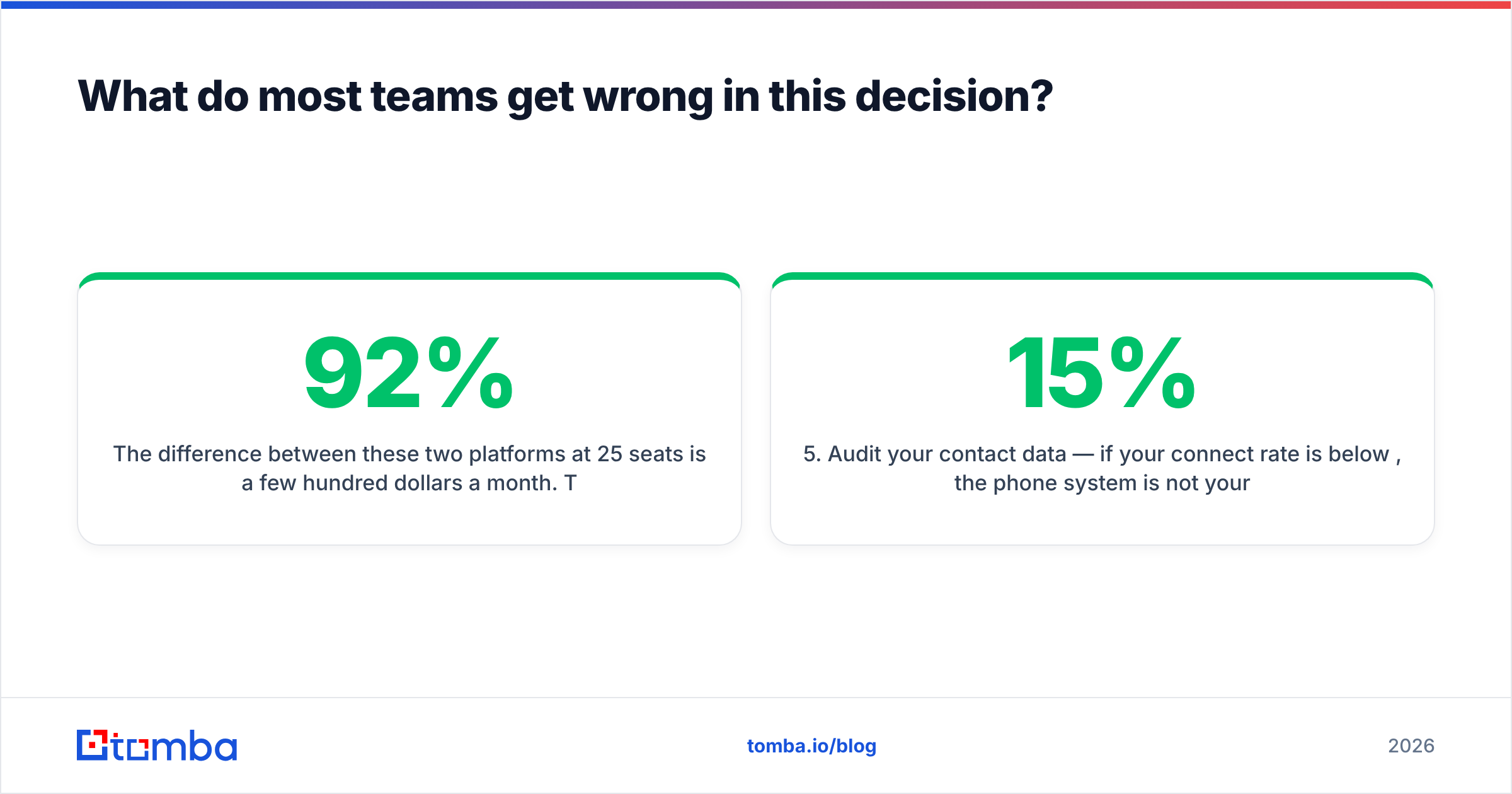
The difference between these two platforms at 25 seats is a few hundred dollars a month. The difference between a prospecting list where 92% of contacts are reachable and one where 65% are is tens of thousands of dollars of rep time per quarter. Both GoTo Connect and Zoom will dial whatever number you give them, perfectly, into a dead line.
So run the comparison, pick the one whose shape matches your team, and then spend the saved energy upstream. Verify the email addresses attached to every dial target so the voicemail you leave has a follow-up that lands. Confirm the direct dial exists before a rep burns a slot on it. Deduplicate the list so two reps do not call the same VP of Ops in the same week.
A quick sanity checklist before you sign either contract:
- Count your true phone-attach rate. Not "everyone might need it" — how many people dialed an external number last month?
- Get the year-two price in writing. Both vendors discount year one aggressively.
- Test the softphone on your actual network with your actual reps for two weeks, not in a vendor-hosted demo.
- Confirm porting timelines against your current contract's termination date, with two weeks of buffer.
- Audit your contact data — if your connect rate is below 15%, the phone system is not your bottleneck.
The bottom line#
GoTo Connect wins when the phone is the product your team runs on and every seat needs a line. Zoom wins when video is the product and phone is a selective add-on for the seats that dial. Pricing lands close for mixed teams, reliability is a wash, and neither replaces a dedicated sales engagement platform for high-volume outbound.
Once you have picked, make sure your reps are calling and emailing real people. Use the Tomba Email Finder to attach a verified work email to every account before your sequences go live — free tier covers 25 searches a month, and paid plans start at $49/mo on the Tomba pricing page. The phone system is a delivery mechanism. The data is what decides whether anyone picks up.
Related guides#
Ready to find emails that actually work?
Join 150,000+ professionals who stopped guessing and started sending. Free credits on signup — no credit card required.
Get the Tomba newsletter
Practical outbound tactics and product updates — once every two weeks.
About the author