Grasshopper Pricing Reviews Pros and Cons (2026 Guide)
A neutral breakdown of Grasshopper's plans, add-on costs, real user reviews, and the honest pros and cons — plus who should pick a cheaper or more sales-native alternative.
Short answer: Grasshopper is a good deal for small inbound teams and a poor one for solo users. This guide puts Grasshopper pricing reviews pros and cons in one place — real plan costs, add-on fees, what buyers actually say, and who should pick a different tool.
TL;DR
- Grasshopper is a virtual phone system, not a sales dialer. You get business numbers, extensions, and call forwarding on top of phones you already own. In 2026 the three published plans sit at roughly $29, $49, and $89 per month.
- The pricing model is unusual: you pay per plan, not per user. That is a bargain for a 6-person team. It is expensive for a solo operator who needs one number.
- Real costs climb with add-ons. Extra numbers, vanity and toll-free numbers, and international minutes are billed on top of the plan.
- Reviews are consistently positive on simplicity and setup speed. They are consistently negative on call quality edge cases, thin analytics, and weak CRM integration.
- If you call prospects rather than answer inbound customers, Grasshopper solves the number problem but not the data problem. You still need accurate direct dials and verified emails to fill the queue.
What is Grasshopper and who is it actually for?#
Grasshopper is a virtual phone system owned by LogMeIn/GoTo. Think of it as a receptionist's switchboard that lives in an app instead of a wooden box in the lobby. Calls come into one business number, get routed by extension, and land on the mobile or desk phone you already carry. Under the hood it is a cloud PBX with forwarding, voicemail transcription, business texting, and a shared inbox. It is lighter than a full unified-communications suite, and that is on purpose.
That framing matters before you look at a single price. Grasshopper is built for inbound-first small businesses: consultants, clinics, contractors, agencies, real estate teams, and early-stage startups that want to stop handing out a personal cell number. It is not built for high-volume outbound teams. There is no power dialer, no local presence rotation, no cadence engine, and no real conversation intelligence.
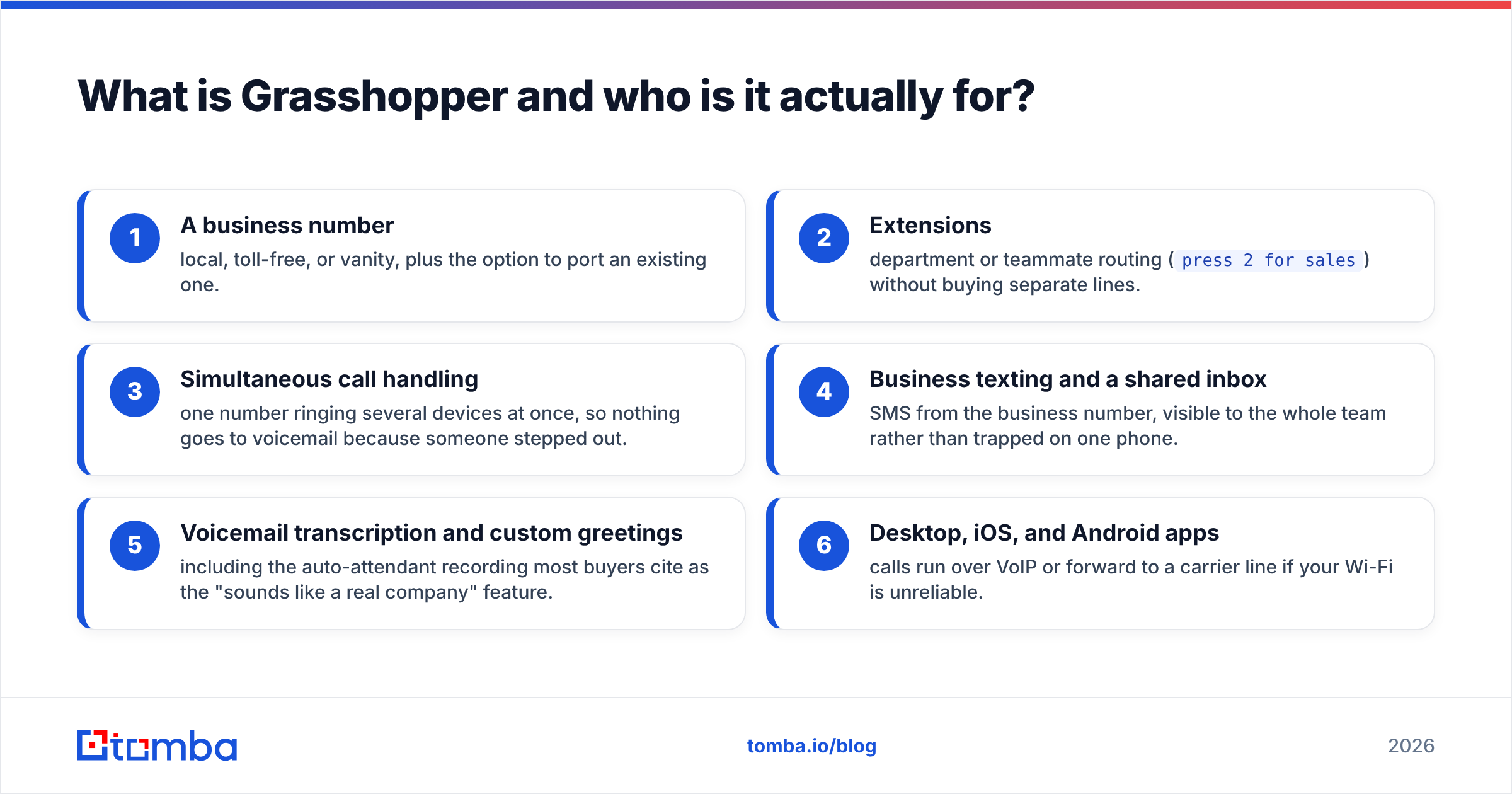
Here is what a plan actually includes, regardless of tier:
- A business number — local, toll-free, or vanity, plus the option to port an existing one.
- Extensions — department or teammate routing (
press 2 for sales) without buying separate lines. - Simultaneous call handling — one number rings several devices at once, so nothing goes to voicemail because someone stepped out.
- Business texting and a shared inbox — SMS from the business number, visible to the whole team instead of trapped on one phone.
- Voicemail transcription and custom greetings — including the auto-attendant most buyers cite as the "sounds like a real company" feature.
- Desktop, iOS, and Android apps — calls run over VoIP, or forward to a carrier line if your Wi-Fi is unreliable.
Notice what is missing from that list: dialing automation, deal records, and lead data. Grasshopper assumes you already know who to call.

How much does Grasshopper cost in 2026?#
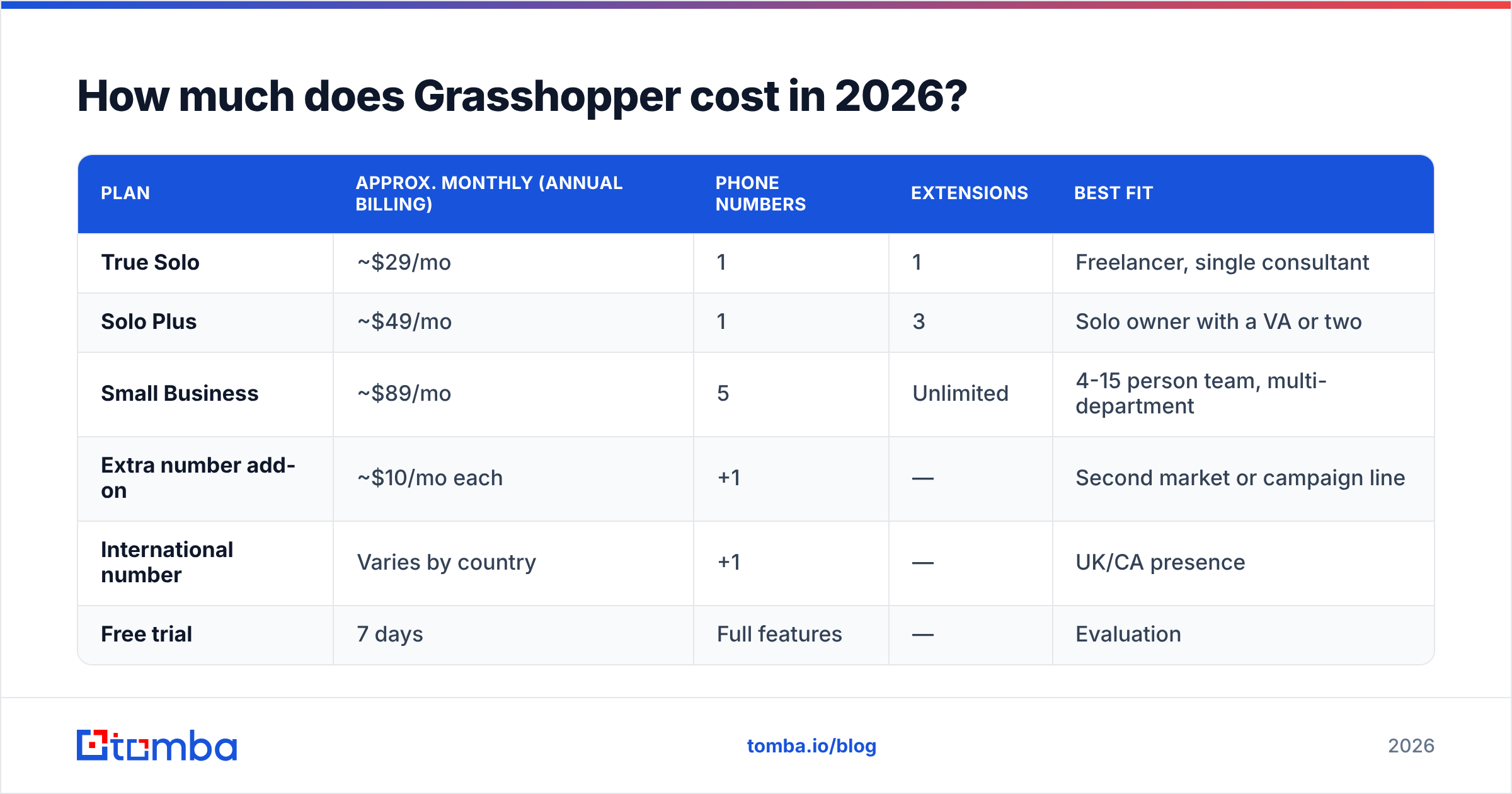
Grasshopper publishes three tiers. Check the live numbers on grasshopper.com before you buy. The company has repriced and renamed tiers more than once, and annual prepay usually shaves around 10%.
| Plan | Approx. monthly (annual billing) | Phone numbers | Extensions | Best fit |
|---|---|---|---|---|
| True Solo | ~$29/mo | 1 | 1 | Freelancer, single consultant |
| Solo Plus | ~$49/mo | 1 | 3 | Solo owner with a VA or two |
| Small Business | ~$89/mo | 5 | Unlimited | 4-15 person team, multi-department |
| Extra number add-on | ~$10/mo each | +1 | — | Second market or campaign line |
| International number | Varies by country | +1 | — | UK/CA presence |
| Free trial | 7 days | Full features | — | Evaluation |
The pricing logic flips the usual SaaS script. Most business phone tools charge $15-$30 per user per month. Grasshopper charges per plan, so the Small Business tier at ~$89 covers unlimited extensions. Split across eight people, that is about $11 per head — genuinely cheap. Split across one person, $29/mo for a single number looks steep next to Google Voice, which starts free for personal use.
The break-even rule of thumb: below three users, Grasshopper is overpriced against per-seat rivals. At four users and above, it is one of the cheapest ways to run a real phone tree.
What are the hidden costs in Grasshopper pricing?#
No vendor calls these "hidden," but buyers keep finding them in month two:
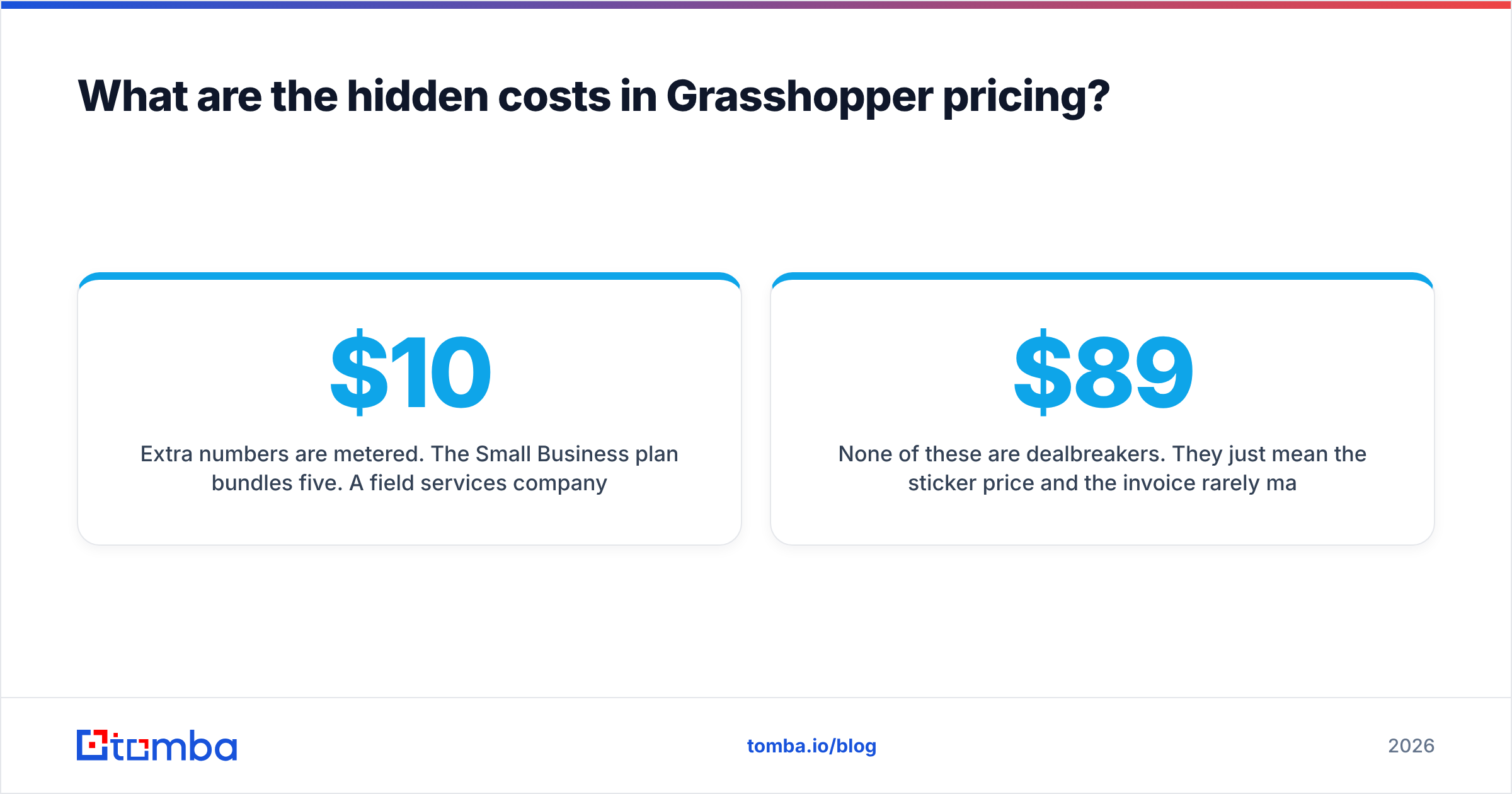
- Extra numbers are metered. The Small Business plan bundles five. A field services company running one number per city hits the ceiling fast. Each extra line adds roughly $10/mo.
- International calling is not included. Outbound international minutes and international numbers bill separately. A US team prospecting into EMEA should model this first.
- No annual escape hatch. The discount requires prepay. If your headcount shifts mid-year — and it does at 5-15 people — you have already paid for the team you had in January.
- No included CRM. Grasshopper connects through Zapier and a few native apps. Rich two-way CRM sync is not part of the product, so budget for the automation layer.
- Compliance and recording. Call recording is limited next to sales-native platforms. Regulated teams often buy a second tool.
None of these are dealbreakers. They just mean the sticker price and the invoice rarely match. Model $89 as roughly $110-$130 all-in for a small team with two extra numbers and a Zapier plan.
What do Grasshopper reviews actually say?#
This is the reviews half of the Grasshopper pricing reviews pros and cons question. Aggregate scores on G2 and Capterra sit in the 4-star range. That is a fair summary: most people get what they expected, and a minority hit a wall.
What reviewers consistently praise
- Setup measured in minutes, not days. No hardware, no SIP provisioning, no IT ticket.
- The professional-presence effect. An auto-attendant and extensions make a two-person shop sound like a twelve-person firm.
- Voicemail transcription accuracy, which many reviewers call the feature they use most.
- Keeping personal cell numbers private while still working from a personal device.
What reviewers consistently criticize
- Call quality varies with network conditions. Forwarding to a carrier line fixes it, but that is a workaround, not a feature.
- Reporting is thin. You get call logs. You do not get the funnel analytics a sales manager expects.
- Support responsiveness draws mixed comments. Billing and porting are the common friction points.
- Integrations feel dated next to rivals that ship native HubSpot and Salesforce apps.
Read the negative reviews and a pattern shows up. Almost all of them come from buyers who wanted an outbound sales platform. The inbound small business crowd rarely complains. That is a positioning mismatch, not a product defect.
How does Grasshopper compare to the alternatives?#
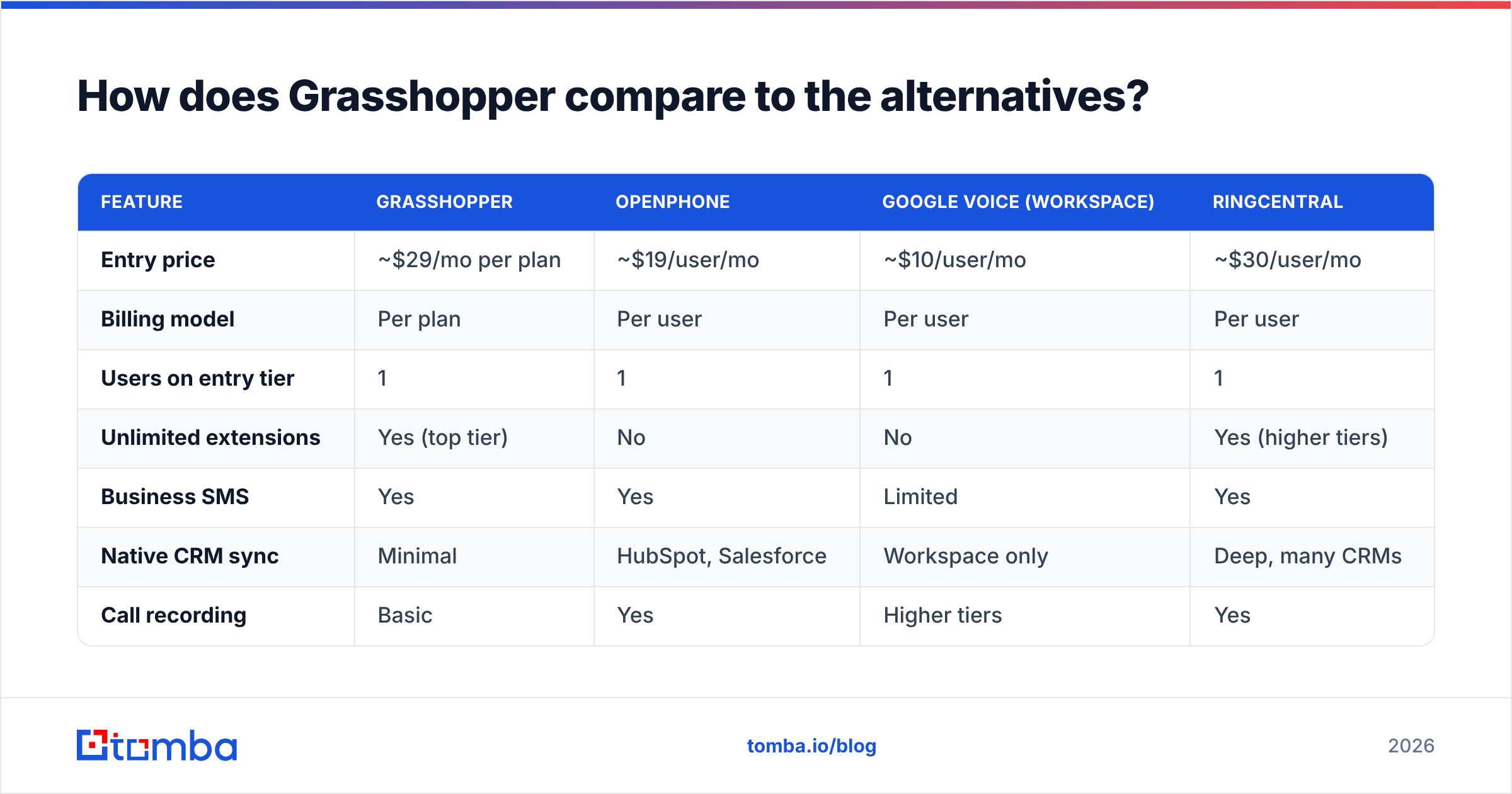
| Feature | Grasshopper | OpenPhone | Google Voice (Workspace) | RingCentral |
|---|---|---|---|---|
| Entry price | ~$29/mo per plan | ~$19/user/mo | ~$10/user/mo | ~$30/user/mo |
| Billing model | Per plan | Per user | Per user | Per user |
| Users on entry tier | 1 | 1 | 1 | 1 |
| Unlimited extensions | Yes (top tier) | No | No | Yes (higher tiers) |
| Business SMS | Yes | Yes | Limited | Yes |
| Native CRM sync | Minimal | HubSpot, Salesforce | Workspace only | Deep, many CRMs |
| Call recording | Basic | Yes | Higher tiers | Yes |
| Video meetings | No | No | Via Meet | Yes |
| Best for | Inbound SMB teams | Startups, light outbound | Google-native solos | Enterprise UCaaS |
The honest read: Grasshopper wins on simplicity per dollar for a small team. It loses on integration depth. And it is beaten on price for a true solo user. If you need video conferencing and contact-center features, you are shopping in RingCentral's category, and Grasshopper will feel incomplete — because it is.
Grasshopper pricing reviews pros and cons: the honest list#
Pros
- Flat pricing that rewards growth. Adding your fifth teammate costs nothing on the Small Business plan. Almost no rival can say that.
- Zero-hardware deployment. It works on devices you already own, so capex stays at zero.
- Number portability. You can bring an existing business number in. You are not restarting your local SEO or reprinting collateral.
- Credible small-business polish. Auto-attendant, extensions, and toll-free options do real work on buyer perception.
- Predictable bill. No per-minute domestic metering surprises for typical usage.
Cons
- Not an outbound sales tool. No dialer, no cadences, no local presence. Manual dialing only.
- Thin analytics. You cannot answer "which rep drove pipeline" from Grasshopper data alone.
- Integration gaps. Zapier bridges most of it, which means another subscription and another failure point.
- Solo pricing is uncompetitive. One number for ~$29/mo is hard to defend against cheaper single-line options.
- International costs are unbundled. Global teams should price this carefully.
Is Grasshopper worth it for a sales team?#
Partly — and only if you are honest about which half of the problem it solves. Most Grasshopper pricing reviews pros and cons lists stop at the plan sheet. That is where the real question starts.
Grasshopper solves connection: a professional number, sane routing, and calls that reach the right person. It does not solve targeting: knowing whose number to dial, whether that number is still live, and what to say when someone picks up. A phone system with no pipeline behind it is a very tidy way to call nobody.
For outbound teams, the sequence that actually works looks like this:
- Build the account list — companies that match your ICP, not a scraped alphabet soup.
- Find the decision-maker's contact data — use a phone finder for direct dials and an email finder for follow-up, because almost nobody converts on the first ring.
- Validate before you dial — run numbers through a phone validator and addresses through an email verifier, so reps spend time on live contacts instead of dead lines.
- Then pick up the phone — Grasshopper, OpenPhone, or whatever routes the call.
Skip steps two and three and your phone bill is the cheapest part of a very expensive problem. Research from firms like Gartner has long pointed at data quality as a leading cause of wasted sales capacity. Connect rates are where bad data shows up first: wrong number, wrong person, wrong company.
For inbound-heavy businesses — a clinic, a law practice, a home services company — the math reverses. Grasshopper at ~$89/mo for the whole team is one of the better deals in the category, and the pros clearly outweigh the cons.
Who should choose Grasshopper, and who should not?#
Choose Grasshopper if:
- You have 4-15 people and want one business number with departmental extensions.
- Most of your call volume is inbound.
- You want to be live this afternoon without IT involvement.
- Per-seat pricing has become the biggest line item in your comms budget.
Choose something else if:
- You are a solo operator who only needs one line — cheaper options exist.
- Your team makes 100+ outbound dials a day and needs a dialer with cadences.
- Your CRM is the system of record and you need every call logged automatically.
- You need video, contact-center routing, or advanced compliance recording.
Frequently asked questions#
Does Grasshopper offer a free trial? Yes — a 7-day trial with full features. Use it to test call quality on your actual network, since that is the most common post-purchase complaint.
Can I port my existing number? Yes. Porting is supported, though reviewers note it can take longer than advertised. Do not cancel your old service until the port completes.
What are the main Grasshopper pricing reviews pros and cons? Pros: flat per-plan pricing, fast setup, and easy number porting. Cons: no dialer, thin analytics, weak CRM sync, and steep pricing for a single user.
Is Grasshopper cheaper than per-user competitors? For teams of four or more, usually yes. For one or two users, usually no.
Does Grasshopper record calls? Basic recording exists, but it is limited next to sales-focused platforms. Do not buy it as a coaching tool.
The bottom line#
Grasshopper is a well-priced, deliberately narrow product. It gives small inbound teams a professional phone presence at a flat rate that gets cheaper per person as you grow. Weigh the Grasshopper pricing reviews pros and cons together and the verdict is clear-cut. You can tell in ten minutes whether you are the buyer.
What it will never give you is someone to call. If your problem is an empty dial list rather than a missing phone tree, start upstream. Use the Tomba Email Finder to pull verified decision-maker contacts by domain, name, or company. Pair it with direct-dial lookup, then feed a clean list into whatever phone system you choose. The free tier covers 25 searches a month, so you can test accuracy on your own target accounts before you spend anything. Paid plans start at $49/mo on Tomba pricing. Buy the phone system for the calls you answer. Buy the data for the calls that grow the business.
Related guides#
Ready to find emails that actually work?
Join 150,000+ professionals who stopped guessing and started sending. Free credits on signup — no credit card required.
Get the Tomba newsletter
Practical outbound tactics and product updates — once every two weeks.
About the author