Greeting Email Subject Lines That Actually Get Opened in 2026
Most greeting email subject lines get ignored because they greet instead of promise. Here are the formats, word counts, and tests that lift open rates on first-touch email.
TL;DR
- A greeting email subject line is the opener on a first-touch message — the line that has to survive a two-second scan in a crowded inbox. "Hello" alone does not survive it.
- Subject lines between 3 and 7 words (roughly 28–45 characters) hold up best on mobile, where the average B2B inbox clips anything past ~35 characters.
- The highest-performing greeting subject lines swap the greeting for a reason: a shared trigger, a named referral, a specific role problem.
- Personalization tokens only help when the underlying data is right. A
{{FirstName}}that renders "Hi There" or "Hi FIRSTNAME" costs more than it earns. - Test one variable at a time — length, question vs statement, name vs no name — and hold the send window constant. Anything else is noise.
What Are Greeting Email Subject Lines?#
Greeting email subject lines are the subject fields on first-contact emails: cold outreach, warm intros, welcome sequences, event follow-ups, and the "nice to meet you" note you send four hours after a conference badge scan. They are the only part of the message a stranger is guaranteed to see.
Here is the trap. The word "greeting" pulls writers toward greeting behaviour — "Hello from Acme," "Greetings!", "Hi there." Those lines describe the sender's intent, not the reader's benefit. An inbox is a queue of costs and payoffs, and a greeting is pure cost: it asks for attention while promising nothing.
Think of it like knocking on a door. "Hello!" makes the person behind it decide whether to open. "Your gate latch is broken, I can show you" makes them want to. Same politeness, wildly different outcome.
The functional job of the subject line on a first-touch email is to answer three questions in under two seconds:
- Who is this? — a recognizable name, company, or shared context
- Why me? — a signal that the message was not blasted to 4,000 people
- What does it cost me? — an implied time commitment (small) and a clear next step
Miss any one of those and the message goes to the archive pile, no matter how good the body copy is.

Why Do Most Greeting Subject Lines Fail?#
Four reasons, in order of how often you'll see them.
1. They lead with the sender. "Hello from [Company]" puts an unknown brand in the highest-value real estate on the page. Nobody has ever opened an email because a company they'd never heard of said hello.
2. They are too long for the preview. Desktop clients typically show 60–70 characters; mobile clients show closer to 30–40. Since the majority of B2B email is now first-opened on a phone, anything after roughly character 35 is a gamble. If your hook lands at character 52, it doesn't exist.
3. The personalization is broken. Merge failures are the loudest kind of failure. "Hi {FirstName}," "Hello there Ops Manager at ," and "Hi Sarah!" sent to a Sarah who left the company in 2023 all signal the same thing: this is automated and unverified. Merge quality is a data problem, not a copy problem, which is why cleaning your list with an email verifier before a first-touch send does more for open rate than another hour of wordsmithing.
4. They trip filter heuristics. All-caps, exclamation stacks, "FREE," "URGENT," and a bare "Hi" from an unknown domain all push messages toward the promotions tab or spam. If you want the mechanics, HubSpot's email deliverability documentation covers how engagement signals feed reputation over time.
There's a fifth, quieter failure: the subject line that works but sets up a body that doesn't deliver. Curiosity gaps get opened once. Bait-and-switch gets you filtered permanently.
Which Greeting Subject Line Formats Perform Best?#
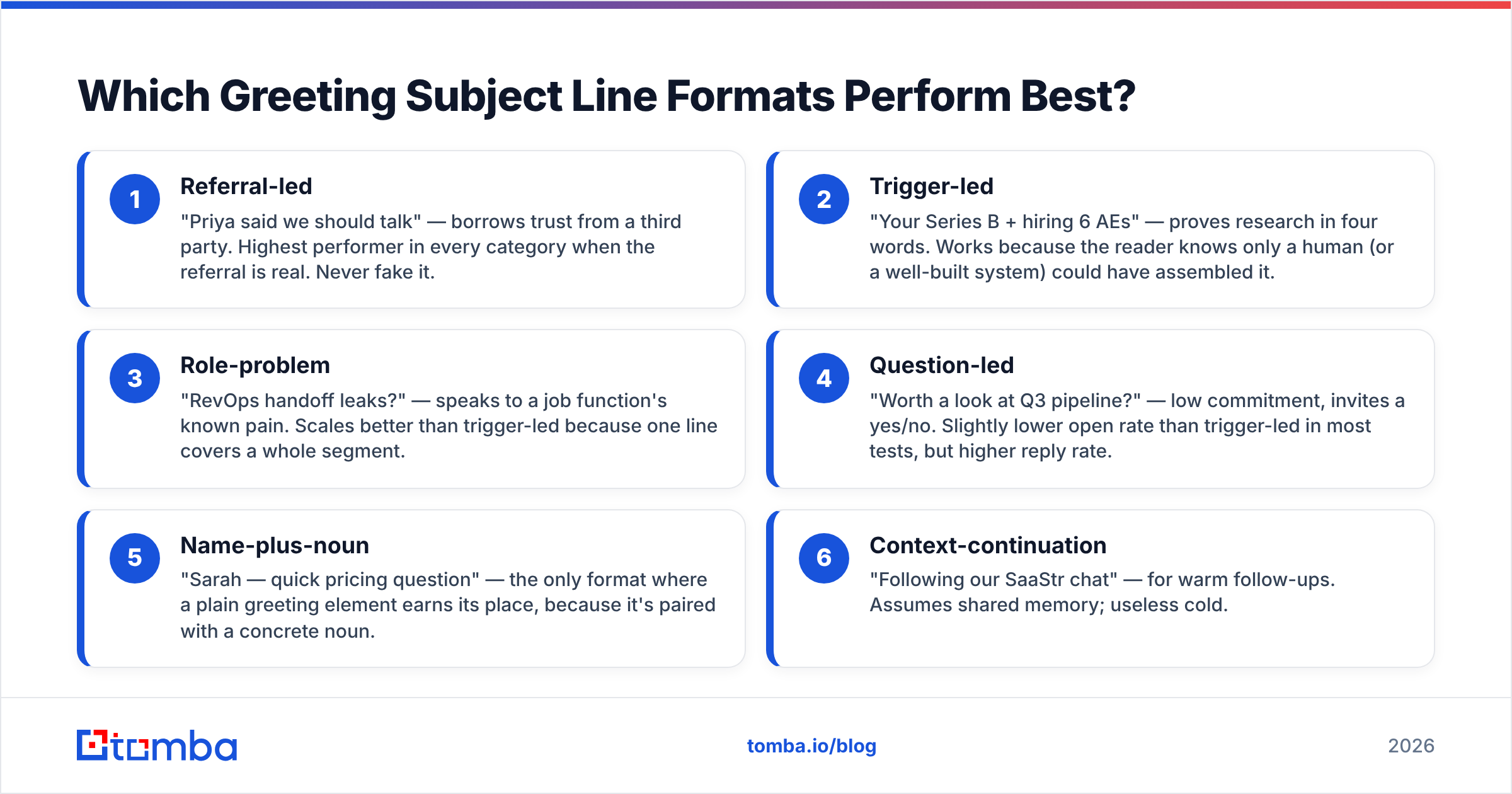
Rather than a list of 100 swipeable lines, here are the six structural formats that hold up, with what each one is actually doing.
- Referral-led — "Priya said we should talk" — borrows trust from a third party. Highest performer in every category when the referral is real. Never fake it.
- Trigger-led — "Your Series B + hiring 6 AEs" — proves research in four words. Works because the reader knows only a human (or a well-built system) could have assembled it.
- Role-problem — "RevOps handoff leaks?" — speaks to a job function's known pain. Scales better than trigger-led because one line covers a whole segment.
- Question-led — "Worth a look at Q3 pipeline?" — low commitment, invites a yes/no. Slightly lower open rate than trigger-led in most tests, but higher reply rate.
- Name-plus-noun — "Sarah — quick pricing question" — the only format where a plain greeting element earns its place, because it's paired with a concrete noun.
- Context-continuation — "Following our SaaStr chat" — for warm follow-ups. Assumes shared memory; useless cold.
Notice what none of them do: none say hello. The greeting lives in line one of the body, where it belongs.
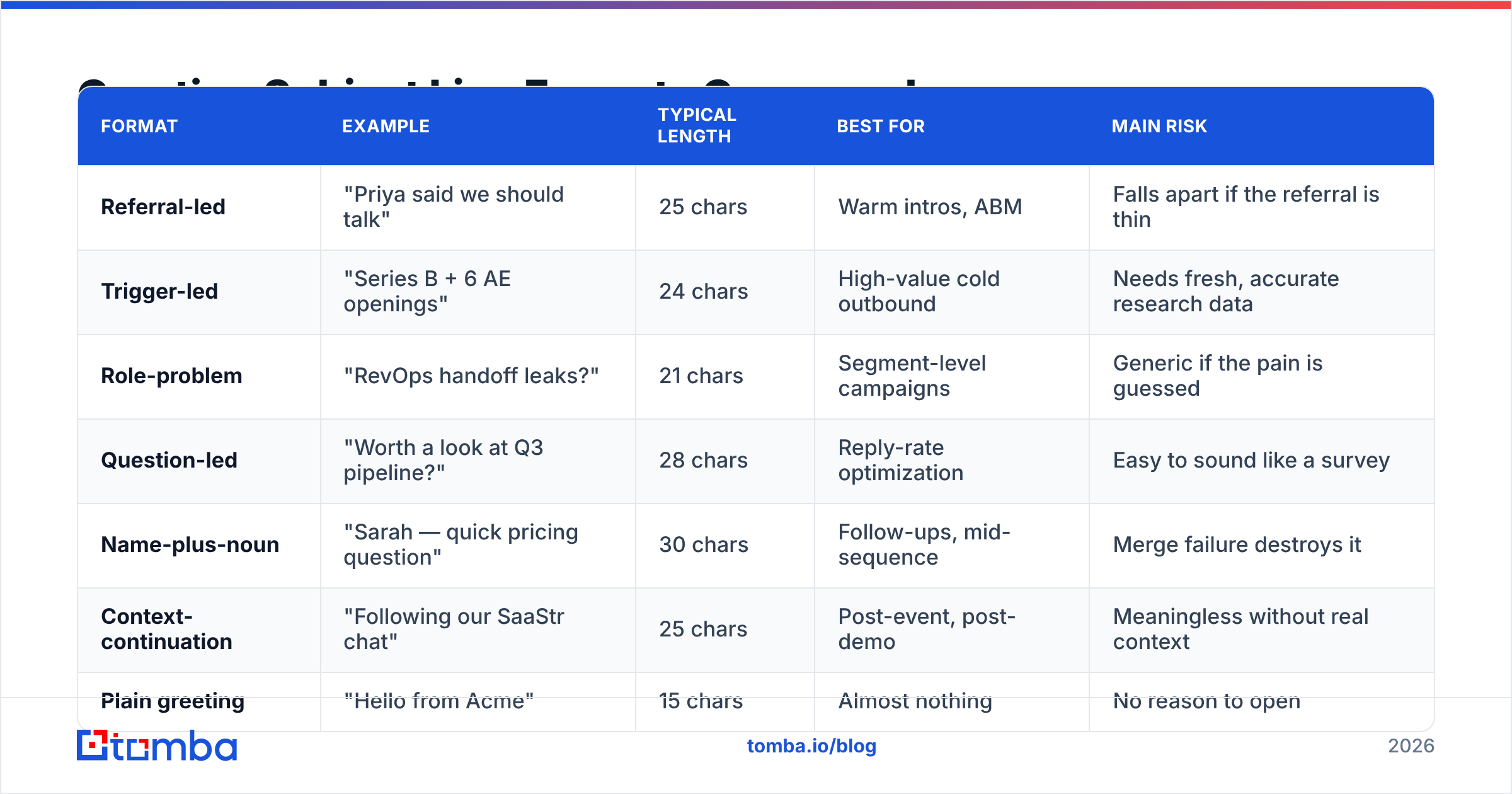
Greeting Subject Line Formats Compared#
| Format | Example | Typical length | Best for | Main risk |
|---|---|---|---|---|
| Referral-led | "Priya said we should talk" | 25 chars | Warm intros, ABM | Falls apart if the referral is thin |
| Trigger-led | "Series B + 6 AE openings" | 24 chars | High-value cold outbound | Needs fresh, accurate research data |
| Role-problem | "RevOps handoff leaks?" | 21 chars | Segment-level campaigns | Generic if the pain is guessed |
| Question-led | "Worth a look at Q3 pipeline?" | 28 chars | Reply-rate optimization | Easy to sound like a survey |
| Name-plus-noun | "Sarah — quick pricing question" | 30 chars | Follow-ups, mid-sequence | Merge failure destroys it |
| Context-continuation | "Following our SaaStr chat" | 25 chars | Post-event, post-demo | Meaningless without real context |
| Plain greeting | "Hello from Acme" | 15 chars | Almost nothing | No reason to open |
The pattern across the top rows: specificity beats politeness, and every winning line contains at least one proper noun, number, or job-specific term.
How Long Should a Greeting Email Subject Line Be?#
Short. Shorter than you think.
The practical target is 3 to 7 words, 25 to 45 characters. That range survives mobile truncation, reads as human rather than marketed, and forces you to cut the adjectives that make outreach sound like a brochure.
A few length rules worth holding:
- Front-load the hook. Put the proper noun, number, or pain word in the first three words. Assume everything after character 35 is invisible on mobile.
- Skip the sender's company name unless the recipient already knows it. That's four to twelve wasted characters.
- One idea per line. "Quick question about your hiring + a resource" is two subject lines fighting each other.
- Use sentence case, not Title Case. Title Case reads as marketing; sentence case reads as a colleague.
- Let the preview text carry the second beat. The preheader gets another 40–90 characters. Most senders waste it on "View in browser."
Emoji in a greeting subject line: skip it for B2B first-touch. It reads as a newsletter, and newsletters get archived by default in enterprise inboxes.
Does Personalization Actually Lift Open Rates?#
Yes — but the lift comes from relevance, not from the token itself.
Inserting a first name into a subject line produces a modest bump at best, and a measurable drop when the data is stale or wrong. What produces real movement is personalization the reader could not have received in a template: their company's recent announcement, their team's stack, a mutual connection, a role-specific problem.
That distinction has a practical consequence. The bottleneck on personalized subject lines is data, not copywriting. You need the right person, the right role, and a deliverable address before the line matters at all. A campaign built on a scraped list with a 30% bounce rate will underperform a plain-text "quick question" sent to a clean, verified list every single time.
Where to get that data cleanly:
- Named contacts at target accounts — a domain search returns the people and email patterns at a company, so your line can name a real person in a real role.
- Deliverability confidence — verification before send protects sender reputation, and reputation is what decides whether your subject line is ever rendered at all.
- Role and seniority context — data enrichment fills in title, department, and company size, which is what turns "Hi there" into "RevOps handoff leaks?"

Two more honest caveats. First, personalization at the subject-line level has diminishing returns past a certain point — "Hi Sarah, saw you joined Acme in March 2024 from Datadog" is creepy, not clever. Second, Apple Mail Privacy Protection has made open rate a soft metric since 2021. Treat open rate as directional and optimize toward replies, which nobody can auto-inflate.
How Do You Test Greeting Subject Lines Properly?#
Most subject-line "tests" are not tests. They change three things at once, run on 80 recipients, and declare a winner off a two-point difference. Here's a structure that produces answers you can act on.
Isolate one variable. Length, or question-vs-statement, or name-vs-no-name. Not all three. If variant A is "Quick question about Q3" and variant B is "Sarah — your Q3 pipeline planning, worth 10 mins?", you've learned nothing about which change mattered.
Get enough volume. Under a few hundred sends per variant, a five-point open-rate gap is usually noise. If your list is small, run the same test across several weeks of sends and pool the results rather than calling it early.
Hold everything else constant. Same send window, same sending domain, same body copy, same day of week. Subject-line tests contaminated by a Monday-vs-Thursday split are worthless.
Measure replies, not just opens. Rank variants by reply rate first, positive-reply rate second, open rate third. A line that gets opened and ignored is a line that trained the recipient to ignore you.
Retire winners on a schedule. A subject line that works in Q1 gets copied by every competitor by Q3. Rotate quarterly.
For a broader view of what buyers actually respond to, G2's software buyer behavior research is a reasonable non-vendor reference point on how B2B purchase conversations start.
What Should You Never Put in a Greeting Subject Line?#
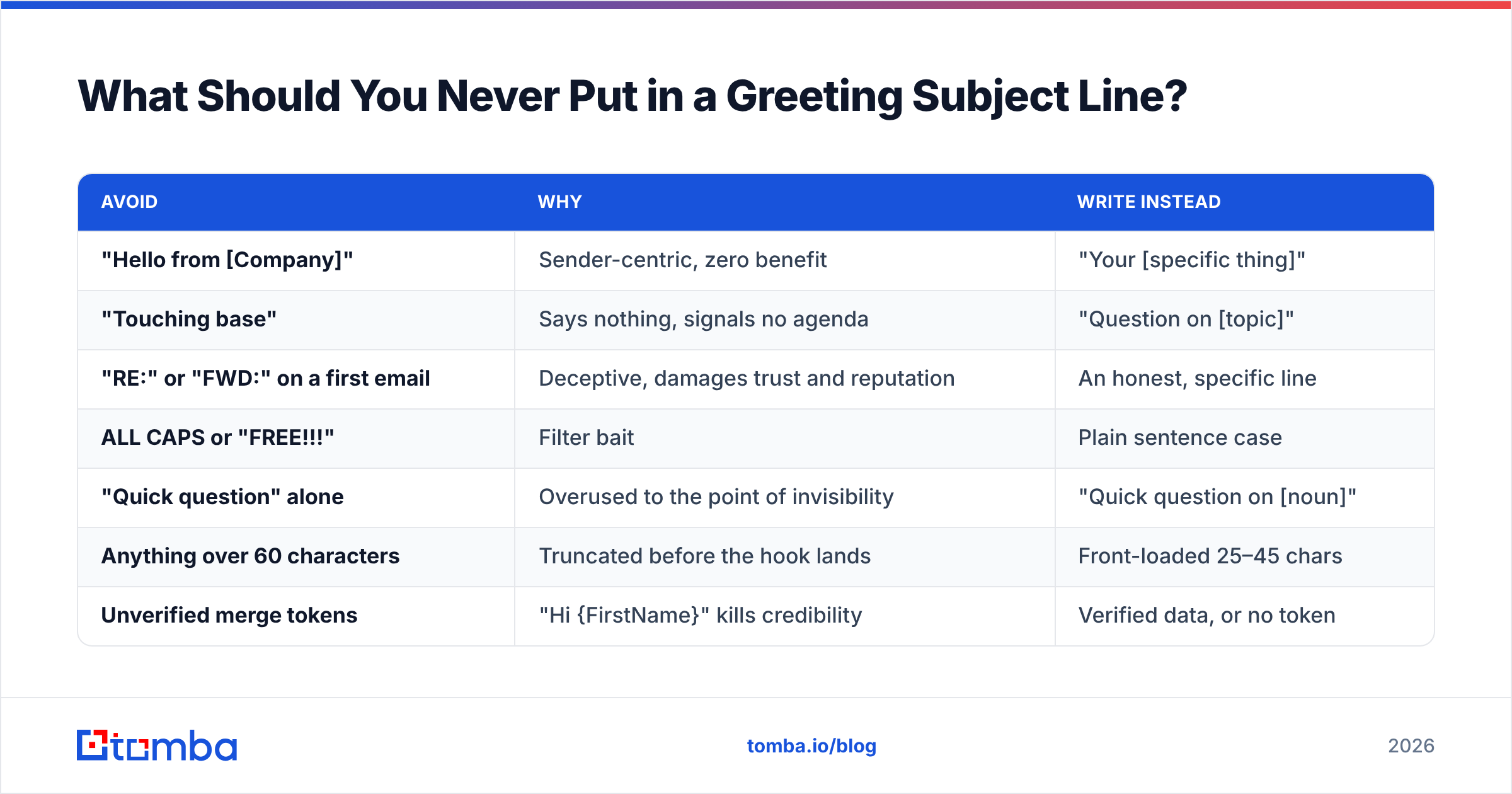
A short blocklist, learned the expensive way:
| Avoid | Why | Write instead |
|---|---|---|
| "Hello from [Company]" | Sender-centric, zero benefit | "Your [specific thing]" |
| "Touching base" | Says nothing, signals no agenda | "Question on [topic]" |
| "RE:" or "FWD:" on a first email | Deceptive, damages trust and reputation | An honest, specific line |
| ALL CAPS or "FREE!!!" | Filter bait | Plain sentence case |
| "Quick question" alone | Overused to the point of invisibility | "Quick question on [noun]" |
| Anything over 60 characters | Truncated before the hook lands | Front-loaded 25–45 chars |
| Unverified merge tokens | "Hi {FirstName}" kills credibility | Verified data, or no token |
The "RE:" trick deserves its own note. It still circulates in outbound playbooks. It works exactly once per recipient, and it converts a cold prospect into someone who now distrusts your domain. Given how much of modern filtering is engagement-based, faking a thread is a durable way to make your future email invisible.
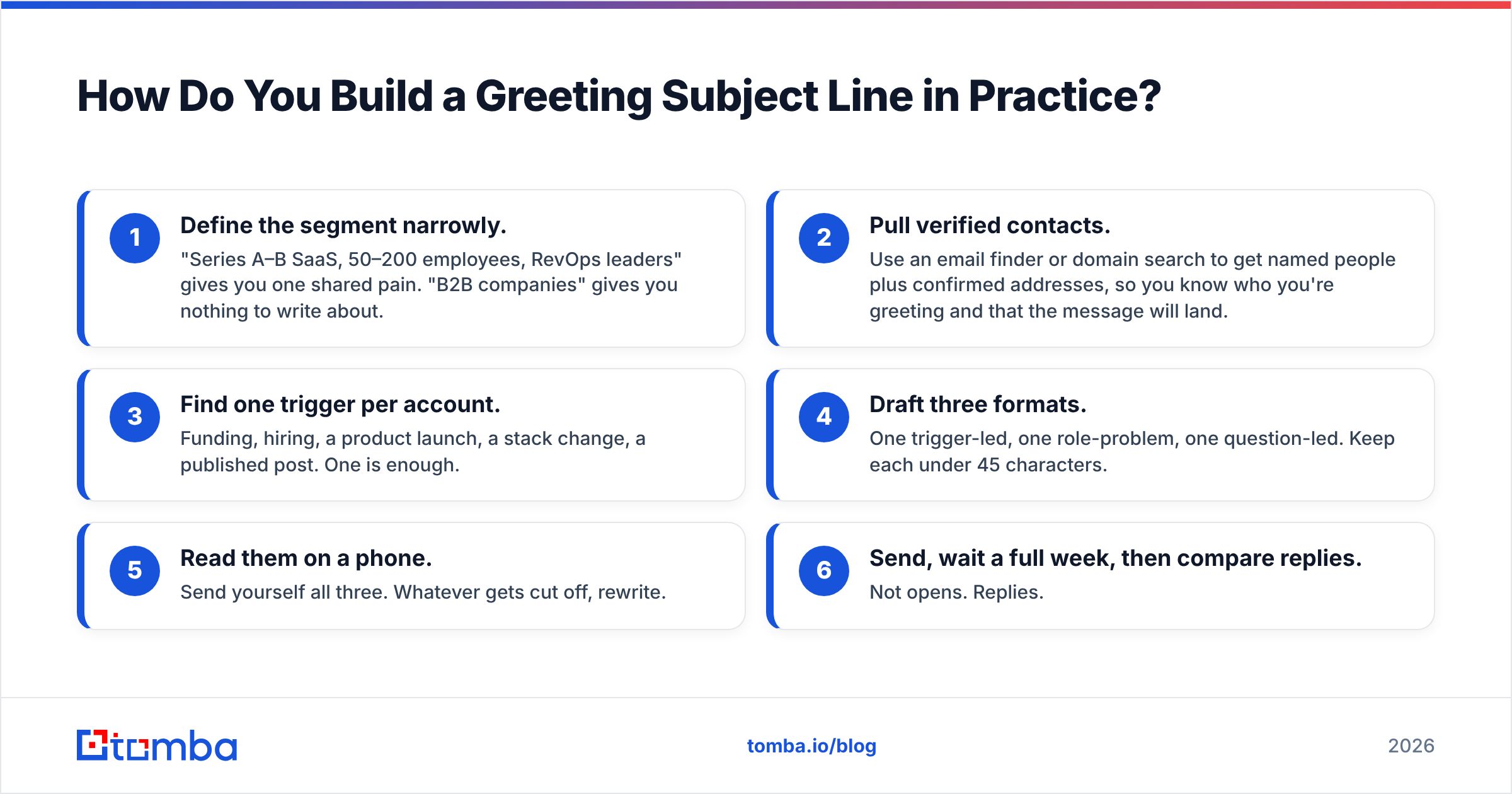
How Do You Build a Greeting Subject Line in Practice?#
A working sequence, from raw account list to sent message:
- Define the segment narrowly. "Series A–B SaaS, 50–200 employees, RevOps leaders" gives you one shared pain. "B2B companies" gives you nothing to write about.
- Pull verified contacts. Use an email finder or domain search to get named people plus confirmed addresses, so you know who you're greeting and that the message will land.
- Find one trigger per account. Funding, hiring, a product launch, a stack change, a published post. One is enough.
- Draft three formats. One trigger-led, one role-problem, one question-led. Keep each under 45 characters.
- Read them on a phone. Send yourself all three. Whatever gets cut off, rewrite.
- Send, wait a full week, then compare replies. Not opens. Replies.
If you want to sanity-check the wording before you commit, running your drafts through a subject line tester will flag length problems, spam-trigger words, and truncation risk faster than eyeballing it will.
One last framing that helps: write the subject line last. Draft the body, find the single most specific sentence in it, then compress that into five words. Subject lines written first tend to promise something the body never delivers — and the body is where the deal actually starts.
Where Should You Start?#
Fix the data before you fix the copy. Every format in this post — referral-led, trigger-led, role-problem — depends on knowing who you're writing to and being confident the message will arrive. A perfectly crafted greeting subject line sent to a guessed address at a person who changed jobs eight months ago is a rounding error, not a campaign.
Start with the Tomba Email Finder: find the named decision-maker at any company by domain, name, or role, and get a deliverability confidence score before you send. The free tier gives you 25 searches a month to test the workflow; paid plans start at $49/mo on Starter and $99/mo on Growth, with full Tomba pricing laid out per credit tier. Build the list first, then spend your time on the seven words that matter.
Related guides#
Ready to find emails that actually work?
Join 150,000+ professionals who stopped guessing and started sending. Free credits on signup — no credit card required.
Get the Tomba newsletter
Practical outbound tactics and product updates — once every two weeks.
About the author