GrowMeOrganic vs Lead Kahuna: Which B2B Lead Tool Wins in 2026?
One is a cloud prospecting suite with LinkedIn scraping and built-in sequences. The other is a desktop scraper that pulls local business data in bulk. Here is which one earns a seat in your 2026 outbound stack — and when neither is the right answer.
GrowMeOrganic vs Lead Kahuna comes down to one question. Do you sell to job titles, or to storefronts?
TL;DR
- GrowMeOrganic is a cloud prospecting suite. It scrapes LinkedIn, finds work emails, and sends drip campaigns. You pay per seat.
- Lead Kahuna is a Windows desktop scraper. It pulls local business listings, sites, and public emails, then exports a CSV. It does not send email.
- The two are not real rivals. Do you sell to job titles at companies? GrowMeOrganic fits. Do you sell to dentists, roofers, and gyms nearby? Lead Kahuna fits.
One flaw shows up in both tools:
- Each one guesses or scrapes addresses. Neither proves that an inbox is real. Every bounce lands on you.
- So split the job in two. Use a scraper to find leads. Use a finder and verifier to check them. Tomba Email Finder fills that second slot at $49/mo.
GrowMeOrganic vs Lead Kahuna: what each tool does#
The two look alike on a pricing page. They solve different problems.
GrowMeOrganic is a browser-based platform. You install a Chrome extension. Then you pull contacts from LinkedIn or Sales Navigator. You add work emails and phone numbers, drop them into a list, and run cold email from your own mailbox.
It also ships a B2B contact database. You can filter it by industry, headcount, and country. The pitch is "unlimited": unlimited exports and sends on the higher plans, sold per seat. Current tiers live on growmeorganic.com.
Lead Kahuna is desktop software, Windows first. You type a keyword and a city. It then crawls public sources, such as directories, maps, and websites.
You get company names, phone numbers, addresses, site URLs, contact forms, and any emails printed on those pages. It also flags things agencies care about, like a missing SSL or a site that breaks on phones. The output is a spreadsheet.
So the real question in growmeorganic vs lead kahuna is not which tool is better. It is which motion you run.
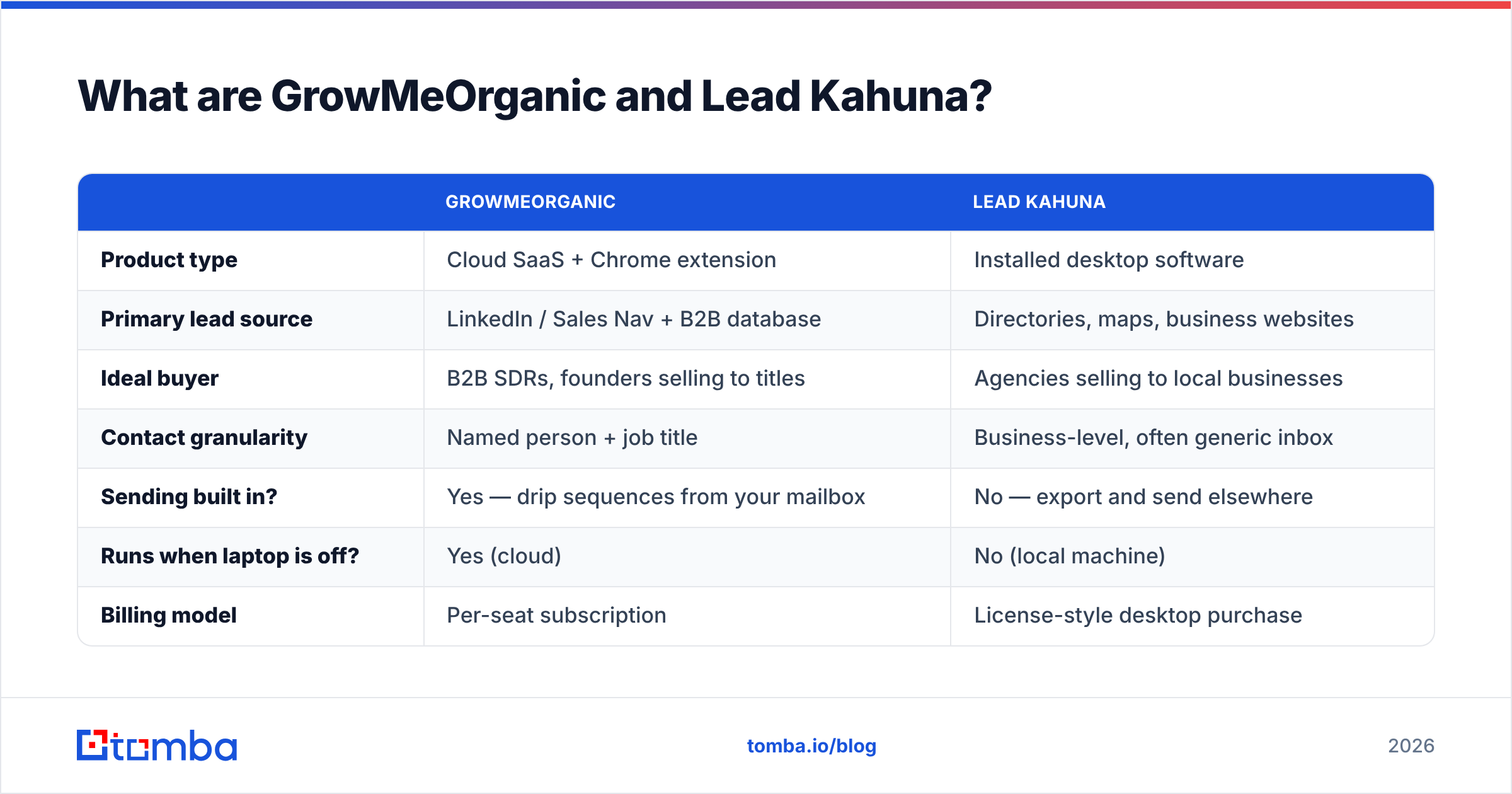
| GrowMeOrganic | Lead Kahuna | |
|---|---|---|
| Product type | Cloud SaaS + Chrome extension | Installed desktop software |
| Primary lead source | LinkedIn / Sales Nav + B2B database | Directories, maps, business websites |
| Ideal buyer | B2B SDRs, founders selling to titles | Agencies selling to local businesses |
| Contact granularity | Named person + job title | Business-level, often generic inbox |
| Sending built in? | Yes — drip sequences from your mailbox | No — export and send elsewhere |
| Runs when laptop is off? | Yes (cloud) | No (local machine) |
| Billing model | Per-seat subscription | License-style desktop purchase |
Which tool gives you better data quality?#
Neither one ships data you should trust blindly. But they fail in different ways.
GrowMeOrganic gets emails from two places: database records and pattern guesses. When it has no verified address, it guesses the format. It tries first.last@, f.last@, or first@, based on the domain's usual pattern. Then it returns a "probable" hit.
That is fine on well-known domains. It is risky everywhere else. A guessed address on a catch-all domain passes an SMTP check even when no mailbox exists. Run a sample through a catch-all verifier before you queue 5,000 sends.
Lead Kahuna has the opposite problem. What it collects is really published, so the address exists. But most of it is info@, contact@, hello@, or a web form.
Role inboxes are real and they deliver. They are also ignored. Worse, they skew your math. Delivery looks fine while replies stay flat, and nothing looks broken.
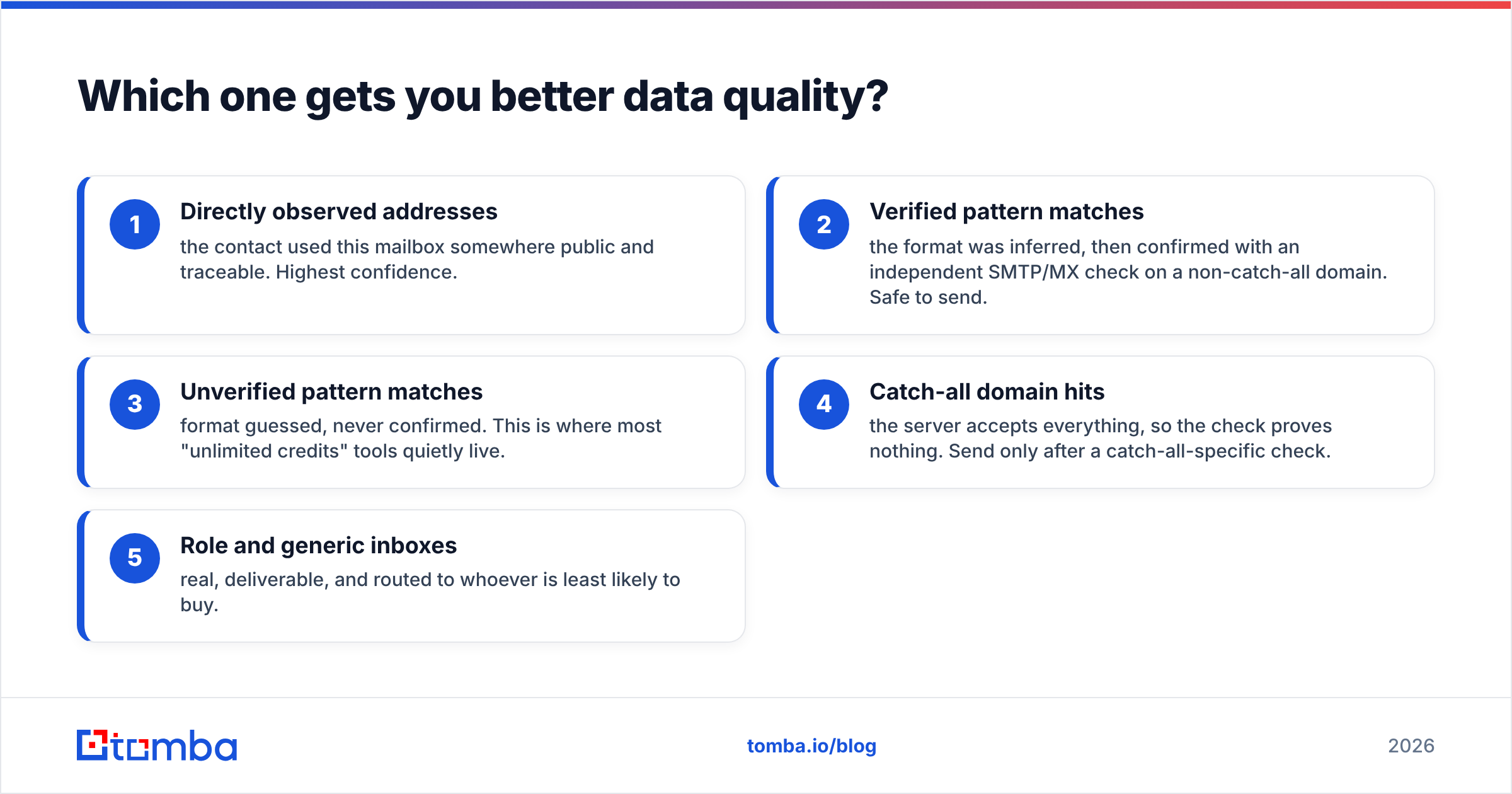
In the growmeorganic vs lead kahuna debate, data quality follows one ladder. Here it is, in the order that predicts bounce rate:
- Seen in public — the contact used this mailbox somewhere you can trace. Highest trust.
- Checked pattern — the format was guessed, then confirmed by an SMTP or MX check on a normal domain. Safe to send.
- Unchecked pattern — the format was guessed and never confirmed. Most "unlimited credit" tools live here.
- Catch-all hits — the server says yes to everything, so the check proves nothing.
- Role inboxes — real, and read by the person least likely to buy.

The fix is the same either way. Treat finding and checking as two jobs. Push every list through an email verifier before it hits your sequencer.
A 3% bounce rate is survivable. At 8% you start to hurt your sender reputation. Once inbox providers throttle you, no amount of unlimited credits helps.
How does pricing compare?#
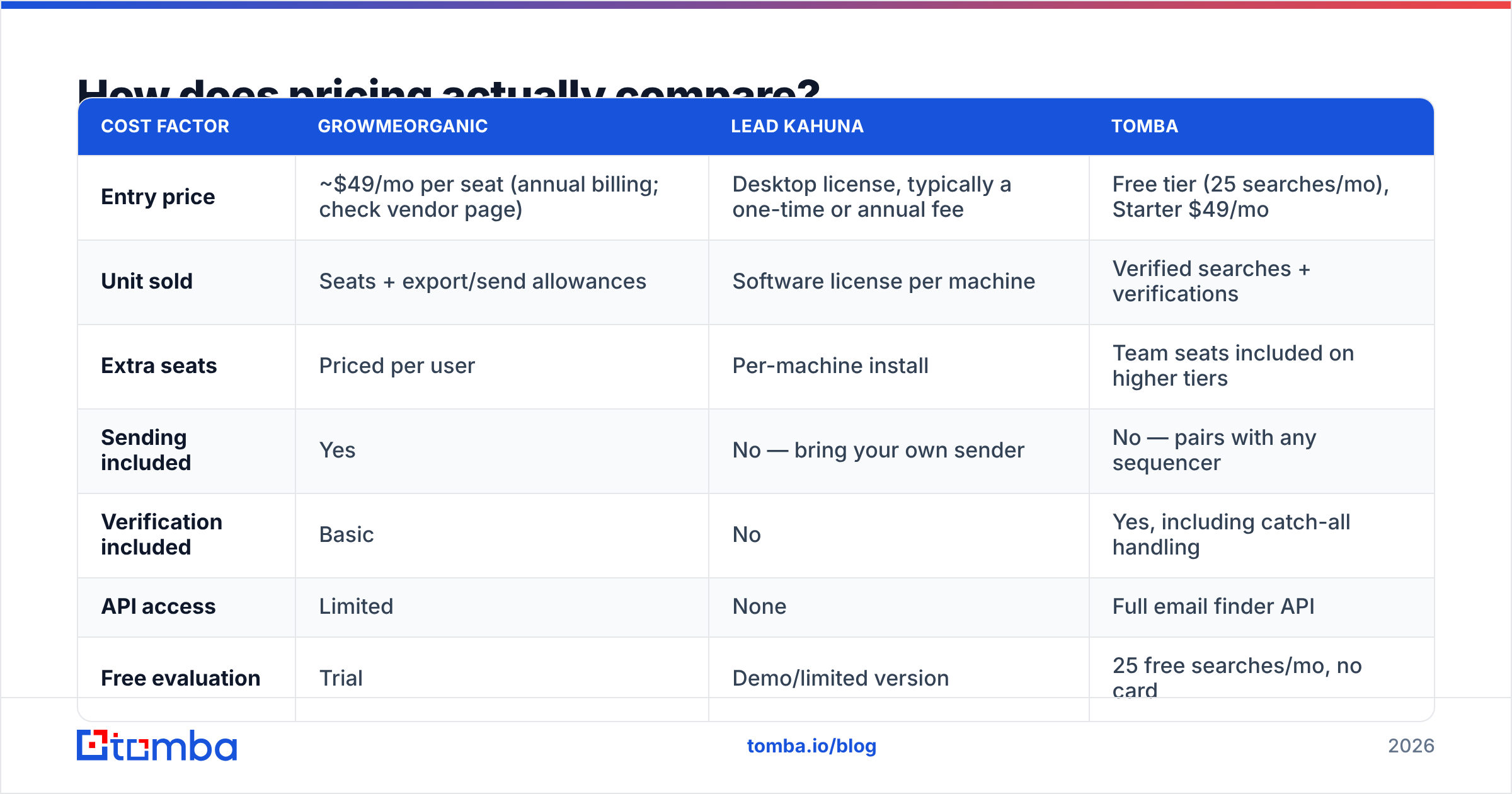
Compare the unit being sold, not the sticker price. GrowMeOrganic sells seats. Lead Kahuna sells software you install. Tomba sells verified lookups.
| Cost factor | GrowMeOrganic | Lead Kahuna | Tomba |
|---|---|---|---|
| Entry price | ~$49/mo per seat (annual billing; check vendor page) | Desktop license, typically a one-time or annual fee | Free tier (25 searches/mo), Starter $49/mo |
| Unit sold | Seats + export/send allowances | Software license per machine | Verified searches + verifications |
| Extra seats | Priced per user | Per-machine install | Team seats included on higher tiers |
| Sending included | Yes | No — bring your own sender | No — pairs with any sequencer |
| Verification included | Basic | No | Yes, including catch-all handling |
| API access | Limited | None | Full email finder API |
| Free evaluation | Trial | Demo/limited version | 25 free searches/mo, no card |
Prices on both products move. Check their own sites before you buy. Tiers quoted in reviews on G2 go stale fast.
Tomba's tiers are public and stable. Free covers 25 searches a month. Starter is $49/mo, Growth $99/mo, and Pro $249/mo. See the Tomba pricing page for the full list.
There is a trap in "unlimited" plans. Volume was never the hard part of outbound. The hard part is how many records deliver and match your target. Ten thousand records at 62% delivery are worth less than 2,000 at 96%. The first option costs you domain reputation, and you cannot buy that back.
Is GrowMeOrganic better than Lead Kahuna for cold email?#
For classic B2B cold email, yes. But there are caveats.
GrowMeOrganic gives you the whole loop in one login. Find the person. Get the email. Write the sequence. Send it. Track replies. For a two-person team, that beats any feature checklist. Fewer tools mean fewer CSV handoffs, and handoffs are where lists rot.
Its limits are clear:
- Sequencing is fine, not great. Do you rotate many inboxes or branch on conditions? A dedicated sender does it better. Many teams add an Instantly alternative or a Reply.io alternative for the send layer.
- LinkedIn scraping carries risk. Extension scraping breaks LinkedIn's terms. Accounts do get limited. Use a spare profile and keep volume low.
- Database depth varies by region. Coverage is deep in some markets and thin in others. Test your exact target list before you sign an annual deal.
Lead Kahuna does not play this game at all. It has no sender, no sequences, and no reply tracking. It is a front-of-funnel harvester.
Say you want 800 local firms with no SSL and a phone number to call. Then it is the right pick. It pairs well with calls and contact forms, not cold email.

What are the real limits of each tool?#
Straight talk, no sponsor:
- Desktop only (Lead Kahuna). The app runs on your machine. Close the laptop and the scrape stops. There is no shared workspace and no log of who pulled what. On a team of five, you will email spreadsheets by week two.
- Stale data (both). Directory data ages fast, since shops close and numbers change. LinkedIn data ages too. People switch jobs every two or three years.
Three more limits matter in any growmeorganic vs lead kahuna review:
- Legal surface. Scraping open listings is usually fine. Scraping gated platform data is not. Under GDPR you also need a lawful basis to process EU data. "We scraped it" is not one. Keep a suppression list and honor opt-outs at once.
- No proof of delivery (both). Neither tool exists to prove an address works. That job falls to you or to a third tool.
- Export caps (GrowMeOrganic). "Unlimited" usually means fair-use throttles and daily limits. Read the terms, not the headline.
GrowMeOrganic vs Lead Kahuna: which should you pick in 2026?#
Match the tool to the motion.
- You sell software or services to job titles. Pick GrowMeOrganic. The LinkedIn-to-sequence loop is the whole point. One subscription beats stitching three tools together at low volume.
- You sell websites, SEO, or services to local firms. Pick Lead Kahuna. No LinkedIn-first tool hands you every HVAC company in Ohio with a broken mobile site.
- You need contact data inside a workflow you already run. Pick neither. Use a finder with a real API, so records land in your CRM instead of your inbox as an attachment. That is what the HubSpot integration, the Google Sheets add-on, and the Tomba API are for.
Two more cases come up often:
- Your current list underperforms. Then sourcing is not the problem. Validation is. Run the list through a verifier and a catch-all check first. Most "cold email is dead" stories end right here.
- You are judging on price alone. Work out cost per reply, not cost per record. Multiply list size by delivery rate, then by your response rate. The pricier tool often wins that math.

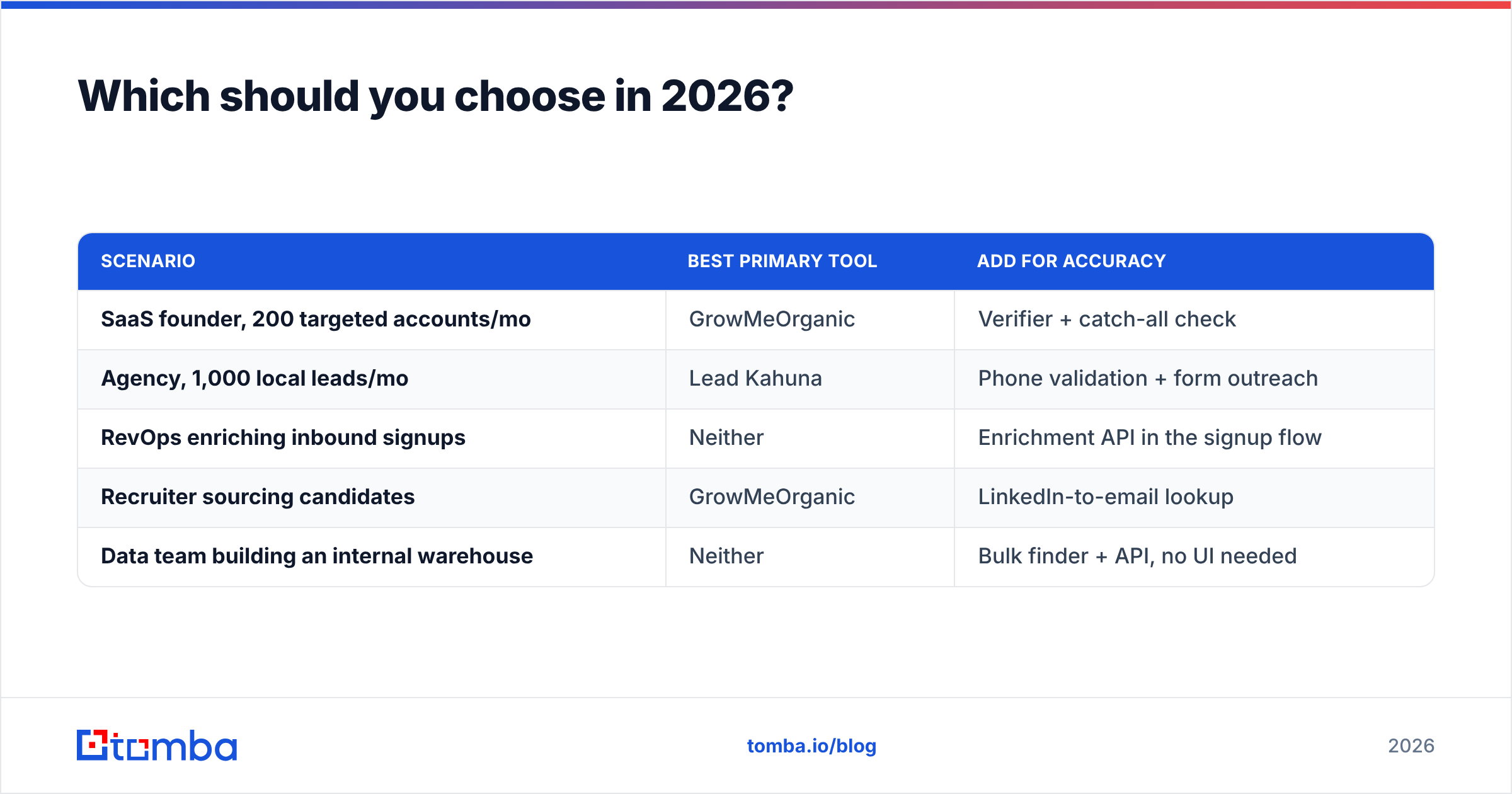
| Scenario | Best primary tool | Add for accuracy |
|---|---|---|
| SaaS founder, 200 targeted accounts/mo | GrowMeOrganic | Verifier + catch-all check |
| Agency, 1,000 local leads/mo | Lead Kahuna | Phone validation + form outreach |
| RevOps enriching inbound signups | Neither | Enrichment API in the signup flow |
| Recruiter sourcing candidates | GrowMeOrganic | LinkedIn-to-email lookup |
| Data team building an internal warehouse | Neither | Bulk finder + API, no UI needed |
How do you build a stack that beats both?#
Split the work into three layers. Buy the best cheap option for each one.
Layer 1 — discovery. Where do names come from? LinkedIn, directory scrapes, event lists, site visitors, review profiles. Both tools live here, and good enough really is good enough.
Layer 2 — resolve and verify. Turn a name and a company into a real mailbox, then prove it. People skip this layer and blame the sequencer later. A domain search shows the company's email pattern. A finder resolves the person. A verifier confirms the address. Run it in bulk so it is one job, not 400 lookups.
Layer 3 — activation. Sequencer, dialer, CRM. Keep this apart from your data layer. Then you can swap one side without rebuilding the other. Teams that buy both from one vendor lose leverage at renewal.
Layer 2 is cheap next to what it protects. Tomba's $49/mo Starter tier covers verified finding, catch-all handling, and API access. That is about the price of one campaign that burns a sending domain. Curious where the records come from? Tomba publishes its data sources, and every vendor should.
The bottom line#
GrowMeOrganic vs Lead Kahuna is not one race. It is two questions with two answers.
GrowMeOrganic wins when your buyers have job titles and you want find-plus-send in one plan. Lead Kahuna wins when your buyers have storefronts and you want volume, fast, in a spreadsheet. Pick the wrong one and you aim a whole quarter of outbound at the wrong kind of company.
Neither tool solves the part that decides your results. Is each address real, active, and tied to the right person? That is a separate job. It is also cheap next to the damage bad data does.
Want a data layer that plugs into whatever you run today? Start with the Tomba Email Finder. The free tier gives you 25 searches a month with no card. That is enough to spot-check an export from either tool in the growmeorganic vs lead kahuna matchup and see how much of it is worth sending to. Paid plans start at $49/mo. Everything is reachable through the API, the Chrome extension, the Sheets add-on, or the bulk uploader.
Sources:
Related guides#
Ready to find emails that actually work?
Join 150,000+ professionals who stopped guessing and started sending. Free credits on signup — no credit card required.
Get the Tomba newsletter
Practical outbound tactics and product updates — once every two weeks.
About the author