GrowMeOrganic vs Mailarrow (2026): Full Cold Email Comparison
One bundles a B2B database with a sequencer. The other does nothing but send cold email well. Here's how GrowMeOrganic and Mailarrow actually differ on data, deliverability, pricing and scale in 2026.
GrowMeOrganic vs Mailarrow is an odd match-up. One tool finds contacts and emails them. The other only sends. Below we compare both on data, deliverability, pricing and scale in 2026, so you can see which job each one is built for.
TL;DR
- GrowMeOrganic is a bundle: a B2B contact database, a LinkedIn/Sales Navigator scraper, an email finder, and a drip sequencer sold as one subscription. Mailarrow is a focused cold email sending platform — sequences, inbox rotation, warmup, reply detection.
- They are not really competitors. GrowMeOrganic overlaps with Apollo and Lusha. Mailarrow overlaps with Instantly, Smartlead and Saleshandy. Comparing them is comparing a Swiss Army knife to a chef's knife.
- Data quality is the deciding factor. Bundled databases carry the widest accuracy variance in the category. If your bounce rate is above 3%, no sequencer on earth saves the campaign.
Our verdict:
- The unbundled stack usually wins at scale: a dedicated data provider for contacts, a dedicated sender for delivery. It costs slightly more per month and dramatically less per booked meeting.
- Our pick: Mailarrow if you already have a data source and just need clean sending. GrowMeOrganic if you're a solo founder who wants one login. Either way, verify the list before it touches your domain.
What are GrowMeOrganic and Mailarrow?#
GrowMeOrganic is an all-in-one B2B prospecting suite. It ships a claimed multi-hundred-million-record contact database, a Chrome extension for pulling contacts out of LinkedIn and Sales Navigator, an email finder and verifier, and a drip campaign builder. Campaigns send through your connected Gmail or Outlook mailbox. The pitch is "cancel your other five subscriptions."
Mailarrow is narrower on purpose. It's a cold email outreach platform: connect unlimited sending mailboxes, rotate sends across them, warm them up, build multi-step sequences with conditional logic, and stop the sequence on reply. There is no built-in prospect database. You bring the list.
That difference in scope drives every other difference in this comparison. GrowMeOrganic optimises for breadth — one tool, one bill, one onboarding. Mailarrow optimises for depth in one job — getting messages into primary inboxes without burning your domain.
Most "X vs Y" posts treat every outreach tool as interchangeable. This is the part they skip. Bundled tools and specialist tools fail in different ways. A bundle fails quietly, through mediocre data that inflates bounce rates. A specialist fails loudly, through a gap in your stack you have to fill with another purchase.
GrowMeOrganic vs Mailarrow: head-to-head comparison#
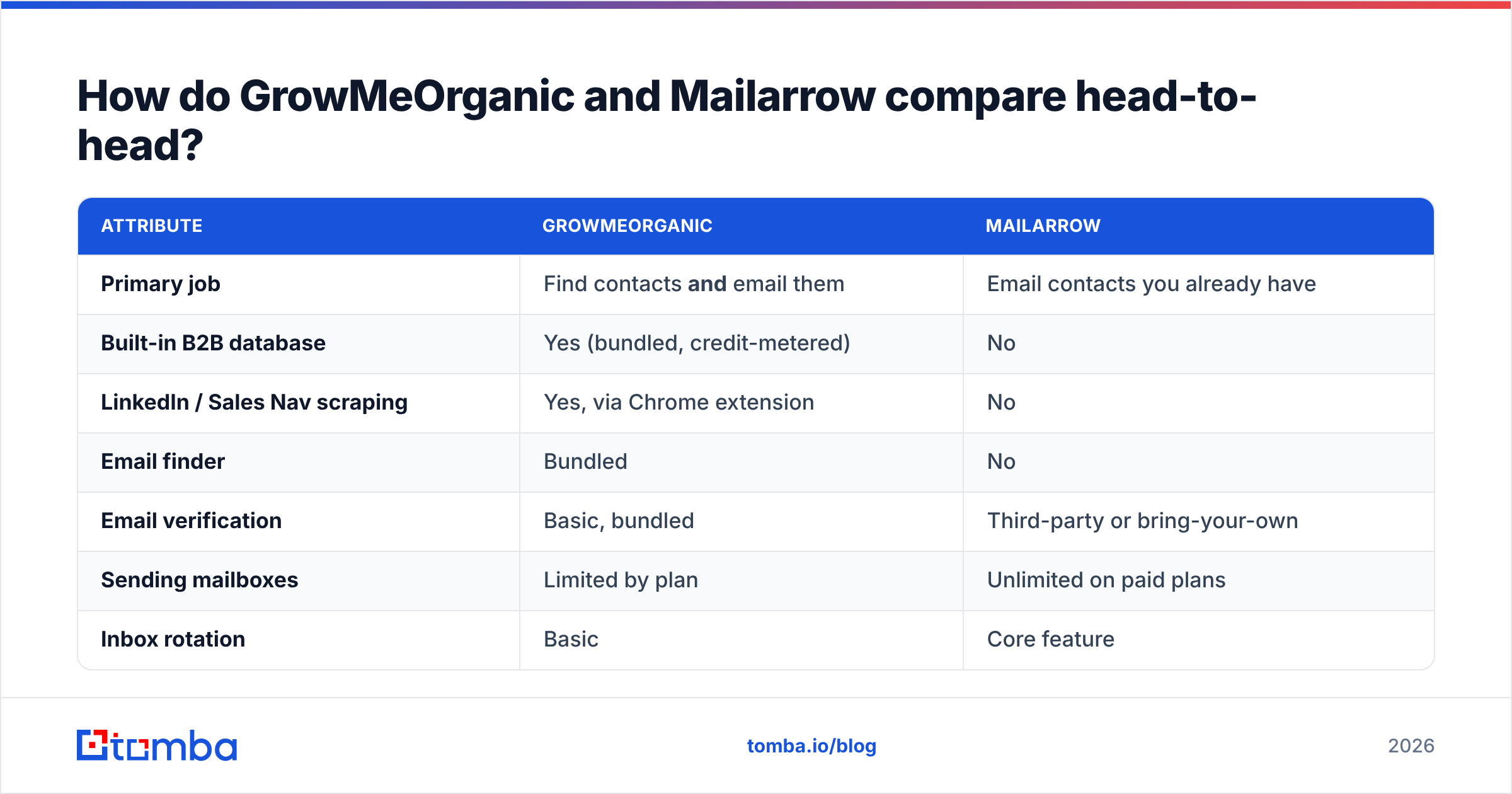
| Attribute | GrowMeOrganic | Mailarrow |
|---|---|---|
| Primary job | Find contacts and email them | Email contacts you already have |
| Built-in B2B database | Yes (bundled, credit-metered) | No |
| LinkedIn / Sales Nav scraping | Yes, via Chrome extension | No |
| Email finder | Bundled | No |
| Email verification | Basic, bundled | Third-party or bring-your-own |
| Sending mailboxes | Limited by plan | Unlimited on paid plans |
| Inbox rotation | Basic | Core feature |
| Built-in warmup | Limited | Yes |
| Sequence logic | Linear drip, some branching | Multi-step with conditions |
| Reply detection | Yes | Yes, with sentiment sorting |
| Best fit | Solo founders, small agencies | Outbound teams, lead-gen agencies |
| Biggest risk | Data accuracy variance | You still need a data source |
Read the GrowMeOrganic vs Mailarrow table as a shopping list, not a scoreboard. Nine of those rows ask "does the product include this category at all," and GrowMeOrganic wins most of them by definition. Two rows decide whether your campaign works: data accuracy and inbox placement. Those are the two rows where a bundle is structurally disadvantaged.
Which tool has better data?#
Neither one solves this well, and that's the honest answer.
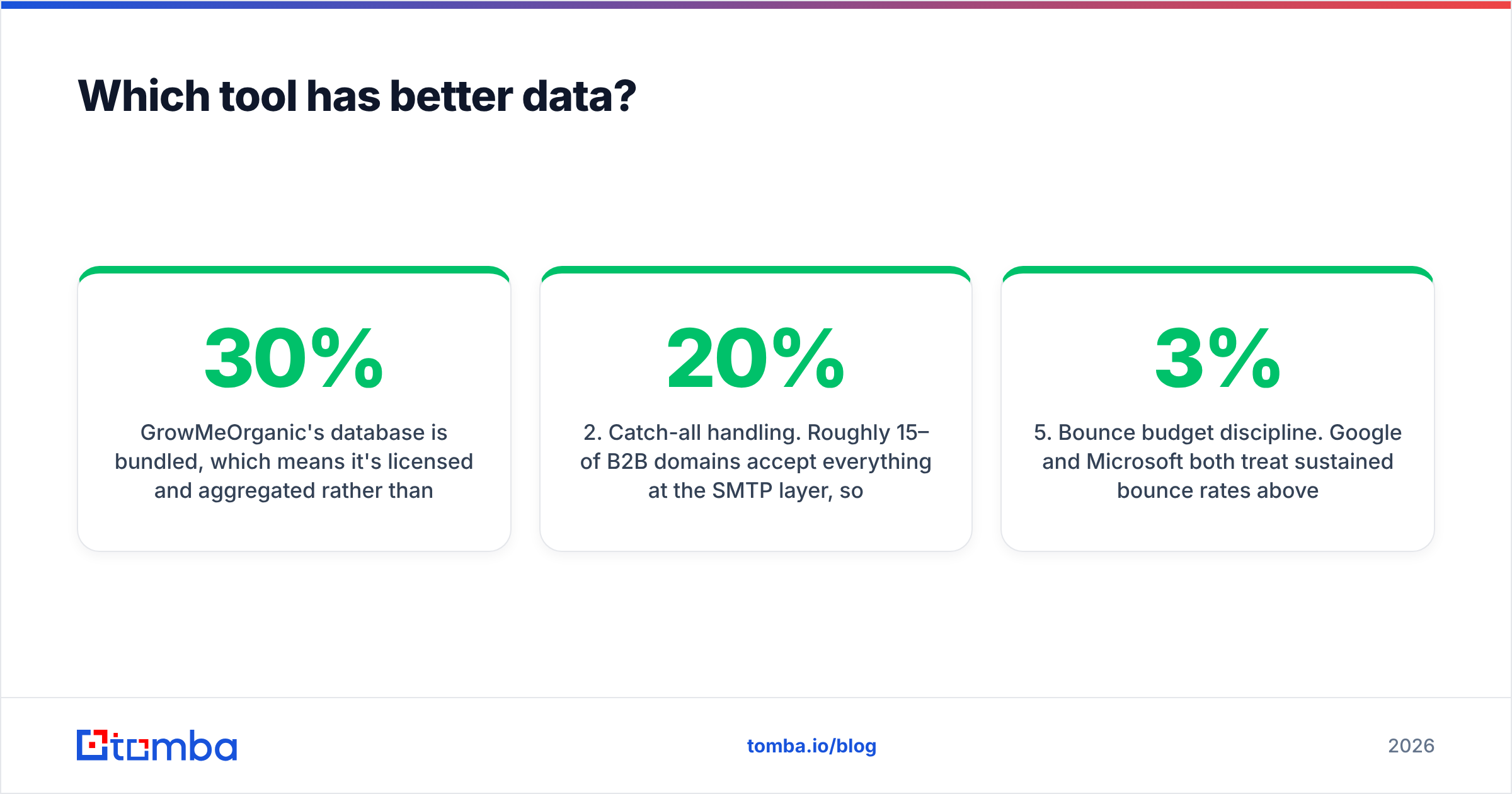
GrowMeOrganic's database is bundled. That means it is licensed and aggregated, not verified at the moment of export. Bundled databases in this tier share one failure mode. The record was right when it was scraped. Nobody checked it again before it hit your CSV. B2B contact data decays by 25–30% a year as people change jobs, and it decays faster in high-churn teams like SaaS sales and marketing.
Mailarrow sidesteps the problem by not having a database. That's not a weakness — it's a scope decision. But the data question doesn't disappear. It just moves to whatever you plug in.
Here's what actually determines whether your list performs, in order of impact:
- Verification recency. A contact verified this week beats a contact verified last quarter, whoever sold it. Run every list through an email verifier before import, even if the source claims it's pre-verified.
- Catch-all handling. Roughly 15–20% of B2B domains accept everything at the SMTP layer, so a standard verifier returns "unknown." Most tools count those as valid and let you send. A catch-all verifier applies pattern confidence and secondary signals instead of guessing.
- Pattern-based discovery vs database lookup. Finding
first.last@company.comfrom the company's real email pattern is more durable than pulling a stale record. A domain search returns the live pattern plus current employees, and that ages better than a static export.
Those three fix the list itself. The last two protect your domain.
- Role-account filtering.
info@,sales@,support@deliver fine and convert terribly, while dragging your engagement metrics down. Strip them before import — neither tool does this aggressively enough by default. - Bounce budget discipline. Google and Microsoft treat sustained bounce rates above ~2–3% as a spam signal. One 8% bounce campaign can cost you six weeks of domain reputation repair.

If you take one thing from this comparison: the sequencer is not what breaks. The list is what breaks.
What does each tool cost?#
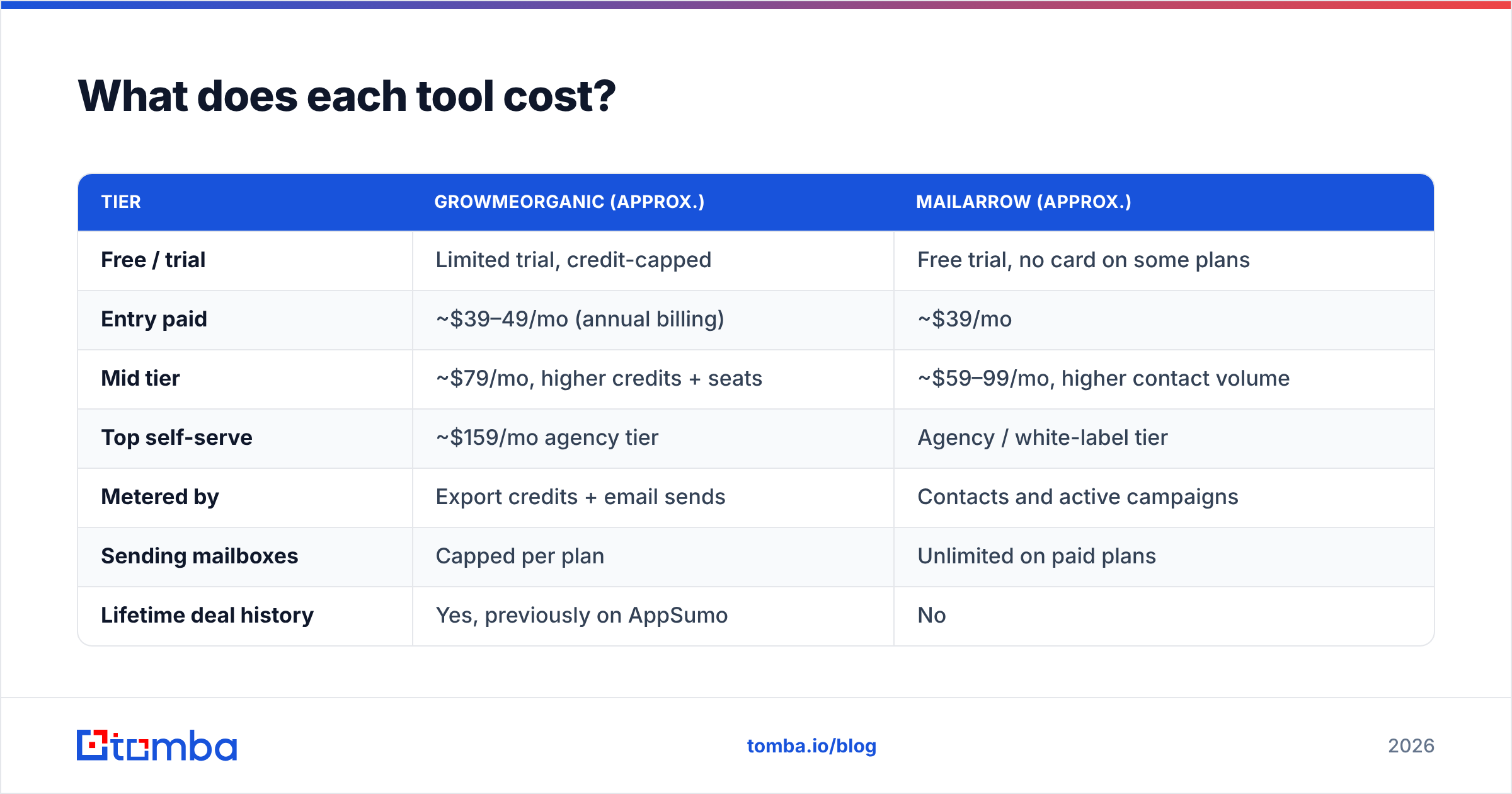
Published pricing shifts often in this category, so treat these as directional and check both vendors before you buy. Broadly, both sit in the SMB-affordable tier rather than the enterprise tier.
| Tier | GrowMeOrganic (approx.) | Mailarrow (approx.) |
|---|---|---|
| Free / trial | Limited trial, credit-capped | Free trial, no card on some plans |
| Entry paid | ~$39–49/mo (annual billing) | ~$39/mo |
| Mid tier | ~$79/mo, higher credits + seats | ~$59–99/mo, higher contact volume |
| Top self-serve | ~$159/mo agency tier | Agency / white-label tier |
| Metered by | Export credits + email sends | Contacts and active campaigns |
| Sending mailboxes | Capped per plan | Unlimited on paid plans |
| Lifetime deal history | Yes, previously on AppSumo | No |
Two pricing notes worth more than the headline numbers.
Credits are not comparable across tools. GrowMeOrganic charges a credit for a contact export whether or not the email is deliverable. Some competitors only charge on a verified hit. A "$39 for 10,000 credits" plan with a 20% bounce rate is really a "$39 for 8,000 credits" plan. You pay for the bounces twice: once in credits, once in domain reputation.
Unlimited mailboxes is Mailarrow's real pricing lever. Modern cold email at volume means 10–30 low-volume mailboxes across several secondary domains, each sending 20–40 emails a day. If your outreach tool charges per mailbox, that setup gets expensive fast. Tools that don't charge per mailbox let you scale sideways. That is the only safe way to scale cold email in 2026.
On the data side, Tomba pricing runs a free tier at 25 searches/month, Starter at $49/mo, Growth at $99/mo, and Pro at $249/mo. It is priced as a dedicated data layer rather than a bundle, so you can pair it with whichever sender you prefer.
Which one is better for deliverability?#
Mailarrow, and it isn't close — but only because deliverability is the entire product.
Cold email deliverability in 2026 rests on three things: authentication, sending pattern, and list hygiene. Google and Yahoo's bulk-sender rules made SPF, DKIM and DMARC non-negotiable. Both providers now weigh recipient engagement heavily. A tool's job is to make good behaviour the default.
Mailarrow does the specialist things. It rotates sends across many mailboxes so no single inbox spikes, and it runs warmup traffic to build reputation on new domains. It also spaces sends at human-like intervals and stops a sequence the moment someone replies.
GrowMeOrganic sends through your connected mailbox with drip scheduling. That's adequate for 30–50 emails a day from one inbox. It is not an architecture for 500 a day. Push volume through a few mailboxes without proper warmup and rotation, and you will land in spam no matter which tool sent the message.

Before you send anything from a new domain, check the fundamentals yourself. Run an SPF checker against your sending domain, confirm you're not on a blocklist with a blacklist checker, and score your copy with a spam checker. Those three checks take ten minutes and prevent the most common self-inflicted deliverability wounds.
Who should pick GrowMeOrganic?#
Pick GrowMeOrganic if you match most of these:
- You're a solo founder or a two-person team doing outbound part-time, and consolidating vendors matters more than optimising any single step.
- Your volume is genuinely low — under 100 emails a day from one or two mailboxes.
- You prospect heavily on LinkedIn and want the scraping extension in the same subscription as the sequencer.
- You're price-sensitive on total spend, not on cost per booked meeting. One $79 bill is easier to justify internally than three $49 bills.
- You're testing whether outbound works at all for your business and don't want to assemble a stack before you have an answer.
Where it stops working: the day you need more than a handful of sending mailboxes. Or the day your bounce rate climbs and you can't tell whether the database or the verifier is at fault, because both are the same vendor.
Who should pick Mailarrow?#
Pick Mailarrow if you match most of these:
- You already have a data source — an existing list, a CRM export, a scraper, or a dedicated finder — and you're shopping for the sending layer only.
- You need multiple mailboxes, which in practice means anything above ~100 sends a day.
- You run outreach for clients and need separated workspaces, per-client domains and clean reporting.
- You've been burned by deliverability before and want warmup, rotation and reply handling as first-class features rather than checkboxes.
- You want to swap data vendors without changing your sender. Splitting those two decisions is worth real money over two years.
Where it stops working: it doesn't find contacts. If you have no list and no plan to get one, Mailarrow is half a solution.
Is there a better way to build the stack?#
Yes — and it's the recommendation most teams land on after a year of doing it the other way. Unbundle the two jobs.
Layer one: data. Use a provider whose whole business is contact accuracy. That is the only way accuracy gets priority. Find contacts by company with a domain search, resolve individuals with an email finder, turn LinkedIn profiles into real addresses with a LinkedIn finder, and clean everything in one pass with bulk verify before it leaves the spreadsheet. Running this from code or a workflow tool? The Tomba API does the same work at pipeline scale.
Layer two: sending. Use a dedicated sender — Mailarrow, or one of its direct peers — with unlimited mailboxes, warmup and rotation.
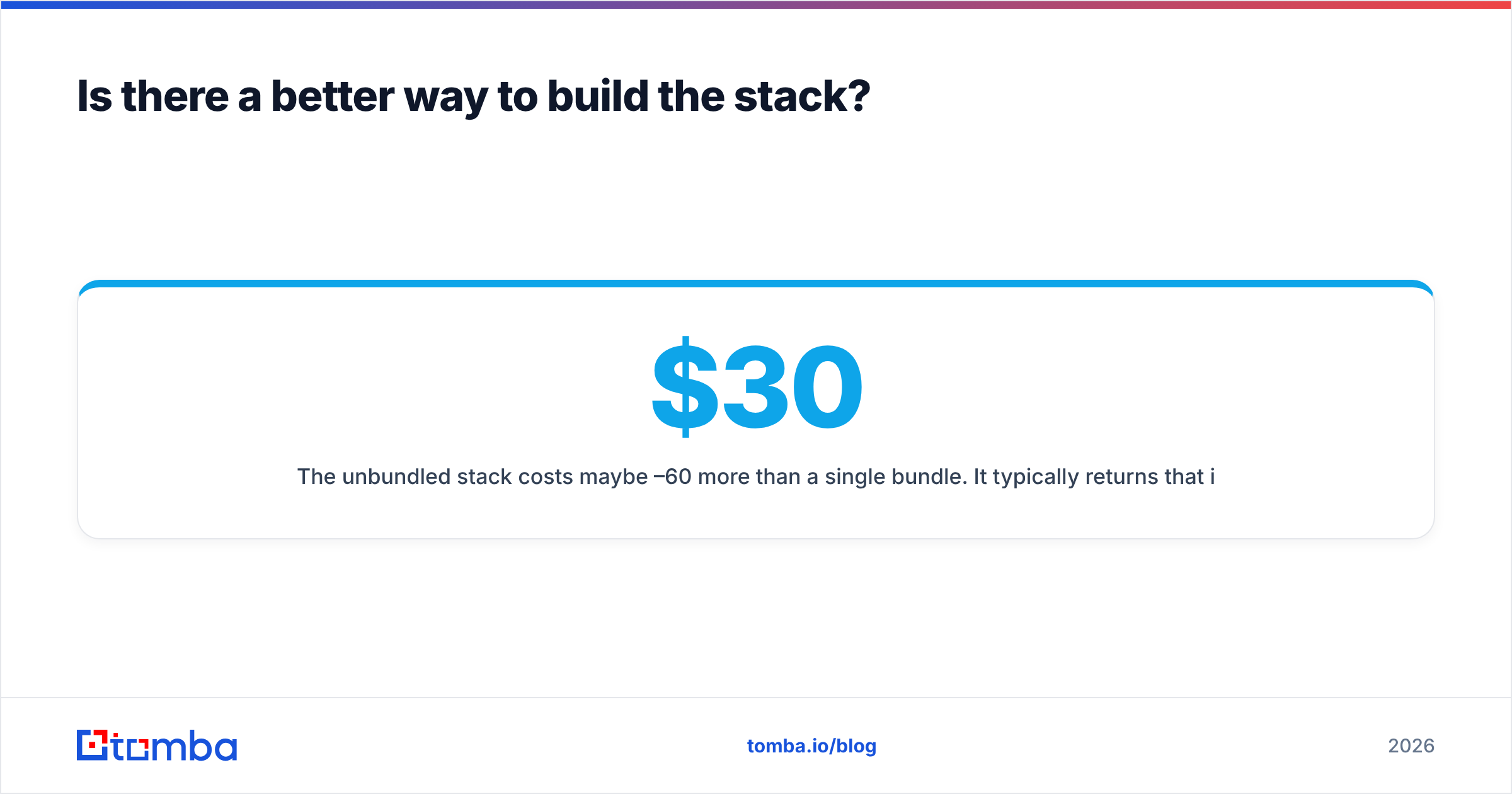
The unbundled stack costs maybe $30–60/month more than a single bundle. It usually returns that in the first campaign. Your bounce rate drops from 8–12% to under 2%, your domain survives, and your reply rate reflects your offer rather than your list quality. Want third-party reviews first? Check the current G2 category pages for both categories. The gap in review volume between them says something about maturity on its own.
The other advantage is replaceability. When your sender raises prices or your data vendor's coverage slips in a new market, you swap one layer and keep the other. In a bundle, every switch is a full migration.
Frequently asked questions#
Is GrowMeOrganic a Mailarrow alternative? Only partially. GrowMeOrganic includes sequencing, so it can replace Mailarrow at low volume. It cannot replace it at scale, because it lacks the mailbox rotation and warmup architecture that high-volume cold email requires.
Is Mailarrow a GrowMeOrganic alternative? No. Mailarrow has no contact database. You'd need to pair it with a data provider to cover the same ground.
Which has better email accuracy? GrowMeOrganic is the only one of the two making an accuracy claim, since Mailarrow doesn't supply data. Verify any bundled list yourself before sending. That advice holds for every bundled database, not just this one.
Can I use both? You can, and some teams do: GrowMeOrganic for LinkedIn scraping, Mailarrow for sending. But then you're paying for GrowMeOrganic's sequencer and never using it, which usually means you should replace the scraping half with a dedicated data tool instead.
What about catch-all domains? Neither tool handles them well. Catch-all domains accept all mail at the SMTP layer, so standard verification returns "unknown." Use a dedicated catch-all finder rather than gambling on unknowns.
Where should you start?#
Fix the data layer first. It's the cheapest change with the largest effect. It also works with whichever sender you choose, so the effort isn't wasted if you switch platforms later.
Start with the Tomba Email Finder. Run 25 searches free, take the same 25 target companies through GrowMeOrganic's database, and compare deliverable rates side by side on the accounts you care about. That test settles the GrowMeOrganic vs Mailarrow question in an afternoon, faster than any comparison post can — including this one. Then pick your sender based on how many mailboxes you need, and stop paying for the overlap.
Related guides#
Ready to find emails that actually work?
Join 150,000+ professionals who stopped guessing and started sending. Free credits on signup — no credit card required.
Get the Tomba newsletter
Practical outbound tactics and product updates — once every two weeks.
About the author