GrowMeOrganic vs Nymeria: Which B2B Data Tool Wins?
GrowMeOrganic bundles LinkedIn scraping with email sequences. Nymeria sells contact data straight from profiles. Here is how the two compare on accuracy, credits, and price — and when neither is the right pick.
GrowMeOrganic vs Nymeria is a choice between two different things. One is a full outbound suite. The other is a contact data source. Here is the short answer, then the detail.
TL;DR
- GrowMeOrganic is a bundle, Nymeria is a data source. GrowMeOrganic wraps LinkedIn and Sales Navigator scraping, email finding, and a sequence sender into one subscription. Nymeria returns emails and phone numbers for people you have already found.
- Nymeria wins on per-contact depth. One lookup often returns a personal email, a work email, and a phone number. GrowMeOrganic's finder is thinner, and it leans on pattern guessing.
- GrowMeOrganic wins on "one login, whole workflow." You do not have to pay for a scraper, a finder, and a sender on their own. The all-in-one price really is cheaper than three tools.
Two things to weigh before you buy:
- Neither ships serious verification. Both hand you addresses. Neither gives you a hard SMTP verdict with catch-all handling. That gap is where most bounce damage starts.
- Pick by bottleneck. Volume outreach on a budget → GrowMeOrganic. Hard-to-find contacts and personal emails → Nymeria. Accuracy-first pipelines feeding a CRM → a dedicated finder plus a verifier.
What are GrowMeOrganic and Nymeria?#
They solve overlapping problems from opposite ends.
GrowMeOrganic is an all-in-one B2B prospecting platform built around a Chrome extension. You scrape a LinkedIn or Sales Navigator search. It then tries to attach emails to those profiles. From there you drop the list into its built-in cold email sequencer. It also bundles a B2B database, Google Maps scraping, and a website visitor tool. The pitch is breadth: one subscription instead of four.
Nymeria is a contact enrichment service. Its Chrome extension sits on LinkedIn, GitHub, and a few other profile sites. It reveals contact details for the person on screen: personal email, work email, phone number, and social handles. It also offers bulk enrichment and an API. The pitch is depth. Fewer features, better data per person, and personal emails that most work-email tools never touch.
That difference explains almost every trade-off below. GrowMeOrganic is built for one question: how many prospects can I move into a sequence today? Nymeria is built for another: can you actually reach this specific person?
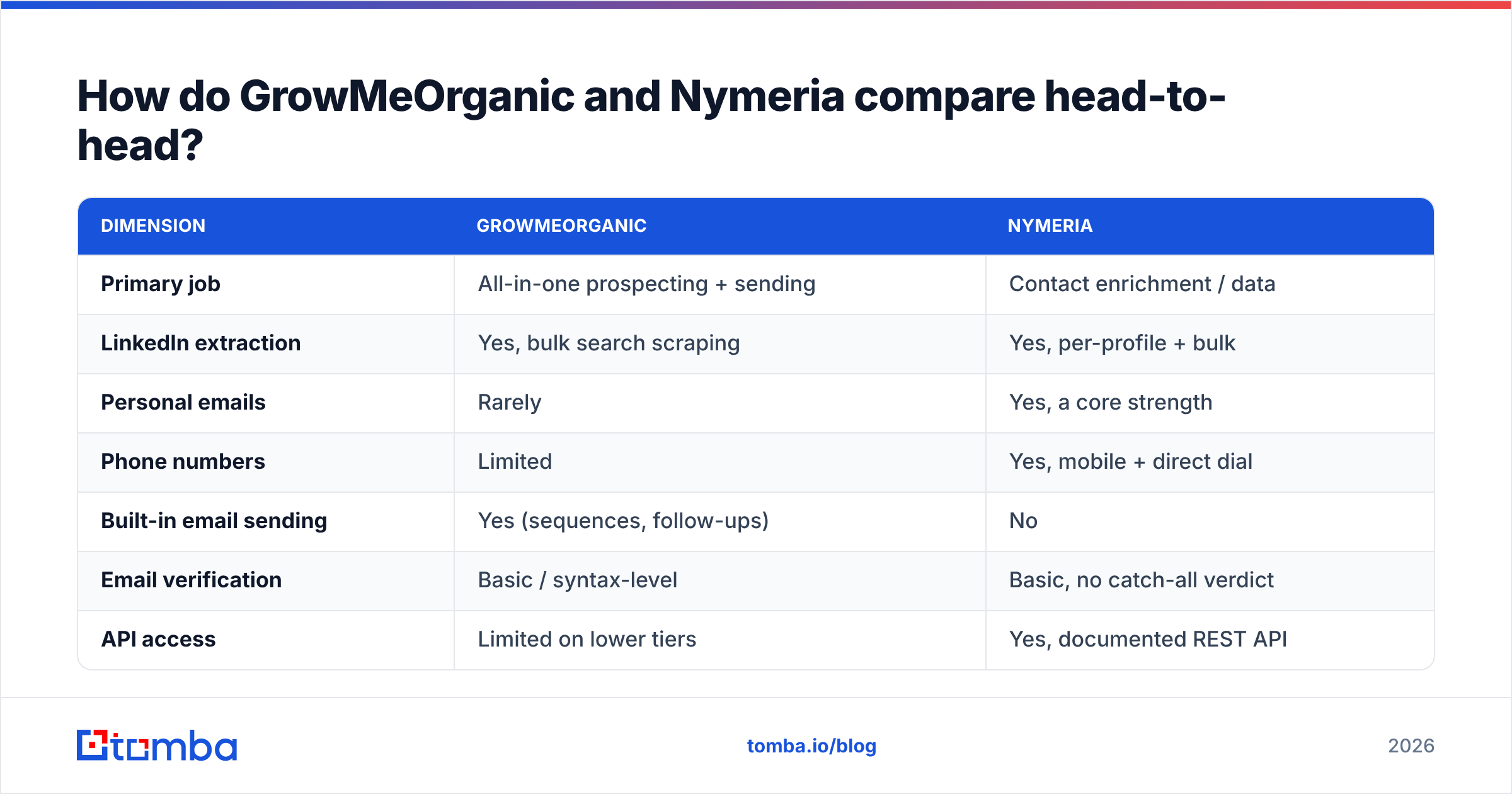
GrowMeOrganic vs Nymeria: how do they compare head-to-head?#
| Dimension | GrowMeOrganic | Nymeria |
|---|---|---|
| Primary job | All-in-one prospecting + sending | Contact enrichment / data |
| LinkedIn extraction | Yes, bulk search scraping | Yes, per-profile + bulk |
| Personal emails | Rarely | Yes, a core strength |
| Phone numbers | Limited | Yes, mobile + direct dial |
| Built-in email sending | Yes (sequences, follow-ups) | No |
| Email verification | Basic / syntax-level | Basic, no catch-all verdict |
| API access | Limited on lower tiers | Yes, documented REST API |
| Entry price (list) | ~$49/mo billed annually | ~$39/mo tier, free trial credits |
| Best for | Solo founders, agencies, budget outbound | Recruiters, researchers, hard-to-reach roles |
| Weakest point | Data accuracy at scale | No outreach layer at all |
Read that table as two different purchases. Say you already run Instantly or Smartlead for sending. Then GrowMeOrganic's biggest selling point, the sequencer, is a feature you pay for twice. If you have no sender at all, Nymeria leaves you shopping for one.

Which tool actually finds more valid emails?#
Accuracy is where the copy on both sites gets loose. So be specific about what you measure. Five numbers matter, and vendors love to blur them:
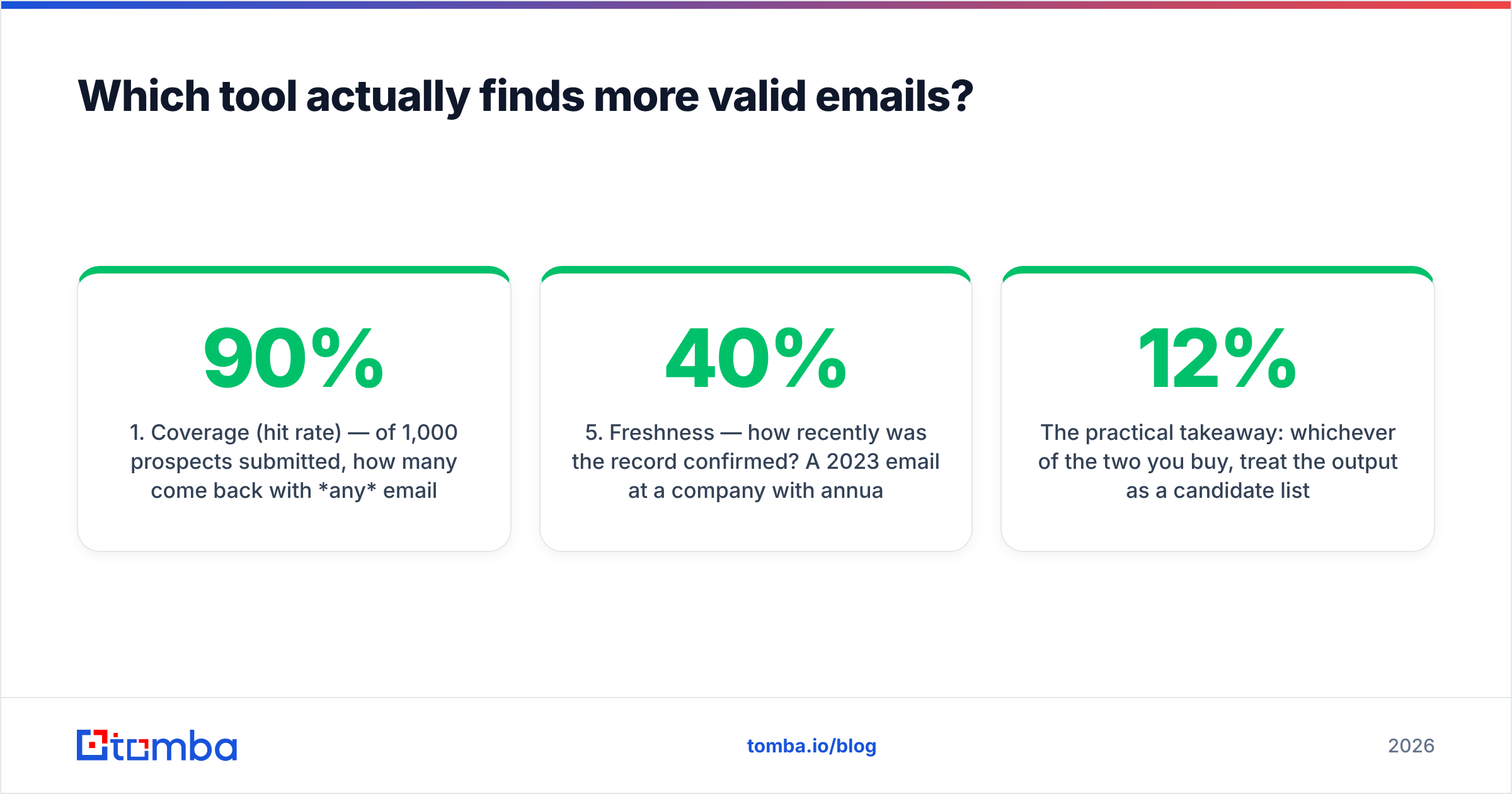
- Coverage (hit rate) — of 1,000 prospects, how many come back with any email? A tool can hit 90% coverage and still be useless.
- Validity — of the emails returned, how many pass a real SMTP check? This number predicts your bounce rate.
- Catch-all share — how many results land on domains that accept everything? Nobody can confirm those without extra work. A high catch-all share inflates coverage and hides risk.
- Deliverable coverage — coverage times validity. This is the only figure worth comparing across vendors, and almost nobody publishes it.
- Freshness — how recently was the record confirmed? A 2023 email at a company with 40% annual churn is a coin flip.
Against those five: Nymeria returns fewer results per list. But more of them are reachable, because it leans on real observed data instead of guesswork. GrowMeOrganic's finder gives broad coverage. A big share of it is guessed first.last@domain.com addresses. Guessed addresses are not worthless, since email patterns are real. Still, sending them unverified is how sending domains get burned.

The takeaway is simple. Whichever tool you buy, treat the output as a candidate list, not a verified one. Run it through an email verifier before it touches your sending setup. A 12% bounce rate on a new domain is not a data problem you can apologise your way out of. Google and Microsoft simply stop delivering your mail.
What does each one cost in 2026?#
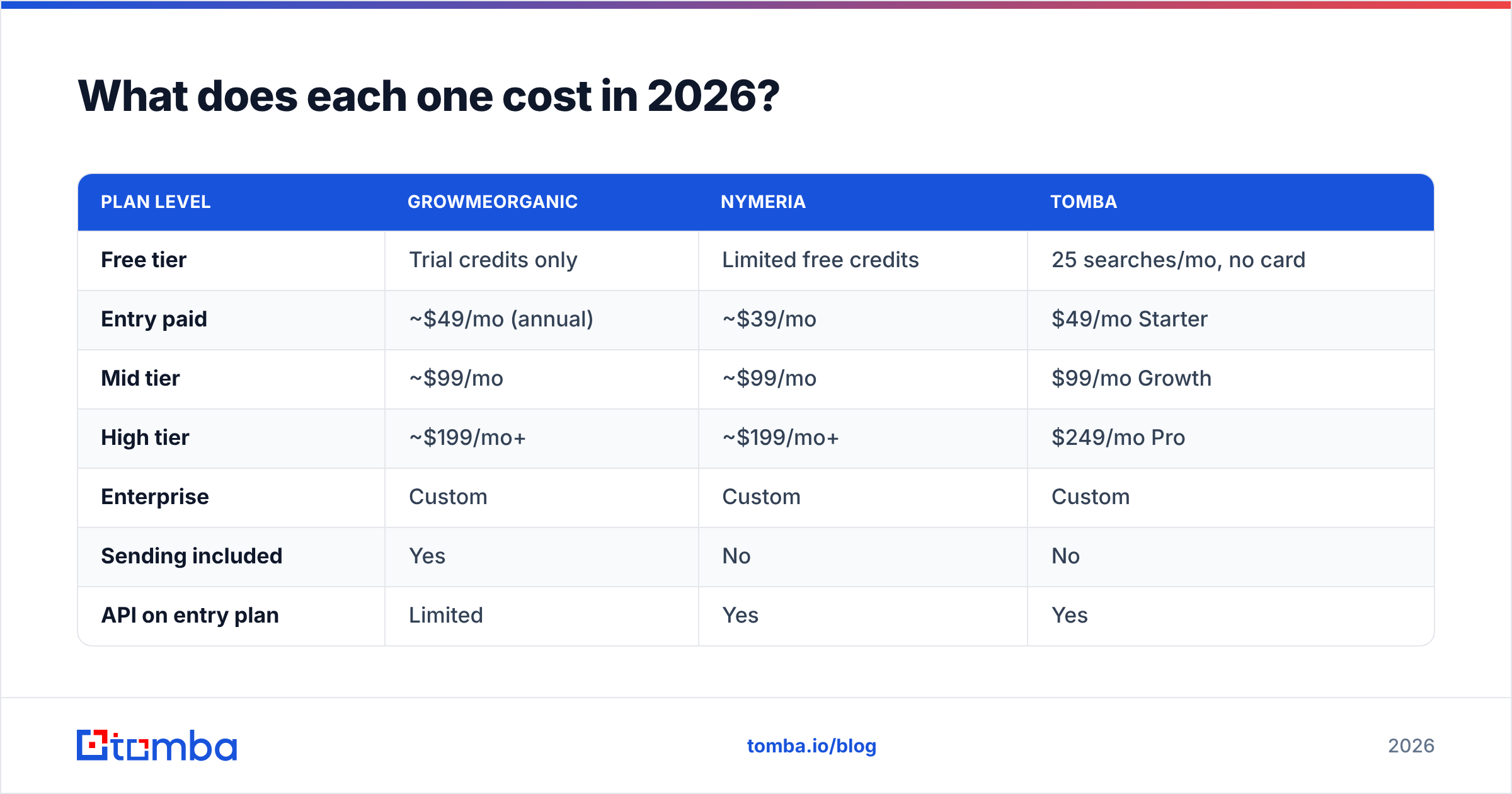
Published list prices move often. Check both vendor pages before you commit. At the time of writing, the shape looks like this:
| Plan level | GrowMeOrganic | Nymeria | Tomba |
|---|---|---|---|
| Free tier | Trial credits only | Limited free credits | 25 searches/mo, no card |
| Entry paid | ~$49/mo (annual) | ~$39/mo | $49/mo Starter |
| Mid tier | ~$99/mo | ~$99/mo | $99/mo Growth |
| High tier | ~$199/mo+ | ~$199/mo+ | $249/mo Pro |
| Enterprise | Custom | Custom | Custom |
| Sending included | Yes | No | No |
| API on entry plan | Limited | Yes | Yes |
| Verification included | Basic | Basic | Full, incl. catch-all |
Two pricing details deserve attention.
First, credit definitions differ. GrowMeOrganic counts a credit per contact exported. Nymeria counts one per enrichment revealed, so a reveal that returns a phone plus two emails is a single credit. That makes Nymeria look costly per credit and cheaper per usable contact. Model it on your own list, not on the sticker.
Second, annual lock-in. GrowMeOrganic's headline price is billed annually. The monthly figure is much higher. If you are still testing, budget for the real monthly rate. Otherwise you commit to a full year on a tool you have not stress-tested. Compare that with month-to-month Tomba pricing, where the Starter plan is $49/mo with no annual deal.

Who should choose GrowMeOrganic?#
Buy GrowMeOrganic if all three of these are true:
- You have no sending stack yet. The sequencer is the differentiator. If it replaces Lemlist plus a scraper plus a finder, the math works.
- Your ICP is mid-market and well-indexed. Standard corporate domains have predictable email patterns. That is where a pattern-heavy finder does best.
- You are cost-constrained and volume-tolerant. Agencies running many client campaigns on thin margins get real value here.
Do not buy it if you need clean data flowing into Salesforce or HubSpot as a system of record. The API story is thinner than Nymeria's. CRM hygiene needs verified, structured records, not CSV exports you clean by hand every Monday.
Who should choose Nymeria?#
Nymeria is the better pick when the person is hard to reach:
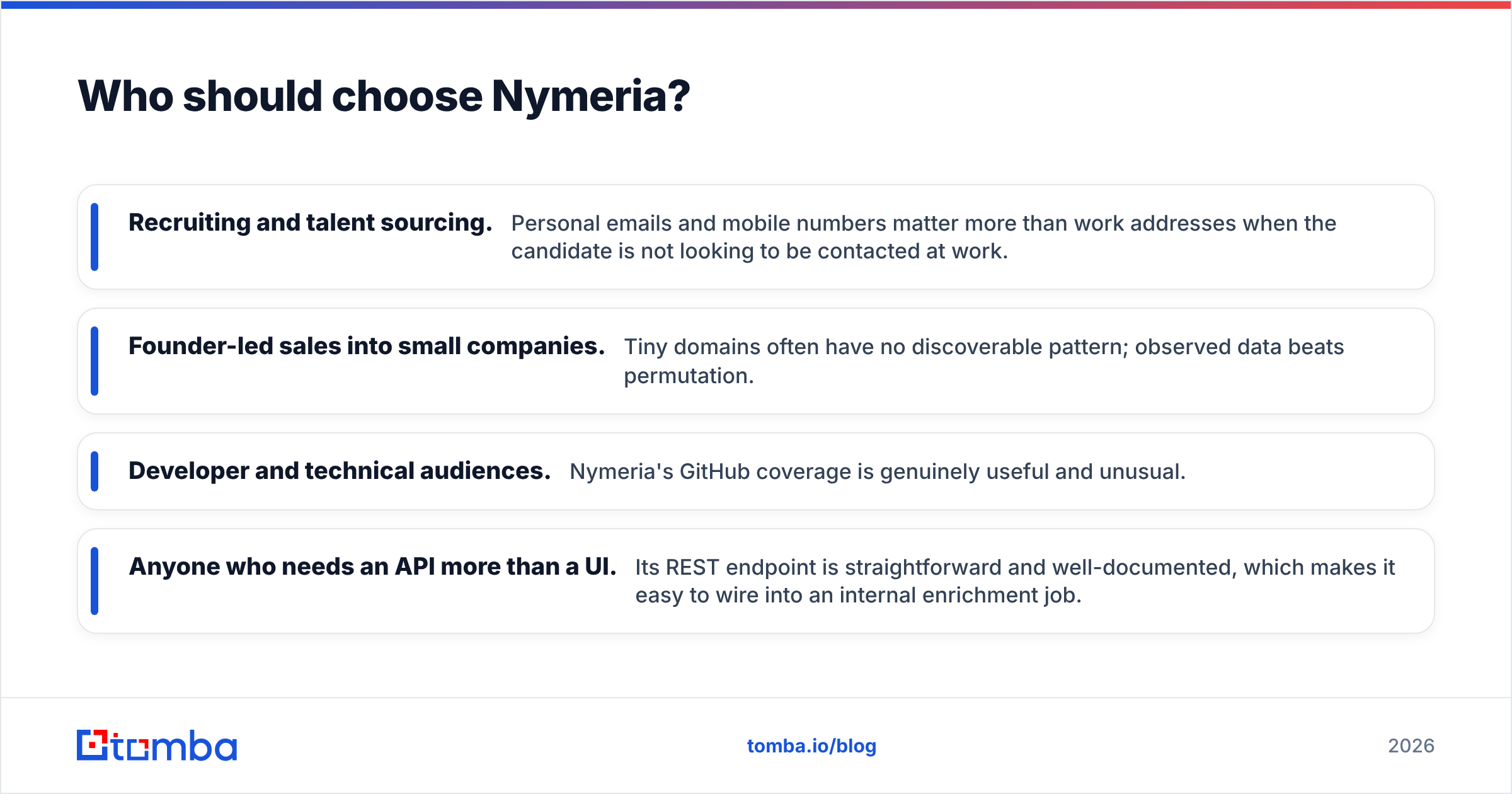
- Recruiting and talent sourcing. Personal emails and mobile numbers beat work addresses here. Candidates rarely want to be pitched at their desk.
- Founder-led sales into small companies. Tiny domains often have no pattern to guess. Observed data wins.
- Developer and technical audiences. Nymeria's GitHub coverage is genuinely useful and unusual.
- Anyone who needs an API more than a UI. The REST endpoint is simple and well documented. It is easy to wire into an internal enrichment job.
The gap is obvious. You still need a sender, a verifier, and probably a list-building layer. Nymeria is a component, priced like a component, and honest about it.

Where does a dedicated email finder fit alongside either?#
Most teams hit the same wall around month three. The finder bundled inside an outreach suite is rarely the best finder available. And the enrichment tool you bought for personal emails cannot sweep a whole company.
A workable three-layer stack looks like this:
- Discovery — find every relevant contact at a target account. A domain search returns the full roster plus the company's email pattern. That is far faster than scraping profile by profile.
- Enrichment — fill in the people you cannot find generically. This is Nymeria's lane. A LinkedIn finder covers much of the same ground when the profile is your starting point.
- Verification — the step you cannot skip. Real SMTP checks, plus a proper catch-all verdict rather than a shrug. Skip it and a good list turns into a spam-folder problem.
Only after those three does sending matter. Deliverability follows data quality. No warmup schedule saves a list that is 15% invalid. That order also explains why all-in-one tools underperform on the metric that decides campaigns. They polish the last step and treat the first three as filler.
Want the view from the other side? G2's contact data category is a fair place to check review volume and recency for both vendors before you trust any single blog post, this one included.
What about verification and catch-all domains?#
This is the biggest blind spot the two tools share, so it gets its own section.
Roughly a fifth to a quarter of B2B domains are catch-all. The mail server accepts every address at the domain, valid or not. A basic verifier marks these "unknown" or, worse, "valid". You learn which one it was when the bounce report lands. Neither tool resolves catch-alls with confidence. Both surface them as accepted results.
Doing it properly takes a different method. You cross-check patterns across sources, weigh past send signals, and score the odds instead of trusting one SMTP handshake. That is the job of a catch-all verifier. It is also why serious outbound teams keep verification separate from discovery. Two vendors, two judgements, far fewer surprises.
Practical rule: if more than 20% of a bought list comes back "unknown", do not send to it. Segment it, verify it on its own, and send at low volume from a backup domain until the pattern proves out.
GrowMeOrganic vs Nymeria: which one wins?#
Nymeria wins on data, GrowMeOrganic wins on scope, and neither wins on verification.
- Choose GrowMeOrganic if you are building your first outbound motion, have no sending tool, and value one bill over best-in-class parts.
- Choose Nymeria if contacts are hard to find, you need personal emails or mobiles, and you already like your sender.
- Choose neither as your single source of truth if anyone on the team reviews bounce rate. Layer a dedicated finder and verifier under whichever you pick.
The honest read on GrowMeOrganic vs Nymeria is that they are complements more than rivals. They point at different bottlenecks. Name your bottleneck first — coverage, reachability, or sending — and the choice makes itself.
Ready to fix the accuracy layer? Start with the Tomba Email Finder. Search by domain, name, or company. Every result comes with a confidence score and the source behind the address. Pipe it into your CRM through the API. The free tier gives you 25 searches a month with no card, and Starter runs $49/mo month-to-month. Test it on 50 contacts from your current list. If the bounce rate drops, you have your answer.
Related guides#
Ready to find emails that actually work?
Join 150,000+ professionals who stopped guessing and started sending. Free credits on signup — no credit card required.
Get the Tomba newsletter
Practical outbound tactics and product updates — once every two weeks.
About the author