GrowMeOrganic vs ReachStream: Which B2B Data Tool Wins?
One is a LinkedIn-first prospecting suite, the other a downloadable B2B contact database. Here is how GrowMeOrganic and ReachStream actually differ on data, pricing, and outreach — and when neither is the right pick.
GrowMeOrganic vs ReachStream is not really a fair fight. It is a choice between two different jobs. One tool scrapes LinkedIn and sends the emails for you. The other sells you a ready-made contact list. Here is how the two differ, and when neither one is the right buy.
TL;DR
- GrowMeOrganic is a workflow tool. It bundles a LinkedIn scraper, an email finder, and a drip sender into one seat-based plan. You build lists by scraping, then email from the same app.
- ReachStream is a data vendor. You filter a pre-built B2B database by industry, title, place, and company size. Then you export CSVs or push records into your CRM. There is no sending engine.
- They are not real substitutes. The choice is between "scrape and send" and "buy a list." Teams that need both usually pay for a data source plus a separate sequencer.
- Data freshness decides it. Scraped LinkedIn data reflects the profile on the day you pulled it. A static database reflects the day the record was last refreshed, which can be many months ago.
- You need a verification layer either way. Run the output through an email verifier before it touches your sending domain. Otherwise your bounce rate will decide for you.
What are GrowMeOrganic and ReachStream?#
Both tools promise the same end state: a list of B2B contacts you can email. They get there from opposite directions.
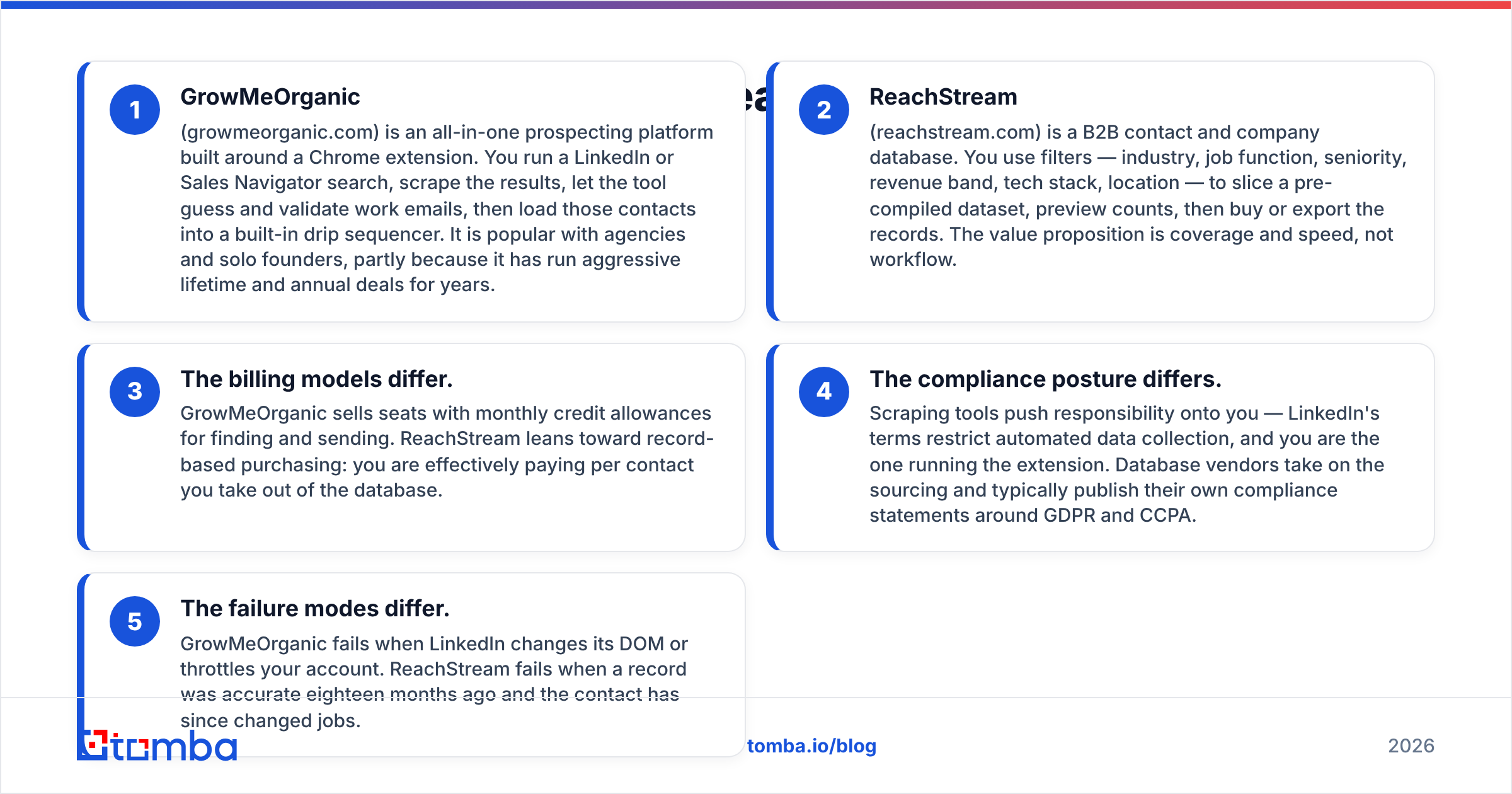
GrowMeOrganic (growmeorganic.com) is an all-in-one prospecting platform built around a Chrome extension. You run a LinkedIn or Sales Navigator search and scrape the results. The tool then guesses and checks work emails. Those contacts drop straight into a built-in drip sequencer. It is popular with agencies and solo founders, partly because it has run aggressive lifetime and annual deals for years.
ReachStream (reachstream.com) is a B2B contact and company database. You slice a pre-compiled dataset with filters: industry, job function, seniority, revenue band, tech stack, location. Then you preview counts and export the records. The pitch is coverage and speed, not workflow.
The billing models differ. GrowMeOrganic sells seats with monthly credits for finding and sending. ReachStream leans toward record-based pricing. You pay for each contact you pull out of the database.
The compliance posture differs. Scraping tools push the risk onto you. LinkedIn's terms restrict automated data collection, and you are the one running the extension. Database vendors handle sourcing themselves and usually publish their own GDPR and CCPA statements.
The failure modes differ. GrowMeOrganic breaks when LinkedIn changes its page code or throttles your account. ReachStream breaks when a record was right eighteen months ago and the contact has since changed jobs.
Most buyers underweight that last point. The B2B database you rent is only as good as its last refresh.
GrowMeOrganic vs ReachStream: how do they compare head to head?#
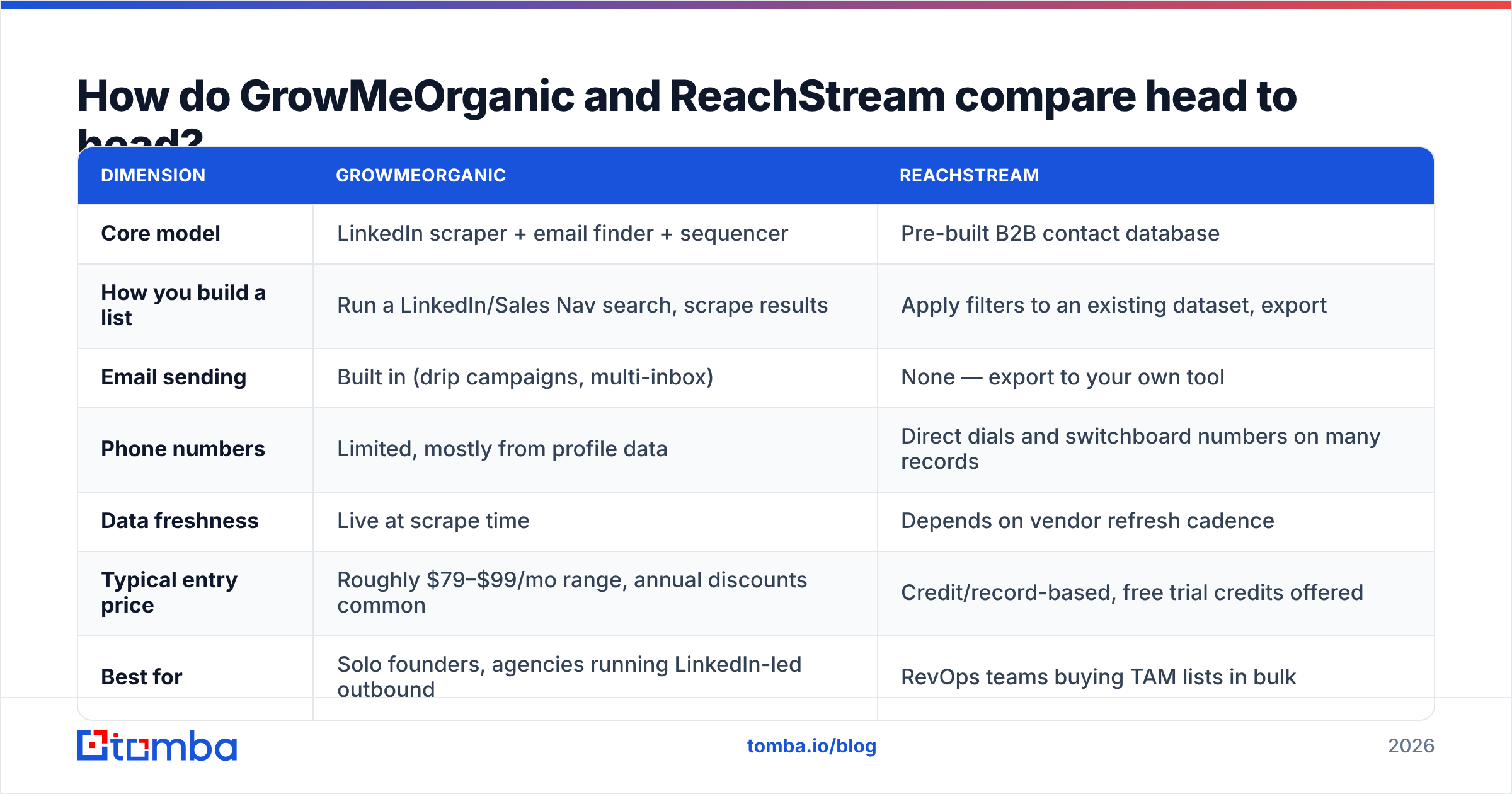
Here is the practical breakdown. Treat pricing as directional. Both vendors change list prices and run promotions, so check their own pages before you buy.
| Dimension | GrowMeOrganic | ReachStream |
|---|---|---|
| Core model | LinkedIn scraper + email finder + sequencer | Pre-built B2B contact database |
| How you build a list | Run a LinkedIn/Sales Nav search, scrape results | Apply filters to an existing dataset, export |
| Email sending | Built in (drip campaigns, multi-inbox) | None — export to your own tool |
| Phone numbers | Limited, mostly from profile data | Direct dials and switchboard numbers on many records |
| Data freshness | Live at scrape time | Depends on vendor refresh cadence |
| Typical entry price | Roughly $79–$99/mo range, annual discounts common | Credit/record-based, free trial credits offered |
| Best for | Solo founders, agencies running LinkedIn-led outbound | RevOps teams buying TAM lists in bulk |
| API access | Limited | Available on higher tiers |
| Biggest weakness | Ties you to LinkedIn's tolerance for automation | Static records decay between refreshes |

The honest summary is short. If your buyers live on LinkedIn and you already run a LinkedIn-led motion, GrowMeOrganic collapses four tools into one bill. If you need 20,000 verified contacts in healthcare IT across three countries by Friday, scraping will never get you there in time. A database is the right instrument for that job.
Whose data is actually more accurate?#
Neither vendor publishes an audited accuracy number. So treat any "95%+ accurate" claim from either side as a target, not a measurement. What you can reason about is how each one gets things wrong.
Scraped data is wrong at the email layer. GrowMeOrganic knows the name and the employer, because it read the profile. It still has to guess the mailbox — first.last@, f.last@, firstinitial+last@ — and then check it. Accuracy leaks at that guessing step. It leaks most at companies with catch-all domains, where an SMTP check accepts anything and tells you nothing.
Database data is wrong at the identity layer. ReachStream's email may have been valid the day it was compiled. But roughly a fifth of B2B contacts change roles each year. A record that has not been refreshed in a year has real odds of pointing at someone who left.


Run a sample before you commit. Pull 200 records from the tool you are testing and verify them yourself. Then count three buckets: valid, invalid, and unknown or catch-all.
The unknown bucket is the one vendors quietly hide inside their accuracy math. If 30% of your sample is catch-all, you need a catch-all verifier in the pipeline no matter which vendor wins.
How does the pricing really compare?#
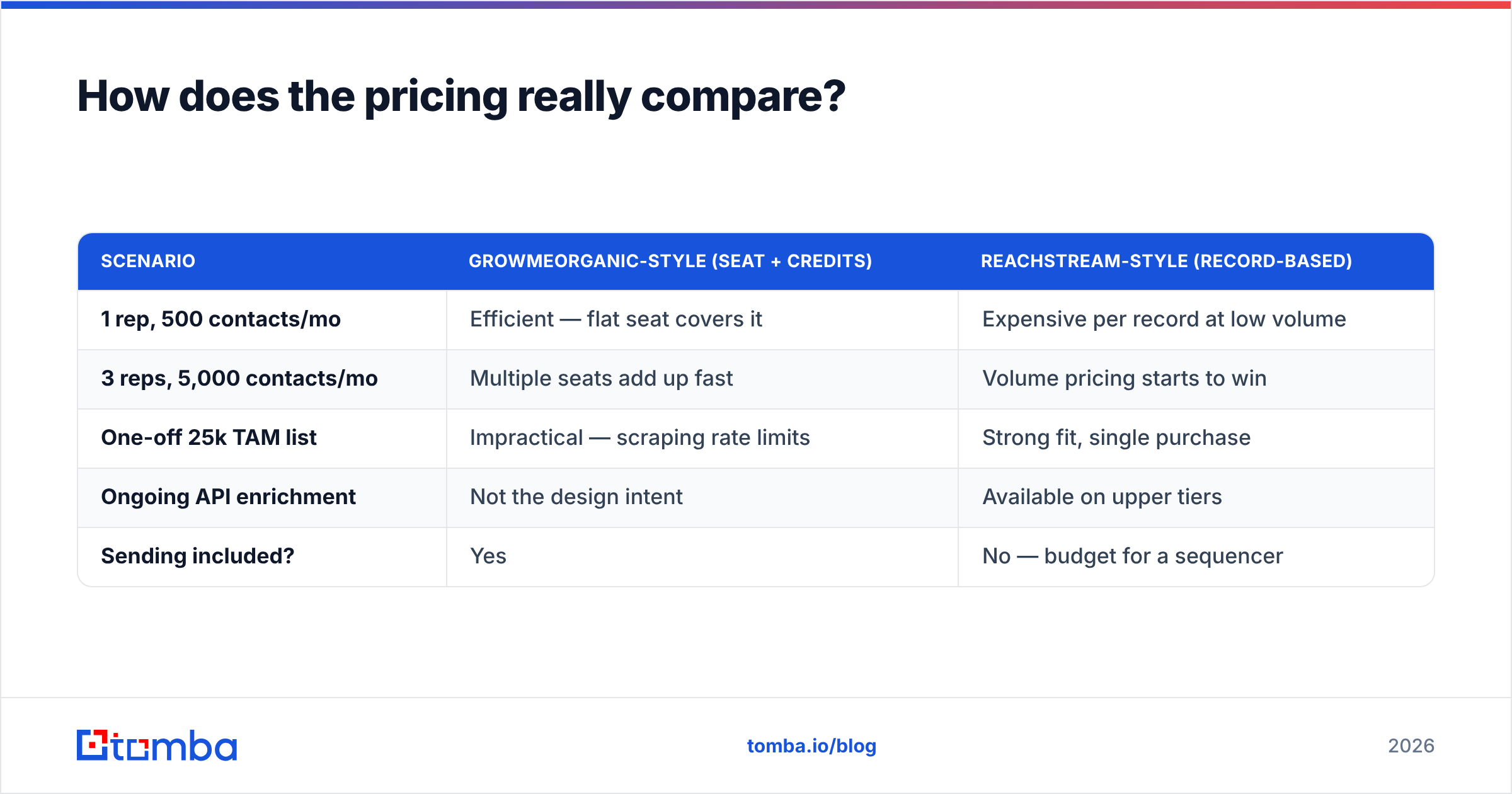
Seat-based and record-based pricing are hard to compare head to head. Convert both to cost per usable contact instead.
| Scenario | GrowMeOrganic-style (seat + credits) | ReachStream-style (record-based) |
|---|---|---|
| 1 rep, 500 contacts/mo | Efficient — flat seat covers it | Expensive per record at low volume |
| 3 reps, 5,000 contacts/mo | Multiple seats add up fast | Volume pricing starts to win |
| One-off 25k TAM list | Impractical — scraping rate limits | Strong fit, single purchase |
| Ongoing API enrichment | Not the design intent | Available on upper tiers |
| Sending included? | Yes | No — budget for a sequencer |
Two costs people forget. First, a database still needs a sending platform, and mid-market sequencers start around $60–$100 per seat per month. Second, a scraper may still need extra LinkedIn Sales Navigator licences. Those are billed separately, and they are not cheap.
Compare the free tiers honestly too. Trial credits built to show you the best-case records are not the same as a working free plan. For reference, Tomba pricing runs a genuinely free tier at 25 searches per month. Paid plans start at $49/mo, then $99/mo, then $249/mo. Use that as a baseline when you judge whether a rival's entry tier is really entry-level.
Which tool fits which team?#
Choose GrowMeOrganic if:
- Your pipeline comes from LinkedIn searches you already know how to build.
- You are one to five people and want a single subscription instead of four.
- You want finding, sequences, and follow-ups in one interface.
- You accept the risk of automating against LinkedIn.
Choose ReachStream if:
- You need volume in industries where LinkedIn presence is thin: manufacturing, logistics, healthcare admin, local services.
- You are building a market list for territory planning, not a 200-contact campaign.
- You already own Instantly, Smartlead, Outreach, or HubSpot for sending.
- Direct dial coverage matters as much as email.
Choose a dedicated finder or verifier API if:
- Your source of truth is your CRM, not a vendor dashboard, and you want enrichment on write.
- You already have the accounts and domains, and you need contacts at them. That is a domain search problem, not a database-browsing problem.
- You want data and sending kept apart, so you can swap either one without a migration.
There is a fourth option worth naming. Curated list vendors such as BookYourData sell verified, filterable B2B contacts on a pay-as-you-go basis, with accuracy guarantees. If your objection to ReachStream is that you do not want a subscription for a one-time list, that model is a fair middle path. Price it alongside both tools here.
What does a modern stack look like instead?#
The all-in-one pitch is seductive because it removes decisions. But all-in-one tools are rarely best in class at all three jobs — sourcing, verifying, and sending. You inherit the weakest part.
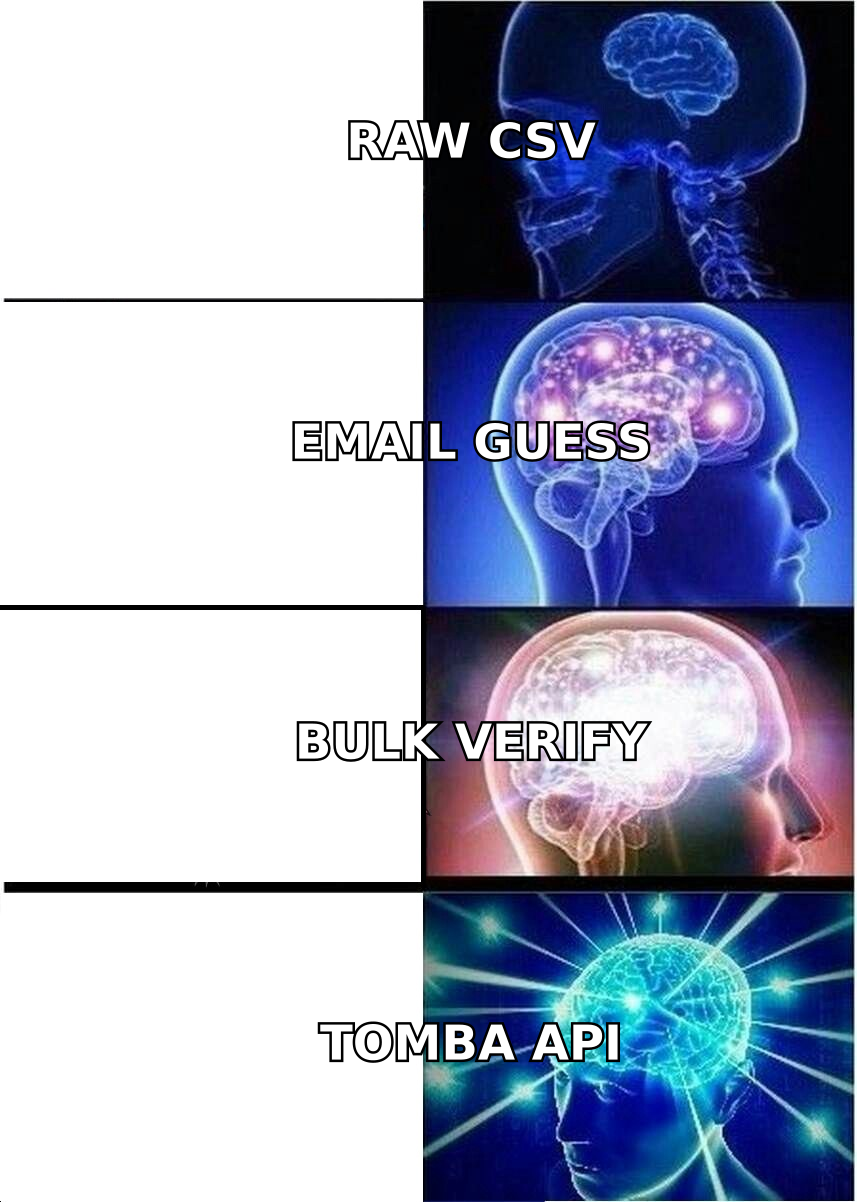
A stack that survives contact with reality usually looks like this:
- Source of intent — website visitors, job-change signals, hiring posts, or a filtered database pull. Here you decide who is worth contacting.
- Contact resolution — turn a name plus a company domain into a mailbox. This is the email finder layer, and it should be callable from code, not just a dashboard.
- Verification — SMTP checks, MX validation, role and disposable filtering, plus explicit catch-all handling. Never skip this, even when the source claims the data is verified.
- Enrichment — append title, seniority, company size, and phone where you need it. Ideally through data enrichment that writes straight into the CRM record.
- Sending — a dedicated deliverability platform with inbox rotation, warmup, and reply detection.
- Measurement — bounce rate, reply rate, and meetings booked per 1,000 contacts, split by data source. That is how you fire the source that underperforms.
Keeping steps 2 and 5 apart is the important move. When one vendor finds your contacts and sends your mail, a bad data month damages your sending reputation. You also cannot swap one part without rebuilding the other.
What do reviewers say about each tool?#
Check G2 and Capterra before you buy either one. Read the two-star reviews, not the five-star ones. That is where the operational complaints live.
Scraper-and-sender suites like GrowMeOrganic draw the same themes: strong value for the price, extension breakage after LinkedIn updates, and support that is hit or miss. Database vendors like ReachStream draw a different set: broad coverage and helpful filters, with a slice of exported records out of date. For them, the refund or credit-back policy matters more than the headline accuracy claim.
One tip saves real money. Ask both vendors, in writing, what happens to bad records. A vendor that credits back hard bounces above a stated threshold is confident in its data. A vendor that will not put that in an email is telling you something.
How should you run the evaluation?#
Give yourself two weeks and a fixed test.
Pick 300 accounts you genuinely want to sell into. Run the same 300 through each tool. Then measure four things: match rate, verified rate, bounce rate on a small live send, and reply rate. Match rate alone is a vanity metric. A tool that returns 90% of contacts with 40% bounces is worse than one that returns 60% clean.
Use a checker outside both vendors so the scoring stays neutral. A free email checker handles spot checks. For the full 300, run a bulk email finder so the comparison is apples to apples. Log everything in a sheet. The winner is usually clear by day ten, and it is often not the one with the better landing page.
The bottom line#
GrowMeOrganic vs ReachStream is a choice between adjacent problems, not the same one. GrowMeOrganic is the better buy if your outbound is LinkedIn-shaped, your team is small, and you want one tool instead of four. ReachStream is the better buy if you need coverage at volume, care about direct dials, and already own a sending platform.
If neither feels right, take that as a signal. Your real need is a clean data layer you can call from anywhere, not another closed dashboard.
If that is where you land, start with the Tomba Email Finder. It turns names and domains into verified work emails. It handles catch-all domains openly instead of silently. And it runs through a REST API, Chrome extension, Sheets add-on, or bulk upload, so your data layer stays independent of whichever sequencer you use this quarter. The free tier gives you 25 searches a month — enough to run the 300-account test above before you spend a dollar.
Related guides#
Ready to find emails that actually work?
Join 150,000+ professionals who stopped guessing and started sending. Free credits on signup — no credit card required.
Get the Tomba newsletter
Practical outbound tactics and product updates — once every two weeks.
About the author