GrowMeOrganic vs SalesQL: Which B2B Data Tool Wins?
One is an all-in-one outbound suite, the other a LinkedIn contact extractor. We break down data accuracy, pricing, export limits, and which one actually belongs in your 2026 stack.
GrowMeOrganic vs SalesQL comes down to one choice. Do you buy a whole outbound suite, or a sharp LinkedIn contact extractor? Here is how the two tools compare on data quality, price, and export limits.
TL;DR
- GrowMeOrganic is an all-in-one outbound suite: a B2B contact database, LinkedIn scraping, email finding, and a built-in cold email sequencer. You buy the whole workflow.
- SalesQL is a focused Chrome extension. It pulls emails and phone numbers off LinkedIn profiles, then exports them to CSV or your CRM. It does one job.
- Data accuracy is the real dividing line. GrowMeOrganic leans on a large static database plus pattern guessing. SalesQL enriches live from the profile you have open, which usually reads cleaner on niche contacts.
- Neither is a verification layer. Both hand you addresses that still need an SMTP-level check. Skip that check and your bounce rate does it for you.
- Best fit: GrowMeOrganic for solo founders who want database plus sending in one bill. SalesQL for LinkedIn-first prospectors. A dedicated finder and verifier like Tomba for teams who need API-grade accuracy.
GrowMeOrganic vs SalesQL: what does each tool actually do?#
They're often compared, but they were built to solve different halves of the same problem.
GrowMeOrganic is a bundled outbound platform. One subscription gets you a claimed 500M+ contact database, a LinkedIn/Sales Navigator extractor, a Google Maps scraper, and email finding. It also ships a cold email sequencer with unlimited sending seats on higher tiers. The pitch is consolidation: stop paying for four tools.
SalesQL is deliberately narrow. It's a browser extension that sits on LinkedIn. Open a profile, click the icon, and it returns personal and work emails plus direct and mobile numbers. It also handles LinkedIn search pages and Sales Navigator lists in bulk. From there it pushes contacts to HubSpot, Pipedrive, Salesforce, or CSV. There is no sequencer, no database to browse, and no scraper beyond LinkedIn.
That difference shapes everything else — pricing, accuracy, and who each one suits.
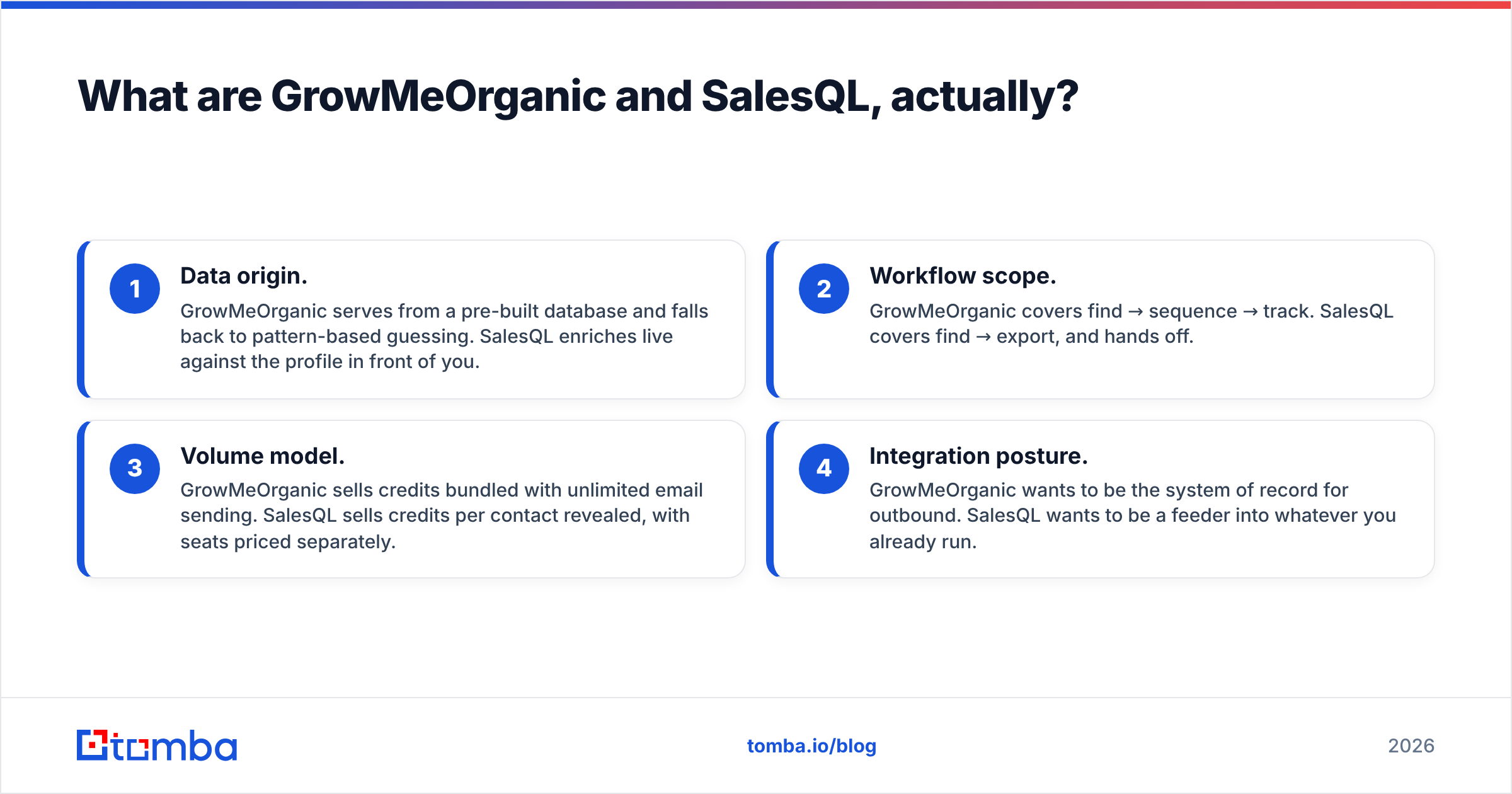
Here's the core distinction in four points:
- Data origin. GrowMeOrganic serves from a pre-built database and falls back to pattern-based guessing. SalesQL enriches live against the profile in front of you.
- Workflow scope. GrowMeOrganic covers find → sequence → track. SalesQL covers find → export, and hands off.
- Volume model. GrowMeOrganic sells credits bundled with unlimited email sending. SalesQL sells credits per contact revealed, with seats priced separately.
- Integration posture. GrowMeOrganic wants to be the system of record for outbound. SalesQL wants to be a feeder into whatever you already run.

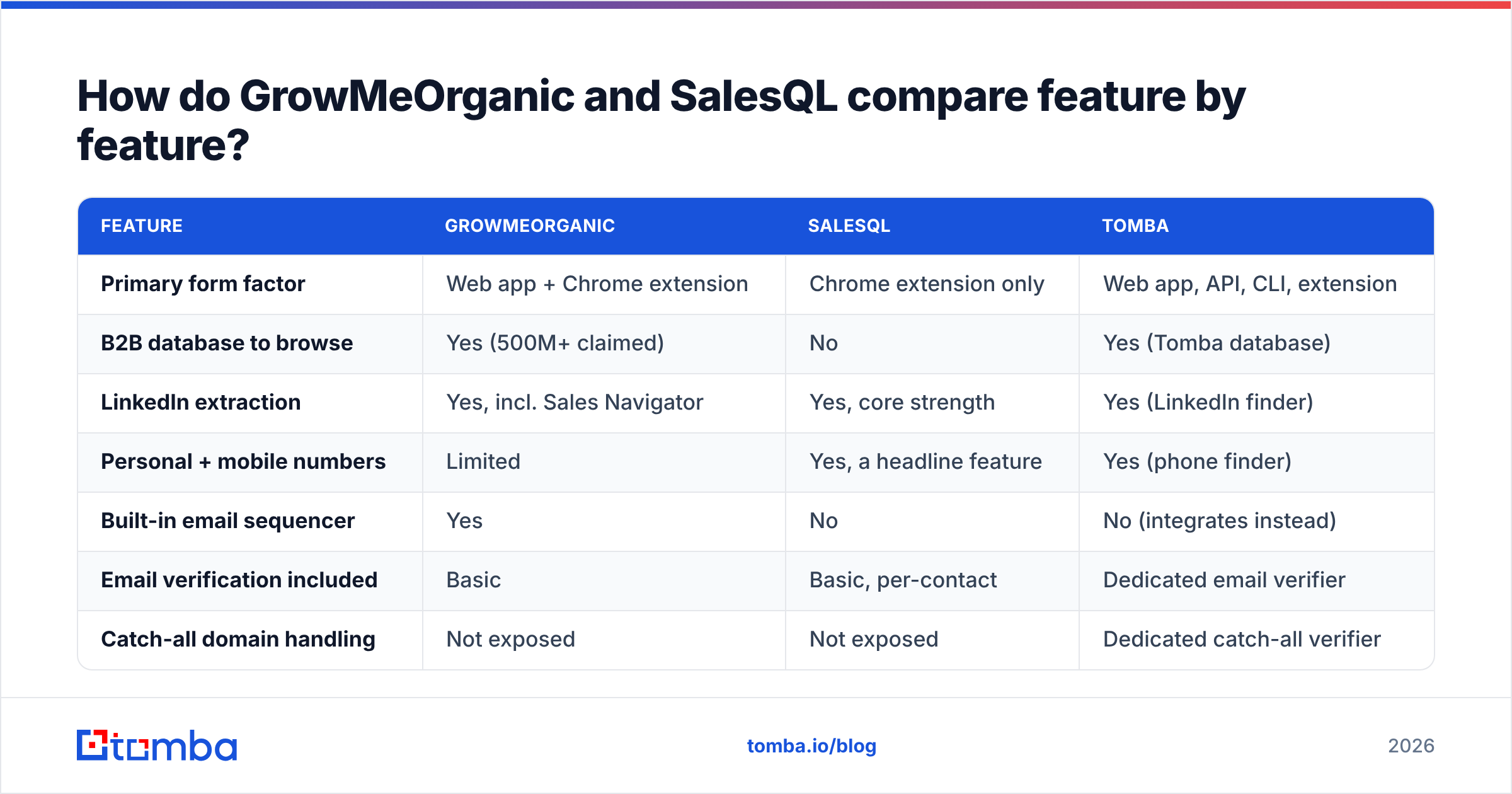
GrowMeOrganic vs SalesQL: how do the features compare?#
| Feature | GrowMeOrganic | SalesQL | Tomba |
|---|---|---|---|
| Primary form factor | Web app + Chrome extension | Chrome extension only | Web app, API, CLI, extension |
| B2B database to browse | Yes (500M+ claimed) | No | Yes (Tomba database) |
| LinkedIn extraction | Yes, incl. Sales Navigator | Yes, core strength | Yes (LinkedIn finder) |
| Personal + mobile numbers | Limited | Yes, a headline feature | Yes (phone finder) |
| Built-in email sequencer | Yes | No | No (integrates instead) |
| Email verification included | Basic | Basic, per-contact | Dedicated email verifier |
| Catch-all domain handling | Not exposed | Not exposed | Dedicated catch-all verifier |
| Public API | Limited | Yes | Yes, full REST API |
| Google Maps / local scraping | Yes | No | No |
| Free tier | Trial only | 100 credits/mo | 25 searches/mo, no card |
Read that table as two different bets. GrowMeOrganic bets you'd rather have eight adequate features than three excellent ones. SalesQL bets that LinkedIn is where your prospecting actually happens and everything else is noise.
Both bets are defensible. Neither covers the gap that kills campaigns, which is verification depth — and that's worth its own section.
Which one has better data accuracy?#
Neither publishes an audited accuracy figure, so treat vendor claims as marketing until you test them on your own list.
What we can say from how each system works:
SalesQL tends to win on precision, GrowMeOrganic on recall. Because SalesQL enriches the specific profile you opened, its hit rate on any single contact is lower. Its false-positive rate is lower too. GrowMeOrganic returns more addresses per list. But a meaningful share of those come from pattern inference (first.last@domain.com) rather than a confirmed source, and that is exactly the class of address that bounces.
Pattern guessing is not inherently bad. It becomes bad when it isn't paired with real SMTP validation and a catch-all strategy. A guessed address at a catch-all domain will pass a naive check and land in your sequencer. Then it quietly burns sender reputation for six weeks before anyone notices the reply rate dropped.

Run a practical test before you commit to either. Pull 100 contacts you already have verified emails for and run them through the trial. Measure three things: hit rate, exact-match rate, and how many of the misses were plausible-but-wrong guesses. That last number is the one that predicts your bounce rate.
If you'd rather not run the experiment, add a dedicated verification pass regardless of which finder you pick. Running exports through an email verifier with explicit catch-all handling costs pennies per thousand and removes the entire failure mode.
How does pricing compare?#
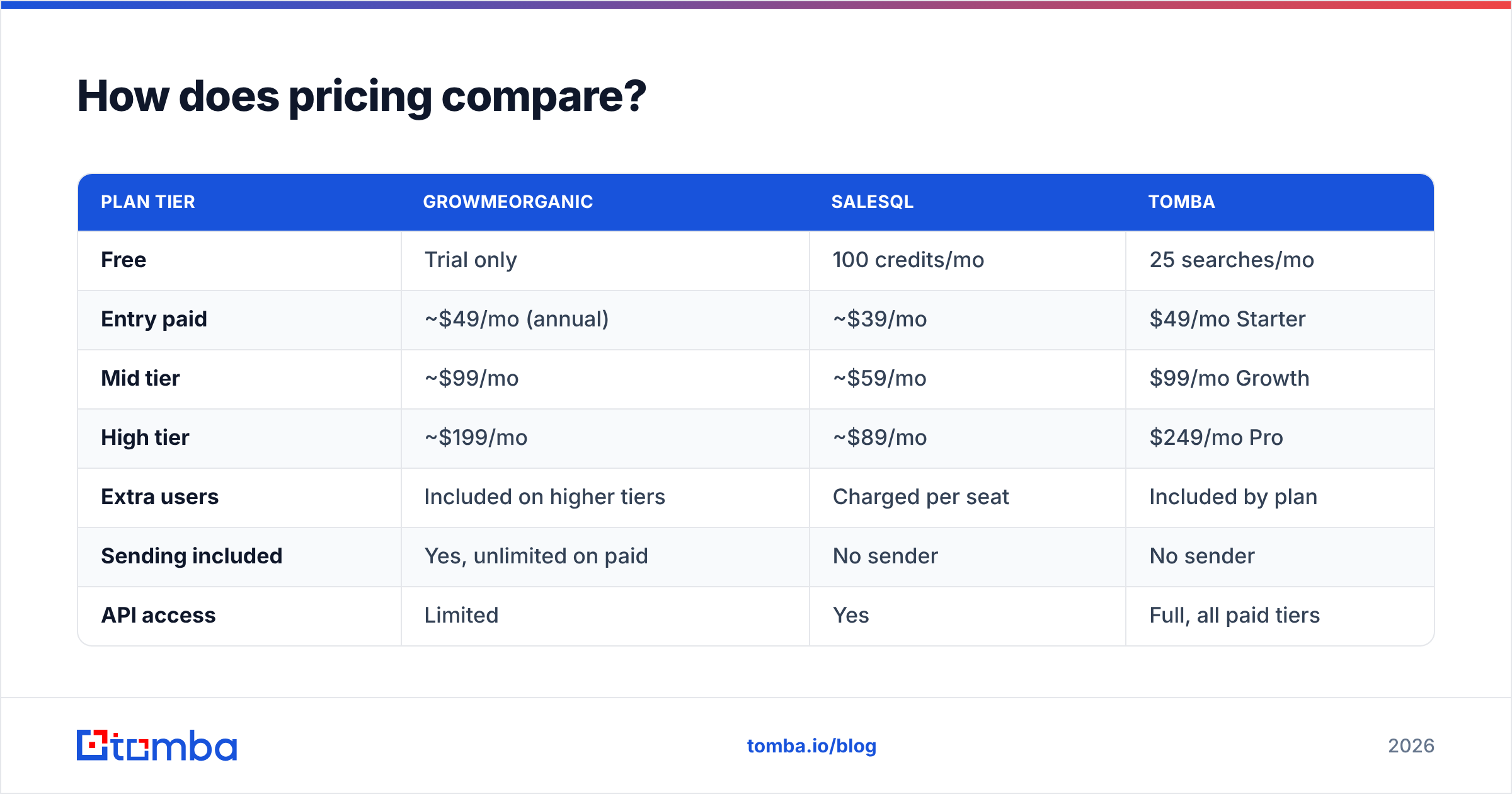
Pricing on both platforms changes often and varies by annual-versus-monthly billing, so verify on the vendor page before you buy. As a shape comparison at the time of writing:
| Plan tier | GrowMeOrganic | SalesQL | Tomba |
|---|---|---|---|
| Free | Trial only | 100 credits/mo | 25 searches/mo |
| Entry paid | ~$49/mo (annual) | ~$39/mo | $49/mo Starter |
| Mid tier | ~$99/mo | ~$59/mo | $99/mo Growth |
| High tier | ~$199/mo | ~$89/mo | $249/mo Pro |
| Extra users | Included on higher tiers | Charged per seat | Included by plan |
| Sending included | Yes, unlimited on paid | No sender | No sender |
| API access | Limited | Yes | Full, all paid tiers |
The honest read: SalesQL is cheaper per contact, GrowMeOrganic is cheaper per workflow. If you already pay for Instantly, Smartlead, or Lemlist, GrowMeOrganic's bundled sequencer is value you're not using. You're paying twice for sending. If you have no sequencer at all and want one bill, the bundle is genuinely efficient.
Watch two line items on both:
- Seat charges. SalesQL prices additional users separately. A five-person SDR team on a mid-tier plan can end up above what a flat-rate tool costs.
- Credit rollover. Neither is generous here. Unused credits mostly evaporate at month end, which punishes lumpy prospecting cycles.
Who should pick GrowMeOrganic?#
Choose GrowMeOrganic if three or more of these describe you:
- You're a solo founder or a two-person team. One subscription replacing four is worth real money and real admin time at that scale.
- You prospect local businesses. The Google Maps extractor is a genuine differentiator. SalesQL has no equivalent, and most email finders don't either.
- You have no sequencer yet. A bundled cold email sender removes a $40–$99/mo line item and one integration.
- Your ICP is mid-market and US/EU-heavy. Static databases perform best on well-documented companies. They degrade fast on sub-50-employee firms and non-English markets.
- You accept a verification step. Budget for cleaning exports before sending, because the bundled checks are shallow.
Where it disappoints: the sequencer is functional rather than good, and deliverability controls are thinner than dedicated senders. The database also has the usual staleness problem. Contacts who left their role two years ago still show up as current.
Who should pick SalesQL?#
Choose SalesQL if:
- LinkedIn is your prospecting surface. If your ICP list starts as a Sales Navigator search, SalesQL is built for that motion and does it with minimal friction.
- You need mobile numbers. Personal and direct dial coverage is one of its stronger features, and it matters if you pair email with calls.
- You already own your sending stack. SalesQL's refusal to bundle a sequencer is a feature when you've standardized on one.
- You want to start free. 100 credits a month is a real evaluation window, not a teaser.
- Your team is small. Per-seat pricing is fine at two or three users and gets uncomfortable past six.
Where it disappoints: it can't help you at all outside LinkedIn. There is no domain-level search and no company-wide contact discovery. You can't answer "who are all the engineering leads at this company" without finding them on LinkedIn first.
Is there a third option worth considering?#
Yes — and the reason is structural, not promotional. Both tools above are optimized for acquisition of contacts. Neither is optimized for confidence in them.
If your bottleneck is bounce rate, spam placement, or an email deliverability problem you can't trace, a finder-plus-verifier with an API is the better shape. Tomba sits there: domain search to map every contact at a company, email finder for individual lookups, and a verifier with explicit catch-all handling. The Tomba API then runs enrichment inside your own workflow instead of as a manual export.

It's also worth naming the adjacent category honestly. Maybe what you need is a pre-verified static list you can buy outright, not a discovery tool. Providers like BookYourData solve that differently, and often better than either tool here. You pay per record for data that's already been cleaned, instead of paying monthly for search access. Different problem, different tool. Check reviews on G2 across all four before you commit. The category churns fast, so a 2024 review is close to worthless in 2026.
What does a working stack actually look like?#
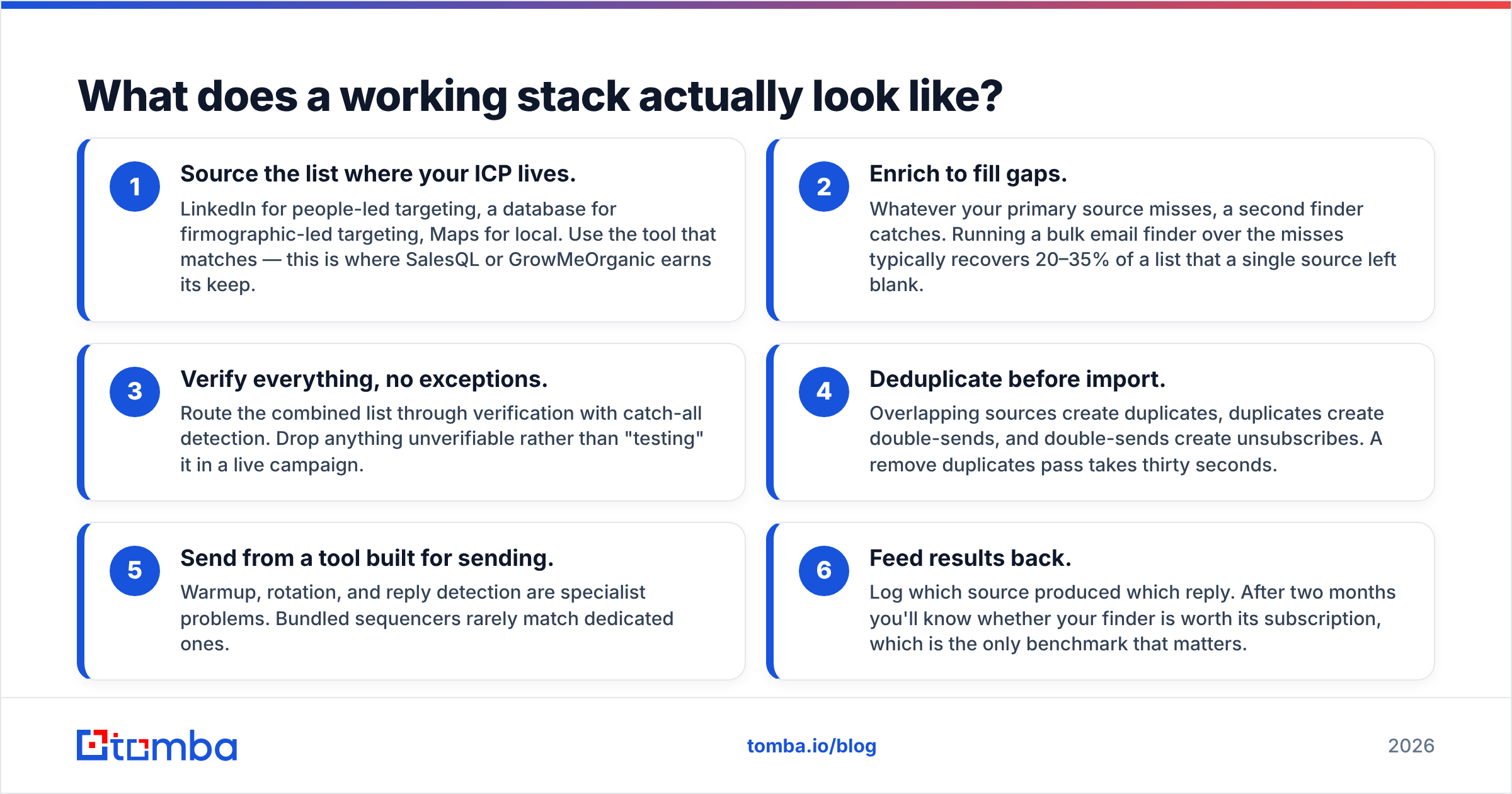
Most teams that run clean outbound end up with a version of this:
- Source the list where your ICP lives. LinkedIn for people-led targeting, a database for firmographic-led targeting, Maps for local. This is where SalesQL or GrowMeOrganic earns its keep.
- Enrich to fill gaps. Whatever your primary source misses, a second finder catches. A bulk email finder run over the misses typically recovers 20–35% of a list.
- Verify everything, no exceptions. Route the combined list through verification with catch-all detection. Drop anything unverifiable.
- Deduplicate before import. Duplicates create double-sends, and double-sends create unsubscribes. A remove duplicates pass takes thirty seconds.
- Send from a tool built for sending. Warmup, rotation, and reply detection are specialist problems.
- Feed results back. Log which source produced which reply. After two months you'll know whether your finder is worth its subscription.
Notice that steps 1 and 5 are where GrowMeOrganic and SalesQL compete, and steps 2–4 are where both leave you exposed.
Frequently asked questions#
Is GrowMeOrganic's 500M contact database real? The count is plausible for an aggregated database, but raw size tells you nothing about freshness in your segment. Test on 100 known contacts in your ICP before trusting the headline number.
Does SalesQL work without LinkedIn? No. It's a LinkedIn-native extension. If you need contacts sourced from a domain or company name, you need a different tool.
Which one is safer for my LinkedIn account? Any extension that reads profiles at volume carries some risk. SalesQL's per-profile model is generally gentler than bulk list scraping. Keep daily volumes conservative on either.
Can I use both? Yes, and some teams do — SalesQL for LinkedIn-sourced contacts, GrowMeOrganic for database and local search. Just budget for a shared verification step, or you'll send to two unvalidated lists instead of one.
Do either offer a real free plan? SalesQL does (100 credits/mo). GrowMeOrganic is trial-based. Tomba's free tier is 25 searches a month with no card required — see Tomba pricing for the full breakdown.
The bottom line#
In the end, GrowMeOrganic vs SalesQL is a question about scope. GrowMeOrganic wins if you want one bill and one login covering database, scraping, and sending. That suits solo operators and local-business prospecting. SalesQL wins if LinkedIn is your entire prospecting surface and you already own a sequencer you like. Both are reasonable buys for the right team, and both leave verification as your problem.
If accuracy is what's actually costing you — bounced sends, burned domains, reps chasing dead addresses — start with the finder-and-verifier layer instead. Try the Tomba Email Finder free with 25 searches a month, no card required. Run it against a list you've already worked and compare the hit rate yourself. That test takes ten minutes and settles the argument better than any comparison post can.
Related guides#
Ready to find emails that actually work?
Join 150,000+ professionals who stopped guessing and started sending. Free credits on signup — no credit card required.
Get the Tomba newsletter
Practical outbound tactics and product updates — once every two weeks.
About the author