Gumloop vs Relevance AI (2026): Which AI Automation Wins?
Gumloop and Relevance AI both promise AI automation for GTM teams, but they solve different problems. Here's the honest pricing, workflow, and data breakdown before you commit a budget.
TL;DR
- Gumloop is a visual, node-based automation builder — think Zapier with an LLM in every node. Best if your team wants drag-and-drop workflows without writing code.
- Relevance AI is an AI agent platform — you hire "digital workers" (BDR, research, support) that operate with tools and memory. Best if you want autonomous agents rather than linear flows.
- Pricing diverges fast: Gumloop starts around $97/mo for teams after a free tier; Relevance AI starts around $19/mo but credit burn on agent runs escalates quickly.
- Neither platform ships verified B2B contact data. Both will happily enrich a bad list and charge you credits for it.
- The realistic 2026 stack: one of these for orchestration, plus a dedicated data source like Tomba Email Finder for the contacts your agents act on.
What are Gumloop and Relevance AI, actually?#
They get lumped together because both sell "AI automation," but the underlying model is different enough that picking wrong wastes a quarter.
Gumloop is a canvas. You drag nodes onto a board — scrape a page, call an LLM, read a Google Sheet, write to HubSpot — and wire them together. Execution is deterministic: input goes in the left, output comes out the right, and you can inspect every intermediate step. It grew out of the no-code automation lineage (Zapier, Make) and added LLM nodes as first-class citizens instead of bolt-ons.
Relevance AI sells agents. You define a role ("SDR who researches inbound signups and drafts a personalized first touch"), give it tools, memory, and guardrails, then let it decide the sequence at runtime. It also supports multi-agent teams where a manager agent delegates to specialists.
The practical difference: Gumloop is a flowchart, Relevance AI is an employee. A flowchart does exactly what you drew, every time. An employee handles ambiguity but occasionally does something you did not expect.
Here is how that plays out across the dimensions that actually affect a GTM team:
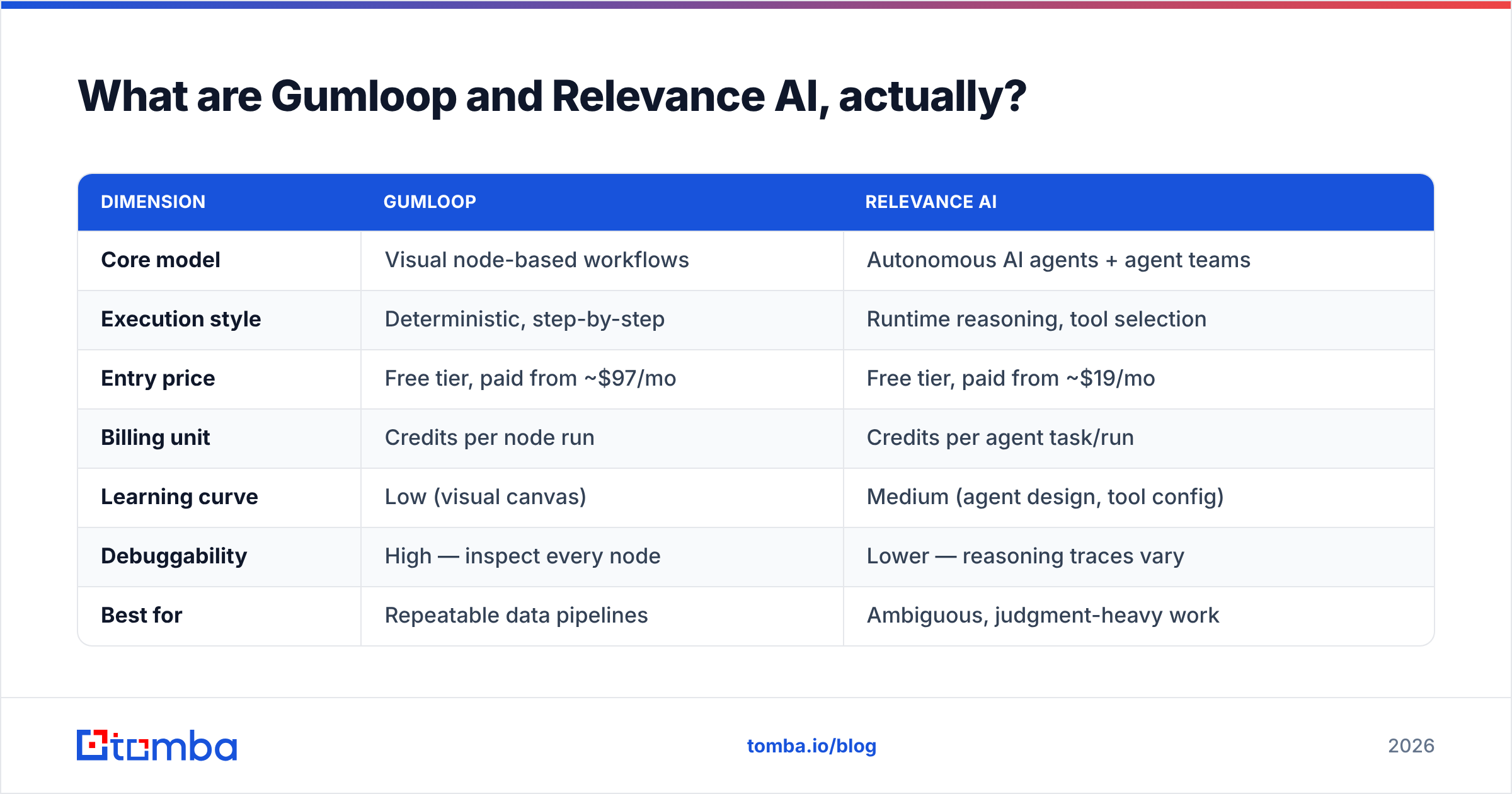
| Dimension | Gumloop | Relevance AI |
|---|---|---|
| Core model | Visual node-based workflows | Autonomous AI agents + agent teams |
| Execution style | Deterministic, step-by-step | Runtime reasoning, tool selection |
| Entry price | Free tier, paid from ~$97/mo | Free tier, paid from ~$19/mo |
| Billing unit | Credits per node run | Credits per agent task/run |
| Learning curve | Low (visual canvas) | Medium (agent design, tool config) |
| Debuggability | High — inspect every node | Lower — reasoning traces vary |
| Best for | Repeatable data pipelines | Ambiguous, judgment-heavy work |
| Built-in B2B contact data | None | None |
| Chrome extension | Yes | No (API/embed instead) |
| Multi-agent orchestration | Limited (subflows) | Native |

Is Gumloop better than Relevance AI for sales workflows?#
For most outbound and RevOps use cases in 2026, Gumloop wins on predictability and Relevance AI wins on ceiling.
Pick Gumloop when the work is describable as a sequence. Enrich a list of 500 domains, classify each company by ICP fit, write a one-line personalization, push to your sequencer. That is five nodes. You can see exactly where a run failed, rerun from the failure point, and hand the flow to a non-technical teammate to clone.
Pick Relevance AI when the work requires judgment you cannot pre-specify. An agent that reads an inbound demo request, decides whether to research the company's funding, their tech stack, or their recent job postings depending on what it finds, then routes to the right rep — that branching is painful as a flowchart and natural as an agent.
The failure modes are also different, and you should budget for them:
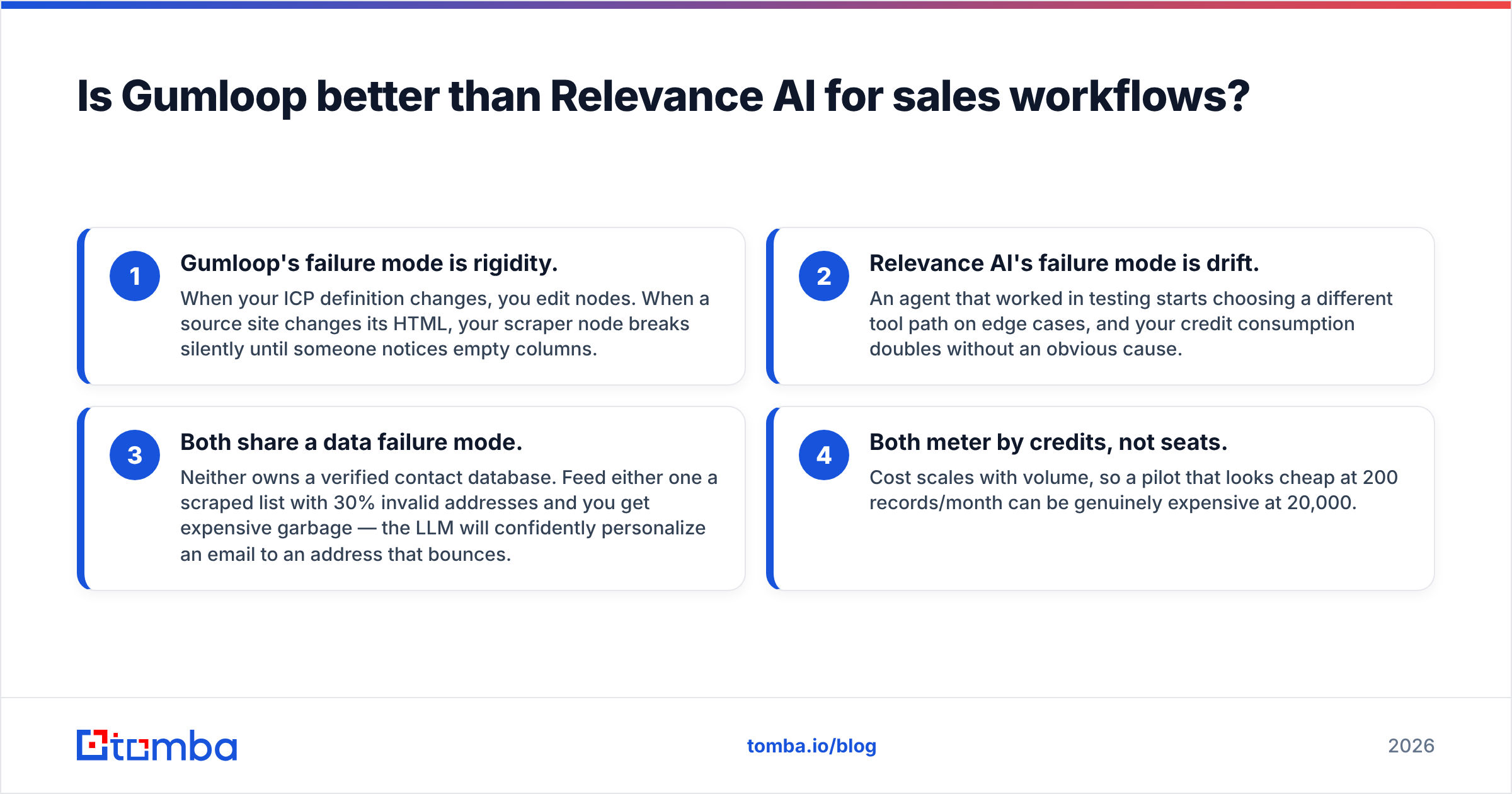
- Gumloop's failure mode is rigidity. When your ICP definition changes, you edit nodes. When a source site changes its HTML, your scraper node breaks silently until someone notices empty columns.
- Relevance AI's failure mode is drift. An agent that worked in testing starts choosing a different tool path on edge cases, and your credit consumption doubles without an obvious cause.
- Both share a data failure mode. Neither owns a verified contact database. Feed either one a scraped list with 30% invalid addresses and you get expensive garbage — the LLM will confidently personalize an email to an address that bounces.
- Both meter by credits, not seats. Cost scales with volume, so a pilot that looks cheap at 200 records/month can be genuinely expensive at 20,000.
That third point is the one that sinks pilots. Automation platforms amplify whatever data quality you start with. Running an email verifier pass before your records ever touch a workflow node is the single highest-ROI step in either stack.
How do Gumloop and Relevance AI pricing compare in 2026?#
Both use credits, which makes headline prices misleading. Read the per-run math, not the monthly number.
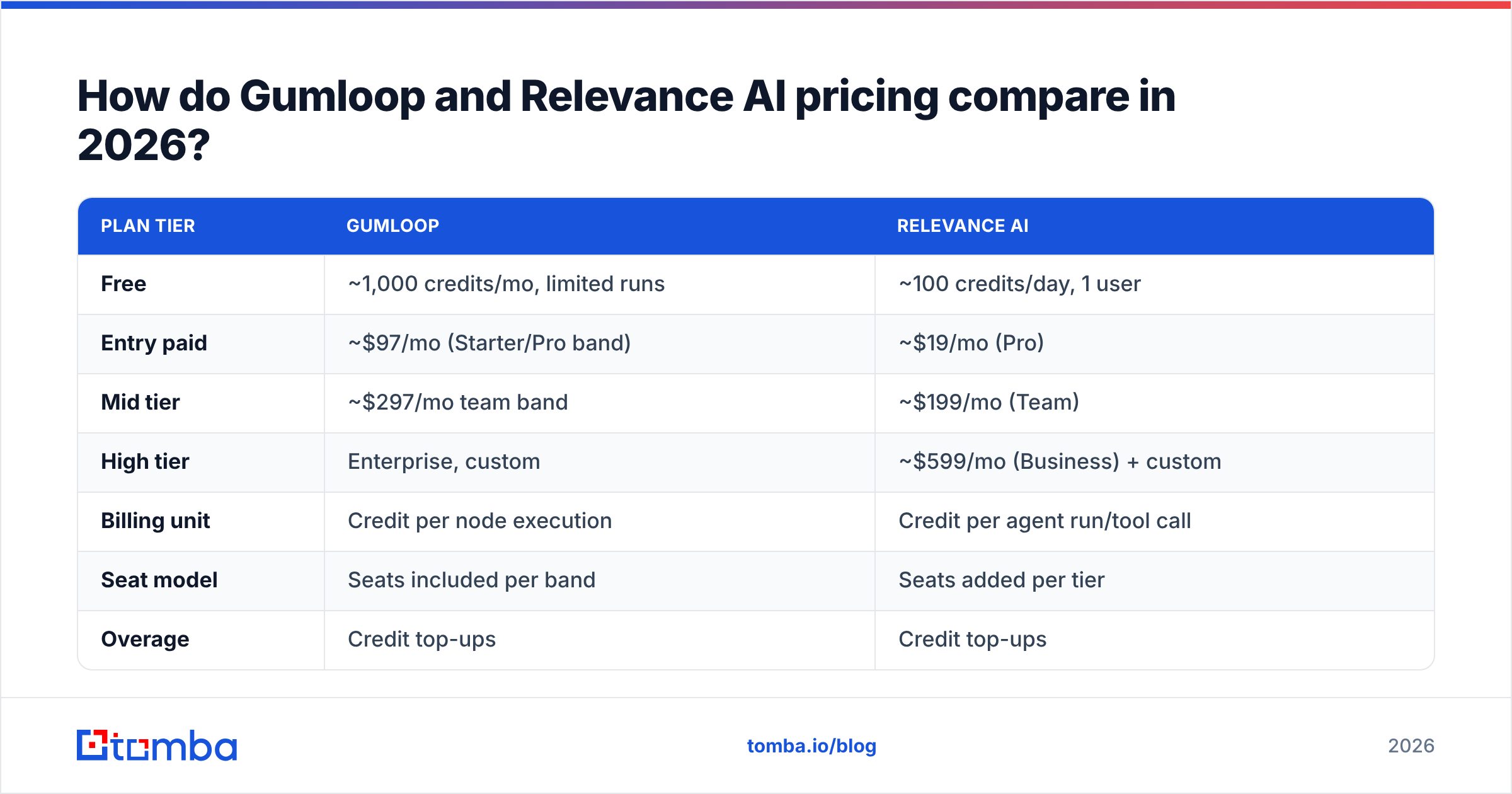
| Plan tier | Gumloop | Relevance AI |
|---|---|---|
| Free | ~1,000 credits/mo, limited runs | ~100 credits/day, 1 user |
| Entry paid | ~$97/mo (Starter/Pro band) | ~$19/mo (Pro) |
| Mid tier | ~$297/mo team band | ~$199/mo (Team) |
| High tier | Enterprise, custom | ~$599/mo (Business) + custom |
| Billing unit | Credit per node execution | Credit per agent run/tool call |
| Seat model | Seats included per band | Seats added per tier |
| Overage | Credit top-ups | Credit top-ups |
| Self-host / VPC | Enterprise only | Enterprise only |
The trap in both cases is the same: a single "record processed" is not one credit. In Gumloop, a ten-node flow over 1,000 leads is roughly 10,000 node executions. In Relevance AI, one agent task might make six tool calls plus multiple LLM turns, and you are charged for the reasoning, not just the output.
Run this before you commit:
- Estimate volume honestly. Records per month, not per pilot.
- Count the steps. Multiply records × nodes (Gumloop) or records × expected tool calls (Relevance AI).
- Add a 40% retry buffer. Failed scrapes, rate limits, and re-runs are normal.
- Price the data separately. Neither platform's credits include verified emails or phone numbers.
- Compare to a flat data cost. Tomba pricing runs Free (25 searches/mo), Starter $49/mo, Growth $99/mo, and Pro $249/mo — predictable per-contact economics rather than credit roulette.
Compare that structure to how G2 buyers describe automation tooling ROI: the platforms that survive procurement are the ones where cost-per-outcome is calculable in advance. Credit systems obscure that. Do the arithmetic yourself.
Which one handles data enrichment better?#
Neither — and that is the most important sentence in this comparison.
Gumloop and Relevance AI are both orchestration layers. They call other people's data. Gumloop ships integrations and scraping nodes; Relevance AI lets agents call tools and APIs. In both cases the actual contact record comes from somewhere else: a scraped LinkedIn profile, a CSV your SDR uploaded, or a third-party enrichment API you connected.
That means the accuracy question is not "Gumloop vs Relevance AI." It is "what data source did you wire in?"
Three patterns work well in practice:
- Verify before you orchestrate. Push your raw list through verification first. Bounces cost you sender reputation, and no amount of clever agent reasoning repairs a burned domain. If you are unsure how bad the damage gets, the mechanics of email deliverability explain why a 5% bounce rate is not a rounding error.
- Call a real finder API from inside the workflow. Both platforms support HTTP nodes and custom tools. Wiring the Tomba API as a node or tool gives your flow real-time email discovery with a confidence score attached, instead of guessing patterns with an LLM.
- Keep catch-all domains out of the main path. Catch-all servers accept everything and tell you nothing. Route them to a separate branch and run a catch-all verifier before they reach your sequencer.
A common and expensive anti-pattern: using an LLM node to guess email formats. firstname.lastname@company.com looks plausible and is wrong often enough to wreck a domain's reputation. LLMs generate; they do not verify. Use a system that actually checks the mail server.

What do real teams use each one for?#
Concrete use cases beat feature lists. Here is what each platform is genuinely good at, based on how they are positioned and what the workflows look like in practice.
Gumloop lands well on:
- List enrichment pipelines. Take 2,000 domains, find decision-makers, score fit, write one personalized line, export. Repeatable and inspectable.
- Content and SEO ops. Scrape competitor pages, cluster topics, draft briefs. The visual canvas suits editorial teams who will never open an IDE.
- Internal reporting glue. Pull from three SaaS tools, normalize, write a Slack digest every Monday.
- Chrome-extension-triggered flows. Kick off enrichment from a page you are already looking at.
Relevance AI lands well on:
- Inbound triage. An agent reads the form fill, researches the company, decides the routing, drafts the reply.
- Multi-step research. "Find every Series B fintech in DACH that hired a Head of Compliance in the last 90 days" — the agent picks its own path through tools.
- Support deflection. Agents with memory that handle repeat tickets and escalate the rest.
- Agent teams. A manager agent coordinating a researcher, a writer, and a QA checker on the same brief.
Where both get used together: Relevance AI agents making judgment calls, Gumloop handling the deterministic bulk processing behind them. That is not unusual — plenty of teams run both, because the cost of running an agent over 10,000 rows is far higher than running a flow over the same rows.
If your primary need is finding contacts at scale rather than orchestrating logic, neither is the right first purchase. A bulk email finder or a domain search solves that directly, at a fraction of the credit burn, and you can always orchestrate on top later.
What should you actually buy?#
Match the tool to the shape of your problem, not to the demo that impressed you.
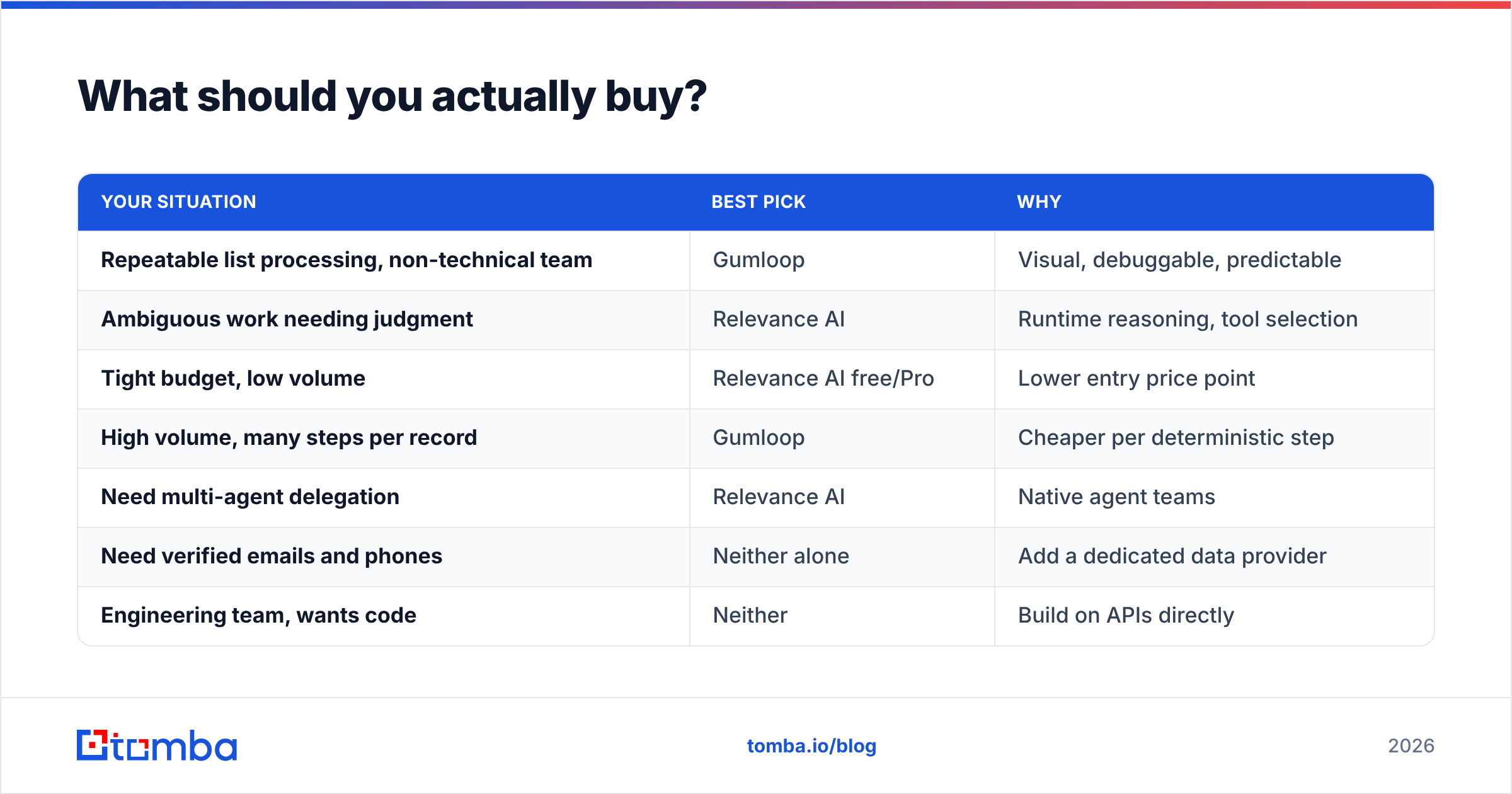
| Your situation | Best pick | Why |
|---|---|---|
| Repeatable list processing, non-technical team | Gumloop | Visual, debuggable, predictable |
| Ambiguous work needing judgment | Relevance AI | Runtime reasoning, tool selection |
| Tight budget, low volume | Relevance AI free/Pro | Lower entry price point |
| High volume, many steps per record | Gumloop | Cheaper per deterministic step |
| Need multi-agent delegation | Relevance AI | Native agent teams |
| Need verified emails and phones | Neither alone | Add a dedicated data provider |
| Engineering team, wants code | Neither | Build on APIs directly |
Two honest caveats about this whole category. First, credit-based pricing means your invoice is a function of how well you engineered your prompts and flows — sloppy design costs real money. Second, both vendors iterate fast; check the current pricing page before you sign, because the tiers above reflect 2026 published bands and these move.
And if you are evaluating alternatives more broadly, the market includes solid data-first players — BookYourData for pay-as-you-go B2B lists, and specialist finders for contact discovery. Automation platforms and data providers are complements, not substitutes. Teams that treat them as substitutes end up with elegant workflows running on contacts that do not exist.
How do you connect real contact data to either platform?#
Both platforms expose an HTTP request node (Gumloop) or a custom tool (Relevance AI). That is your integration point.
The pattern:
- Trigger — a new row, a form fill, a scheduled batch.
- Resolve the company — domain from a company name, if you only have a brand.
- Find the person — call an email finder endpoint with domain + first/last name. You get an address plus a confidence score.
- Verify — run the result through verification. Drop anything below your threshold instead of sending to it.
- Enrich — add title, seniority, LinkedIn, and phone via data enrichment so your LLM node has something real to personalize with.
- Act — write to CRM, push to sequencer, or hand off to an agent.
Steps 3 through 5 are where accuracy is won or lost, and they are the steps neither Gumloop nor Relevance AI performs natively. Skipping them is how teams end up with a beautiful automation that generates high-volume, high-confidence, completely undeliverable email.
If you prefer not to build the plumbing, Tomba's integrations cover HubSpot, Salesforce, Pipedrive, Zapier, Make, and Google Sheets — which means you can route data into either platform without writing an HTTP node by hand.
The bottom line#
Gumloop and Relevance AI are both credible in 2026, and the choice comes down to one question: is your work a sequence or a judgment call? Sequences belong on Gumloop's canvas. Judgment calls belong to Relevance AI's agents. Pilot with real volume, not a 50-record demo, and compute cost-per-outcome before the annual contract lands on your desk.
But whichever orchestration layer you pick, the contacts flowing through it determine whether any of it produces revenue. Start with data you can trust: Tomba Email Finder returns verified professional email addresses by domain, name, or company, with confidence scores you can branch on inside any workflow. Free tier is 25 searches a month — enough to test the accuracy against your own known-good list before you wire it into production. Run that test first, then build the automation on top of it.
Related guides#
Ready to find emails that actually work?
Join 150,000+ professionals who stopped guessing and started sending. Free credits on signup — no credit card required.
Get the Tomba newsletter
Practical outbound tactics and product updates — once every two weeks.
About the author