Hard Bounce vs Soft Bounce: The 2026 Deliverability Guide
One bounce type is a data problem you caused. The other is a temporary server hiccup you can wait out. Confusing them is how good domains get throttled — here's how to tell them apart and what to do about each.
TL;DR
- A hard bounce is a permanent failure (SMTP 5.x.x) — the address does not exist or the domain is dead. Suppress it immediately and never retry.
- A soft bounce is a temporary failure (SMTP 4.x.x) — full mailbox, rate limiting, receiver outage. Retry on a backoff schedule, then suppress after 3–5 consecutive failures.
- Hard bounces damage sender reputation far faster than soft bounces because mailbox providers read them as a signal you bought or scraped a list you never validated.
- Keep hard bounces under 0.5% per send and total bounces under 2%. Above 2% hard bounces, Gmail and Outlook start throttling; above 5% you are effectively in the spam folder.
- Almost every hard bounce is preventable before you press send. Verification at list-build time is cheaper than reputation repair after.
What actually happens when an email bounces?#
An email bounce is the receiving mail server telling your sending server "no." Think of it like a courier returning a parcel: the label on the box tells you whether the address does not exist (return to sender, permanently) or the resident was out (try again tomorrow). Same parcel, wildly different follow-up.
Technically, the receiver responds to your SMTP transaction with a numeric reply code plus an enhanced status code, and your ESP converts that into a bounce record. The first digit is the whole story:
- 4xx codes are transient. The server is saying "not right now." Your ESP queues the message and retries automatically, usually for 24–72 hours.
- 5xx codes are permanent. The server is saying "not ever." No amount of retrying changes the outcome.
- Enhanced status codes (5.1.1, 4.7.0, 5.7.1) give the reason — bad mailbox, policy block, rate limit — and matter more than the base code for diagnosis.
- Asynchronous bounces arrive minutes or hours later as a bounce message to your return path, not during the SMTP handshake. These are the ones people miss.
- Silent drops are not bounces at all. The server accepts the message with a 250 and quietly discards it. These never appear in your bounce column, which is why a 0% bounce rate is sometimes worse news than a 1% one.
That last point is the one most teams get wrong. Bounce rate is a lagging, incomplete signal. It is still the best early warning you have. The Wikipedia entry on bounce messages covers the underlying RFC behavior if you want the protocol detail.
What is a hard bounce?#
A hard bounce is a permanent delivery failure. The mailbox does not exist, the domain does not resolve, or the receiving server has explicitly and permanently refused mail for that recipient.
Common triggers:
- Typo'd or guessed addresses.
jhon.smith@instead ofjohn.smith@. Pattern-guessing without verification is the single largest source of hard bounces in B2B outbound. - Departed employees. B2B data decays roughly 2–3% per month. A list built 18 months ago is close to half-rotten.
- Dead domains. The company rebranded, got acquired, or shut down. MX records vanish; every address at that domain is now permanently undeliverable.
- Role account rejections. Some servers permanently refuse
info@,sales@, ornoreply@from external senders. - Recipient-level blocks. The receiving admin has blacklisted your domain or IP specifically.
The critical property: a hard bounce is a data problem you created. You cannot fix it by sending again, waiting, or warming up harder. The only remedies are better list hygiene upstream and permanent suppression downstream.
What is a soft bounce?#
A soft bounce is a temporary failure. The address is real and the domain is alive, but the message could not be delivered right now.
Typical causes:
- Mailbox over quota. Extremely common with abandoned-but-existing accounts and small on-prem Exchange setups.
- Greylisting. The receiver deliberately rejects the first attempt from an unknown sender and accepts the retry. This is a spam-filtering technique, not an error.
- Rate limiting. You sent 400 messages to one domain in ten minutes. The server tells you to slow down with a 421.
- Receiver-side outage or maintenance. Their problem, not yours.
- Message too large. Attachment exceeds the recipient's limit.
Most soft bounces resolve themselves. Your ESP retries on a backoff schedule and the message lands within a day or two. The rest convert into hard bounces after the retry window expires.
Hard bounce vs soft bounce: what is the actual difference?#
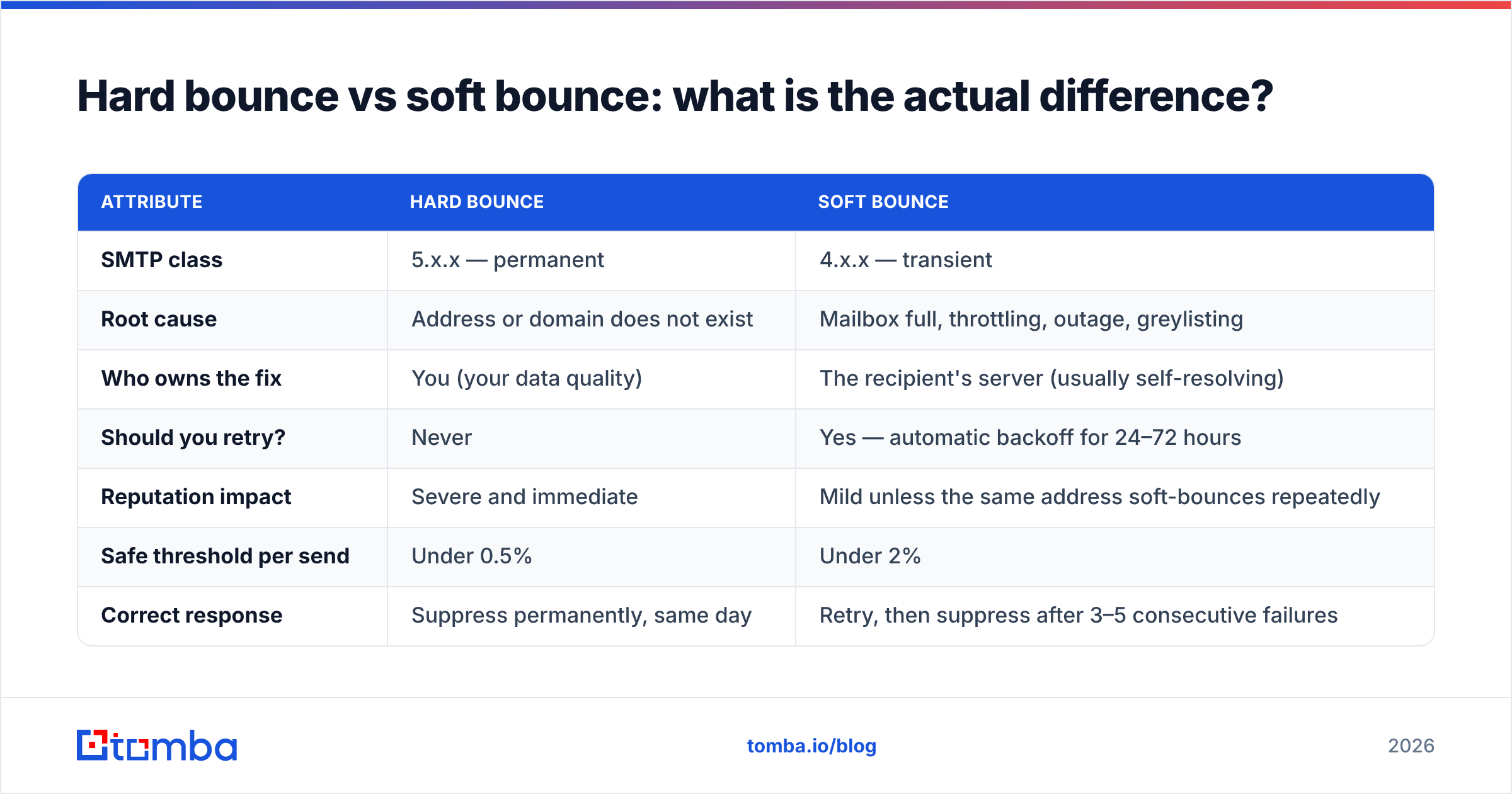
| Attribute | Hard bounce | Soft bounce |
|---|---|---|
| SMTP class | 5.x.x — permanent | 4.x.x — transient |
| Root cause | Address or domain does not exist | Mailbox full, throttling, outage, greylisting |
| Who owns the fix | You (your data quality) | The recipient's server (usually self-resolving) |
| Should you retry? | Never | Yes — automatic backoff for 24–72 hours |
| Reputation impact | Severe and immediate | Mild unless the same address soft-bounces repeatedly |
| Safe threshold per send | Under 0.5% | Under 2% |
| Correct response | Suppress permanently, same day | Retry, then suppress after 3–5 consecutive failures |
| Preventable pre-send? | Yes — verification catches most | Partially — throttling and warmup help |
The row that matters most is "who owns the fix." Soft bounces are noise in your sending environment. Hard bounces are an audit of your data sourcing, and mailbox providers grade them accordingly.
Which bounce type actually damages sender reputation?#
Hard bounces, by a wide margin.
Mailbox providers use invalid-recipient rates as a proxy for list acquisition quality. A sender with 6% hard bounces almost certainly scraped, bought, or permutated a list without verifying it — and senders who do that also tend to generate complaints. So the filter treats hard bounces as a leading indicator of spam behavior and starts throttling before the complaint data even arrives.
Some providers also operate recycled spam traps: addresses that were once real, went dormant, hard-bounced for a period, and were then reactivated as traps. Continuing to mail an address after it has hard-bounced is one of the fastest ways to hit one. That is precisely why "suppress on first hard bounce" is non-negotiable rather than a nice-to-have.
Soft bounces are graded on repetition, not incidence. One over-quota mailbox is nothing. The same address soft-bouncing on twelve consecutive sends says you are not processing feedback, and providers do notice unresponsive senders.
Watch the trend in Google Postmaster Tools alongside your ESP's bounce log. If your reputation dashboard drops in the same week your hard bounce rate crosses 2%, you have your answer. For background on how these signals compound, see the primer on sender reputation.
What bounce rate is acceptable in 2026?#
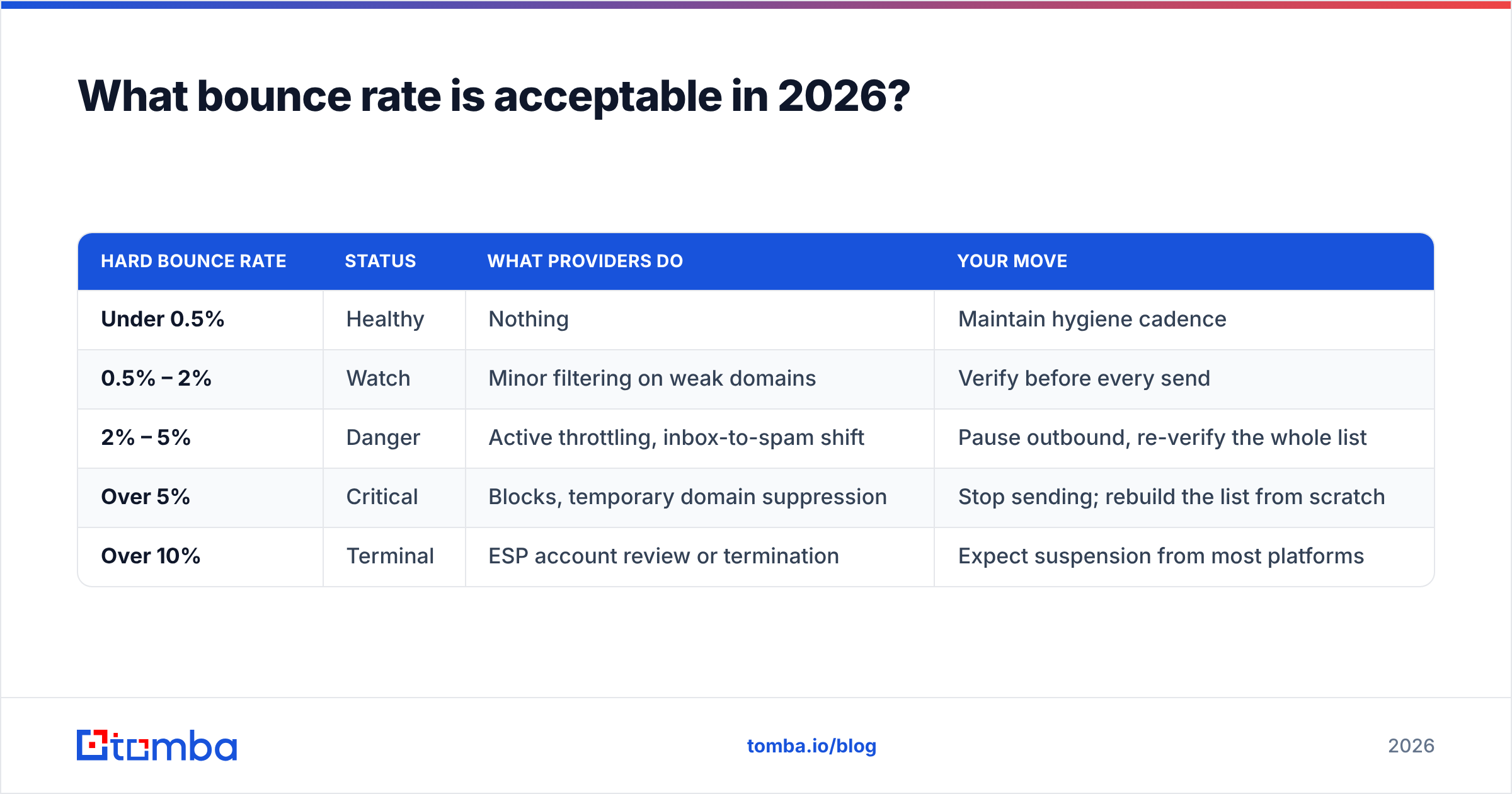
| Hard bounce rate | Status | What providers do | Your move |
|---|---|---|---|
| Under 0.5% | Healthy | Nothing | Maintain hygiene cadence |
| 0.5% – 2% | Watch | Minor filtering on weak domains | Verify before every send |
| 2% – 5% | Danger | Active throttling, inbox-to-spam shift | Pause outbound, re-verify the whole list |
| Over 5% | Critical | Blocks, temporary domain suppression | Stop sending; rebuild the list from scratch |
| Over 10% | Terminal | ESP account review or termination | Expect suspension from most platforms |
Total bounce rate (hard plus soft) should stay under 2% for cold outbound and under 1% for opt-in marketing lists. Mailchimp's bounce documentation uses comparable thresholds, and most major ESPs enforce something in that range in their acceptable use policies.
Cold outbound gets no special allowance here. If anything, the bar is higher, because a cold sending domain has no engagement history to offset a bad bounce signal.
How do you read the SMTP code to classify a bounce correctly?#
Your ESP's hard/soft classification is a heuristic and it is wrong often enough to matter. When a campaign goes sideways, read the raw codes yourself.
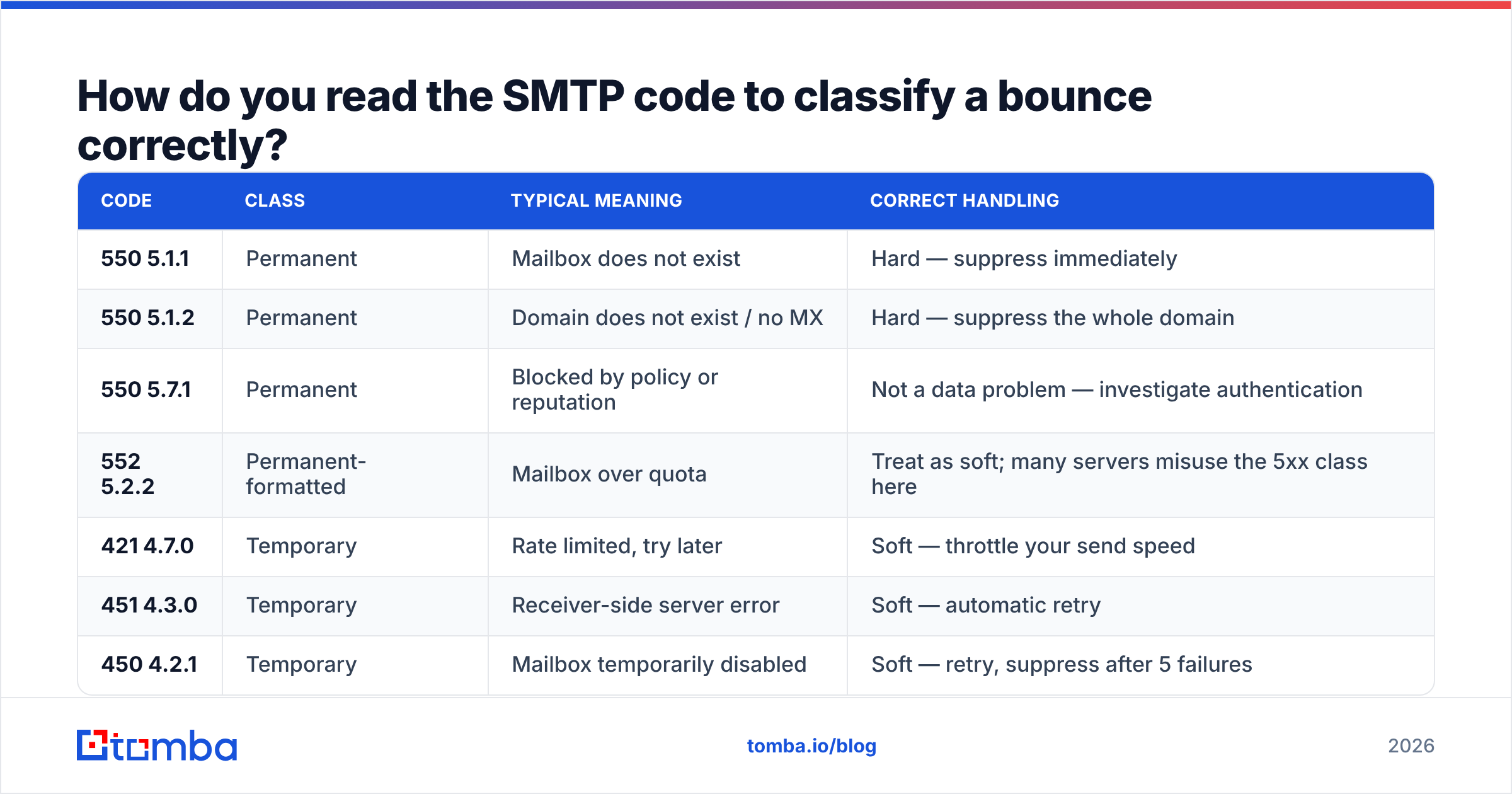
| Code | Class | Typical meaning | Correct handling |
|---|---|---|---|
| 550 5.1.1 | Permanent | Mailbox does not exist | Hard — suppress immediately |
| 550 5.1.2 | Permanent | Domain does not exist / no MX | Hard — suppress the whole domain |
| 550 5.7.1 | Permanent | Blocked by policy or reputation | Not a data problem — investigate authentication |
| 552 5.2.2 | Permanent-formatted | Mailbox over quota | Treat as soft; many servers misuse the 5xx class here |
| 421 4.7.0 | Temporary | Rate limited, try later | Soft — throttle your send speed |
| 451 4.3.0 | Temporary | Receiver-side server error | Soft — automatic retry |
| 450 4.2.1 | Temporary | Mailbox temporarily disabled | Soft — retry, suppress after 5 failures |
Two traps worth flagging. First, 552 5.2.2 is formatted as permanent but means "mailbox full," which is temporary — suppressing on it throws away real, reachable contacts. Second, 550 5.7.1 is not a bad address at all; it is a policy block. If you file those as hard bounces you will quietly delete valid prospects while the actual problem — a broken SPF record or missing DMARC alignment — goes unfixed.
How do you prevent hard bounces before they happen?#
Hard bounces are the only deliverability problem you can fully solve in advance. The sequence:
- Validate syntax and MX at capture. Reject malformed addresses in your forms and import scripts. Check that the domain has live MX records before the address ever enters your CRM. A free email checker handles one-off spot checks; do it programmatically for anything at volume.
- Verify the full list before every campaign, not once at import. B2B data decays continuously, so a list verified in January is measurably worse in April. Run it through an email verifier as a pre-send step in your workflow.
- Stop guessing address patterns. Permutating
first.last@domain.comand hoping produces 15–30% invalid rates. Source addresses from a provider that confirms them at the mailbox level — that is the entire job of a proper email finder. - Handle catch-all domains explicitly. Catch-all servers accept everything at SMTP time and bounce asynchronously hours later, so standard verification returns "unknown." Route them through a catch-all verifier and segment them into a lower-volume send rather than dumping them into your main campaign.
- Suppress on first hard bounce, permanently and globally. Not per campaign — across every tool that touches that contact. Sync suppression back to your CRM and your sequencer.
- Re-verify anything older than 90 days. Set it as a recurring job. Bulk verification makes this cheap enough that there is no argument for skipping it.
How should you handle soft bounces?#
Let your ESP retry — that is what the 4xx class is for — but do not let retries run forever.
A sane policy: retry for up to 72 hours. If an address soft-bounces on three consecutive campaigns, move it to a slow-cadence segment. After five, suppress it. An address that is permanently over quota is functionally dead even though it never returns a 5xx.
Also watch soft bounce concentration. Scattered soft bounces across many domains are normal. Forty soft bounces all from one domain in one hour is a rate limit, and the fix is throttling your send speed to that domain — not touching your list at all.
Do verification tools actually eliminate hard bounces?#
They eliminate most of them, not all. Honest framing matters here.
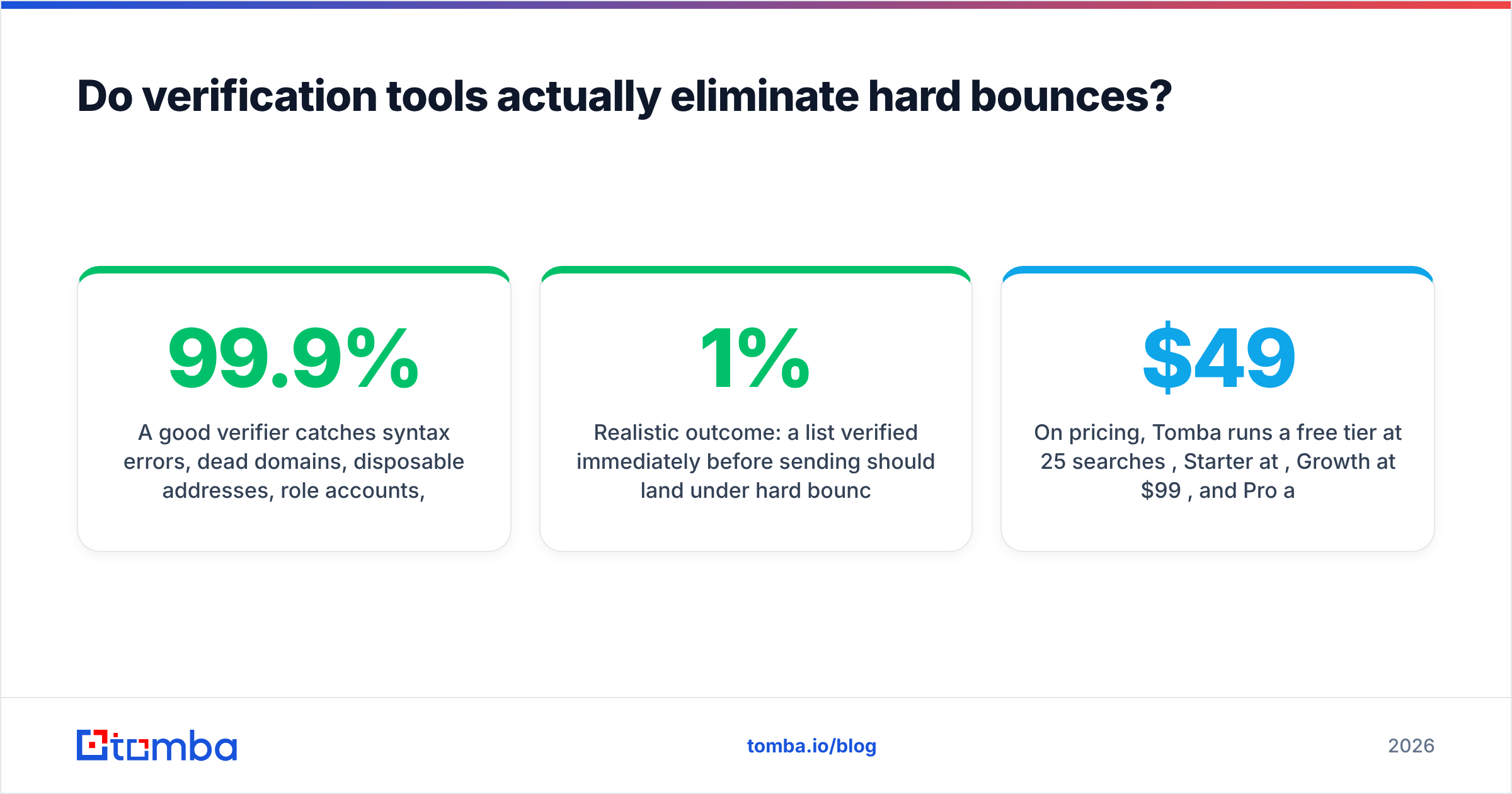
A good verifier catches syntax errors, dead domains, disposable addresses, role accounts, and mailboxes that fail SMTP probing. What no verifier can guarantee is a mailbox on a catch-all domain, an address that dies between verification and send, or a server that accepts everything and bounces asynchronously. Any vendor claiming 99.9% accuracy on catch-all domains is selling you something.
Realistic outcome: a list verified immediately before sending should land under 1% hard bounces, and often under 0.5%. That is the whole game.
Your options split into two shapes. Dedicated verification services score lists you already have. Finder-plus-verifier platforms like Tomba source and validate in one pass, which removes the gap between "found" and "confirmed." Contact-database vendors such as BookYourData sell pre-verified lists outright, which suits teams who want ready-made coverage in specific segments rather than building lists themselves. Which fits depends on whether your bottleneck is finding contacts or cleaning them.
On pricing, Tomba runs a free tier at 25 searches per month, Starter at $49/mo, Growth at $99/mo, and Pro at $249/mo, with finding and verification drawing from the same credit pool — see the Tomba pricing breakdown for the per-plan limits. Worth comparing against per-verification pricing elsewhere if your volumes are lopsided toward cleaning existing lists.
The bottom line#
Hard bounce vs soft bounce comes down to one question: is this my data problem or their server problem? A 5.x.x is yours — suppress it and fix the sourcing that produced it. A 4.x.x is theirs — retry, then let it go after a handful of failures. Misclassify them and you will either burn your domain by re-mailing dead addresses or discard perfectly good prospects whose mailbox happened to be full on a Tuesday.
Stop the problem at the source. The Tomba Email Finder confirms addresses at the mailbox level before they reach your sequencer, so your bounce rate stays a rounding error instead of a reputation event. Start on the free tier, run your next list through it, and compare the bounce column against your last campaign.
Related guides#
Ready to find emails that actually work?
Join 150,000+ professionals who stopped guessing and started sending. Free credits on signup — no credit card required.
Get the Tomba newsletter
Practical outbound tactics and product updates — once every two weeks.
About the author