HiHello vs Popl: Digital Business Card Showdown 2026
HiHello and Popl both replace paper business cards, but they solve different problems. Here is an honest breakdown of pricing, NFC hardware, CRM sync, and which one actually feeds your pipeline.
TL;DR
- HiHello is a contact-management app first, a card app second. Its strength is the free tier, the AI business card scanner, and clean contact organization inside your phone.
- Popl is a hardware-and-team-analytics company first. Its strength is NFC products (cards, tags, wristbands), lead capture forms, and a manager dashboard for tracking who is actually networking.
- Price: HiHello's free plan is genuinely usable for solo reps. Popl gates most useful features behind paid tiers and pushes you toward hardware purchases.
- Teams: Popl wins on team deployment, branded templates at scale, and CRM push. HiHello wins on individual polish and lower cost per seat.
- Neither fills your pipeline. Both capture inbound contacts you already met. Outbound still needs a data layer — that's where an email finder sits, not a card app.
What are HiHello and Popl, exactly?#
Both replace the paper rectangle in your wallet, but they arrived from opposite directions.
HiHello launched as a digital business card and contact manager. You build a card, share it via QR, link, text, or email, and the person on the other end lands on a mobile page with your details. HiHello's second act is contact management: an AI scanner that reads paper cards you receive, auto-fills the fields, and files the contact into groups. Think of it as a personal Rolodex that happens to have a sharing feature bolted on.
Popl came from the hardware side. The original product was a physical NFC dot you stuck on your phone case; tap it against someone's phone and your profile opened. Popl expanded that into cards, key fobs, badges, wristbands, and eventually a full team platform with lead capture forms, analytics, and CRM integrations. Think of it as event-booth infrastructure that happens to include a profile page.
That origin story explains almost every difference in the hihello vs popl comparison. HiHello optimizes for the individual professional who wants a tidy contact list. Popl optimizes for the sales manager who bought 40 NFC cards for a trade show and wants to know which rep collected the most leads.
How do HiHello and Popl compare feature by feature?#
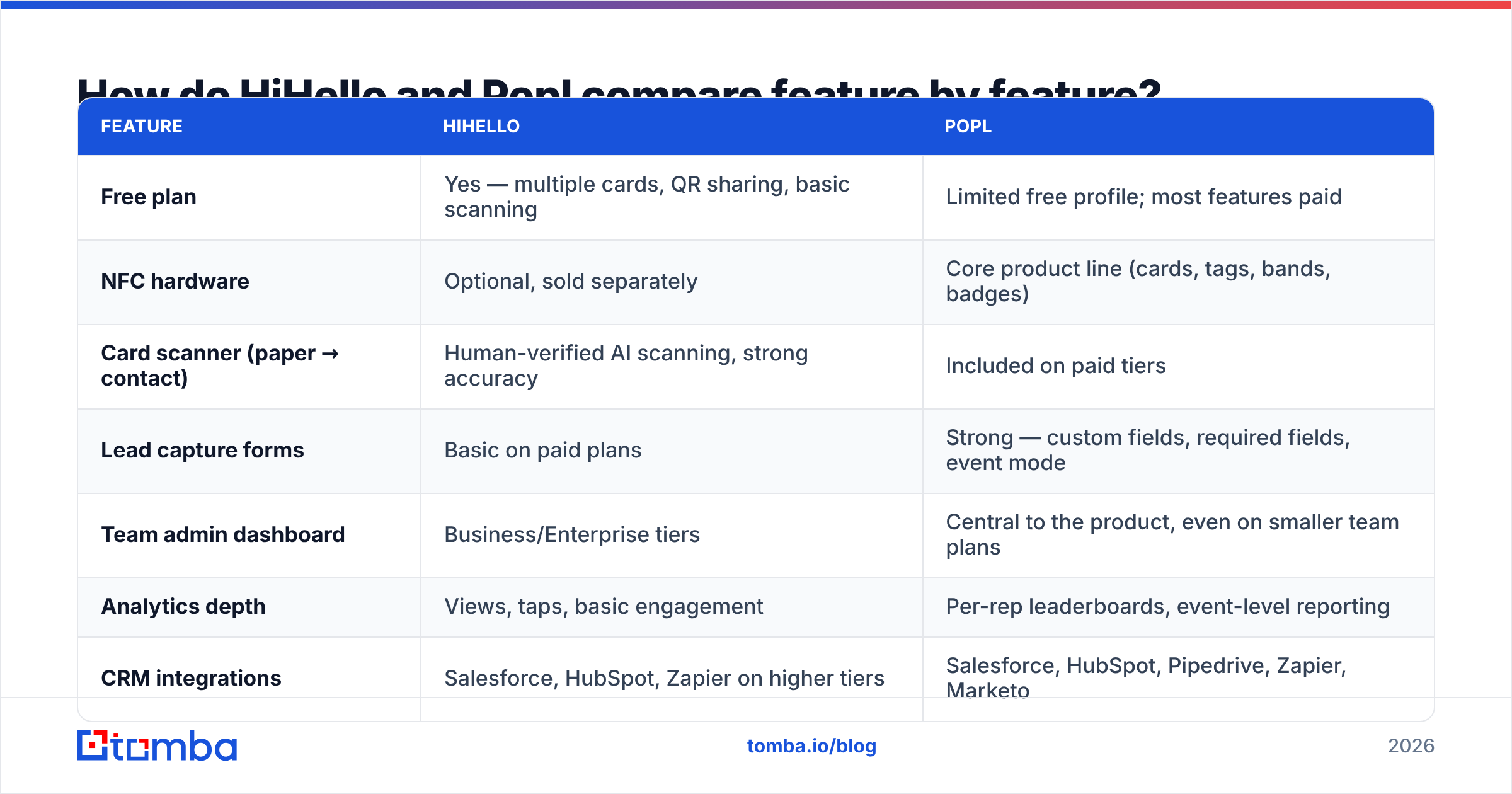
Here is the head-to-head on the attributes that actually change your workflow.
| Feature | HiHello | Popl |
|---|---|---|
| Free plan | Yes — multiple cards, QR sharing, basic scanning | Limited free profile; most features paid |
| NFC hardware | Optional, sold separately | Core product line (cards, tags, bands, badges) |
| Card scanner (paper → contact) | Human-verified AI scanning, strong accuracy | Included on paid tiers |
| Lead capture forms | Basic on paid plans | Strong — custom fields, required fields, event mode |
| Team admin dashboard | Business/Enterprise tiers | Central to the product, even on smaller team plans |
| Analytics depth | Views, taps, basic engagement | Per-rep leaderboards, event-level reporting |
| CRM integrations | Salesforce, HubSpot, Zapier on higher tiers | Salesforce, HubSpot, Pipedrive, Zapier, Marketo |
| Virtual backgrounds / email signatures | Yes, well executed | Yes |
| Best fit | Solo professionals, small teams, recruiters | Field sales, trade-show teams, franchises |
Two honest observations from that grid.
First, feature parity is closer than the marketing on either site suggests. Both do cards, both do QR, both do email signatures, both do some CRM push. The differences are in depth, not presence.
Second, Popl's advantage compounds with headcount. One rep does not need a leaderboard. Forty reps at a conference do. HiHello's advantage compounds in the opposite direction: if you are one person who meets fifteen people a month, the free tier plus the scanner covers you entirely.
Which one is cheaper in 2026?#
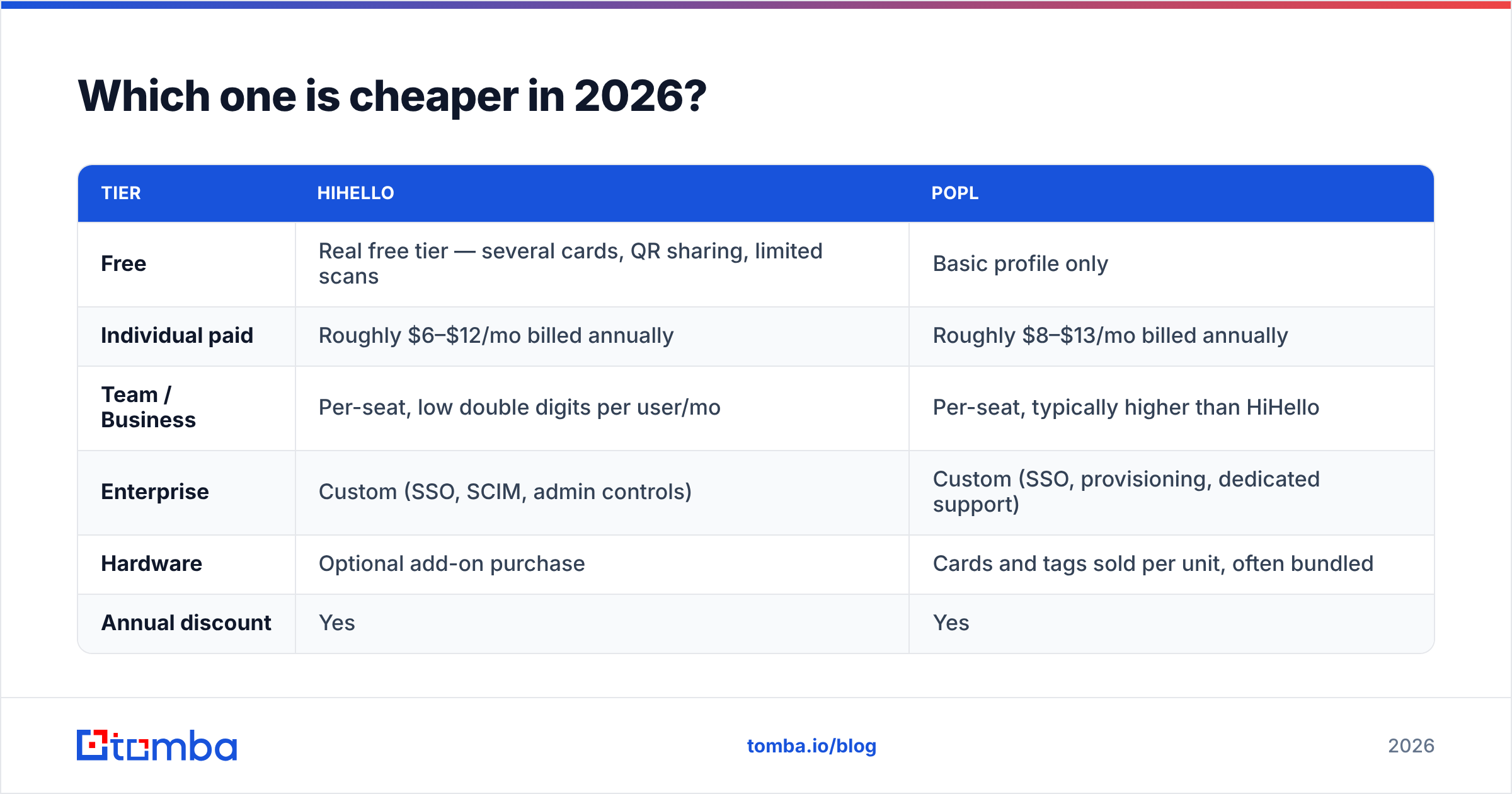
Pricing on both platforms moves, and both run annual discounts, so treat the table below as a shape rather than a quote. Check each vendor's current page before you buy.
| Tier | HiHello | Popl |
|---|---|---|
| Free | Real free tier — several cards, QR sharing, limited scans | Basic profile only |
| Individual paid | Roughly $6–$12/mo billed annually | Roughly $8–$13/mo billed annually |
| Team / Business | Per-seat, low double digits per user/mo | Per-seat, typically higher than HiHello |
| Enterprise | Custom (SSO, SCIM, admin controls) | Custom (SSO, provisioning, dedicated support) |
| Hardware | Optional add-on purchase | Cards and tags sold per unit, often bundled |
| Annual discount | Yes | Yes |
The real cost difference is hardware. Popl's model assumes you are buying physical NFC products for every rep, and those unit costs stack on top of the subscription. A 25-person sales team equipping everyone with a branded metal card is looking at a meaningful one-time spend before the first tap happens.
HiHello lets you run entirely software-side. QR codes are free, work on every phone, and do not get left in a hotel room. If your team's networking happens over Zoom, LinkedIn, and email as much as it happens at booths, the hardware premium buys you very little.
The counterargument is real too: at a loud trade show, tapping a phone is faster and feels better than asking someone to open their camera app and frame a QR code. Popl's hardware is not a gimmick — it is a genuine conversion-rate improvement in a specific environment.
Is Popl better than HiHello for sales teams?#
For field sales teams that live at events, yes — with caveats.
Popl's team layer is built around a question managers actually ask: did the trip pay for itself? You get per-rep capture counts, event tagging, and a push into the CRM so the leads do not die in someone's camera roll. If you send eight reps to three conferences a quarter, that reporting is the product.
HiHello's team features are competent but lighter. You get shared templates, brand enforcement, and admin provisioning on higher tiers. What you do not get is the same event-centric analytics story.
Where Popl gets less compelling is the follow-up. A captured lead in Popl is a name, a company, and whatever the person typed into your form. That is a starting point, not a record. Anyone who has imported trade-show leads knows what happens next: 20–30% of the email addresses are typos, personal Gmail accounts, or scribbles the OCR misread. You send a follow-up sequence into that list and your sender reputation takes the hit.
The fix is boring and mandatory: run captured contacts through an email verifier before they touch a sequence, and enrich the incomplete rows so you have a title and a company domain to personalize with. That step sits between the card app and the CRM, and neither HiHello nor Popl does it for you.
What does a digital business card actually not do?#
This is the part most comparison posts skip, so let's be concrete about the boundary.
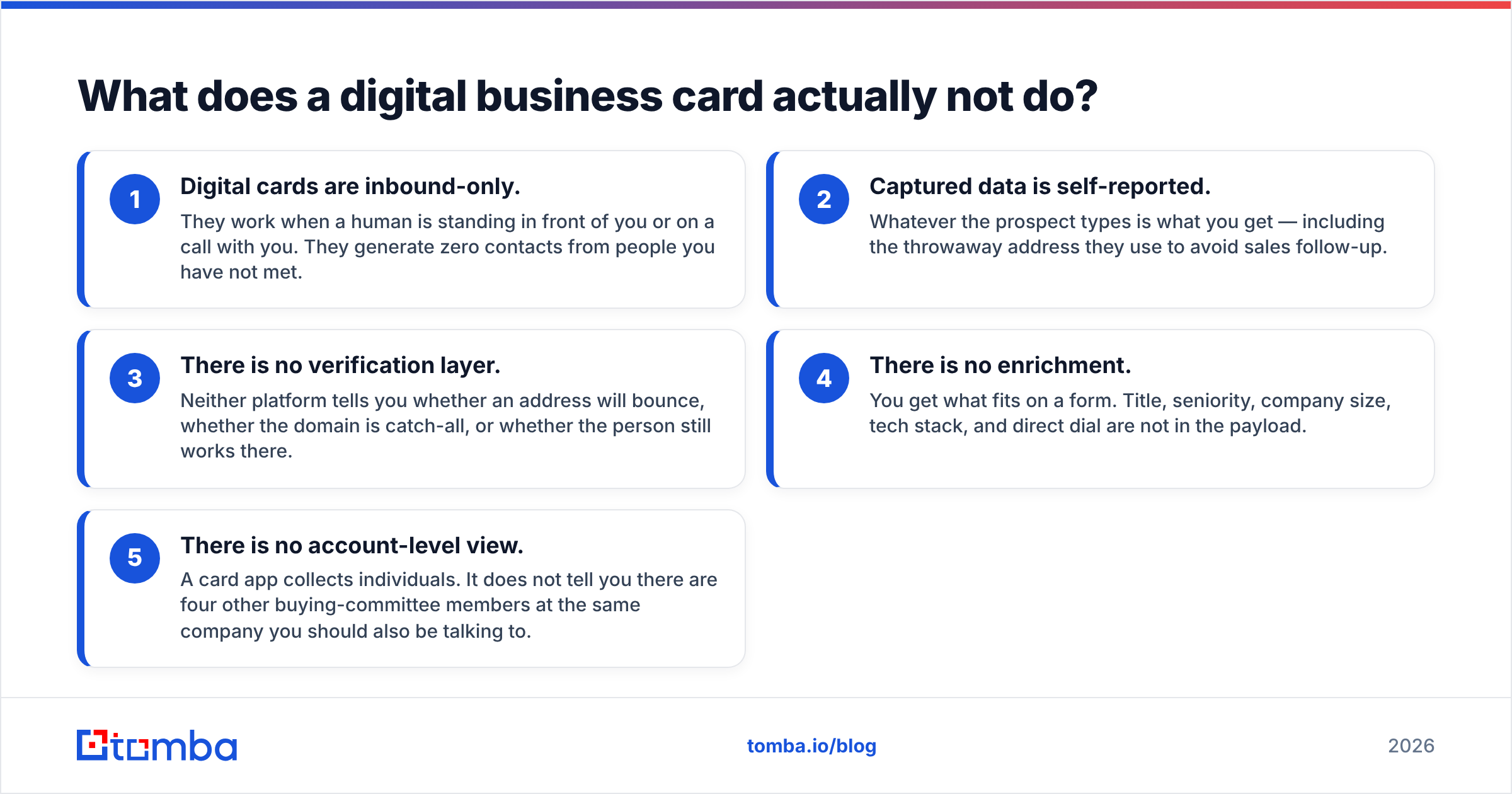
- Digital cards are inbound-only. They work when a human is standing in front of you or on a call with you. They generate zero contacts from people you have not met.
- Captured data is self-reported. Whatever the prospect types is what you get — including the throwaway address they use to avoid sales follow-up.
- There is no verification layer. Neither platform tells you whether an address will bounce, whether the domain is catch-all, or whether the person still works there.
- There is no enrichment. You get what fits on a form. Title, seniority, company size, tech stack, and direct dial are not in the payload.
- There is no account-level view. A card app collects individuals. It does not tell you there are four other buying-committee members at the same company you should also be talking to.
Every one of those gaps is a data problem, and data problems get solved with a data tool. That is why the mature stack looks like: card app for capture → verification and enrichment for cleanup → CRM for storage → sequencer for outreach. Swapping the card app changes very little about pipeline volume. Adding the data layer changes a lot.
How do you connect either tool to your outbound stack?#
Both platforms land in the same place: a CRM record. What you do in the 60 seconds after that determines whether the lead converts.
The workable pipeline, in order:
- Capture at the event. Popl form or HiHello card exchange — pick whichever your reps will actually use. Adoption beats features.
- Push to CRM automatically. Both support Zapier, and both have native connectors on paid tiers. If you are on HubSpot, wire it up through the HubSpot integration path so nothing sits in a CSV overnight.
- Verify every address before the first send. Bounces from event lists are the single fastest way to wreck a warm domain.
- Enrich the thin records. Turn "Dana, marketing, Acme" into a full record with a verified work address, title, and LinkedIn profile using contact enrichment.
- Expand to the account. You met one person; there are usually three more worth reaching. A domain search on their company pulls the rest of the department.
- Sequence within 48 hours. Event recall decays fast. The tooling only matters if the follow-up is quick.
Steps 1 and 2 are the card app's job. Steps 3 through 5 are not, and no amount of comparing hihello vs popl will change that.
Which should you choose?#
Here is the decision framed by who you are, rather than by feature count.
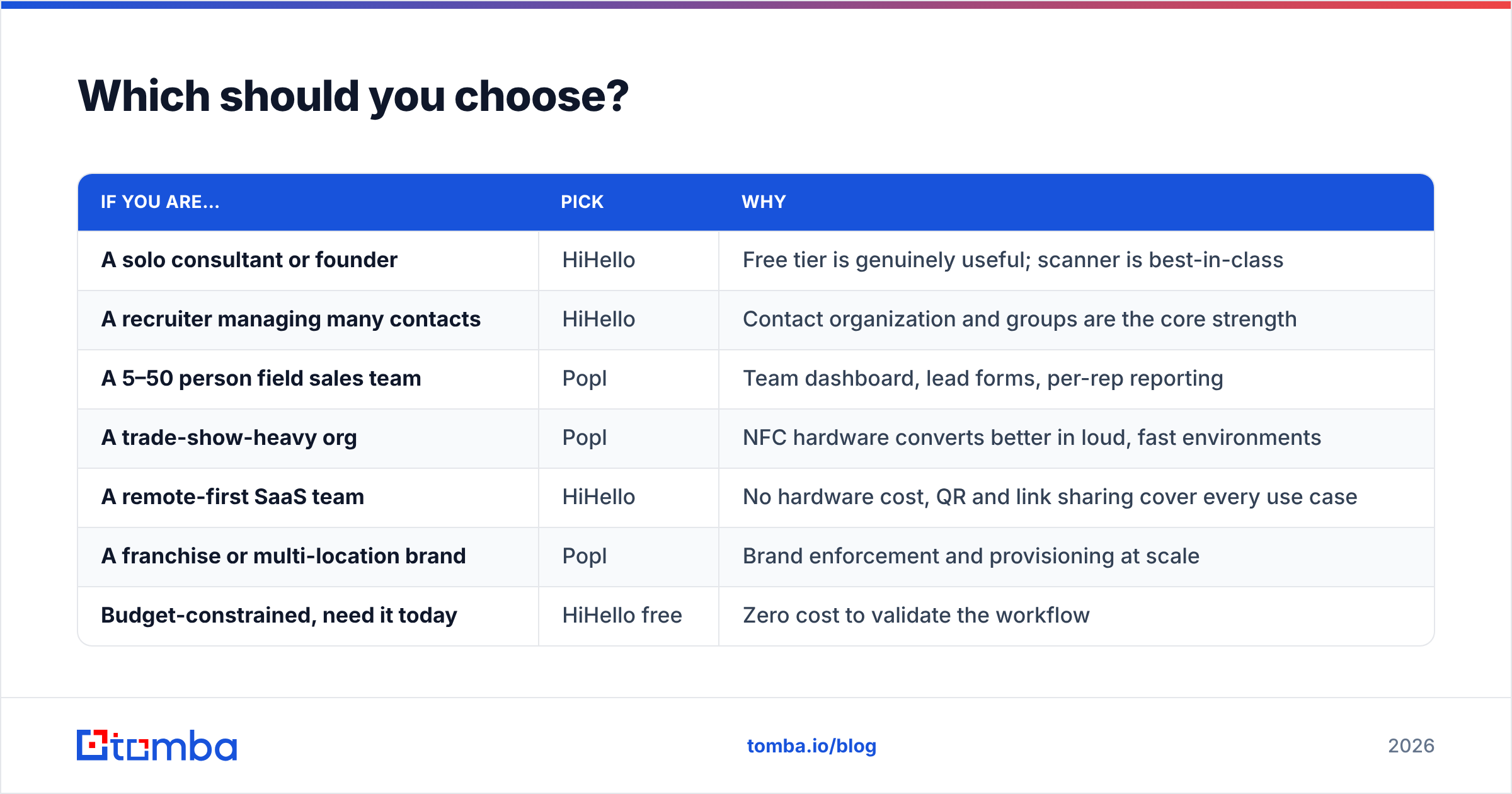
| If you are… | Pick | Why |
|---|---|---|
| A solo consultant or founder | HiHello | Free tier is genuinely useful; scanner is best-in-class |
| A recruiter managing many contacts | HiHello | Contact organization and groups are the core strength |
| A 5–50 person field sales team | Popl | Team dashboard, lead forms, per-rep reporting |
| A trade-show-heavy org | Popl | NFC hardware converts better in loud, fast environments |
| A remote-first SaaS team | HiHello | No hardware cost, QR and link sharing cover every use case |
| A franchise or multi-location brand | Popl | Brand enforcement and provisioning at scale |
| Budget-constrained, need it today | HiHello free | Zero cost to validate the workflow |
If you cannot decide, run both free tiers for a month across two reps and compare capture counts. Both companies have public review profiles on G2 where you can sanity-check the complaints — pay attention to comments about Android NFC behavior, CRM field mapping, and support response times, because those are the recurring friction points for both products.
Do you still need paper cards in 2026?#
Fewer than you think, but not zero. Keep a small stack for three situations: regions and industries where handing over a physical card is a courtesy norm, environments where phones are locked away or batteries die, and the occasional executive who simply prefers it. Everything else — conferences, meetups, coffee meetings, video calls — is better served by a link or a tap.
The practical middle ground: put a QR to your digital card on the back of a minimal paper card. You cover both behaviors with one artifact, and you stop reprinting every time someone's title changes.
The honest verdict#
Popl if you manage a team that networks in person. HiHello if you are an individual who wants the best free contact manager with sharing attached. That is the whole comparison in one line, and most of the internet's 3,000-word takes land in the same place.
But treat this as a tooling decision worth about an hour of your time, not a week. The card app is the cheapest, least differentiated layer of your go-to-market stack. Two reps with a mediocre card app and a clean, verified contact database will out-produce ten reps with premium NFC cards and a CRM full of bounced addresses. Compare Tomba pricing against what you were about to spend on hardware and you will see where the leverage actually is.
Ready to turn the names you collect into pipeline? A card app captures the handshake; the Tomba Email Finder finds the other four decision-makers at that company and confirms the addresses are real before you hit send. Start free with 25 searches a month, then scale to Starter at $49/mo when the follow-ups start converting.
Related guides#
Ready to find emails that actually work?
Join 150,000+ professionals who stopped guessing and started sending. Free credits on signup — no credit card required.
Get the Tomba newsletter
Practical outbound tactics and product updates — once every two weeks.
About the author