Hiring Signals for Sales: How to Turn Job Posts Into Pipeline
Job ads leak budget, pain, and timing months before a company ever runs an RFP. Here's how to read hiring signals, score them, and build outbound that lands while the pain is still fresh.
TL;DR
- A job post is a funded, board-approved admission of a problem. That makes hiring signals for sales one of the few free, public, timestamped intent sources you can act on.
- Not all job ads are signals. A backfill req is noise; a first-ever req for a role, a re-post after 60 days, or a 3x headcount jump in one function is a signal.
- The signal decays fast. Reps who reach out in the 0-14 day window after a req goes live consistently outperform reps working the same account 90 days later.
- The workflow is four steps: detect the req, decode what it implies about the stack and the pain, identify the person who owns the outcome (rarely the recruiter), then find a verified email and send something specific.
- Hiring signals stack well with other triggers. A funding round plus five new AE reqs plus a new VP of Sales is a far stronger buy window than any one of those alone.
What are hiring signals for sales?#
A hiring signal is a public job posting that reveals something actionable about a company's budget, priorities, pain, or timeline.
Think of a job ad like a shopping list left on a kitchen counter. Nobody wrote it for you, but it tells you exactly what the household is planning to cook this week, roughly what they're willing to spend, and which ingredients they've run out of. A req for "Senior Deliverability Engineer, Lifecycle Marketing" tells you the company is sending a lot of email, that something is going wrong with it, and that finance signed off on a six-figure salary to fix it.
Three things make hiring data unusually good as a sales trigger:
- It's funded. Nobody posts a req without headcount approval. Unlike a whitepaper download or a webinar registration, a job ad has already survived a budget conversation.
- It's timestamped. You know roughly when the decision was made, which means you can time your outreach instead of guessing.
- It's specific. Job descriptions name tools, name the manager, name the metrics, and name the problem. Most intent data gives you an anonymized account and a topic cluster. A job post gives you the actual sentence.
The catch is volume. There are millions of open reqs at any moment and the vast majority mean nothing to you. The skill is not "find job ads" — it's "separate the 2% that indicate a buying window from the 98% that indicate ordinary churn."

Which hiring signals actually predict a purchase?#
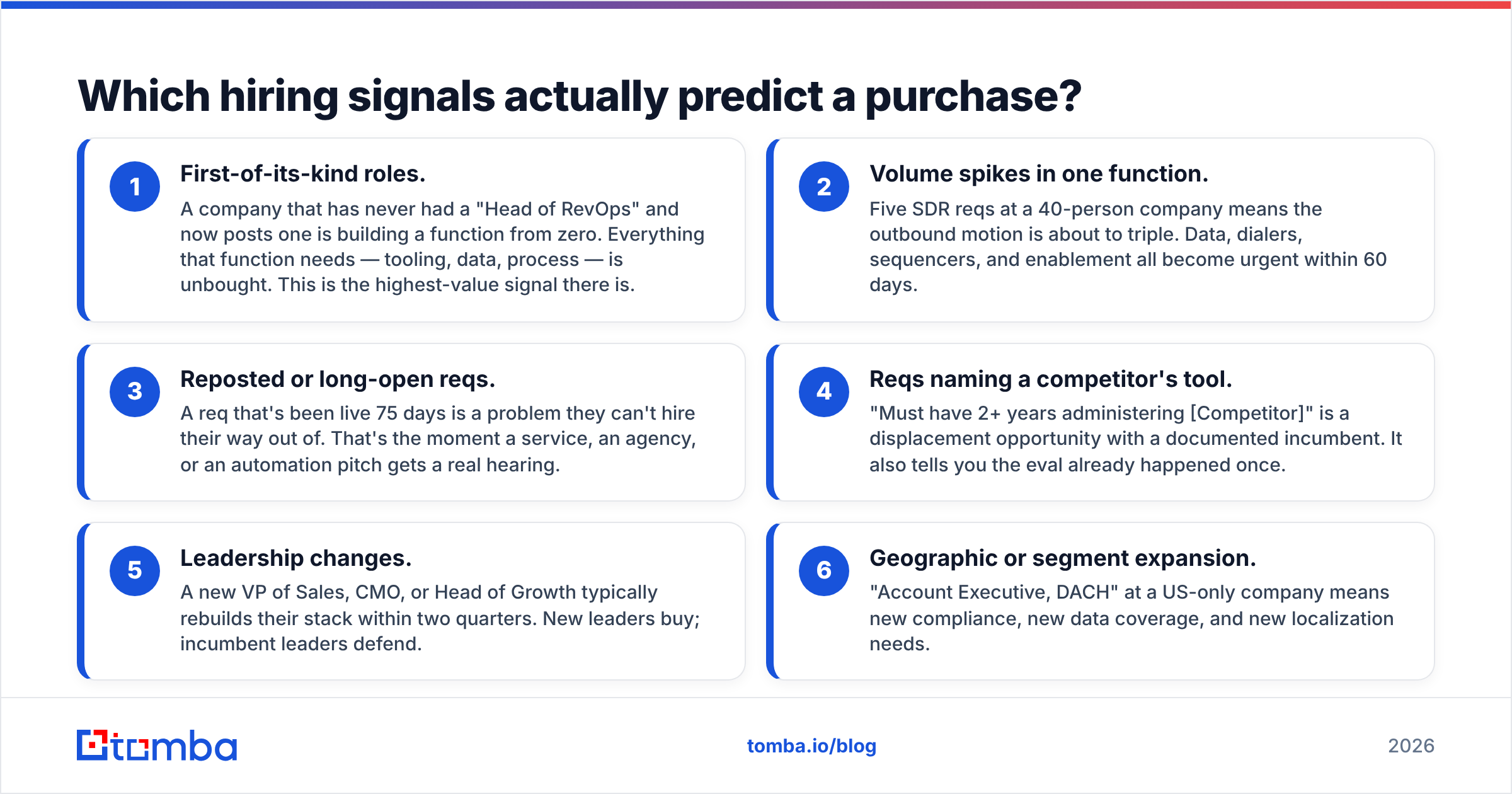
Rank them by how much they change the odds. Here is the hierarchy most outbound teams converge on after a quarter of testing:
- First-of-its-kind roles. A company that has never had a "Head of RevOps" and now posts one is building a function from zero. Everything that function needs — tooling, data, process — is unbought. This is the highest-value signal there is.
- Volume spikes in one function. Five SDR reqs at a 40-person company means the outbound motion is about to triple. Data, dialers, sequencers, and enablement all become urgent within 60 days.
- Reposted or long-open reqs. A req that's been live 75 days is a problem they can't hire their way out of. That's the moment a service, an agency, or an automation pitch gets a real hearing.
- Reqs naming a competitor's tool. "Must have 2+ years administering [Competitor]" is a displacement opportunity with a documented incumbent. It also tells you the eval already happened once.
- Leadership changes. A new VP of Sales, CMO, or Head of Growth typically rebuilds their stack within two quarters. New leaders buy; incumbent leaders defend.
- Geographic or segment expansion. "Account Executive, DACH" at a US-only company means new compliance, new data coverage, and new localization needs.
Signals 1, 2, and 5 are worth building automation around. Signals 3, 4, and 6 are worth a manual scan on your named accounts.
What is a weak signal you should ignore?#
Backfills. Generic engineering reqs at companies that always have generic engineering reqs open. Reqs posted by staffing agencies on behalf of unnamed clients. Contract roles under three months. And any req at a company above ~5,000 employees where a single posting represents a rounding error in headcount — at that size you need a pattern of reqs, not a single one.
How do hiring signals compare to other buying triggers?#
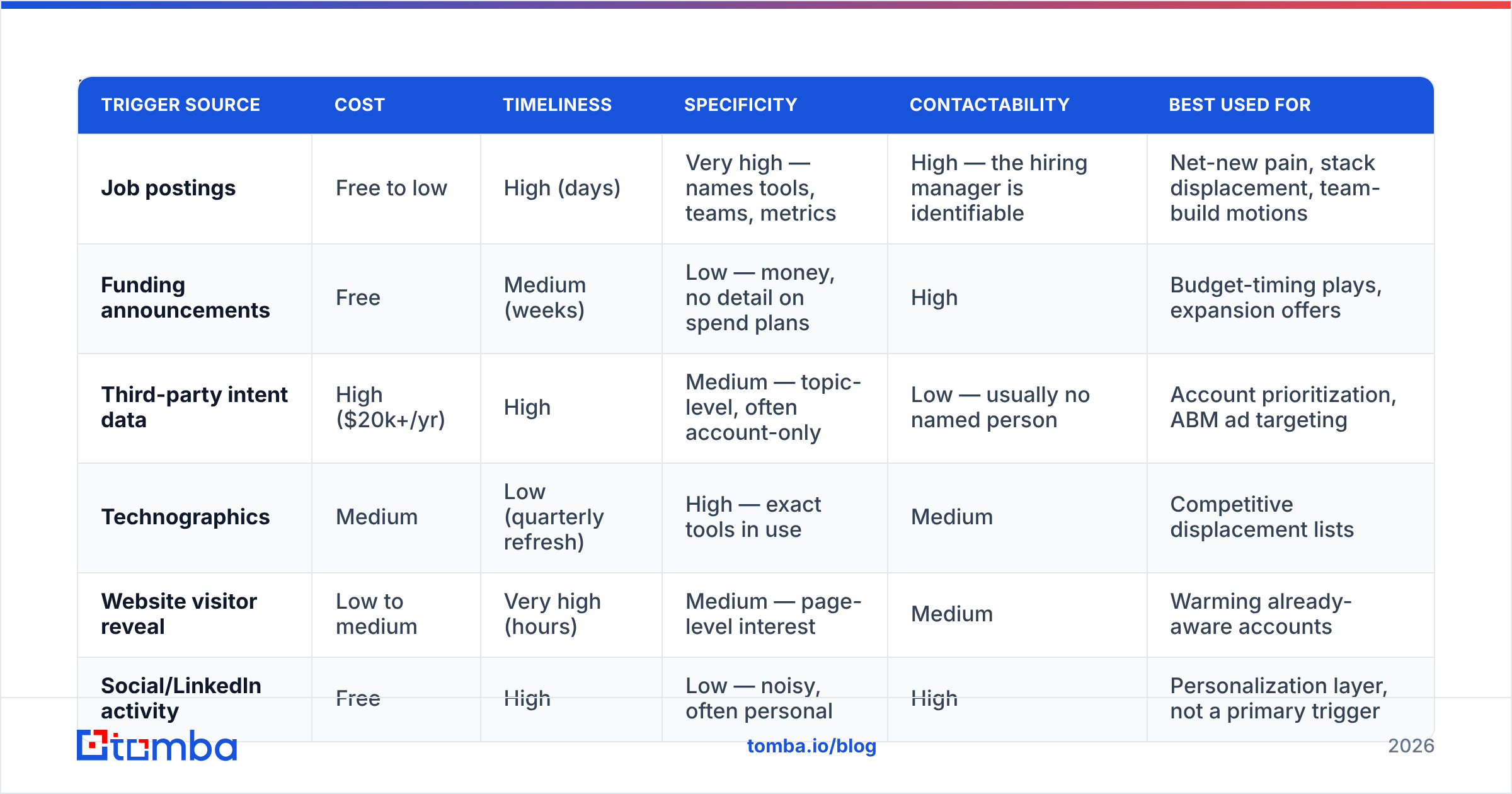
Hiring data is not the only trigger source, and it isn't the best one on every axis. Here's how it stacks up against the alternatives most teams evaluate.
| Trigger source | Cost | Timeliness | Specificity | Contactability | Best used for |
|---|---|---|---|---|---|
| Job postings | Free to low | High (days) | Very high — names tools, teams, metrics | High — the hiring manager is identifiable | Net-new pain, stack displacement, team-build motions |
| Funding announcements | Free | Medium (weeks) | Low — money, no detail on spend plans | High | Budget-timing plays, expansion offers |
| Third-party intent data | High ($20k+/yr) | High | Medium — topic-level, often account-only | Low — usually no named person | Account prioritization, ABM ad targeting |
| Technographics | Medium | Low (quarterly refresh) | High — exact tools in use | Medium | Competitive displacement lists |
| Website visitor reveal | Low to medium | Very high (hours) | Medium — page-level interest | Medium | Warming already-aware accounts |
| Social/LinkedIn activity | Free | High | Low — noisy, often personal | High | Personalization layer, not a primary trigger |
The honest read: hiring signals win on specificity and cost, lose on coverage. Intent platforms surface accounts you'd never have found. Job ads only surface accounts that happen to be hiring right now. Most strong outbound teams use hiring data as the sequencing layer on top of an existing ICP list — deciding who to hit this week, not who exists.
That's also why website visitor reveal pairs well with it. Hiring data tells you a company has a new problem; visitor data tells you they've started shopping. When both fire on the same account in the same month, that account goes to the top of the queue.
How do you build a hiring-signal workflow?#
Four steps, in order. Skip any of them and the play degrades into ordinary spray.
Step 1 — Detect. Pick your sources. Company career pages are the cleanest (no aggregator lag, no ghost jobs), LinkedIn Jobs and Indeed give you breadth, and ATS platforms like Greenhouse and Lever expose predictable public URL patterns you can monitor. If you don't know what an ATS is, Wikipedia's overview is a decent primer. Monitor your named-account list first, then broaden.
Step 2 — Decode. Read the actual job description, not the title. Extract: named tools, the reporting line ("reports to the VP of Demand Gen"), the metrics they're accountable for, and the team size. These four things give you your entire opening line. A req that says "you'll own list-building and email verification for a 12-person SDR team" has written your pitch for you.
Step 3 — Identify the owner. The recruiter is not your buyer. The hiring manager named in the req, or the function head one level up, is. Pull their name from the reporting line, LinkedIn, or the company's team page. Then get a working address — a domain search across the company gives you the email pattern and the department roster in one pass, which is faster than guessing person by person.
Step 4 — Send within the window. Reference the req, not the company. "Saw you're hiring a deliverability lead" is a real observation; "I noticed you're a leader in fintech" is filler. Keep it to four sentences and one question.

What does the outreach actually look like?#
Two rules: mention the req in the first line, and connect it to an outcome the hiring manager already cares about.
Weak version:
Hi Sarah, I saw your company is hiring! We help companies like yours with lead data. Do you have 15 minutes Thursday?
Strong version:
Sarah — saw the Senior SDR Manager req has been open since June, and that it calls for someone to "rebuild the outbound data process."
The teams I talk to usually hit that wall when list-building eats 40% of rep hours. We cut that step for a 14-rep team at [comparable company] and their contact-to-meeting rate moved because reps stopped emailing dead addresses.
Worth 12 minutes before the new hire starts, or better after they land?
The second version works because it does three things: proves you read the req, offers a specific mechanism instead of a benefit adjective, and gives the prospect an easy out that still moves the conversation forward. That last question — "before or after?" — also handles the most common objection to hiring-triggered outreach, which is "we're waiting for the new person."
Worth noting: sending fast only helps if the mail lands. A trigger-based sequence sent to a stale list will tank your sender reputation faster than a generic one, because you're sending more of it. Run every hiring-signal list through an email verifier before it hits the sequencer.
How fast does a hiring signal decay?#
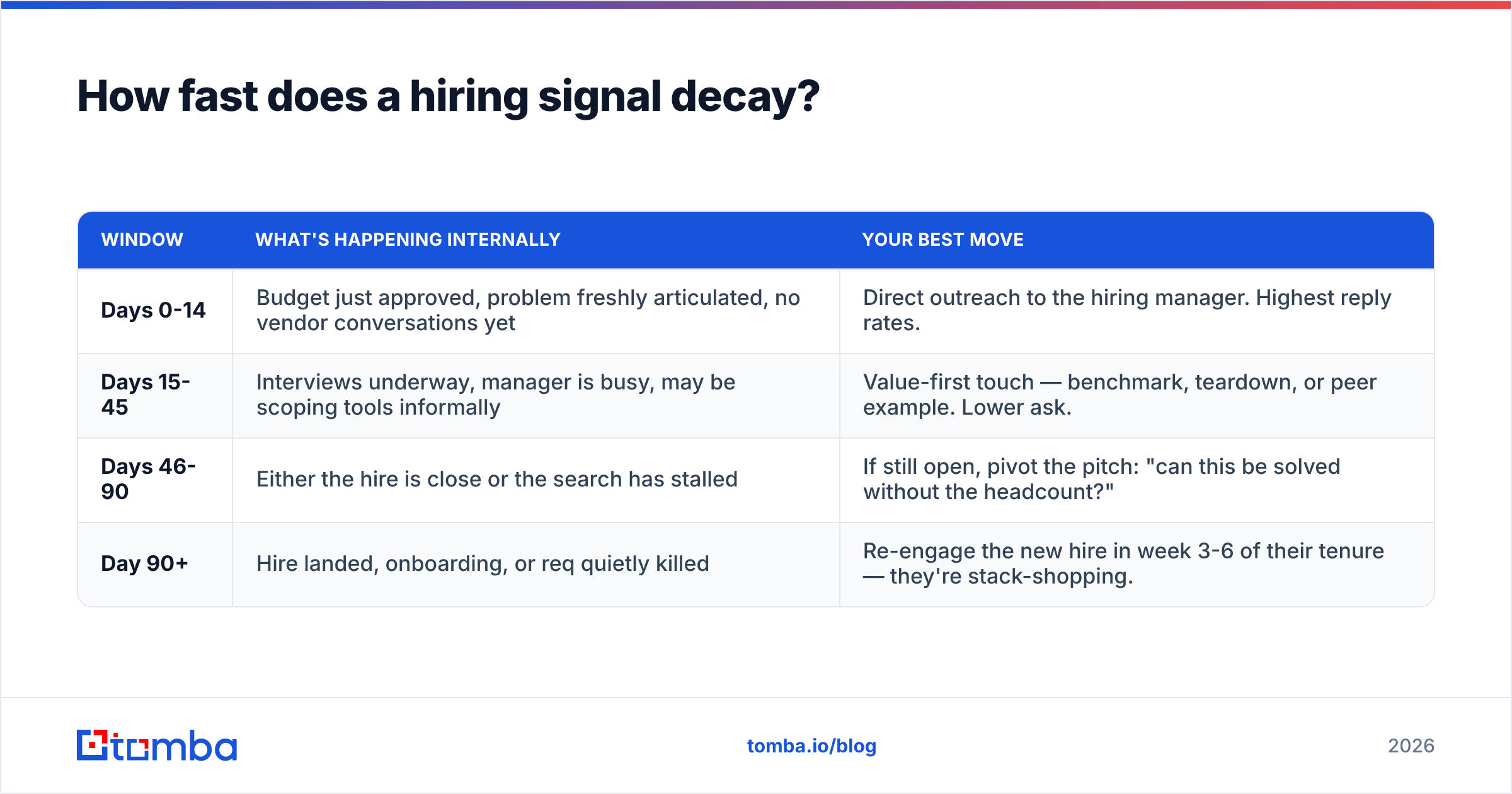
Faster than most reps assume. Treat the req's post date as day zero and work backwards from there.
| Window | What's happening internally | Your best move |
|---|---|---|
| Days 0-14 | Budget just approved, problem freshly articulated, no vendor conversations yet | Direct outreach to the hiring manager. Highest reply rates. |
| Days 15-45 | Interviews underway, manager is busy, may be scoping tools informally | Value-first touch — benchmark, teardown, or peer example. Lower ask. |
| Days 46-90 | Either the hire is close or the search has stalled | If still open, pivot the pitch: "can this be solved without the headcount?" |
| Day 90+ | Hire landed, onboarding, or req quietly killed | Re-engage the new hire in week 3-6 of their tenure — they're stack-shopping. |
The day 90+ row is the one most teams miss. A newly hired VP or manager has a 90-day mandate, a budget they didn't spend yet, and no loyalty to the incumbent vendor. That's arguably a second signal generated by the first.
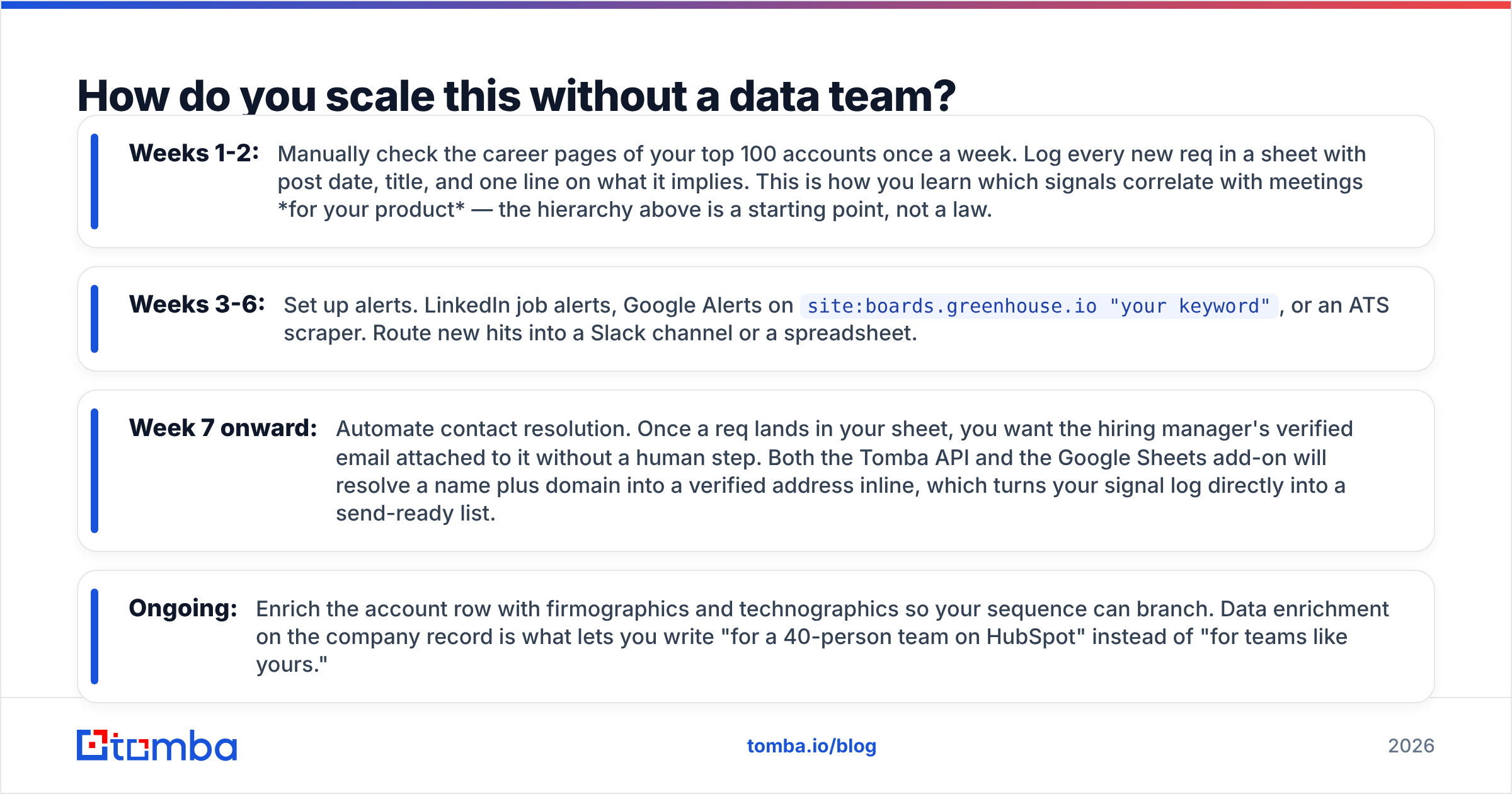
How do you scale this without a data team?#
Start manual, then automate the boring parts.
- Weeks 1-2: Manually check the career pages of your top 100 accounts once a week. Log every new req in a sheet with post date, title, and one line on what it implies. This is how you learn which signals correlate with meetings for your product — the hierarchy above is a starting point, not a law.
- Weeks 3-6: Set up alerts. LinkedIn job alerts, Google Alerts on
site:boards.greenhouse.io "your keyword", or an ATS scraper. Route new hits into a Slack channel or a spreadsheet. - Week 7 onward: Automate contact resolution. Once a req lands in your sheet, you want the hiring manager's verified email attached to it without a human step. Both the Tomba API and the Google Sheets add-on will resolve a name plus domain into a verified address inline, which turns your signal log directly into a send-ready list.
- Ongoing: Enrich the account row with firmographics and technographics so your sequence can branch. Data enrichment on the company record is what lets you write "for a 40-person team on HubSpot" instead of "for teams like yours."
For a broader view of how trigger-based selling fits into a modern outbound org, Gartner's sales research and HubSpot's sales blog are both useful counterweights to vendor-published playbooks. And if you want to see how peers rate the tooling in this space before you buy anything, G2's category pages are more honest than any single vendor's comparison page — including ours.
What are the common mistakes with hiring signals?#
Pitching the recruiter. Recruiters have no budget for your product and receive dozens of these emails a week. You will get filtered.
Treating every req as urgent. If you email every account that posts any role, you've rebuilt spray-and-pray with extra steps and worse targeting. Filter hard.
Ghost jobs. A meaningful share of listings are evergreen pipeline-building posts, not real openings. Cross-check: if the same req has been live for 8 months with no repost activity, it's probably a permanent net, not a signal.
Over-personalizing. "I saw you're hiring a Senior Backend Engineer with Kubernetes experience reporting to Dana" is creepy when you're selling email data. Reference the implication, not the granular detail.
Skipping verification. Hiring-triggered emails go to individuals, not role addresses. A guessed pattern gets you a bounce, and a bounce on a fresh domain compounds. Verify first.
Ignoring the second-order signal. When Company A hires away Company B's VP of Sales, you now have two signals: A is rebuilding, and B has an open seat. Work both.
Start with the accounts already showing their hand#
Hiring signals for sales work because they invert the usual outbound problem. You're not guessing whether a company has budget, a problem, and a timeline — the company published all three, in writing, with a date on it. Your only real job is to notice quickly and reach the person who owns the outcome before the queue fills up.
That last part is where most of this play breaks down. Detecting the req is easy; getting a verified, deliverable address for the hiring manager named in it — at scale, across hundreds of accounts a month — is the bottleneck. The Tomba Email Finder resolves a name plus company domain into a verified professional email, with a free tier of 25 searches a month to test the workflow on your own account list before you commit. Paid plans start at $49/mo, and full Tomba pricing scales with volume as your signal engine grows.
Pull your top 50 accounts, check who's hiring this week, and send five emails that reference the actual req. That's the entire experiment, and it takes an afternoon.
Related guides#
Ready to find emails that actually work?
Join 150,000+ professionals who stopped guessing and started sending. Free credits on signup — no credit card required.
Get the Tomba newsletter
Practical outbound tactics and product updates — once every two weeks.
About the author