HoneyBook Pricing Reviews Pros and Cons: A 2026 Breakdown
HoneyBook bundles proposals, contracts, invoices and payments into one clientflow tool, but the sticker price is not the whole cost. Here is what the plans, the transaction fees, and the real reviews say before you commit.
This guide covers HoneyBook pricing reviews pros and cons in one place: what each plan really costs, what the payment fees add on top, and where the tool falls short.
TL;DR
- HoneyBook sells three tiers: Starter, Essentials and Premium. The annual price runs about 35-40% below the month-to-month price, so the number you see advertised is almost always the annual one.
- The subscription is the smaller half of the cost. Card processing runs about 2.9% + $0.25 per charge, and bank transfers about 1.5%. That is where most users spend real money, and it grows with revenue instead of headcount.
- Reviews are consistently strong on ease of use and client experience. They are just as consistent on the complaints: shallow reporting, rigid templates, and slow support.
- HoneyBook is a clientflow tool, not a sales-acquisition tool. It manages people who already contacted you. It does not find new prospects, enrich records, or verify email addresses.
- Best fit: solo and small service businesses (photography, design, events, consulting) billing under roughly $500K/year. Worst fit: outbound B2B teams, product companies, and anyone who needs pipeline forecasting.
What is HoneyBook and who is it actually built for?#
HoneyBook is a clientflow platform for independent service businesses. In practice, it collapses five tools into one: a lead capture form, a proposal and contract builder with e-signature, an invoicing and payments layer, a scheduler, and a light CRM with automations between them.
The target customer is narrow on purpose. HoneyBook was built for the photographer who sends fifteen proposals a month. Or the wedding planner juggling seven active events. Or the freelance designer who hates chasing invoices. Everything is tuned for the moment after a lead raises their hand: book them, paper the deal, get paid.
Keep that focus in mind when you judge the price. HoneyBook competes with a contract tool plus a scheduler plus a payment processor. It does not compete with Salesforce or HubSpot. Judge it as a sales CRM and you will be let down by things it never set out to do.
How much does HoneyBook cost in 2026?#
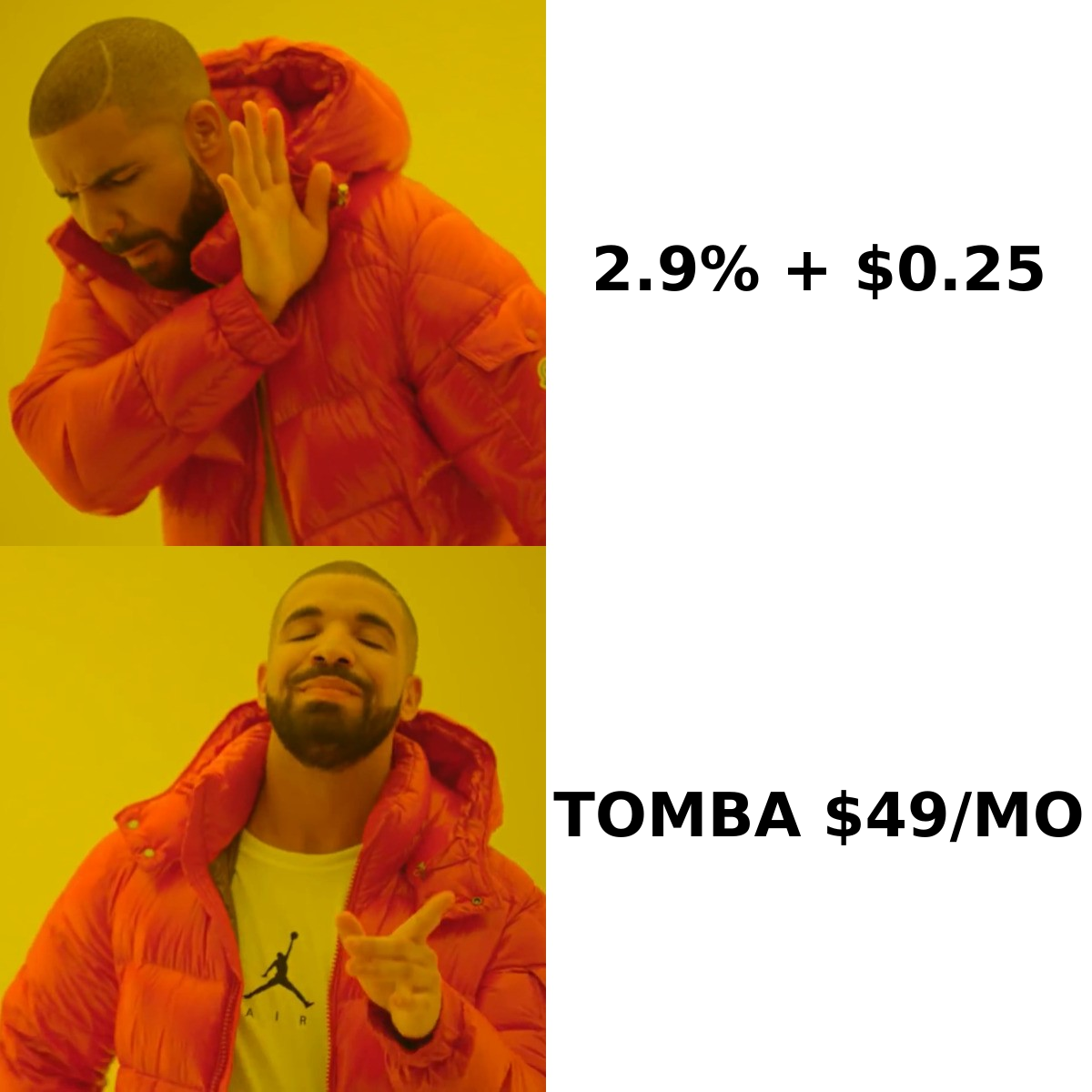
HoneyBook publishes three tiers. Pricing has shifted more than once in the last two years. Treat the table below as the shape of the offer, and confirm current numbers on the official HoneyBook pricing page before you buy.
| Plan | Annual (per month, billed yearly) | Month-to-month | Team seats | Key unlock |
|---|---|---|---|---|
| Starter | ~$19-29 | ~$29-36 | 1 | Unlimited clients, invoices, contracts, scheduler |
| Essentials | ~$39-49 | ~$59 | Up to 2 | Automations, QuickBooks sync, expense tracking |
| Premium | ~$79-99 | ~$129 | Unlimited | Multiple companies, priority support, onboarding specialist |
| Free trial | 7 days (often extended promotionally) | Same | 1 | Full feature access, no card charge until conversion |
Three things to flag in that table.
First, the annual discount is aggressive. Paying yearly typically saves 35-40%. That is a real saving. It is also a year-long commitment to a tool whose main weakness, reporting, usually only shows up in month four.
Second, Starter is genuinely limited. No automations. No QuickBooks Online sync. Most users move to Essentials within a few months, so budget for Essentials from day one.
Third, seat counts are tight. Essentials caps you at two team members. A three-person studio pays Premium prices, roughly triple the Essentials rate, for what may be one extra login.
What do HoneyBook's payment processing fees really cost you?#
This is the part that pricing pages bury and reviews complain about. It deserves its own math.
HoneyBook processes payments in-app and takes a cut on every transaction. The published rates sit in the standard payments range:
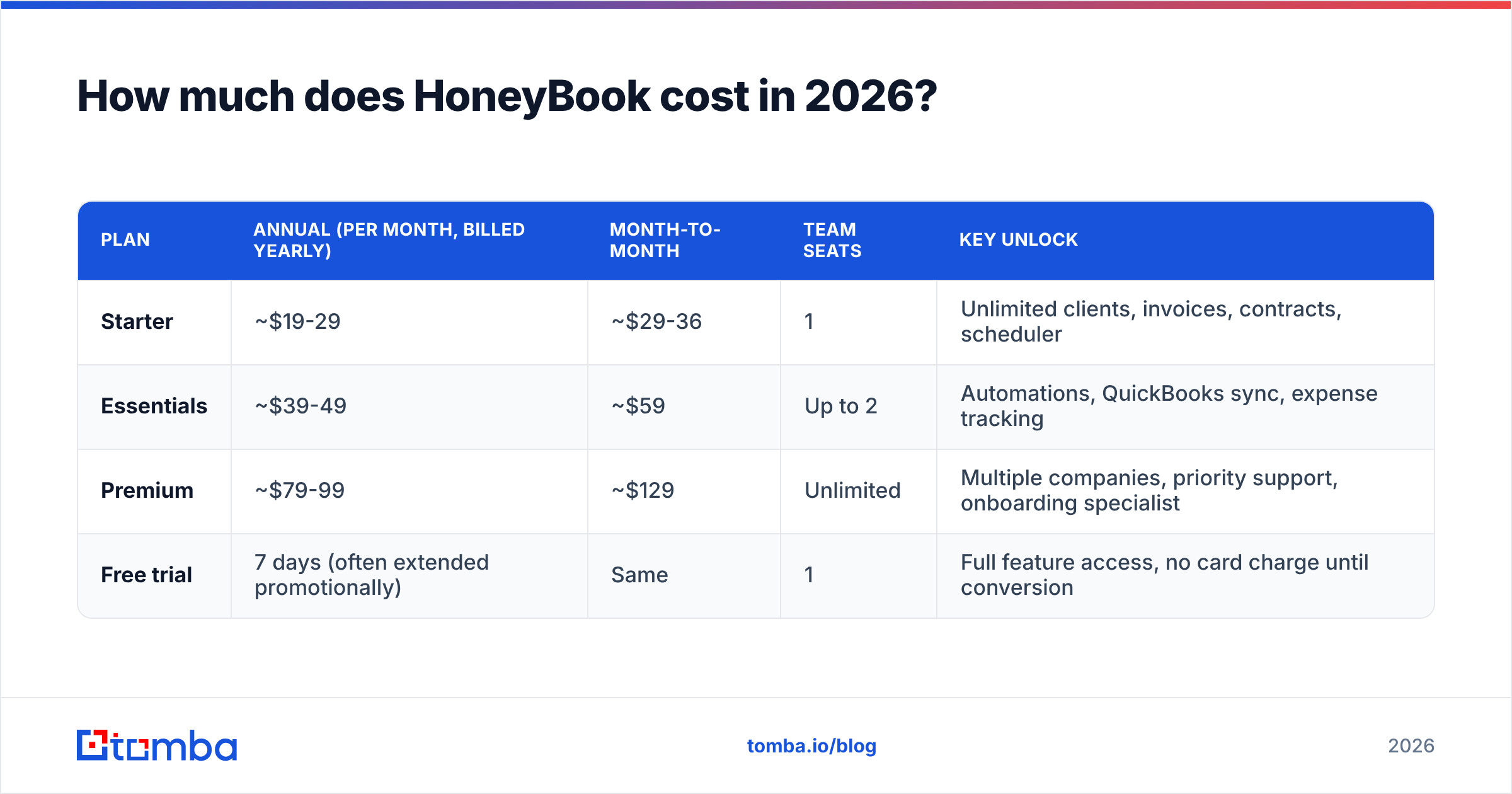
- Credit and debit cards — roughly 2.9% + $0.25 per transaction. That matches Stripe or Square, so it is not predatory. It is not free either.
- Bank transfer / ACH — roughly 1.5%, historically with a per-transaction cap. Steering clients here is the biggest single lever on your cost.
- Instant deposit — an optional extra percentage to get funds same-day instead of waiting for standard settlement.
- Chargebacks and disputes — handled in the payments layer with the usual fees and evidence process. Budget for at least one a year if consumers pay you by card.
- International cards — expect a surcharge on top. That matters if you take clients outside your home market.
Run it on real numbers. A studio invoices $200,000 a year, all on card. Processing costs about $5,800. The annual Essentials plan costs about $470. The subscription is 7% of what HoneyBook actually costs you. Move half that volume to ACH and you save roughly $1,400 a year, for the price of an email asking clients to pay by bank transfer.
The takeaway: compare HoneyBook to your current processor, not to your current software budget. If you already pay Stripe 2.9% + $0.30, the payments layer costs you nothing extra and the subscription is the only new line item. If you collect by bank transfer today at zero cost, HoneyBook is far more expensive than it looks.
What do HoneyBook reviews say — the good and the ugly?#
This is where the HoneyBook pricing reviews pros and cons debate gets useful. Aggregate scores on G2 and Capterra sit in the mid-4s out of 5 across thousands of reviews, near the top of the category. The signal is not the average. It is how consistent the complaints are.
What reviewers reliably praise:
- Client-facing polish. Proposals, contracts and payment pages look professional with no design work. Several reviewers say they closed deals faster because the paperwork looked credible.
- Time-to-value. Most users send real proposals within a day. That is unusual for anything CRM-adjacent.
- Consolidation. One subscription replaces a contract tool, a scheduler, an invoicing tool and a payment link. For a solo operator that genuinely lowers total spend.
- Mobile app quality. Reviewers who work on location, like photographers and planners, rate the mobile experience among the best in the category.
What reviewers reliably criticize:
- Reporting is shallow. You get revenue snapshots. You do not get cohort analysis, win-rate trends, or a forecast. To see your win rate by lead source over three quarters, you will export to a spreadsheet.
- Template rigidity. The proposal and contract builders are easy but constrained. Anyone who wants precise brand control or complex conditional pricing hits walls.
- Support latency. Chat and email support is helpful, but replies stretch during busy hours. Premium buys priority, which tells you something about the baseline.
- Automation ceilings. Automations are linear and trigger-based. Anyone coming from a real workflow engine will find them limiting.
- Migration friction. Moving historical projects and clients in from another system is manual for most people.
None of this disqualifies the core user. All of it disqualifies someone running a structured outbound sales motion.
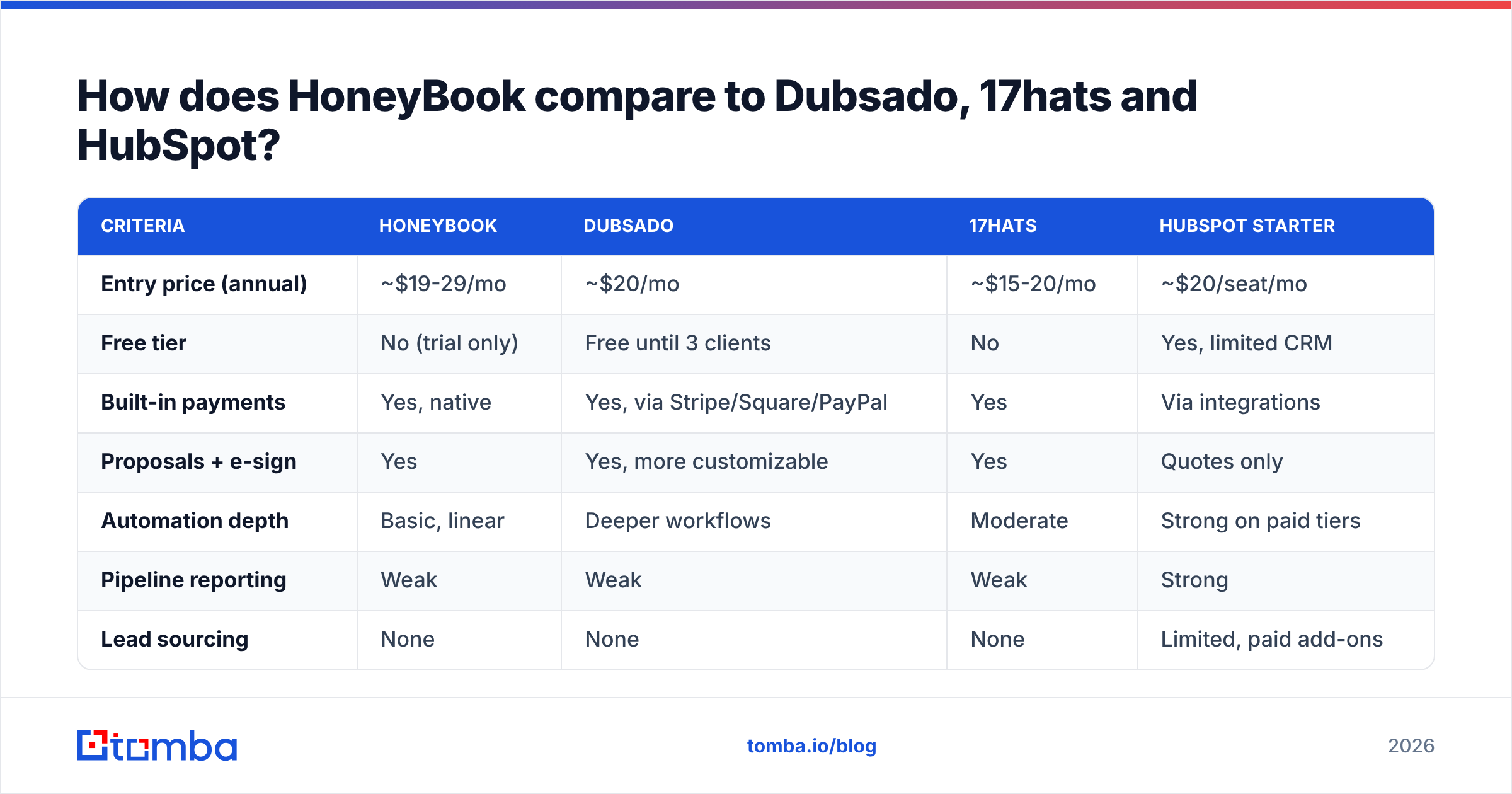
How does HoneyBook compare to Dubsado, 17hats and HubSpot?#
| Criteria | HoneyBook | Dubsado | 17hats | HubSpot Starter |
|---|---|---|---|---|
| Entry price (annual) | ~$19-29/mo | ~$20/mo | ~$15-20/mo | ~$20/seat/mo |
| Free tier | No (trial only) | Free until 3 clients | No | Yes, limited CRM |
| Built-in payments | Yes, native | Yes, via Stripe/Square/PayPal | Yes | Via integrations |
| Proposals + e-sign | Yes | Yes, more customizable | Yes | Quotes only |
| Automation depth | Basic, linear | Deeper workflows | Moderate | Strong on paid tiers |
| Pipeline reporting | Weak | Weak | Weak | Strong |
| Lead sourcing | None | None | None | Limited, paid add-ons |
| Best for | Solo service pros who want polish fast | Studios wanting workflow control | Budget-conscious solos | Teams that will scale into sales ops |
The honest read: HoneyBook wins on user experience and speed. Dubsado wins on customization. 17hats wins on raw price. HubSpot wins the moment you have a real sales team with a real pipeline. Pick the one you need most in the next twelve months, not the one that demos best.
Note the row that reads "None" three times. That gap is not a flaw in any of these products. It is a category boundary, and most buyers find it too late.
What does HoneyBook not do that your pipeline still needs?#
HoneyBook starts working when a lead fills out your contact form. Everything before that happens somewhere else: deciding who to contact, finding their email address, checking that it is deliverable, and enriching the record with company data.
For a wedding photographer running on referrals, that is fine. For a consultant, agency, or B2B firm that has to create demand, it is a structural hole. You end up with a tidy book of business and no repeatable way to add to it.

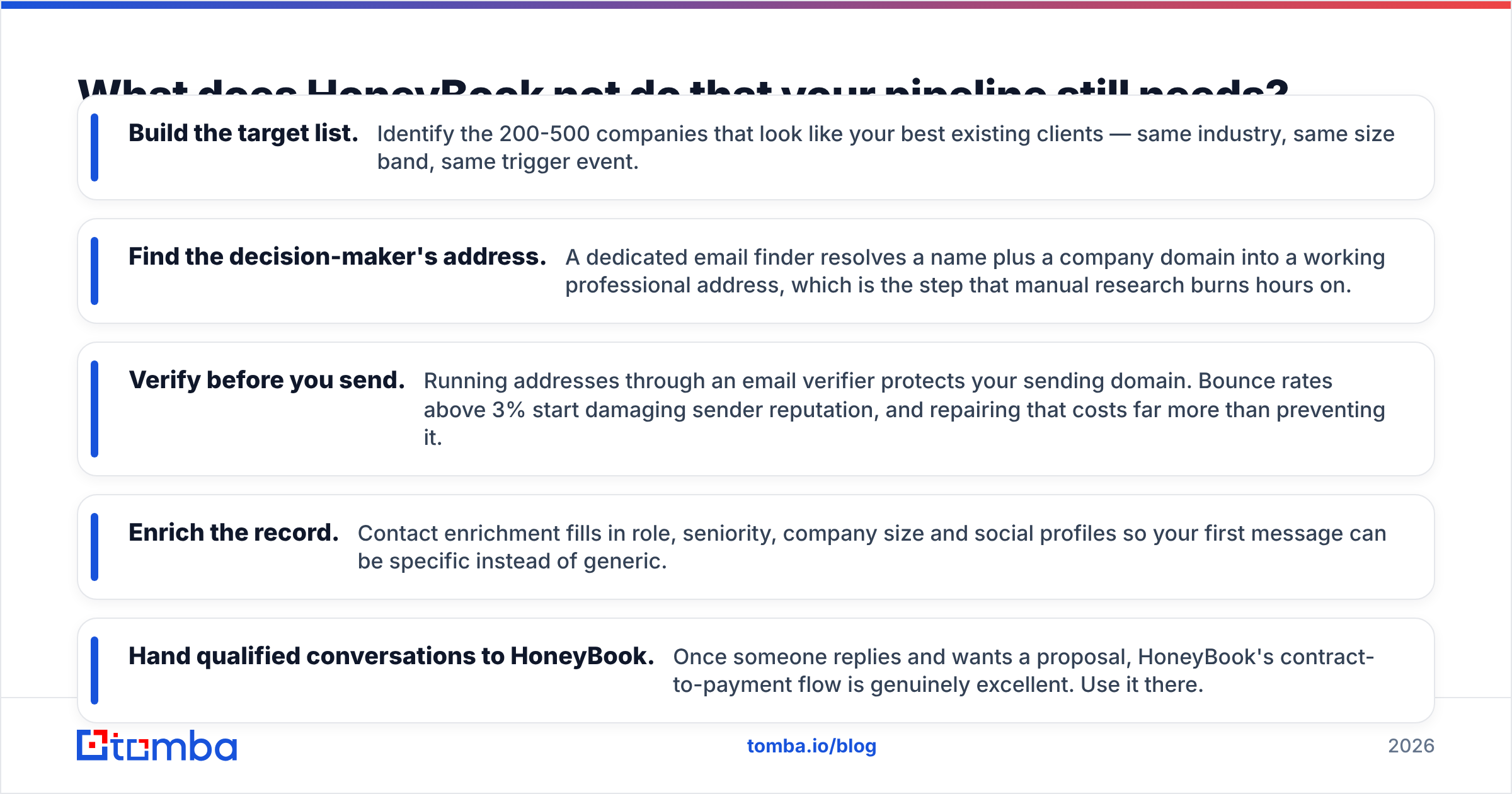
The practical fix is to run a thin acquisition layer in front of HoneyBook, then let HoneyBook do what it is good at:
- Build the target list. Identify the 200-500 companies that look like your best clients: same industry, same size band, same trigger event.
- Find the decision-maker's address. A dedicated email finder turns a name plus a company domain into a working professional address. That is the step manual research burns hours on.
- Verify before you send. An email verifier protects your sending domain. Bounce rates above 3% damage sender reputation, and repair costs far more than prevention.
- Enrich the record. Contact enrichment fills in role, seniority, company size and social profiles, so your first message can be specific.
- Hand qualified conversations to HoneyBook. Once someone replies and wants a proposal, HoneyBook's contract-to-payment flow is excellent. Use it there.
The cost comparison favors that split. A prospecting layer costs a flat monthly fee no matter how much you invoice. Tomba's plans start with a free tier at 25 searches per month, then $49/mo for Starter. HoneyBook's real cost rises with every dollar you collect. One is a fixed input to growth. The other is a variable tax on it.
HoneyBook pricing reviews pros and cons: is it worth it in 2026?#
Buy HoneyBook if:
- You are a solo or two-person service business and referrals are your main channel.
- You pay for a contract tool, a scheduler and an invoicing tool separately. Consolidation alone will likely cover Essentials.
- Client experience is part of your differentiation. HoneyBook's client-facing surfaces are the best in this price band.
- You already accept cards and pay about 2.9% elsewhere, so the payments layer is cost-neutral.
Skip HoneyBook if:
- You run outbound. You will need a separate prospecting stack anyway, and HoneyBook adds nothing to it.
- You need forecasting, attribution, or multi-stage pipeline reporting. Buy a real CRM.
- You have three or more team members. The jump from Essentials to Premium is steep for what you get.
- You collect payment by bank transfer today at near-zero cost. Processing fees will dominate your total cost.
The verdict: weigh the HoneyBook pricing reviews pros and cons together and the tool is fairly priced for what it is. It is also a pleasure to use, and the reviews say so. The ledger only tips negative when buyers expect a job it never claimed: filling the top of the funnel. Price the subscription and the processing fees as one number. Compare that number to your current stack, not to zero. The decision usually takes ten minutes.
Where should you start if lead flow is the real problem?#
If this made you realize your bottleneck is finding clients, not managing them, fix that first. Software that organizes an empty pipeline organizes nothing.
Start with the Tomba Email Finder. Give it a name and a company domain. It returns a verified professional email address with source attribution and a confidence score, so you know what you are sending to. The free tier covers 25 searches a month, enough to test a target list before you spend anything. Paid plans start at $49/mo once the motion works. Build the list, verify the addresses, start the conversations. Let HoneyBook handle the contract and the invoice once someone says yes.
Related guides#
Ready to find emails that actually work?
Join 150,000+ professionals who stopped guessing and started sending. Free credits on signup — no credit card required.
Get the Tomba newsletter
Practical outbound tactics and product updates — once every two weeks.
About the author