How Does Clearbit Work? A Practical Breakdown for 2026
Clearbit turns a domain or an email into a full company and person profile — but the mechanics, the HubSpot bundling, and the credit math decide whether it fits your stack. Here is exactly how it works.
TL;DR
- How does Clearbit work? You give it one clue — a domain, an email, or an IP. It matches that clue against its own company graph. Then it hands back clean data through an API, a CRM sync, or a form widget.
- Clearbit is now part of HubSpot. The 2023 deal renamed it Breeze Intelligence. Self-serve signup is gone. Credits ride on HubSpot seats.
- Clearbit adds detail to contacts you already have. It is not an email finder.
- Three products matter: Enrichment, Reveal, and Forms.
- Need a verified work email? Tomba starts at $49/mo and fills that gap.
What is Clearbit, exactly?#
Clearbit is a B2B data enrichment platform. You give it a weak clue: an email, a domain, or a visitor IP. It gives back a full record.
That record holds company size, industry, tech stack, funding, location, and revenue band. For people, it adds job title, seniority, and social handles.
Think of it as a reverse dictionary for business identity. You know one word, like "acme.com". Clearbit hands you the whole entry. What the firm does. How big it is. Who works there. It does not run the other way.
That gap trips up most buyers. They expect a prospect database. They get a data layer instead. Both are useful. They are not the same buy.
HubSpot bought Clearbit in November 2023 for a reported $150M. The brand now sits inside HubSpot's AI layer as Breeze Intelligence. The clearbit.com domain still loads. Old API keys still work. But new buyers go through HubSpot.
How does Clearbit work under the hood?#
So how does Clearbit work, step by step? Four stages, in order.
- Collection. Clearbit crawls public sources: company sites, job boards, press releases, filings, and app stores. It adds bought data sets. It also folds in signals from its own customer network.
- Resolution. Raw rows get merged into one entity. "Acme Inc.", "Acme, Incorporated", and "acme.com" all map to a single company ID. This is the hard part, and the place vendors differ.
- Scoring. Each entity gets fields: staff count band, industry, tech stack read from page markup and DNS, and funding stage from filings.
- Delivery. You pull the record by API, CRM sync, a JavaScript snippet, or a spreadsheet upload.
Speed matters if you build on it. Cached records come back in 100–300ms. A cold domain kicks off a live crawl. You may get a 202 Pending reply. Then you poll, or you wait for a webhook.
Plan your form logic around that. Blocking a signup on a cold lookup is a self-inflicted wound.

What are Clearbit's three core products?#
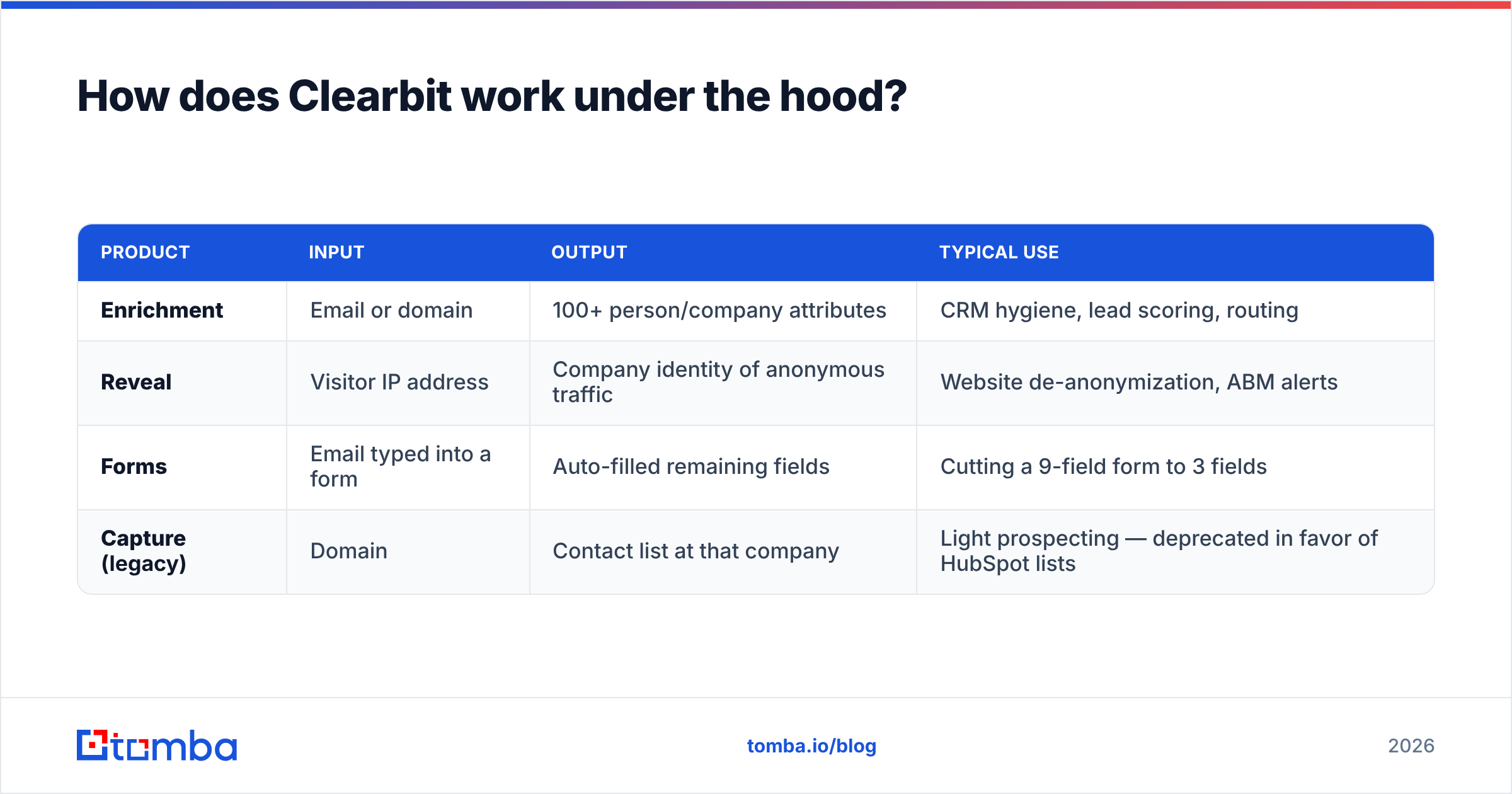
| Product | Input | Output | Typical use |
|---|---|---|---|
| Enrichment | Email or domain | 100+ person/company attributes | CRM hygiene, lead scoring, routing |
| Reveal | Visitor IP address | Company identity of anonymous traffic | Website de-anonymization, ABM alerts |
| Forms | Email typed into a form | Auto-filled remaining fields | Cutting a 9-field form to 3 fields |
| Capture (legacy) | Domain | Contact list at that company | Light prospecting — deprecated in favor of HubSpot lists |
How does Clearbit work across the product line? Forms is the most underrated of the four. Cut a demo form from nine fields to three, and sign-ups often jump by double digits. Clearbit fills in size, industry, and title from the email domain. You get the same data. The buyer types less.
Reveal is the most oversold. IP matching works well for big firms with their own IP ranges. It works poorly for remote teams on home broadband. Expect fair match rates on large accounts, and weak ones on small ones. Treat any "we spot most of your traffic" claim with doubt. Ours too.
Is Clearbit an email finder?#
No. How does Clearbit work here? It reads emails. It does not find them.
Person enrichment takes an email as input. It returns fields as output. It is a lookup on an address you already own.
Got a name and a company but no email? Clearbit is the wrong tool. You need an email finder. A finder builds likely addresses and tests them against the firm's mail server.
The old Clearbit Prospector did list contacts by role at a domain. It was sunset. That job now sits in HubSpot's list tools, behind a HubSpot license.
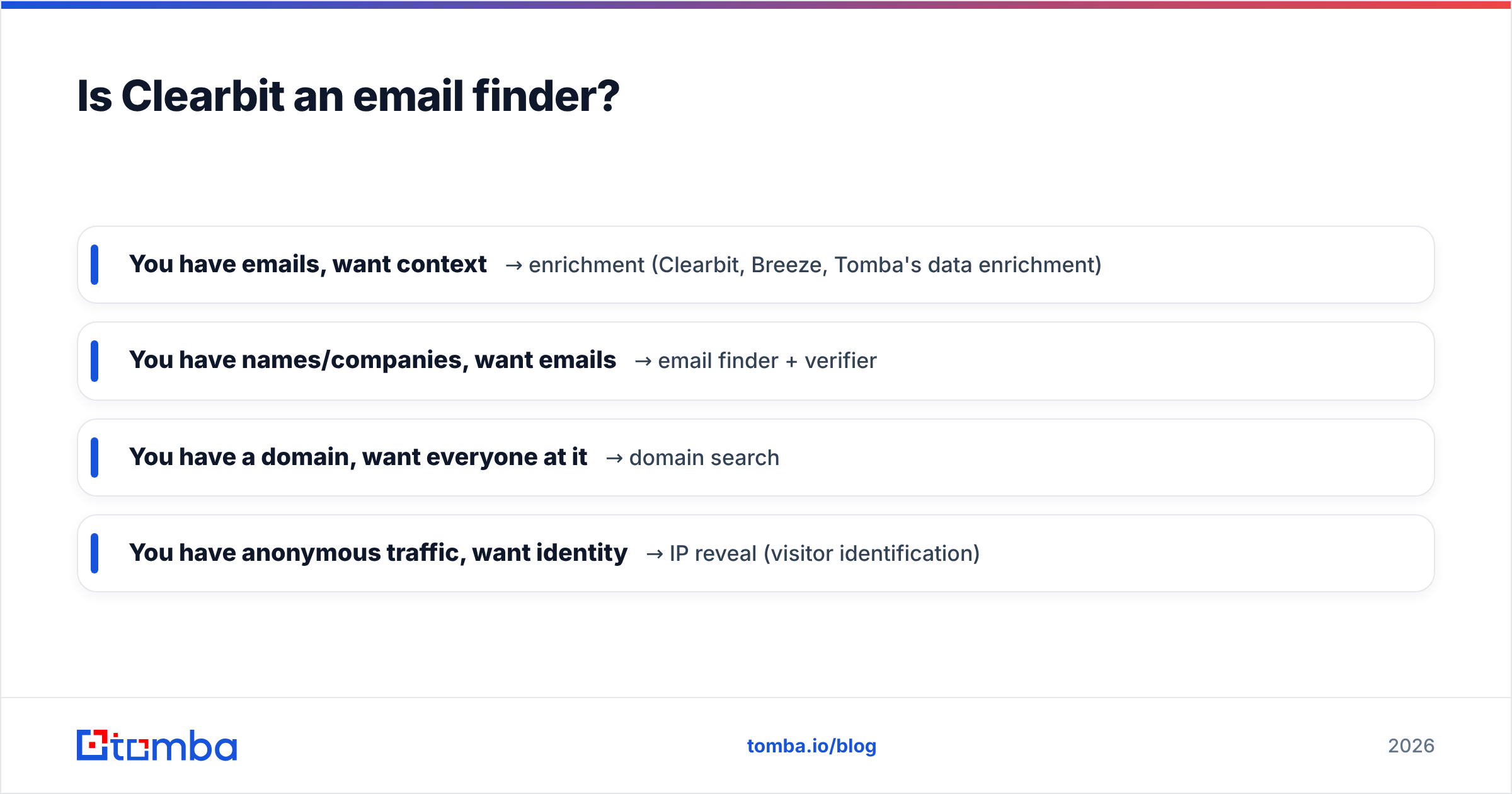
So the split is simple:
- You have emails, want context → enrichment (Clearbit, Breeze, Tomba's data enrichment)
- You have names, want emails → an email finder plus a verifier
- You have a domain, want the whole team → domain search
- You have unknown traffic, want names → IP reveal (visitor identification)
Most teams need two of these four. Buying the wrong one first is why these deals get dropped at renewal.
How accurate is Clearbit's data?#
Two numbers get mixed up here all the time.
- Match rate — how many of your records return any data. Domain-level rates run high, since company records are dense and public. Person-level rates drop hard, above all outside North America and Western Europe.
- Field accuracy — of the rows that match, how many fields are right today. Staff count and industry age slowly. Job titles age fast. B2B contact data decays 2-3% a month. Much of a static list is stale within a year.
The company layer is strong. It is one of the better company graphs you can buy. Tech-stack detection beats most rivals. The person layer is thinner, and it thins out most for non-US contacts and firms under 50 staff.
One rule holds: never trust a vendor's email field. Run each address through an email verifier first. These vendors chase coverage. Verifiers chase truth. Those are different goals.
Want to see how vendor claims hold up? G2's data enrichment category is the least filtered source of user reviews.
What does Clearbit cost in 2026?#
How does Clearbit work as a purchase now? Through HubSpot, and only through HubSpot.
Clearbit no longer lists self-serve prices. You buy Breeze Intelligence credits instead. Credits come in packs and ride on a HubSpot plan. Old contracts move over at renewal.
In practice:
- Already on HubSpot? This is an easy add-on. Setup work is near zero.
- On Salesforce, Pipedrive, or your own stack? You buy into a whole ecosystem to get one data feed. That is a real cost.
- Just want an API for emails and company data? The fit is poor.
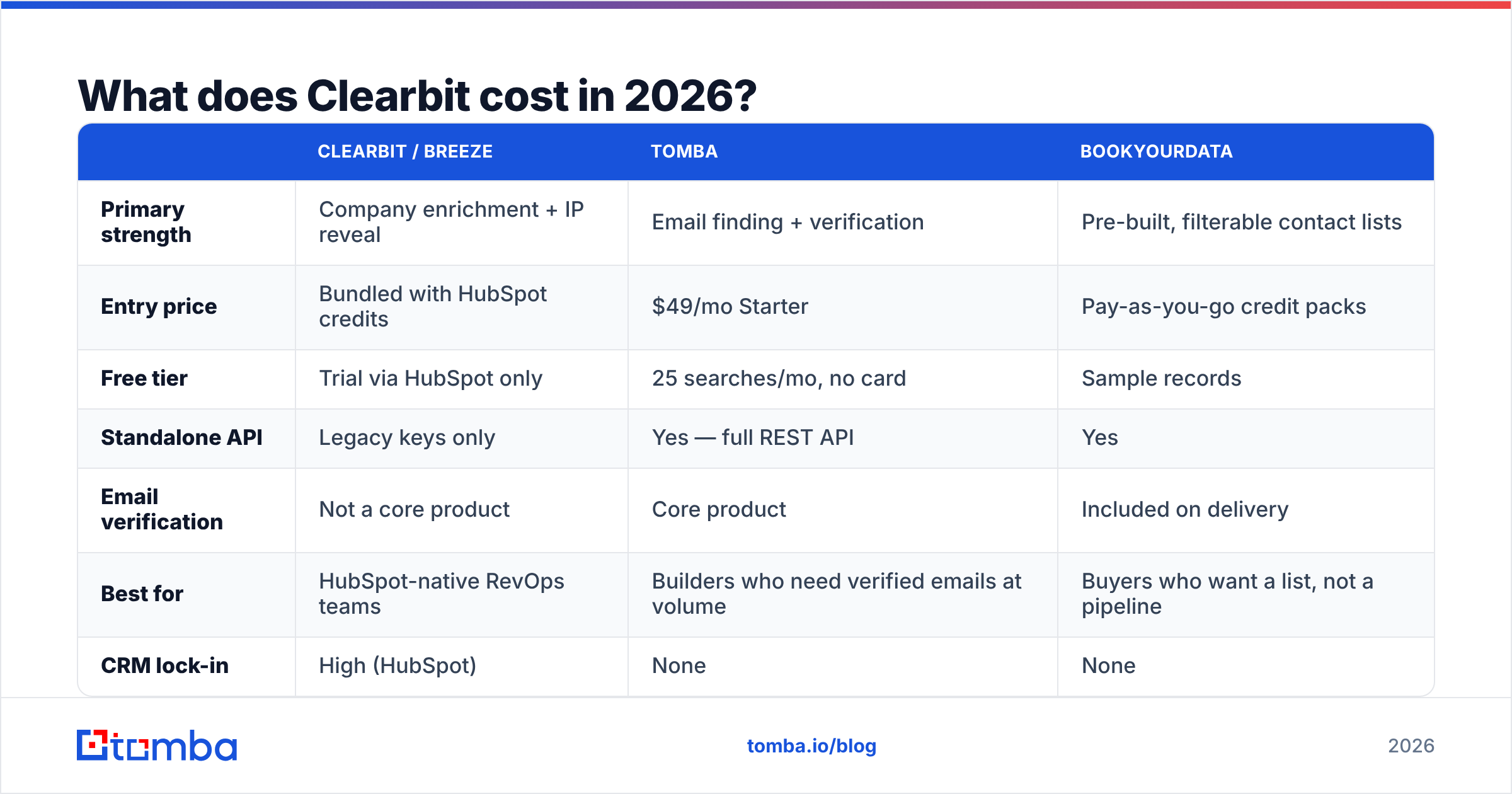
Here is how the field compares for a small or mid-size team:
| Clearbit / Breeze | Tomba | BookYourData | |
|---|---|---|---|
| Primary strength | Company enrichment + IP reveal | Email finding + verification | Pre-built, filterable contact lists |
| Entry price | Bundled with HubSpot credits | $49/mo Starter | Pay-as-you-go credit packs |
| Free tier | Trial via HubSpot only | 25 searches/mo, no card | Sample records |
| Standalone API | Legacy keys only | Yes — full REST API | Yes |
| Email verification | Not a core product | Core product | Included on delivery |
| Best for | HubSpot-native RevOps teams | Builders who need verified emails at volume | Buyers who want a list, not a pipeline |
| CRM lock-in | High (HubSpot) | None | None |
BookYourData is worth a look if you need a clean, filtered list this week. That is a different shape of problem. It solves that shape well.
Tomba's pricing is public: Free (25 searches/mo), Starter $49/mo, Growth $99/mo, Pro $249/mo, and Enterprise custom. No CRM needed.

How do you actually implement Clearbit?#
How does Clearbit work in a real rollout? Like this, if you are on HubSpot and the fit is right.
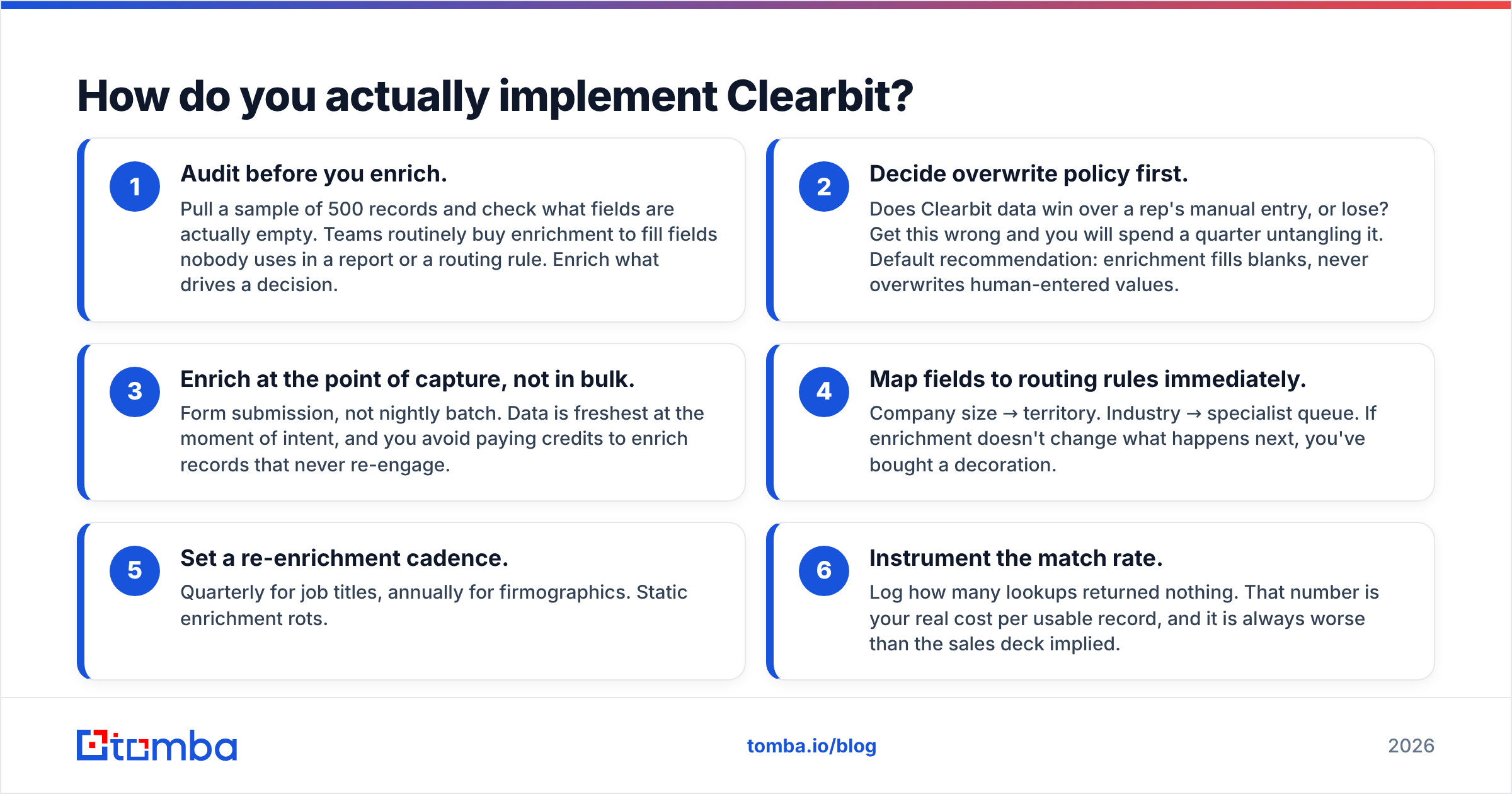
- Audit first. Pull 500 records. Check which fields are truly empty. Fill only what drives a decision.
- Set the overwrite rule. Does Clearbit beat a rep's manual entry, or lose to it? Decide now. Default: fill blanks, never overwrite a human.
- Enrich at capture. Do it on form submit, not in a nightly batch. Data is freshest at the moment of intent.
- Wire fields to routing. Company size to territory. Industry to a queue. If nothing changes downstream, you bought a decoration.
- Set a refresh cadence. Quarterly for job titles. Yearly for company fields.
- Track the match rate. Log every empty lookup. That is your true cost per usable record.
Not on HubSpot? Go API-first. Call the endpoint at signup. Cache the result. Refresh it on a schedule. Tomba's Tomba API and MCP server cover that pattern with no CRM tie-in. The HubSpot integration is there if you do live in HubSpot.
When should you use something other than Clearbit?#
Skip it, or pair it with another tool, in these cases:
- You do outbound, not inbound. Clearbit suits people who came to you. Cold outbound needs a finder plus a verifier.
- You are not on HubSpot. The new packaging is hard to justify for a data feed alone.
- Your buyers are small or non-US. Person coverage thins out fast.
- You need phone numbers. Not Clearbit's game. Use a phone finder.
- You need catch-all handling. Most vendors hand back a catch-all address with no signal at all. A catch-all verifier settles it first.
That last one matters more than it sounds. Mail sent to unchecked catch-all addresses wrecks email deliverability fast. No amount of company data saves you from that.
What's the honest verdict on Clearbit in 2026?#
How does Clearbit work out in the end? It is a strong company-data graph bolted to a CRM you may not want.
Run inbound on HubSpot? Breeze Intelligence is close to a default pick. The tie-in is native. The company data is strong. Forms alone can pay for the credits through lift in sign-ups.
Run outbound, build on an API, or live outside HubSpot? The product has moved away from you. You pay an ecosystem tax for data you can source for less. You still need a finder and a verifier on top.
Here is the setup that works for most teams. Use enrichment for context on inbound records. Use a finder plus a verifier for everything outbound. Two tools. Clean split. Neither one pretending to be the other.
HubSpot's own research on sales data quality lands in the same place. Better data sharpens decisions. It does not create pipeline.
Need the half Clearbit doesn't cover? Tomba Email Finder turns a name and a domain into a verified work email. You get SMTP checks, catch-all detection, and bulk runs. Start free with 25 searches a month. No card. No CRM. Starter runs $49/mo when you scale.
Related guides#
Ready to find emails that actually work?
Join 150,000+ professionals who stopped guessing and started sending. Free credits on signup — no credit card required.
Get the Tomba newsletter
Practical outbound tactics and product updates — once every two weeks.
About the author