How Long Do SPF Records Take to Propagate in 2026?
SPF propagation is not a mystery — it is arithmetic on your DNS TTL. Here is how long it really takes, how to force it faster, and how to verify the change actually landed.
TL;DR
- SPF propagation is governed by your record's TTL, not by some fixed global timer. If your TXT record TTL is 3600 seconds, worst case is roughly one hour for most resolvers.
- The "24-48 hours" figure you see everywhere is a legacy safety margin from the era of slow secondary nameservers and ISP resolvers that ignored TTLs. In 2026 most changes are live in 5 minutes to 4 hours.
- You can make propagation nearly instant by lowering the TTL to 300 seconds a day before you edit the record, then raising it back afterwards.
- Nothing "propagates" in a push sense. DNS is pull-based: resolvers only see your new SPF record once their cached copy of the old one expires.
- Verify with
dig, not with your inbox. A test send tells you nothing until you know which resolver the receiving MTA used.
What does "SPF propagation" actually mean?#
Think of DNS like a library's card catalog that gets photocopied. When you update your SPF record, you update the master card at your authoritative nameserver. But thousands of resolvers around the world are holding photocopies they made earlier. They will not throw those photocopies away until the expiry stamp on them — the TTL — runs out. Only then do they walk back to the master and copy the new version.
That is the whole mechanism. There is no broadcast, no sync event, no queue draining across the internet. So the honest answer to "how long do SPF records take to propagate" is: as long as the TTL you set on that record, plus the refresh interval of any secondary nameservers your provider runs.
Technically, an SPF record is a plain TXT record on your root domain that starts with v=spf1. It tells receiving mail servers which IPs and services are allowed to send on behalf of your domain. Google, Microsoft, and Yahoo all check it at delivery time as part of authentication. If you want the formal grounding, RFC 7208 is the specification, and the Wikipedia entry on Sender Policy Framework is a readable overview.

Wait — that image syntax is wrong. Here it is correctly:
How long do SPF records take to propagate in practice?#
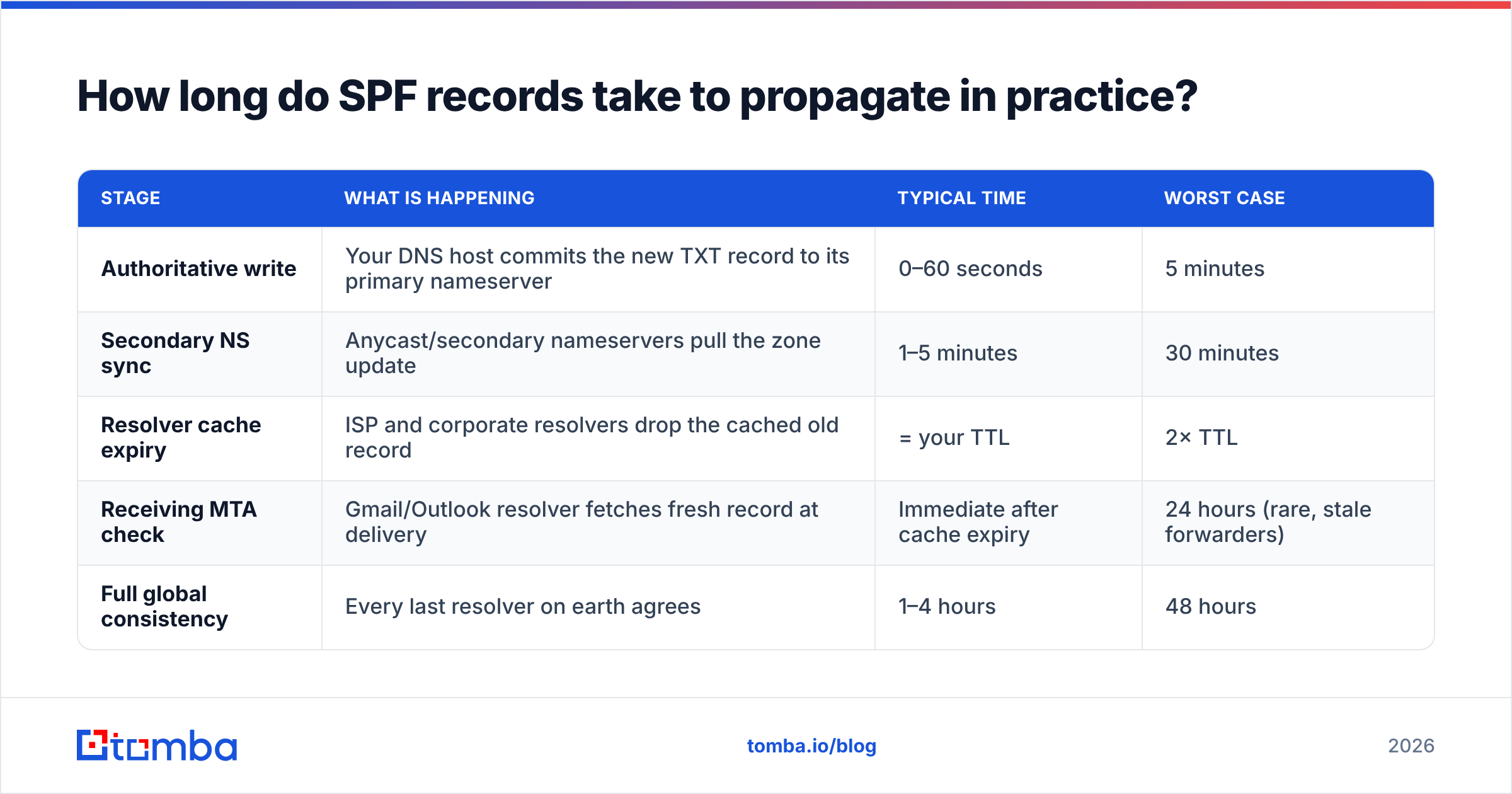
Here is what the timeline actually looks like once you hit save at your DNS host. These are observed ranges across common registrars and DNS providers, not vendor promises.
| Stage | What is happening | Typical time | Worst case |
|---|---|---|---|
| Authoritative write | Your DNS host commits the new TXT record to its primary nameserver | 0–60 seconds | 5 minutes |
| Secondary NS sync | Anycast/secondary nameservers pull the zone update | 1–5 minutes | 30 minutes |
| Resolver cache expiry | ISP and corporate resolvers drop the cached old record | = your TTL | 2× TTL |
| Receiving MTA check | Gmail/Outlook resolver fetches fresh record at delivery | Immediate after cache expiry | 24 hours (rare, stale forwarders) |
| Full global consistency | Every last resolver on earth agrees | 1–4 hours | 48 hours |
The row that matters is resolver cache expiry. Everything else is measured in minutes. If you set a 3600-second TTL, plan for an hour. If your provider defaults to 86400 seconds (24 hours) — and several registrars still do — you inherited the full-day wait, and that is where the mythical "48 hours" comes from.
One nuance that trips people up: some resolvers, particularly at large ISPs and inside corporate networks, apply a minimum TTL floor. They will not honor a 60-second TTL; they will clamp it to 300 or 600 seconds. So a TTL below 5 minutes buys you nothing in the real world.
Why does everyone say 24 to 48 hours?#
Three reasons, and only one of them is still valid:
- Legacy TTL defaults. Registrars used to ship 86400-second TTLs by default to reduce query load on their nameservers. Change the record, wait a day. Many older tutorials were written against that default and never updated.
- Non-compliant resolvers. A small tail of resolvers historically ignored TTLs entirely and refreshed on their own schedule. This is much rarer now but not extinct — which is why "48 hours" persists as a support-safe answer.
- Registrar transfers and NS changes get conflated with record edits. Changing your nameservers really can take 24–48 hours because it involves the TLD registry and its own TTLs. Changing a TXT record under nameservers you already control does not. Support articles frequently blur these two.
If you only remember one thing: a nameserver change is slow, a record change is TTL-fast.
How do you make SPF changes propagate faster?#
You cannot speed up a cache that has already been populated. But you can plan ahead so the cache is short-lived when the change lands.
- Lower the TTL first, 24 hours before the edit. Set your existing SPF TXT record's TTL to 300 seconds and leave the record content unchanged. Wait for the old TTL to fully expire. Now every resolver is holding a copy that dies in 5 minutes.
- Make the actual SPF change. Edit the record content. Because the cached copies expire in 5 minutes, the new value is effectively live across the internet within that window.
- Verify at multiple resolvers. Query 8.8.8.8 (Google), 1.1.1.1 (Cloudflare), 9.9.9.9 (Quad9), and your own ISP resolver. If all four agree, you are done.
- Restore a sane TTL. Push it back to 3600 seconds once you have confirmed the change. Permanently low TTLs increase query volume and add latency to every lookup against your domain.
- Only then resume sending volume. Do not run a campaign into a half-propagated SPF record — you will collect authentication failures that hurt your sender reputation for weeks.
- Log the change. Record the timestamp, the old value, and the new value. When someone asks in three months why deliverability dipped on a Tuesday, you will have the answer.
That five-step pattern turns a "wait and pray for two days" problem into a 10-minute maintenance window.
How do you verify an SPF record has actually propagated?#
Stop using test emails as your first check. A test send confirms delivery, not which record version the receiver saw. Query DNS directly.
On macOS or Linux:
# Ask Google's public resolver
dig TXT tomba.io @8.8.8.8 +short

# Ask Cloudflare
dig TXT tomba.io @1.1.1.1 +short

# Ask your authoritative nameserver directly (bypasses all caches)
dig TXT tomba.io @ns1.yourprovider.com +short

# Check the remaining TTL on the cached copy
dig TXT tomba.io @8.8.8.8 | grep -i spf
On Windows PowerShell:
Resolve-DnsName -Name tomba.io -Type TXT -Server 8.8.8.8The TTL value in the dig output counts down — if you query twice ten seconds apart and the number drops by ten, you are looking at a cached copy and you know exactly how many seconds remain before it refreshes. That is your propagation countdown, precisely measured, no guessing.
For a browser-based check without the terminal, run the record through an SPF checker and compare the returned string against what you entered. If they differ, you are still inside the cache window at whatever resolver that tool used.
What breaks SPF besides slow propagation?#
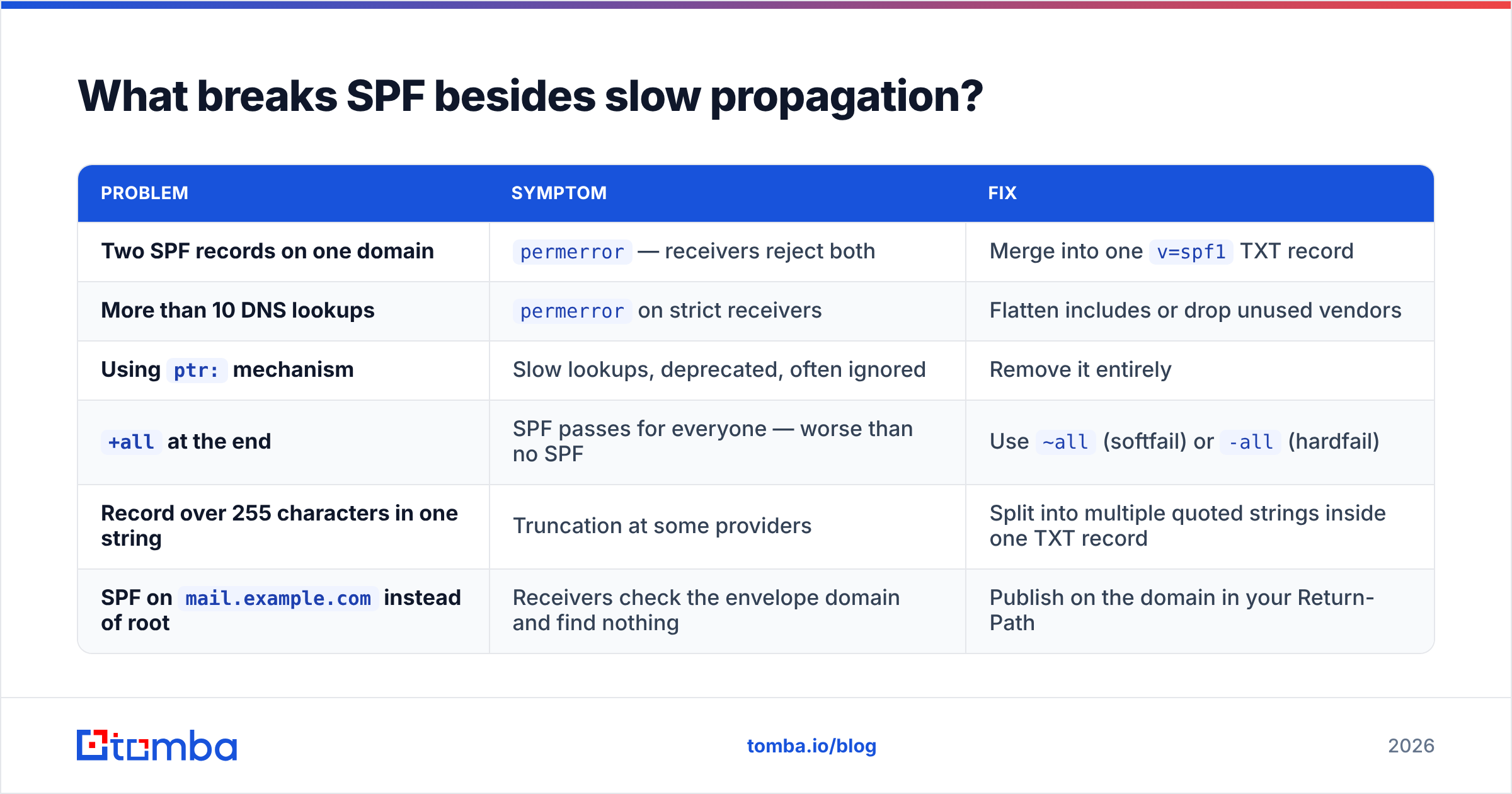
Most "my SPF isn't propagating" tickets are not propagation problems at all. They are record problems that would fail even after a week of waiting.
| Problem | Symptom | Fix |
|---|---|---|
| Two SPF records on one domain | permerror — receivers reject both |
Merge into one v=spf1 TXT record |
| More than 10 DNS lookups | permerror on strict receivers |
Flatten includes or drop unused vendors |
Using ptr: mechanism |
Slow lookups, deprecated, often ignored | Remove it entirely |
+all at the end |
SPF passes for everyone — worse than no SPF | Use ~all (softfail) or -all (hardfail) |
| Record over 255 characters in one string | Truncation at some providers | Split into multiple quoted strings inside one TXT record |
SPF on mail.example.com instead of root |
Receivers check the envelope domain and find nothing | Publish on the domain in your Return-Path |
The 10-lookup limit is the one that bites growing teams hardest. Every include: costs a lookup, and stacking Google Workspace + an ESP + a CRM + a helpdesk + a billing tool will blow past ten faster than you expect. Once you hit permerror, receivers treat your mail as unauthenticated regardless of how long the record has been live.
Does SPF propagation differ from DKIM and DMARC?#
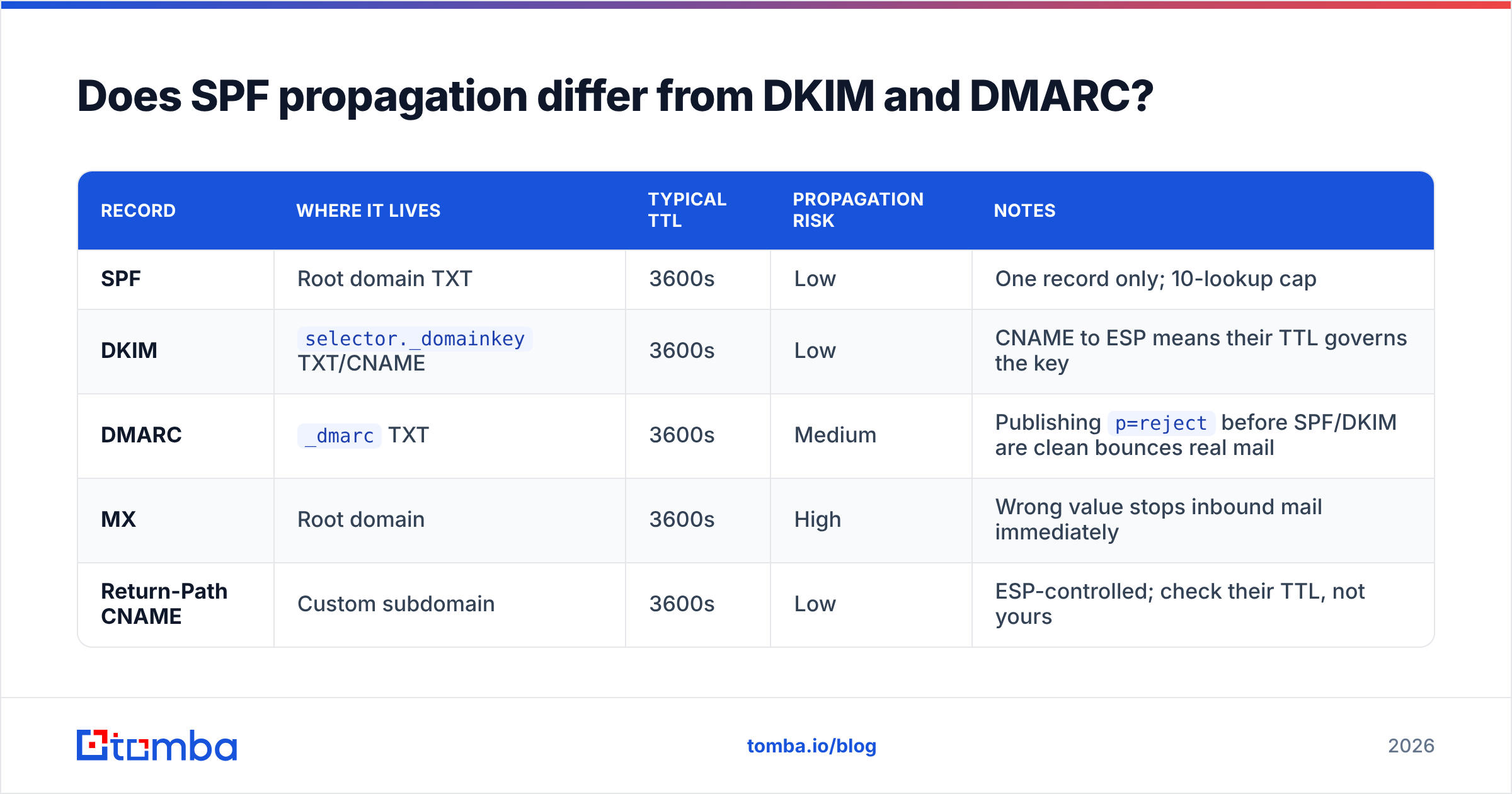
Mechanically, no — all three are DNS records and all three follow TTL rules. Operationally, the sequencing matters.
| Record | Where it lives | Typical TTL | Propagation risk | Notes |
|---|---|---|---|---|
| SPF | Root domain TXT | 3600s | Low | One record only; 10-lookup cap |
| DKIM | selector._domainkey TXT/CNAME |
3600s | Low | CNAME to ESP means their TTL governs the key |
| DMARC | _dmarc TXT |
3600s | Medium | Publishing p=reject before SPF/DKIM are clean bounces real mail |
| MX | Root domain | 3600s | High | Wrong value stops inbound mail immediately |
| Return-Path CNAME | Custom subdomain | 3600s | Low | ESP-controlled; check their TTL, not yours |
The order to roll these out: SPF first, DKIM second, then DMARC at p=none for two weeks of reporting, then tighten to quarantine, then reject. If you jump to p=reject while your SPF is still mid-change, you are hard-bouncing your own mail during the exact window you cannot see clearly. Google's Postmaster Tools will show you the authentication pass rate, but it lags by a day or so — plan for that.
Once authentication is stable, the next constraint on your results is list quality, not DNS. A perfectly authenticated message to a dead mailbox still bounces. Running your list through an email verifier before a campaign removes the invalid addresses that drive bounce-rate penalties, and a catch-all verifier handles the domains that accept everything and tell you nothing.
What is a realistic SPF change checklist?#
Use this as your runbook. It takes about 30 minutes of active work spread over two days.
Day 1 — prepare
- Record your current SPF string verbatim. Paste it somewhere outside the DNS panel.
- Count your
include:mechanisms. If you are at 8 or more, plan a flattening pass now. - Drop the TTL on the SPF TXT record to 300. Change nothing else.
- Confirm the low TTL is visible at 8.8.8.8 before you go further.
Day 2 — change
- Edit the record content. One
v=spf1record, oneallmechanism, noptr:. - Wait 5 minutes. Query four resolvers. Confirm they all return the new string.
- Send a single test message to a Gmail address and a Microsoft 365 address. Open the raw headers and look for
spf=pass. - Raise the TTL back to 3600.
- Note the change in your change log with the timestamp.
Week 1 — monitor
- Watch DMARC aggregate reports for sources you did not expect.
- Check bounce reasons for anything mentioning SPF or authentication.
- If you changed sending platforms, re-warm gradually rather than resuming full volume.
If you are managing this across multiple sending domains — separate domains for cold outreach, product notifications, and billing, which is the correct architecture — repeat the whole cycle per domain. Do not assume a shared TTL policy across registrars.
Where does contact data quality fit into this?#
Deliverability is a stack, and DNS is only the bottom layer. Above it sits list hygiene, and above that sits targeting. Getting SPF right removes one failure mode; it does not compensate for sending to addresses that were guessed, scraped years ago, or typed wrong in a form.
The practical order of operations for an outbound program is: authenticate the domain (SPF, DKIM, DMARC), verify the list, then send. Teams that invert this — send first, fix DNS when complaints arrive — spend months rebuilding reputation. The email deliverability fundamentals have not changed much, but enforcement at Gmail and Microsoft has tightened considerably since the 2024 bulk-sender requirements, and there is far less tolerance for unauthenticated or high-bounce senders now.
If you are also sourcing new contacts rather than just cleaning an existing list, pull them from a source that verifies at collection time instead of dumping raw guesses into your sequencer. That is the difference between a 2% bounce rate and a 15% one — and at 15%, no SPF record on earth will save your reputation.
Get the sending side right, then get the list right#
SPF propagation is solved arithmetic: lower the TTL, make the change, verify at four resolvers, restore the TTL. Budget an hour, not two days.
What takes longer to fix is a contact list full of addresses that never existed. Once your authentication is clean, use the Tomba Email Finder to source verified professional addresses by domain, name, or company — each one checked against live mail servers before it reaches your sequencer. The free tier includes 25 searches per month, and paid plans start at $49/mo on Tomba pricing if you need volume. Clean DNS plus a clean list is the entire game.
Related guides#
Ready to find emails that actually work?
Join 150,000+ professionals who stopped guessing and started sending. Free credits on signup — no credit card required.
Get the Tomba newsletter
Practical outbound tactics and product updates — once every two weeks.
About the author