How Many Emails Can I Send Per Day? Limits by Provider
Gmail says 2,000. Your inbox provider says otherwise. Here are the real sending limits for Google Workspace, Microsoft 365, and cold email tools in 2026 — plus the safe daily number that actually protects your domain.
TL;DR
- Google Workspace caps you at 2,000 external recipients per day; Microsoft 365 caps at 10,000. Those are abuse ceilings, not sending targets.
- The safe cold-outreach number is 20–40 emails per inbox per day on a warmed domain — not 2,000.
- Volume scales by adding inboxes and domains, not by pushing one mailbox harder.
- Bounce rate matters more than volume. Over 3% bounces and providers throttle you regardless of how few you sent.
- A new domain needs 3–4 weeks of warmup before it sees real outbound traffic.
What is the actual answer to "how many emails can I send per day"?#
There are two numbers, and confusing them is why most cold email programs die in week three.
The first number is the provider limit — a hard technical cap enforced by Google, Microsoft, or your SMTP relay. Hit it and you get a bounce message like "You have reached a limit for sending mail." Annoying, but recoverable.
The second number is the safe volume — how many emails you can send before spam filters start reading your traffic pattern as bulk. There is no error message for crossing this line. Your emails just quietly stop reaching inboxes, and your open rate drifts from 45% to 12% over a fortnight while you blame your subject lines.
Think of it like a highway. The speed limit sign says 70 mph. The safe speed in heavy rain is 45. The sign doesn't change when the weather does — and your inbox provider doesn't warn you when your reputation is soaking wet.
Almost everyone who asks how many emails they can send per day is asking about the first number when they should be asking about the second.

What are the daily sending limits by provider in 2026?#
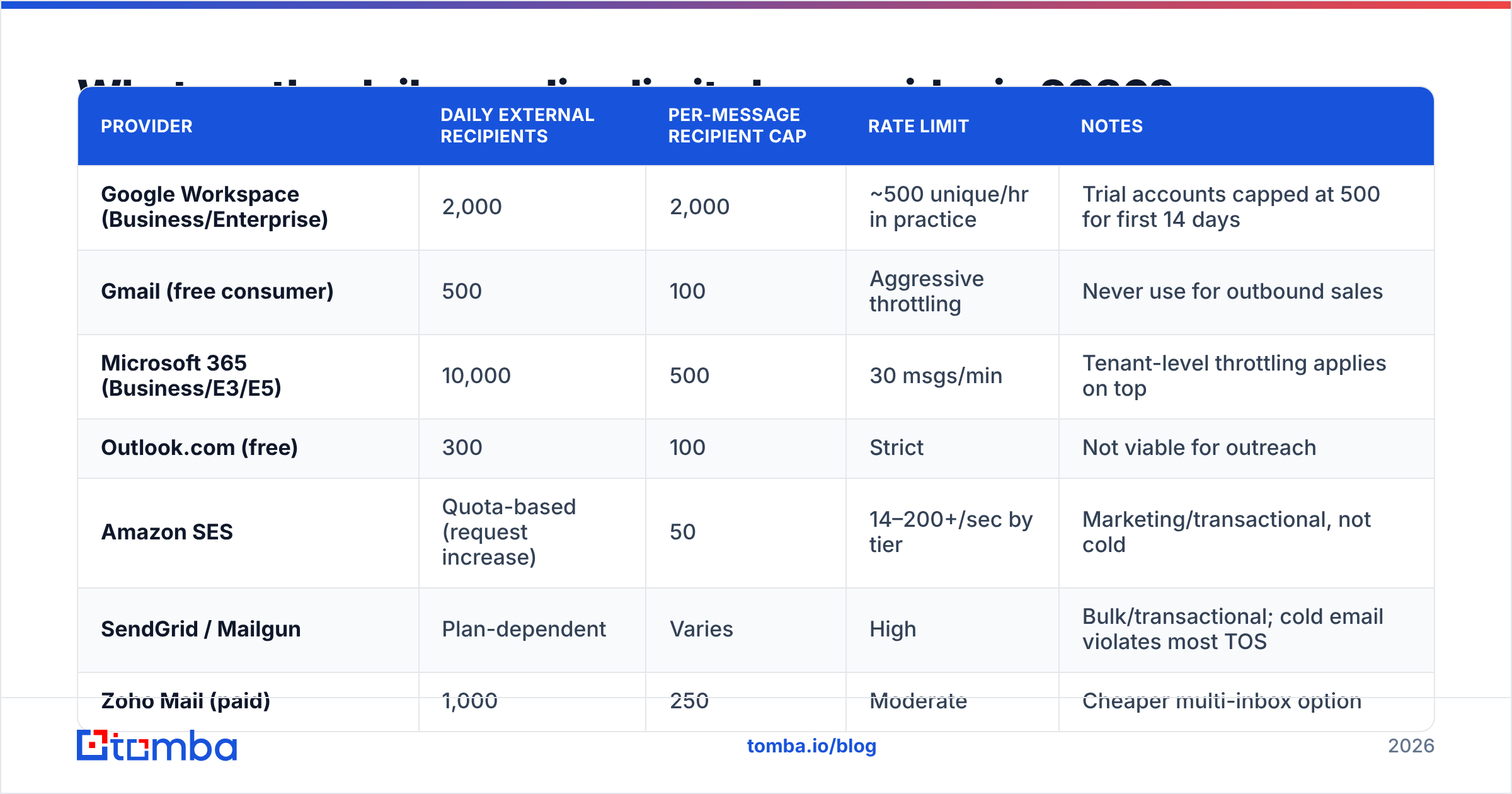
Here are the published caps for the major providers. "External recipients" means unique addresses outside your own domain — the number that actually matters for outbound.
| Provider | Daily external recipients | Per-message recipient cap | Rate limit | Notes |
|---|---|---|---|---|
| Google Workspace (Business/Enterprise) | 2,000 | 2,000 | ~500 unique/hr in practice | Trial accounts capped at 500 for first 14 days |
| Gmail (free consumer) | 500 | 100 | Aggressive throttling | Never use for outbound sales |
| Microsoft 365 (Business/E3/E5) | 10,000 | 500 | 30 msgs/min | Tenant-level throttling applies on top |
| Outlook.com (free) | 300 | 100 | Strict | Not viable for outreach |
| Amazon SES | Quota-based (request increase) | 50 | 14–200+/sec by tier | Marketing/transactional, not cold |
| SendGrid / Mailgun | Plan-dependent | Varies | High | Bulk/transactional; cold email violates most TOS |
| Zoho Mail (paid) | 1,000 | 250 | Moderate | Cheaper multi-inbox option |
Two things jump out of that table.
First, the gap between free and paid accounts is enormous — a free Gmail account gives you 500 recipients per day and a trigger-happy suspension policy. Every serious outbound program runs on paid Workspace or 365 mailboxes.
Second, none of these numbers are recommendations. Google will happily let you send 2,000 cold emails today. Google will also happily let your domain reputation collapse tomorrow. The cap and the advice are unrelated.
What is the safe number of cold emails per day per inbox?#
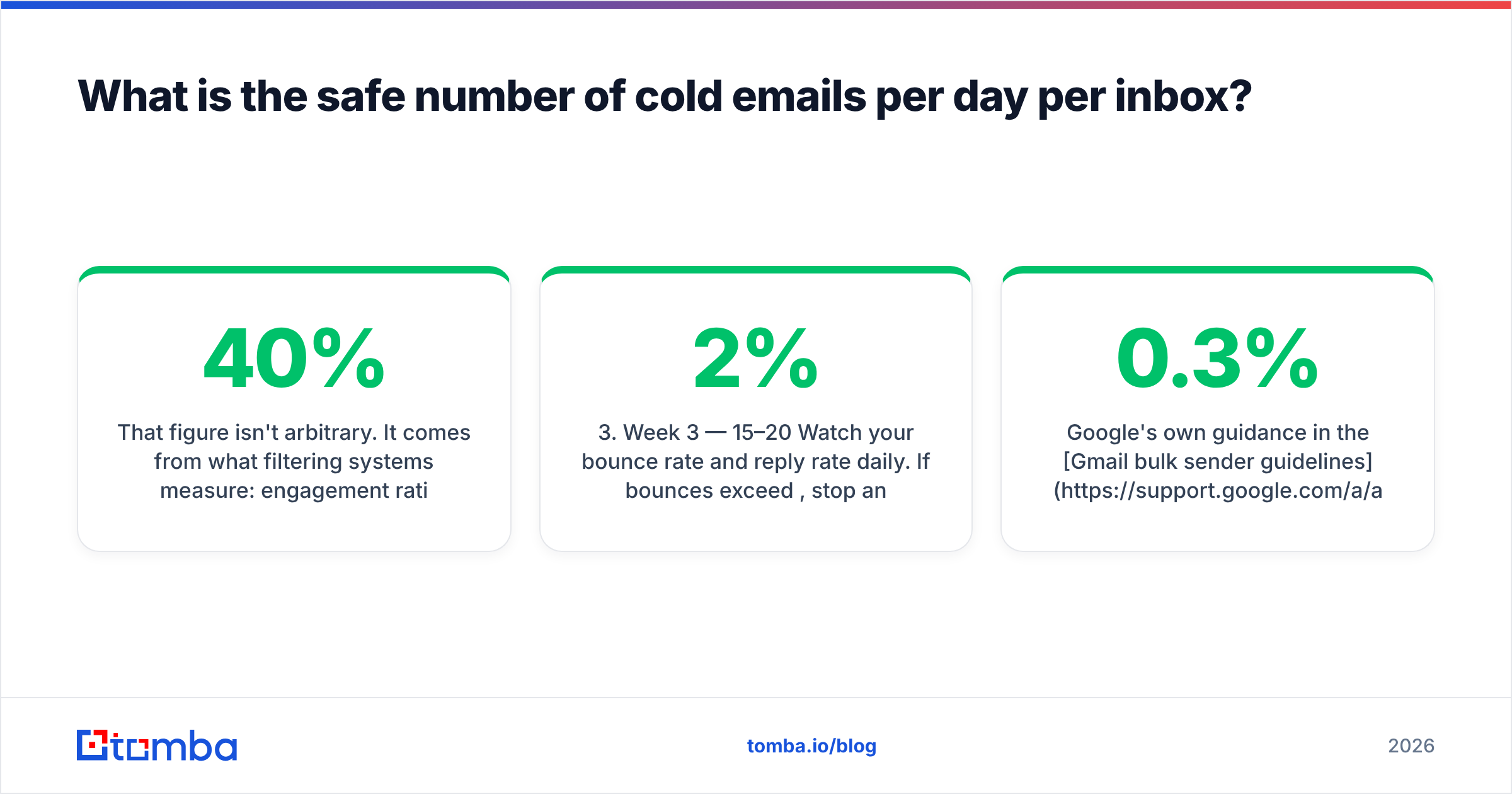
20 to 40 per inbox per day on a warmed domain. 10 to 15 during the first month.
That figure isn't arbitrary. It comes from what filtering systems measure: engagement ratio, complaint rate, bounce rate, and sending consistency. A mailbox sending 30 personalized emails a day with a 40% open rate and a 0.5% bounce rate looks like a salesperson. A mailbox sending 400 near-identical emails with an 8% bounce rate looks like a compromised account.
Here's a realistic ramp for a new sending domain:
- Week 1 — warmup only. No prospects. Run automated warmup (Instantly, Mailreach, Warmbox) so the mailbox exchanges 5–20 replies a day with real accounts. Zero cold sends.
- Week 2 — 5–10 cold emails/day. Only your highest-confidence, fully verified contacts. Every bounce here costs disproportionately.
- Week 3 — 15–20/day. Watch your bounce rate and reply rate daily. If bounces exceed 2%, stop and re-verify the list.
- Week 4 — 25–30/day. Keep warmup running in parallel. Warmup never gets turned off; it's the baseline positive signal underneath your outbound.
- Week 5+ — 30–40/day sustained. This is your steady-state ceiling for a single inbox. Do not push past it.
- Need more? Add inboxes. Two mailboxes at 35/day beat one at 70 every single time.
Google's own guidance in the Gmail bulk sender guidelines is explicit about the thresholds that matter: keep spam complaints under 0.3%, authenticate with SPF, DKIM and DMARC, and make unsubscribing trivial. Nowhere does it say "sending fewer emails fixes a bad list" — because it doesn't. Volume is one input among several.
How does list quality change your daily limit?#
Dramatically. Your effective sending limit is capped by your bounce rate long before it's capped by your provider.
Run the arithmetic. Send 40 emails a day from a list with a 12% invalid rate and you generate about 5 hard bounces daily, roughly 100 a month. Mailbox providers read a sustained double-digit bounce rate as a signal that you're sending to purchased or scraped data, and they act accordingly: soft throttling first, then bulk-foldering, then outright rejection. At that point your "limit" is effectively zero no matter what the admin console says.
The same 40 emails from a list verified to a sub-2% invalid rate produce fewer than one bounce a day. Same volume, opposite outcome.
This is where sourcing matters more than sending. If you're pulling contacts from a scrape or a three-year-old CSV, cut your daily volume in half and put the savings into verification. Running your list through an email verifier before the first send is the single highest-ROI step in the entire sequence — and for domains that accept everything, a dedicated catch-all verifier tells you which addresses are actually safe to touch.
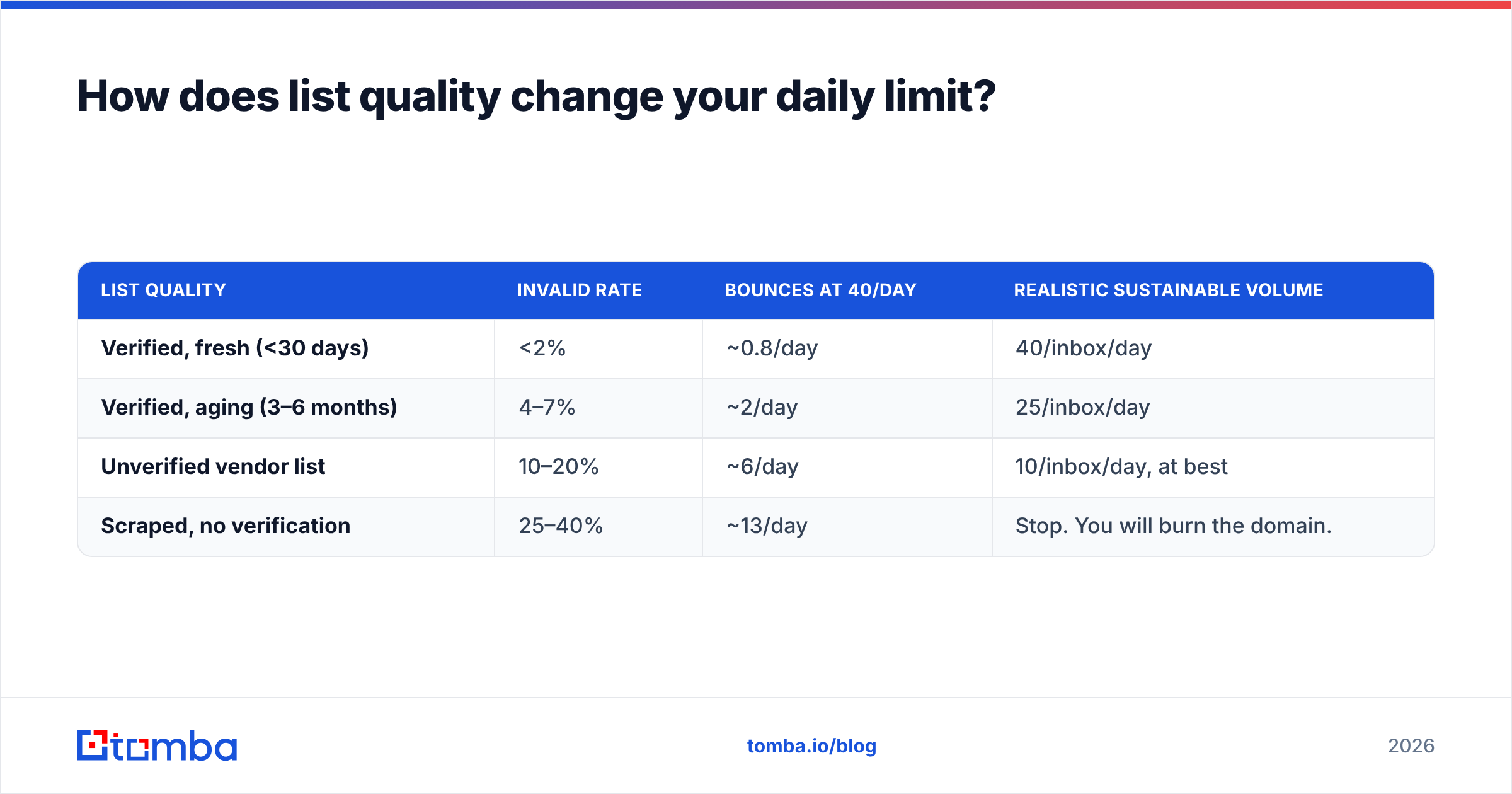
| List quality | Invalid rate | Bounces at 40/day | Realistic sustainable volume |
|---|---|---|---|
| Verified, fresh (<30 days) | <2% | ~0.8/day | 40/inbox/day |
| Verified, aging (3–6 months) | 4–7% | ~2/day | 25/inbox/day |
| Unverified vendor list | 10–20% | ~6/day | 10/inbox/day, at best |
| Scraped, no verification | 25–40% | ~13/day | Stop. You will burn the domain. |
The last row isn't hyperbole. A 30% bounce rate on a new domain typically produces measurable reputation damage inside a week and takes 6–8 weeks of remediation to undo — assuming the domain is salvageable at all.
How do you scale past 40 emails a day safely?#
Horizontally. You add sending capacity by adding mailboxes and domains, never by raising the per-inbox number.
The standard architecture looks like this:
- Keep your primary domain clean. Never send cold outreach from
yourcompany.com. That domain carries your billing, your support, and your existing customer relationships. If it gets blacklisted you have a genuine emergency. - Register 2–5 lookalike domains.
getyourcompany.com,yourcompany.co,try-yourcompany.com. Each gets its own SPF, DKIM, and DMARC records. - Run 3 mailboxes per domain. More than that and the pattern starts looking like a mailbox farm to filtering systems.
- Do the math. 3 domains × 3 inboxes × 35 emails/day = 315 emails per day, sustainably, with no single mailbox anywhere near a provider cap.
- Rotate sends across inboxes. Any decent sequencer (Instantly, Smartlead, Lemlist) will distribute a campaign across a mailbox pool automatically.
- Warm every inbox continuously. Warmup traffic is the positive-engagement floor that keeps reputation stable when a campaign underperforms.
That structure gets you to five figures a month without any single account looking abnormal. It costs more — roughly $6–$12 per mailbox per month plus domain registration — but it's the difference between a channel that compounds and one that resets every quarter.

What signals matter more than raw daily volume?#
Volume is the input everyone obsesses over because it's the easiest to control. Filtering systems weight it far below these:
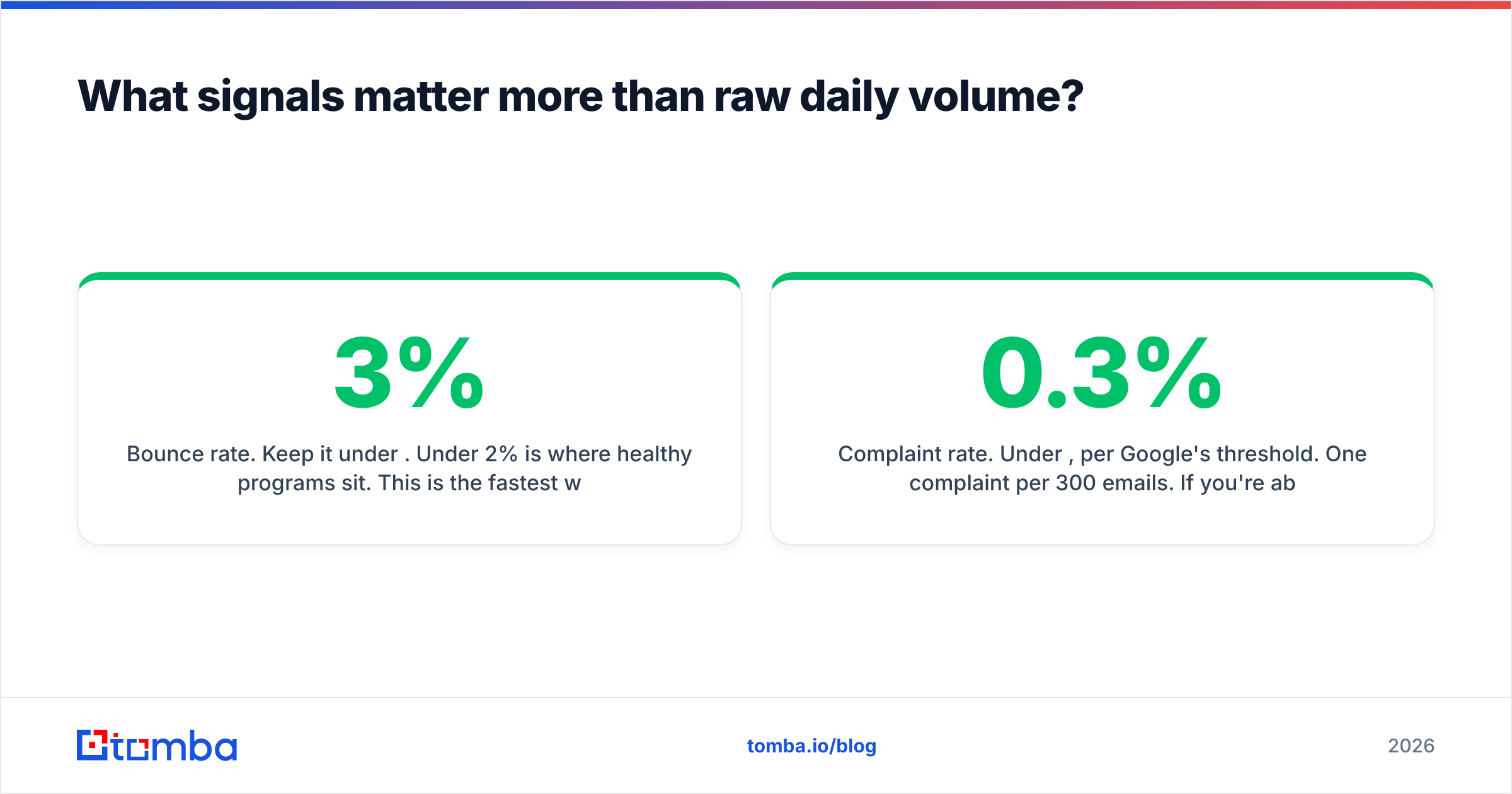
Bounce rate. Keep it under 3%. Under 2% is where healthy programs sit. This is the fastest way to destroy a domain and the easiest to prevent.
Complaint rate. Under 0.3%, per Google's threshold. One complaint per 300 emails. If you're above it, your targeting is wrong — not your volume.
Reply rate. Positive engagement is the strongest counter-signal to spam classification. A mailbox that receives replies is a mailbox with a human on the other end. This is exactly what warmup simulates.
Authentication. SPF, DKIM, and DMARC on every sending domain, no exceptions. Google and Yahoo made this mandatory for bulk senders in 2024 and enforcement has only tightened. Check your records with an SPF checker before you send anything.
Consistency. 30 emails a day, five days a week beats 150 on Monday and nothing until Friday. Erratic volume looks like a burst campaign; steady volume looks like a person doing their job.
Content variation. Identical bodies across hundreds of recipients get fingerprinted. Genuine personalization — the first line, the specific pain, the named competitor — isn't just a reply-rate play, it's a deliverability one.
Independent deliverability research consistently lands in the same place. Validity's benchmark reporting has shown for years that list hygiene and authentication explain more inbox-placement variance than send volume does. The volume question matters, but it's third or fourth on the list.
How does this differ for newsletters and transactional email?#
Different rules entirely, and mixing them up is a common mistake.
Newsletters and marketing email go through an ESP — Mailchimp, Klaviyo, Customer.io — not your Workspace mailbox. Volume limits are contractual, not technical, and you can send 100,000 emails in an hour if you're paying for it. The constraint is opt-in status: everyone on the list asked to be there. Complaint rates are the binding limit, and they should sit well below 0.1%.
Transactional email — receipts, password resets, notifications — runs through SES, Postmark, or SendGrid. Volume is effectively unlimited because recipients triggered the send. Never route cold outreach through these providers; it violates their terms and gets the account terminated, usually without warning.
Cold outreach is the only category where the 20–40 rule applies, because it's the only one where the recipient didn't ask for the email. That asymmetry is exactly why the limit is so much lower.
If your plan involves sending 5,000 cold emails a day, the honest answer is that no legitimate architecture supports it. What supports it is 150 mailboxes, and at that scale you've built a spam operation whose economics depend on being unsalvageably burned every few months.
What should you do before increasing volume?#
Work through this in order. Each step is cheaper than the reputation damage it prevents.
- Verify the list. Every address, before the first send. Non-negotiable.
- Confirm authentication. SPF, DKIM, DMARC on each sending domain. Test with a real send to a seed inbox.
- Check your current bounce rate. Above 3%? Fix the list before touching volume.
- Confirm warmup is running. On every inbox, permanently, not just during onboarding.
- Raise volume by 20% per week, maximum. Then hold and observe for a full week before the next increase.
- Watch reply rate as your canary. If replies drop while sends stay flat, you're already being filtered — reduce volume immediately and investigate.
The teams that scale outbound successfully treat daily volume as an output of list quality and domain health, not as a dial they turn independently. When the fundamentals are right, volume increases are boring. When they're wrong, no volume is safe.
Sourcing matters as much as sending here. Pulling verified contacts directly — by company domain, by name, by role — produces a fundamentally different bounce profile than buying a list. Tomba's domain search returns the addresses associated with a company along with confidence scores, and bulk verification handles the list-hygiene pass before anything enters a sequence. Pricing starts free at 25 searches a month, with paid plans from $49/mo — see Tomba pricing for the full breakdown.
Ready to send at a volume that actually lands?#
Your daily sending limit isn't set by Google. It's set by the quality of the addresses you put into the sequencer. A verified 30-email day beats an unverified 300-email day on replies, on reputation, and on every metric that leads to revenue.
Start by fixing the input. Tomba Email Finder sources professional email addresses by domain, name, or company with confidence scoring built in, so the list you load into your sequencer is clean before it costs you a single bounce. The free tier gives you 25 searches a month to test it against contacts you can independently verify — run it on a segment you already know, compare the results, then decide.
Get the data right, and the volume question mostly answers itself.
Related guides#
Ready to find emails that actually work?
Join 150,000+ professionals who stopped guessing and started sending. Free credits on signup — no credit card required.
Get the Tomba newsletter
Practical outbound tactics and product updates — once every two weeks.
About the author