How to Address an Email Without a Name: 9 Openers That Work
No name on the lead? Your greeting is the first thing that decides whether the email gets read or deleted. Here are the openers that survive 2026 inboxes, the ones that scream mass-blast, and the fastest ways to find the real name in under a minute.
TL;DR
- The best answer to "how to address an email without a name" is usually to stop and spend 60 seconds finding the name — a first name beats every generic salutation.
- If you genuinely can't find one, use a role-based or context-based opener ("Hi there," "Hello Support team," "Hi — quick question about your pricing page") instead of "To Whom It May Concern."
- "Dear Sir or Madam" and "To Whom It May Concern" still have narrow legitimate uses: formal complaints, legal notices, and blind job applications. They do not belong in sales emails.
- Never fake personalization. "Hi {First Name}" that renders as "Hi ," or "Hi FIRSTNAME" is worse than no greeting at all.
- The greeting is only 5% of the problem. If you don't know the name, you probably don't know the person — fix the research, not just the salutation.
Why does the greeting matter more than you think?#
The salutation is the first line a recipient reads after the subject line, and it does one job: it tells them whether this email was written for them or at them.
Think of it like knocking on a door. "Hi Sarah" is a neighbor knocking. "To Whom It May Concern" is a clipboard. People answer the first one and pretend not to be home for the second.
That's why the greeting punches above its word count. It's a signal of effort, and effort is the cheapest proxy a busy reader has for relevance. When you open with a generic salutation, you've told the reader — before they've read a single word of your pitch — that they are one row in a spreadsheet.
There's a second, less obvious cost. Spam filters and inbox-provider heuristics don't score your greeting directly, but they do score engagement. Emails that get ignored, deleted-without-open, or marked as promotional drag down your sending domain over time. A weak opener contributes to that pattern, which quietly erodes your email deliverability across every future campaign.
So the honest framing is: a no-name greeting is damage control. Sometimes it's necessary. It's never optimal.
What are your actual options when you don't have a name?#
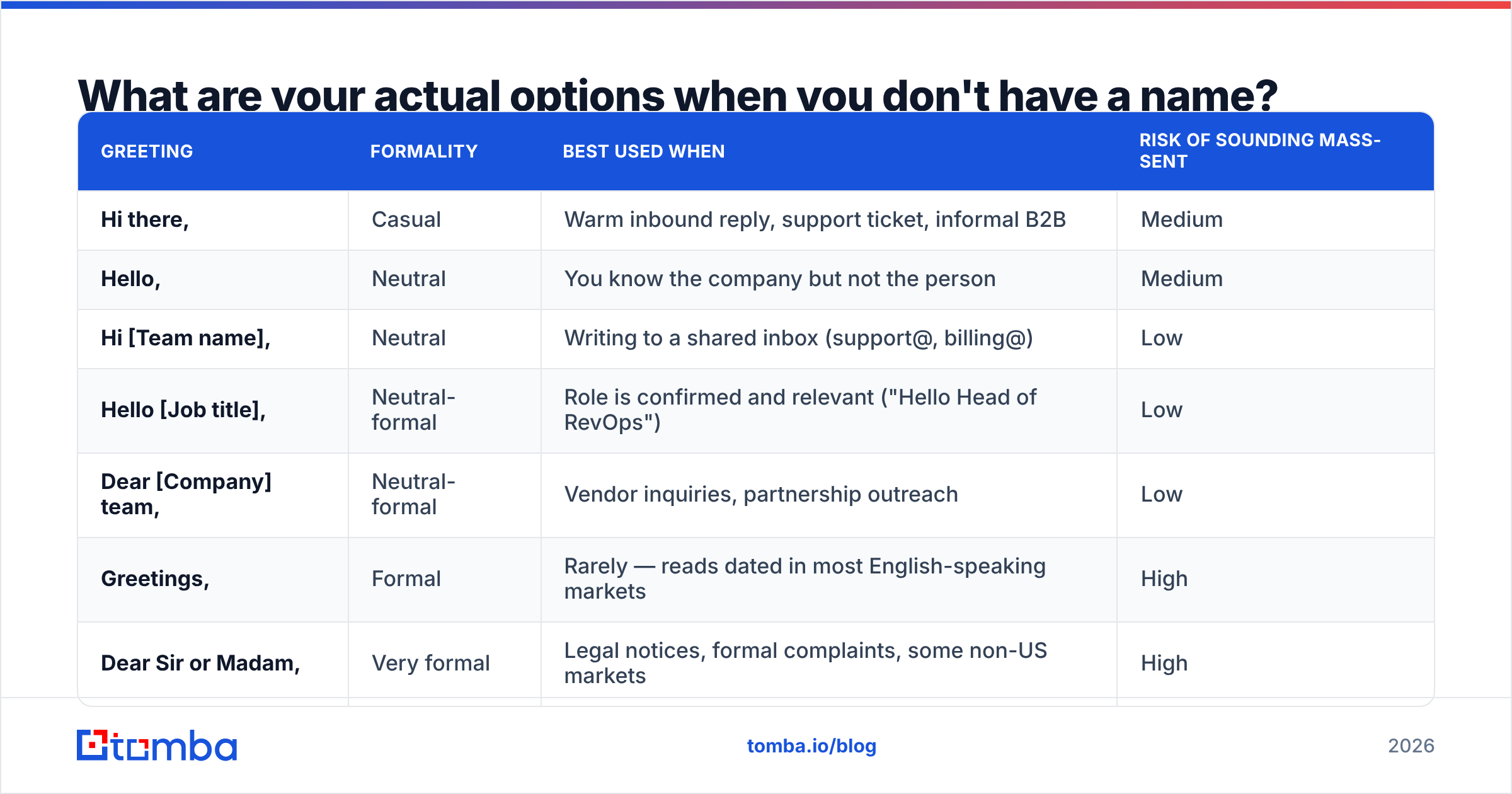
There are nine common openers people reach for. They are not equivalent — each one carries a different level of formality and a different risk of reading as automated.
| Greeting | Formality | Best used when | Risk of sounding mass-sent |
|---|---|---|---|
| Hi there, | Casual | Warm inbound reply, support ticket, informal B2B | Medium |
| Hello, | Neutral | You know the company but not the person | Medium |
| Hi [Team name], | Neutral | Writing to a shared inbox (support@, billing@) | Low |
| Hello [Job title], | Neutral-formal | Role is confirmed and relevant ("Hello Head of RevOps") | Low |
| Dear [Company] team, | Neutral-formal | Vendor inquiries, partnership outreach | Low |
| Greetings, | Formal | Rarely — reads dated in most English-speaking markets | High |
| Dear Sir or Madam, | Very formal | Legal notices, formal complaints, some non-US markets | High |
| To Whom It May Concern, | Very formal | Reference letters, official records requests | Very high |
| No greeting (straight into the sentence) | Casual | Short reply-style emails, thread continuations | Low |
Two rows deserve a note.
"Greetings," feels neutral when you write it and archaic when someone reads it. In practice it clusters with automated messages, because that's who still uses it.
No greeting at all is underrated. An email that starts "Quick question about the pricing page on your site —" reads like a human firing off a note, not a template with a hole in it. It works best when the email is genuinely short.

Is "To Whom It May Concern" dead in 2026?#
Mostly, yes — for outreach. Not entirely, for correspondence.
The phrase is a formal salutation designed for documents that will be read by an unknown official party: reference letters, records requests, formal complaints to a regulator, legal correspondence. In those contexts it's still correct and expected, because the reader genuinely is unknown and the register is genuinely formal.
Where it fails is commercial email. When a salesperson opens with "To Whom It May Concern," they're announcing that they emailed a domain, not a person. It's the written equivalent of addressing a package to "Occupant." Sales teams at companies like HubSpot have spent a decade training reps away from it for exactly this reason.
There's also a regional nuance worth respecting. In parts of Europe, the Middle East, and Japan, a formal opening is not a red flag — it's basic courtesy, and an overly casual "Hey!" can land badly. If you're writing to a German Geschäftsführer or a Japanese company's general inquiry address, formality is safer than familiarity. The rule isn't "never be formal." The rule is "never be generic when you had the option not to be."
Which no-name greeting should you actually use?#
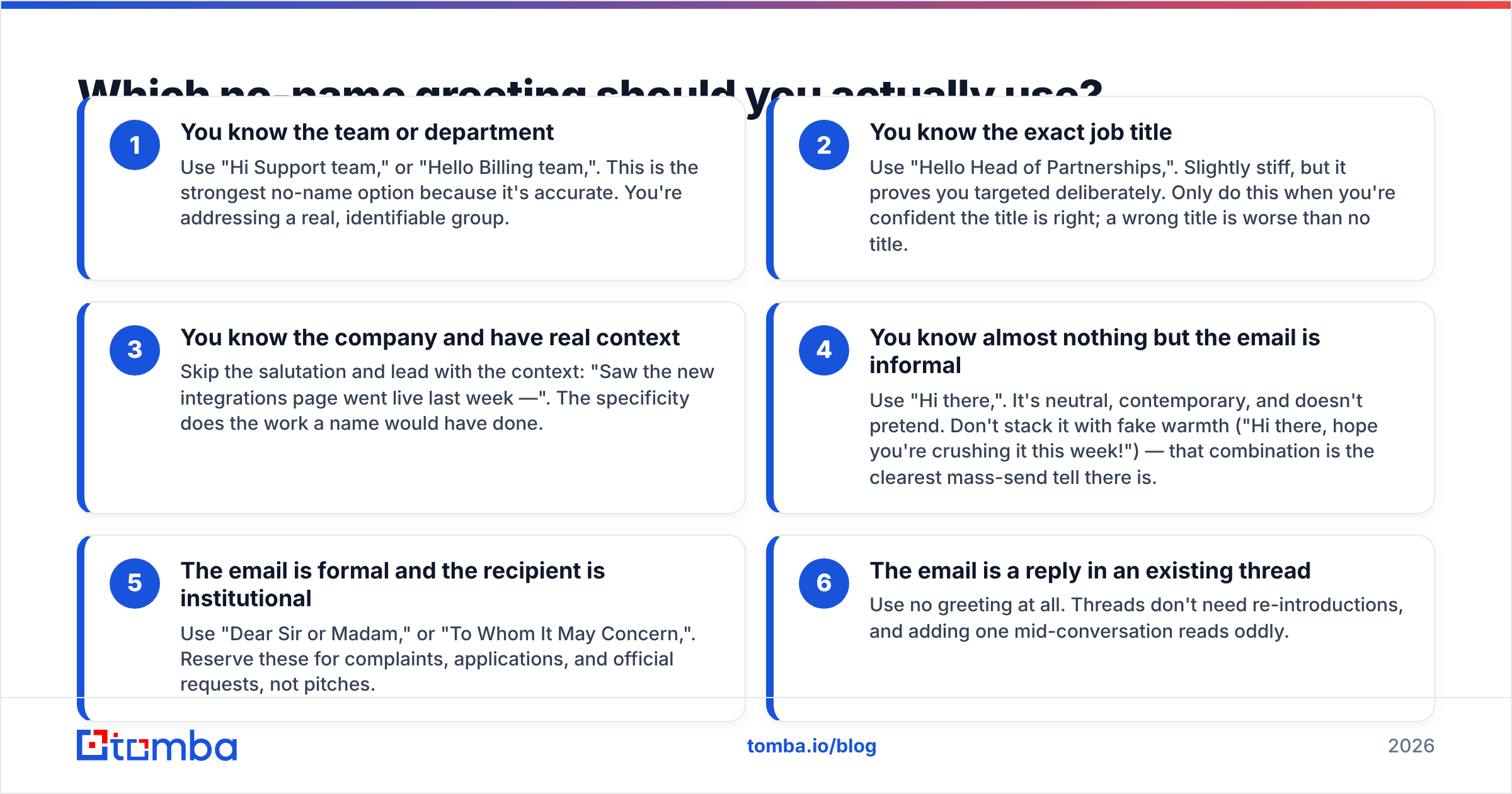
Pick based on what you do know, in this order of preference:
- You know the team or department — Use "Hi Support team," or "Hello Billing team,". This is the strongest no-name option because it's accurate. You're addressing a real, identifiable group.
- You know the exact job title — Use "Hello Head of Partnerships,". Slightly stiff, but it proves you targeted deliberately. Only do this when you're confident the title is right; a wrong title is worse than no title.
- You know the company and have real context — Skip the salutation and lead with the context: "Saw the new integrations page went live last week —". The specificity does the work a name would have done.
- You know almost nothing but the email is informal — Use "Hi there,". It's neutral, contemporary, and doesn't pretend. Don't stack it with fake warmth ("Hi there, hope you're crushing it this week!") — that combination is the clearest mass-send tell there is.
- The email is formal and the recipient is institutional — Use "Dear Sir or Madam," or "To Whom It May Concern,". Reserve these for complaints, applications, and official requests, not pitches.
- The email is a reply in an existing thread — Use no greeting at all. Threads don't need re-introductions, and adding one mid-conversation reads oddly.
One rule cuts across all six: match the greeting to the rest of the email. A formal salutation stapled onto a casual body ("Dear Sir or Madam, Hope you're having an awesome week!") reads as a template that was edited by two different people, because effectively it was.
How do you find the recipient's name instead?#
This is the part most guides skip, and it's the part that actually moves reply rates. The greeting problem is a research problem wearing a costume.
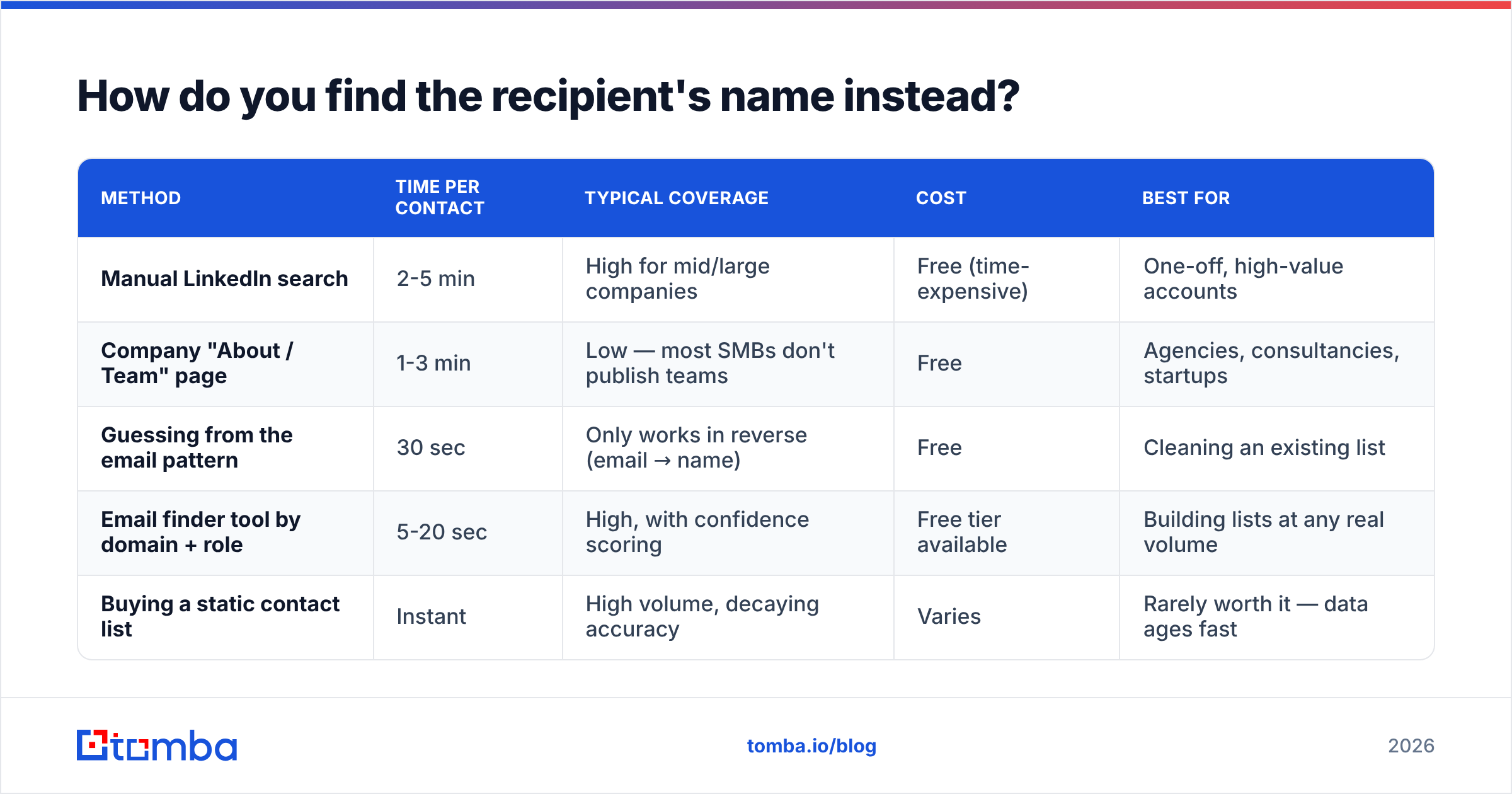
Here's how the common methods stack up:
| Method | Time per contact | Typical coverage | Cost | Best for |
|---|---|---|---|---|
| Manual LinkedIn search | 2-5 min | High for mid/large companies | Free (time-expensive) | One-off, high-value accounts |
| Company "About / Team" page | 1-3 min | Low — most SMBs don't publish teams | Free | Agencies, consultancies, startups |
| Guessing from the email pattern | 30 sec | Only works in reverse (email → name) | Free | Cleaning an existing list |
| Email finder tool by domain + role | 5-20 sec | High, with confidence scoring | Free tier available | Building lists at any real volume |
| Buying a static contact list | Instant | High volume, decaying accuracy | Varies | Rarely worth it — data ages fast |
The practical workflow for most teams looks like this:
Start with the domain, not the person. Run a domain search on the company to see every published email address and the pattern behind them (first.last@, f.last@, first@). Once you know the pattern, an unnamed contact becomes a solvable equation rather than a guess.
Filter by department and seniority. A domain search that returns 40 addresses isn't useful until you narrow it to the two people who own the problem you're solving. Most tools let you filter by department — use it before you export anything.
Work backwards from a LinkedIn profile. If you already found the right human but not their email, a LinkedIn finder closes the gap in the other direction: profile in, verified work email out. This is the highest-intent path, because you've confirmed the role before you spend a credit.
Use the byline when you're pitching content. For editorial and link-building outreach, the author finder pulls the email of whoever wrote the article you're referencing. "Hi Marcus — your piece on warehouse routing" beats "Hi there" by a distance no subject-line tweak will close.
Verify before you send. A found name is worthless if the mailbox bounces. Running addresses through an email verifier before a campaign protects both your reply rate and your sender reputation.
For pricing context, most of these workflows fit inside a free tier while you're testing — Tomba includes 25 searches per month free, with the Starter plan at $49/mo and Growth at $99/mo once you're running real volume. You can see the full breakdown on the Tomba pricing page. The point isn't the vendor; it's that 20 seconds of lookup is cheaper than the reply you lose to "Dear Sir or Madam."

What about writing to a shared or team inbox?#
Shared inboxes — support@, hello@, careers@, info@ — are the one case where a no-name greeting is genuinely correct rather than merely acceptable.
Address the function, not a phantom person:
- "Hi Support team," for a ticket or an issue.
- "Hello Partnerships team," for a business development inquiry.
- "Hi [Company] team," when you're not sure which function owns the request.
Do not write "Hi there" to a support queue and then ask for a decision that only a VP can make. Shared inboxes are triage layers; the person reading is deciding where to route you, not whether to buy. Make the routing obvious in your first sentence and you'll get forwarded to the right human — who will then have a name you can use in follow-up.
There's a related trap: catch-all domains. Some companies accept mail at any address on the domain, so a made-up address won't bounce — it just goes nowhere. If a lot of your list is on catch-all domains, a catch-all verifier will tell you which addresses are actually monitored before you burn a send on them.
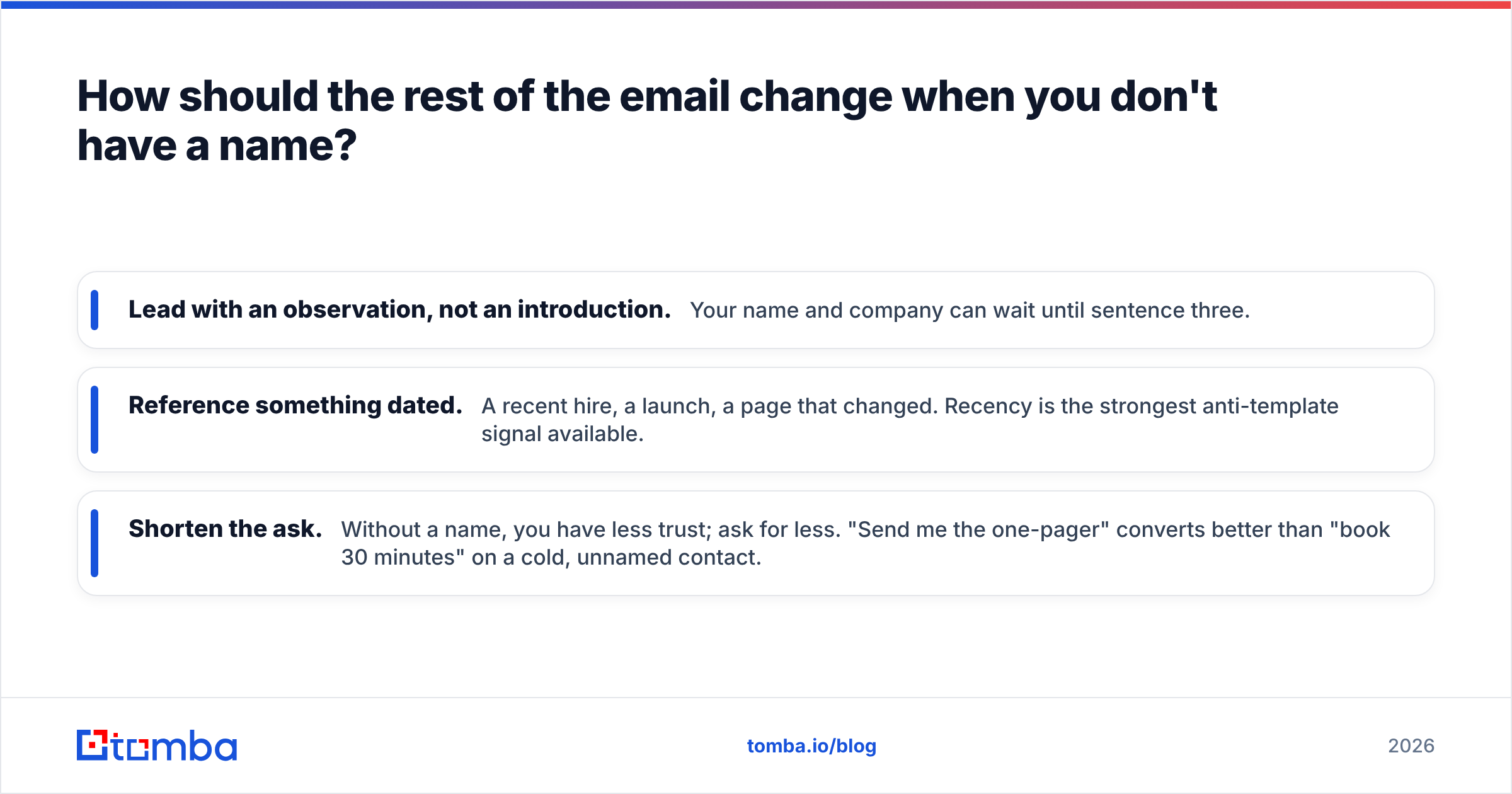
How should the rest of the email change when you don't have a name?#
If you're missing the name, you have to over-deliver on specificity everywhere else. The reader's implicit question — "did a human write this for me?" — needs an answer within two lines.
Weak version:
Hi there,
I hope this email finds you well. I wanted to reach out because I think our platform could help your team improve efficiency and drive better results. Would you be open to a quick 15-minute call this week?
Stronger version, same missing name:
Hi there,
Your careers page lists four open SDR roles in EMEA — that usually means the team is about to double its outbound volume.
We help teams in that exact position keep list quality from collapsing as headcount grows. Worth a 10-minute look, or should I send the one-pager instead?
Nothing changed about the greeting. Everything changed about the evidence. The second email proves research happened; the first proves only that a template exists.
Three concrete adjustments when the name is missing:
- Lead with an observation, not an introduction. Your name and company can wait until sentence three.
- Reference something dated. A recent hire, a launch, a page that changed. Recency is the strongest anti-template signal available.
- Shorten the ask. Without a name, you have less trust; ask for less. "Send me the one-pager" converts better than "book 30 minutes" on a cold, unnamed contact.
If you want structural starting points, our cold email templates library covers the common no-name scenarios — inbound follow-up, shared-inbox inquiry, and content outreach.
What mistakes kill reply rates on no-name emails?#
- Broken merge tags. "Hi {{first_name}}," or "Hi ," is the single most damaging error in cold email. Always set a fallback value, and always send a test with an empty-name record.
- Fake first names. "Hi Friend," "Hi Buddy," "Hey Legend," — these read as either spam or sarcasm. There is no third reading.
- Gendered guesses. "Dear Sir," when you don't know the recipient's gender is a coin flip with a real downside. "Dear Sir or Madam" is safer; a role-based greeting is safer still.
- Stacking formality and casualness. "Dear Sir or Madam, Hope you're doing awesome!" is a tonal collision that signals the email was assembled, not written.
- Over-apologizing for not knowing. "Sorry, I couldn't find who handles this" invites the reader to conclude you didn't try. Ask a clean routing question instead: "Is this the right inbox for partnership questions, or should I try someone else?"
- Treating the greeting as the whole fix. Reviews on marketplaces like G2 are full of teams who blamed their tooling for low replies when the real issue was that every email in the sequence opened with the same generic line and offered the same generic value.
What's the fastest decision tree?#
Use this when you're staring at a lead with a blank name field:
- Is there a name available in under 60 seconds via domain search, LinkedIn, or the site? → Find it. Use it. Stop here.
- Is it a shared inbox? → Address the function ("Hi Support team,").
- Do you know the role with confidence? → "Hello [Role],".
- Is the email formal or institutional? → "Dear Sir or Madam,".
- None of the above? → "Hi there," plus a specific, dated observation in line one.
Ninety percent of the time, step one is available and skipped. That's the whole problem.
Find the name before you send#
Every generic salutation is a research shortcut you're paying for later in ignored emails. The fix is boring and fast: look the person up, confirm the address is live, and write the first line to the human you found.
Tomba Email Finder turns a company domain plus a role into a verified, named contact in seconds — with confidence scoring so you know which results are safe to send to. Start on the free tier (25 searches/month, no card), run it against the accounts currently sitting in your list with blank name fields, and see how many "Hi there" emails you can retire this week.
Related guides#
Ready to find emails that actually work?
Join 150,000+ professionals who stopped guessing and started sending. Free credits on signup — no credit card required.
Get the Tomba newsletter
Practical outbound tactics and product updates — once every two weeks.
About the author