How to Address Multiple People in an Email: Rules That Work
To, Cc, or Bcc? "Hi all" or named greetings? Here is a practical, field-tested guide to addressing multiple people in one email without killing your reply rate or leaking your contact list.
Need to know how to address multiple people in email? Put the people who must act in To, put everyone who only needs to know in Cc, and name one owner in the first line. The rest is edge cases, and this guide covers them.
TL;DR
- Put the people who must act in To, the people who must know in Cc, and never use Cc as a substitute for accountability.
- Use Bcc only for privacy (external lists, intros you are stepping out of) — not to secretly loop in a manager.
- Two or three recipients get named greetings ("Hi Sarah, Marcus —"). Four or more get a role-based greeting ("Hi team," / "Hi procurement team,").
- Every extra recipient lowers the odds anyone replies. Diffusion of responsibility is real: assign one named owner in the first line.
- For cold outreach, one-to-one beats one-to-many almost every time. Verify each address individually instead of blasting a group.
What does it mean to address multiple people in email?#
To address multiple people in email is three decisions, not one: which field each person goes in, how you greet them, and who you ask to act. Get one of the three wrong and the email gets ignored — or it annoys people who never needed it.
The mechanics are trivial. You type commas between addresses. The judgment is not. A five-person thread where nobody owns the next step costs more time than five separate emails. So before you type a single address, answer one question: what do I want to happen after someone reads this?
If the answer is "one person does one thing," send a one-to-one email and put the observers in Cc. If the answer is "a group needs the same facts," send a broadcast and expect no reply. Those are different emails. Mixing them is why most group threads die.
When should you use To, Cc, and Bcc?#
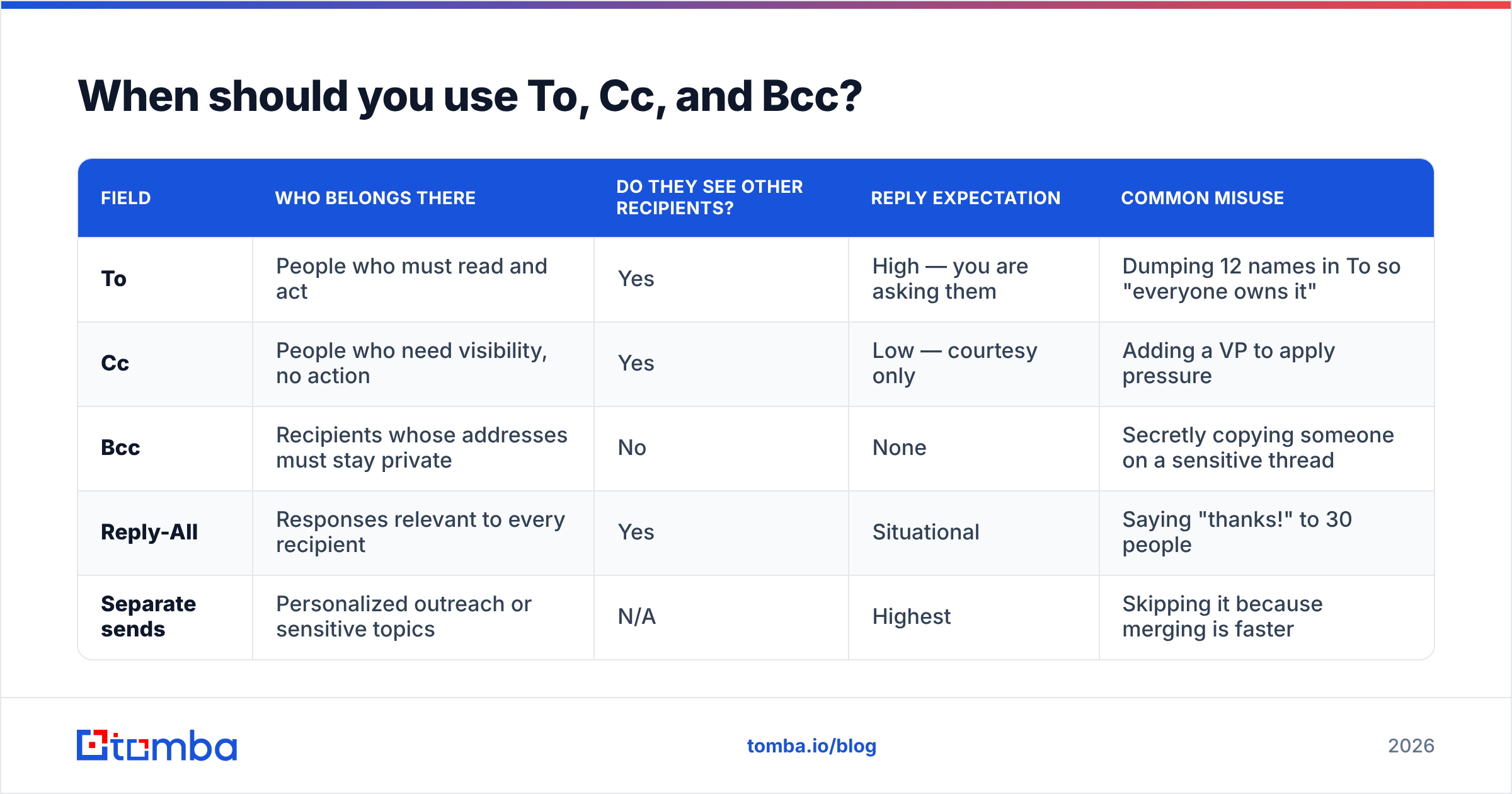
The fields are not decoration. Mail clients treat them the same way at the SMTP level. People do not: readers see a hierarchy of obligation.
| Field | Who belongs there | Do they see other recipients? | Reply expectation | Common misuse |
|---|---|---|---|---|
| To | People who must read and act | Yes | High — you are asking them | Dumping 12 names in To so "everyone owns it" |
| Cc | People who need visibility, no action | Yes | Low — courtesy only | Adding a VP to apply pressure |
| Bcc | Recipients whose addresses must stay private | No | None | Secretly copying someone on a sensitive thread |
| Reply-All | Responses relevant to every recipient | Yes | Situational | Saying "thanks!" to 30 people |
| Separate sends | Personalized outreach or sensitive topics | N/A | Highest | Skipping it because merging is faster |
Two rules that resolve 90% of disputes:
Cc is a receipt, not a request. If you need something from a person, they go in To. Cc someone and then ask them for a deliverable in paragraph four, and half your recipients will assume the email is not for them.
Bcc protects addresses, not secrets. Blind carbon copy exists so that 200 event attendees do not see each other's inboxes. Using it to quietly loop in someone's boss is a trust problem. The moment that hidden person hits reply-all, everyone finds out. Google's own Gmail documentation draws the same line: Bcc is an addressing tool, not a surveillance tool.
What greeting should you use for multiple recipients?#
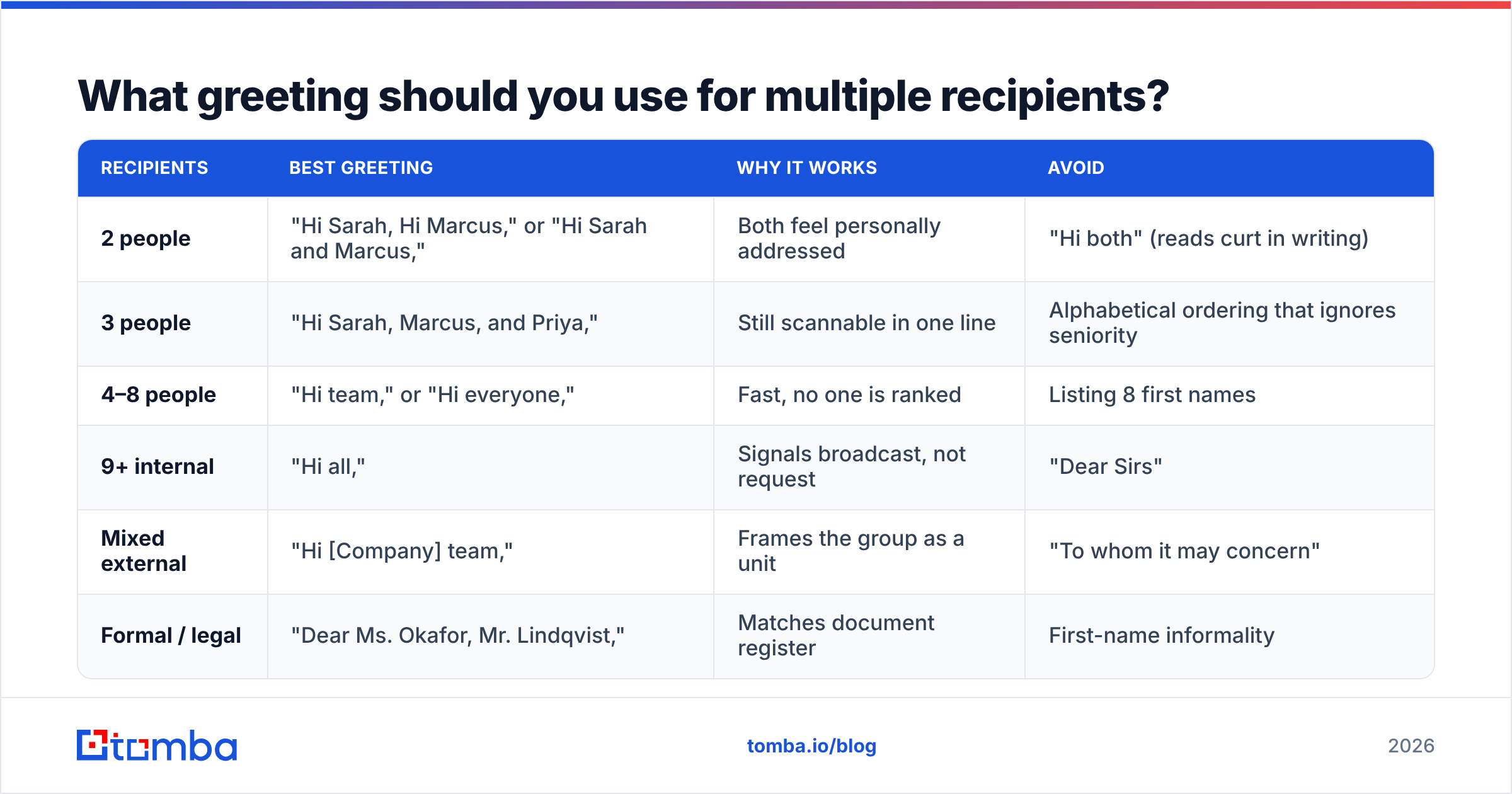
Your greeting scales with group size and formality. Naming people is warmer, and it makes each reader feel addressed. Past three names, though, the greeting becomes a wall of text before your first sentence.
| Recipients | Best greeting | Why it works | Avoid |
|---|---|---|---|
| 2 people | "Hi Sarah, Hi Marcus," or "Hi Sarah and Marcus," | Both feel personally addressed | "Hi both" (reads curt in writing) |
| 3 people | "Hi Sarah, Marcus, and Priya," | Still scannable in one line | Alphabetical ordering that ignores seniority |
| 4–8 people | "Hi team," or "Hi everyone," | Fast, no one is ranked | Listing 8 first names |
| 9+ internal | "Hi all," | Signals broadcast, not request | "Dear Sirs" |
| Mixed external | "Hi [Company] team," | Frames the group as a unit | "To whom it may concern" |
| Formal / legal | "Dear Ms. Okafor, Mr. Lindqvist," | Matches document register | First-name informality |
A few refinements that matter more than they should:
- Order signals priority, not politeness. In a two-name greeting, readers treat the first name as the primary owner. If Marcus owns the decision, write "Hi Marcus, Hi Sarah."
- "Hi all" is fine; "Dear Sirs" is not. Gendered group salutations are outdated, and they cost you credibility.
- Skip "Hi guys" in professional email. It sounds casual in speech and careless in writing, especially in mixed-gender or international groups.
- Never write "Hi [First Name]" and hope. A visible merge-tag failure is worse than no greeting at all.
What are the 6 rules for addressing a group without killing your reply rate?#
- Name one owner in the first sentence. "Marcus — can you confirm the Q3 numbers by Thursday? Sarah and Priya, copying you for visibility." That one move beats diffusion of responsibility: more recipients means fewer replies.
- Keep To under four people. Past four, an email stops being a request and becomes an announcement. Need four actions? Send four emails.
- Match the greeting to the To field, not the Cc field. Six people in Cc? Still greet the two in To.
- State each person's role. One line — "Legal for review, Finance for the budget, everyone else FYI" — saves a dozen replies.
- Put the ask above the fold. Most people read three lines on a phone and decide whether the email is theirs.
- Say whether reply-all is wanted. "No need to reply-all — just Marcus." One sentence prevents twenty notifications.
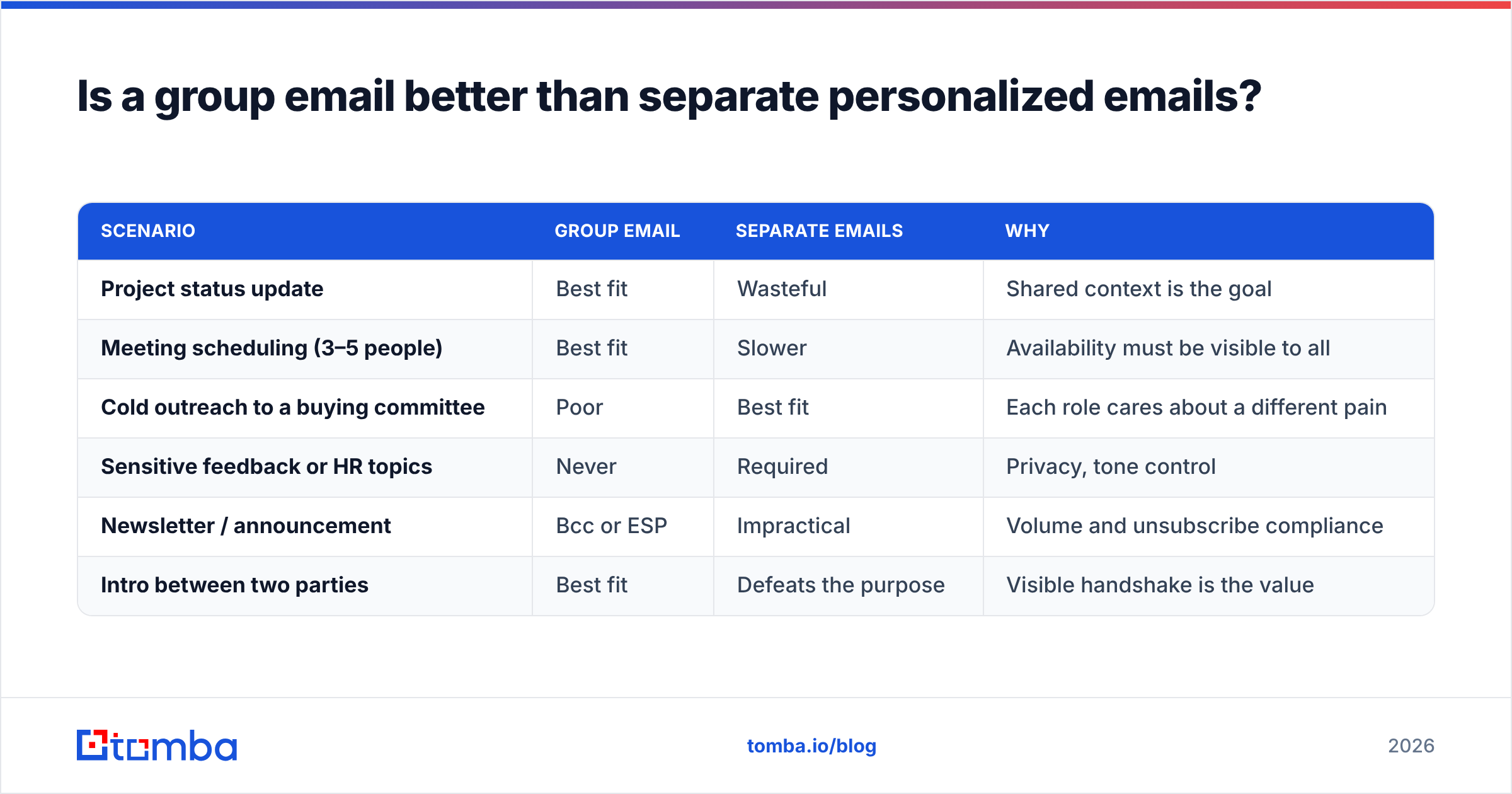
Is a group email better than separate personalized emails?#
For internal coordination, group email wins. Shared context is the whole point. For sales, recruiting, or partnership outreach, separate emails win, and it is not close.
| Scenario | Group email | Separate emails | Why |
|---|---|---|---|
| Project status update | Best fit | Wasteful | Shared context is the goal |
| Meeting scheduling (3–5 people) | Best fit | Slower | Availability must be visible to all |
| Cold outreach to a buying committee | Poor | Best fit | Each role cares about a different pain |
| Sensitive feedback or HR topics | Never | Required | Privacy, tone control |
| Newsletter / announcement | Bcc or ESP | Impractical | Volume and unsubscribe compliance |
| Intro between two parties | Best fit | Defeats the purpose | Visible handshake is the value |
The buying committee is where most teams get this wrong. HubSpot's research on B2B buying groups shows that purchase decisions span several stakeholders. Each one weighs a different risk. A single email to "Hi team" speaks to none of them. Four short emails, each aimed at one role's real concern, beat it every time.
There is also a deliverability angle. Filters read a long To or Cc line as spam. One bad address can drag down the whole send. So resolve and confirm each address on its own. An email verifier run takes seconds and protects your sender reputation.
How do you handle mixed seniority and external recipients?#
Three practical patterns:
The escalating thread. Start narrow. Email the individual contributor first. Add their manager only when the thread needs a decision at that level. Add them openly — "Adding Elena for the budget call" — so nobody feels ambushed. Escalating by Bcc is the fastest way to lose a working relationship.
The mixed internal/external thread. Never assume your internal shorthand travels. With three colleagues and two client contacts on a thread, greet the clients by name and refer to your team as a group: "Hi Dana and Tomás — looping in our implementation team below." It shows who the email is for and keeps the rest visible.
The introduction email. Name both parties in the greeting. Give each a one-line credential, say why you are connecting them, then step out: "I'll move myself to Bcc — over to you two." Moving yourself to Bcc is the polite convention, and it keeps a conversation you do not need out of your inbox.
For external threads, the addresses matter as much as the etiquette. A bounce on a five-person client thread is visible to everyone on it. A domain search beats guessing at patterns, and it tells you which format a company actually uses before you type a single name.
What are the most common mistakes when emailing multiple people?#
- Reply-all for one-word replies. "Thanks!" to 25 people is 25 interruptions. Reply to the sender only.
- Using Cc as pressure. Adding a VP to force a response is transparent, and it burns goodwill.
- Exposing external contacts in To. An announcement to 80 customers with every address visible is a privacy incident, not a formatting slip.
- Merge-tag leakage. A broadcast that renders "Hi {{first_name}}" tells everyone how personal the email was not.
- Forgetting the thread grows. Anyone added later can scroll up and read everything. Write group emails as if they will be forwarded.
- Assuming silence means agreement. With no named owner, silence usually means everyone assumed it was someone else's turn.
- Ignoring time zones. "By end of day" means five different moments. Write the date and the zone.
How do you address multiple people in email for cold outreach?#
Do not, in most cases. Address one person, and reference the others.
A cold email to "Hi team" reads as a template, because it is one. A cold email that says "Hi Priya — saw you own onboarding at Northwind; I'll keep this to your side of the problem and can loop in Marcus on the security review" reads as research. Same facts, very different response rate.
When you do need several people at one account, sequence rather than broadcast:
- Start with the practitioner who feels the pain daily. They are the most likely to reply.
- Reference the first contact when you email the second. "Priya mentioned onboarding volume is the constraint" is a fair opener, as long as it is true.
- Only go multi-threaded once you have a reply. Then a group email works, because there is real shared context.
- Keep each message single-ask. One person, one request, one next step.
That sequence needs an accurate address for each named person, not a generic info@ catch-all. So it is a sourcing problem before it is a writing problem. If you are working through a list, a bulk email finder resolves a spreadsheet of names and companies in one pass. Templates worth adapting live in the email templates library.
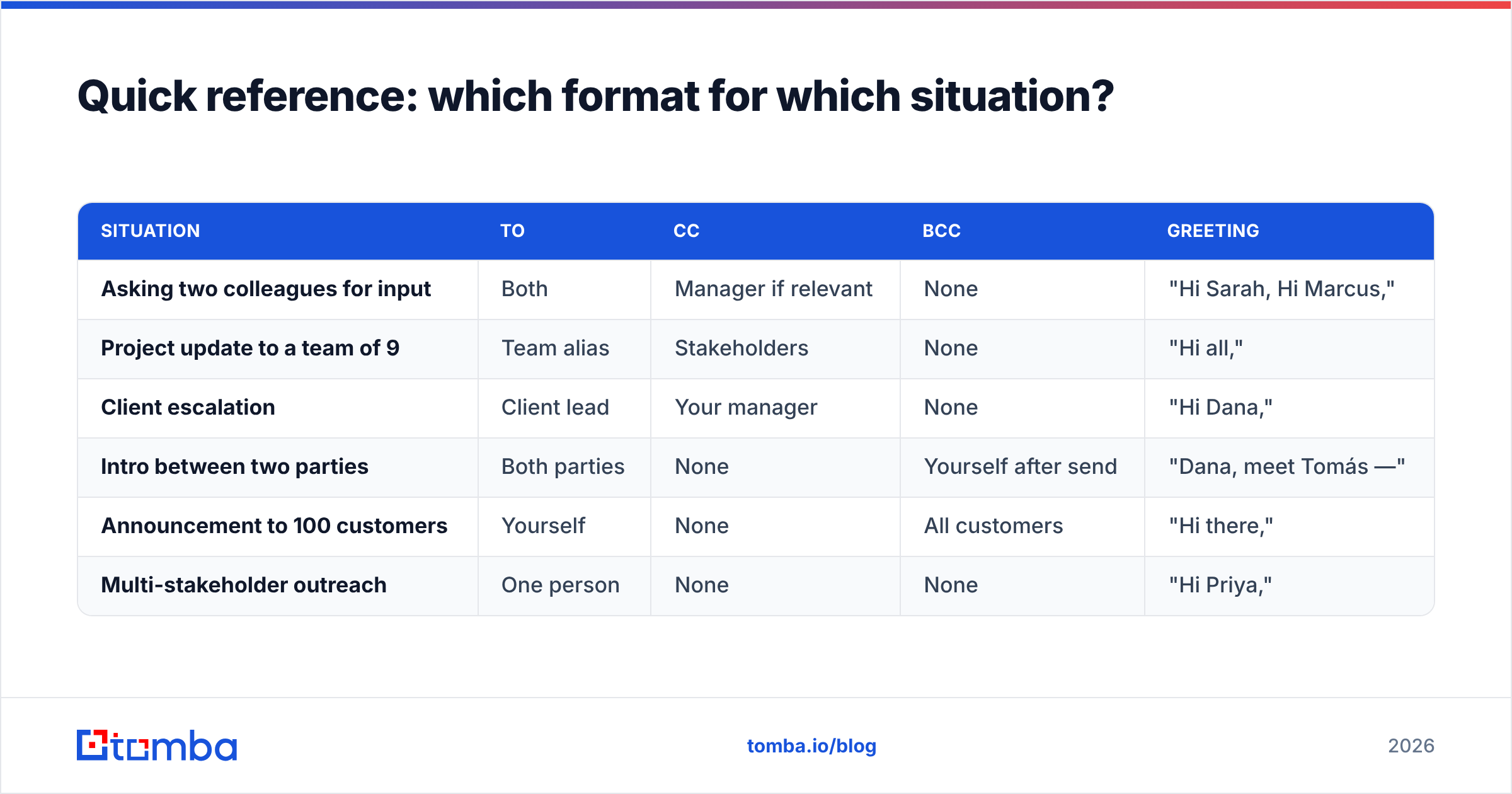
Quick reference: which format for which situation?#
| Situation | To | Cc | Bcc | Greeting |
|---|---|---|---|---|
| Asking two colleagues for input | Both | Manager if relevant | None | "Hi Sarah, Hi Marcus," |
| Project update to a team of 9 | Team alias | Stakeholders | None | "Hi all," |
| Client escalation | Client lead | Your manager | None | "Hi Dana," |
| Intro between two parties | Both parties | None | Yourself after send | "Dana, meet Tomás —" |
| Announcement to 100 customers | Yourself | None | All customers | "Hi there," |
| Multi-stakeholder outreach | One person | None | None | "Hi Priya," |
Print that, or keep it in a note. Nearly every argument about how to address multiple people in email is settled by one row of it.
Where does this leave you?#
Knowing how to address multiple people in email comes down to restraint: fewer names in To, clearer ownership in line one, and a bias toward separate emails whenever the ask is personal. The formatting rules above are easy. The discipline of asking "does this person actually need to be here?" is the part that changes your reply rate.
And when the email is one-to-one — a specific person, at a specific company, with a specific ask — the bottleneck is usually the address, not the wording. The Tomba Email Finder resolves professional addresses by name and domain. It confirms the company's real email pattern and validates each result before you send. The free tier covers 25 searches a month, and paid plans start at $49/mo. See Tomba pricing if you are scaling a multi-threaded outbound motion. Get the address right first. Then worry about whether it is "Hi all" or "Hi team."
Related guides#
Ready to find emails that actually work?
Join 150,000+ professionals who stopped guessing and started sending. Free credits on signup — no credit card required.
Get the Tomba newsletter
Practical outbound tactics and product updates — once every two weeks.
About the author