How to Boost Sales in 2026: 9 Tactics That Actually Work
Most "boost sales" advice is motivational fluff. Here are nine concrete levers — data quality, pipeline math, follow-up cadence, pricing — with the numbers and tools behind each one.
TL;DR
- Most sales slumps are not a motivation problem or a copy problem — they are a list problem. Fix contact data accuracy before you touch subject lines.
- The four levers with the fastest payback: clean prospect data, a real follow-up sequence (4-7 touches), qualification discipline, and pricing/packaging tests.
- Pipeline math beats hustle: a 2% lift at each of four funnel stages compounds to roughly a 8.2% revenue lift with zero extra activity.
- Track response rate, meeting-held rate, and win rate separately. "Sales are down" is not a diagnosis.
- Budget rule of thumb: data and deliverability tooling should cost less than 3% of the revenue it touches. A $49/mo data tool that adds one meeting a month has already paid for itself.
Sales does not go up because you decided it should. It goes up when you change a specific number in a specific stage of your funnel. This guide walks through nine levers, ordered by how fast they pay back, with the arithmetic and the tooling for each.
What actually causes a sales slump?#
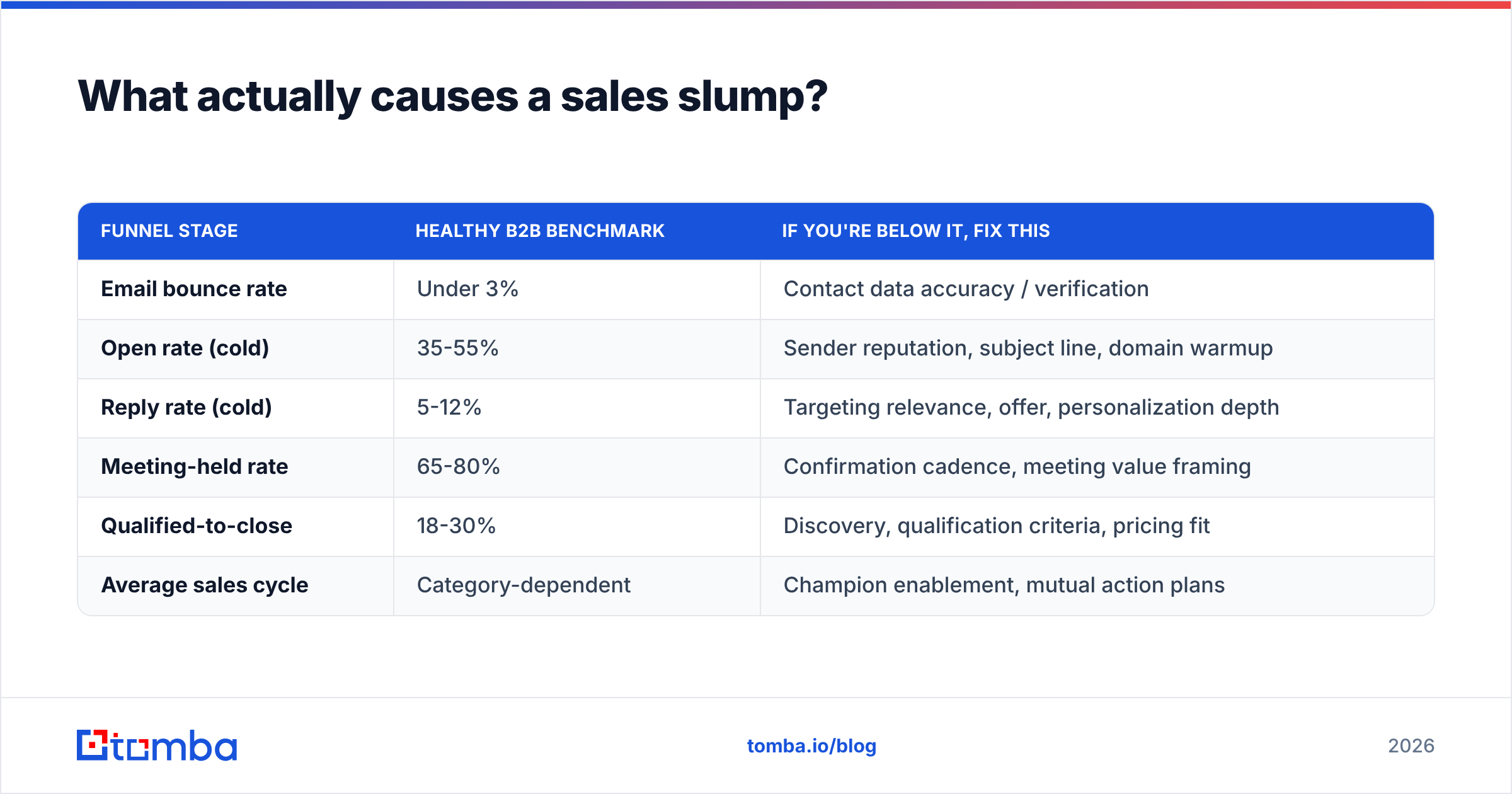
Before you fix anything, find where the funnel is leaking. There are only five places revenue can go missing:
- Not enough contacts — your total addressable list is too small or too stale to hit quota math.
- Contacts are wrong — emails bounce, phone numbers are dead, titles are two jobs out of date.
- Messages don't land — deliverability problems, or copy that reads like a template.
- Meetings don't convert — weak discovery, no qualification, talking to non-buyers.
- Deals stall late — pricing friction, no champion, no compelling event.
Each cause has a different fix, and the fixes are not interchangeable. Rewriting your cold email will not help if 22% of your addresses bounce. Buying more leads will not help if your close rate on qualified meetings is 6%.
Run this diagnostic before spending anything:
| Funnel stage | Healthy B2B benchmark | If you're below it, fix this |
|---|---|---|
| Email bounce rate | Under 3% | Contact data accuracy / verification |
| Open rate (cold) | 35-55% | Sender reputation, subject line, domain warmup |
| Reply rate (cold) | 5-12% | Targeting relevance, offer, personalization depth |
| Meeting-held rate | 65-80% | Confirmation cadence, meeting value framing |
| Qualified-to-close | 18-30% | Discovery, qualification criteria, pricing fit |
| Average sales cycle | Category-dependent | Champion enablement, mutual action plans |
Write your own numbers next to those. The single widest gap is your project for this quarter. Everything else waits.
Why is data quality the fastest lever?#
Because it is the one input that silently taxes every downstream stage. A bad email address does not just fail to convert — it damages your sender reputation, which reduces inbox placement for the addresses that are good. One bad list poisons three months of outbound.
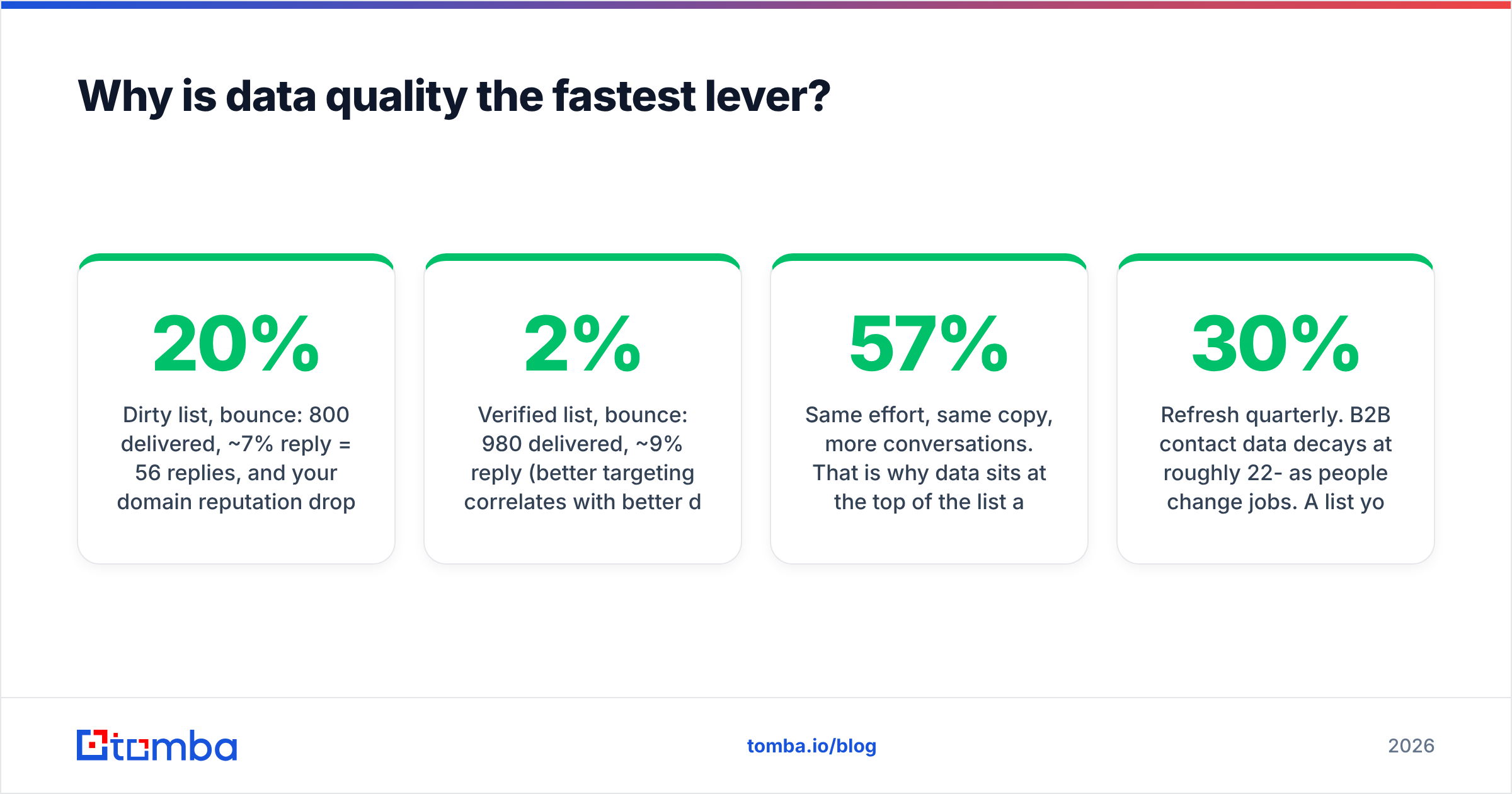
The math is unforgiving. Say you send 1,000 emails a month:
- Dirty list, 20% bounce: 800 delivered, ~7% reply = 56 replies, and your domain reputation drops. Next month's delivery is worse.
- Verified list, 2% bounce: 980 delivered, ~9% reply (better targeting correlates with better data) = 88 replies, reputation holds.
Same effort, same copy, 57% more conversations. That is why data sits at the top of the list and not at the bottom.
Practically, this means three habits:
- Verify before you send, not after you bounce. Run every import through an email verifier so invalid and risky addresses never enter a sequence.
- Refresh quarterly. B2B contact data decays at roughly 22-30% per year as people change jobs. A list you bought in January is measurably worse in July.
- Handle catch-all domains deliberately. Catch-all servers accept everything, so a standard verify returns "unknown." Use a catch-all verifier or segment them into a lower-volume, higher-caution send.
If you are building lists from scratch rather than cleaning old ones, domain search is the faster path: give it a company domain and get the verified contacts and email pattern for that org, instead of guessing formats one prospect at a time.
How do you build a better prospect list in 2026?#
Volume-first list building is dead. Inbox providers now weight engagement heavily, so a 10,000-contact spray gets you filtered before it gets you meetings. The 2026 approach is narrower and deeper.
The four-filter method:
- Fit filter — firmographics that correlate with your existing best customers. Not "companies with 50-500 employees," but "companies with 50-500 employees that already run a CRM and have a named RevOps hire."
- Trigger filter — a reason to reach out this week. Funding, new exec hire, job posting for a role your product supports, tech-stack change, expansion into a new market.
- Reachability filter — do you have a verified email, a phone, or a warm path? A perfect-fit account with no reachable contact is not a lead, it is a wish.
- Capacity filter — can you actually run a 7-touch sequence on this many people this month? If not, cut the list, not the cadence.
A 300-contact list that passes all four filters outperforms a 5,000-contact list that passes one. This is the single most common mistake in outbound: teams optimize for list size because it is the easiest number to grow.
For trigger-based lists, pair a source (job boards, funding databases, LinkedIn activity) with a contact-resolution step. Tools like LinkedIn finder turn a profile you already identified as a fit into a working email, which keeps you from paying for bulk records you will never contact.
How many follow-ups does it actually take?#
More than you are sending. The most reliable free revenue in B2B sits in touches four through seven.
Published outreach data across major sequencing platforms consistently shows that roughly half of all replies to a cold sequence arrive after the first message — and a meaningful share arrive after touch four. Yet most small teams stop at two. They are leaving the back half of the sequence on the table.
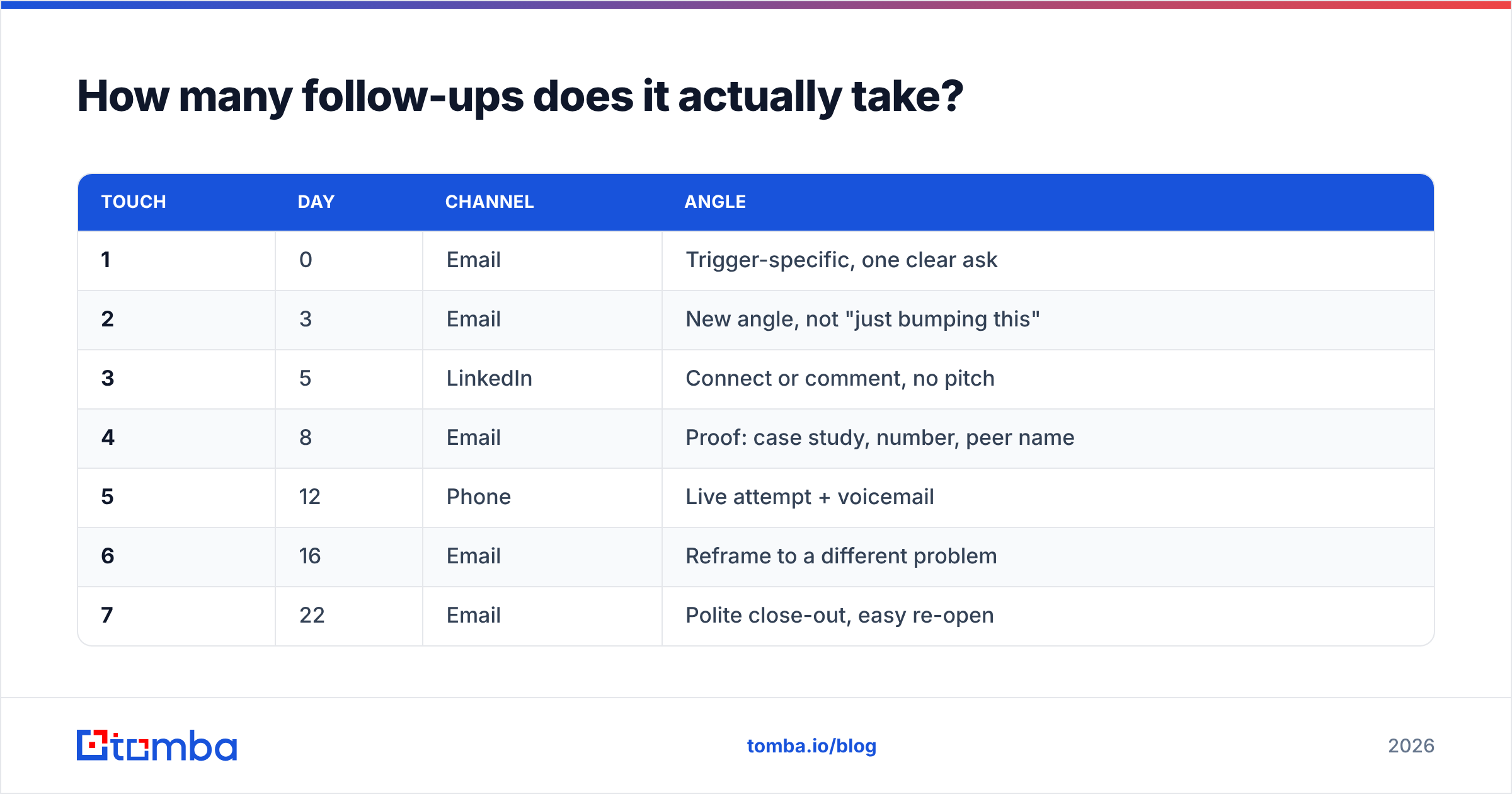
A cadence that holds up in 2026:
| Touch | Day | Channel | Angle |
|---|---|---|---|
| 1 | 0 | Trigger-specific, one clear ask | |
| 2 | 3 | New angle, not "just bumping this" | |
| 3 | 5 | Connect or comment, no pitch | |
| 4 | 8 | Proof: case study, number, peer name | |
| 5 | 12 | Phone | Live attempt + voicemail |
| 6 | 16 | Reframe to a different problem | |
| 7 | 22 | Polite close-out, easy re-open |
Three rules make this work. Never send a bump with no new information. Change the angle each touch, not just the wording. And close out explicitly at touch seven — "I'll stop here, reply if timing changes" generates a surprising number of replies on its own.
Adding a phone touch matters more than most email-first teams expect. A verified mobile number turns a dead sequence into a conversation, and a phone finder is usually cheaper per contact than the ad spend needed to generate an equivalent inbound lead.
Does personalization still increase reply rates?#
Yes — but not the kind most teams do. Referencing someone's recent podcast appearance in line one is now so common it reads as automated. The reply-rate lift has moved from surface personalization to problem personalization.
The distinction:
- Surface: "Loved your post on RevOps hiring." Costs 90 seconds per prospect. Diminishing returns.
- Problem: "You're hiring three SDRs but still running lists in Sheets — that usually breaks around month two." Costs 3 minutes. Still works, because it demonstrates you understand their operating reality.
Problem personalization requires enrichment, not research. Pull the firmographic and technographic context programmatically — headcount, stack, growth signals — then write one sentence that only makes sense for that account. Data enrichment does the first part; a human does the second. Fully automated "personalization" tokens are transparently machine-written and prospects grade them accordingly.
A practical constraint: if you cannot write a genuinely account-specific sentence in under three minutes, the account probably does not belong on your list. Personalization difficulty is a fit signal.
Which tools give the biggest lift per dollar?#
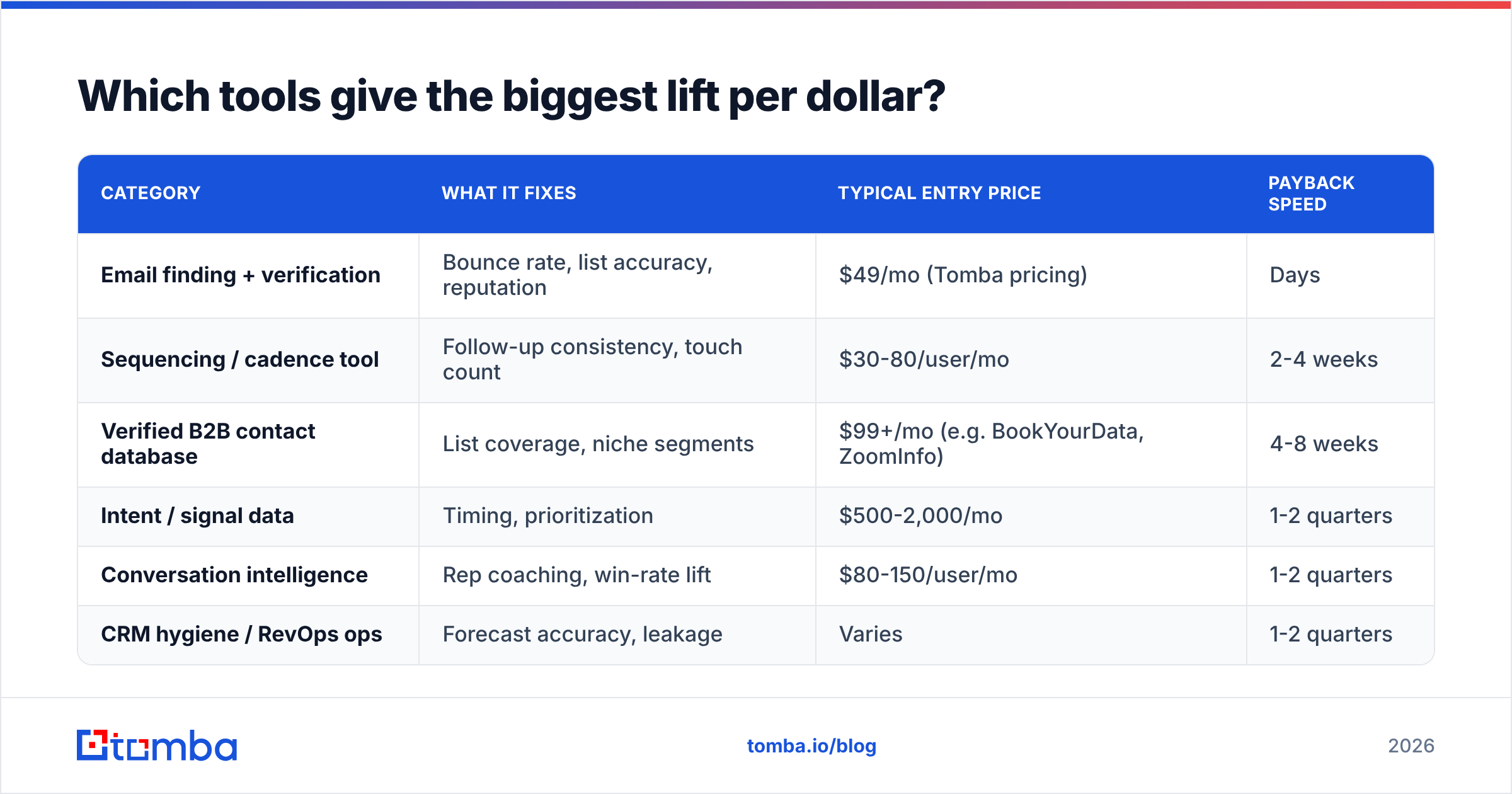
The honest answer is that the tool tier matters less than the sequencing of purchases. Buy data quality first, sequencing second, intelligence third. Teams routinely do this backwards and buy a $1,000/mo intent platform to feed a list that bounces at 18%.
| Category | What it fixes | Typical entry price | Payback speed |
|---|---|---|---|
| Email finding + verification | Bounce rate, list accuracy, reputation | $49/mo (Tomba pricing) | Days |
| Sequencing / cadence tool | Follow-up consistency, touch count | $30-80/user/mo | 2-4 weeks |
| Verified B2B contact database | List coverage, niche segments | $99+/mo (e.g. BookYourData, ZoomInfo) | 4-8 weeks |
| Intent / signal data | Timing, prioritization | $500-2,000/mo | 1-2 quarters |
| Conversation intelligence | Rep coaching, win-rate lift | $80-150/user/mo | 1-2 quarters |
| CRM hygiene / RevOps ops | Forecast accuracy, leakage | Varies | 1-2 quarters |
Two notes on this table. First, the price ranges are entry points, not what you will actually spend — credit consumption is where budgets break, so model your monthly contact volume before committing to an annual plan. Second, "payback speed" assumes you already have the earlier tiers in place. Intent data on a clean, well-sequenced funnel is genuinely powerful; intent data on a broken one is an expensive dashboard.
For teams comparing purpose-built contact databases, BookYourData is a solid option when you want pre-built, verified lists by industry and geography without running your own discovery process. It solves a different problem than an on-demand finder: bulk coverage versus per-prospect precision. Many teams end up running both — a database for territory-level list building, a finder for the specific accounts that appear mid-quarter.

How do you raise win rate without more leads?#
Improving conversion is cheaper than improving volume, and almost nobody prioritizes it. Four changes with measurable effect:
- Disqualify faster. Add two hard criteria to your first call — budget authority present, and a dated compelling event. Deals missing both should exit the pipeline the same week. Reps hate this; forecast accuracy loves it.
- Multi-thread every deal above your average contract value. Single-threaded deals die when your champion changes jobs, which happens to roughly a quarter of them per year. Get a second contact on the thread by call two.
- Write mutual action plans. A shared document listing every step to signature, with dates and owners. It converts vague interest into a project with a timeline, and it surfaces blockers weeks earlier.
- Run a loss-reason review monthly. Not the CRM dropdown — actual notes from five lost deals. Patterns show up within two months, and they are usually about pricing packaging or a missing integration, not rep skill.
Measure the effect on win rate specifically, isolated from lead volume. If win rate moves and volume did not, you found a real improvement. HubSpot's sales research library is a reasonable external benchmark set when you want to sanity-check your own numbers against category medians.
Should you change pricing to boost sales?#
Sometimes — and it is the most underused lever on this list. Pricing changes hit revenue immediately, with no additional pipeline required. But "raise prices" is not the move. Repackaging usually is.
Three approaches, in ascending order of risk:
- Add a higher tier. The safest test. A premium tier does not cost existing customers anything and reliably pulls a slice of buyers upward. It also makes your middle tier look more reasonable, which lifts middle-tier conversion.
- Change what's metered. If you charge per seat but value scales with usage, you are leaving money on the table with your best accounts and overcharging your smallest. Realigning the meter can lift ARPU without changing headline prices.
- Raise list price on new business only. Grandfather existing customers, test on new deals for one quarter, watch close rate. If close rate holds, the old price was too low.
Track the effect on revenue, not close rate alone. A price increase that drops close rate 10% but lifts ACV 25% is a clear win. G2's category pricing pages are useful for seeing where competitors have landed, though public list prices in B2B are directionally accurate at best.
What should you measure weekly?#
Five numbers, reviewed every Monday, on one page:
- New qualified conversations — replies that reached a real discussion, not raw reply count.
- Meetings held / meetings booked — the no-show rate is an early warning on lead quality.
- Pipeline created — dollar value entering stage two this week.
- Stage conversion deltas — which stage moved versus last month.
- Bounce + spam complaint rate — your deliverability early-warning system. A rising bounce rate predicts a bad month before revenue shows it.
The point of a weekly cadence is not accountability theater. It is that funnel problems compound quietly. A bounce rate creeping from 3% to 9% over six weeks is invisible in a monthly revenue review and obvious in a weekly data review.
What's the 30-day plan?#
If you do nothing else, do this sequence in order:
Week 1 — Diagnose. Pull your last 90 days of outbound data. Fill in the benchmark table above. Identify the single widest gap.
Week 2 — Clean. Verify your entire active contact list. Remove invalids, segment catch-alls, and re-verify anything older than six months. This alone often moves reply rate before you change a word of copy.
Week 3 — Extend the cadence. Take your best-performing sequence from three touches to seven, with a distinct angle per touch and at least one phone attempt. Do not add new prospects this week.
Week 4 — Qualify harder. Add your two hard disqualification criteria. Review five recent losses. Pick one pricing or packaging test to run next quarter.
Four weeks, no new headcount, no new category of software. Most teams find their biggest gain in week two, which tells you something about where the real problem usually lives.
Get the data layer right first#
Every tactic here depends on reaching the right person at a working address. That is the foundation, and it is the cheapest part of the stack to fix.
Start with the Tomba Email Finder — find verified professional emails by name, domain, or company, with verification built into the same workflow so bad addresses never enter your sequence. The free tier gives you 25 searches a month to test accuracy against a list you already know, and paid plans start at $49/mo when you are ready to run real volume. Clean the list first; everything downstream gets easier.
Related guides#
Ready to find emails that actually work?
Join 150,000+ professionals who stopped guessing and started sending. Free credits on signup — no credit card required.
Get the Tomba newsletter
Practical outbound tactics and product updates — once every two weeks.
About the author