How to Build a Cold Call List That Actually Connects in 2026
Most cold call lists fail before the first dial because the numbers are stale and the accounts were never qualified. Here is the 7-step process reps use to build a list that connects.
TL;DR
- A cold call list is not a phone number dump. It is a filtered account list, a mapped buying committee, and a verified direct dial for each contact — in that order.
- Bought CSVs decay at roughly 2.5% per month for job changes alone. Anything older than 90 days needs re-verification before it hits a dialer.
- Build the list in seven steps: define the ICP, pull the account universe, add trigger filters, map titles, enrich contacts, verify numbers, and tier by priority.
- Expect 4-9% connect rates on mobile direct dials and 1-3% on switchboard numbers. That gap is the entire argument for spending time on enrichment.
- Budget 60-90 minutes of list-building per 100 dialable contacts if you do it manually, or automate the enrichment layer with a phone finder and cut it to under 15.
What is a cold call list, and why do most of them fail?#
A cold call list is a working file of accounts and named contacts, each with a phone number you have reason to believe is current, ranked so your best-fit prospects get dialed first.
That definition rules out most of what reps actually use. The failure modes are predictable:
- The list is a phone number dump. Someone exported 5,000 rows from a database with no ICP filter. You dial companies that will never buy.
- The numbers are switchboards. A main office line routes you to a gatekeeper who has been trained to end your call. Direct dials skip that entirely.
- The data is stale. LinkedIn's own workforce reporting puts annual B2B job-change rates in the high teens to low twenties. A list you bought in January is materially wrong by June.
- Nobody mapped the committee. You have one contact per account. If they do not pick up, the account is dead — instead of having three other people to try.
- There is no tiering. Every row gets equal treatment, so your 20 best accounts get the same energy as row 4,800.
The fix is not "buy better data." It is building the list in a defined sequence where each step narrows and enriches what the previous one produced.
How do you define the ICP filters before you pull a single record?#
Write the filters down before you open any tool. If you cannot express your ICP as a set of queryable attributes, you do not have an ICP — you have a vibe.
Use these five filter layers:
- Firmographics — Industry (NAICS or SIC), headcount band, revenue band, HQ country. Keep headcount bands narrow: 50-200 behaves nothing like 200-1,000.
- Technographics — What they run. If you sell a Salesforce app, "uses Salesforce" is a hard gate, not a nice-to-have.
- Trigger events — Recent funding, a new VP in your buyer function, office expansion, a job posting for the role your product supports.
- Negative filters — Existing customers, open opportunities, churned logos, competitors, and anyone who asked not to be contacted. This list is as important as the positive one.
- Reachability — Do direct dials actually exist for this segment? Some industries (healthcare, government) have terrible mobile coverage. Know that before you build.
A practical test: take your last 20 closed-won deals and check how many pass all five filters. If fewer than 14 do, your filters are wrong, not your pipeline.
Which data sources should you combine to build the list?#
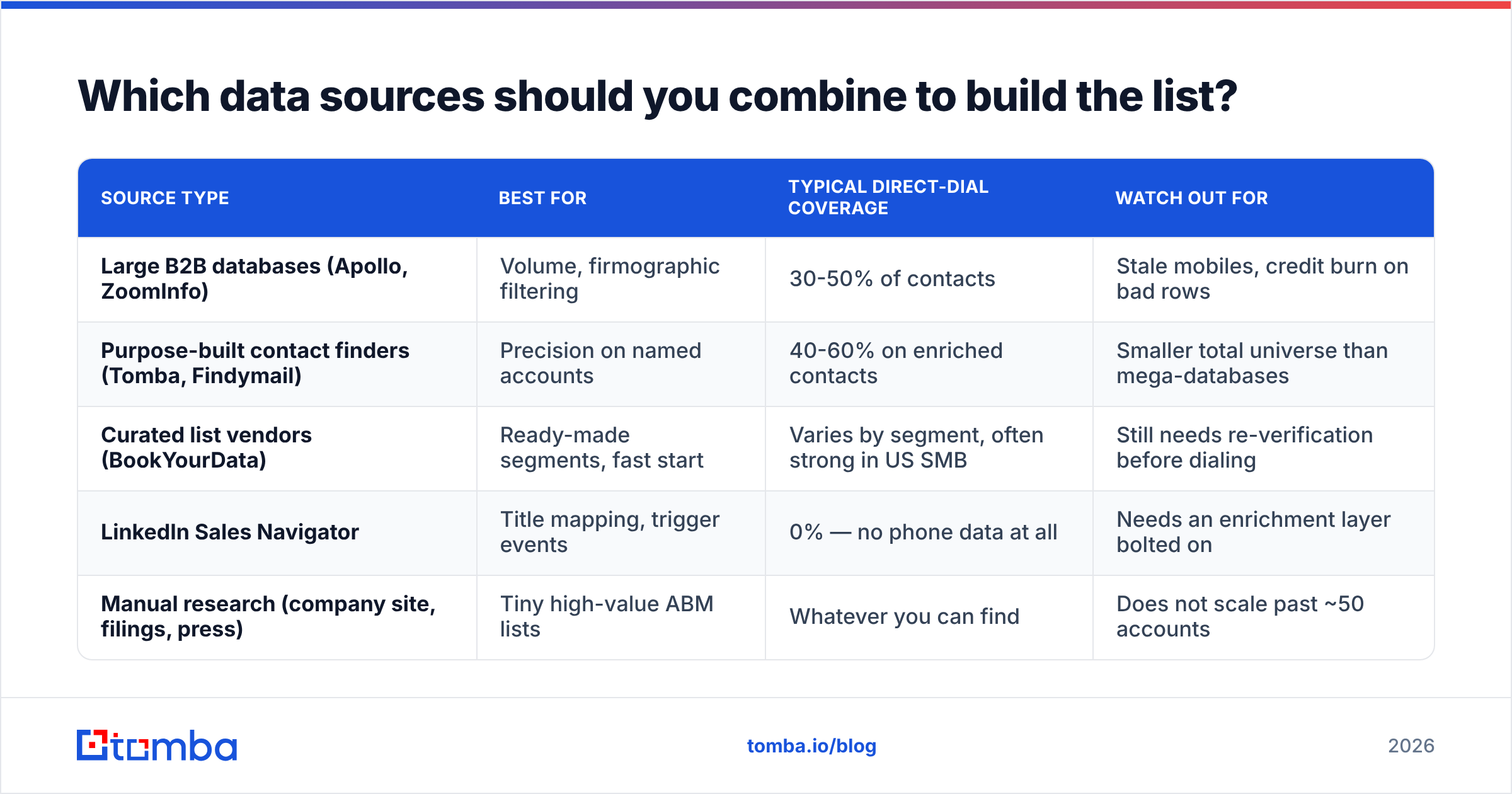
No single source covers everything. Serious list-builders stack two or three and reconcile them.
| Source type | Best for | Typical direct-dial coverage | Watch out for |
|---|---|---|---|
| Large B2B databases (Apollo, ZoomInfo) | Volume, firmographic filtering | 30-50% of contacts | Stale mobiles, credit burn on bad rows |
| Purpose-built contact finders (Tomba, Findymail) | Precision on named accounts | 40-60% on enriched contacts | Smaller total universe than mega-databases |
| Curated list vendors (BookYourData) | Ready-made segments, fast start | Varies by segment, often strong in US SMB | Still needs re-verification before dialing |
| LinkedIn Sales Navigator | Title mapping, trigger events | 0% — no phone data at all | Needs an enrichment layer bolted on |
| Manual research (company site, filings, press) | Tiny high-value ABM lists | Whatever you can find | Does not scale past ~50 accounts |
The workable pattern for most teams: use Sales Navigator or a large database to define the account and people universe, then run an enrichment pass to attach verified phone numbers and emails. That second step is where lists live or die.
If you want the account layer built from the domain up rather than from a saved search, a domain search pass on your target company list returns the people and email patterns per company, which you then enrich with phone data.
What are the seven steps to build a cold call list?#
Follow these in order. Skipping ahead is what produces 5,000-row lists with 3% connect rates.
Step 1 — Lock the ICP filters. Write them in a doc. Include negatives. Get your AE and manager to sign off before you spend credits.
Step 2 — Pull the account universe. Accounts first, not people. Aim for 200-600 accounts for a quarter of outbound per rep. More than that and you cannot work them properly.
Step 3 — Apply trigger filters and score. Rank accounts on fit plus timing. A perfect-fit company that just hired your champion persona outranks a perfect-fit company that is quiet.
Step 4 — Map the buying committee. For each Tier 1 account, get 3-5 named contacts: the economic buyer, the user-champion, and one adjacent stakeholder. This is the single highest-ROI step, because it multiplies your dialable surface per account without adding accounts.
Step 5 — Enrich contacts with phone and email. Attach mobile direct dial (best), desk direct dial (fine), switchboard plus extension (last resort). Attach a verified email at the same time, because your call and email sequence should hit the same person.
Step 6 — Verify everything. Run phone validation to strip disconnected and invalid numbers. Run an email verifier on the email column so your follow-up does not bounce and damage your domain.
Step 7 — Tier and load. Split into Tier 1 (top 20%, personalized approach, 6+ touches), Tier 2 (standard cadence), Tier 3 (bulk, low effort). Load into the dialer with tier as a field so you can report on it later.
A 300-account list built this way typically yields 900-1,400 named contacts, of which 500-800 will have a usable direct dial. That is a full quarter of dialing.
How do you verify phone numbers before you dial?#
Verification has three layers, and most reps only do the first.
Layer 1 — Format and line-type validation. Does the number parse as a valid number in its country? Is it mobile, landline, or VoIP? A phone validator answers this instantly and removes the obviously dead rows. This alone usually strips 8-15% of a purchased list.
Layer 2 — Attribution confidence. Is this number attached to this person or to the company generally? A number that appears on 40 contact records at the same company is a switchboard mislabelled as a direct dial. Check for duplicates across your list and demote them.
Layer 3 — Recency. When was the record last seen or confirmed? Anything past 6 months without a refresh should be re-enriched. Job changes are the killer here — the number may work fine but ring a person who left the company 8 months ago.
There is a compliance layer too. In the US, scrub against the National DNC registry for anything that could be a personal line, and check state-level restrictions. The FTC's DNC guidance for businesses is the primary source; B2B calls to business lines are broadly exempt, but mobile numbers blur that line and TCPA exposure is real. Talk to whoever owns compliance at your company before you assume your list is safe.

What connect rates should you actually expect?#
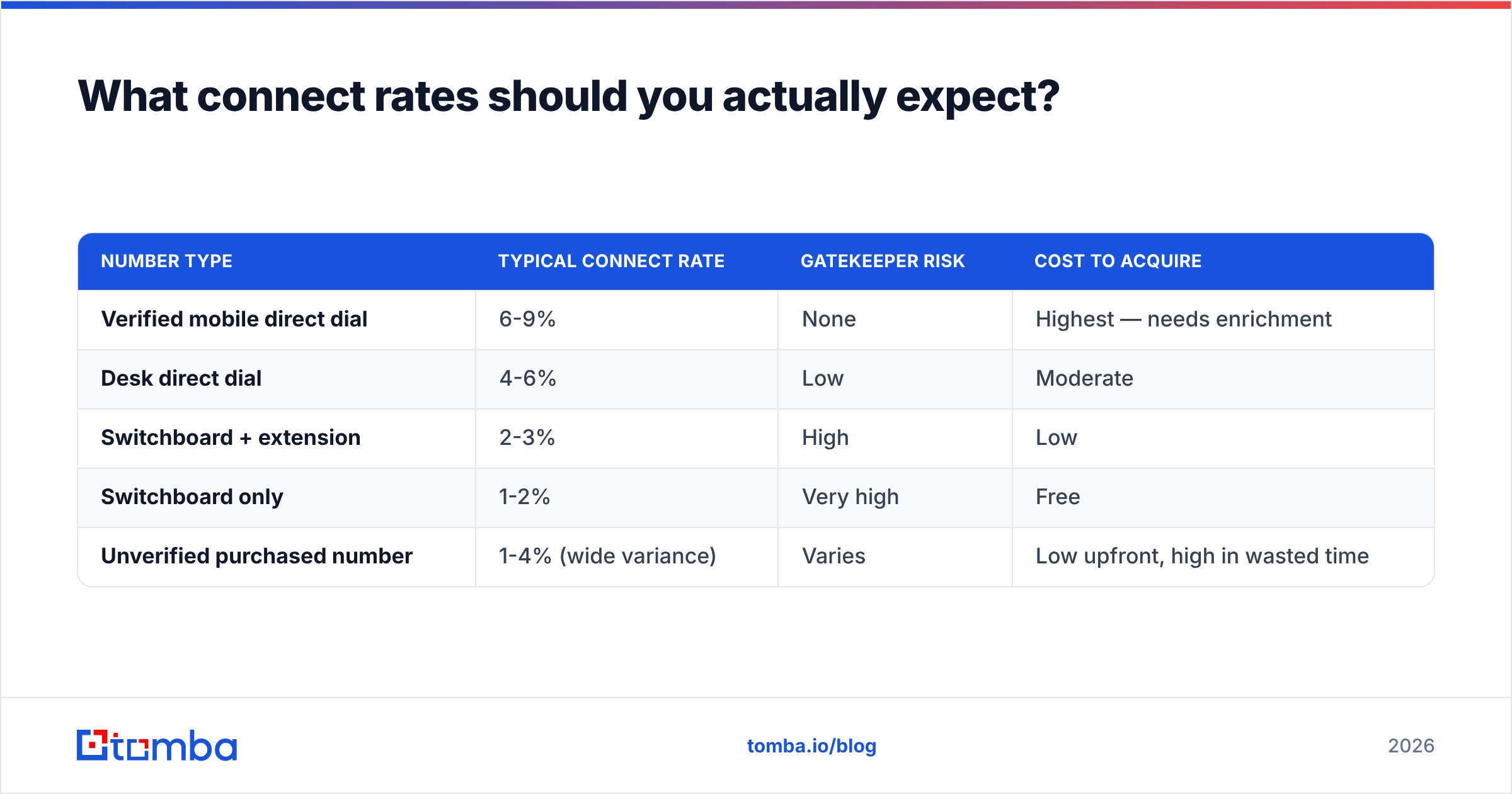
Benchmarks vary by segment, but these ranges are what teams consistently report, and they justify every hour you spend on enrichment.
| Number type | Typical connect rate | Gatekeeper risk | Cost to acquire |
|---|---|---|---|
| Verified mobile direct dial | 6-9% | None | Highest — needs enrichment |
| Desk direct dial | 4-6% | Low | Moderate |
| Switchboard + extension | 2-3% | High | Low |
| Switchboard only | 1-2% | Very high | Free |
| Unverified purchased number | 1-4% (wide variance) | Varies | Low upfront, high in wasted time |
Run the math on a 100-dial day. At 8% on verified mobiles you get 8 conversations. At 1.5% on switchboards you get 1.5. Same effort, five times the output. If enrichment costs you $0.10 per contact, the eight conversations cost $10 in data — which is nothing against a rep's fully loaded hourly cost.
This is also why call-and-email pairing matters. Teams that pair every dial with a same-day email on a verified address see materially better response rates than call-only sequences, because the voicemail and the email reinforce each other.
Is buying a list better than building one?#
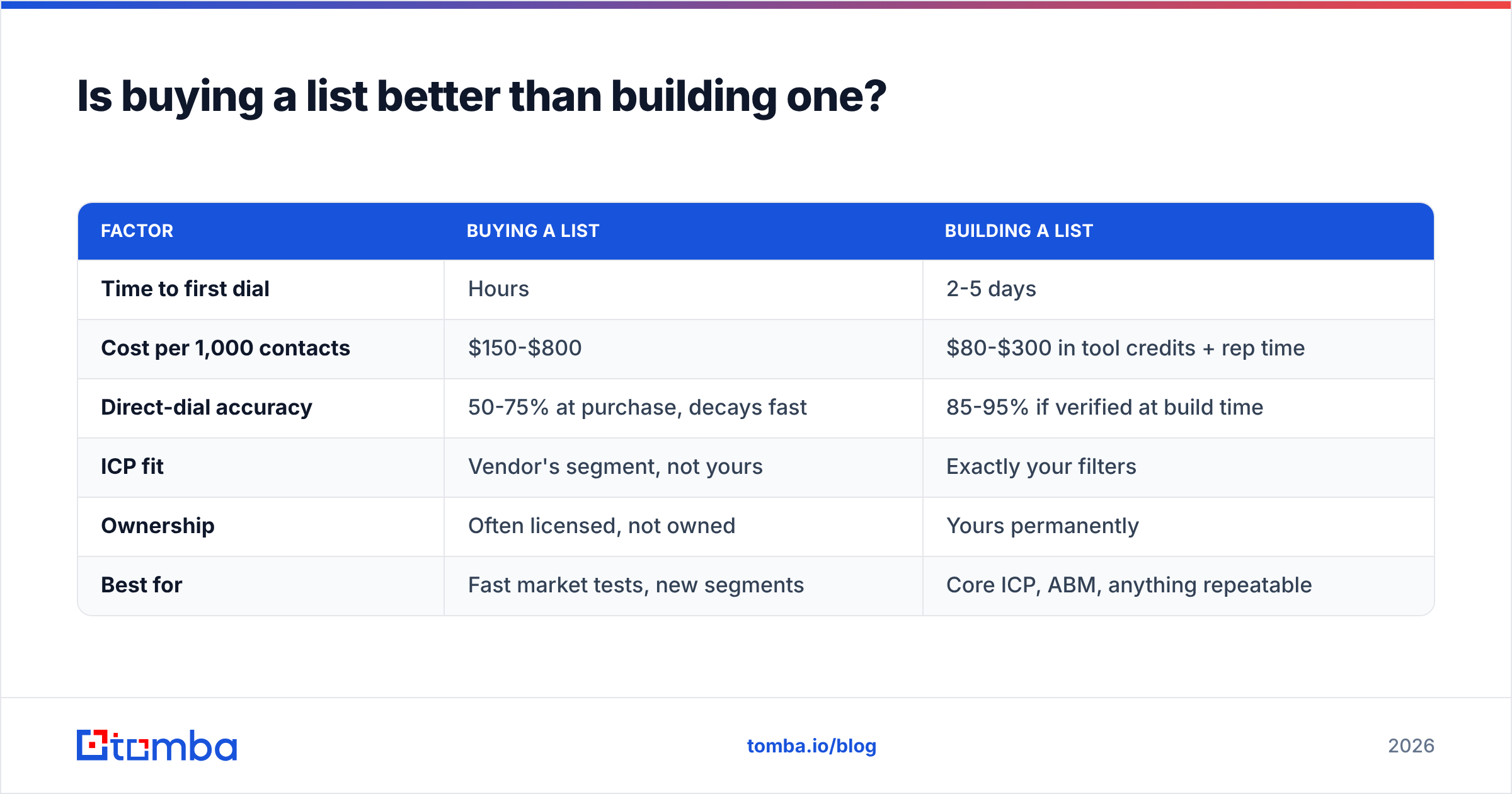
Buying is faster; building is more accurate. The honest answer is that most teams should do both — buy the account universe, build the contact layer.
| Factor | Buying a list | Building a list |
|---|---|---|
| Time to first dial | Hours | 2-5 days |
| Cost per 1,000 contacts | $150-$800 | $80-$300 in tool credits + rep time |
| Direct-dial accuracy | 50-75% at purchase, decays fast | 85-95% if verified at build time |
| ICP fit | Vendor's segment, not yours | Exactly your filters |
| Ownership | Often licensed, not owned | Yours permanently |
| Best for | Fast market tests, new segments | Core ICP, ABM, anything repeatable |
Curated vendors have gotten notably better. If you need a US SMB list by Friday, a provider like BookYourData will get you there faster than any manual build, and their segment coverage is solid. What no vendor can do is guarantee freshness on the day you dial — so treat any purchased file as raw material for step 6, not as a finished list.
The workflow that works: buy or pull broad, filter hard against your ICP, then re-enrich and re-verify the survivors. You end up with a smaller, far more dialable file, and you stop paying the tax of dialing dead numbers.
How do you keep the list from decaying?#
A cold call list is a perishable asset. Build maintenance into the process or you will rebuild from scratch every quarter.
- Re-verify on a 90-day cycle. Run the whole file back through phone validation and email verification. Archive anything that fails twice.
- Trigger a refresh on disposition. When a rep dispositions a call as "wrong number" or "no longer with company," that row goes to a re-enrichment queue automatically, not to the trash.
- Track a decay metric. Percentage of dials hitting invalid or wrong-person numbers, reported weekly. If it climbs above 10%, your source is the problem.
- Enrich at the account level, not the contact level. When a champion leaves, you want their replacement, not a hole. Re-running a domain-level pull on your Tier 1 accounts monthly catches new hires early.
- Sync dispositions back to the source of truth. If your dialer knows a number is dead but your CRM does not, the next rep will dial it again.
For teams running this at volume, the Tomba API or a scheduled bulk email finder job handles the refresh cycle without anyone touching a spreadsheet. Point it at your account list, get back current contacts and numbers, diff against last month, and work the delta.
What does a finished cold call list look like?#
Minimum viable columns, in the order a rep actually uses them:
- Tier (1/2/3) — drives priority and cadence
- Account name + domain — domain is your join key across every tool
- Contact first/last name + title — title drives your opener
- Direct dial + line type — mobile flagged separately from desk
- Verified email — for same-day pairing
- Trigger note — one line on why now ("hired a VP Rev Ops in March")
- Last verified date — so anyone can see how much to trust the row
That last column is the one most teams skip and the one that saves you most. A rep who can see "verified 11 days ago" dials with confidence. A rep looking at an undated row hedges, sounds tentative, and converts worse.
If you want an external benchmark for the tools in this stack before you commit budget, G2's sales intelligence category is the least biased place to compare coverage and pricing claims across vendors.
Build your next list with verified contact data#
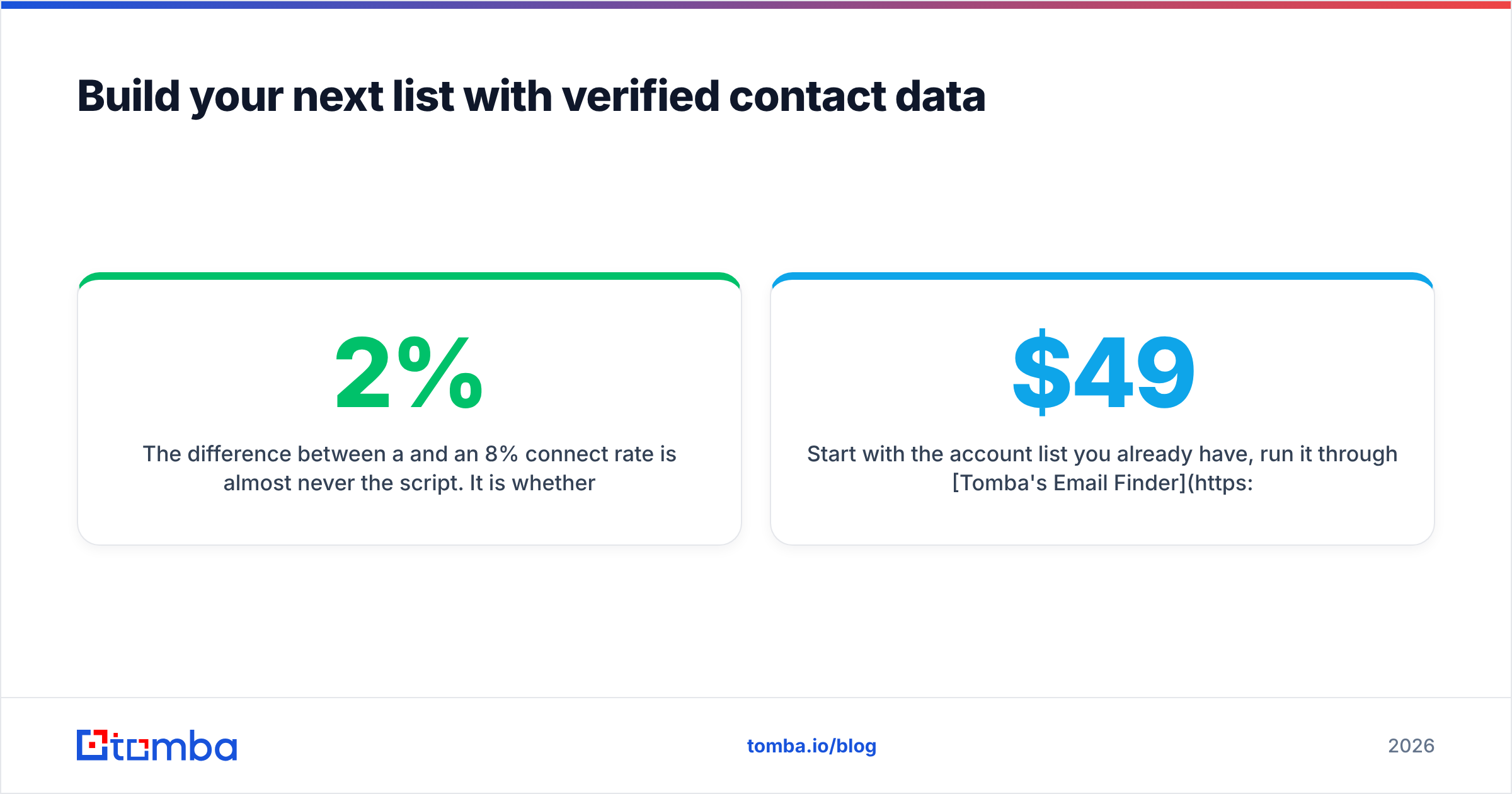
The difference between a 2% and an 8% connect rate is almost never the script. It is whether the number on the row belongs to the person you think it belongs to, right now.
Start with the account list you already have, run it through Tomba's Email Finder and phone enrichment to attach verified contacts, and let the verification layer strip the dead rows before they cost you dial time. The free tier gives you 25 searches a month to test the accuracy on your own accounts; paid plans start at $49/mo on Starter and $99/mo on Growth — see full Tomba pricing for bulk and API volumes.
Build the list once, properly, and maintain it. Your connect rate will tell you within a week whether it worked.
Related guides#
Ready to find emails that actually work?
Join 150,000+ professionals who stopped guessing and started sending. Free credits on signup — no credit card required.
Get the Tomba newsletter
Practical outbound tactics and product updates — once every two weeks.
About the author