How to Check an Email Address: 6 Methods That Work in 2026
A bad email address costs you more than a bounce — it damages your sending domain. Here are six ways to check an email address, what each method actually proves, and when even a green checkmark can lie.
TL;DR
- "Checking an email address" is four separate tests stacked on top of each other: syntax, domain/MX, mailbox (SMTP), and risk scoring. Most free tools only run the first two.
- A single manual check takes about 30 seconds with a free checker. A list of 10,000 takes minutes with a bulk verifier and costs roughly $0.001–$0.008 per address.
- Catch-all domains — where the server accepts everything — are the one case no honest tool can resolve with a plain SMTP handshake. You need pattern data or a dedicated catch-all check.
- Never "test" an address by sending a real email from your primary domain. Bounces are logged by mailbox providers and directly hurt your sender reputation.
- Re-check any list older than 90 days. B2B email data decays at roughly 2–2.5% per month as people change jobs.
What does it actually mean to check an email address?#
It means answering four different questions, and most people only ask the first one.
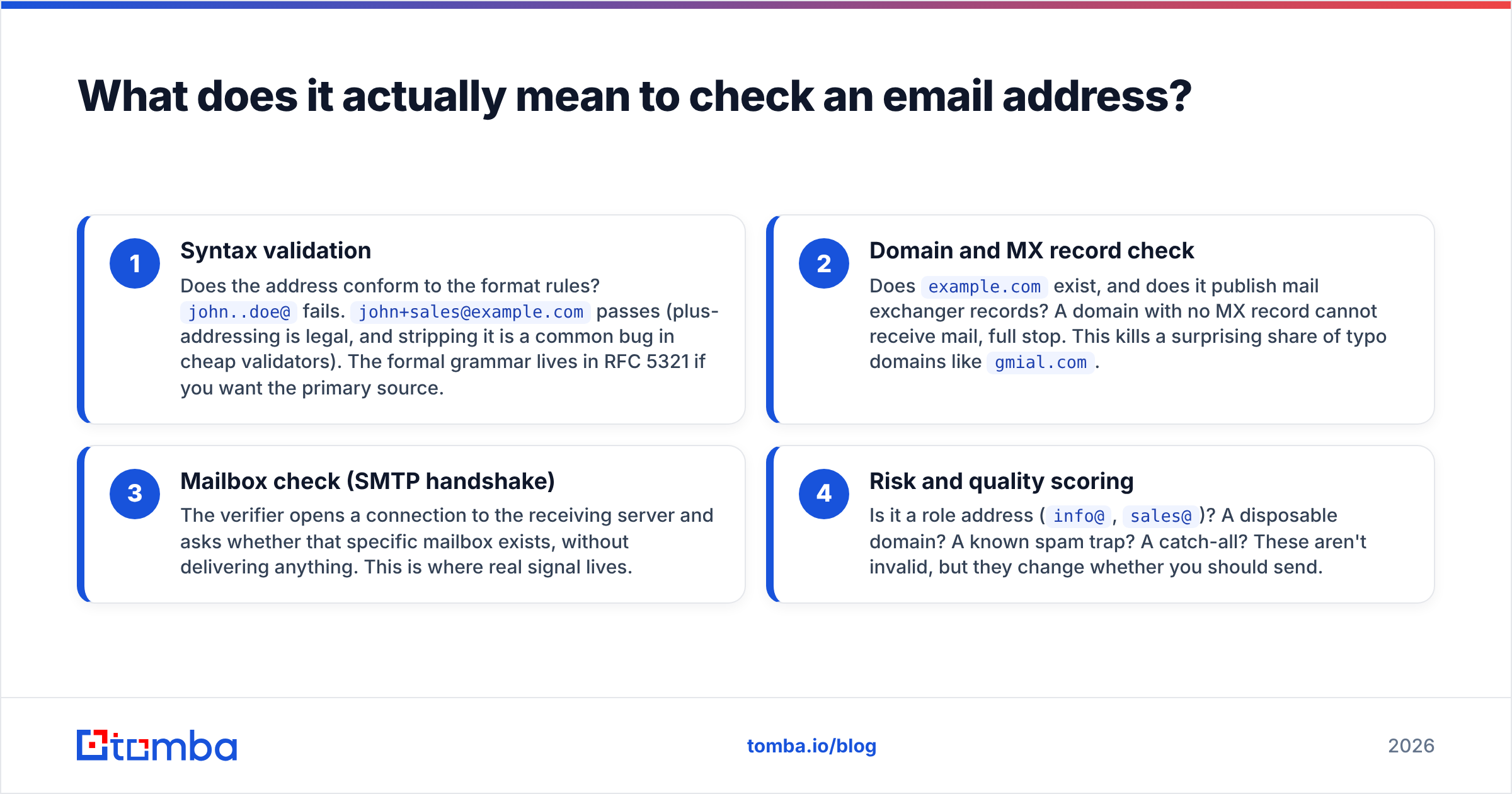
When someone says they want to check an email address, they usually mean "will this bounce?" But a mail server can reject a message for reasons that have nothing to do with whether the string looks valid. So a real check runs in layers:
- Syntax validation — Does the address conform to the format rules?
john..doe@fails.john+sales@example.compasses (plus-addressing is legal, and stripping it is a common bug in cheap validators). The formal grammar lives in RFC 5321 if you want the primary source. - Domain and MX record check — Does
example.comexist, and does it publish mail exchanger records? A domain with no MX record cannot receive mail, full stop. This kills a surprising share of typo domains likegmial.com. - Mailbox check (SMTP handshake) — The verifier opens a connection to the receiving server and asks whether that specific mailbox exists, without delivering anything. This is where real signal lives.
- Risk and quality scoring — Is it a role address (
info@,sales@)? A disposable domain? A known spam trap? A catch-all? These aren't invalid, but they change whether you should send.
Skip layer 3 and 4 and you get a checker that tells you notarealperson@microsoft.com is fine. It's syntactically perfect and Microsoft has MX records. It just doesn't exist.

How do you check a single email address in 30 seconds?#
Paste it into a browser-based checker and read the status code. That's the whole workflow for one-off checks.
- Step 1 — Use a free web checker. Tools like the free email checker run syntax, MX, and SMTP in one pass and return a verdict without you touching a terminal. No signup for a handful of lookups.
- Step 2 — Read the status, not the color. "Valid" means the server confirmed the mailbox. "Accept-all" or "catch-all" means the server confirms everything and proves nothing. "Unknown" means the server timed out or greylisted the probe — retry later rather than treating it as invalid.
- Step 3 — Check the domain's pattern. If the address is
j.smith@acme.combut Acme usesjsmith@acme.comeverywhere else, you have the wrong permutation, not a dead person. A company email pattern lookup settles it in one query. - Step 4 — Cross-reference one external signal. A LinkedIn profile, a company team page, an author byline, a conference speaker list. If the human exists and the pattern matches, a catch-all result is usually fine to send to.
- Step 5 — Decide the send risk. Valid + personal + non-role = send. Catch-all + confirmed pattern = send, but not as the first message from a brand-new domain. Unknown = park it and re-check in a week.
That five-step loop is the manual version. For anything above ~50 addresses it stops being worth your time.
What are the six methods, and how do they compare?#
Six approaches actually work. They differ mainly in accuracy, speed, and what they cost you in reputation risk.
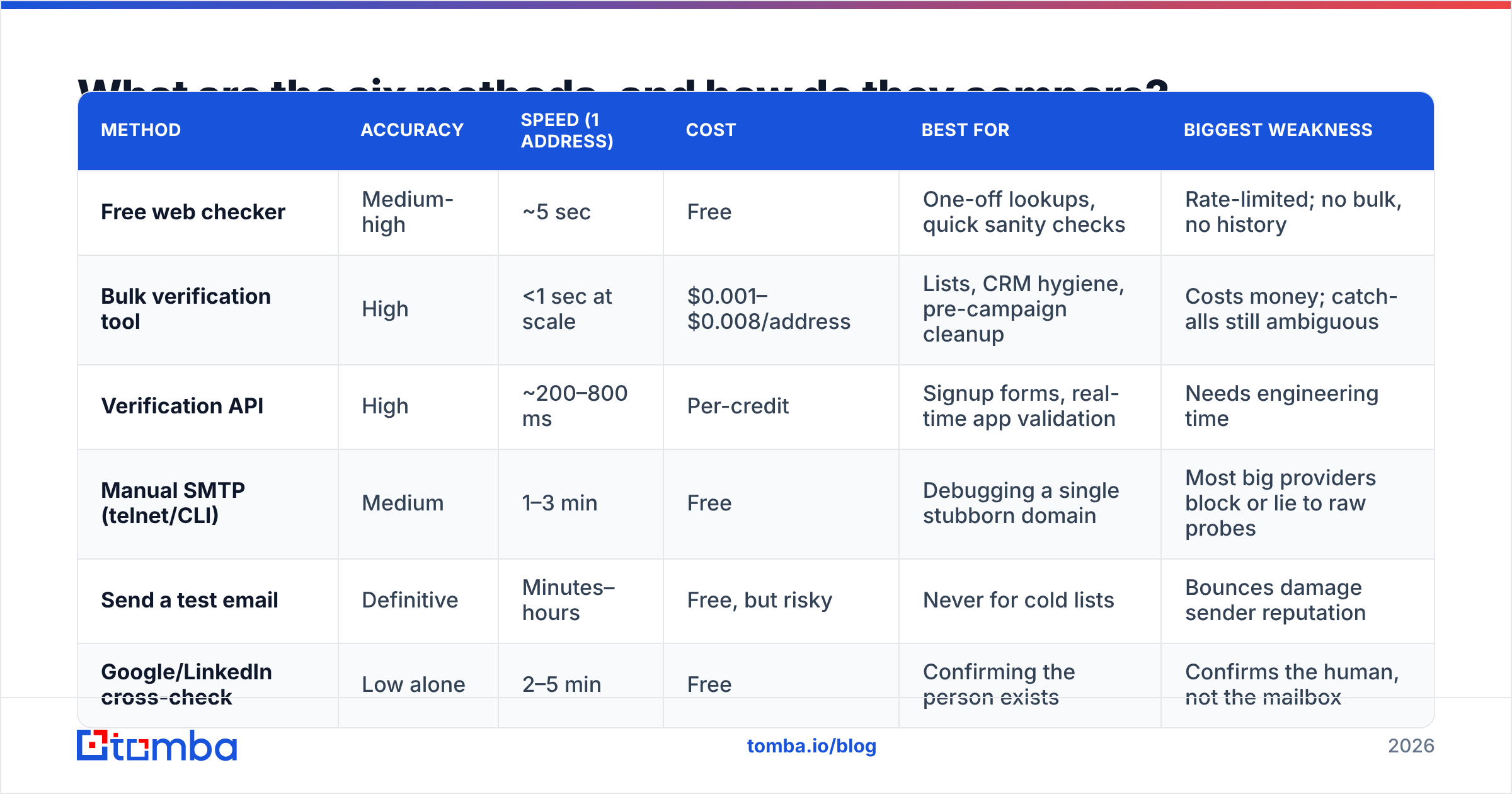
| Method | Accuracy | Speed (1 address) | Cost | Best for | Biggest weakness |
|---|---|---|---|---|---|
| Free web checker | Medium-high | ~5 sec | Free | One-off lookups, quick sanity checks | Rate-limited; no bulk, no history |
| Bulk verification tool | High | <1 sec at scale | $0.001–$0.008/address | Lists, CRM hygiene, pre-campaign cleanup | Costs money; catch-alls still ambiguous |
| Verification API | High | ~200–800 ms | Per-credit | Signup forms, real-time app validation | Needs engineering time |
| Manual SMTP (telnet/CLI) | Medium | 1–3 min | Free | Debugging a single stubborn domain | Most big providers block or lie to raw probes |
| Send a test email | Definitive | Minutes–hours | Free, but risky | Never for cold lists | Bounces damage sender reputation |
| Google/LinkedIn cross-check | Low alone | 2–5 min | Free | Confirming the person exists | Confirms the human, not the mailbox |
Two things stand out. First, "send a test email" is the only method that gives you certainty — and it's the one you should almost never use on unverified data, because the certainty arrives as a hard bounce recorded against your domain. Second, manual SMTP has quietly stopped working well: Google, Microsoft 365, and most enterprise gateways either accept every RCPT TO or throttle repeat probes from unknown IPs. Verifiers get better results because they rotate infrastructure and maintain provider-specific logic.
What does a bulk email check look like in practice?#
Upload a CSV, map the email column, run it, download a segmented file.
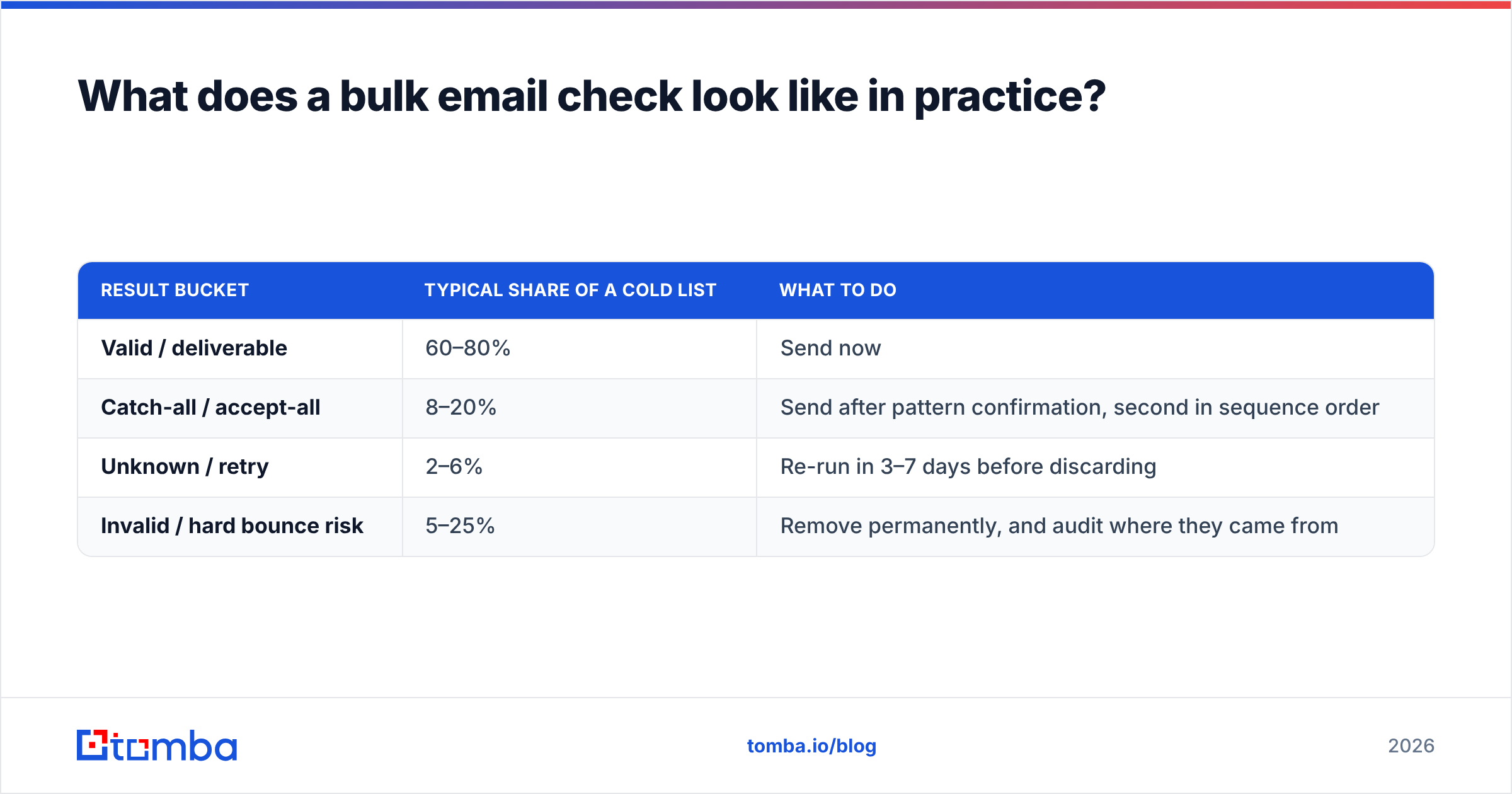
Here's the part most people get wrong: don't delete everything that isn't green. A well-run bulk pass splits your list into four buckets, and three of them are usable.
| Result bucket | Typical share of a cold list | What to do |
|---|---|---|
| Valid / deliverable | 60–80% | Send now |
| Catch-all / accept-all | 8–20% | Send after pattern confirmation, second in sequence order |
| Unknown / retry | 2–6% | Re-run in 3–7 days before discarding |
| Invalid / hard bounce risk | 5–25% | Remove permanently, and audit where they came from |
If your invalid bucket exceeds 25%, the problem isn't your verifier — it's your source. Scraped lists, purchased databases with no refresh cycle, and forms without double opt-in all produce this pattern. Fix the intake, not the output.
For lists, a bulk email finder that handles both finding and verifying in one upload saves a round trip, since a "bad" address is often just the wrong permutation of a real one rather than a dead mailbox. The G2 email verification category is a reasonable place to compare vendors on real user reviews if you want a second opinion on any tool, including this one.
How do you check an email address for free?#
You have three genuinely free routes, each with a ceiling.
- Browser tools with a free quota. Most vendors give away a limited number of checks per month. Tomba's free tier includes 25 searches per month; other vendors range from 10 to 100 credits. Enough for spot-checking, not for list work. Full Tomba pricing starts at $49/mo on Starter if you outgrow it.
- DNS lookups you run yourself.
nslookup -type=mx example.comon any machine tells you instantly whether a domain can receive mail. It costs nothing and eliminates typo domains in bulk if you script it. It tells you nothing about the specific mailbox. - Public signal triangulation. Search the address in quotes, check the company's team page, look for a conference bio or a GitHub commit. This confirms the person, and often the format their employer uses. Slow, but free and surprisingly reliable for senior titles.
What you should not do for free: sign up for ten trial accounts and split your list across them. You'll get inconsistent scoring models, no audit trail, and duplicate rows that quietly re-enter your CRM.
Why do catch-all domains break every checker?#
Because the server is configured to say yes to everything, so "yes" carries zero information.
A catch-all (or accept-all) domain accepts mail for any address at that domain — ceo@, asdfgh@, all of it — and sorts out delivery internally afterward. From the outside, an SMTP handshake can't distinguish a real mailbox from a fictional one. Any tool claiming 99% accuracy on catch-alls without explaining how is overselling.
The honest ways to resolve them:
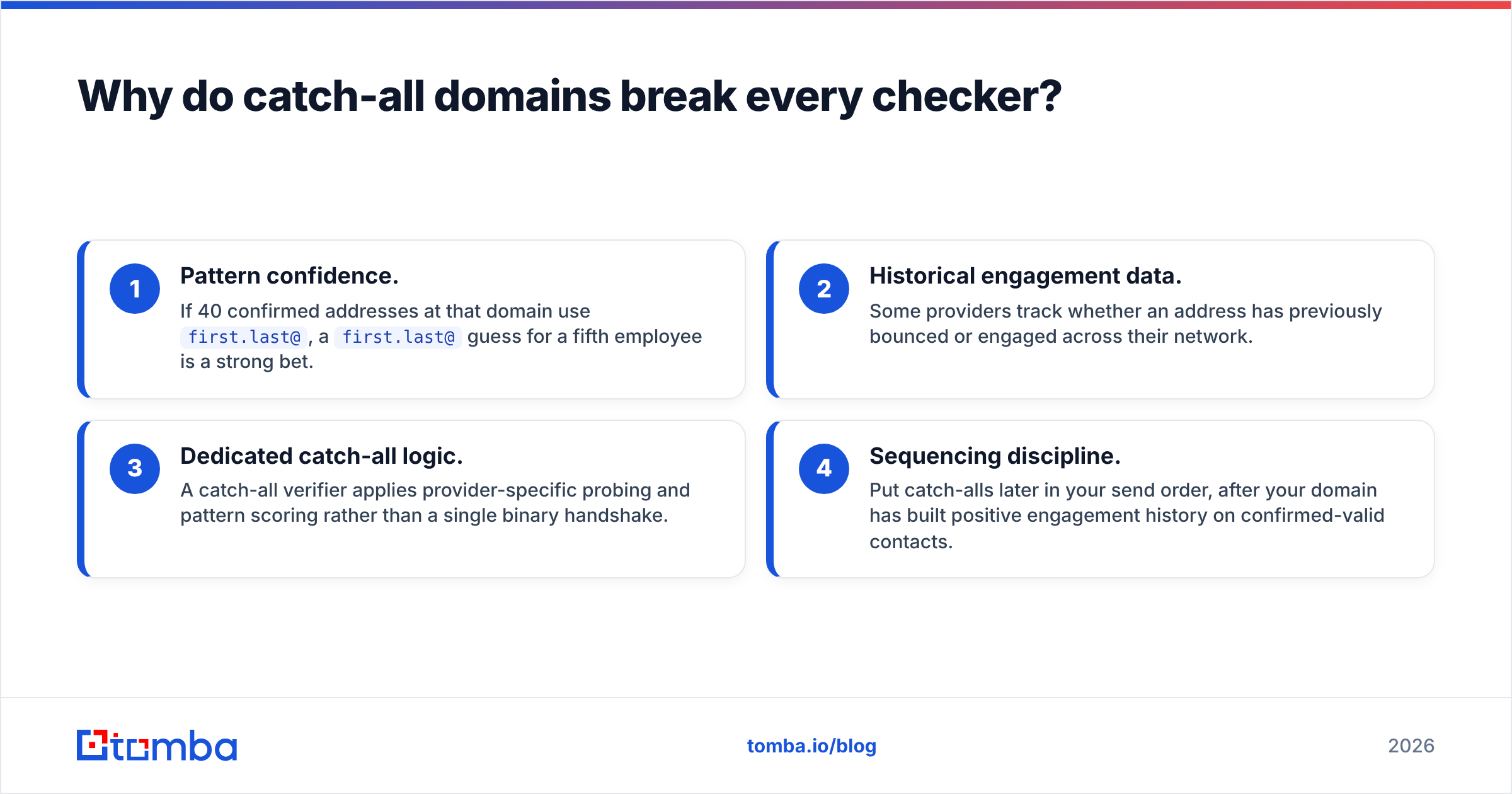
- Pattern confidence. If 40 confirmed addresses at that domain use
first.last@, afirst.last@guess for a fifth employee is a strong bet. - Historical engagement data. Some providers track whether an address has previously bounced or engaged across their network.
- Dedicated catch-all logic. A catch-all verifier applies provider-specific probing and pattern scoring rather than a single binary handshake.
- Sequencing discipline. Put catch-alls later in your send order, after your domain has built positive engagement history on confirmed-valid contacts.
Roughly 15–20% of B2B domains run catch-all, and it skews toward larger enterprises. If you sell upmarket, discarding every catch-all means discarding a chunk of your ICP.
What are the most common mistakes when checking emails?#
Five, in rough order of how much damage they cause.
Sending a "just checking" email from your main domain. Mailbox providers count hard bounces against your sender reputation. A 5% bounce rate is the widely cited danger line; past that, inbox placement degrades for your whole domain, including messages to people who wanted to hear from you. Verification exists precisely so you don't have to test in production.
Treating "unknown" as "invalid." Greylisting, rate limits, and temporary outages all produce unknowns. Discarding them permanently throws away good contacts. Retry after a few days.
Verifying once and never again. B2B contact data decays around 2–2.5% per month. A list verified in January is meaningfully wrong by June. Set a 90-day re-verification cadence for anything you email regularly.
Ignoring role addresses. info@, support@, and sales@ are usually valid and usually terrible cold targets. They route to shared inboxes, get filtered aggressively, and are frequently repurposed as spam traps. Segment them out rather than deleting them — they're fine for support and billing flows.
Confusing "valid" with "permitted." A deliverable address is not consent. Depending on jurisdiction — GDPR in the EU, CAN-SPAM in the US, CASL in Canada — your legal basis for contacting someone is a separate question from whether the mailbox accepts mail. Verification solves deliverability, not compliance.
How does email checking fit into your wider stack?#
Verification is one node in a chain: find → verify → enrich → send → monitor.
Finding and checking are usually the same motion. When you use a domain search to pull contacts at a target company, the addresses that come back should already carry a confidence status — otherwise you're doing the same work twice with two vendors and two bills. The same applies to signup forms: a real-time API check at the point of entry prevents junk from ever reaching your CRM, which is far cheaper than cleaning it quarterly.
Downstream, monitor what actually happened. Your ESP's bounce and complaint reports are the ground truth against which you should judge any verifier's claimed accuracy. If a tool says 98% deliverable and your campaign bounces at 7%, the tool is wrong about your data — measure, don't assume. For background on the underlying protocol behavior, the SMTP entry on Wikipedia is a solid neutral primer on why servers respond the way they do.
Which method should you pick?#
Match the method to the volume and the stakes.
- One address, low stakes — free web checker, 30 seconds, done.
- A prospecting list under 5,000 — bulk verifier, segment into four buckets, send to valid first.
- A signup or lead form — real-time API validation at submission, so bad data never lands.
- A CRM with years of history — bulk pass now, then a recurring 90-day job on active records only.
- A single stubborn enterprise domain — pattern lookup plus catch-all logic, and accept that certainty isn't available.
The underlying rule doesn't change: verify before you send, re-verify on a schedule, and never use your production domain as a test harness.
Ready to stop guessing? Run your next list through the Tomba Email Finder — it returns addresses with a confidence score and a verification status in the same call, so finding and checking happen in one step instead of two. Start on the free tier with 25 searches a month, and move to Starter at $49/mo when your volume justifies it.
Related guides#
// get started
Find, verify and enrich your first contacts today
Start on the free plan with 25 searches a month, then scale when your team is ready.
Free plan · No credit card required · GDPR & CCPA
// about the author