How to Check If Your Domain or IP Is on an Email Blacklist
Your open rate collapsed overnight and nobody replied. Before you rewrite the copy, check whether your sending IP or domain got blacklisted — here is the 10-minute diagnostic, the delisting process, and how to stay clean.
TL;DR
- A blacklist (DNSBL/RBL) is a published list of IPs or domains that mailbox providers consult before accepting your mail. Getting listed can drop your inbox placement to near zero within hours.
- Check three things separately: your sending IP, your sending domain, and any link domains in the email body. They get listed for different reasons and need different fixes.
- Run one multi-list lookup (MXToolbox or a free blacklist checker), then confirm on the source registry — Spamhaus, SORBS, Barracuda — because aggregators cache stale data.
- Being listed is a symptom, not the disease. Spam traps, high bounce rates, and complaint spikes cause listings. Delisting without fixing the cause gets you relisted in days.
- Most listings for cold outbound teams trace back to unverified lists. Verifying before send is cheaper than delisting after.
What is an email blacklist, and why does it matter?#
Think of a blacklist like a shared "do not admit" list passed around every bouncer in the city. One club sees you cause trouble, adds your name, and suddenly every other venue turns you away at the door — even the ones you've never visited.
Technically, an email blacklist is a DNS-based blocklist (DNSBL, sometimes called an RBL — realtime blackhole list). It is a DNS zone that answers a simple question: "is this IP or domain known for sending abusive mail?" When a receiving mail server gets a connection from your IP, it can query a dozen of these lists in a few milliseconds before deciding whether to accept, defer, or reject the message. Wikipedia's DNSBL entry covers the mechanics in detail if you want the protocol-level version.
The practical impact varies enormously by which list you're on:
- Spamhaus SBL/XBL/PBL — the heavyweight. A listing here is felt across a large share of the internet's mail infrastructure. Treat it as a fire alarm.
- Spamhaus DBL — domain-based rather than IP-based. This is the one that bites when your link domain or from domain is the problem, not your server.
- Barracuda, SpamCop, SORBS — meaningful at specific providers and appliances. Real impact, narrower blast radius.
- Long-tail lists (UCEPROTECT L2/L3, various niche zones) — often listed by netblock, frequently ignored by major receivers. Do not panic-buy a delisting.
That last category matters. Plenty of "you're on 3 blacklists!" panic reports come from lists almost nobody enforces. Learning to triage is half the skill.
How do you check if you're on a blacklist?#
Here is the diagnostic order. Work through it in sequence — each step narrows the problem.
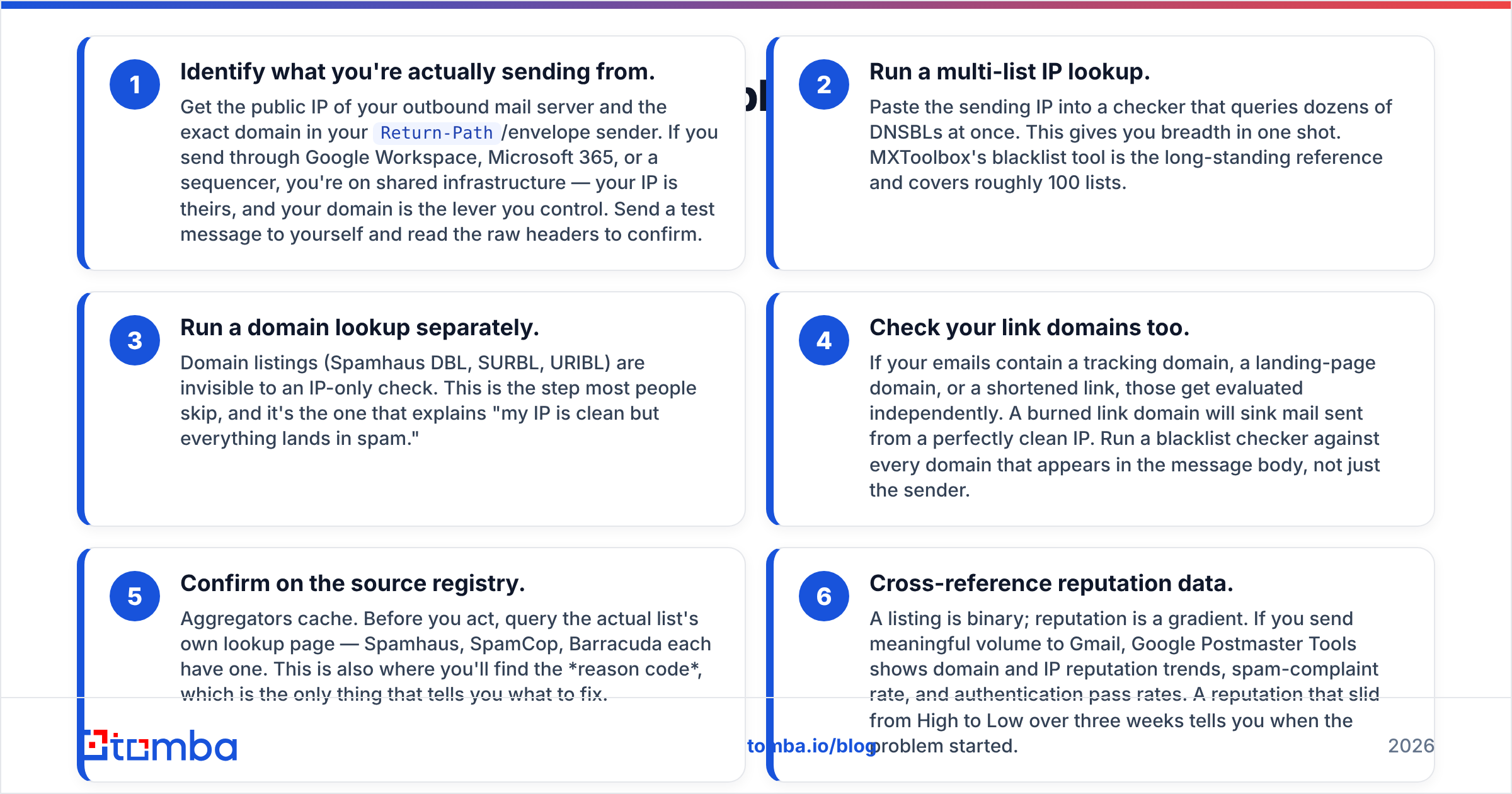
- Identify what you're actually sending from. Get the public IP of your outbound mail server and the exact domain in your
Return-Path/envelope sender. If you send through Google Workspace, Microsoft 365, or a sequencer, you're on shared infrastructure — your IP is theirs, and your domain is the lever you control. Send a test message to yourself and read the raw headers to confirm. - Run a multi-list IP lookup. Paste the sending IP into a checker that queries dozens of DNSBLs at once. This gives you breadth in one shot. MXToolbox's blacklist tool is the long-standing reference and covers roughly 100 lists.
- Run a domain lookup separately. Domain listings (Spamhaus DBL, SURBL, URIBL) are invisible to an IP-only check. This is the step most people skip, and it's the one that explains "my IP is clean but everything lands in spam."
- Check your link domains too. If your emails contain a tracking domain, a landing-page domain, or a shortened link, those get evaluated independently. A burned link domain will sink mail sent from a perfectly clean IP. Run a blacklist checker against every domain that appears in the message body, not just the sender.
- Confirm on the source registry. Aggregators cache. Before you act, query the actual list's own lookup page — Spamhaus, SpamCop, Barracuda each have one. This is also where you'll find the reason code, which is the only thing that tells you what to fix.
- Cross-reference reputation data. A listing is binary; reputation is a gradient. If you send meaningful volume to Gmail, Google Postmaster Tools shows domain and IP reputation trends, spam-complaint rate, and authentication pass rates. A reputation that slid from High to Low over three weeks tells you when the problem started.

Do all six before you touch anything. The most expensive mistake in deliverability is fixing the wrong layer — rotating IPs when the domain was listed, or rewriting copy when a spam trap was the trigger.
Which blacklist checker should you use?#
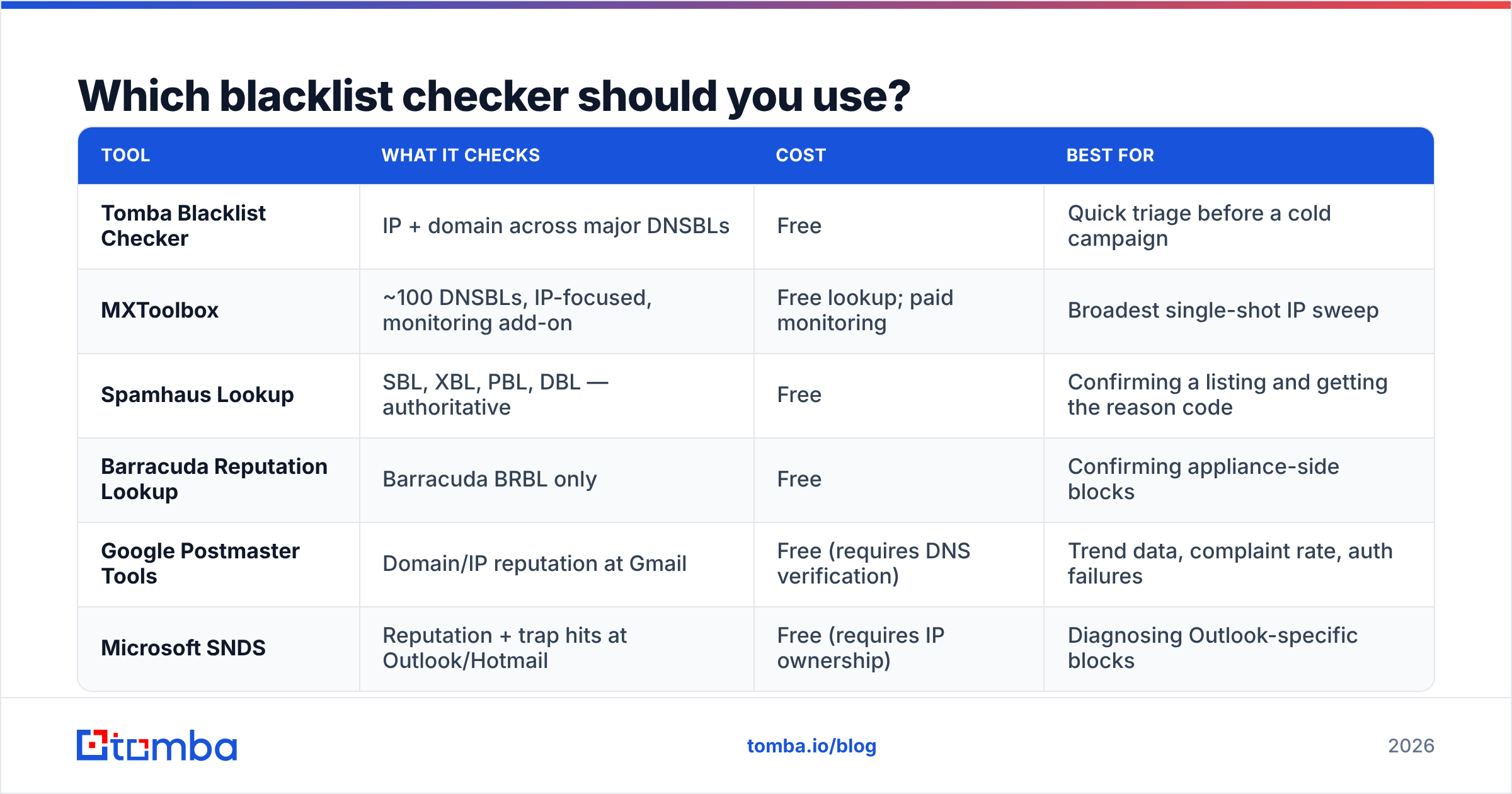
Different tools answer different questions. Here's how the common options compare:
| Tool | What it checks | Cost | Best for |
|---|---|---|---|
| Tomba Blacklist Checker | IP + domain across major DNSBLs | Free | Quick triage before a cold campaign |
| MXToolbox | ~100 DNSBLs, IP-focused, monitoring add-on | Free lookup; paid monitoring | Broadest single-shot IP sweep |
| Spamhaus Lookup | SBL, XBL, PBL, DBL — authoritative | Free | Confirming a listing and getting the reason code |
| Barracuda Reputation Lookup | Barracuda BRBL only | Free | Confirming appliance-side blocks |
| Google Postmaster Tools | Domain/IP reputation at Gmail | Free (requires DNS verification) | Trend data, complaint rate, auth failures |
| Microsoft SNDS | Reputation + trap hits at Outlook/Hotmail | Free (requires IP ownership) | Diagnosing Outlook-specific blocks |
A workable routine: aggregator first for breadth, source registry second for truth, provider tools third for trend. Anyone selling you a "one-click removal from 300 blacklists" service is selling you nothing — delisting is per-list, and most legitimate lists don't accept third-party requests.
Is it your IP or your domain that got listed?#
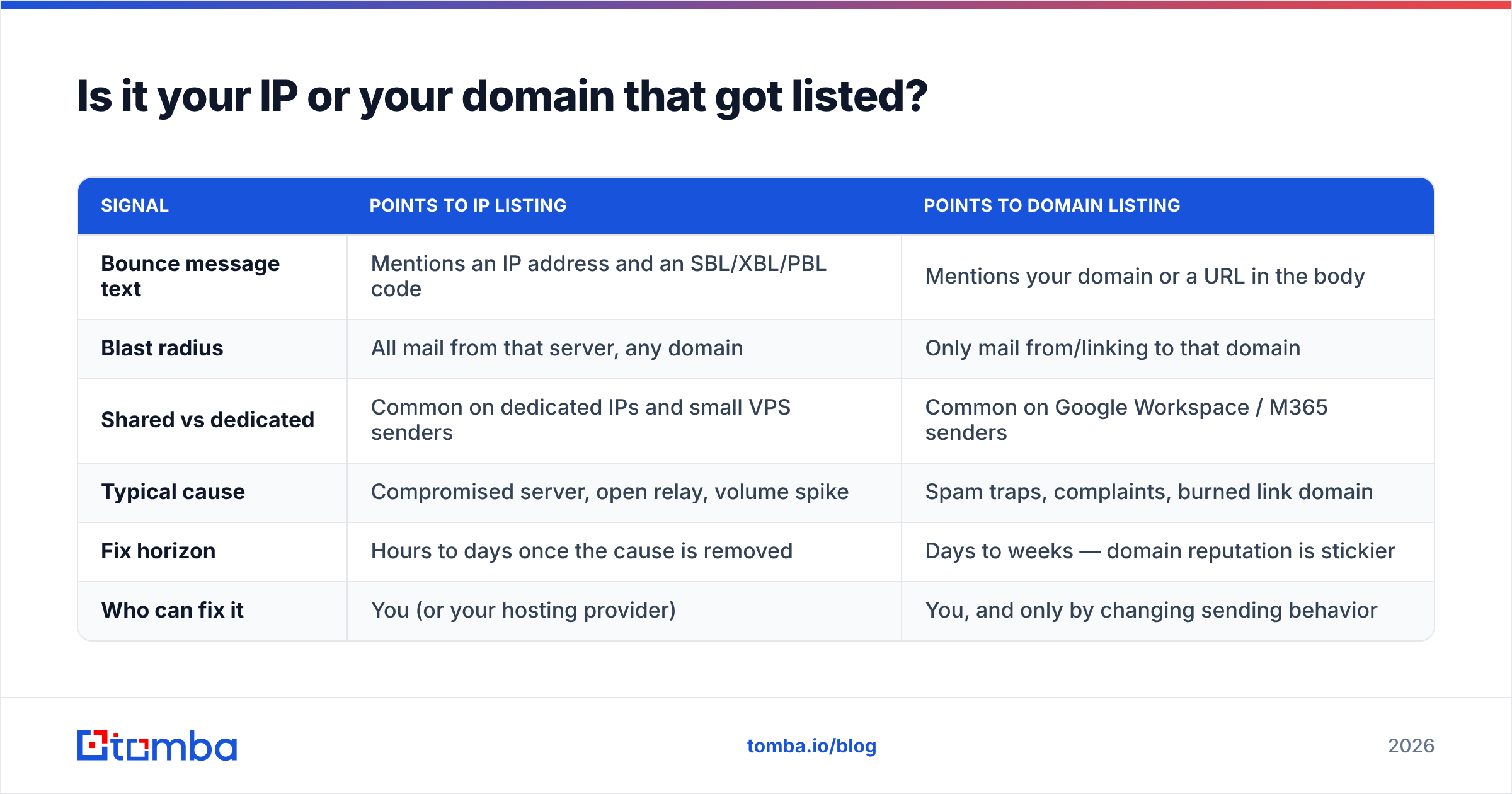
This is the fork in the road, and the answer changes everything you do next.
| Signal | Points to IP listing | Points to domain listing |
|---|---|---|
| Bounce message text | Mentions an IP address and an SBL/XBL/PBL code | Mentions your domain or a URL in the body |
| Blast radius | All mail from that server, any domain | Only mail from/linking to that domain |
| Shared vs dedicated | Common on dedicated IPs and small VPS senders | Common on Google Workspace / M365 senders |
| Typical cause | Compromised server, open relay, volume spike | Spam traps, complaints, burned link domain |
| Fix horizon | Hours to days once the cause is removed | Days to weeks — domain reputation is stickier |
| Who can fix it | You (or your hosting provider) | You, and only by changing sending behavior |
If you're on shared infrastructure, IP listings are largely out of your hands — your provider manages that pool. Your leverage is entirely on the domain side: authentication, list hygiene, complaint rate, and content.
Read the actual bounce string. A rejection that reads 550 5.7.1 Service unavailable; Client host [203.0.113.5] blocked using zen.spamhaus.org is unambiguous. One that reads 550 5.7.1 Message rejected due to content is not a blacklist problem at all — that's a filter, and no delisting request will help you.
Why did you get blacklisted in the first place?#
Listings are earned, not assigned at random. The usual causes, roughly in order of how often they hit B2B outbound teams:
- Spam traps. Recycled addresses (abandoned mailboxes reactivated as traps) and pristine traps (addresses never used by a human, seeded on the web to catch scrapers). Hitting one pristine trap can trigger a listing. These are the single biggest reason scraped or purchased lists burn domains.
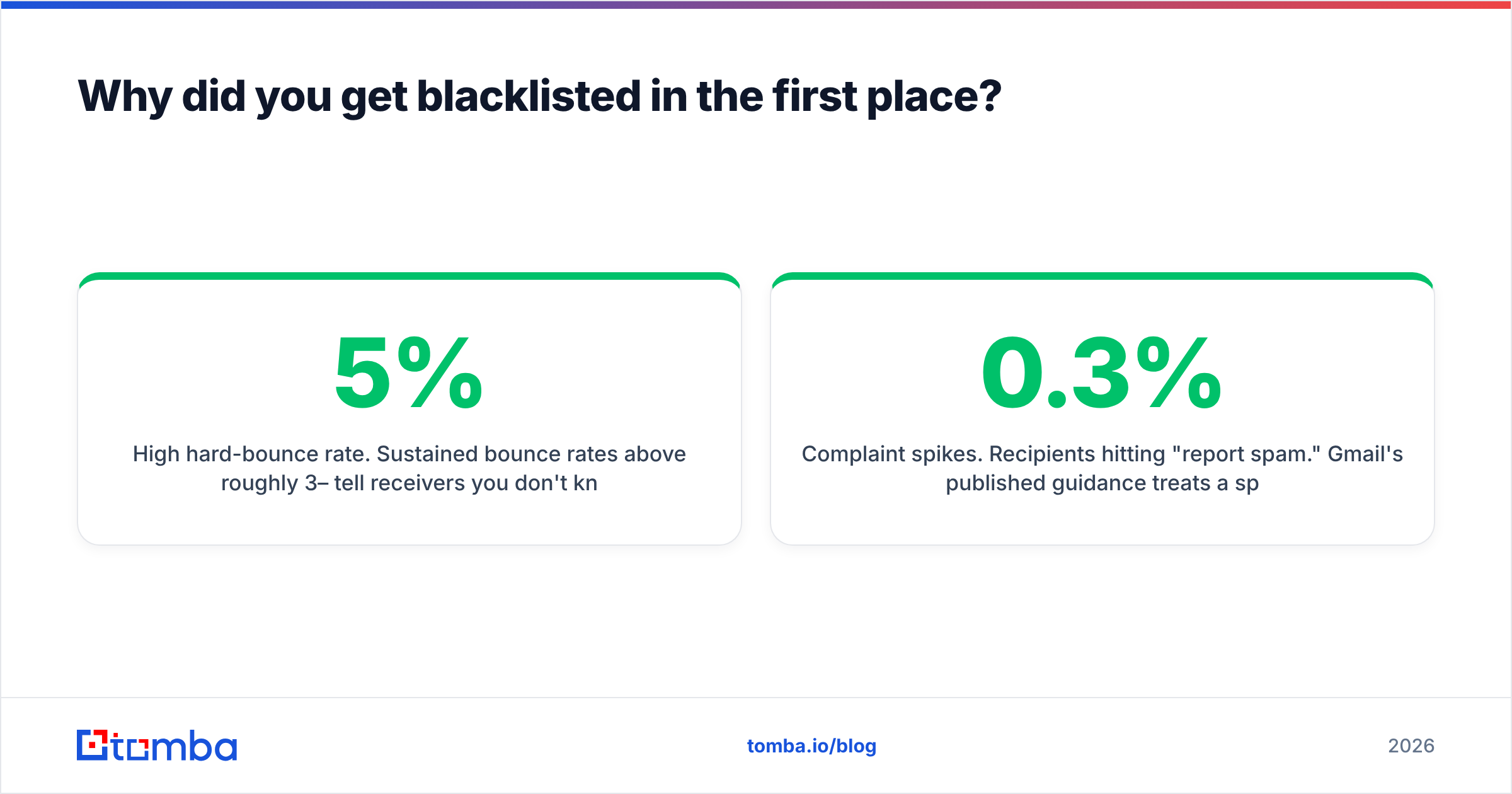
- High hard-bounce rate. Sustained bounce rates above roughly 3–5% tell receivers you don't know who you're mailing. Some lists act on this directly; providers throttle you regardless.
- Complaint spikes. Recipients hitting "report spam." Gmail's published guidance treats a spam-complaint rate above 0.3% as the danger zone, and 0.1% as the target ceiling.
- Volume ramps. Going from 50 to 5,000 sends a day on a cold domain looks exactly like a compromised account.
- Compromised infrastructure. An open relay, a hijacked WordPress form, or a leaked SMTP credential. If you're listed on XBL and you didn't change anything, assume compromise and audit before delisting.
- Guilt by netblock. Some lists list entire ranges when a neighbor misbehaves. Common on cheap VPS providers, and a real argument for not hosting outbound mail on the cheapest box you can find.
Notice how many of those trace back to list quality rather than to your server. That's why an email verifier pass before send does more for deliverability than most technical tuning. Removing invalid addresses removes the bounces; removing role accounts and known trap patterns removes a chunk of the complaint risk.

How do you get delisted?#
Delisting is mechanical once you've fixed the cause. Do it in this order — reversing the order gets you relisted.
Step 1: Fix the cause. Stop the campaign. Pull the list. Rotate any credentials if compromise is even slightly plausible. Patch the form or relay. If you can't articulate in one sentence what caused the listing, you are not ready to request removal.
Step 2: Verify your authentication. Confirm SPF, DKIM, and DMARC all pass on a live test message. A broken SPF record won't itself blacklist you, but it removes your credibility during a manual review and it materially hurts inbox placement everywhere else. Check the record syntax and the DNS lookup count — SPF hard-fails above ten lookups.
Step 3: Clean the list before you send again. Every address that hard-bounced, every catch-all you never confirmed, every address older than a few months. This is where a bulk verification pass pays for itself immediately.
Step 4: Submit the removal request. Go to the specific list's removal page. Spamhaus runs a self-service removal center for many listings; SpamCop expires automatically once trap hits stop; Barracuda takes a form. Be factual: what happened, what you changed, what prevents recurrence. Do not argue, do not submit twice, do not use a "delisting service."
Step 5: Resume slowly. Restart at maybe 10–20% of prior volume, aimed at your most engaged recipients, and ramp over two to three weeks. A second listing on the same domain is dramatically harder to clear than the first.
Step 6: Set up monitoring. Weekly automated checks on your IPs, sending domains, and link domains. Finding a listing on day one instead of day twelve is the difference between a bad week and a dead domain.
How do you stay off blacklists for good?#
The teams that never get listed all do roughly the same boring things:
- Verify every address before it enters a sequence. Not once a quarter — at import. Bounce rate is the leading indicator of every other deliverability problem, and it's the one fully under your control. Bulk verification through bulk verify or an API call at the point of import turns this into a non-decision.
- Separate your domains. Send cold outbound from a subdomain or a dedicated sending domain, never your primary corporate domain. If it burns, your invoices and password resets still arrive.
- Suppress aggressively. Unsubscribes, complaints, hard bounces, and anyone who hasn't opened in six months. Keeping a dead address "just in case" is how you meet a recycled trap.
- Cap daily volume per mailbox. Most cold-outbound operators run well under 50 sends per mailbox per day for a reason. Scale by adding mailboxes, not by pushing one harder.
- Watch complaint rate as a first-class metric. Not open rate. Complaints are what receivers actually score you on, and they lead listings by days.
- Never buy an unverified list. If a vendor won't tell you where the data came from or how recently it was validated, the price of that list includes a future delisting.
Reputable B2B data vendors — including specialist providers like BookYourData — will document their sourcing and validation. That documentation is the thing you're actually paying for. Check how any provider describes its data sources before you commit budget; opaque sourcing is the single strongest predictor of trap hits.
What if you're clean but still landing in spam?#
Being off every blacklist and still hitting the spam folder is common, and it's a different diagnosis. Blacklists are a hard gate; filters are a score. If your checks come back clean:
- Confirm DMARC alignment, not just SPF/DKIM presence.
- Check for a burned link domain — including URL shorteners, which are widely distrusted.
- Look at your Gmail domain reputation trend rather than a single-day snapshot.
- Reduce images, tracking pixels, and link count in the first message of a sequence.
- Audit engagement: filters weight replies and opens heavily, and a sequence nobody answers decays on its own.
Blacklist status is the first thing to rule out because it's binary and fast to check. It is rarely the whole story.
Where should you start today?#
Run the three lookups — IP, sending domain, link domain — right now, before your next campaign goes out. It takes under ten minutes and it either clears you or hands you the exact reason code you need.
Then close the loop upstream. Most listings that hit outbound teams are list-quality problems wearing an infrastructure costume: bad addresses in, bounces and traps out, listing follows. Build your prospect lists from verified, sourced data instead of scrapes, and the blacklist question mostly stops coming up.
Start with the Tomba Email Finder to build lists from verified professional addresses rather than guesses, and check Tomba pricing — the free tier gives you 25 searches a month to test accuracy on your own target accounts, with paid plans from $49/mo when you're ready to scale.
Related guides#
// get started
Find, verify and enrich your first contacts today
Start on the free plan with 25 searches a month, then scale when your team is ready.
Free plan · No credit card required · GDPR & CCPA
// about the author