How to Check Company Email Addresses: 7 Methods for 2026
Guessing a company email address wastes sends and burns your domain. Here are seven ways to check a company email — from free MX lookups to bulk verification — ranked by speed, cost, and accuracy.
TL;DR
- Checking a company email means answering three separate questions: does the domain accept mail, does the specific mailbox exist, and is the format right for that company.
- Free methods (MX lookup, email pattern guessing, LinkedIn cross-referencing) get you to "probably." SMTP-level verification gets you to "yes."
- Catch-all domains — roughly 15-20% of B2B domains — accept everything and confirm nothing. You need a dedicated catch-all check, not a standard verifier.
- Bulk verification before a send is the single cheapest insurance against a bounce spike. Under 2% bounce rate keeps you out of spam folders.
- Free tiers exist: Tomba gives 25 searches/month at no cost; paid plans start at $49/mo.
What does "checking a company email" actually mean?#
Three different checks get lumped under one phrase, and confusing them is why people send to addresses they "verified."
1. Domain-level check. Does acme.com have mail servers configured at all? An MX record lookup answers this in under a second. No MX records means no mail gets delivered, full stop. This is the cheapest filter and it catches parked domains, dead startups, and typos like gmial.com.
2. Format and pattern check. Does this company use first.last@, flast@, first@, or something else? Most organizations standardize on one pattern. If you know the pattern and you know the person's name, you can construct the address. This is inference, not verification.
3. Mailbox-level check. Does jane.doe@acme.com specifically exist on that server? This requires an SMTP conversation with the receiving mail server — opening a connection, issuing a RCPT TO command, and reading the response code without ever sending a message.
Only the third one is verification. The first two narrow the field. Skipping straight from step two to "hit send" is how a 3,000-contact list produces a 12% bounce rate and a burned sending domain.

What are the 7 methods to check a company email?#
Here's the full menu, ordered from free-and-rough to paid-and-precise.
- MX record lookup — Confirms the domain accepts mail. Free via
dig MX acme.comin a terminal or any online DNS tool. Takes seconds. Tells you nothing about individual mailboxes. - Company email pattern lookup — Identifies the dominant format for a domain from known public addresses. A company email pattern checker returns something like "88% use first.last@." Good for constructing candidates.
- Email permutator — Generates every plausible combination from a first name, last name, and domain. An email permutator turns "Jane Doe + acme.com" into 20+ candidates. You still have to test them.
- Manual web reconnaissance — Search
site:acme.com "@acme.com", check press releases, author bylines, GitHub commit logs, and the company's contact page. Slow but zero cost and often exact. - SMTP verification — Ping the mail server directly. This is what a real email verifier does under the hood, plus syntax, disposable-domain, and role-account checks.
- Catch-all detection — Test a deliberately fake address like
zzqx9182@acme.com. If the server accepts it, the domain is catch-all and standard verification will return false positives for every address you test. - Bulk list verification — Upload a CSV, get back valid / invalid / risky / catch-all classifications per row. This is the pre-send gate for anything above a few dozen contacts.
Most workflows chain three of these: pattern lookup → candidate generation → SMTP verification.
How do free methods compare to paid verification?#
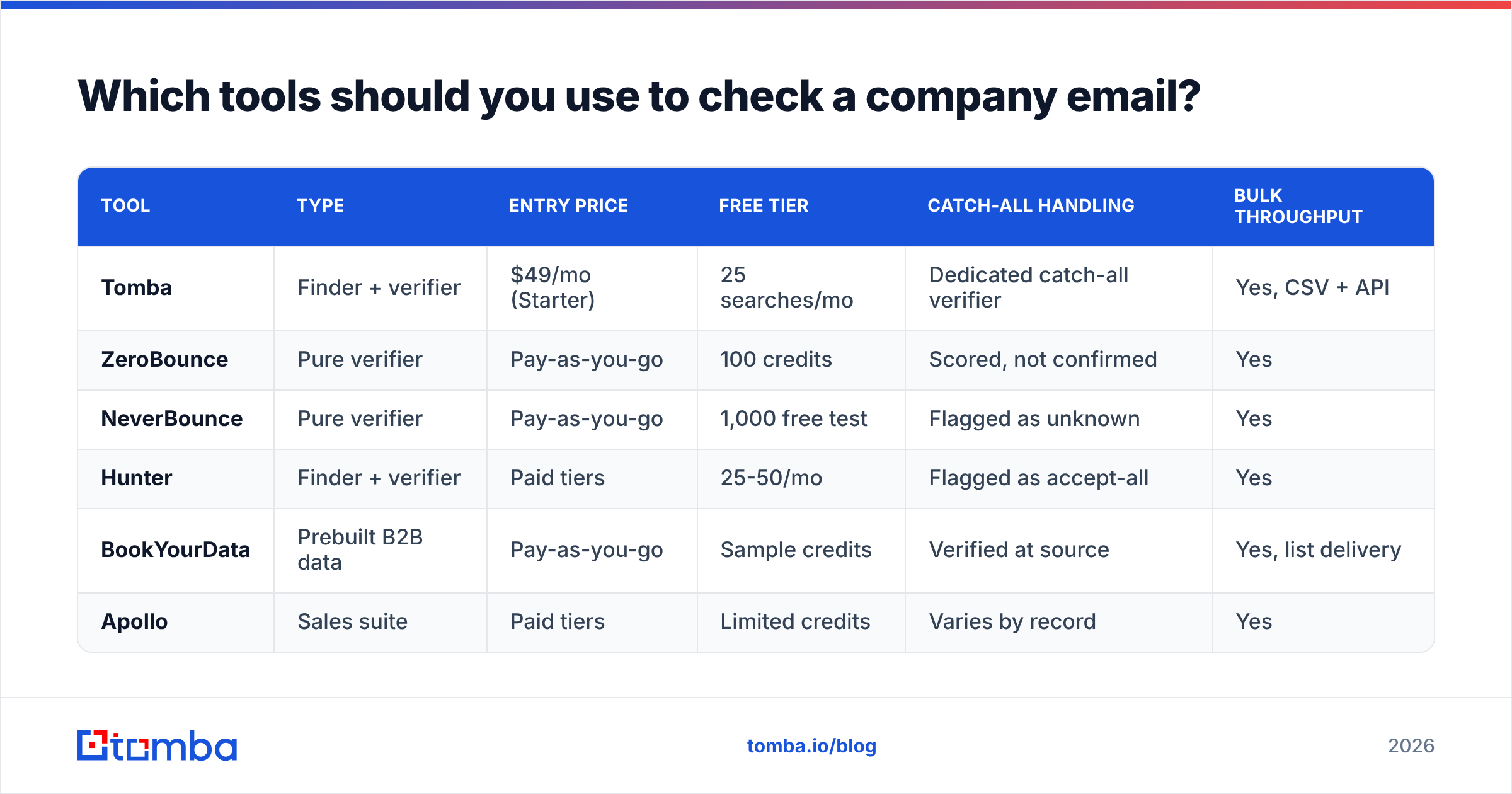
The honest answer: free methods are fine for one-off checks and genuinely bad at scale.
| Method | Cost | Speed per contact | Confirms mailbox exists? | Catch-all safe? | Best for |
|---|---|---|---|---|---|
| MX record lookup | Free | ~1 sec | No | N/A | Filtering dead domains |
| Pattern lookup | Free tier | ~2 sec | No | N/A | Constructing candidates |
| Manual web search | Free (your time) | 3-10 min | Sometimes | Yes | High-value single targets |
| Email permutator | Free | Instant | No | No | Generating a test set |
| SMTP verification | ~$0.001-0.01 | <1 sec | Yes | No | Standard domains |
| Catch-all verification | Paid only | 1-5 sec | Probabilistic | Yes | The 15-20% edge case |
| Bulk CSV verification | Paid | 1k-10k/min | Yes | Depends on tool | Pre-campaign hygiene |
The break-even is roughly 50 contacts. Below that, manual research plus a free checker is defensible. Above it, the time cost of manual work exceeds any verification bill, and the bounce risk compounds.
Which tools should you use to check a company email?#
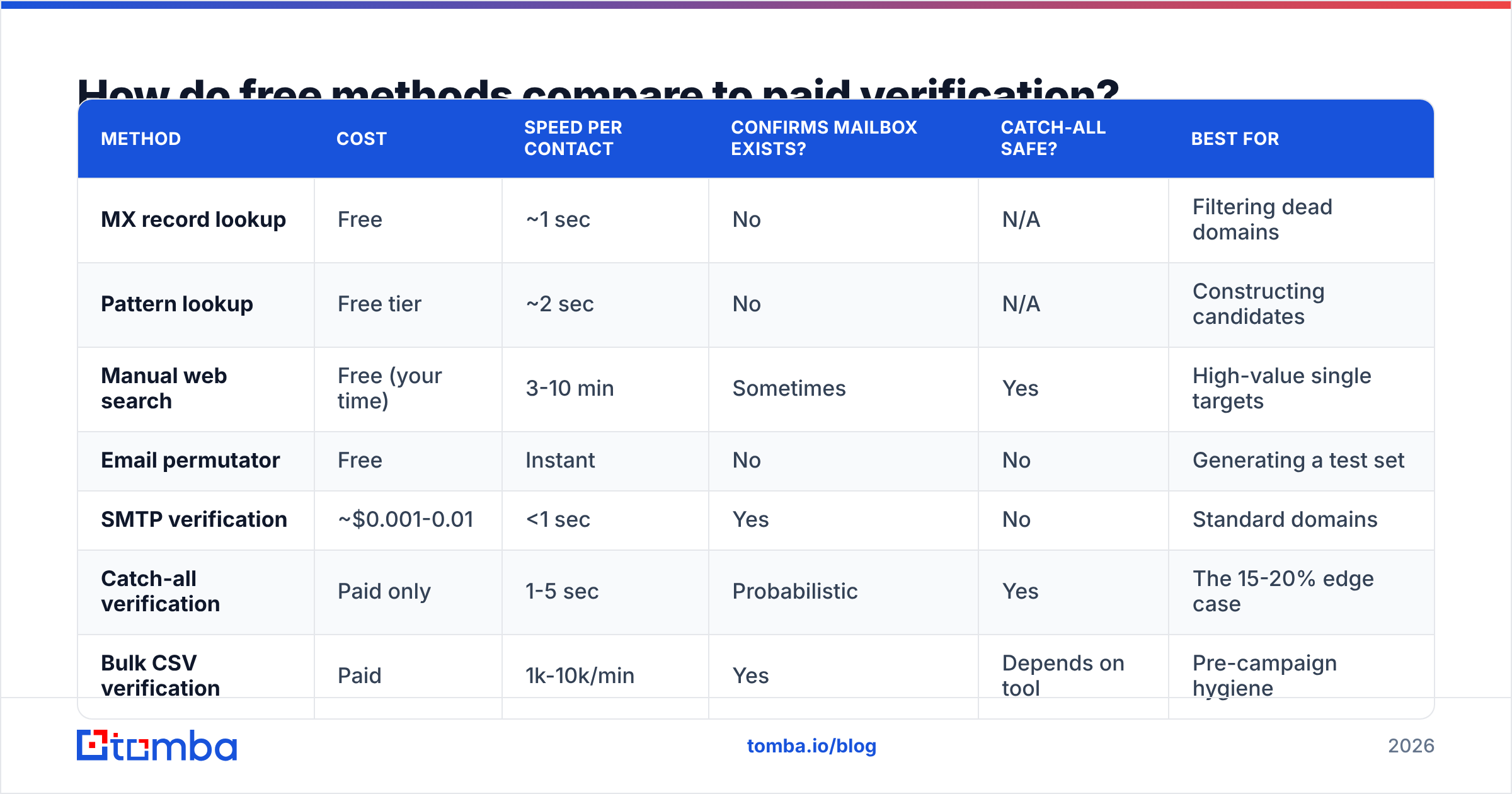
The market splits into three groups: pure verifiers, finder-plus-verifier platforms, and full sales-intelligence suites with verification bolted on.
| Tool | Type | Entry price | Free tier | Catch-all handling | Bulk throughput |
|---|---|---|---|---|---|
| Tomba | Finder + verifier | $49/mo (Starter) | 25 searches/mo | Dedicated catch-all verifier | Yes, CSV + API |
| ZeroBounce | Pure verifier | Pay-as-you-go | 100 credits | Scored, not confirmed | Yes |
| NeverBounce | Pure verifier | Pay-as-you-go | 1,000 free test | Flagged as unknown | Yes |
| Hunter | Finder + verifier | Paid tiers | 25-50/mo | Flagged as accept-all | Yes |
| BookYourData | Prebuilt B2B data | Pay-as-you-go | Sample credits | Verified at source | Yes, list delivery |
| Apollo | Sales suite | Paid tiers | Limited credits | Varies by record | Yes |
Two practical notes. First, pure verifiers only verify — they won't find the address for you, so you need a finder upstream. Second, catch-all handling is the real differentiator. Every tool on this list will tell you bounce@nowhere.invalid is bad. Far fewer will give you a usable signal on a catch-all domain, and that's where most B2B contacts live.
If you're buying rather than finding, BookYourData sells pre-verified B2B lists with per-record guarantees, which sidesteps the check-it-yourself problem entirely for teams that would rather pay for finished data. If you're finding addresses yourself from names and domains, a combined email finder and verifier stack is the fewer-moving-parts option.
How do you check a company email for free, step by step?#
Say you need jane.doe@acme.com and you have no budget.
Step 1 — confirm the domain. Run dig MX acme.com +short. If you get back records pointing at Google Workspace (aspmx.l.google.com) or Microsoft 365 (acme-com.mail.protection.outlook.com), the domain is live and you know the mail host. If nothing returns, stop here.
Step 2 — find the pattern. Search Google for site:acme.com "@acme.com" and "@acme.com" -site:acme.com. Press releases, support docs, and job postings leak addresses constantly. Two or three real examples establish the pattern with high confidence.
Step 3 — construct the candidate. Apply the pattern to your target's name. If the pattern is first.last@, you get jane.doe@acme.com. If you're unsure between two patterns, generate both.
Step 4 — check it. Run the candidate through a free email checker. You'll get syntax validation, MX confirmation, disposable-domain detection, and an SMTP result where the receiving server allows it.
Step 5 — cross-reference. Search the address itself in quotes. If it appears anywhere public — a conference attendee list, a mailing list archive, a GitHub commit — that's independent confirmation.
Total time: five to ten minutes per contact. Perfectly reasonable for a shortlist of ten strategic accounts. Completely unworkable for a list of 500.

What is a catch-all domain and why does it break verification?#
A catch-all (or accept-all) domain is configured to accept mail addressed to any mailbox at that domain, valid or not. The server says "yes" to everything at the SMTP layer, then decides internally whether to deliver, forward, or silently discard.
This is a real problem, not a technicality. When you verify jane.doe@acme.com on a catch-all domain, the server returns a 250 OK. Your verifier reports "valid." You send. The message hits a black hole, or worse, a spam trap.
Standard verifiers handle this by returning "unknown" or "accept-all" and shifting the decision to you. Better approaches layer additional signals: historical deliverability data for that domain, pattern consistency across known-good addresses, and probabilistic scoring. A dedicated catch-all verifier exists precisely because the standard SMTP handshake can't answer the question.
Practical rule: segment catch-all addresses into their own campaign. Send to them separately, at lower volume, from a domain you're not using for your primary sequences. Watch the engagement rate. If it's near zero, the pattern was wrong.
How does checking emails protect deliverability?#
Bounces are a reputation signal, and mailbox providers weight them heavily.
Google's own Postmaster Tools guidance and Microsoft's sender requirements both treat high invalid-recipient rates as an indicator of purchased or scraped lists. The consequences escalate: first your mail lands in Promotions, then Spam, then the receiving server starts rejecting connections outright.
The working thresholds most senders target:
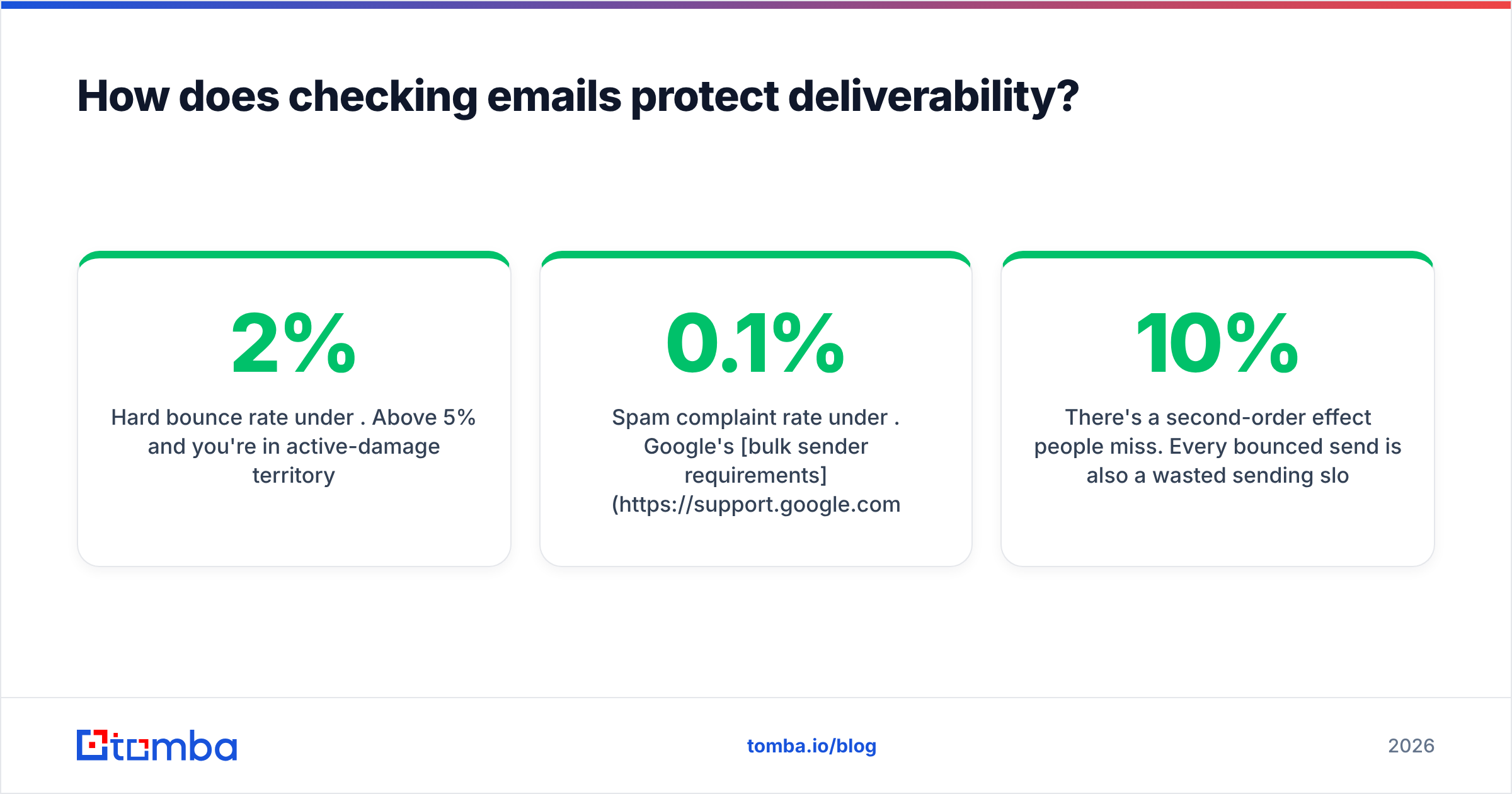
- Hard bounce rate under 2%. Above 5% and you're in active-damage territory.
- Spam complaint rate under 0.1%. Google's bulk sender requirements made 0.3% a hard ceiling.
- Unknown-user rate near zero. This is the specific metric verification fixes.
There's a second-order effect people miss. Every bounced send is also a wasted sending slot. If your warmed domain supports 50 sends a day and 10% bounce, you've thrown away five slots daily — 150 a month — on addresses that were never going to convert. Verification isn't just defensive; it raises your effective throughput.
For a deeper treatment of the underlying mechanics, the email deliverability glossary entry covers authentication, reputation, and throttling in one place.
How do you check company emails in bulk?#
Once you're past roughly 50 contacts, the workflow changes shape entirely.
Option A — CSV round trip. Export your list, upload it to a bulk email finder or verifier, download the annotated result, filter to valid, re-import. Simple, no engineering required, works with any CRM. Downside: it's a manual step someone has to remember.
Option B — API integration. Call a verification endpoint at the point of data capture — form submission, list import, CRM record creation. The email verification API approach means bad data never enters your system in the first place. This is the right architecture if you're ingesting leads continuously.
Option C — spreadsheet-native. Verify inside the tool where your list already lives. A Google Sheets add-on or Excel integration lets a non-technical operator run checks without exports. Slower per row, but zero context switching.
Option D — CRM-triggered. Wire verification into your CRM so records are checked on creation and re-checked on a schedule. B2B email data decays at roughly 2-3% per month as people change jobs, so a list verified twelve months ago is meaningfully worse than one verified last week. G2's data quality category tracks vendors across this space if you want to compare options independently.
Whichever you pick, verify immediately before sending, not when you built the list. The gap between acquisition and send is where decay happens.
What mistakes should you avoid?#
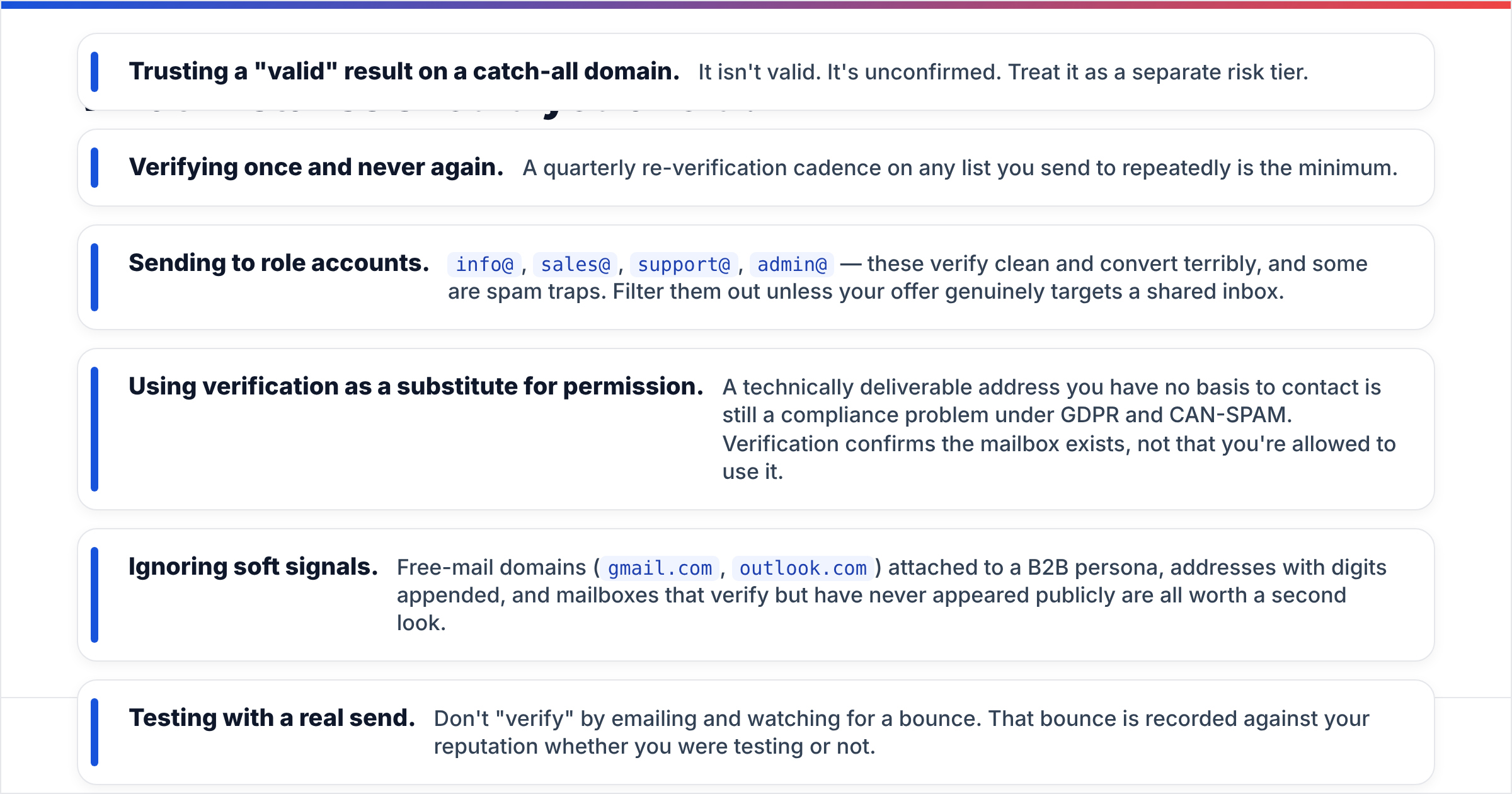
- Trusting a "valid" result on a catch-all domain. It isn't valid. It's unconfirmed. Treat it as a separate risk tier.
- Verifying once and never again. A quarterly re-verification cadence on any list you send to repeatedly is the minimum.
- Sending to role accounts.
info@,sales@,support@,admin@— these verify clean and convert terribly, and some are spam traps. Filter them out unless your offer genuinely targets a shared inbox. - Using verification as a substitute for permission. A technically deliverable address you have no basis to contact is still a compliance problem under GDPR and CAN-SPAM. Verification confirms the mailbox exists, not that you're allowed to use it.
- Ignoring soft signals. Free-mail domains (
gmail.com,outlook.com) attached to a B2B persona, addresses with digits appended, and mailboxes that verify but have never appeared publicly are all worth a second look. - Testing with a real send. Don't "verify" by emailing and watching for a bounce. That bounce is recorded against your reputation whether you were testing or not.
Which method should you actually use?#
Match the method to the volume and the stakes.
- One high-value contact: manual web research plus a free checker. Ten minutes, near-perfect accuracy, no cost.
- 10-50 contacts: pattern lookup to construct candidates, then individual verification. Free tiers cover this.
- 50-5,000 contacts: bulk CSV verification before every send. Budget roughly $49/mo at the low end — see Tomba pricing for tier comparisons.
- Continuous ingestion: API verification at the point of capture, plus scheduled re-verification.
- Catch-all-heavy lists: dedicated catch-all handling, segmented sends, and engagement-based pruning.
The mistake isn't choosing the wrong method. It's choosing no method and letting the mail servers grade your list for you.
Start checking before you send#
If you're finding company email addresses from names and domains — the most common case — the fastest path is a tool that finds and verifies in one pass, so you never hold an address you haven't checked. The Tomba Email Finder does exactly that: enter a name and a company domain, get a verified address with a confidence score and the sources it was confirmed against. The free tier covers 25 searches a month if you want to test it against contacts whose addresses you already know, which is the only honest way to benchmark any finder. Paid plans start at $49/mo when you're ready to run real volume.
Related guides#
// get started
Find, verify and enrich your first contacts today
Start on the free plan with 25 searches a month, then scale when your team is ready.
Free plan · No credit card required · GDPR & CCPA
// about the author