How to Check DMARC Records in 2026: Step-by-Step Guide
A DMARC record is one TXT string standing between your domain and spoofed mail. Here is how to check it in under two minutes, read every tag, and fix the four errors that silently break enforcement.
TL;DR
- A DMARC record is a single TXT record published at
_dmarc.yourdomain.com. If it is missing, malformed, or duplicated, receivers ignore it entirely — and you get no protection and no reports. - The fastest check is one command:
dig +short TXT _dmarc.yourdomain.com. Anything else — web checkers, monitoring platforms — is a convenience layer on top of that same DNS lookup. - A valid record must start with
v=DMARC1and havep=as the second tag. Order matters more than most people realize. p=noneis a monitoring mode, not protection. Since the 2024 Google and Yahoo bulk-sender rules — and Microsoft's 2025 follow-on — high-volume senders without an enforced policy are getting throttled or rejected.- Check DMARC before every cold campaign, every domain migration, and every time a new sending tool is added to your stack. Records drift.
What is a DMARC record, and why does it matter?#
DMARC (Domain-based Message Authentication, Reporting and Conformance) is the instruction manual you hand to receiving mail servers. SPF says which servers may send for your domain. DKIM cryptographically signs your messages. DMARC ties both to the visible From: address and tells Gmail, Outlook, and everyone else what to do when the check fails — and where to send the paperwork.
Think of it like the bouncer's list at a venue. SPF is the guest list of approved vehicles at the gate. DKIM is the wristband. DMARC is the written policy that says: if someone shows up in an unapproved car with no wristband, do you wave them in, hold them at the side door, or turn them away? Without DMARC, every bouncer improvises.
The technical shape is deliberately simple. One TXT record, one hostname, semicolon-separated tags:
_dmarc.example.com. IN TXT "v=DMARC1; p=reject; rua=mailto:dmarc@example.com; adkim=s; aspf=s; pct=100"That is the whole thing. The complexity is not in the syntax — it is in knowing whether the record you published is the record receivers actually see, and whether it is doing anything. The DMARC.org overview is the canonical spec-level reference if you want the underlying RFC framing.
Why it matters commercially: since February 2024, Google and Yahoo require any sender pushing more than 5,000 messages a day to a personal inbox to publish a DMARC policy. Microsoft extended similar requirements to Outlook.com high-volume senders in 2025. A missing or broken record is no longer a theoretical risk to email deliverability — it is a hard gate on whether your mail is accepted at all.

How do you check a DMARC record in under two minutes?#
Five steps. No account, no signup, no vendor.
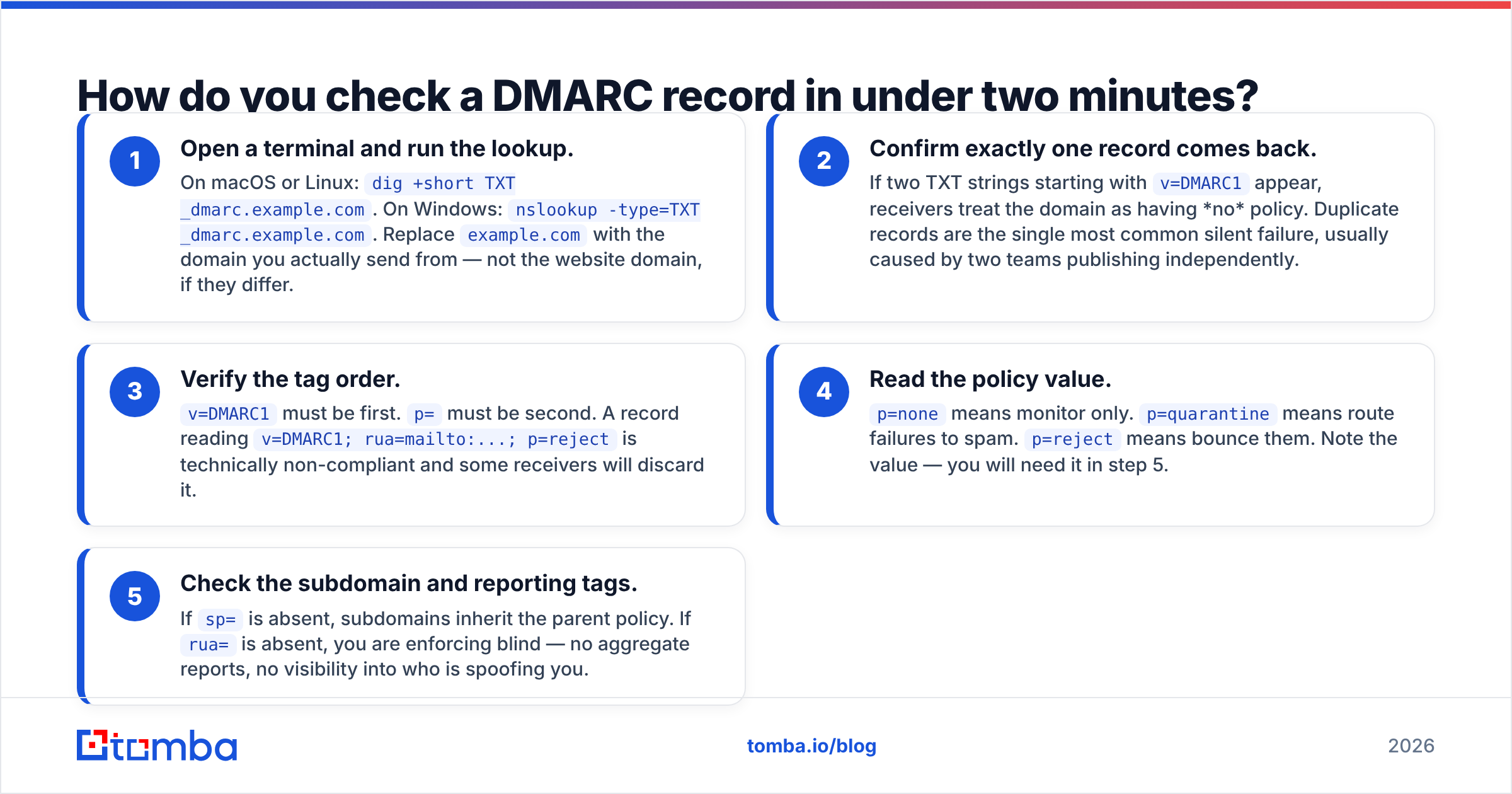
- Open a terminal and run the lookup. On macOS or Linux:
dig +short TXT _dmarc.example.com. On Windows:nslookup -type=TXT _dmarc.example.com. Replaceexample.comwith the domain you actually send from — not the website domain, if they differ. - Confirm exactly one record comes back. If two TXT strings starting with
v=DMARC1appear, receivers treat the domain as having no policy. Duplicate records are the single most common silent failure, usually caused by two teams publishing independently. - Verify the tag order.
v=DMARC1must be first.p=must be second. A record readingv=DMARC1; rua=mailto:...; p=rejectis technically non-compliant and some receivers will discard it. - Read the policy value.
p=nonemeans monitor only.p=quarantinemeans route failures to spam.p=rejectmeans bounce them. Note the value — you will need it in step 5. - Check the subdomain and reporting tags. If
sp=is absent, subdomains inherit the parent policy. Ifrua=is absent, you are enforcing blind — no aggregate reports, no visibility into who is spoofing you.
That is the complete manual check. If you can run those five steps, you never need a paid tool to answer "do we have DMARC?" You need paid tooling for the harder question: "is our DMARC actually passing for every legitimate sender?"
Which DMARC lookup method should you use?#
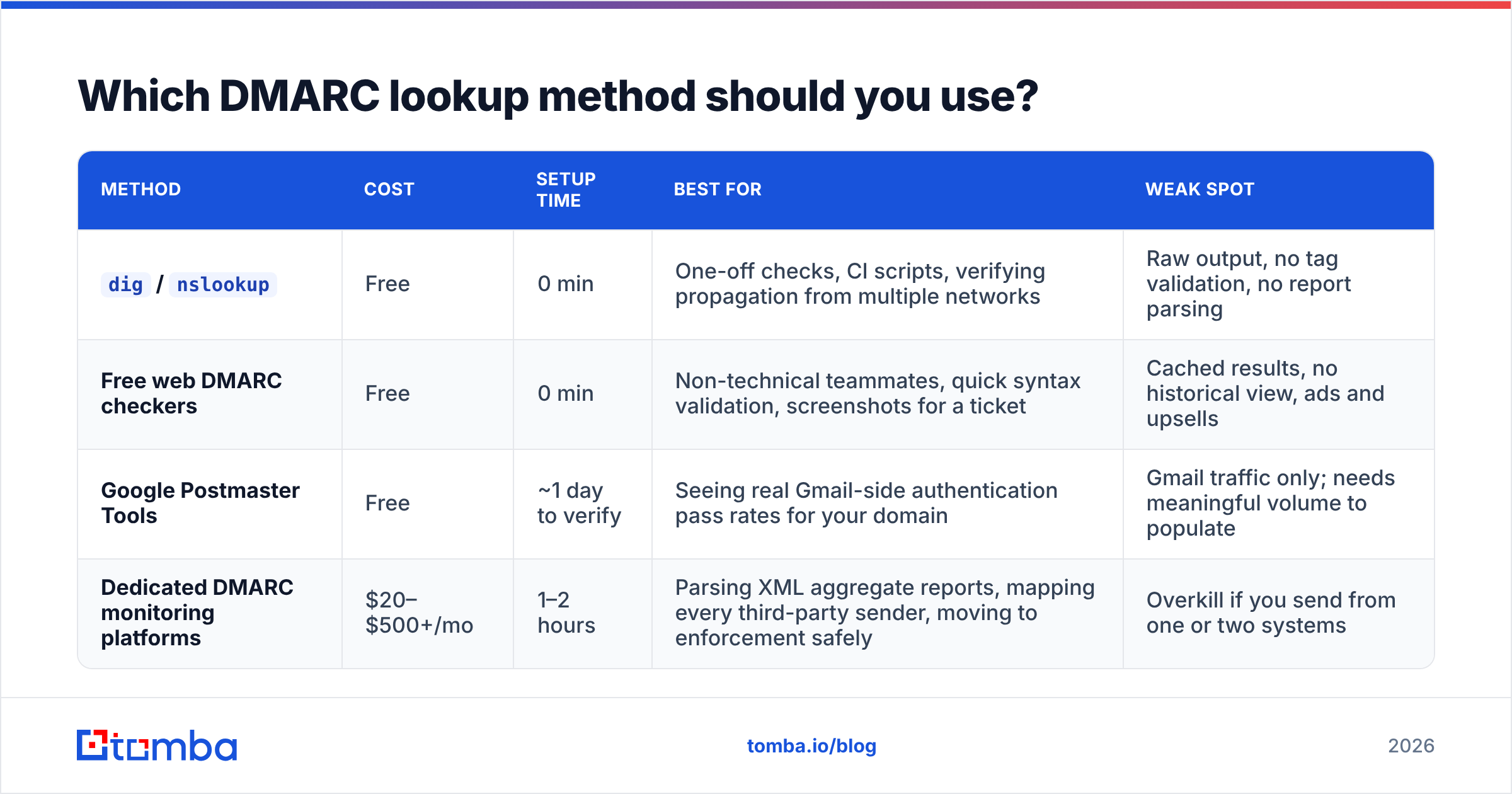
The methods differ less in accuracy than in what they do after the lookup. All four query the same DNS record.
| Method | Cost | Setup time | Best for | Weak spot |
|---|---|---|---|---|
dig / nslookup |
Free | 0 min | One-off checks, CI scripts, verifying propagation from multiple networks | Raw output, no tag validation, no report parsing |
| Free web DMARC checkers | Free | 0 min | Non-technical teammates, quick syntax validation, screenshots for a ticket | Cached results, no historical view, ads and upsells |
| Google Postmaster Tools | Free | ~1 day to verify | Seeing real Gmail-side authentication pass rates for your domain | Gmail traffic only; needs meaningful volume to populate |
| Dedicated DMARC monitoring platforms | $20–$500+/mo | 1–2 hours | Parsing XML aggregate reports, mapping every third-party sender, moving to enforcement safely | Overkill if you send from one or two systems |
The honest recommendation: start with dig, add Google Postmaster Tools once you have volume, and only buy a monitoring platform when you have more than three or four systems sending as your domain. Most small teams pay for report parsing they check twice and abandon.
What does each DMARC tag actually mean?#
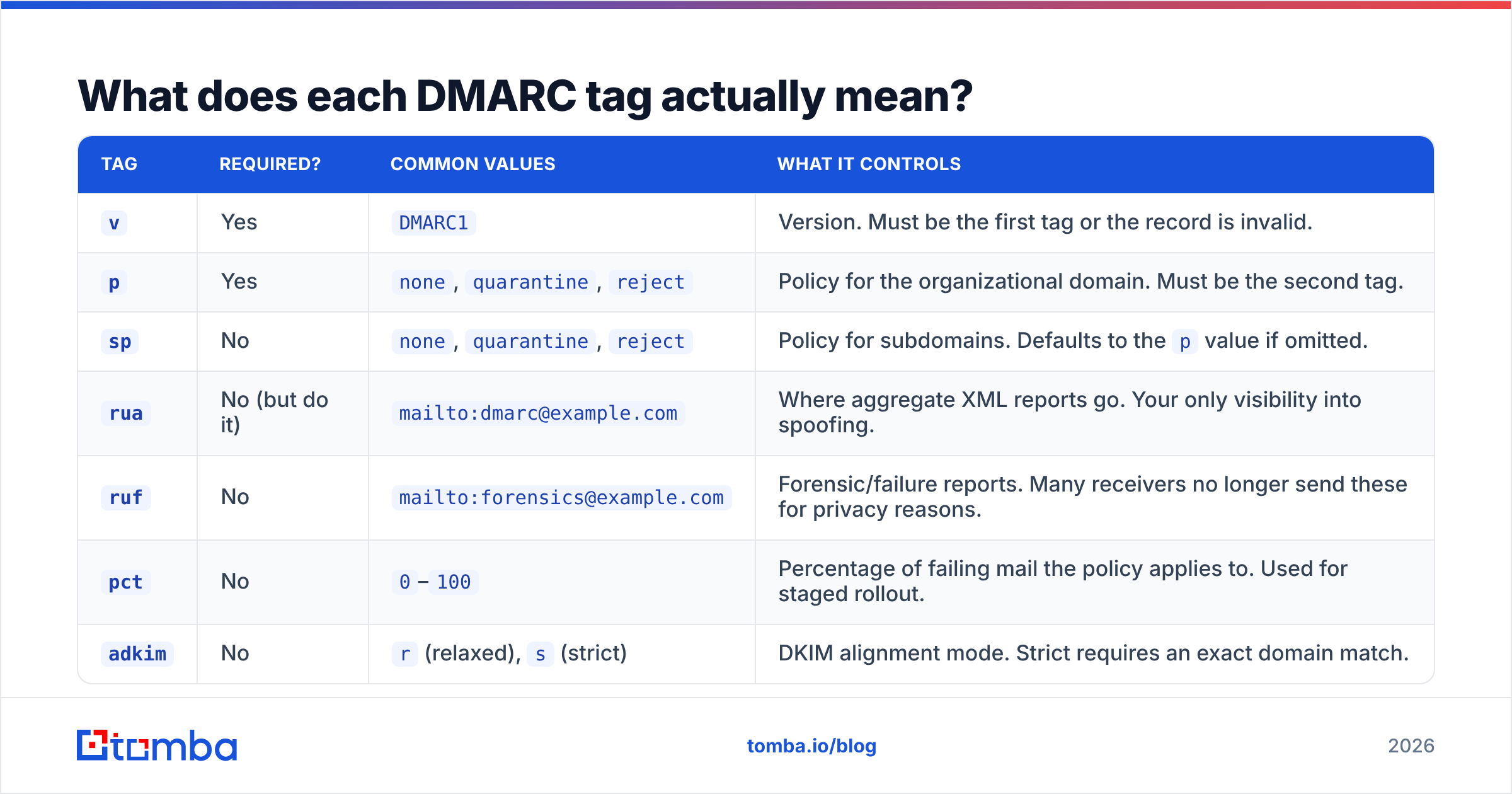
This is the reference most guides bury. Here is what you will see in a real record and what each value does.
| Tag | Required? | Common values | What it controls |
|---|---|---|---|
v |
Yes | DMARC1 |
Version. Must be the first tag or the record is invalid. |
p |
Yes | none, quarantine, reject |
Policy for the organizational domain. Must be the second tag. |
sp |
No | none, quarantine, reject |
Policy for subdomains. Defaults to the p value if omitted. |
rua |
No (but do it) | mailto:dmarc@example.com |
Where aggregate XML reports go. Your only visibility into spoofing. |
ruf |
No | mailto:forensics@example.com |
Forensic/failure reports. Many receivers no longer send these for privacy reasons. |
pct |
No | 0–100 |
Percentage of failing mail the policy applies to. Used for staged rollout. |
adkim |
No | r (relaxed), s (strict) |
DKIM alignment mode. Strict requires an exact domain match. |
aspf |
No | r (relaxed), s (strict) |
SPF alignment mode. Strict requires an exact envelope-domain match. |
fo |
No | 0, 1, d, s |
Which failure conditions trigger a forensic report. |
Two notes that trip people up. First, pct does not apply to p=none in any useful way — it only stages quarantine and reject. Second, if your rua address is on a different domain than the one publishing the record, the receiving domain must publish an authorization record: example.com._report._dmarc.reportvendor.com with the value v=DMARC1. Without it, most receivers drop your reports on the floor and you will wonder why the dashboard is empty for three weeks.
What are the most common DMARC record mistakes?#
After auditing enough sending domains, the same four failures come up repeatedly.
Duplicate records. Two v=DMARC1 TXT strings at _dmarc. The result is not "the stricter one wins" — it is total policy failure. Receivers see ambiguity and skip DMARC evaluation. Fix by consolidating into one record.
Wrong hostname. The record lives at _dmarc.example.com, not example.com and not dmarc.example.com. Some DNS panels auto-append the domain, so entering _dmarc.example.com produces _dmarc.example.com.example.com. Always re-query after publishing rather than trusting the panel's confirmation.
Enforcement without alignment. Jumping straight to p=reject before confirming every legitimate sender aligns is how companies bounce their own invoices, password resets, and Salesforce notifications. Start at p=none, collect two to four weeks of aggregate reports, fix the gaps, then escalate.
Forgotten subdomains. You publish p=reject on the root domain, feel secure, and an attacker spoofs mail.example.com — which, if sp is set loosely or a separate subdomain record exists with p=none, sails right through. Check subdomain policy explicitly.
A fifth, quieter one: SPF record breakage. DMARC depends on SPF or DKIM passing in alignment. If your SPF record has more than ten DNS lookups it returns a permanent error, SPF fails, and DMARC leans entirely on DKIM. Run an SPF checker alongside your DMARC lookup — the two records fail together more often than separately.
Is p=none enough in 2026?#
No, and the market has decided this for you.
p=none was designed as a diagnostic phase. It publishes a record, collects reports, and instructs receivers to do nothing differently. That was acceptable in 2019. In 2026, with mailbox providers explicitly checking for enforcement on high-volume senders and BIMI requiring at least p=quarantine, staying at none indefinitely means you get the compliance checkbox without the protection or the brand benefit.
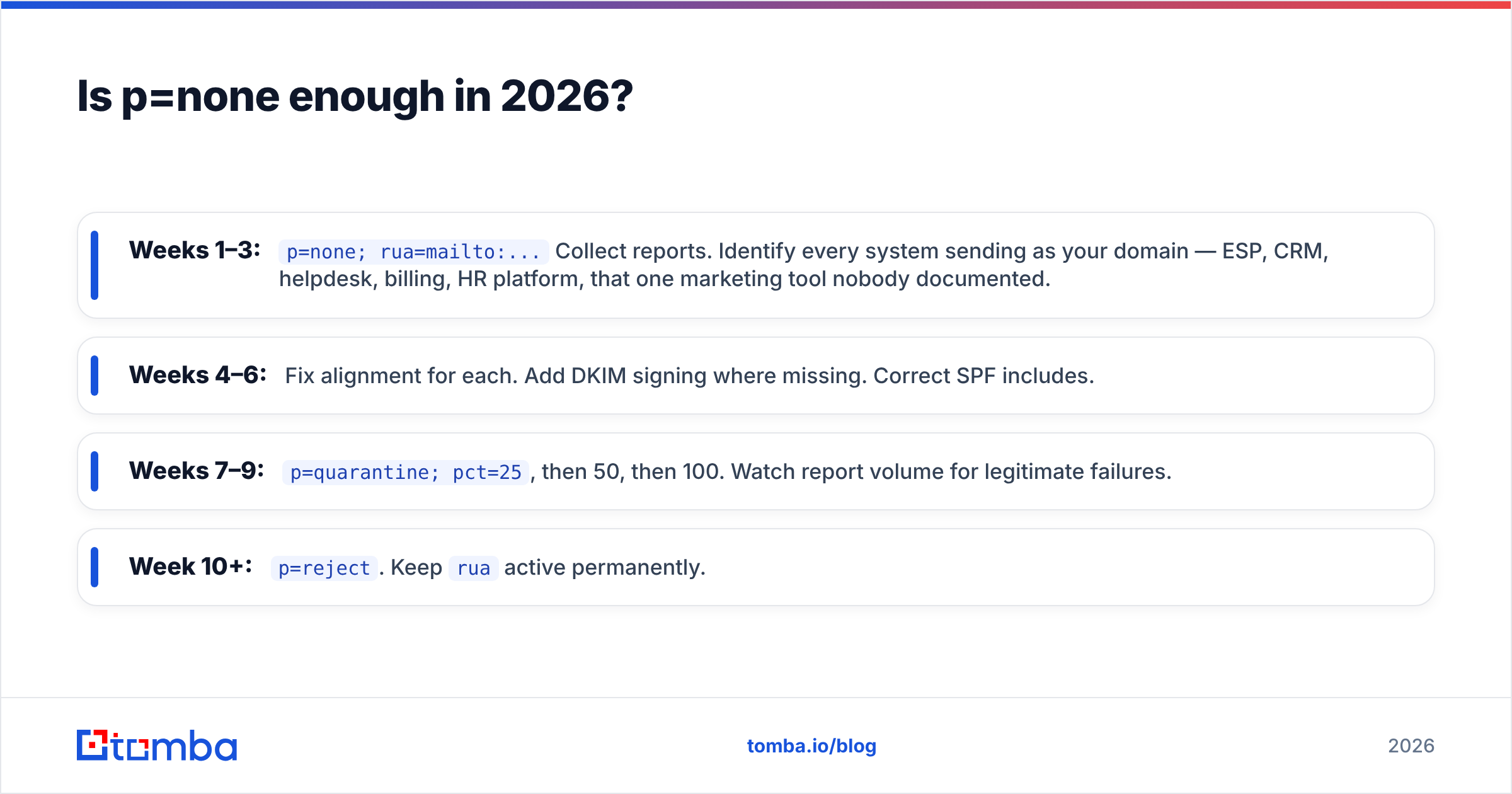
The staged path that works:
- Weeks 1–3:
p=none; rua=mailto:...Collect reports. Identify every system sending as your domain — ESP, CRM, helpdesk, billing, HR platform, that one marketing tool nobody documented. - Weeks 4–6: Fix alignment for each. Add DKIM signing where missing. Correct SPF includes.
- Weeks 7–9:
p=quarantine; pct=25, then 50, then 100. Watch report volume for legitimate failures. - Week 10+:
p=reject. Keepruaactive permanently.
Rushing this compresses risk into a single change window. Skipping it entirely means you either never protect the domain or you break production mail. There is no shortcut worth taking, and your sender reputation is the collateral either way.

How does checking DMARC fit into your outbound workflow?#
DMARC is one of three checks that should run before any campaign leaves the building. The other two get skipped far more often.
The sequence that prevents most deliverability incidents:
- Authentication check — verify SPF, DKIM, and DMARC on every sending domain. Takes two minutes with
dig. Re-run after any DNS change, domain purchase, or ESP switch. - Reputation check — confirm your sending IP and domain are not on major blocklists. A blacklist checker catches this before the campaign, not after the bounce spike.
- List hygiene — bad addresses drive bounce rates, bounce rates drive reputation damage, and reputation damage undermines everything DMARC was protecting. Running your list through an email verifier before send is the highest-leverage step of the three.
That third point deserves emphasis, because it is where the causality gets inverted. Teams see poor inbox placement, assume an authentication problem, spend a week on DNS, and discover the real issue was a list scraped eighteen months ago with a 22% invalid rate. DMARC being perfect does not save you from sending to dead mailboxes. Perfect authentication on a dirty list still lands in spam.
For a deeper look at how the whole authentication stack fits together, the Wikipedia DMARC entry is unusually good on the historical and protocol context, and Google Workspace's DMARC documentation is the clearest vendor-side walkthrough for anyone publishing their first record.
How do you check DMARC across many domains at once?#
If you run multiple sending domains — common for cold outreach setups where teams rotate three to ten secondary domains — checking manually stops scaling around domain four.
A simple shell loop handles it:
for d in domain1.com domain2.com domain3.com; do
  echo -n "$d: "
  dig +short TXT _dmarc.$d | head -1
done
Run it weekly as a cron job and pipe failures to Slack. This catches the failure mode nobody plans for: a registrar DNS migration silently dropping TXT records on a domain you check once a quarter.
For teams managing this at scale, the pattern to adopt is treating DNS records as monitored infrastructure rather than one-time configuration. Records drift. Vendors change. Someone edits a zone file at 6pm on a Friday. The check is cheap; the outage is not.
What should you do next?#
Run the lookup today on every domain you send from. Not the one you think is configured — all of them. Then note which are at p=none and put a date on the calendar for escalation.
Authentication gets your mail accepted. It does not get it read, and it certainly does not tell you who to send it to. Once your DMARC record is enforcing and your SPF chain is clean, the constraint shifts back to data quality — whether the addresses on your list are real, current, and attached to people who can actually buy.
That is where Tomba's Email Finder fits. It sources verified professional addresses by domain, name, or company, with SMTP-level verification built into the same workflow, so the list you send to matches the effort you put into your DNS. The free tier covers 25 searches a month if you want to test accuracy on your own target accounts first; paid plans start at $49/mo, and the full breakdown is on the Tomba pricing page. Get the record right, then get the list right — in that order.
Related guides#
// get started
Find, verify and enrich your first contacts today
Start on the free plan with 25 searches a month, then scale when your team is ready.
Free plan · No credit card required · GDPR & CCPA
// about the author