How to Check If an Email Address Is Valid: 7 Methods
Syntax checks pass addresses that still hard-bounce. Here are seven ways to check if an email address is valid — free manual checks, MX and SMTP lookups, catch-all handling, and when a paid verifier actually pays for itself.
TL;DR
- "Valid" has three separate meanings — correctly formatted, deliverable today, and owned by the person you think owns it. Most tools only answer the first two.
- Free checks (syntax, MX record lookup, a manual SMTP handshake) catch roughly 60-70% of bad addresses and cost nothing but time.
- Paid verification exists to handle the remaining hard cases: catch-all domains, spam traps, role accounts, and disposable providers.
- Never rely on a "send a test email" check for cold outreach. One hard bounce on a fresh domain is worth far more damage than one verification credit.
- For a single address, use a free checker. For anything over ~200 addresses a month, a verifier with a bulk API is cheaper than the deliverability damage.
What does "a valid email address" actually mean?#
Three different questions hide inside that one word, and mixing them up is why people get burned.
Syntactically valid means the string obeys the format rules — a local part, an @, a domain with a real TLD. jane.doe@acme.com passes. jane.doe@@acme does not. This is a regex problem, and it is the weakest signal you can get. Wikipedia's page on email address syntax is a good reminder of how permissive the spec really is — quoted local parts, plus-addressing, and unusual characters are all legal even though most business mail servers reject them.
Deliverable means a message sent to that address right now would land in a mailbox instead of bouncing. That requires the domain to exist, publish MX records, and have the mail server accept that specific recipient.
Correct means the mailbox belongs to the person you intend to reach. info@acme.com is syntactically valid and perfectly deliverable, and it is still the wrong address if you wanted the VP of Engineering.
A verifier answers the first two. Only your source data answers the third. Keep that distinction in mind when a tool tells you an address is "valid" and your reply rate is still zero.

How do you check if an email address is valid for free?#
Five methods, ordered from fastest to most thorough. Each one filters a different failure mode, and running them in sequence is how commercial verifiers work under the hood.
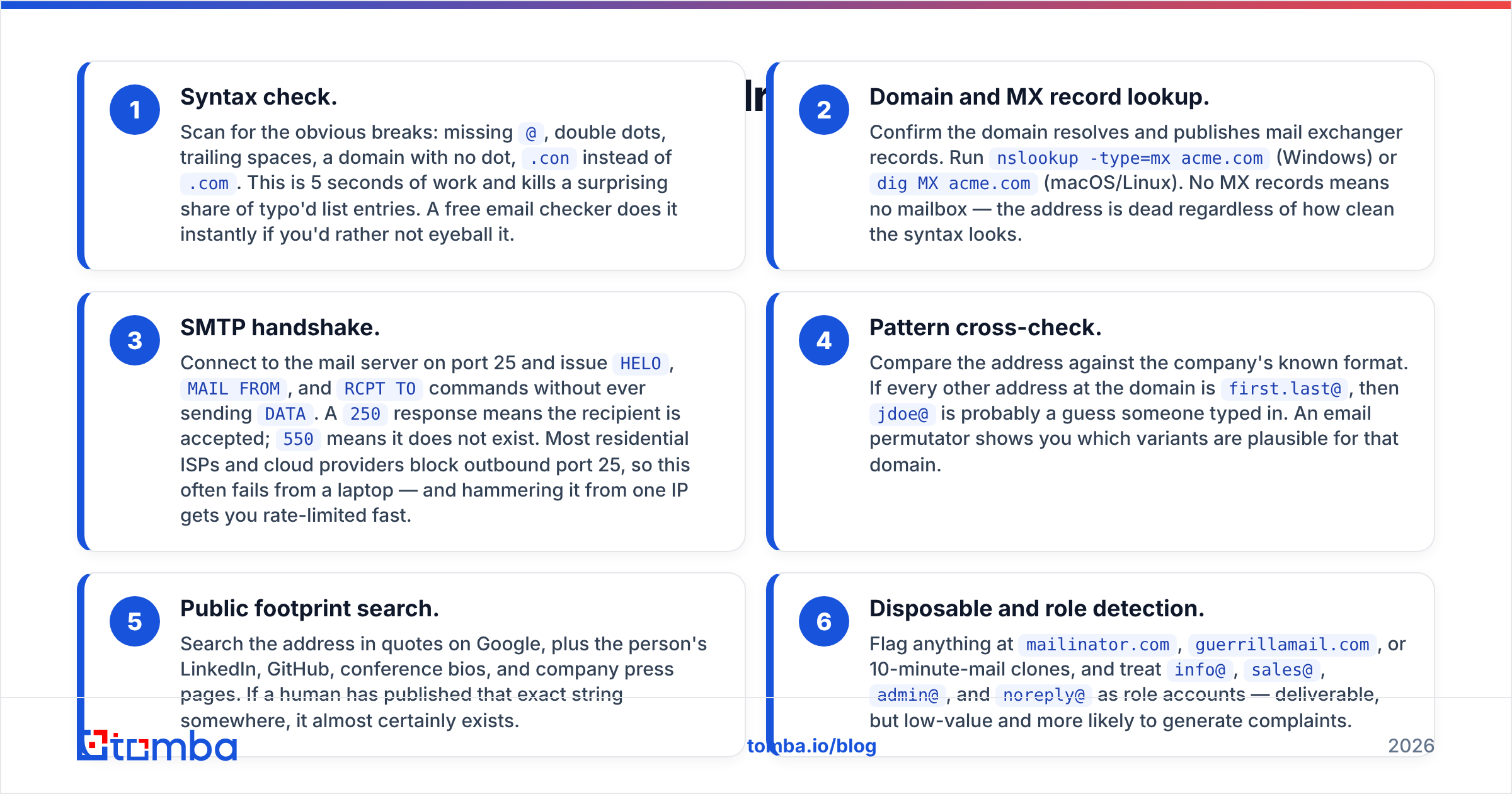
- Syntax check. Scan for the obvious breaks: missing
@, double dots, trailing spaces, a domain with no dot,.coninstead of.com. This is 5 seconds of work and kills a surprising share of typo'd list entries. A free email checker does it instantly if you'd rather not eyeball it. - Domain and MX record lookup. Confirm the domain resolves and publishes mail exchanger records. Run
nslookup -type=mx acme.com(Windows) ordig MX acme.com(macOS/Linux). No MX records means no mailbox — the address is dead regardless of how clean the syntax looks. - SMTP handshake. Connect to the mail server on port 25 and issue
HELO,MAIL FROM, andRCPT TOcommands without ever sendingDATA. A250response means the recipient is accepted;550means it does not exist. Most residential ISPs and cloud providers block outbound port 25, so this often fails from a laptop — and hammering it from one IP gets you rate-limited fast. - Pattern cross-check. Compare the address against the company's known format. If every other address at the domain is
first.last@, thenjdoe@is probably a guess someone typed in. An email permutator shows you which variants are plausible for that domain. - Public footprint search. Search the address in quotes on Google, plus the person's LinkedIn, GitHub, conference bios, and company press pages. If a human has published that exact string somewhere, it almost certainly exists.
- Disposable and role detection. Flag anything at
mailinator.com,guerrillamail.com, or 10-minute-mail clones, and treatinfo@,sales@,admin@, andnoreply@as role accounts — deliverable, but low-value and more likely to generate complaints.
Notice what is missing from that list: sending a test email. It works, but it produces a real bounce on your sending domain if the address is dead, and it puts a stranger's mail server on notice. For personal use, fine. For outbound at scale, it is the single most expensive way to answer the question.
What does each validation layer actually catch?#
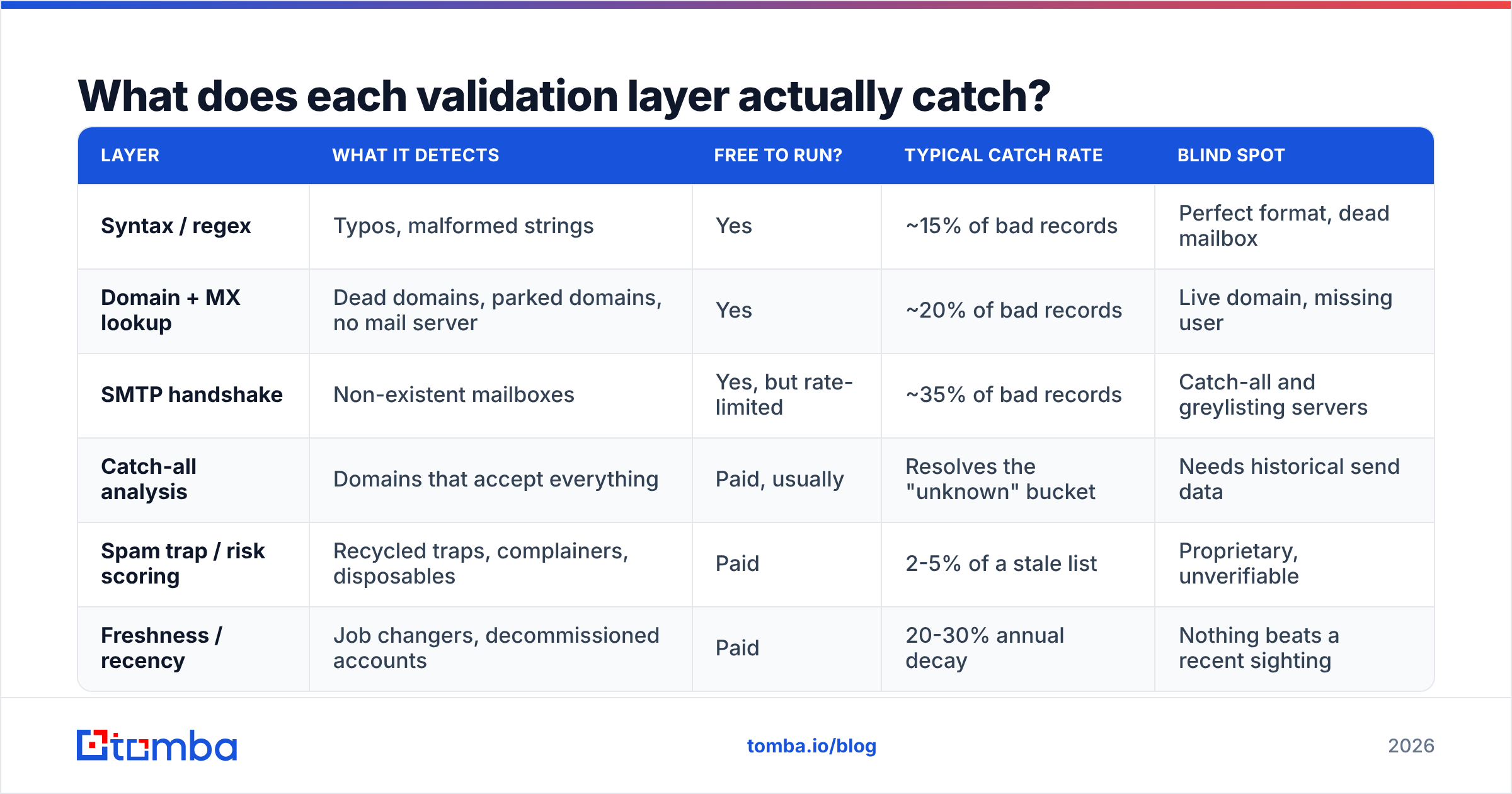
| Layer | What it detects | Free to run? | Typical catch rate | Blind spot |
|---|---|---|---|---|
| Syntax / regex | Typos, malformed strings | Yes | ~15% of bad records | Perfect format, dead mailbox |
| Domain + MX lookup | Dead domains, parked domains, no mail server | Yes | ~20% of bad records | Live domain, missing user |
| SMTP handshake | Non-existent mailboxes | Yes, but rate-limited | ~35% of bad records | Catch-all and greylisting servers |
| Catch-all analysis | Domains that accept everything | Paid, usually | Resolves the "unknown" bucket | Needs historical send data |
| Spam trap / risk scoring | Recycled traps, complainers, disposables | Paid | 2-5% of a stale list | Proprietary, unverifiable |
| Freshness / recency | Job changers, decommissioned accounts | Paid | 20-30% annual decay | Nothing beats a recent sighting |
The pattern is clear: free checks handle the mechanical failures, and paid verification exists almost entirely to resolve the ambiguous cases — catch-alls, traps, and staleness. If your list is 40 addresses you collected by hand this week, the free stack is genuinely enough. If it is 40,000 rows exported from a database of unknown age, it is not close.
Why do syntax checks pass emails that still bounce?#
Because format tells you nothing about existence. Roughly 22-30% of B2B email data goes stale every year through job changes alone, and none of that decay shows up in a regex. sarah.chen@acme.com was perfectly valid until Sarah left in March.
Three specific traps catch people out:
Greylisting. Some servers deliberately return a temporary failure to unknown senders on the first attempt, expecting a legitimate mail server to retry. A one-shot SMTP check reads that as a soft failure and reports "unknown." Verifiers handle this by retrying on a schedule; a manual telnet session does not.
Accept-then-bounce. Microsoft 365 and some corporate gateways accept the RCPT TO at the edge and only reject the message internally afterward. The handshake says 250, the message still bounces hours later. This is why SMTP-only tools quietly under-report on Microsoft-hosted domains.
Catch-all domains. The domain is configured to accept mail for every possible local part. asdkjfh@acme.com returns a 250 exactly like ceo@acme.com does. A raw SMTP check can never distinguish them.
How do you handle catch-all domains?#
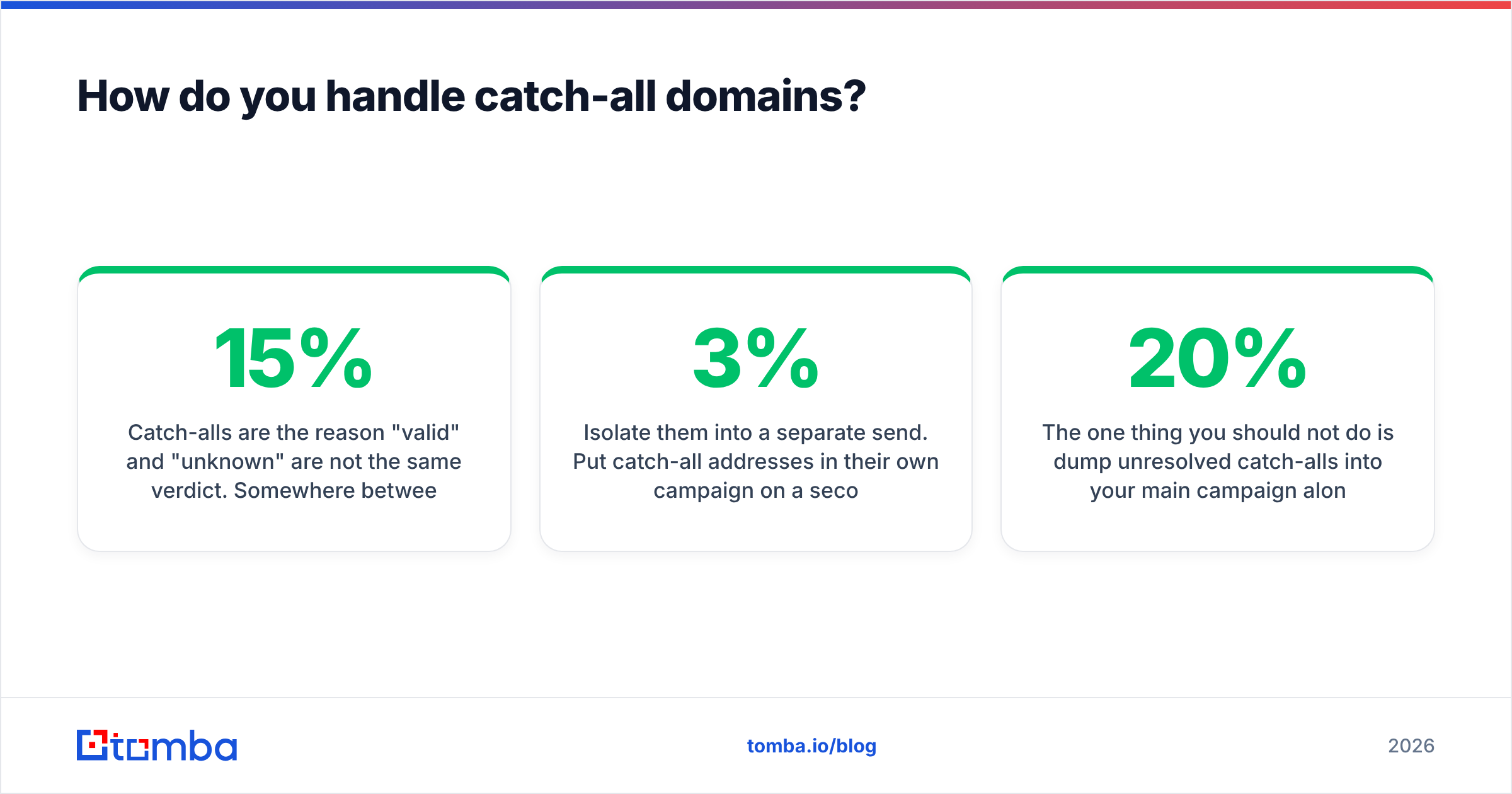
Catch-alls are the reason "valid" and "unknown" are not the same verdict. Somewhere between 15% and 25% of business domains run one, and they cluster in exactly the mid-market and enterprise segments most B2B teams target.
You have three honest options:
- Discard them. Safest for deliverability, and you throw away a quarter of your addressable market. Rarely the right trade.
- Verify them with historical data. Tools that track which specific addresses at a catch-all domain have actually received mail can score them probabilistically rather than guessing. A catch-all verifier works this way — it separates "the server accepts everything" from "this particular mailbox has a real history."
- Isolate them into a separate send. Put catch-all addresses in their own campaign on a secondary domain, watch the bounce rate for the first 200 sends, and only scale if it holds under 3%.
The one thing you should not do is dump unresolved catch-alls into your main campaign alongside verified addresses. If 20% of them are dead, you have just turned a 1% bounce rate into a 5% one, and mailbox providers will notice before you do.

Which email verification tool should you use?#
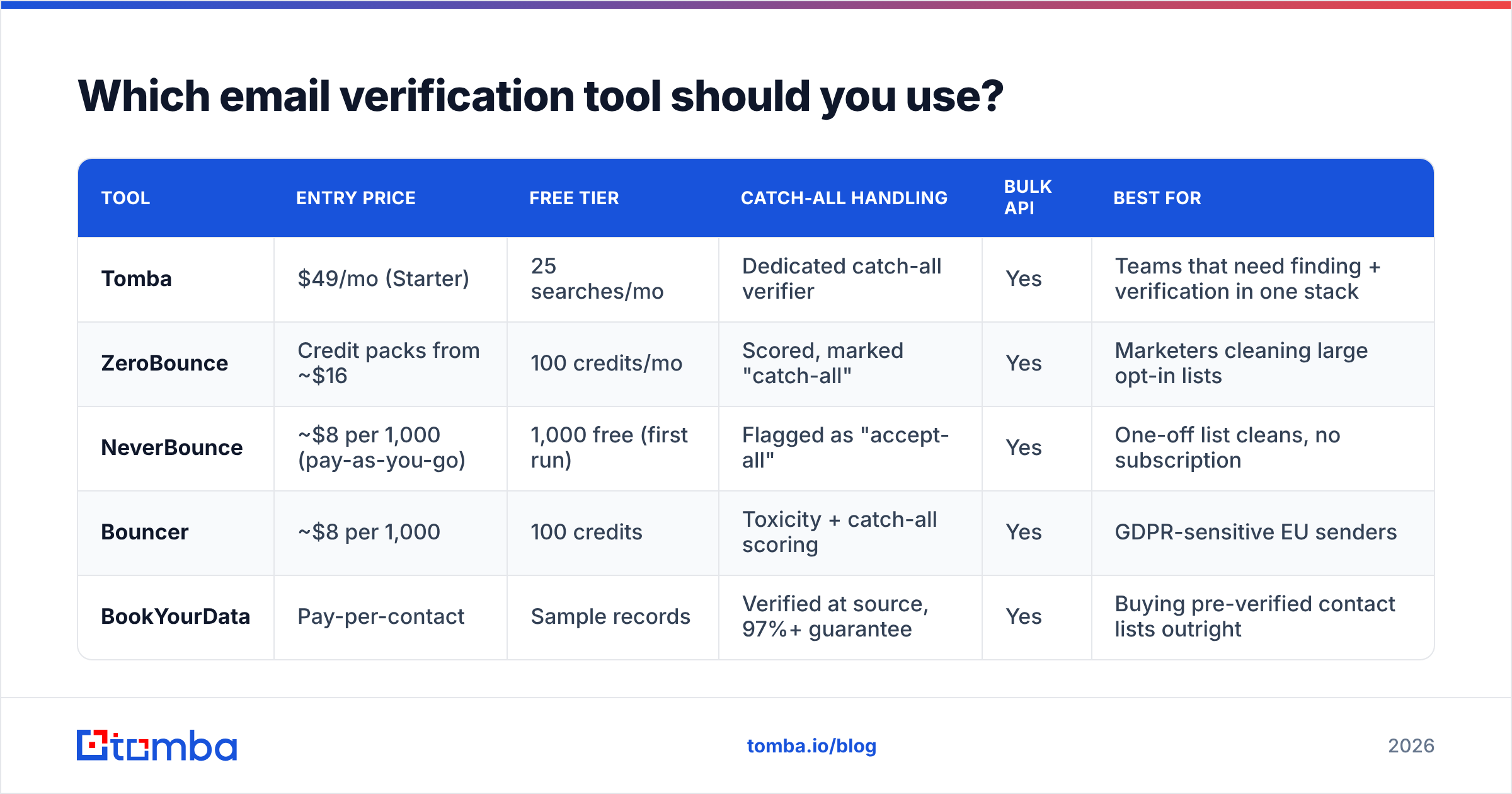
Pricing below reflects publicly listed rates at the time of writing — always confirm on the vendor's own page before buying, since credit packs change often. Category listings on G2's email verification section are a decent starting point for user-reported accuracy.
| Tool | Entry price | Free tier | Catch-all handling | Bulk API | Best for |
|---|---|---|---|---|---|
| Tomba | $49/mo (Starter) | 25 searches/mo | Dedicated catch-all verifier | Yes | Teams that need finding + verification in one stack |
| ZeroBounce | Credit packs from ~$16 | 100 credits/mo | Scored, marked "catch-all" | Yes | Marketers cleaning large opt-in lists |
| NeverBounce | ~$8 per 1,000 (pay-as-you-go) | 1,000 free (first run) | Flagged as "accept-all" | Yes | One-off list cleans, no subscription |
| Bouncer | ~$8 per 1,000 | 100 credits | Toxicity + catch-all scoring | Yes | GDPR-sensitive EU senders |
| BookYourData | Pay-per-contact | Sample records | Verified at source, 97%+ guarantee | Yes | Buying pre-verified contact lists outright |
The split is mostly about workflow, not accuracy — most established verifiers land within a few points of each other on clean lists. The real questions are: do you also need to find the addresses, and do you need this inside a script?
If you already have the list and just want it cleaned, a pay-as-you-go verifier is the cheapest path. If you are building the list as you go — prospecting from company domains, LinkedIn profiles, or article bylines — a combined platform saves you from stitching two credit systems together. Tomba's email verifier sits alongside the finder on the same credit pool, which is the practical argument for it over a standalone cleaner.
How do you validate email addresses in bulk?#
Manual checks fall apart somewhere around 50 addresses. Past that, use one of these three patterns.
CSV upload. Export your list, upload it, download the scored file. Zero engineering effort, and it is the right answer for a one-time cleanup before a quarterly campaign. Most tools including bulk verification accept a plain CSV with one address per row.
API integration. Call the verification endpoint at the moment data enters your system — form submissions, imported lead lists, CRM syncs. This is the only approach that stops bad data at the door instead of cleaning it up later. A single POST per address, cached by result, is usually all you need.
Spreadsheet formula. For teams living in Google Sheets or Excel, an add-in that exposes verification as a cell function means analysts can validate without touching an API key. Slower per-record, but adoption is close to 100% because nobody has to change tools.
Whichever you pick, store the verification date next to the result. A "valid" verdict from 14 months ago is not evidence of anything, and re-verifying a stale list before every major send is standard practice — not paranoia. Bounce data from Google Postmaster Tools will tell you soon enough if you skipped it.
How often should you re-verify a list?#
Set a policy and automate it rather than deciding case by case:
- Before every cold campaign, no exceptions, regardless of when the list was built.
- Every 90 days for warm lists you email regularly — job change decay compounds quietly.
- Immediately on any address that hard-bounced, then suppress it permanently. Never retry a hard bounce.
- On import, for every record entering the CRM from a purchased list, a scraper, or a partner handoff.
Keep your bounce rate under 2% and you stay out of trouble with essentially every major mailbox provider. Cross 5% and you should assume your sending reputation is already damaged, and no amount of copy tweaking will fix it — the fix is upstream, in the data.
What is the fastest way to check one address right now?#
If you have a single address and 60 seconds:
- Paste it into a free checker for syntax and MX in one shot.
- If it returns "catch-all" or "unknown," search the exact string in quotes on Google.
- If you find nothing, check whether the format matches the company's dominant pattern.
- If it still looks uncertain, do not send. Find the right address instead of gambling on a guess.
That last step matters more than people expect. A verified-but-wrong address costs you a wasted send and a confused reader. An unverified guess that bounces costs you a fraction of your domain reputation, and reputation is the one input in cold email you cannot buy back with money.
Start with the right address, not the cleanest guess#
Verification is damage control. The cheaper move is to source addresses that were correct in the first place — pulled from live company domains and cross-checked against real mail servers, rather than permutated and hoped over.
That is what the Tomba Email Finder is built for: give it a name and a domain, or just a domain, and get back addresses that have already passed syntax, MX, and deliverability checks before they reach your CSV. The free tier covers 25 searches a month if you want to test it against addresses you already know are good; paid plans start at $49/mo on Starter and scale to $99/mo on Growth. Check the current Tomba pricing for credit allocations, then run your next list through verification before you send a single message.
Related guides#
// get started
Find, verify and enrich your first contacts today
Start on the free plan with 25 searches a month, then scale when your team is ready.
Free plan · No credit card required · GDPR & CCPA
// about the author