How to Check Someone Email Address: 7 Methods for 2026
Guessing an email address wastes sends and burns your domain. Here are seven ways to check someone's email in 2026 — free manual tricks, SMTP verification, and the tools worth paying for.
Searching "how to check someone email" turns up two jobs, not one. First you find the address. Then you prove it still accepts mail. This guide covers both, with the real hit rate for each method.
TL;DR
- "Check someone's email" means two different jobs: finding an address that exists, and verifying that it still accepts mail. Do both, in that order.
- Free manual methods (Google operators, GitHub commits, WHOIS, pattern guessing) work for one-off lookups but cap out around 40–60% hit rate.
- Dedicated finders resolve 65–90% of B2B contacts. They combine crawled sources, pattern inference, and live SMTP checks in one call.
- Never send to an unverified list. A 5% bounce rate is enough to get throttled by Google and Microsoft filters.
- Catch-all domains (roughly 20–25% of B2B domains) accept everything on SMTP. They need a separate scoring step, not a coin flip.
How to check someone email: what the phrase really means#
Two different problems get filed under the same phrase. Mixing them up is why most people waste an afternoon.
Problem one is discovery. You know a name and a company, and you need the address. Sarah Kim, Head of Ops at Northwind Logistics — is she skim@, sarah.kim@, sarahk@, or sarah@? That's a finding problem.
Problem two is validation. You already have sarah.kim@northwind.com from a webinar list, a business card, or a scraped export from 2023. Does that mailbox still exist? That's a verification problem, and it's the one people skip.
Think of it like checking a phone number. Finding is looking someone up in the directory. Verifying is dialing to hear it ring instead of a dead tone. Skip the second step and you end up with a 12% bounce rate and a domain that quietly stops landing in inboxes.
How do you find someone's email address in 2026?#
Six methods, ordered from free-and-slow to paid-and-fast. Use the first three when you need a single address.
- Google search operators. Try
site:company.com "@company.com"or"firstname lastname" email -site:linkedin.com. Speaker bios, conference PDFs, and press releases leak addresses all the time. The hit rate is low, but it costs nothing. - The company's own footprint. Check the About, Team, Press, and Contact pages. Job postings and PDF case studies often list a direct address. Newswire press releases almost always name a media contact.
- Developer and public-record trails. If the person writes code,
git logon any repo they touched shows their commit email. GitHub's public events API leaks addresses too. A WHOIS lookup sometimes still names a domain contact, though GDPR redaction killed most of those.
The next three scale. They trade a few dollars for a lot of time.
- Pattern inference. Find two known addresses at the domain and copy the format. If
john.smith@acme.comandmary.jones@acme.comboth exist,sarah.kim@acme.comis a strong guess. An email permutator builds every plausible variant in one click. - A dedicated email finder. Feed it a name and a domain. You get one best-guess address, a confidence score, and the sources it was seen on. That is what an email finder does, and it folds methods 1–4 into one call.
- Domain-wide crawling. No specific person in mind? Run a domain search to pull every public address at a company, then filter by department or seniority.

How accurate is each method, really?#
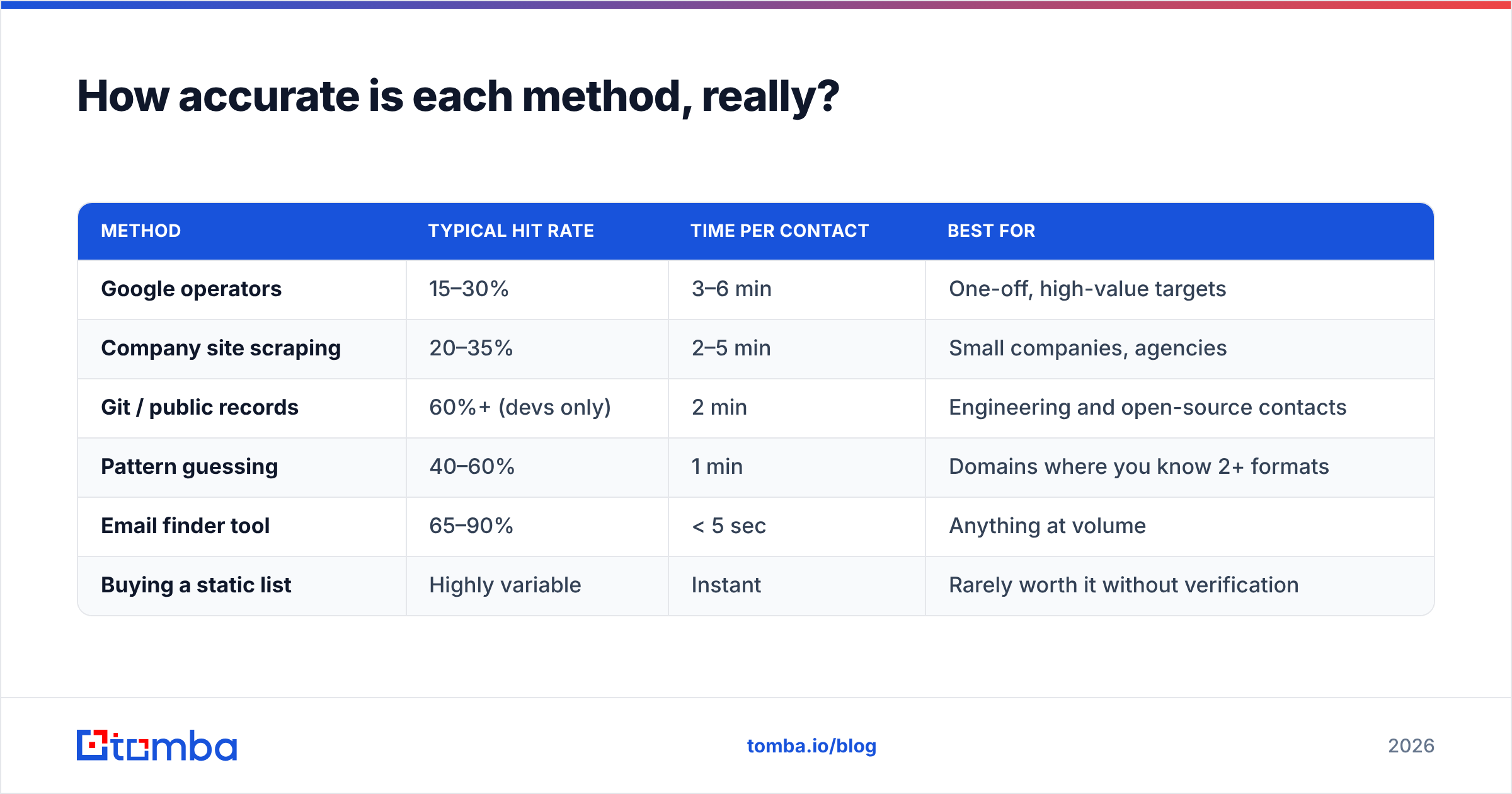
Accuracy here means one thing: of the addresses a method returns, what share actually deliver? The ranges below come from B2B domains, and they swing hard by industry. Government, healthcare, and European enterprises are much harder than US SaaS.

| Method | Typical hit rate | Time per contact | Best for |
|---|---|---|---|
| Google operators | 15–30% | 3–6 min | One-off, high-value targets |
| Company site scraping | 20–35% | 2–5 min | Small companies, agencies |
| Git / public records | 60%+ (devs only) | 2 min | Engineering and open-source contacts |
| Pattern guessing | 40–60% | 1 min | Domains where you know 2+ formats |
| Email finder tool | 65–90% | < 5 sec | Anything at volume |
| Buying a static list | Highly variable | Instant | Rarely worth it without verification |
The gap between pattern guessing and a real finder isn't magic. A finder has already crawled millions of pages. It already knows that acme.com uses first.last. And it pings the mail server before it hands you a result. Guessing skips that last step.
How do you verify an email address is real?#
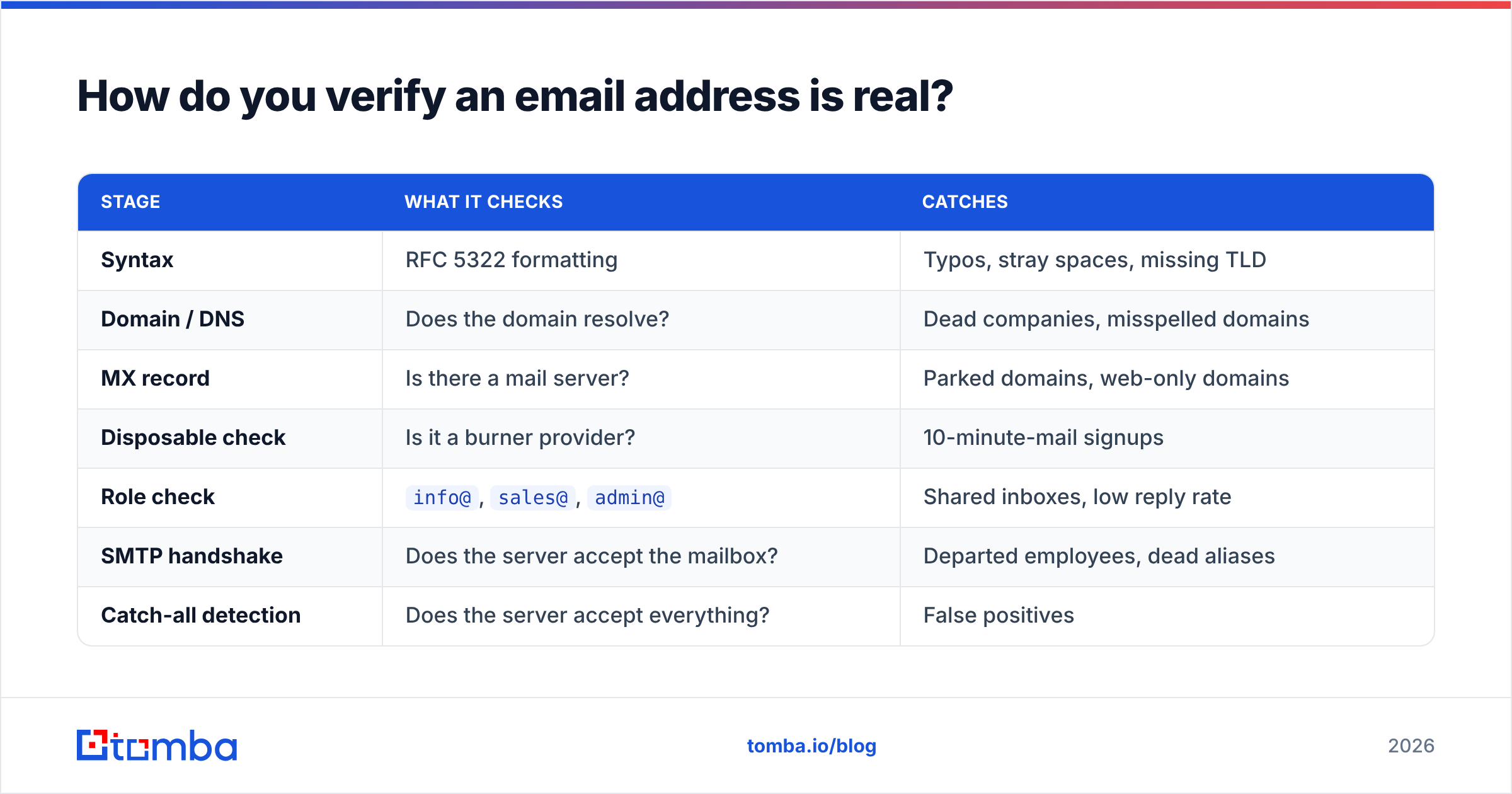
Verification runs as a cascade. Each stage costs less than the next, so a good email verifier fails fast and only escalates when it has to.
| Stage | What it checks | Catches |
|---|---|---|
| Syntax | RFC 5322 formatting | Typos, stray spaces, missing TLD |
| Domain / DNS | Does the domain resolve? | Dead companies, misspelled domains |
| MX record | Is there a mail server? | Parked domains, web-only domains |
| Disposable check | Is it a burner provider? | 10-minute-mail signups |
| Role check | info@, sales@, admin@ |
Shared inboxes, low reply rate |
| SMTP handshake | Does the server accept the mailbox? | Departed employees, dead aliases |
| Catch-all detection | Does the server accept everything? | False positives |
The SMTP handshake is the interesting one. Your verifier opens a connection to the recipient's mail server and starts the conversation a real sender would — HELO, MAIL FROM, RCPT TO — then hangs up before sending anything. A 250 response means the mailbox exists. A 550 means it doesn't. The SMTP specification covers the rest of the response codes.
Two caveats. Large providers now rate-limit or hide RCPT TO responses, so a verifier that leans on SMTP alone will degrade on Microsoft 365 tenants. And raw SMTP probes from your own IP are a good way to get that IP flagged. Use a service with a rotating verification pool.
Which email checking tool should you use?#
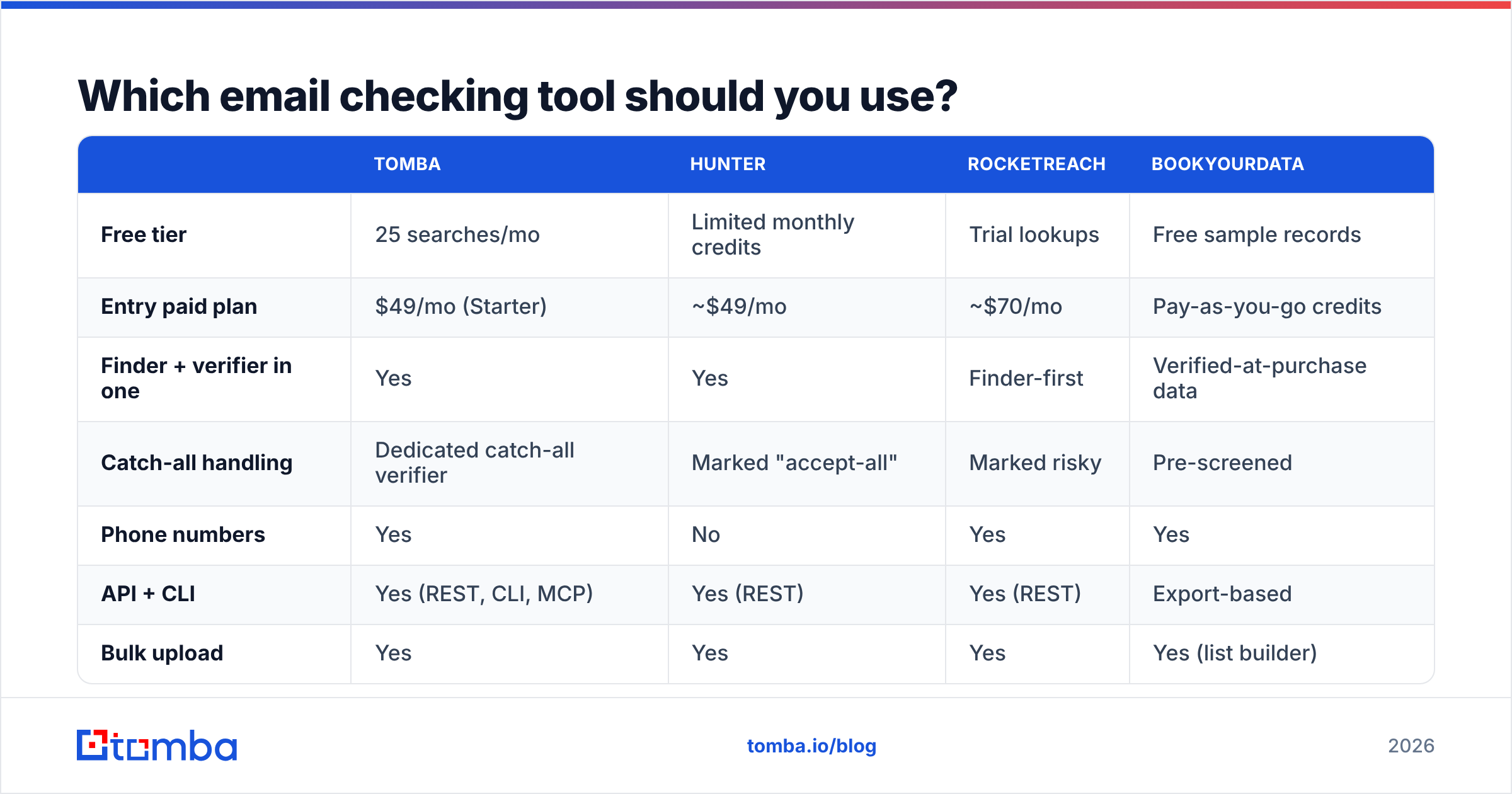
The honest answer depends on two things: how many contacts you check each month, and whether you need an API. Here is how the common options compare. Prices reflect published entry tiers at the time of writing, so confirm on the vendor's own page before you buy.

| Tomba | Hunter | RocketReach | BookYourData | |
|---|---|---|---|---|
| Free tier | 25 searches/mo | Limited monthly credits | Trial lookups | Free sample records |
| Entry paid plan | $49/mo (Starter) | ~$49/mo | ~$70/mo | Pay-as-you-go credits |
| Finder + verifier in one | Yes | Yes | Finder-first | Verified-at-purchase data |
| Catch-all handling | Dedicated catch-all verifier | Marked "accept-all" | Marked risky | Pre-screened |
| Phone numbers | Yes | No | Yes | Yes |
| API + CLI | Yes (REST, CLI, MCP) | Yes (REST) | Yes (REST) | Export-based |
| Bulk upload | Yes | Yes | Yes | Yes (list builder) |
| Best fit | Teams wanting find + verify + enrich on one bill | Simple domain lookups | Recruiting and exec search | Buying a pre-built verified list |
A few notes on fit, rather than a scoreboard:
- Hunter is the simplest thing that works for domain-level lookups, and it has the most familiar UI.
- RocketReach leans hardest into personal and mobile contact data. Recruiters value that more than most sales teams do.
- Tomba bundles the finder, verifier, catch-all checks, phone data, and enrichment into one credit pool. That matters when you would otherwise pay three vendors. Tomba pricing starts at $49/mo Starter, then $99/mo Growth and $249/mo Pro, with a free tier of 25 searches a month.
BookYourData takes a different shape from the rest. You build and buy a list of already-verified contacts instead of looking people up one at a time. If your motion is "give me 5,000 verified CFOs in manufacturing" rather than "check this one person," that model is faster, and the pay-as-you-go pricing means no seat commitment.
Check independent reviews on G2 before you commit. Vendor-published accuracy figures are marketing numbers. The only benchmark that counts is a sample from your own target segment.
What do you do about catch-all domains?#
Roughly a fifth to a quarter of B2B domains are catch-all. The mail server accepts every address at the domain, then sorts it out inside. SMTP verification returns "valid" for asdkjhaskd@company.com as happily as for the CEO. Every result is a false positive.
Three ways to handle them:
- Skip them entirely. Safest, but you throw away a quarter of your market.
- Send anyway and watch. Bounces arrive late, and some catch-alls discard mail silently. You learn slowly and risk your reputation.
- Score them. Blend pattern confidence, public-page sightings, employment signals, and past engagement into a probability. A catch-all verifier returns a graded result instead of a yes or no.
Practical rule: send to high-confidence catch-alls from a secondary domain, in small batches. Watch the reply-to-bounce ratio before you scale.

Is it legal to check someone's email address?#
Finding and verifying a business email address is generally lawful in most places. Sending to it is where the rules bite, and they differ by region.
- Under GDPR, a work email tied to a named person is personal data. You can process it under legitimate interest for B2B outreach, but you need a documented basis, a privacy notice, and a working opt-out. Germany and Italy read the rules more strictly for cold email.
- Under CAN-SPAM (US), cold B2B email is legal without prior consent. You need accurate headers, a real physical address, and unsubscribes honored within 10 business days.
- Under CASL (Canada), consent is the default. The exceptions are narrow, such as a business address published conspicuously and relevant to the person's role.
Two things are never fine anywhere: harvesting addresses to resell without disclosure, and trying to get into someone's mailbox. Checking an email means confirming an address exists. It never means reading anyone's mail. HubSpot's overview of email compliance is a reasonable non-legal starting point, and a real lawyer is the right next step at scale.
What mistakes quietly destroy your sender reputation?#
These are the ones that show up three weeks later as a mysterious drop in reply rate.
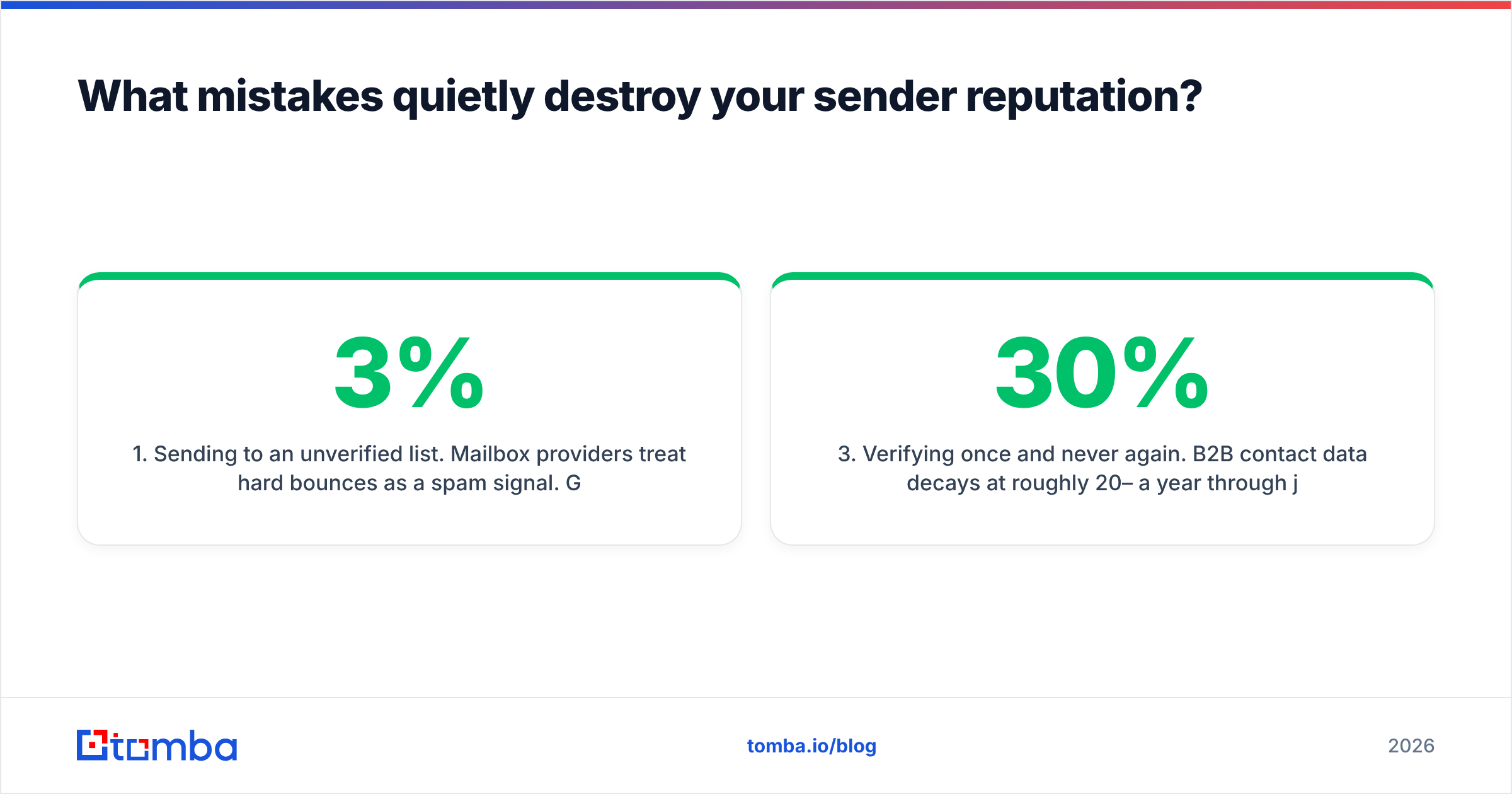
- Sending to an unverified list. Mailbox providers read hard bounces as a spam signal. Google and Microsoft both tightened bulk-sender rules in the last two years. Sustained bounce rates above 2–3% get you throttled. Above 5%, you are in the spam folder.
- Blasting role addresses.
info@,support@, andsales@land in shared inboxes where nobody owns a reply. High volume, near-zero conversion, more complaints. - Verifying once and never again. B2B contact data decays 20–30% a year on job changes alone. A list you verified in January is wrong by summer. Re-verify anything older than 90 days.
The last two are about blast radius.
- Testing deliverability from your primary domain. Use a separate sending domain for cold outreach. A bad experiment should not take your invoicing and support mail down with it.
- Confusing "found" with "verified." A finder's confidence score is a prediction. A verifier's result is a check against the live server. Ship only what passed the second one.
What's the fastest workflow end to end?#
Here is how to check someone email address end to end, in three shapes.
For a single contact: run the name and domain through a finder, take the top result, verify it, send. Under ten seconds.
For a list: upload a CSV of names and domains. Run bulk find, then bulk verify on the output. Drop everything below your score threshold. Segment catch-alls into their own low-volume batch, then load the clean set into your sequencer. Budget a few minutes per thousand rows.
For a product: call the API on signup or on CRM record creation. Contact data then gets checked as it enters your system, not in a panic before a campaign. That's a five-line integration, and it removes the cleanup step entirely.
Ready to stop guessing? Start with the Tomba Email Finder. Search by name and domain, get a confidence-scored address with its sources, and run SMTP and catch-all verification in the same call. The free tier gives you 25 searches a month with no card required. That's enough to benchmark accuracy against your own target list before you spend anything. If the numbers hold up on your segment, Starter is $49/mo and includes the verifier, domain search, and full API access.
Related guides#
// get started
Find, verify and enrich your first contacts today
Start on the free plan with 25 searches a month, then scale when your team is ready.
Free plan · No credit card required · GDPR & CCPA
// about the author