How To Circle Back On An Email Without Sounding Desperate
"Just circling back" is the weakest sentence in B2B email. Here are the follow-up structures, timing windows, and templates that actually pull replies in 2026.
TL;DR
- "Just circling back" is filler. It adds zero new information, which is exactly why it gets ignored — rewrite the opener so the first seven words carry something the recipient didn't have before.
- Follow-up timing matters less than follow-up content. A 3-day gap with a new angle beats a 2-day gap with a bump.
- Send 3–5 follow-ups per sequence. Most replies land on touches 2 through 4, not touch 1.
- Half of "no reply" isn't rejection — it's a bad address or a spam-foldered send. Verify before you blame your copy.
- Use a different value unit each time: a data point, a customer story, a shorter ask, a breakup. Never the same email twice.
What does "circling back" actually mean in an email?#
Circling back means returning to a thread that went quiet — you sent something, got nothing, and now you're re-entering the conversation. The phrase itself comes from meeting jargon ("let's circle back to that"), and it migrated into email as a soft, apologetic way to say "you ignored me."
That's the problem. The phrase signals that your email is a repeat, not new information. The moment a busy buyer reads "just circling back," their brain files it as "same email, second attempt" and moves on. You've spent your subject line and your first line telling them there's nothing new here.
Here's the reframe that fixes most follow-up problems: a follow-up is not a reminder. It's a new email that happens to reference an old one. Every touch should be independently useful. If the recipient never read your first email, touch three should still make sense and still make them want to reply.
That single shift — from reminder to new value — is what separates a 4% reply rate from an 11% one.
Why do most "circling back" emails get ignored?#
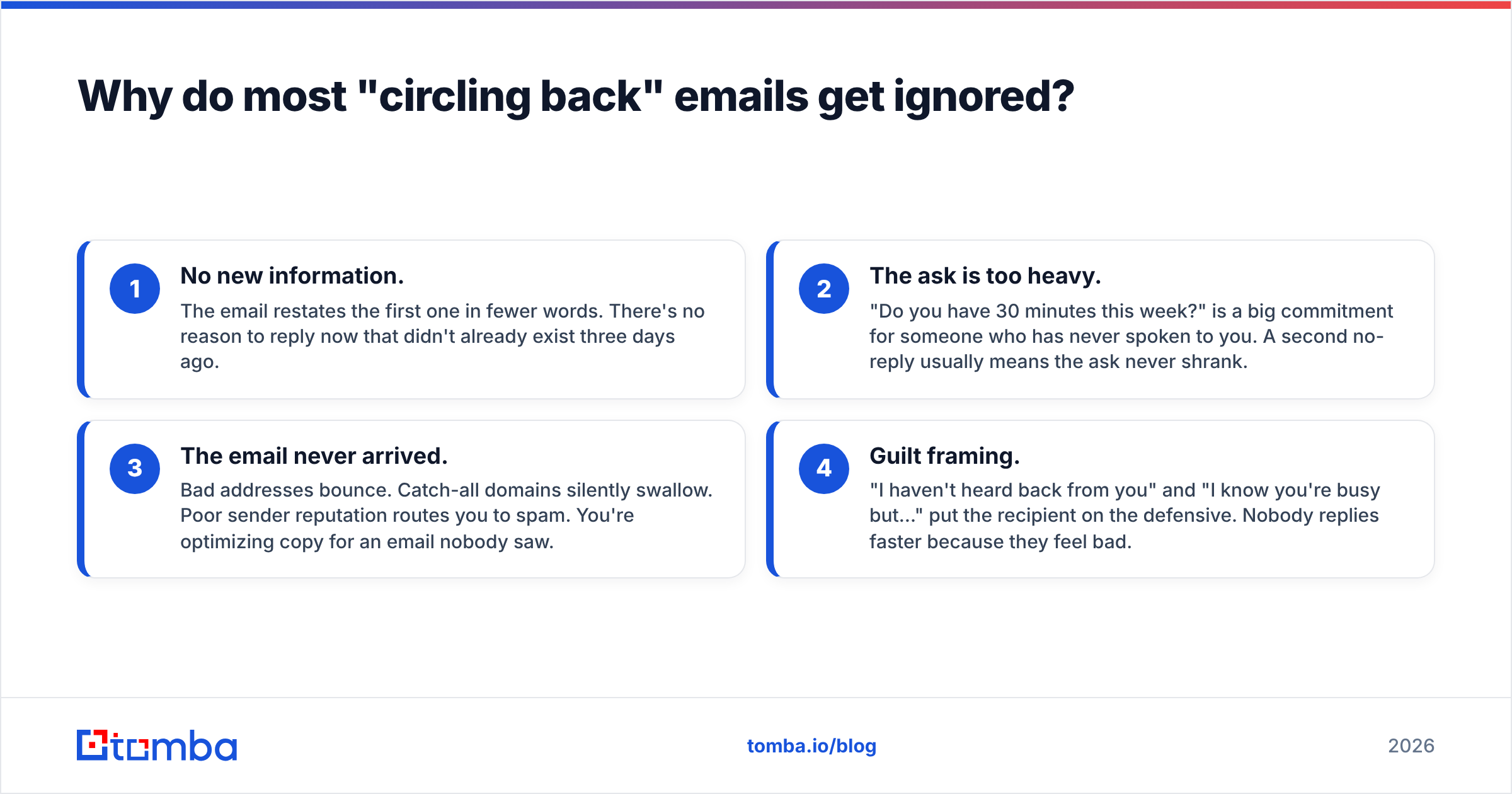
Four failure modes account for nearly every dead follow-up thread:
- No new information. The email restates the first one in fewer words. There's no reason to reply now that didn't already exist three days ago.
- The ask is too heavy. "Do you have 30 minutes this week?" is a big commitment for someone who has never spoken to you. A second no-reply usually means the ask never shrank.
- The email never arrived. Bad addresses bounce. Catch-all domains silently swallow. Poor sender reputation routes you to spam. You're optimizing copy for an email nobody saw.
- Guilt framing. "I haven't heard back from you" and "I know you're busy but…" put the recipient on the defensive. Nobody replies faster because they feel bad.
Fix the deliverability layer first, because it's binary. Run your list through an email verifier before you rewrite a single sentence — if 18% of your sends are hitting invalid mailboxes, no opener in the world saves that sequence. Then check your SPF, DKIM, and DMARC records; Google's own sender guidelines spell out the current bulk-sender requirements.
What should you say instead of "just circling back"?#
Six replacements, each doing a different job. Pick based on what you actually have to add.
- The new-information open — "Your team just posted a Series B announcement — congrats. That usually changes the hiring math, which is why I'm following up." You've earned the follow-up with a trigger event.
- The shrunken ask — "Not chasing a meeting. Just: is inbound lead routing something you own, or should I be talking to someone else?" One question, answerable in four words.
- The direct assumption — "I'm assuming this isn't a priority right now, so I'll stop here unless you say otherwise." Permission to say no is what makes people say yes.
- The value drop — "Here's the teardown I mentioned — no reply needed." Give something, ask nothing. Reciprocity works even when the ask is deferred.
- The referral pivot — "If this isn't yours, who owns onboarding at your company?" Reroutes to the right person instead of dying in the wrong inbox.
- The one-line bump — "Worth a conversation?" Four words, top of thread. Works precisely because it's short and low-pressure — but use it once per sequence, not three times.
Notice what none of them do: apologize, guilt-trip, or restate the original email.
What's the right timing for each follow-up?#
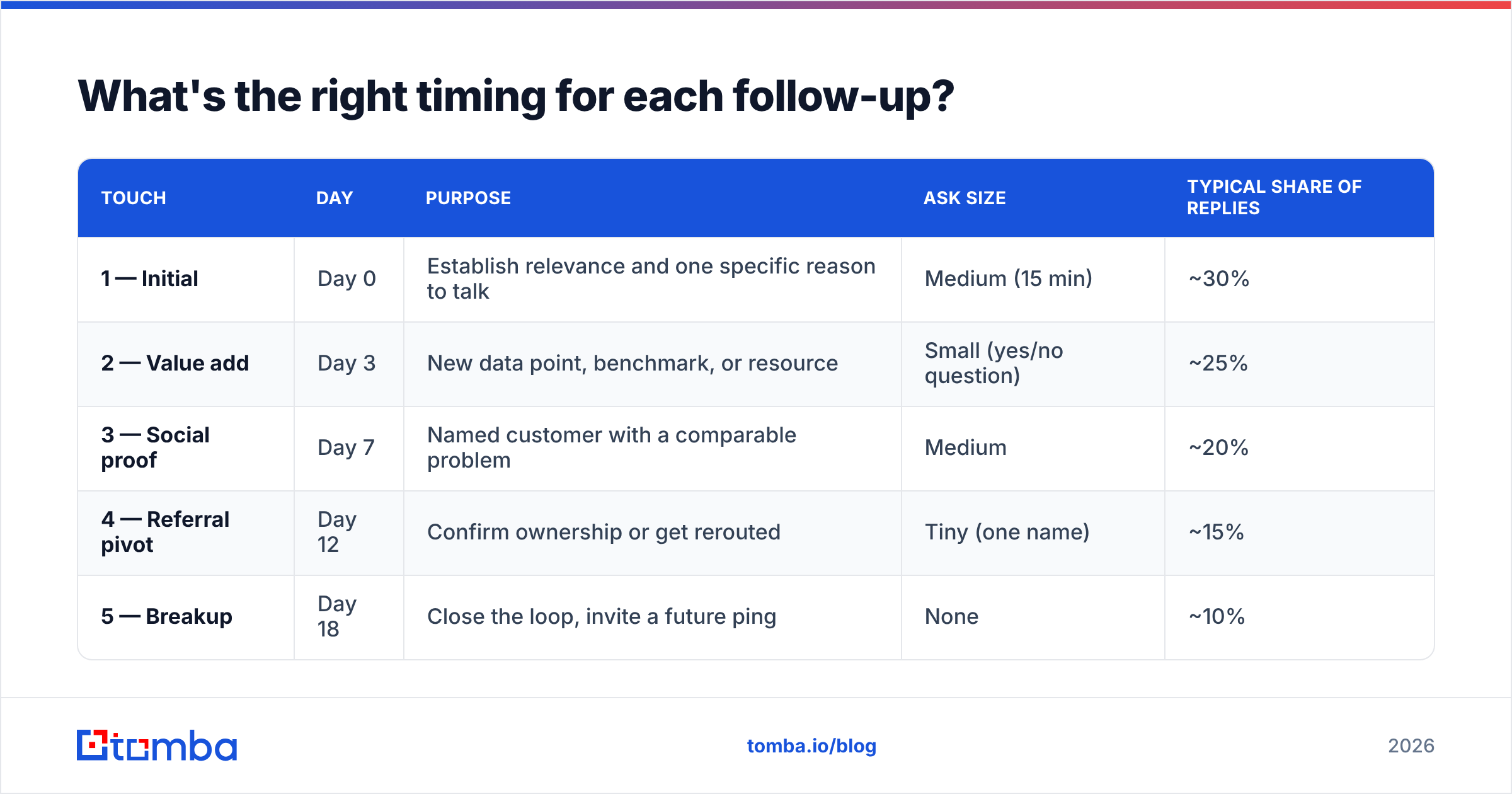
Timing should widen as the sequence progresses. Tight early gaps catch people who genuinely meant to reply; wider late gaps avoid looking obsessive.
| Touch | Day | Purpose | Ask size | Typical share of replies |
|---|---|---|---|---|
| 1 — Initial | Day 0 | Establish relevance and one specific reason to talk | Medium (15 min) | ~30% |
| 2 — Value add | Day 3 | New data point, benchmark, or resource | Small (yes/no question) | ~25% |
| 3 — Social proof | Day 7 | Named customer with a comparable problem | Medium | ~20% |
| 4 — Referral pivot | Day 12 | Confirm ownership or get rerouted | Tiny (one name) | ~15% |
| 5 — Breakup | Day 18 | Close the loop, invite a future ping | None | ~10% |
Two rules that matter more than the exact day count:
- Never follow up in under 48 hours. It reads as automated pressure, and it is.
- Stop at five. Past touch five, reply rates flatten while spam complaints don't. The marginal email costs you domain health.
Send windows: Tuesday through Thursday, 7–9am in the recipient's timezone, still outperforms mid-afternoon for B2B in most tests. But timezone accuracy beats time-of-day cleverness — sending "9am" in your timezone to someone eight hours ahead is worse than any suboptimal hour.
How do you write a follow-up that actually gets a reply?#
Structure every follow-up in four parts, in this order:
- Line 1 — The new thing. A trigger event, a stat, a customer name, a question you haven't asked yet. Never a reference to your previous email.
- Line 2 — The connection. One sentence tying that new thing to their specific situation. Not your product. Their situation.
- Line 3 — The ask. Smaller than last time. Always.
- Line 4 — The exit. Explicit permission to decline. "If not relevant, just say so and I'll close the file."
Here's it working, touch three of a sequence:
Subject: Re: routing inbound demos
Saw Northwind cut their speed-to-lead from 4 hours to 11 minutes after moving routing off round-robin — same setup you described on the podcast.
Given your inbound volume, I'd guess the gap costs you somewhere north of 20 opportunities a quarter.
Worth me sending the 2-page breakdown of how they did it? Yes or no is fine.
If this isn't your area, happy to stop here.
Word count: 71. New information: yes. Ask: binary. Exit: explicit. That's the whole formula.
For subject lines, keep the thread. Replying inside the original thread with "Re:" preserves context and generally outperforms a new subject line — except on touch five, where a fresh subject like "Closing the loop" signals a genuine change in tone.

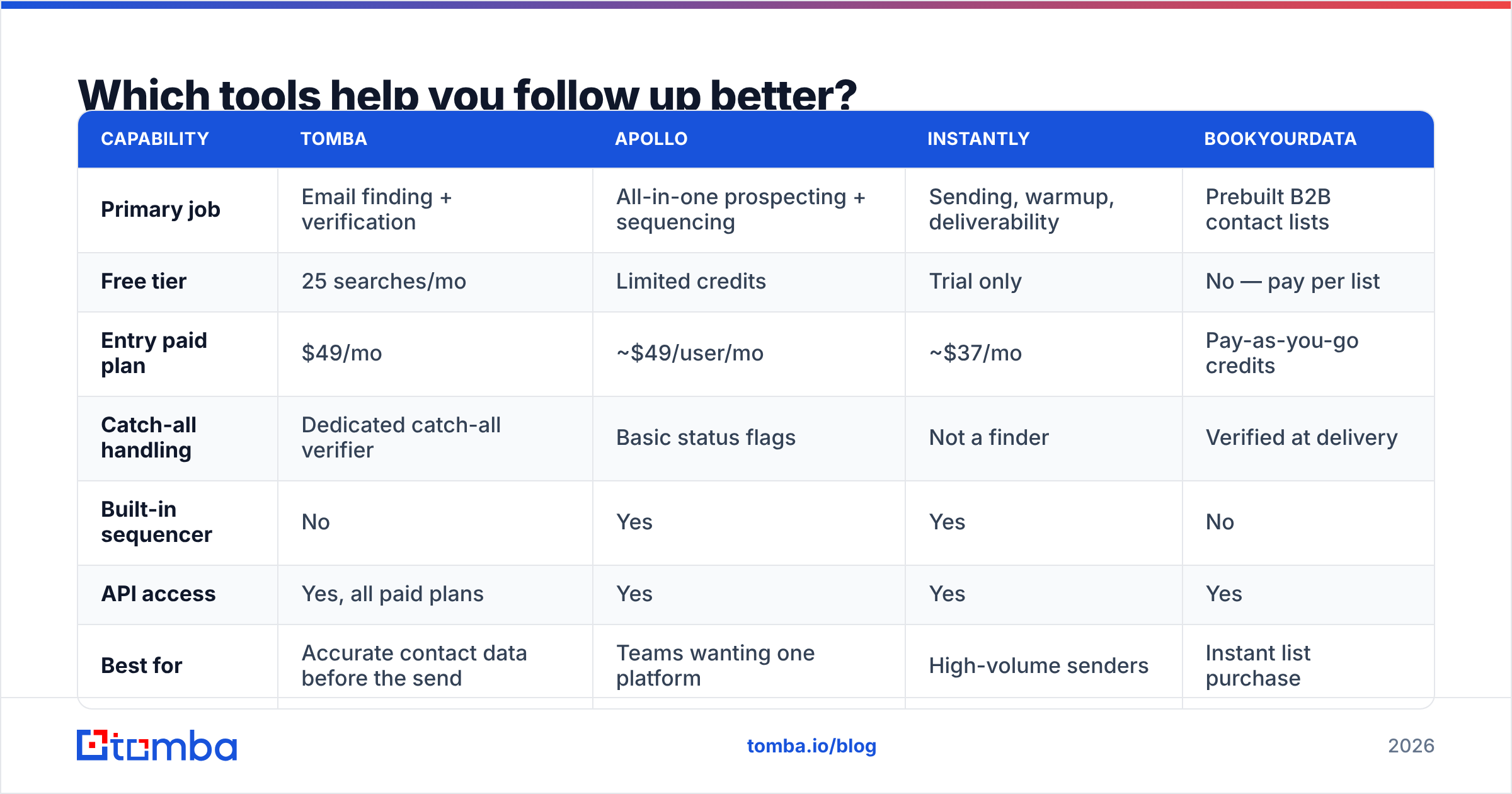
Which tools help you follow up better?#
The follow-up stack splits into three jobs: finding the right contact, making sure mail lands, and sequencing the touches. Different tools own different pieces.
| Capability | Tomba | Apollo | Instantly | BookYourData |
|---|---|---|---|---|
| Primary job | Email finding + verification | All-in-one prospecting + sequencing | Sending, warmup, deliverability | Prebuilt B2B contact lists |
| Free tier | 25 searches/mo | Limited credits | Trial only | No — pay per list |
| Entry paid plan | $49/mo | ~$49/user/mo | ~$37/mo | Pay-as-you-go credits |
| Catch-all handling | Dedicated catch-all verifier | Basic status flags | Not a finder | Verified at delivery |
| Built-in sequencer | No | Yes | Yes | No |
| API access | Yes, all paid plans | Yes | Yes | Yes |
| Best for | Accurate contact data before the send | Teams wanting one platform | High-volume senders | Instant list purchase |
None of these is "the follow-up tool," because follow-up quality is upstream of sending. Two of the four failure modes above are data problems. If you want the sequencer to do its job, feed it addresses that resolve — that's what the email finder and catch-all verifier exist for. BookYourData is a reasonable shortcut when you'd rather buy a verified list than build one, and it pairs fine with a verification pass before send.
For the sequencing layer, compare feature depth on a neutral source like G2's sales engagement category rather than vendor sites — the review volume there is a better signal than any feature matrix, including this one.
How many follow-ups is too many?#
Five is the practical ceiling for a cold sequence. Here's the reasoning, not just the number.
Each additional touch has a declining reply yield and a flat-or-rising complaint risk. Touches 1–4 typically produce ~90% of a sequence's replies. Touch 5 (the breakup) picks up a chunk of stragglers because it triggers loss aversion. Touch 6 onward converts almost nobody and materially raises your spam-complaint rate, which degrades email deliverability for every campaign on that domain, not just this one.
Warm threads are different. If someone has replied even once, you're not cold-emailing anymore — you're managing a conversation, and the ceiling is however long the deal takes. The five-touch rule applies to sequences where the recipient has never engaged.
A few guardrails worth enforcing at the team level:
- One sequence per contact per quarter. Re-entering the same person in March and again in April is how a domain gets blocked.
- Suppress on any reply, including out-of-office and "not interested." Automated follow-up after a human "no" is the fastest way to burn a brand.
- Cap daily volume per mailbox at 30–50 cold sends. Volume, not content, is what most filters actually measure.
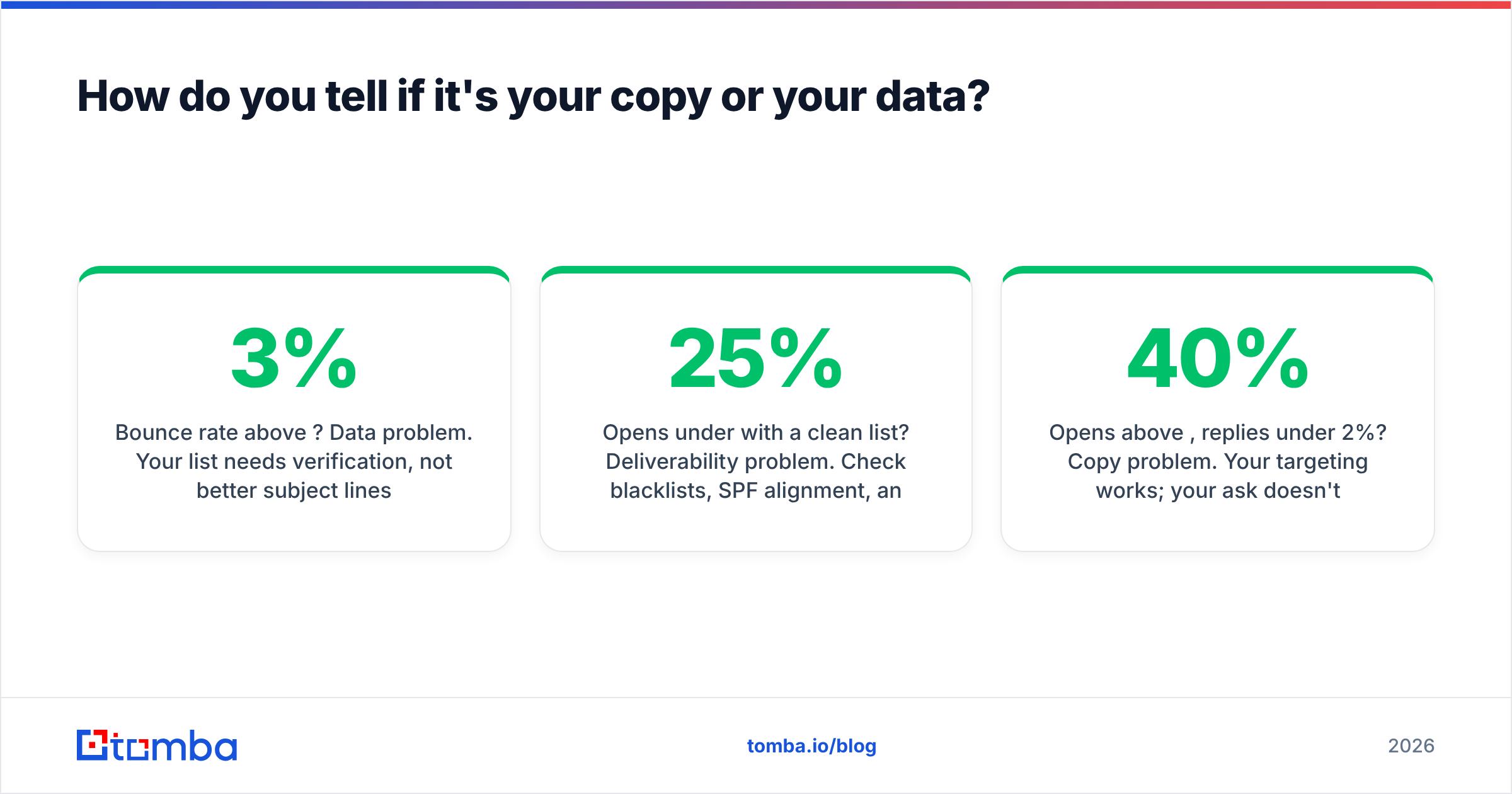
How do you tell if it's your copy or your data?#
Run this diagnostic before rewriting anything. It takes ten minutes and saves weeks of A/B testing the wrong variable.
- Bounce rate above 3%? Data problem. Your list needs verification, not better subject lines.
- Opens under 25% with a clean list? Deliverability problem. Check blacklists, SPF alignment, and whether your domain is warmed.
- Opens above 40%, replies under 2%? Copy problem. Your targeting works; your ask doesn't.
- Replies healthy but all negative? Targeting problem. You're reaching real people who genuinely don't have the problem you solve.
- Everything looks fine but pipeline is flat? Qualification problem — replies aren't the goal, meetings are.
Most teams jump straight to the copy problem because it's the fun one to solve. In practice, list hygiene and sender setup account for more lost replies than any opener ever will. Enrichment helps here too — knowing role, seniority, and company size before you write means touch two can reference something real instead of a generic benefit statement. That's what data enrichment is for.
What does a full 5-touch sequence look like?#
Compressed, with the job each email does:
Touch 1 (Day 0) — Trigger-based relevance. "Noticed you're hiring three SDRs. Usually means the data spend is about to jump." Ask: 15 minutes.
Touch 2 (Day 3) — Benchmark. "For context, teams your size typically waste 21% of send volume on invalid addresses." Ask: "Is that a number you track?"
Touch 3 (Day 7) — Named proof. The Northwind-style example above. Ask: "Want the breakdown?"
Touch 4 (Day 12) — Referral pivot. "If lead data isn't yours, who should I ask?" Ask: one name.
Touch 5 (Day 18) — Breakup. "Closing this out — if the invalid-address problem resurfaces next quarter, reply to this and I'll pick it back up." Ask: none.
Every email adds something. None says "circling back." None apologizes. The ask shrinks monotonically. That's the entire discipline.
Ready to fix the data layer first?#
Better follow-up copy multiplies whatever reply rate your data allows. If a fifth of your addresses are wrong, you're multiplying zero. Start by building lists that actually resolve: the Tomba Email Finder locates verified professional addresses by domain, name, or company, with a free tier of 25 searches a month and paid plans from $49/mo — see full Tomba pricing for the Growth and Pro tiers. Verify, enrich, then write the follow-up. In that order.
Related guides#
// get started
Find, verify and enrich your first contacts today
Start on the free plan with 25 searches a month, then scale when your team is ready.
Free plan · No credit card required · GDPR & CCPA
// about the author