How to Contact Business Owners: 7 Methods That Work in 2026
Business owners screen harder than any other buyer. Here are seven contact methods ranked by reply rate, cost, and how fast they break — plus what to do when the gatekeeper wins.
TL;DR
- Owners of businesses under 200 employees are reachable directly. Owners above that line are reachable through a chief of staff, an EA, or not at all — pick your method based on headcount, not vertical.
- Personal-domain email plus a mobile number beats every other combination. Generic
info@inboxes convert at a fraction of a verified personal address. - The highest-yield sequence in 2026 is: find the domain → pull the owner's email pattern → verify it → warm the name on LinkedIn → email → call. Not the reverse.
- Local business owners (trades, clinics, restaurants) answer the phone. SaaS and agency founders answer email and LinkedIn. Do not run one playbook across both.
- Budget roughly $0.02–$0.08 per verified owner contact if you build it yourself, versus $0.30–$1.20 per record from a prebuilt owner list.
Why is contacting business owners harder than contacting employees?#
Because owners are the only buyer persona with no incentive to be findable.
A VP of Marketing wants inbound. A recruiter wants inbound. An owner of a 40-person HVAC company already has more work than crew, and every unsolicited call costs them billable time. So the contact surface shrinks: the website lists info@, the phone routes to a receptionist, and the LinkedIn profile is a placeholder from 2017.
That does not mean the data is absent. It means it lives in second-order places — domain registration records, state business filings, invoice footers, press quotes, podcast appearances, and the email pattern the company uses for everyone else. Your job is to reconstruct the owner's contact point from the company's contact surface, then verify it before you send.
The other thing that changed by 2026: volume stopped working. Google and Microsoft both tightened bulk-sender enforcement, and a cold sequence to 5,000 scraped info@ addresses now damages your sending domain faster than it produces meetings. Precision is not a stylistic preference anymore. It is a deliverability requirement.
What are the 7 ways to contact business owners?#
Ranked by observed reply rate on outbound to owner-operators at companies under 200 employees. Treat the numbers as directional bands, not lab results — they move with vertical, offer, and list quality.
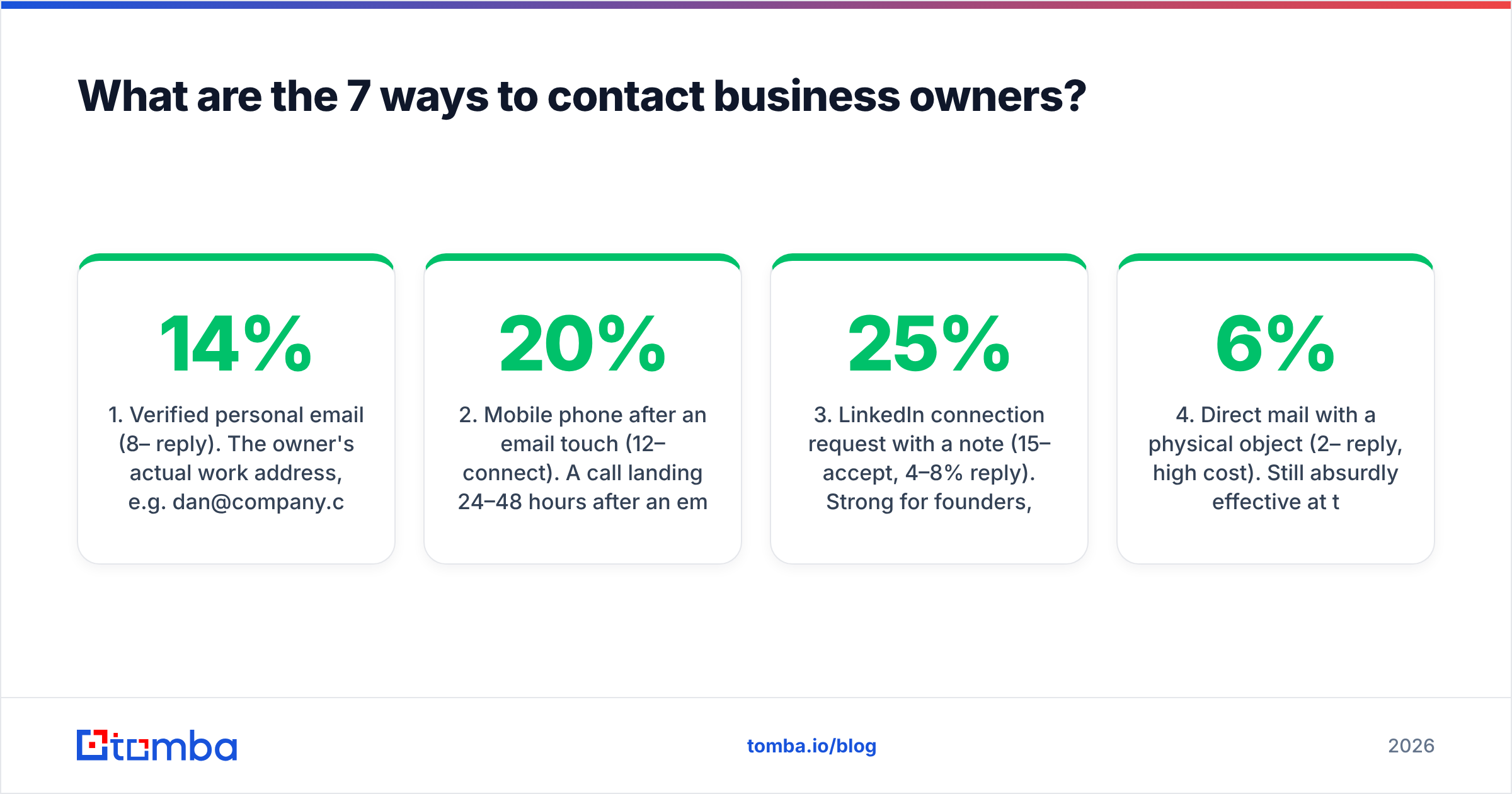
- Verified personal email (8–14% reply). The owner's actual work address, e.g.
dan@company.com, confirmed by an SMTP-level check. This is the backbone. Everything else supports it. - Mobile phone after an email touch (12–20% connect). A call landing 24–48 hours after an email that got opened converts far better than a cold dial. The email supplies the name recognition; the call supplies the urgency.
- LinkedIn connection request with a note (15–25% accept, 4–8% reply). Strong for founders, agency owners, and anyone under 500 connections. Weak for trades and franchise owners who never log in.
- Direct mail with a physical object (2–6% reply, high cost). Still absurdly effective at the top of a targeted 100-account list because almost nobody does it. Terrible economics past ~250 accounts.
- Warm intro via a shared connection (30–50% reply). Highest rate, lowest volume. Mine your CRM and your investors before you buy anything.
- Community and forum presence (indirect). Answer questions where owners actually gather — trade association forums, local subreddits, Slack groups. Slow, but the reply rate on a follow-up DM is unmatched.
- Generic inbox as fallback (1–3% reply).
info@,hello@,contact@. Use only when there is no other route, and expect a gatekeeper to read it first.
The mistake most teams make is starting at #7 because it is easiest to scrape, then blaming "cold email being dead" when a 1% reply rate on a 3,000-send blast lands them in spam folders.
How do you actually find a business owner's email address?#
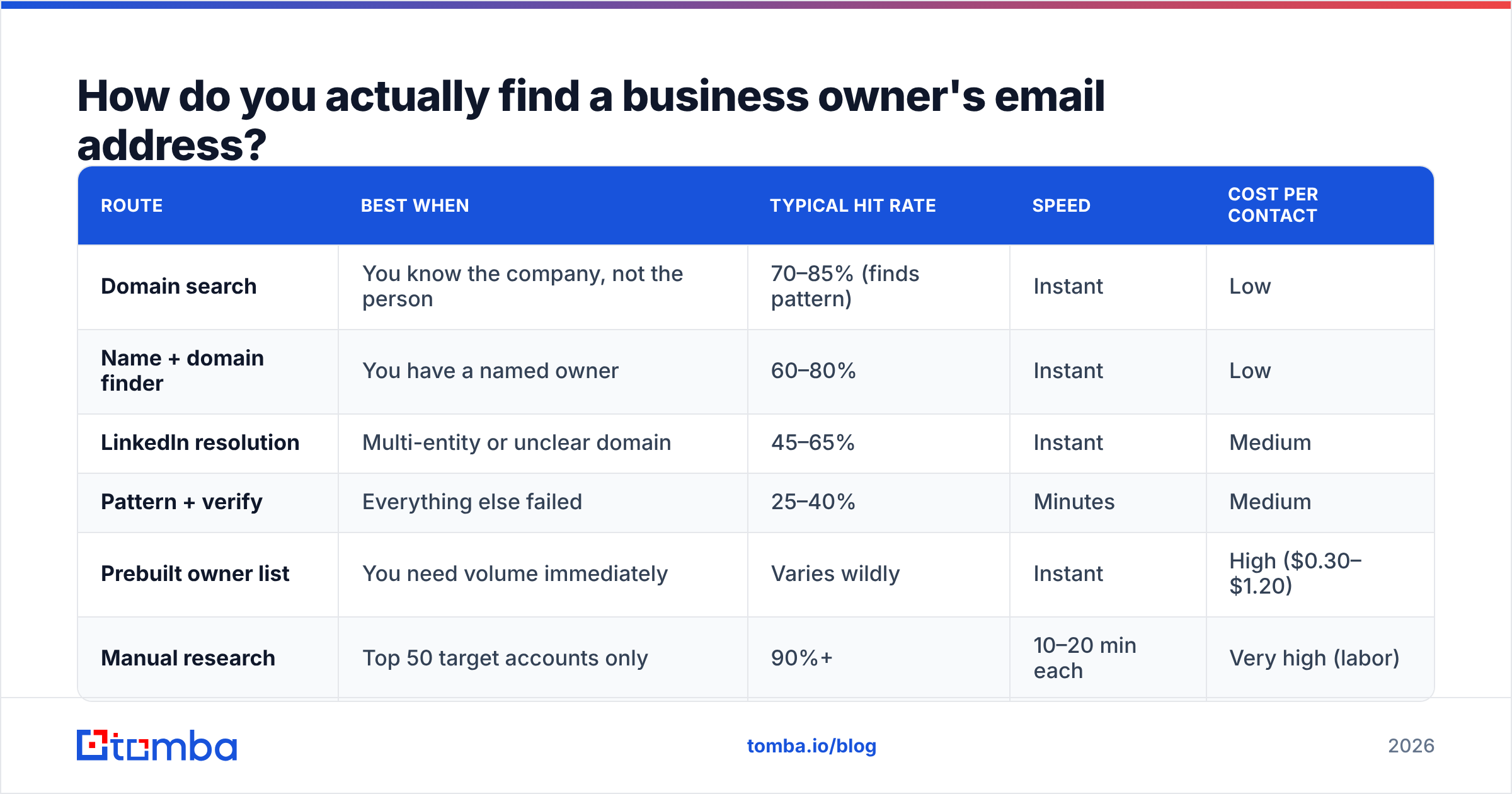
There are four reliable routes, and you should run them in this order.
Route 1 — Domain search. Pull every publicly indexed address on the company domain, then look for the pattern. If sarah.chen@acme.com and mike.torres@acme.com both exist, the owner is first.last@acme.com. A domain search returns the addresses plus the confidence-weighted pattern in one call, which saves you from guessing.
Route 2 — Name-plus-domain lookup. Once you know the owner's name (from the About page, state filings, or LinkedIn), feed name + domain into an email finder. This is the highest-precision route and the one to default to for named targets.
Route 3 — LinkedIn profile resolution. For owners whose company domain is unclear — holding companies, DBAs, multi-brand operators — start from the profile URL. A LinkedIn finder resolves the profile to a work email without you having to guess which of their six entities they actually use.
Route 4 — Pattern generation plus verification. When the first three come up empty, generate the plausible permutations (dan@, dnorris@, dan.norris@, dnorris@) and verify each. This is brute force, so gate it behind verification or you will burn your domain reputation on bounces.
Whatever route you use, verify before you send. Owner-level data decays fast — small companies rebrand domains, migrate from Google Workspace to Microsoft 365, and quietly shut down. Running every address through an email verifier before it enters a sequence is the single cheapest deliverability insurance available.
| Route | Best when | Typical hit rate | Speed | Cost per contact |
|---|---|---|---|---|
| Domain search | You know the company, not the person | 70–85% (finds pattern) | Instant | Low |
| Name + domain finder | You have a named owner | 60–80% | Instant | Low |
| LinkedIn resolution | Multi-entity or unclear domain | 45–65% | Instant | Medium |
| Pattern + verify | Everything else failed | 25–40% | Minutes | Medium |
| Prebuilt owner list | You need volume immediately | Varies wildly | Instant | High ($0.30–$1.20) |
| Manual research | Top 50 target accounts only | 90%+ | 10–20 min each | Very high (labor) |
How do you find business owners who have no website?#
Roughly a third of US small businesses still have no functional site, or run everything through a Facebook page. These owners are among the easiest to reach by phone and the hardest to reach by email.
Work these sources in order:
- Secretary of State business registries. Every US state publishes registered agent and officer names for LLCs and corporations, free. This gives you the legal owner name, which is what you need for every other lookup.
- Licensing boards. Contractors, electricians, medical practices, and food service all sit on public license registers with a named principal and often a direct phone.
- Google Business Profile. The listed phone is usually the owner's cell for businesses under ~10 employees.
- Local chamber of commerce directories. Under-scraped, frequently list the owner by name with a direct line.
- Invoice and quote footers. If you can get a quote from the business, the reply almost always comes from a personal address rather than the generic one.
For these targets, a phone finder plus a call script beats any email sequence. An owner-operator plumbing company will not read a cold email on Tuesday. They will answer a call at 7:15am.
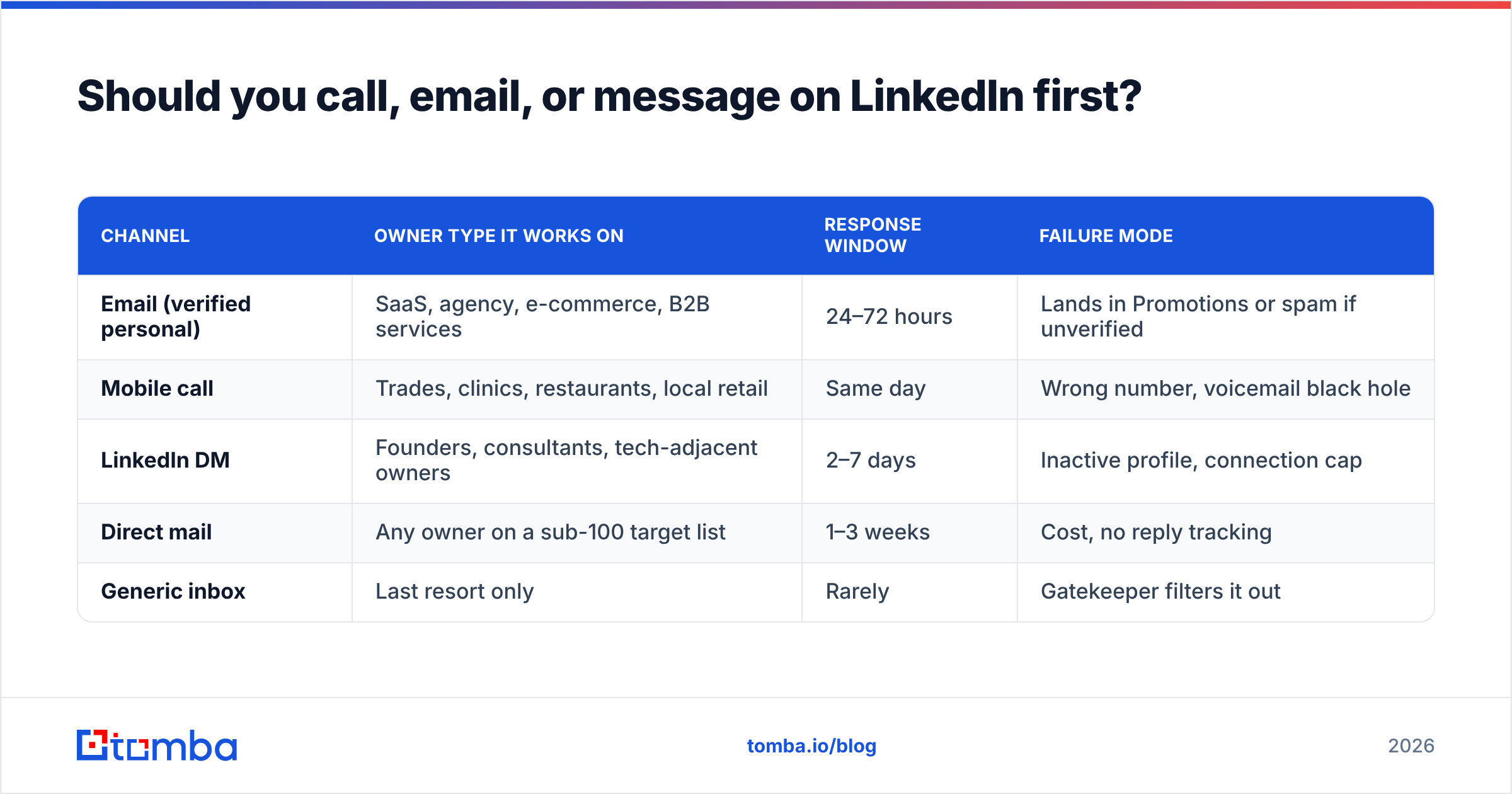
Should you call, email, or message on LinkedIn first?#
Email first, then call, then LinkedIn — with one exception.
The exception is local service businesses, where the order flips to call first. Everywhere else, email creates the name recognition that makes the call answerable. "Hi Dan, I sent you a note Tuesday about the fleet routing thing" is a completely different conversation from "Hi, is this the owner?"
| Channel | Owner type it works on | Response window | Failure mode |
|---|---|---|---|
| Email (verified personal) | SaaS, agency, e-commerce, B2B services | 24–72 hours | Lands in Promotions or spam if unverified |
| Mobile call | Trades, clinics, restaurants, local retail | Same day | Wrong number, voicemail black hole |
| LinkedIn DM | Founders, consultants, tech-adjacent owners | 2–7 days | Inactive profile, connection cap |
| Direct mail | Any owner on a sub-100 target list | 1–3 weeks | Cost, no reply tracking |
| Generic inbox | Last resort only | Rarely | Gatekeeper filters it out |
A practical cadence that respects all three channels without being obnoxious:
- Day 0 — Email, 90 words, one specific observation about their business, one question.
- Day 2 — LinkedIn connection request, no pitch in the note.
- Day 4 — Call. Reference the email by subject line.
- Day 8 — Second email, different angle, forwarded on the first thread.
- Day 15 — Final email, permission-to-close framing. Then stop.
Five touches over two weeks. Anything longer stops being persistence and starts being noise, and owners have long memories for the brands that annoyed them.
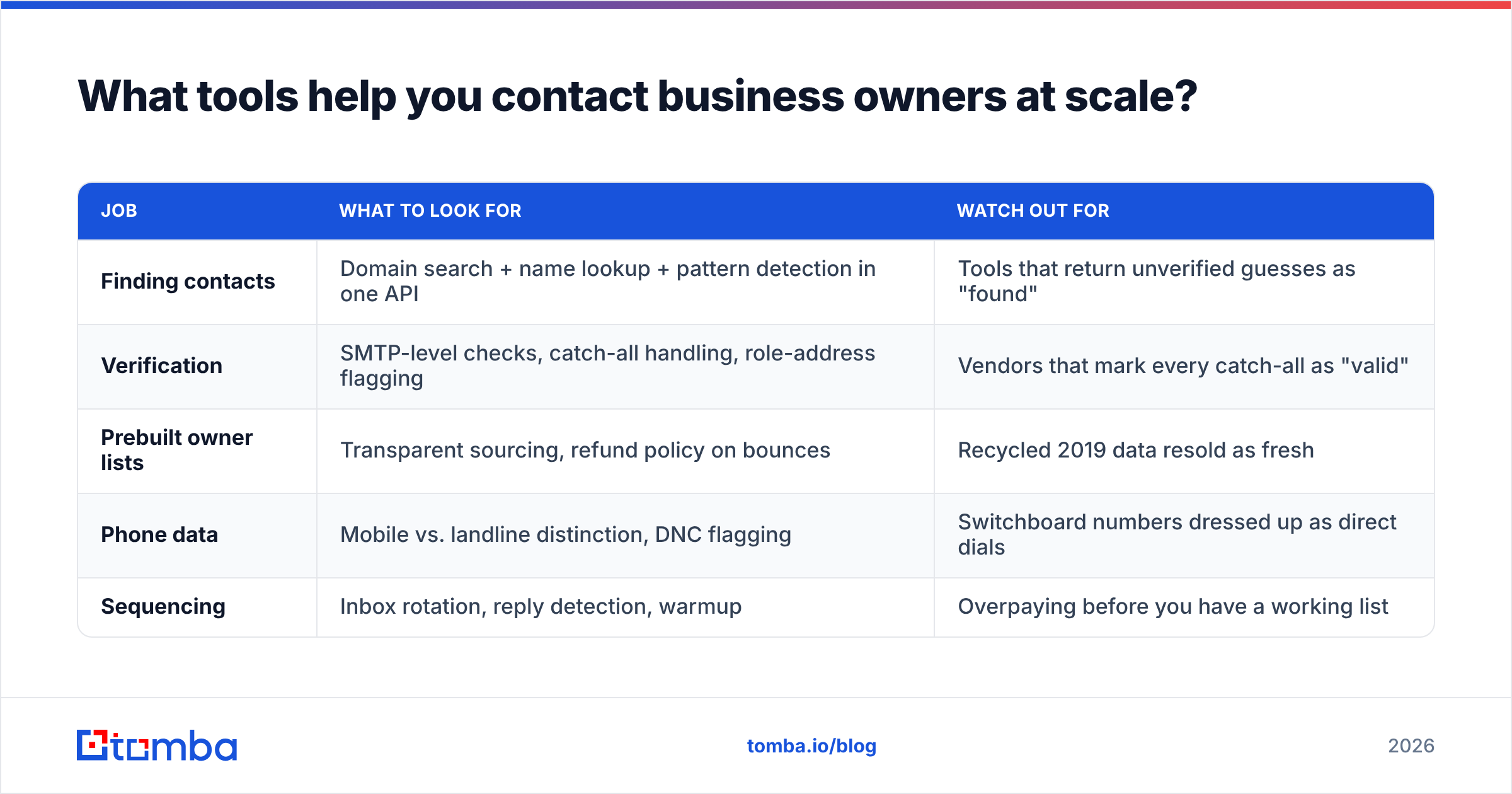
What tools help you contact business owners at scale?#
The tooling splits into three jobs: finding the contact, verifying it, and sequencing the outreach. Most teams overbuy on sequencing and underbuy on verification, which is backwards — a great sequencer sending to a 30%-invalid list still produces a 30%-invalid bounce rate.
| Job | What to look for | Watch out for |
|---|---|---|
| Finding contacts | Domain search + name lookup + pattern detection in one API | Tools that return unverified guesses as "found" |
| Verification | SMTP-level checks, catch-all handling, role-address flagging | Vendors that mark every catch-all as "valid" |
| Prebuilt owner lists | Transparent sourcing, refund policy on bounces | Recycled 2019 data resold as fresh |
| Phone data | Mobile vs. landline distinction, DNC flagging | Switchboard numbers dressed up as direct dials |
| Sequencing | Inbox rotation, reply detection, warmup | Overpaying before you have a working list |
On the list side, BookYourData is a solid option when you need owner records immediately and want a pay-as-you-go structure with a bounce guarantee — useful for testing a new vertical before you commit to building the list yourself. It sits at the "buy" end of the build-versus-buy spectrum.
If you would rather build, Tomba pricing starts with a free tier at 25 searches per month, Starter at $49/mo, Growth at $99/mo, and Pro at $249/mo — with the Tomba API available on paid plans so you can run finding and verification inside your own enrichment pipeline rather than exporting CSVs by hand.
The economics generally favor building once you are past ~2,000 contacts per month. Below that, buying a targeted list and spending your time on messaging is the better trade.

What should you actually say to a business owner?#
Short, specific, and about their business rather than yours.
Owners have a highly tuned filter for templated language. The tell is any sentence that could have been sent to a thousand other people. "I noticed you're scaling your team" is a template. "I noticed you added three techs in Phoenix since March" is research.
A structure that holds up:
- One line of proof you looked. A specific detail from their site, a job posting, a review, a podcast. One line. Not a paragraph of flattery.
- One line connecting that detail to a problem. Not your product — the problem. "Three new techs usually means dispatch becomes the bottleneck before month four."
- One line of evidence you have solved it. A named comparable company or a concrete number. No case study links in the first email.
- One question, low commitment. "Worth a look?" outperforms "Do you have 15 minutes Thursday at 2?" by a wide margin on cold sends.
Keep it under 100 words. Owners read on their phone, between jobs, and a wall of text gets archived without a decision. If you want a starting frame to adapt, the cold email templates library is a reasonable place to pull structures from — just rewrite every specific until nothing generic survives.
One more thing worth internalizing: an owner's objection is almost never "I don't believe you." It is "I don't have the bandwidth to evaluate this." Write for the bandwidth objection and your response rate climbs without you touching the offer.
What are the legal and compliance limits?#
Different rules by channel and jurisdiction, and they are not symmetrical.
- Email (US, CAN-SPAM). Cold B2B email is legal. You need accurate headers, a non-deceptive subject line, a physical postal address, and a working opt-out you honor within 10 business days. See the FTC's CAN-SPAM compliance guide for the actual text rather than a vendor's summary.
- Email (EU/UK, GDPR + PECR). B2B outreach can rest on legitimate interest, but you need a documented balancing test, the source of the data, and an immediate opt-out. Sole traders and partnerships get treated closer to individuals than to companies in the UK.
- Phone (US). Business-to-business calls have carve-outs from the national DNC registry, but state-level rules vary and cell phones carry more risk. Scrub against DNC anyway; the cost of scrubbing is trivial next to the cost of not.
- Canada (CASL). Stricter than CAN-SPAM. Implied consent windows are narrow and penalties are real. Do not run a US playbook into Canadian lists unchanged.
The practical takeaway: keep provenance records for every contact — where it came from, when, and which verification pass it cleared. If a complaint ever arrives, "we sourced this from a public company directory on 2026-03-14 and verified it the same day" resolves it. "We bought a list" does not.
Where should you start this week?#
Pick 100 target companies. Not 5,000.
Run each domain through domain search to get the pattern and the indexed addresses. Identify the owner by name from the About page, state filings, or LinkedIn. Resolve name plus domain into an address. Verify every result. Enrich with a mobile number where the business is local. You will end up with somewhere between 55 and 75 verified owner contacts, which is a week of genuinely good outbound rather than a month of bouncing.
Then measure two things: bounce rate and reply rate. If bounce is above 3%, your verification step is broken. If bounce is clean and replies are under 3%, your message is broken. Those two numbers tell you which half of the system to fix, and almost every team that says "outbound doesn't work" has never separated them.
Ready to build the list? Start with the Tomba Email Finder — the free tier gives you 25 searches a month to test the workflow on a handful of target accounts before you commit to a paid plan, and every result runs through the same verification layer that keeps your sending domain healthy.
Related guides#
// get started
Find, verify and enrich your first contacts today
Start on the free plan with 25 searches a month, then scale when your team is ready.
Free plan · No credit card required · GDPR & CCPA
// about the author