How to Craft a Lead: The 7-Step B2B Lead Building Framework
A lead is not a name you found — it is a record you build. Here is the 7-step framework for turning a raw buying signal into a verified, scored, contactable B2B lead that survives your CRM and your send.
TL;DR
- A lead is not a name you found. It is a record you assemble from a trigger, a person, a verified channel, and a reason to reach out. Skip any of those four and you have a contact, not a lead.
- The cheapest way to kill a campaign is to craft leads at the end of the pipeline instead of the start. Verification after sending is damage control.
- Bought lists average 20–40% decay per year. Crafted leads pull their data at the moment of outreach, so decay never gets a chance to accumulate.
- The seven steps: define the trigger, define the ICP row, resolve the company, resolve the person, find and verify the channel, enrich for relevance, score and route.
- Budget roughly 2–4 minutes per lead manually, or 3–8 seconds per lead when steps 4–6 run through an API. Both beat a $2,000 list that bounces.
What does it actually mean to craft a lead?#
Crafting a lead means building a record that someone can act on without doing more research.
Most teams confuse three different objects. A contact is a name and an email. A prospect is a contact who fits your ICP. A lead is a prospect with a documented reason to be contacted now and a channel you have confirmed works. The gap between those three is where most outbound revenue leaks.
Think of it like cooking versus grocery shopping. Buying a list is grocery shopping — you get raw ingredients of unknown freshness in bulk. Crafting a lead is cooking to order: you pull only what you need, you check it is not spoiled, and you plate it with context the recipient can taste.
A properly crafted lead record has seven fields minimum:
- Trigger — the observable event that makes this the right week to reach out (funding, hire, tech change, content publication, job posting).
- Company — legal name, domain, headcount band, and industry, resolved to a single canonical row.
- Person — full name, current title, tenure in role, and seniority band.
- Channel — a verified work email, and where relevant a direct phone or LinkedIn profile.
- Evidence — the URL or source that proves the trigger is real, so your first line is not invented.
- Fit score — how closely the account matches your best closed-won accounts.
- Route — which sequence, which rep, which day.
Miss field 5 and your personalization becomes flattery. Miss field 4 and none of the rest matters.
Why do bought lists fail where crafted leads work?#
Because a list is a photograph and a lead is a live feed.
B2B contact data decays fast. Titles change, companies get acquired, and people leave — the commonly cited figure across the industry sits around 2.1% per month, which compounds to roughly a quarter to a third of a database going stale each year. A list you bought in January is materially different by June, and nobody sends you a changelog.
The failure mode is not just bounces. It is that bounces poison the sender reputation that carries your good leads. One 12% bounce campaign can suppress inbox placement for the next three campaigns that were built correctly.
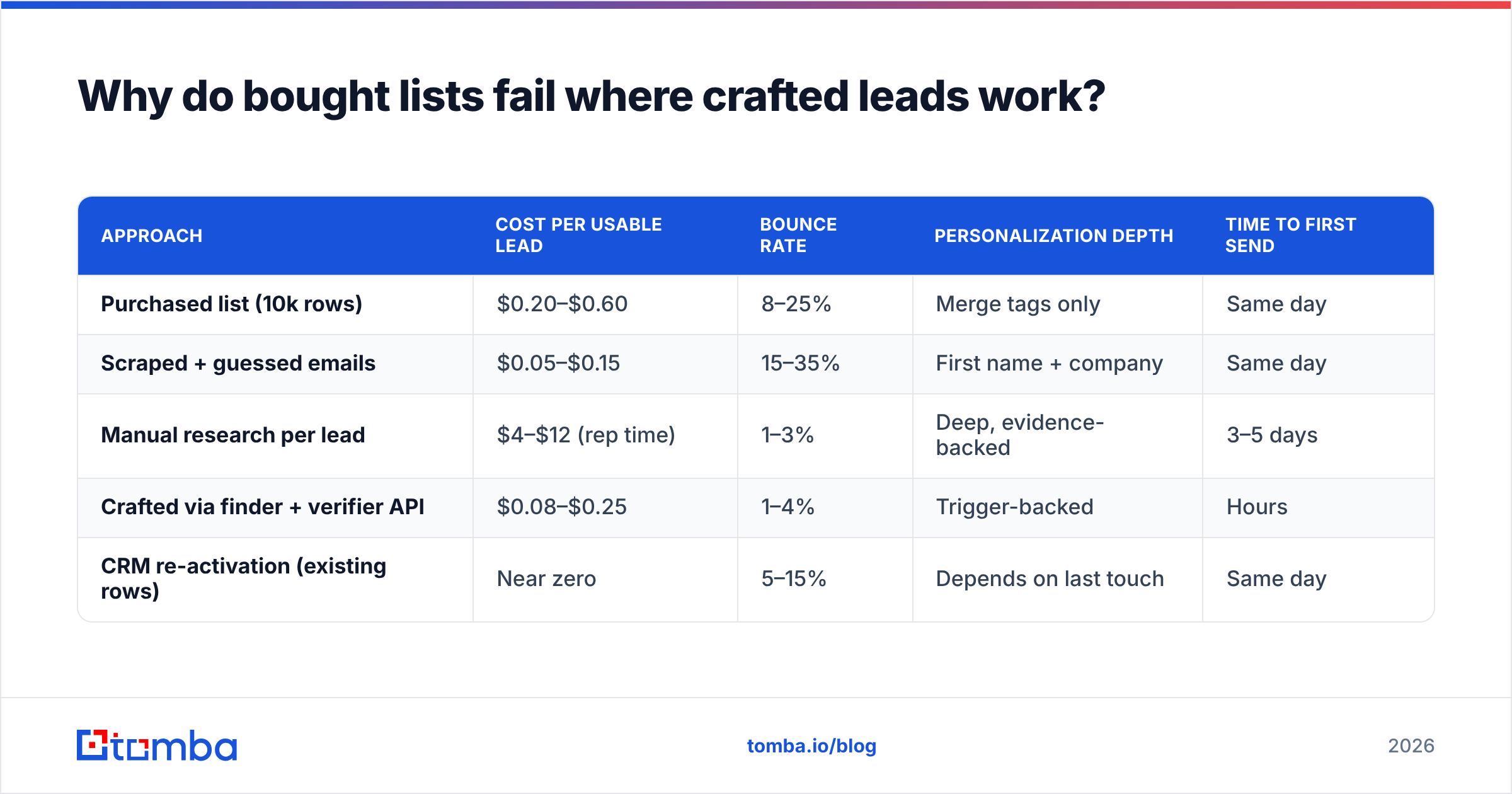
| Approach | Cost per usable lead | Bounce rate | Personalization depth | Time to first send |
|---|---|---|---|---|
| Purchased list (10k rows) | $0.20–$0.60 | 8–25% | Merge tags only | Same day |
| Scraped + guessed emails | $0.05–$0.15 | 15–35% | First name + company | Same day |
| Manual research per lead | $4–$12 (rep time) | 1–3% | Deep, evidence-backed | 3–5 days |
| Crafted via finder + verifier API | $0.08–$0.25 | 1–4% | Trigger-backed | Hours |
| CRM re-activation (existing rows) | Near zero | 5–15% | Depends on last touch | Same day |
The bottom two rows are where most teams should live. The fourth row is the one this article is about: crafted quality at scraped-list speed.

How do you define the trigger before you define the list?#
Start from the event, not from the filter.
Most prospecting starts backwards: someone opens a database, sets headcount 50–200 and industry SaaS, exports 5,000 rows, and then tries to invent a reason to email each one. Crafted leads reverse that. You pick a trigger that correlates with your buying window, then find every company that just fired it.
Useful triggers by category:
- Funding and financial — Series A/B announcements, new CFO, opening an office in a new region.
- Hiring — a job posting for the exact role that owns your problem. A company posting "Demand Generation Manager" is telling you their demand gen is under-resourced right now.
- Technology — installing or removing a tool in your category. Removals are the strongest signal in outbound and the most underused.
- Content — an executive publishing a post, a podcast appearance, a conference talk. This is where an author finder turns a byline into a contactable person.
- Structural — an acquisition, a rebrand, a website migration, a compliance deadline in their industry.
The test for a good trigger: could you write the first sentence of the email using only the trigger, and would the recipient agree it is accurate? If not, it is a demographic filter wearing a trigger costume.
What are the seven steps to craft a lead end to end?#
Here is the pipeline in order. Each step should either enrich the record or kill it — never leave a record ambiguous.
Step 1 — Lock the trigger and the source URL. Capture the event and the link that proves it. If the trigger is a job post, save the posting URL. This becomes your personalization evidence and your audit trail when a rep asks "why is this in my queue?"
Step 2 — Resolve the company to a domain. Company names are unreliable keys; domains are not. "Acme Inc," "Acme Incorporated," and "ACME Group" collapse into one row only when you resolve to acme.com. Do this first, because every downstream lookup keys off the domain.
Step 3 — Find the right person, not the most senior person. Match to the role that owns the pain, then check whether a decision-maker sits above them. Tenure matters: someone 3–14 months into a role is measurably more likely to buy new tools than someone at 4 years. If your only entry point is a LinkedIn profile, a LinkedIn finder closes the gap between profile and inbox.
Step 4 — Retrieve the work email from the domain. This is where a domain search beats permutation guessing. Pattern guessing produces first.last@, flast@, first@ candidates and hopes one lands; a real finder returns the pattern the company actually uses plus a confidence score and the sources that support it.
Step 5 — Verify before the record is allowed into the sequence. Run SMTP-level verification, catch-all detection, and role-account filtering. A record without a verification timestamp is not a lead yet. Use an email verifier as a hard gate, not an optional cleanup pass.
Step 6 — Enrich for relevance, not for volume. Add only the fields your message or your routing actually uses: headcount, tech stack, region, funding stage. Every extra field you enrich is a field you have to maintain. Data enrichment should be scoped to what changes the email.
Step 7 — Score and route. Combine fit (does the account look like your closed-won set?) with intent (how strong and how recent is the trigger?). High fit plus fresh trigger goes to a rep with a manual first touch. Low fit plus fresh trigger goes to a nurture sequence. High fit with a stale trigger waits for a new one.
How do you know a lead is verified and not just plausible?#
Verification is a four-layer check, and most tools only do the first two.
Layer 1 — Syntax and domain. Does the address parse, and does the domain have valid MX records? This catches typos and dead domains. It is table stakes.
Layer 2 — Mailbox response. An SMTP handshake that confirms the mailbox exists without sending a message. This is the layer most "verifiers" mean when they say verified.
Layer 3 — Catch-all handling. Roughly one in five business domains accepts everything, so layer 2 returns a useless "accept" for any address you invent. A catch-all verifier uses secondary signals — historical send data, pattern confidence, source corroboration — to separate real mailboxes from black-hole domains. Without this layer, your "verified" list is quietly padded with fiction.
Layer 4 — Risk and role filtering. Strip info@, sales@, support@, known spam traps, and disposable domains. Role accounts inflate your delivered count and destroy your reply rate.
A record that clears all four layers and carries a timestamp under 30 days old is a lead. Anything else is a hypothesis.

What does a crafted lead record look like in practice?#
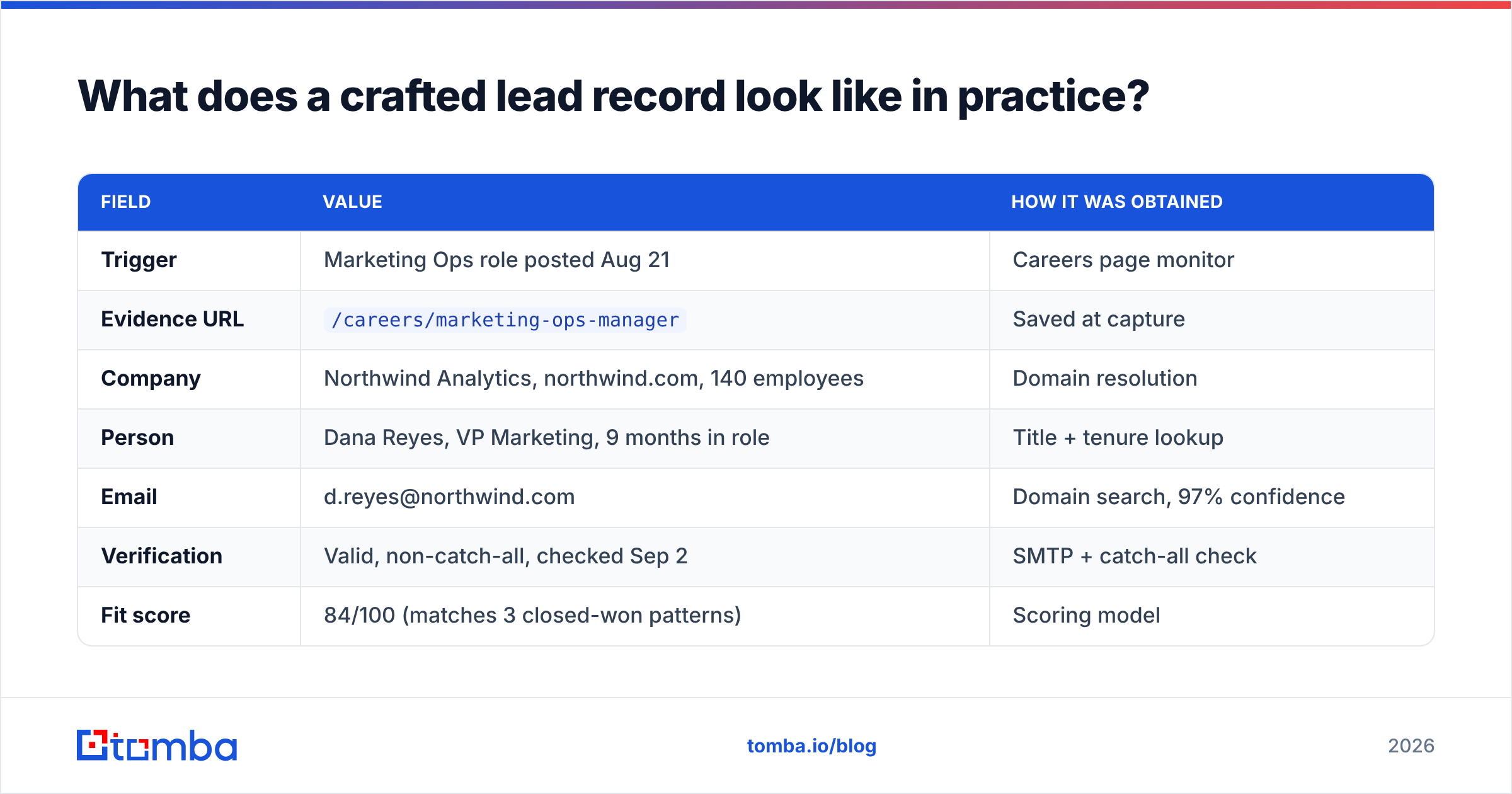
Concrete example. Your trigger is "company posted a Marketing Ops job in the last 14 days" and you sell attribution software.
| Field | Value | How it was obtained |
|---|---|---|
| Trigger | Marketing Ops role posted Aug 21 | Careers page monitor |
| Evidence URL | /careers/marketing-ops-manager |
Saved at capture |
| Company | Northwind Analytics, northwind.com, 140 employees | Domain resolution |
| Person | Dana Reyes, VP Marketing, 9 months in role | Title + tenure lookup |
| d.reyes@northwind.com | Domain search, 97% confidence | |
| Verification | Valid, non-catch-all, checked Sep 2 | SMTP + catch-all check |
| Fit score | 84/100 (matches 3 closed-won patterns) | Scoring model |
| Route | Rep queue, manual first touch, Tue send | Routing rule |
The email that comes out of this record writes itself: you know they are hiring for the function, you know the VP is new enough to be changing the stack, and you know the message will land. Compare that to a bought row containing "Dana Reyes, Marketing, Northwind" and nothing else.
Note what is not in the record: no guessed phone number, no scraped personal email, no invented "recently mentioned your interest in analytics." Fabricated personalization is worse than none — it signals automation immediately.
Which tools do you actually need to craft leads at volume?#
Fewer than the market wants to sell you. You need four capabilities, and several tools cover more than one.
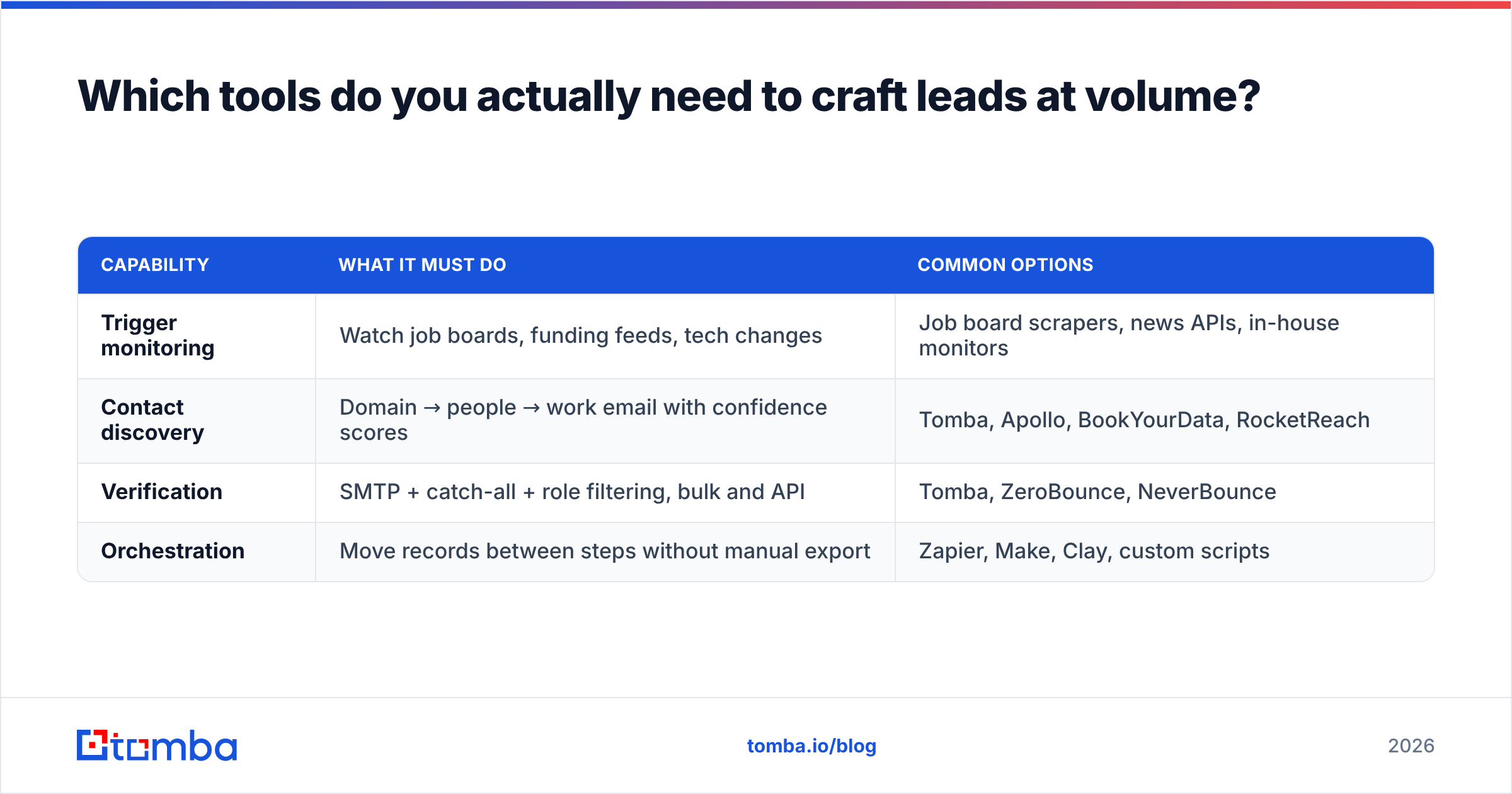
| Capability | What it must do | Common options |
|---|---|---|
| Trigger monitoring | Watch job boards, funding feeds, tech changes | Job board scrapers, news APIs, in-house monitors |
| Contact discovery | Domain → people → work email with confidence scores | Tomba, Apollo, BookYourData, RocketReach |
| Verification | SMTP + catch-all + role filtering, bulk and API | Tomba, ZeroBounce, NeverBounce |
| Orchestration | Move records between steps without manual export | Zapier, Make, Clay, custom scripts |
On pricing, the honest framing is cost per usable lead, not cost per credit. A tool at $0.02 per lookup with a 60% hit rate and no verification is more expensive than one at $0.06 with a 90% hit rate and verification included, once you count the bounces. Tomba pricing starts with a free tier at 25 searches per month, Starter at $49/mo, Growth at $99/mo, and Pro at $249/mo, with the verifier and domain search sitting alongside the finder rather than billed separately. Peers like BookYourData take a different angle — prepaid, download-a-list buying that suits teams who want a static export rather than an API in the loop. Both models work; which one fits depends on whether your leads are built continuously or in batches.
Check independent review sites like G2 for current accuracy claims rather than trusting any vendor's own benchmark, including ours. And if you want the textbook framing of the funnel these leads feed, HubSpot and the Wikipedia entry on lead generation cover the terminology consistently.
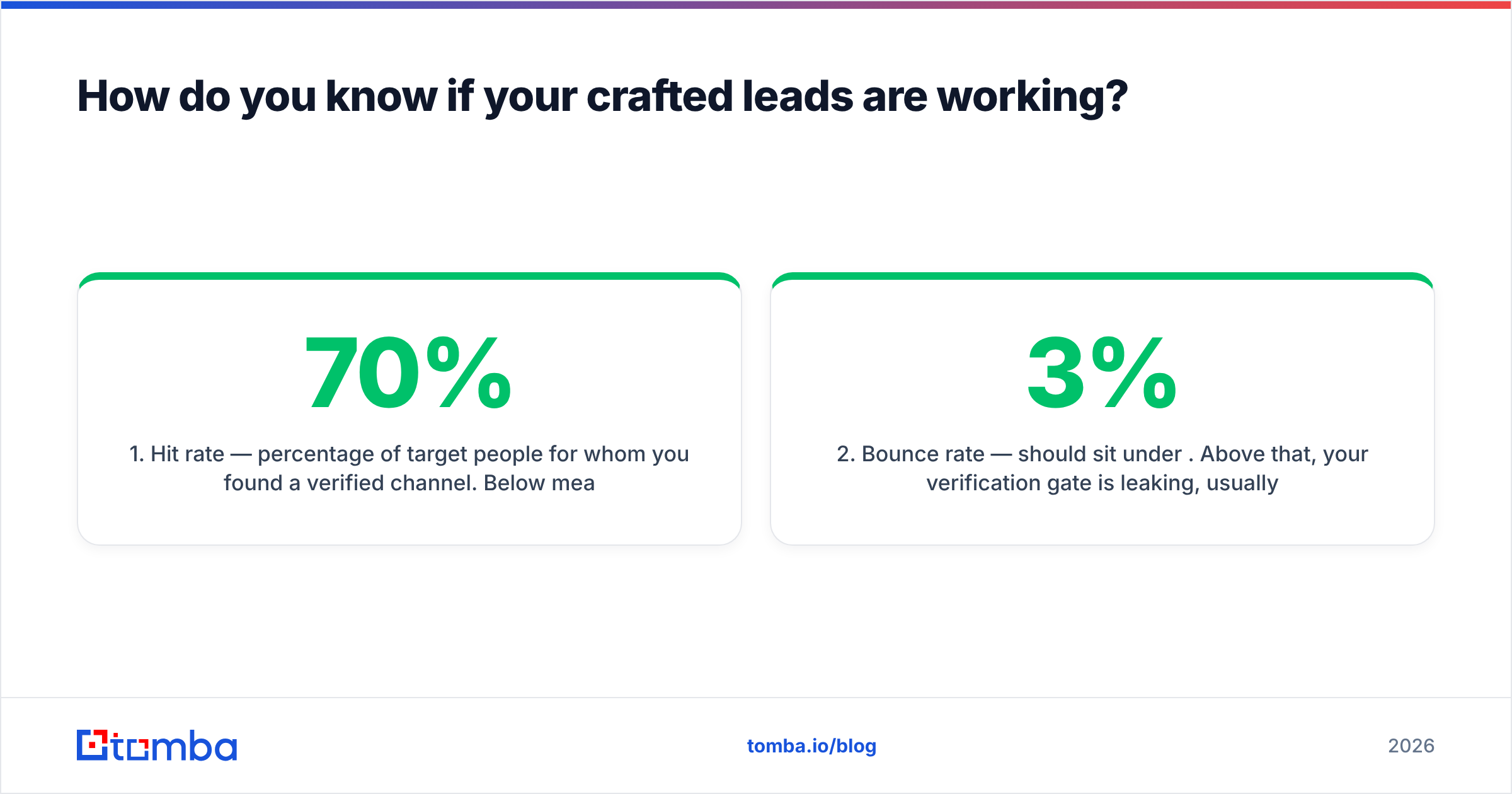
How do you know if your crafted leads are working?#
Measure four numbers, weekly, per source.
- Hit rate — percentage of target people for whom you found a verified channel. Below 70% means your discovery step or your ICP definition is off.
- Bounce rate — should sit under 3%. Above that, your verification gate is leaking, usually on catch-all domains.
- Reply rate by trigger type — this is the number that tells you which triggers are real. Expect a 2–4x spread between your best and worst trigger.
- Meeting rate per 100 crafted leads — the only metric that survives a board meeting. Track it against cost per lead to get true cost per meeting.
If reply rate is fine but meeting rate is low, your leads are correct and your offer is not. If bounce rate is fine but reply rate is low, your triggers are demographic filters in disguise. Separating those two diagnoses is the entire reason to craft leads with recorded evidence instead of buying them.
Refresh cadence: re-verify any lead older than 30 days before it enters a new sequence, and re-resolve the person if the record is older than 90 days. Cheap insurance against the decay curve.
Where should you start this week?#
Pick one trigger, build 50 leads by hand through all seven steps, and send. Do not automate first — you will automate a bad definition. Once those 50 produce replies you can read, wire steps 4 through 6 into an API and let the volume climb.
When you get to that stage, the Tomba Email Finder handles the part that eats the most rep time: turning a name and a domain into a verified, confidence-scored work email, with catch-all detection and bulk processing built in rather than bolted on. Start on the free tier at 25 searches a month, craft your first batch, and only pay once the leads are proving themselves.
Related guides#
// get started
Find, verify and enrich your first contacts today
Start on the free plan with 25 searches a month, then scale when your team is ready.
Free plan · No credit card required · GDPR & CCPA
// about the author