How to Create a Sales Deck That Actually Closes Deals
Most sales decks are 30 slides of company history nobody reads. Here is the 12-slide structure, the research workflow behind it, and the tooling that makes each deck feel custom-built.
TL;DR
- A sales deck is not a company overview. It is a narrative that moves a buyer from "this is my problem" to "you are the obvious fix," in roughly 12 slides.
- Open with the shift happening in your buyer's market — not your founding story. The strongest decks earn attention before they earn credibility.
- Build one master deck plus a personalization layer: three to five slides you swap per account using real research on the company and the person.
- Every claim needs a proof slide behind it. Numbers, named logos, and a before/after story beat adjectives every time.
- Deck quality only matters if it reaches the right inbox. Accurate contact data and a clean sender setup do more for meeting rates than another design pass.
What is a sales deck, and what is it not?#
A sales deck is the visual spine of a sales conversation. It exists to keep a live discussion on track and to survive being forwarded to three people who were not on the call.
Think of it like a restaurant menu. A menu does not cook the food or explain the chef's biography — it helps a hungry person decide fast. Your deck works the same way: it frames a decision, not a documentary.
Here is the distinction most teams get wrong:
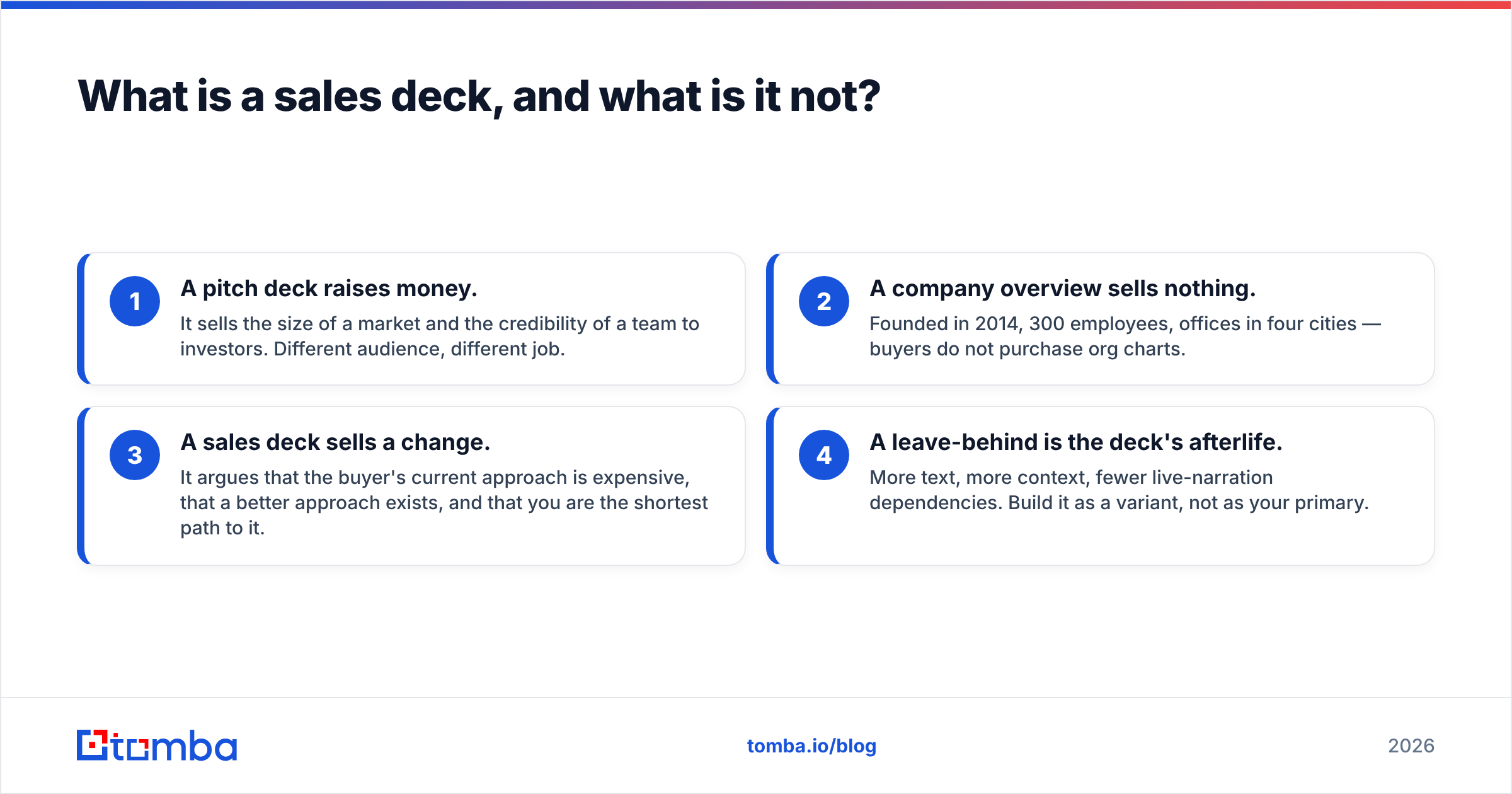
- A pitch deck raises money. It sells the size of a market and the credibility of a team to investors. Different audience, different job.
- A company overview sells nothing. Founded in 2014, 300 employees, offices in four cities — buyers do not purchase org charts.
- A sales deck sells a change. It argues that the buyer's current approach is expensive, that a better approach exists, and that you are the shortest path to it.
- A leave-behind is the deck's afterlife. More text, more context, fewer live-narration dependencies. Build it as a variant, not as your primary.
If your deck could have someone else's logo pasted on it and still make sense, it is a company overview wearing a sales deck costume.

How do you research before you build a single slide?#
Do the research first. A beautiful deck built on a guess about the buyer's pain is an expensive way to be wrong.
Spend 30 to 45 minutes per target segment gathering four inputs:
- Win/loss language. Pull the last ten closed-won and closed-lost deals from your CRM and read the notes. The phrases buyers used to describe their problem are your slide headlines. Do not paraphrase them into marketing-speak.
- Peer review evidence. Read your category page on G2 and note what reviewers praise and complain about — for you and for the two competitors you meet most often. That tells you which objection slide you actually need.
- The buyer's public signals. Earnings calls, job postings, and product changelogs tell you what a company is prioritizing this quarter. A company hiring six SDRs has a different problem than one that just froze headcount.
- The individual's context. The VP of Sales who came from a company that used your competitor will need a very different slide four than the one who has never bought in your category.
That last input is where most decks fall apart. Reps build one artifact for a title, not for a person. The fix is structural: separate your deck into a fixed core and a swappable layer, so personalization takes eight minutes instead of eighty.
What is the 12-slide structure that works?#
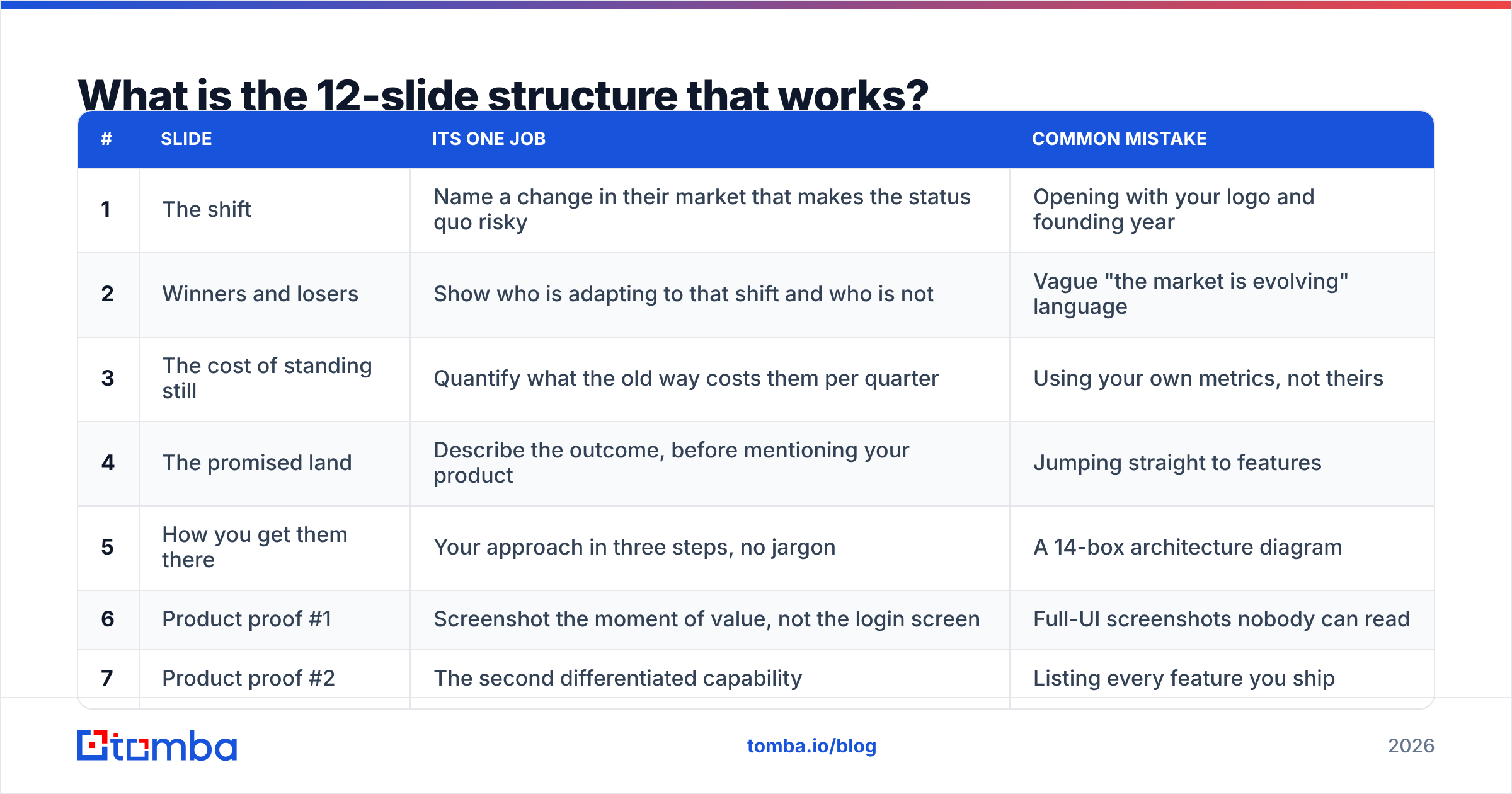
Use this as your skeleton. Every slide has one job and one headline that states a claim, not a topic. "Pipeline Overview" is a topic. "Your reps spend 11 hours a week on data entry" is a claim.
| # | Slide | Its one job | Common mistake |
|---|---|---|---|
| 1 | The shift | Name a change in their market that makes the status quo risky | Opening with your logo and founding year |
| 2 | Winners and losers | Show who is adapting to that shift and who is not | Vague "the market is evolving" language |
| 3 | The cost of standing still | Quantify what the old way costs them per quarter | Using your own metrics, not theirs |
| 4 | The promised land | Describe the outcome, before mentioning your product | Jumping straight to features |
| 5 | How you get them there | Your approach in three steps, no jargon | A 14-box architecture diagram |
| 6 | Product proof #1 | Screenshot the moment of value, not the login screen | Full-UI screenshots nobody can read |
| 7 | Product proof #2 | The second differentiated capability | Listing every feature you ship |
| 8 | Customer evidence | A named before/after with a number | Anonymous "a Fortune 500 client" |
| 9 | Objection pre-empt | Handle the top blocker before they raise it | Pretending the objection does not exist |
| 10 | Implementation | Timeline, effort required from them, who does what | Hand-waving "we'll get you live fast" |
| 11 | Commercials | Tiers, what drives price, what is included | Hiding pricing until the fourth call |
| 12 | The next step | One specific ask with a date | "Let us know if you have questions" |
Twelve is a target, not a law. Enterprise deals with security review often need an appendix of ten more slides that live behind the "any questions on X?" moment. What matters is that the linear path a buyer walks stays under fifteen minutes of narration.
Why does slide 1 decide the whole meeting?#
Because attention is highest in the first ninety seconds and never recovers. If you spend that window on your headquarters map, you are trading your most valuable inventory for nothing.
The strongest openers do one of three things: name a change the buyer has felt but not articulated, share a data point they have not seen, or state a contrarian position about their market. Test it this way — read your first slide headline out loud to someone in your target segment. If they say "yeah, obviously," rewrite it.
How do you personalize a deck at scale without rebuilding it?#
Split the deck into three layers and only touch the top one per account.
Layer 1 — Fixed core (slides 4-7, 10-11). Your approach, product proof, implementation, and pricing. These change quarterly, not per deal.
Layer 2 — Segment layer (slides 1-3). Build one version per industry or company size. A 40-person agency and a 4,000-person manufacturer do not share a "cost of standing still" slide.
Layer 3 — Account layer (slides 8-9, 12). Swap in the customer story closest to their profile, the objection their peers raise most, and a next step tied to their timeline. Add one detail that proves you read something — a line from their careers page, a metric from their last earnings call.
That third layer is where research tooling pays for itself. You need the right person's name, role, and reachable contact details before the deck matters at all. Tools like an email finder and data enrichment turn a company name into a named buyer with a title and a verified address, which is the raw material for a personalized slide 12.
Which tools should you build the deck in?#
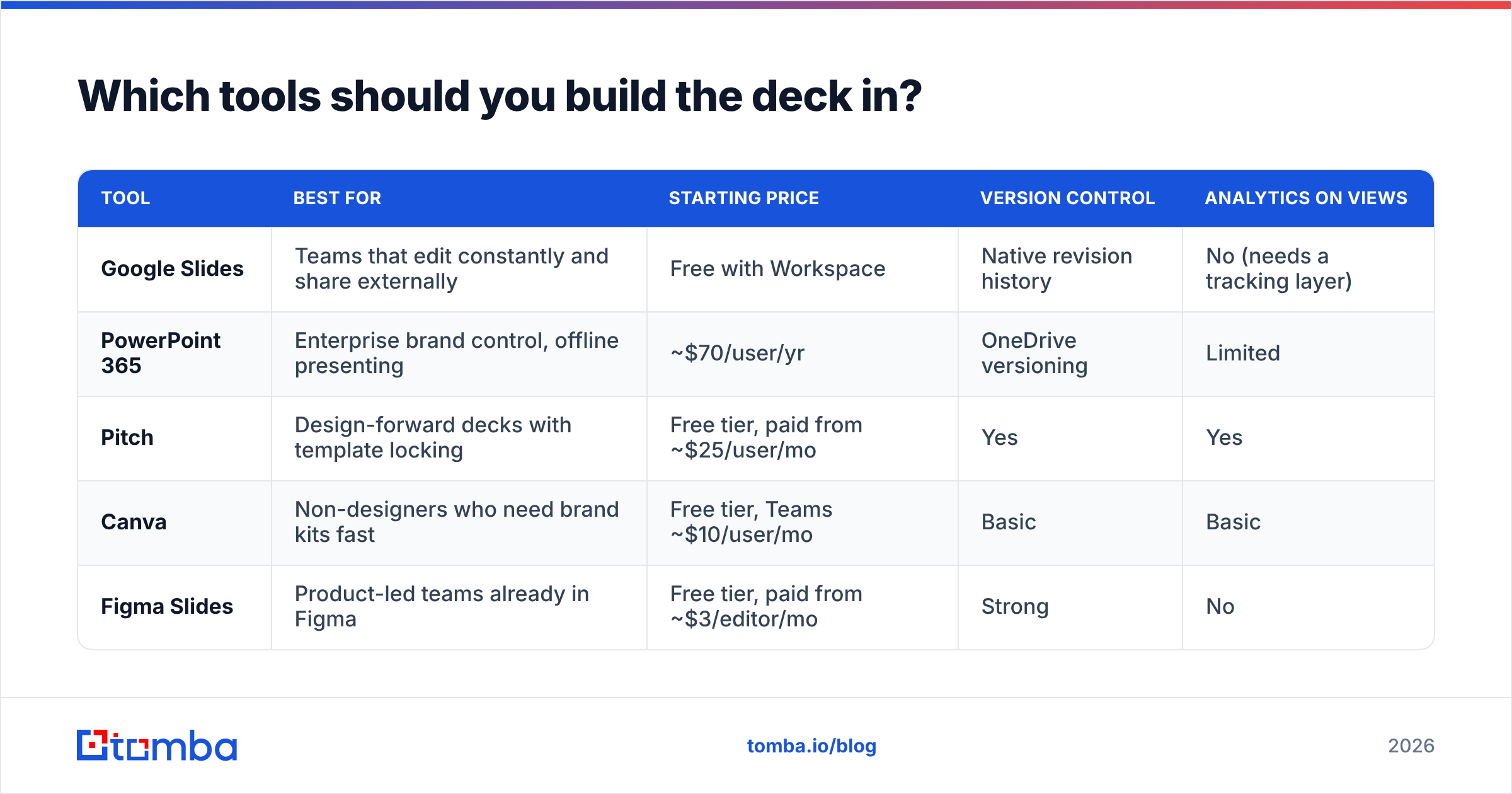
Pick based on how often the deck changes and who edits it, not on which one looks prettiest in a demo.
| Tool | Best for | Starting price | Version control | Analytics on views |
|---|---|---|---|---|
| Google Slides | Teams that edit constantly and share externally | Free with Workspace | Native revision history | No (needs a tracking layer) |
| PowerPoint 365 | Enterprise brand control, offline presenting | ~$70/user/yr | OneDrive versioning | Limited |
| Pitch | Design-forward decks with template locking | Free tier, paid from ~$25/user/mo | Yes | Yes |
| Canva | Non-designers who need brand kits fast | Free tier, Teams ~$10/user/mo | Basic | Basic |
| Figma Slides | Product-led teams already in Figma | Free tier, paid from ~$3/editor/mo | Strong | No |
A practical rule: whatever tool your least technical rep can update at 8pm before a 9am call is the correct tool. Deck adoption dies on friction, not on aesthetics.
For brand guidelines and template governance, HubSpot's sales resources and Salesforce's sales enablement material both publish usable frameworks if you are starting from zero.
What separates a deck that converts from one that gets ignored?#
Five things, in order of impact.
- One idea per slide. If you need to say "and" in the headline, it is two slides. Buyers reading a forwarded PDF have no narrator to untangle a dense slide.
- Numbers over adjectives. "Cut ramp time from 90 days to 34" beats "dramatically accelerate onboarding." If you cannot source a number, use a named customer quote instead of an adjective.
- Screenshots of the moment of value. Show the report the buyer will forward to their boss, not your settings page. Annotate it — one arrow, one caption, nothing more.
- Objections handled on the record. Every deal has a predictable blocker: price, security, migration effort, or internal politics. Putting it on slide 9 signals confidence. Hiding it signals the opposite.
- A next step with a date. "Should we get your security team on a 30-minute call Thursday?" closes more second meetings than any design flourish.
The inverse list is just as useful. Cut the team-photo slide, the world-map-of-customers slide, the awards row, and any diagram with more than five boxes. None of them advance a decision.

How do you know if your sales deck is working?#
Measure the deck as a system, not as a document. Four signals tell you enough:
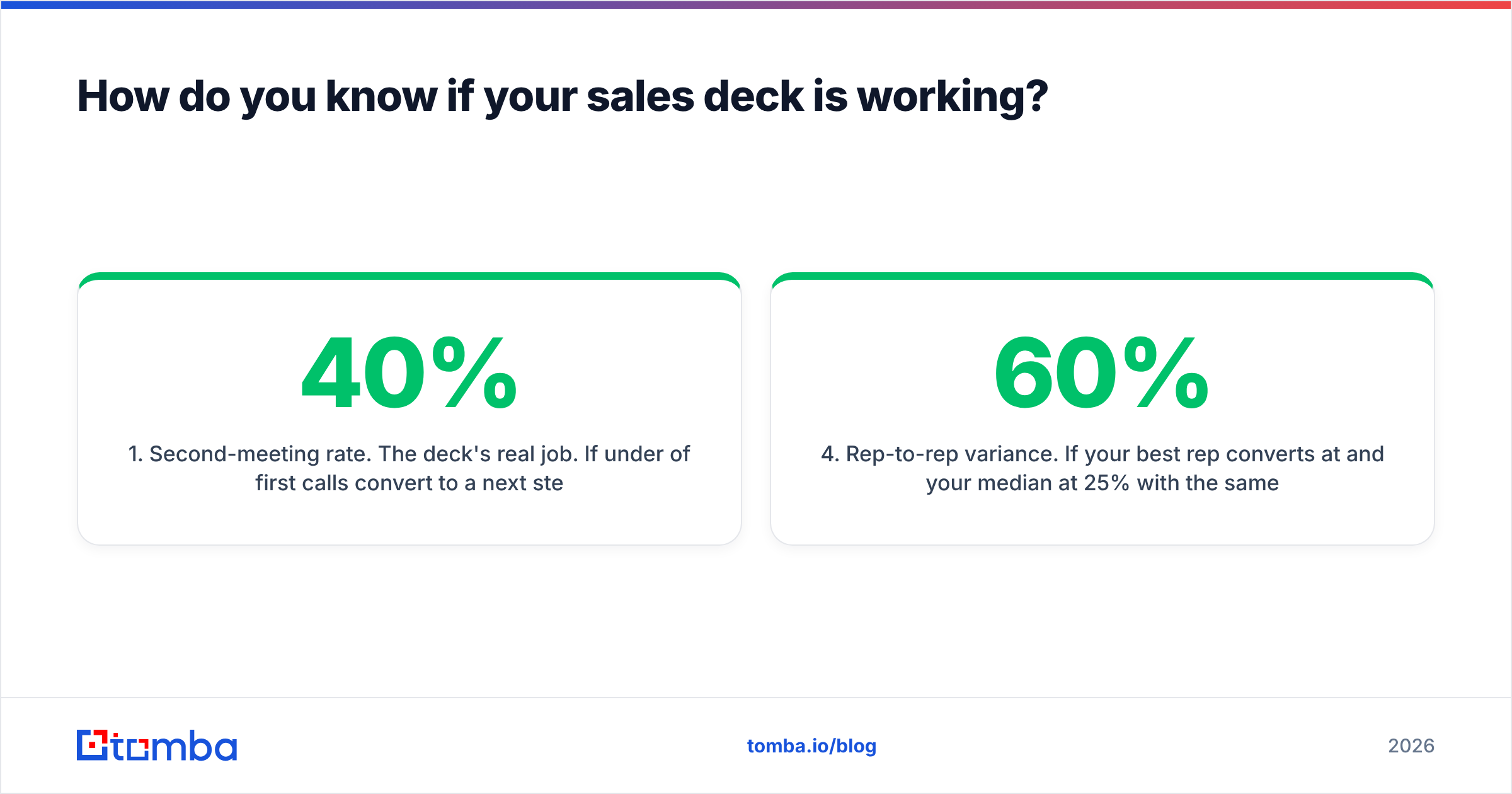
- Second-meeting rate. The deck's real job. If under 40% of first calls convert to a next step, your slides 1-3 are not landing.
- Slide-level drop-off. Any tool that tracks forwarded decks shows where readers stop. A cliff at slide 6 means your product proof is confusing.
- Objections raised after slide 9. If buyers still surface the objection you pre-empted, your handling slide is weak, not your ordering.
- Rep-to-rep variance. If your best rep converts at 60% and your median at 25% with the same deck, the problem is enablement, not design. Record the top rep narrating it and make that the training asset.
Run this review monthly with three closed-lost calls in front of you. Patterns show up fast — usually the same two slides that nobody remembers.
How does contact data fit into deck performance?#
A perfect deck sent to a role-based inbox performs at zero. This is the least glamorous and most decisive part of the workflow.
Two failure modes account for most of it. First, you present to someone without budget authority, so the deck gets forwarded and loses its narrator — which is exactly why slides must stand alone. Second, your follow-up email bounces, and a bounce rate above 3% starts damaging email deliverability for every other message you send that week.
Fixing both is process work, not creative work:
- Map the buying committee before the first call. Economic buyer, champion, technical evaluator, and blocker. Use domain search to pull the named contacts at the account rather than guessing at patterns.
- Verify before you send. Run every address through an email verifier so your post-meeting deck send actually lands. Catch-all domains need their own handling.
- Enrich the record, not just the email. Title, seniority, and department drive which segment-layer slides you attach.
- Log which deck version went out. You cannot attribute win-rate changes to a deck revision you did not track.
For teams that also work phone-first motions, pairing the deck send with a phone finder touch inside 24 hours meaningfully lifts reply rates — the deck gives the call a reason to exist.
What does a 90-minute build sprint look like?#
If you are starting from nothing, do not schedule a two-week deck project. Block 90 minutes and produce a rough v1 you can test on a real call this week.
- Minutes 0-20: Pull win/loss notes and write your slide 1 headline. Five attempts, pick one.
- Minutes 20-40: Draft headlines only — all twelve, no design, no body copy. If the headlines alone read as a coherent argument, the deck will work.
- Minutes 40-65: Add one piece of evidence per headline. Number, screenshot, or quote. Nothing else.
- Minutes 65-80: Build the account layer for your next scheduled call.
- Minutes 80-90: Read it aloud, timed. If narration runs past 15 minutes, cut slides, not words.
Test it live before you hand it to a designer. Design multiplies a working argument and disguises a broken one.
Common questions#
How many slides should a sales deck have? Twelve for the linear path, plus an appendix. Enterprise motions often carry 20-30 appendix slides that only appear when asked for.
Should you send the deck before the call? Usually no for a discovery-stage deck — it removes your reason to meet. Yes for a leave-behind variant after the call, with more written context on each slide.
Should pricing be in the deck? Yes, as a structure slide: tiers, what drives cost, what is included. Buyers who cannot estimate budget stall internally. You do not need a final number, but you need a range.
How often should you rebuild it? Refresh evidence quarterly, restructure annually or whenever your positioning shifts. Decks decay quietly — old logos and stale stats erode credibility more than dated design does.
Where should you start?#
Start with the headlines. Twelve claims, written as sentences, in the order a buyer needs to hear them. Everything else — layout, colors, animation — is downstream of whether that argument holds.
Then solve the delivery problem, because the best deck in your category is worthless if it reaches the wrong person or bounces on the way. Tomba Email Finder turns a target company and a name into a verified, deliverable business address, so the deck you just built lands with the buyer who can actually approve it. The free tier gives you 25 searches a month to test it against your current account list, and paid plans start at $49/mo on Starter with Growth at $99/mo — see full Tomba pricing for team volumes. Build the argument, find the right inbox, and let the deck do the job it was designed for.
Related guides#
// get started
Find, verify and enrich your first contacts today
Start on the free plan with 25 searches a month, then scale when your team is ready.
Free plan · No credit card required · GDPR & CCPA
// about the author