How to Create a Sales Presentation That Actually Closes Deals
Most sales decks lose the room by slide four. Here is a 7-step framework for building a sales presentation that survives a buying committee, plus the structure, tooling, and research steps that make it land.

TL;DR
- A sales presentation is not a company overview. It is an argument built for one buying committee, and it should be rebuilt (not reused) for every serious deal.
- The structure that works in 2026: problem framing first, cost of inaction second, your mechanism third, proof fourth, pricing fifth, next step sixth. Product features come late or not at all.
- Cap the live deck at 10-14 slides. Everything else goes in a leave-behind appendix the champion forwards internally.
- Research is the real work. Before you open a slide tool, know the org chart, the current stack, the trigger event, and who signs.
- Build the contact list first: use a domain search to map the account, then verify before you send the follow-up deck.
What is a sales presentation, and what is it not?#
A sales presentation is a structured argument that moves a specific buying committee from "this is interesting" to "this is a priority." That is the whole job.
What it is not: a company overview, a product tour, or a slide-shaped version of your website. Those are marketing artifacts. They answer "who are you?" — a question your buyer stopped asking the moment they took the meeting.
The distinction matters because it changes what goes on the slides. A company overview leads with founding year, logos, and funding. An argument leads with the buyer's situation and works forward. Gartner's research on B2B buying consistently finds that buyers spend the majority of their purchase journey without a seller in the room, which means your deck is competing against self-education, not against ignorance. By the time you present, they know the category. They need help deciding.
Three formats get confused under the same name:
- The live discovery-to-demo deck — 10-14 slides, presented, heavily interrupted. This is what most of this guide covers.
- The leave-behind — 25-40 slides, read asynchronously, forwarded by your champion to people who never met you. Denser, more self-contained, more proof.
- The executive summary — 3-5 slides for the economic buyer. Numbers, risk, timeline. No product screenshots.
Build one, then derive the others. Trying to make a single deck do all three is the most common reason presentations sprawl to 45 slides and land with nobody.

How do you prepare before you build a single slide?#
Spend 60-70% of your prep time on research, not design. A plain deck with the right insight beats a beautiful deck with generic content every time.
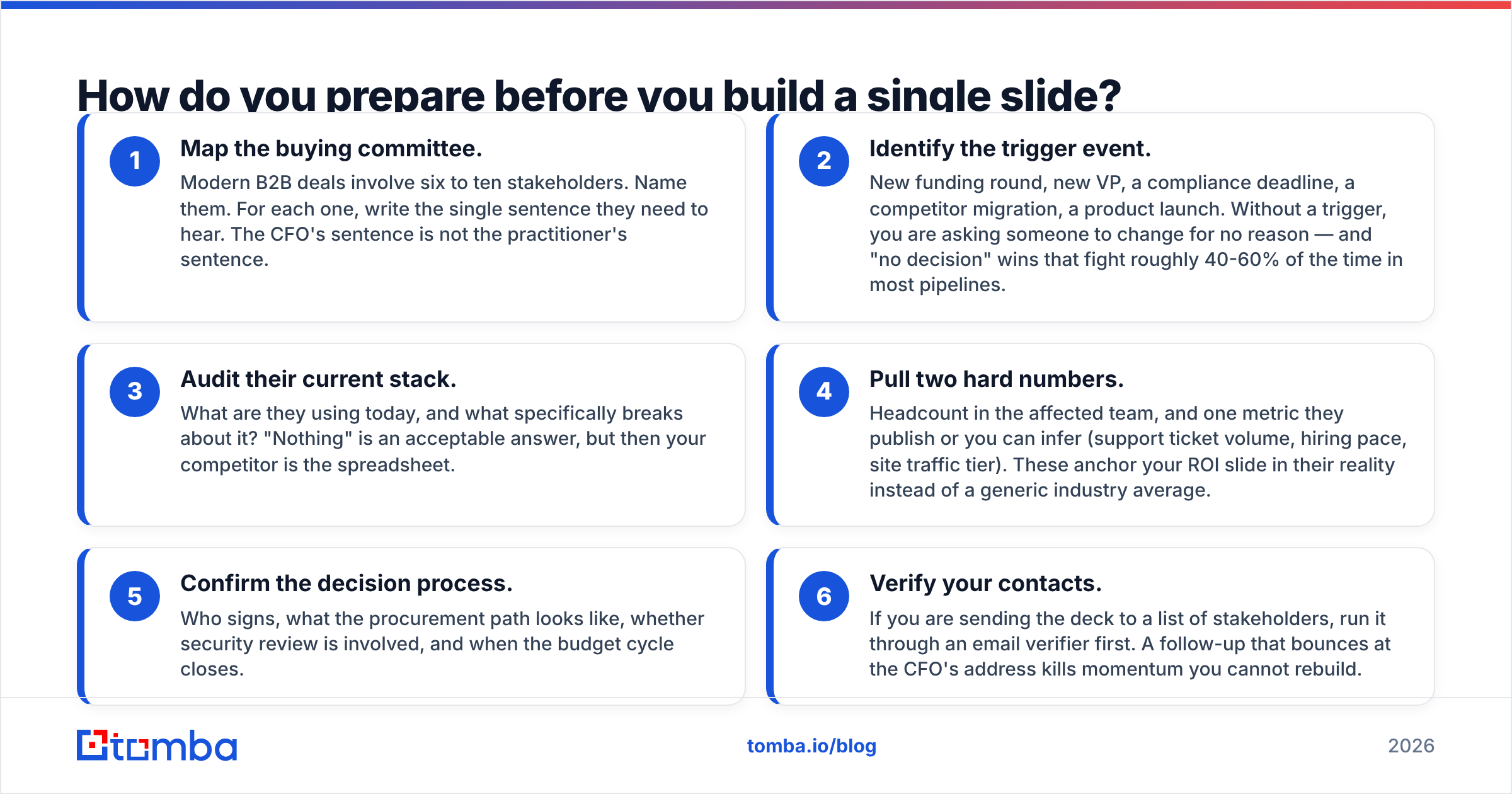
Here is the pre-build checklist:
- Map the buying committee. Modern B2B deals involve six to ten stakeholders. Name them. For each one, write the single sentence they need to hear. The CFO's sentence is not the practitioner's sentence.
- Identify the trigger event. New funding round, new VP, a compliance deadline, a competitor migration, a product launch. Without a trigger, you are asking someone to change for no reason — and "no decision" wins that fight roughly 40-60% of the time in most pipelines.
- Audit their current stack. What are they using today, and what specifically breaks about it? "Nothing" is an acceptable answer, but then your competitor is the spreadsheet.
- Pull two hard numbers. Headcount in the affected team, and one metric they publish or you can infer (support ticket volume, hiring pace, site traffic tier). These anchor your ROI slide in their reality instead of a generic industry average.
- Confirm the decision process. Who signs, what the procurement path looks like, whether security review is involved, and when the budget cycle closes.
- Verify your contacts. If you are sending the deck to a list of stakeholders, run it through an email verifier first. A follow-up that bounces at the CFO's address kills momentum you cannot rebuild.
That last point gets skipped constantly. You do the discovery work, nail the meeting, then send the recap deck to three stakeholders and two addresses hard-bounce because you guessed the format. Tools that resolve company email patterns — Tomba's email finder, Hunter, Apollo — exist specifically to stop that failure, and the cost of using one is far lower than the cost of a silent thread.
What is the right sales presentation structure in 2026?#
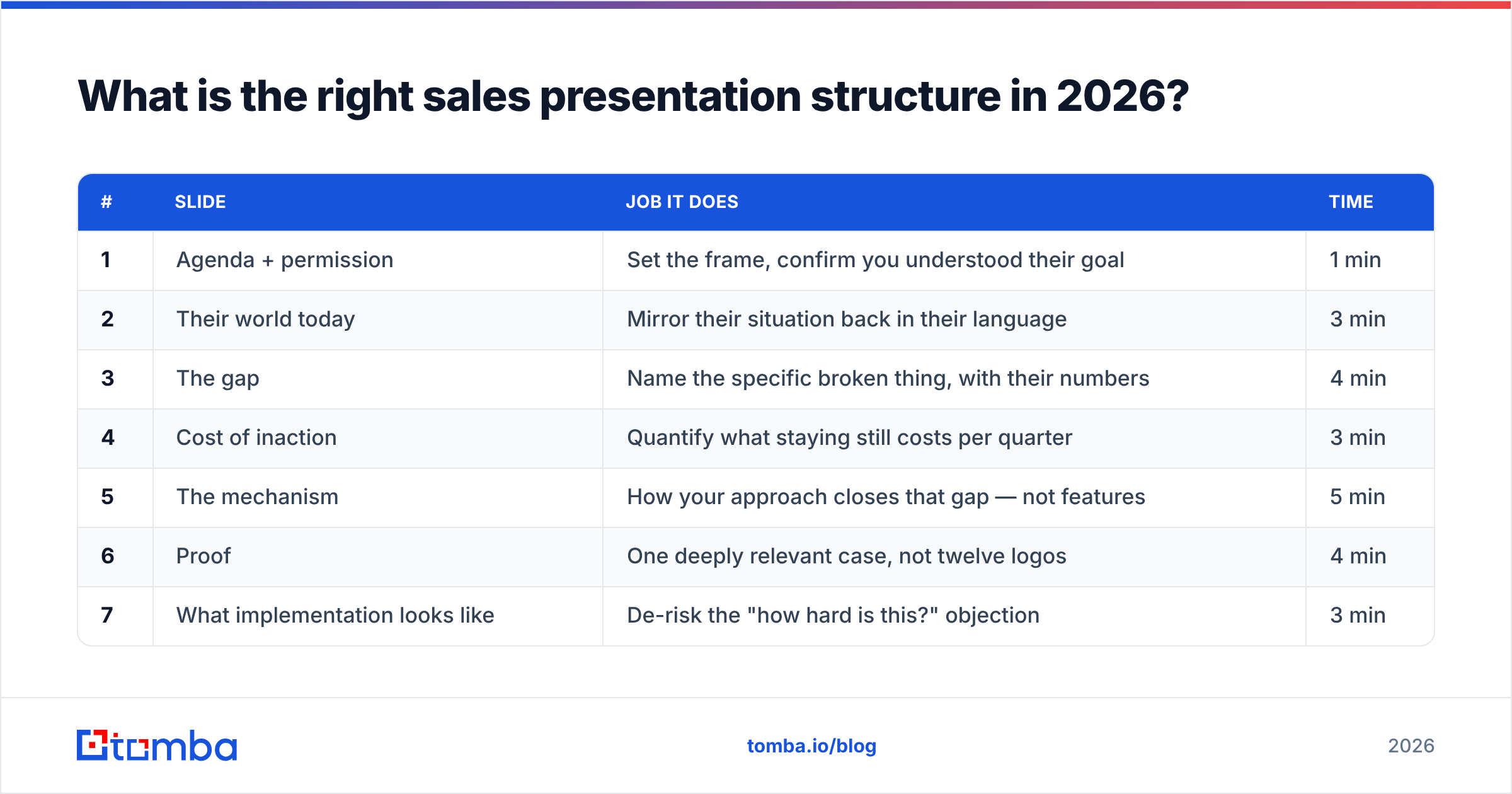
Use this order. It is the sequence that keeps attention because each slide creates the question the next one answers.
| # | Slide | Job it does | Time |
|---|---|---|---|
| 1 | Agenda + permission | Set the frame, confirm you understood their goal | 1 min |
| 2 | Their world today | Mirror their situation back in their language | 3 min |
| 3 | The gap | Name the specific broken thing, with their numbers | 4 min |
| 4 | Cost of inaction | Quantify what staying still costs per quarter | 3 min |
| 5 | The mechanism | How your approach closes that gap — not features | 5 min |
| 6 | Proof | One deeply relevant case, not twelve logos | 4 min |
| 7 | What implementation looks like | De-risk the "how hard is this?" objection | 3 min |
| 8 | Pricing + packaging | Plain numbers, no reveal theatrics | 3 min |
| 9 | Mutual action plan | Dates, owners, next step | 3 min |
That is nine slides and roughly 29 minutes of content, which fits a 45-minute call with room for the interruptions you actually want. Add an appendix of 10-20 slides for security, integrations, detailed pricing tiers, and additional case studies — referenced live, read later.
Two structural rules worth defending:
Cost of inaction before your solution. If the buyer has not internalized what the status quo costs, every number on your pricing slide reads as pure expense. Put the pain in the room first.
One case study, not a logo wall. A logo wall says "other people bought this." One case study from a company that looks like theirs, with the before number, the after number, and the timeline, says "this will work here." The second one moves deals.
Which sales presentation tools should you use?#
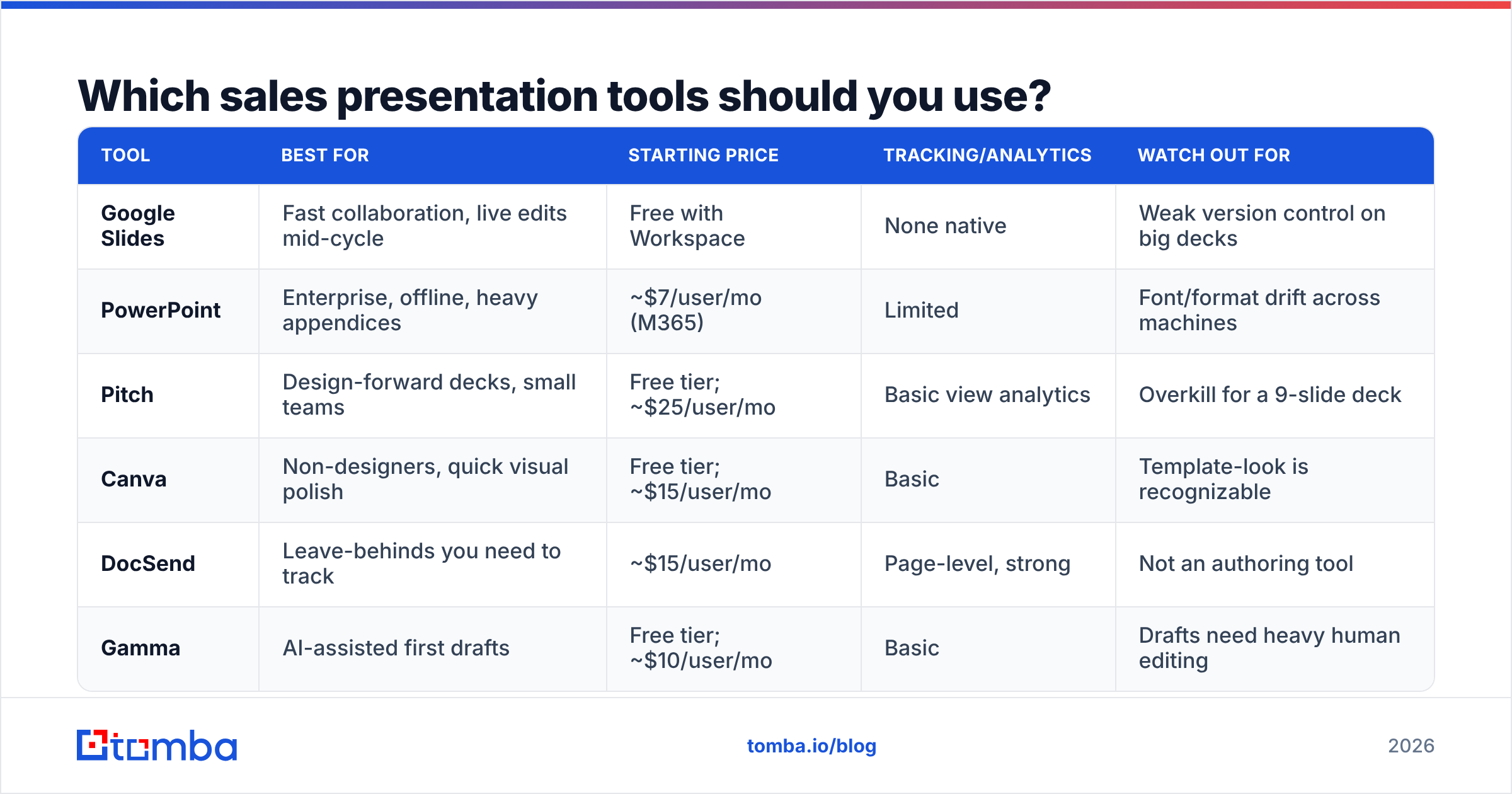
Pick based on how the deck gets consumed, not on which tool has the nicest templates.
| Tool | Best for | Starting price | Tracking/analytics | Watch out for |
|---|---|---|---|---|
| Google Slides | Fast collaboration, live edits mid-cycle | Free with Workspace | None native | Weak version control on big decks |
| PowerPoint | Enterprise, offline, heavy appendices | ~$7/user/mo (M365) | Limited | Font/format drift across machines |
| Pitch | Design-forward decks, small teams | Free tier; ~$25/user/mo | Basic view analytics | Overkill for a 9-slide deck |
| Canva | Non-designers, quick visual polish | Free tier; ~$15/user/mo | Basic | Template-look is recognizable |
| DocSend | Leave-behinds you need to track | ~$15/user/mo | Page-level, strong | Not an authoring tool |
| Gamma | AI-assisted first drafts | Free tier; ~$10/user/mo | Basic | Drafts need heavy human editing |
The honest recommendation: author in whatever your company already standardizes on, then distribute the leave-behind through something with page-level analytics. Knowing that your champion spent four minutes on the pricing slide and zero on the security appendix tells you exactly what the internal conversation is about.
Check current numbers on G2 before you commit — presentation tool pricing shifts more often than you would expect, and seat minimums are where budgets get surprised.
How do you write slides people actually absorb?#
Write the headline as a full sentence that states the conclusion. "Support volume grew 3x while headcount stayed flat" beats "Support Overview" every time, because a reader scanning the forwarded deck gets your argument from headlines alone.
Then apply these constraints:
- One idea per slide. If you need "and" in the headline, split the slide.
- Under 30 words of body text. The slide supports you; it is not your script.
- Numbers over adjectives. "Cuts onboarding from 6 weeks to 9 days" not "dramatically accelerates onboarding."
- Their vocabulary, not yours. If they say "reqs," do not write "requisitions." If they call it "the list," do not call it "the prospect database."
- No feature slide before slide 5. Features answer "what is it." Buyers on a first call are still asking "why bother."
HubSpot's sales research has repeatedly found that talk-to-listen ratio correlates with close rates, and a dense deck pushes you toward talking. Slides with less on them force you to ask more questions. That is a feature.
On design: pick two fonts, three colors, and one chart style, then stop. Consistency reads as competence. Elaborate transitions read as a team with time on its hands.

How do you handle pricing in the presentation?#
Show it. On a slide. With actual numbers.
Withholding price until "let's take that offline" trains the buyer to think the number is embarrassing, and it guarantees that the person who forwards your deck internally cannot answer the first question their boss asks. If your pricing is genuinely usage-based and complex, show a worked example for their specific scale rather than a generic table.
Structure the pricing slide in three parts:
- The packages — two or three, with what changes between them. Not five.
- A recommendation — say which one fits them and why. Buyers want a default.
- The math — total annual cost next to the cost-of-inaction number from slide 4.
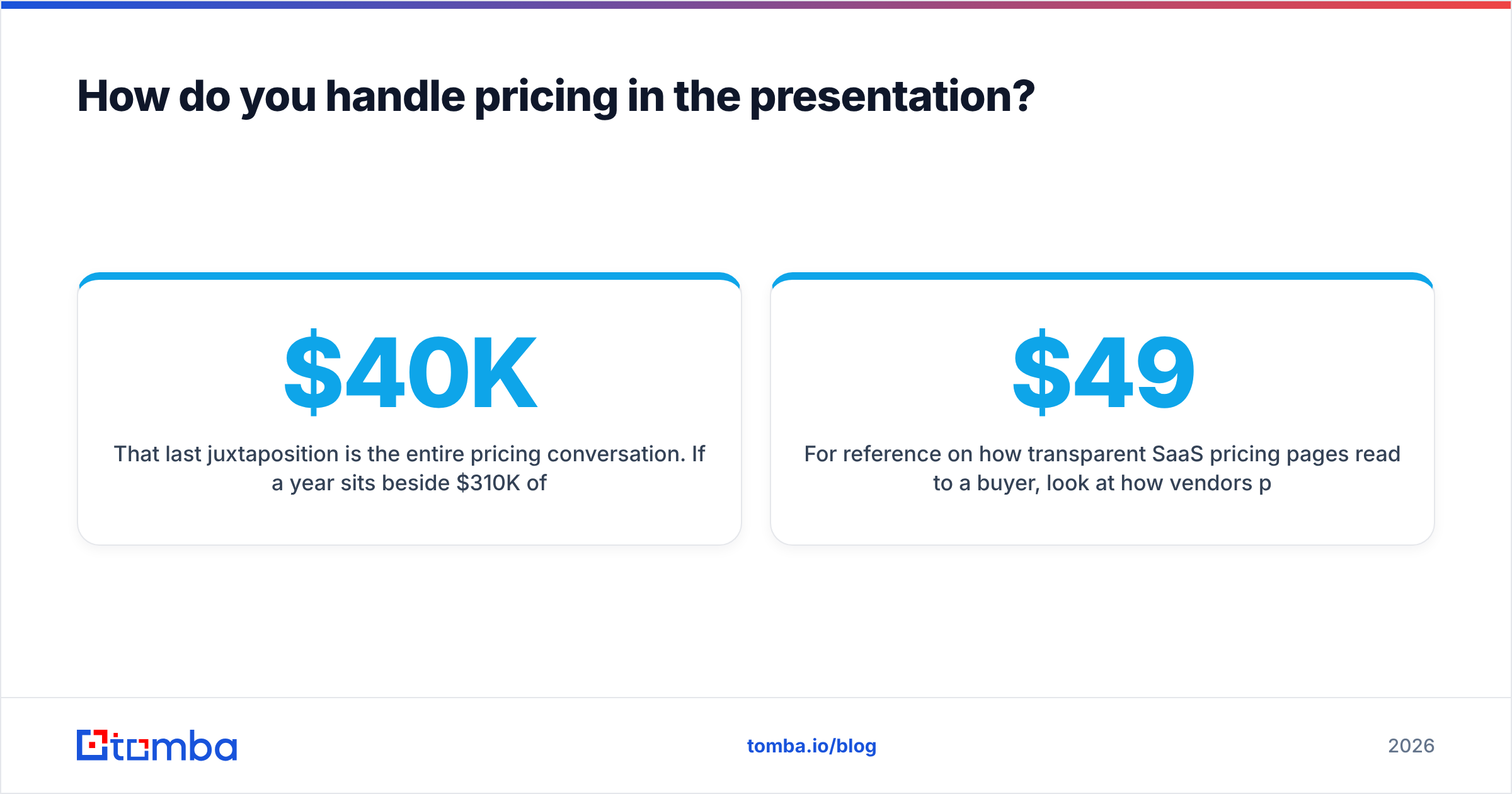
That last juxtaposition is the entire pricing conversation. If $40K a year sits beside $310K of quantified waste, the number stops being a hurdle and becomes an obvious trade.
For reference on how transparent SaaS pricing pages read to a buyer, look at how vendors publish tiers publicly — Tomba pricing runs a free tier at 25 searches per month, Starter at $49/mo, Growth at $99/mo, and Pro at $249/mo, all visible without a form. Whatever your product, the buyer's ability to self-qualify before the call shortens the cycle.
What are the mistakes that kill sales presentations?#
Presenting before discovery is done. If you cannot name the trigger event and the economic buyer, you are not ready to present. Reschedule and run more discovery. A presentation to an unqualified room is a well-rehearsed waste of forty minutes.
Reading the slides. The fastest way to lose a room. If the slide says it, say something else — the context, the caveat, the story behind the number.
The 45-slide sprawl. Every slide added by committee dilutes the ones that matter. Ruthlessly move things to the appendix.
Generic case studies. A logo from a Fortune 100 enterprise means nothing to a 40-person startup. Match the case study to the buyer's shape: size, industry, and stack.
No next step on the last slide. End on a mutual action plan with dates and named owners, not "Thank you / Questions?" The final slide is on screen during the whole Q&A. Make it work.
Sending the follow-up to unverified addresses. You did the meeting, the champion asks you to loop in two colleagues, you guess their emails from the pattern, and both bounce. Run new contacts through a bulk email finder or a verifier before the send. It takes two minutes and protects the entire deal.
Ignoring the async reader. More people will read your deck than sit through it. Headlines should carry the argument on their own for the VP who scrolls it at 11pm.
How do you follow up after the presentation?#
Send within four hours, while the meeting is still the most recent thing in their inbox.
Include four things: a two-sentence recap of what you heard (not what you said), the leave-behind deck, the mutual action plan with dates, and one specific question that requires a reply. A question that can be answered "yes" gets no reply. A question like "who owns the security review on your side?" gets one.
Then track engagement. If the deck goes unopened for four days, your champion is not championing — go multi-thread. If it gets opened eleven times from three different locations, it is circulating internally and you should be preparing for procurement, not sending another nudge.
Multi-threading is where most single-threaded deals die. Map the other stakeholders you identified in prep, find their contact details, and send each a version tailored to their sentence — the CFO gets the executive summary, the practitioner gets the implementation detail. A LinkedIn finder or data enrichment workflow turns a list of names from the org chart into a reachable committee, which is the difference between a deal that survives your champion changing jobs and one that does not.
Build the list before you build the deck#
The best sales presentation in your library is worthless if it lands in the wrong inbox — or no inbox at all. Before your next pitch, map the full buying committee at the account, then use Tomba Email Finder to get verified addresses for every stakeholder you identified. Start on the free tier at 25 searches per month, and scale to Starter at $49/mo when the pipeline justifies it. Do the contact work first, and every deck you build after that has somewhere real to land.
Related guides#
// get started
Find, verify and enrich your first contacts today
Start on the free plan with 25 searches a month, then scale when your team is ready.
Free plan · No credit card required · GDPR & CCPA
// about the author